BookNotesSlidesP-sets Syllabusdraft · v0.2.49.1
💬Comments welcome. To leave a note, select any text and click the note / highlight button that pops up — or open the panel with the tab at the top-right (‹). Notes are visible only inside our private review group.
Computational Photography, an AI-powered Slopendium — 26 AI for photography
expand to📖 Full book outline1 parts · 7 chapters · 24 sections · 4 figures embedded · 4 placeholders · double-click a figure to enlarge
▸Part 26 AI FOR PHOTOGRAPHY⧉
<!--uid: ai-for-photography-->
▸26.1 Editing as a program⧉
⬜ figure not yet created
one photograph edited two ways, as a readable operation sequence with its sliders and as a generated image fig-paraxial-vs-snell
⬜ figure not yet created
the sequence Exposure learns, step by step, with the image after each operation. fig-gain-vignette-solve
26.1.1 The edit as a recipe⧉
26.1.2 Learning a sequence of operations, without language⧉
26.1.3 Predicting a curve against predicting a plan⧉
26.1.4 When pixels are the right output⧉
▸26.2 Language as an editing interface⧉
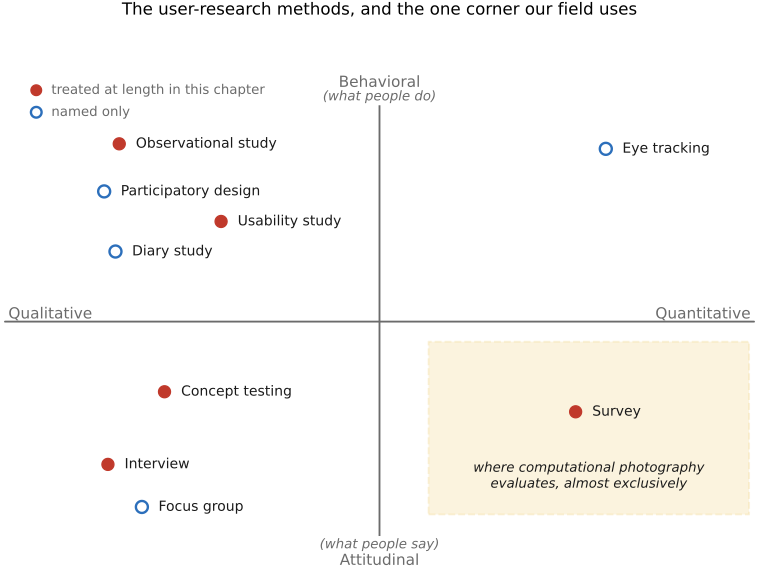
fig-user-research-map
fig-user-research-map · the method map: qualitative-quantitative against attitudinal-behavioral, methods placed in the four quadrants, survey corner shaded to show where comp photo actually operates (Towards Meaningful User Studies, EVALUATION) ✅
26.2.1 What people say, and what tools do⧉
26.2.2 From a phrase to an operation and an amount⧉
26.2.3 Regions: "the sky", "her face"⧉
26.2.4 Asking back⧉
▸26.3 Language models that call vision tools⧉
⬜ figure not yet created
one request traced through a router and through a generated program, side by side. fig-paraxial-vs-snell
26.3.1 A language model as a dispatcher⧉
26.3.2 Writing a program over image modules⧉
26.3.3 What these systems cannot see⧉
▸26.4 Planning a retouch⧉
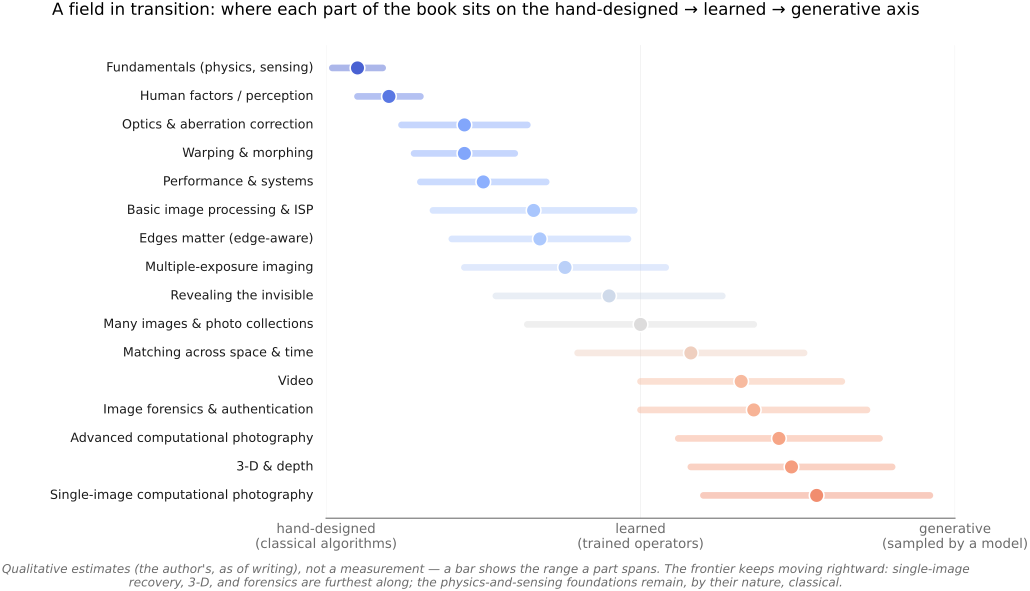
fig-learning-transition
fig-learning-transition · book-wide overview: each PART placed on the hand-designed→learned→generative axis with a range bar (foundations classical; single-image/3-D/forensics furthest right); intro 'field in transition' ✅
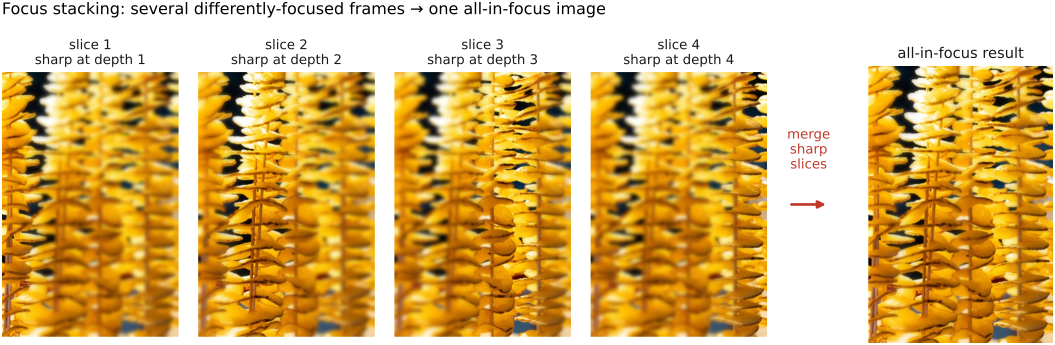
fig-focus-stacking
fig-focus-stacking · optics-chapter illustrative figure (07-07 Figure 4): a stepped-focus stack → sharpness selection → all-in-focus composite. Synthetic per-slice defocus on one photo (`sourced/corn-cobs.jpg`, © Frédo Durand) — license-safe. The full real-data treatment lives in part-08 `fig-focalstack-*` ✅
26.4.1 Teaching a model to see an adjustment⧉
26.4.2 A plan with reasons⧉
26.4.3 An agent over a real editor's tools⧉
26.4.4 Editable output⧉
▸26.5 Verify and correct⧉
⬜ figure not yet created
a two-round edit where the check catches a failure and the second plan fixes it. fig-rectify-resample-stretch
26.5.1 Decompose, act, check⧉
26.5.2 Who does the checking⧉
26.5.3 Stopping⧉
▸26.6 AI editing in products⧉
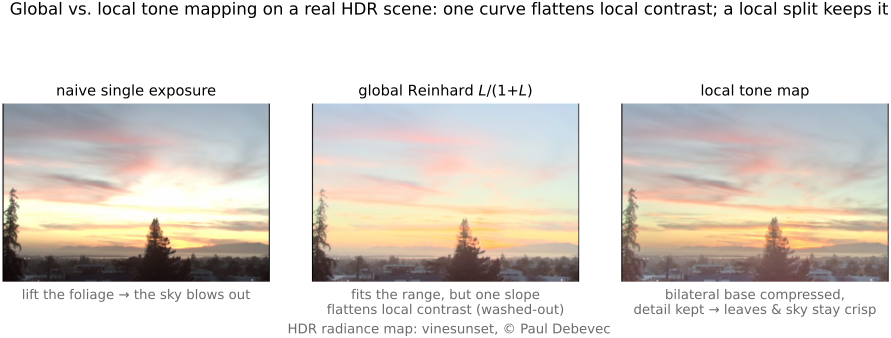
fig-tonemap-real
fig-tonemap-real · global vs local tone mapping RESULT on a real HDR photo (seal at marina): naive single exposure · global Reinhard (one slope flattens local contrast → hazy) · local bilateral base+detail split (range fits, detail stays crisp) — real-image companion to `fig-tonemap-global-vs-local` (BASIC tone mapping) ✅
26.6.1 Driving the tools already there⧉
26.6.2 Describing the result instead⧉
26.6.3 Assistants that call an editor⧉
▸26.7 Trust, authorship and evaluation⧉
26.7.1 Did it do what was asked?⧉
26.7.2 Can the user see what it did?⧉
26.7.3 Does the photograph still say what it recorded?⧉