4.8 Recap: the full color pipeline, color management and ICC⧉
A file, an editor, and an output device must agree on what the pixel values represent. Color management supplies that agreement across defined interfaces. It cannot recover clipped colors or compensate for an incorrectly characterized device.
4.8.1 The full color pipeline⧉
A conventional raw workflow begins with sensor measurements. Subtract black levels, linearize if required by the raw encoding, identify saturation, and apply the camera’s calibration. White balance, denoising, demosaicking, and color correction may be separate or jointly implemented. Their input conventions must agree.
The working image can use a scene-linear RGB representation with enough range for values above reference white. Some editing operations use log or perceptual coordinates, then return to the appropriate working representation. Scene rendering determines tone and color for the intended output; transfer encoding then represents that output numerically. These are distinct steps even when software combines them.
At export, convert to the destination encoding and include its profile or equivalent color metadata. At display, the application and system transform from that interpretation to the characterized device. Printer conversion may produce device-specific RGB or CMYK according to the driver workflow.
Common failures are duplicate encoding, a wrong input profile, an omitted conversion, and two independent printer color conversions. Preserve metadata with intermediate arrays and give each conversion a defined owner. An as-shot raw white-balance tag is an instruction or estimate; its presence does not prove that gains have already been applied.
4.8.2 Color management, ICC, and industry standards⧉
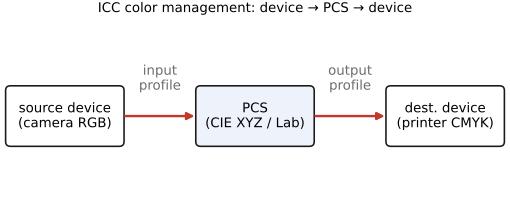
ICC profiles describe transforms between device or encoding values and a profile connection space (PCS). In the conventional ICC v2/v4 architecture, that space uses D50-referenced XYZ or Lab. A color-management module combines source and destination transforms. Profiles can use matrices and curves or multidimensional lookup tables; a printer is not generally one three-by-three matrix away from RGB.
Assigning a profile declares the meaning of unchanged values. Converting profiles changes values to meet a color-reproduction objective. For example, the triple $(0.8,0.2,0.1)$ denotes different colors in sRGB and Adobe RGB. Assigning Adobe RGB to sRGB data leaves that triple unchanged and changes its interpretation. A conversion starts with the sRGB interpretation and computes destination values for the intended match, subject to the destination gamut and rendering intent. Assign the known source interpretation before conversion. For an untagged image of uncertain origin, sRGB is a common fallback assumption, not recovered metadata.
| Intent | Objective and limitation |
|---|---|
| Media-relative colorimetric | Relate source white to destination white and retain in-gamut colorimetry relative to those whites. Out-of-gamut behavior depends on the conversion. |
| ICC-absolute colorimetric | Retain source media-white colorimetry, useful for proof simulation; destination limits still apply. |
| Perceptual | Re-render colors to accommodate differences between media, potentially changing in-gamut values. The mapping is profile- and implementation-dependent. |
| Saturation | Favor vivid graphic reproduction over strict colorimetric matching; behavior is profile-dependent. |
Black-point compensation is a separate option that maps tonal ranges between different black points, commonly used with relative colorimetric conversion. Compare it with the selected profiles instead of treating it as another rendering intent. See the ICC introduction and black-point compensation white paper.
Profile construction and connection account for chromatic adaptation. Bradford is widely used in this architecture Bradford chromatic-adaptation transform, but do not prepend an extra adaptation to an already specified profile conversion. The complete Bradford formula and its white-to-white checks are in Chapter 4.2, White balance and white point. A camera’s raw gains are not simply that same XYZ transform.
For printing, use the profile matching the actual printer, ink, paper, and driver settings. If the application converts to printer values, configure the driver accordingly; if the driver owns conversion, supply the input it expects. A printer profile should not be embedded as though it described an ordinary web RGB image.
4.8.3 Soft proofing⧉
Soft proofing predicts a target reproduction on a calibrated, profiled display. The application uses the printer-and-paper profile and selected intent, then simulates that result through the display profile. Paper-white and black-ink simulation help reveal the print’s reduced contrast and substrate color.
Gamut warnings identify values outside the modeled destination gamut; they do not predict the visibility or importance of every resulting error. Compare intents on saturated detail, smooth gradients, skin, and deep shadows. A screen cannot simulate a print color outside its own gamut.
The prediction depends on correct output settings, a suitable display, and the illumination under which the print will be viewed. Screen brightness and surround affect the comparison. For critical work, inspect a physical proof under the intended light. See the Krita color-managed workflow and Elle Stone Stone, Nine Degrees Below.
Try paper-white and black-ink simulation separately. Paper-white simulation makes the display preview account for the substrate's white rather than treating the brightest monitor value as the paper. A warm paper can shift that reference as well as reduce its brightness. Black-ink simulation raises the darkest preview values to represent the limited black the paper and ink can produce. The image may look flatter than the ordinary screen rendering because the proof is exposing a real contrast constraint.
A gamut-warning overlay answers another question: which source colors cannot be reproduced under the selected output profile and settings? It does not show how objectionable every difference will be. Use it to locate candidates for adjustment, compare the chosen rendering intent, and inspect a physical proof before committing an important print run. The preview remains a prediction dependent on profiles and viewing conditions.