💬Comments welcome. To leave a note, select any text and click the note / highlight button that pops up — or open the panel with the tab at the top-right (‹). Notes are visible only inside our private review group.
Computational Photography, an AI-powered Slopendium
Frédo Durand, MIT · Version 0.2.5
expand tojump to24 parts · 195 chapters · 569 sections · 510 figures embedded · 134 placeholders · double-click a figure to enlarge
Part 1 INTRO
1.1 From Digital to Computational Photography
⬜ figure not yet created
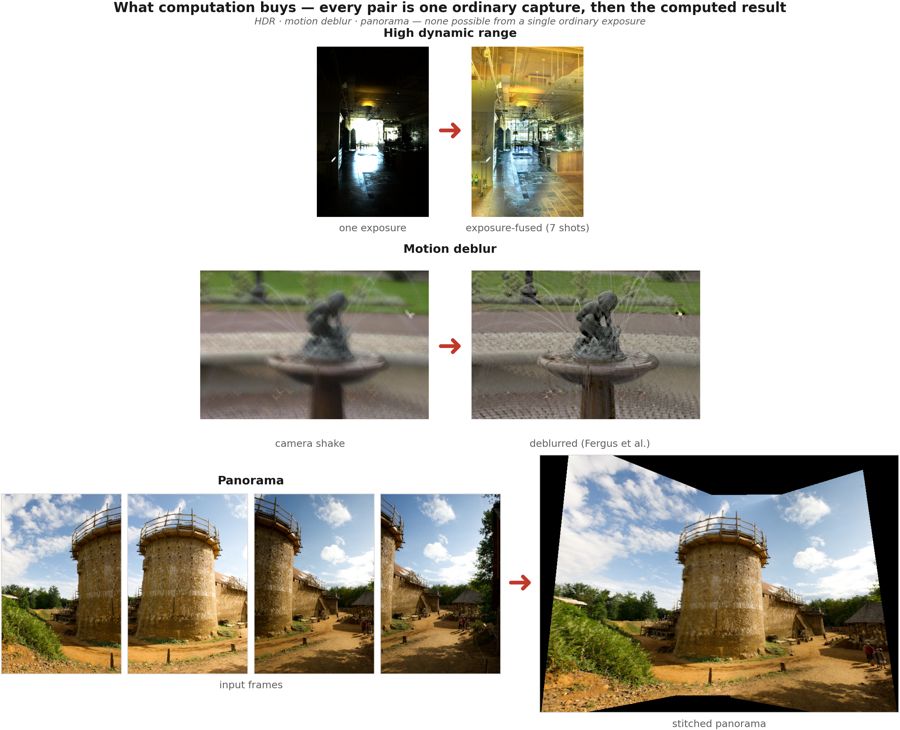
a montage of computational-photography results — HDR tone mapping (Durand & Dorsey 2002), refocus-after-capture (Ng et al. 2005), motion deblur (Levin et al. 2007), a stitched panorama (problem set) [results-montage figure] fig-results-montage
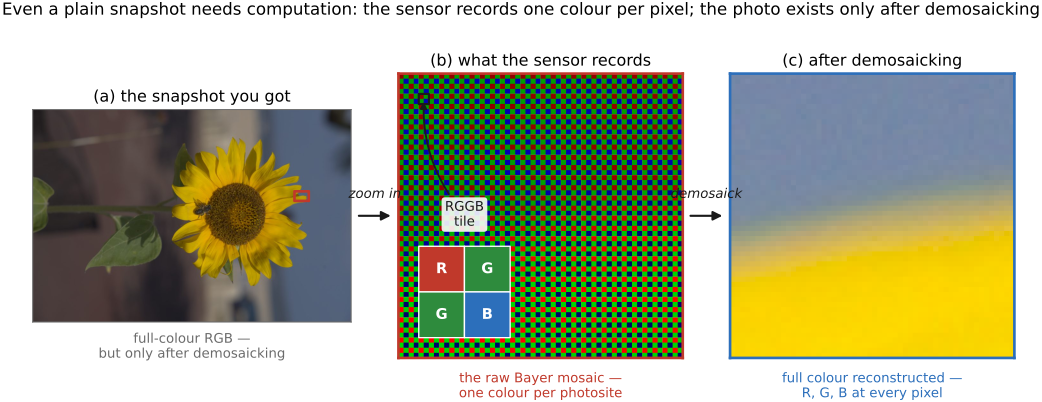
fig-demosaick-snapshot
fig-demosaick-snapshot · even a plain snapshot needs computation: one colour per pixel (Bayer mosaic) → demosaicked RGB
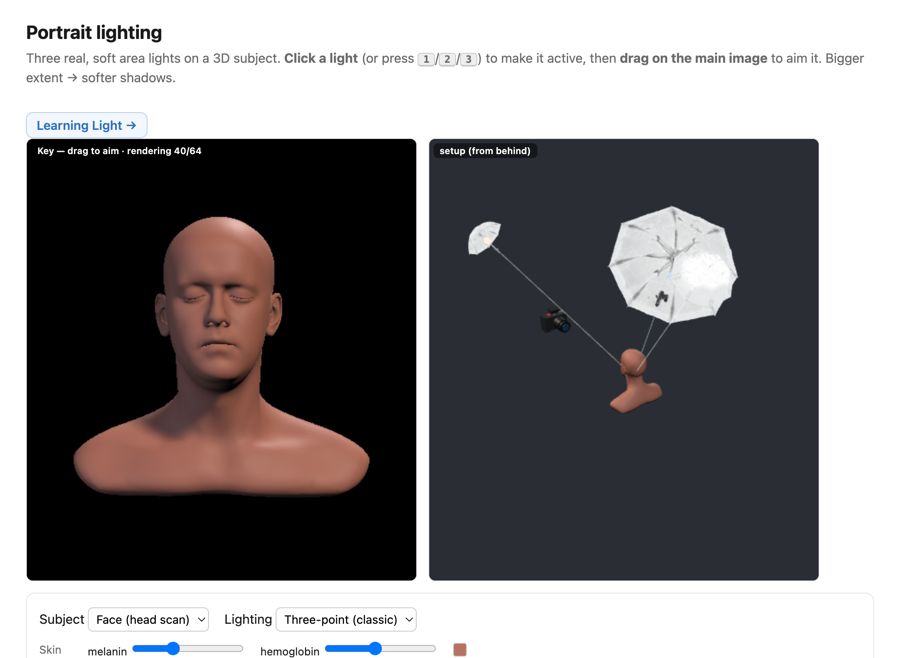
fig-portrait-lighting-sim
fig-portrait-lighting-sim · live portrait-lighting simulator (web edition): three soft area lights (key/fill/kicker — az/el/extent/intensity/colour, area-light-supersampled soft shadows) on a 3D face with a physiological melanin/hemoglobin skin model; a from-behind setup view with Meshy studio umbrellas + a camera rig; lighting presets; static fallback is a screenshot. *3D umbrella generated with Meshy AI.*
At first, the digital revolution merely replaced film by digital sensors more amenable to quick snapshots, instant gratification and sharing. But it did more than that : it created the opportunity to add arbitrary computation between the photons in a scene and the final image.
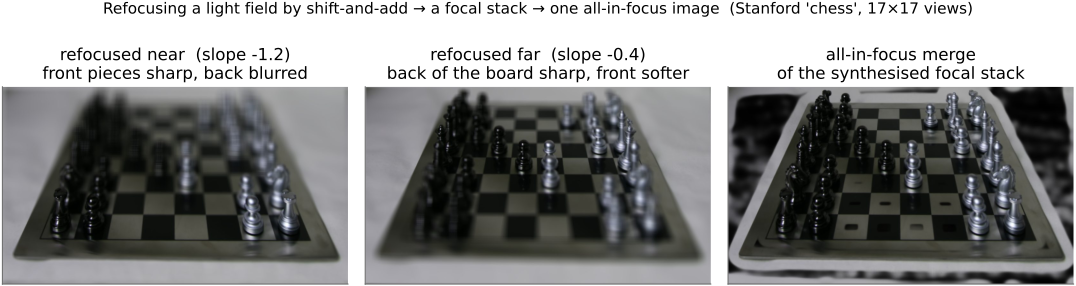
This allows us to do really cool stuff : manage scenes where contrast is excessive, computationally remove blur, combine images into virtual wide angle panoramas, and even capture the full array of light to do stuff like refocusing after the fact and extract 3D.
[results-montage figure — HDR tone mapping (Durand et al.), refocus-after-capture (Ng et al.), motion deblur (Levin et al.), panorama (problem set)]
In fact, even a simple snapshot requires serious computation because each pixel usually captures only one of the 3 channels and the other two need to be reconstructed [demosaick-snapshot figure]. Cell phones these days take much better images than they have a right to because of computational photography.
Plus generative AI is poised to further revolutionize photography and image making with its ability to learn the space of all possible images in a manner reminiscent of a Borges novella (cite *The Library of Babel* and https://arxiv.org/abs/2310.01425)
1.2 How to read this book
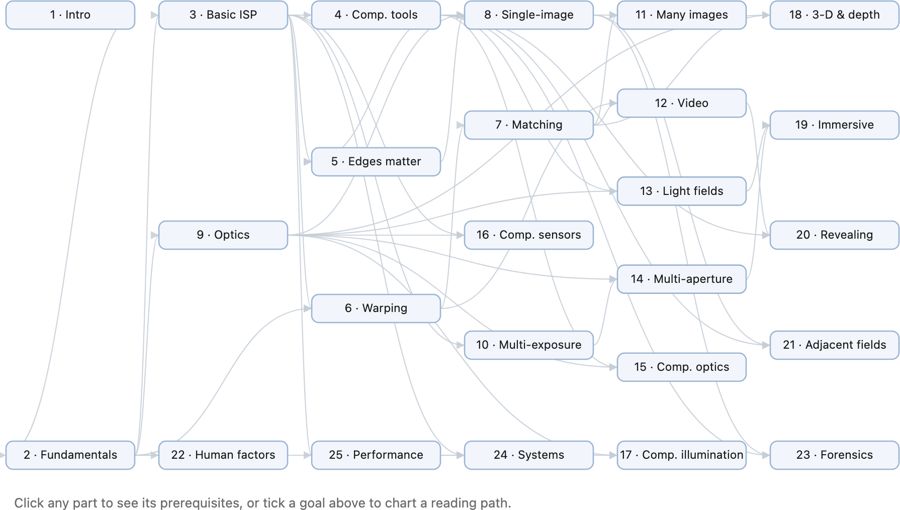
fig-chapter-dependency-graph
fig-chapter-dependency-graph · graph of chapter dependencies (provides/requires) so a reader can chart a path 🟨
• the book is organized **cross-cuttingly**: a chapter is sometimes a **tool** (convolution, the bilateral filter), sometimes a **big idea** (priors, the light field), and the major themes deliberately **recur** across chapters — the same lesson seen from several angles. The redundancy is intentional; cross-references thread the pieces together.
• **hammers and nails**: we deliberately sought a **balance between "hammers and nails"** — between **tools/techniques** (the hammers: convolution, the bilateral filter, optimization, priors) and **applications/challenges** (the nails: HDR, panoramas, deblurring, refocusing). Rather than a purely tool-first or purely application-first table of contents, the book's structure is **organized by a combination of tools and applications/challenges**, alternating between the two so each motivates the other.
• **intuition first**: lead with the idea and a picture, then the math. The audience is a **CS undergrad**, new to imaging (what to know coming in is spelled out in *[[#Prerequisites]]* below).
• **how to read**: FUNDAMENTALS grounds the physics and perception; BASIC IMAGE PROCESSING gives the toolkit; later parts build single- and multi-image computational photography. Read mostly front-to-back, or follow the dependency graph below to chart your own path.
• **how this book came to be**:
• grew out of Frédo's **computational photography course** at MIT — its lectures, slides, and problem sets are this book's backbone.
• written **with an AI collaborator** (Claude) as a deliberate experiment in **AI-assisted authoring** — the outline, figures, drafts, and the book's own tooling were co-developed; a fitting, slightly meta nod to the generative-AI theme the book itself discusses.
• the **process** (how outline, figures, and prose are generated, verified, and kept consistent) is documented in an appendix — itself a small piece of AI methodology [forward ref: "how this book was created"].
• **chapter dependency graph**:
• *(placeholder — to create later)* a **graph of chapter dependencies** belongs here, at the end of the intro: a diagram showing which chapters rely on which, so a reader can chart their own path through the book. Generate it from the **provides / requires** graph (see [[Book Generation Process#Cross-chapter dependencies]] and each section's `- prereqs:`), once enough of the book is written for the dependencies to be stable.
1.3 Basic intro to digital images
Just so that we can be concrete and perform simple experiments for the FUNDAMENTALS part.
1.3.2 An image as a function over the plane
1.4 Problem sets
• **PS0 — Environment & C++ basics**: toolchain setup, a minimal `Image` class, image I/O. (→ [[Developing, Testing and Debugging]])
• **PS1 — Image class, point operations, color**: pixel access, brightness/contrast, luminance–chrominance (YUV), gamma, white balance, the Spanish-Castle illusion. (→ [[Image representation]], [[Point operations]], [[Human (and animal) vision and color]])
• **PS2 — Convolution & the bilateral filter**: box/Gaussian blur, gradients, sharpening, and bilateral denoising (with a YUV variant). (→ [[Neighborhood operations and convolution]], [[Bilateral filtering]])
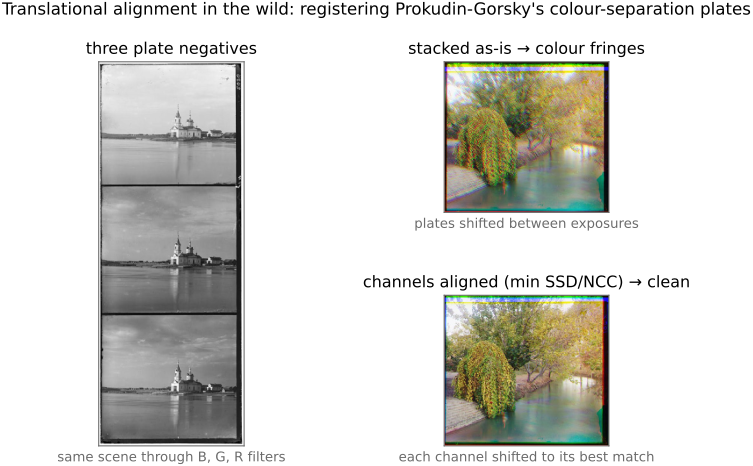
• **PS3 — Denoising & demosaicking**: align-and-average a burst, ISO/variance; Bayer demosaicking (green-first, edge-based, color-difference) and Prokudin-Gorsky channel alignment. (→ [[Denoising]], [[Demosaicking]])
• **PS4 — HDR**: merge an exposure bracket into a radiance map and tone-map it. (→ [[HDR merging]], [[Tone mapping]])
• **PS5 — Resampling, warping & morphing**: nearest/bilinear/bicubic/Lanczos resampling; Beier–Neely segment warps; a full Beier–Neely morph. (→ [[Warping and resampling]], [[Morphing]])
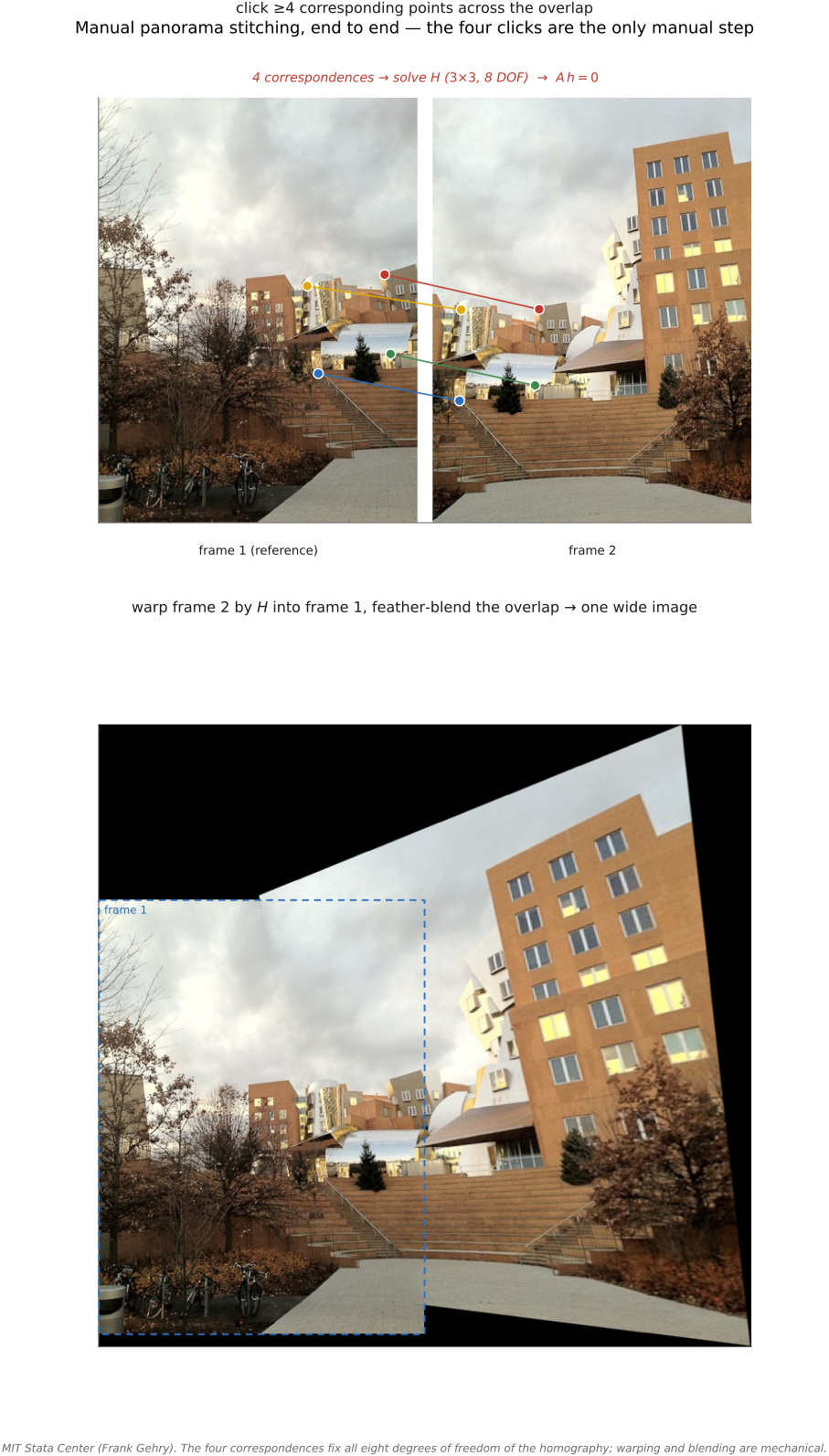
• **PS6 — Homographies & manual panoramas**: homogeneous coordinates, warp by a homography, solve $H$ from four correspondences, stitch a planar mosaic. (→ [[Manual panorama stitching from multiple views]])
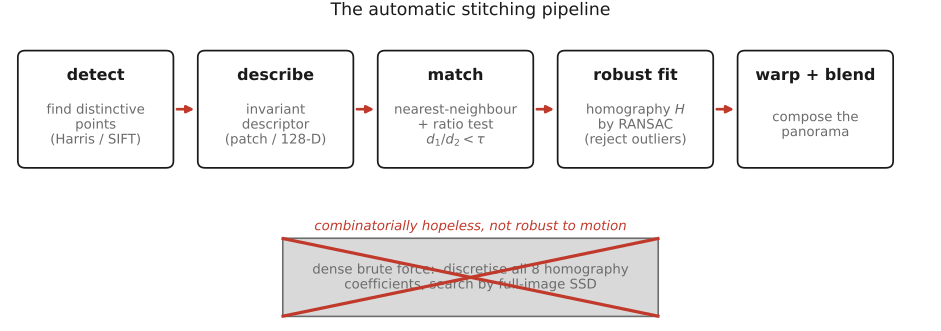
• **PS7 — Automatic panoramas**: Harris corners (structure tensor), patch descriptors, the second-nearest-neighbour ratio test, RANSAC, and feathered / two-scale blending. (→ [[Automatic panorama stitching from multiple views and feature matching]])
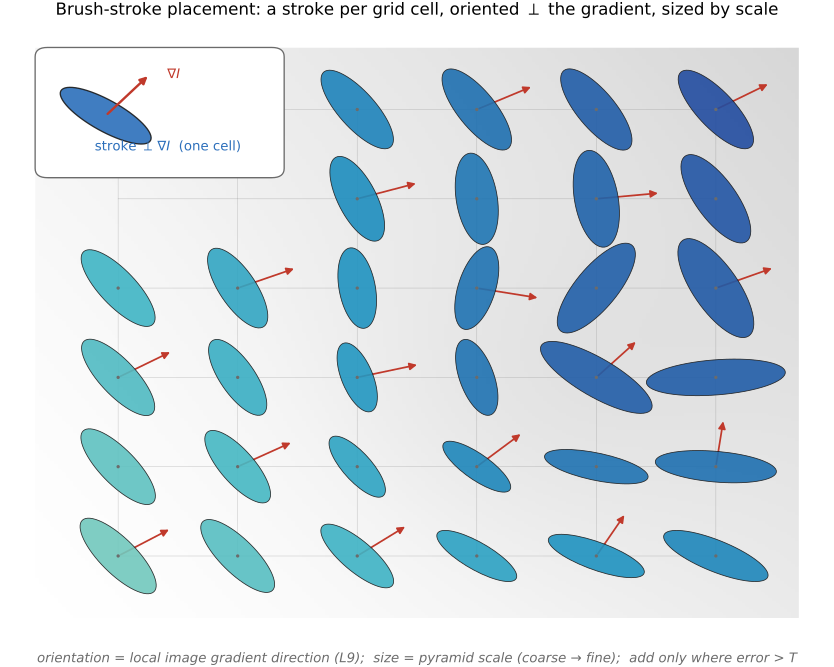
• **PS8 — Non-photorealistic rendering**: paintbrush splatting; single-scale, two-scale, and gradient-oriented painterly rendering. (→ [[Non-photorealistic rendering]])
• **PS9 — Make-your-own / video & ethics**: a self-proposed project (optical-flow retiming, phase-based video magnification, …) plus the ethics deliverable; its open menu of advanced topics seeds many [[Advanced computational photography]] sections. (→ [[Optical flow]], [[Video magnification]])
Part 2 FUNDAMENTALS OF PHOTOGRAPHY
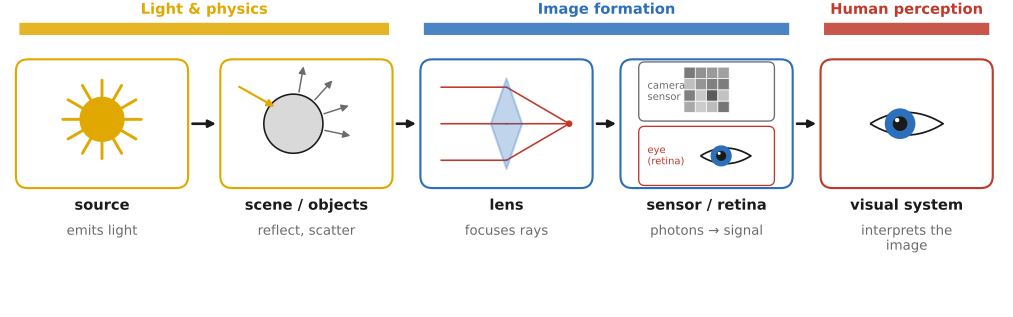
fig-light-journey
fig-light-journey · FUNDAMENTALS part opener — the journey of light: source → scene (reflection) → lens → sensor / retina → visual system, each step labelled with its chapter
**Photography means writing with light** — from the Greek *phōs* ("light") and *graphē* ("drawing"). This first part follows light on its entire journey and studies each step in turn.
• **the path of light** (and the chapters that follow it): a **source** emits light → it strikes **objects** and is reflected, absorbed, and scattered (the scene) → it passes through a **lens** → it lands on a camera **sensor** or the **retina**'s cones and rods → and the **visual system** interprets it.
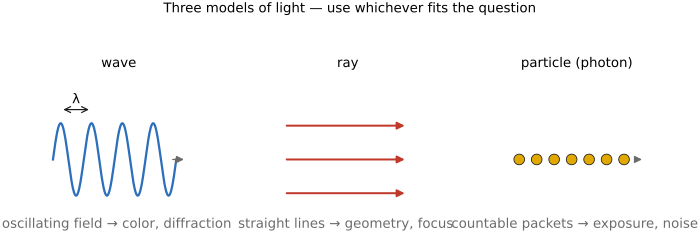
• **Light and physics** — what light *is* (wave / ray / photon), how it interacts with matter (reflection, refraction, scattering, the BRDF), and how we *measure* it (radiometry: radiance, irradiance, the inverse-square and cosine laws).
• **Image formation and linear perspective** — how a lens turns 3-D rays into a 2-D image (pinhole, perspective projection), depth of field, the **sensor** and the exposure triangle, and **noise**.
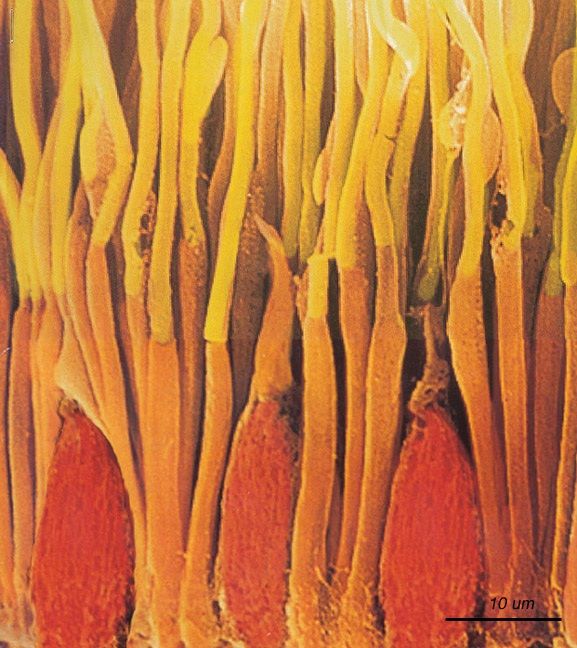
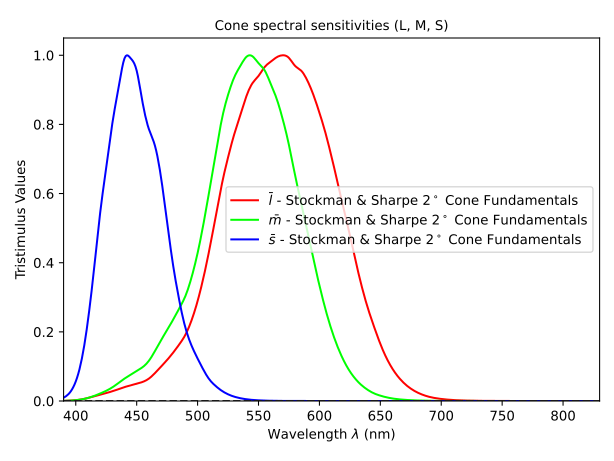
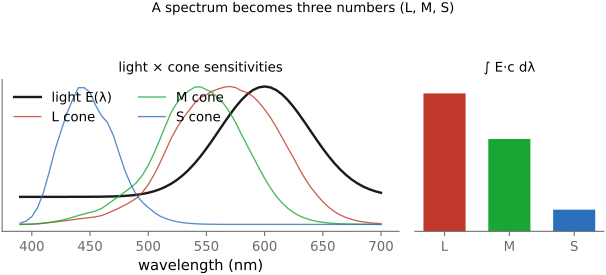
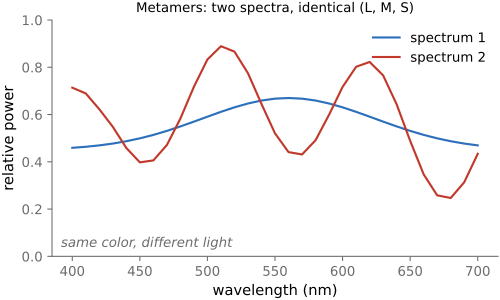
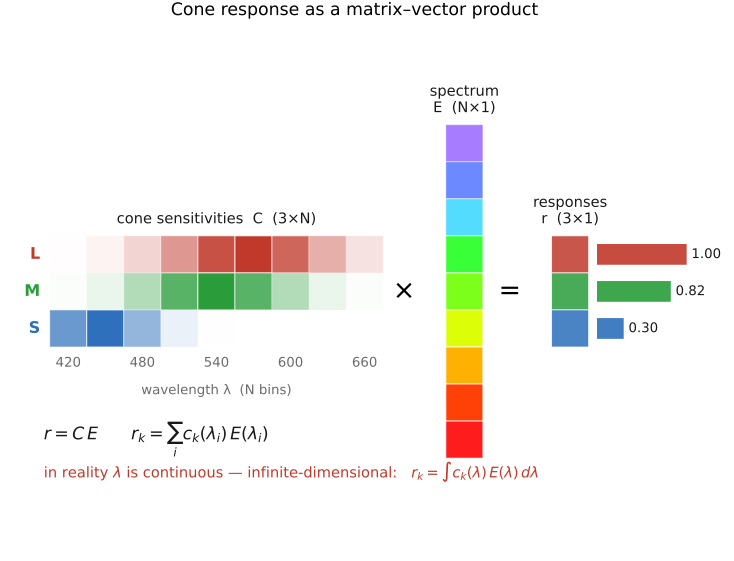
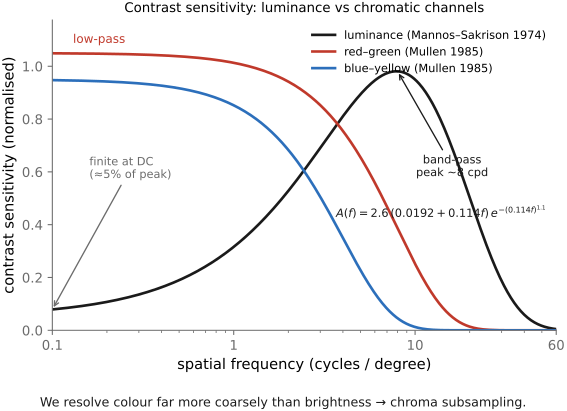
• **Human perception and color** — the eye and visual system; why three **cones** make us trichromatic; color as the projection of a spectrum onto three numbers; opponent processing, constancy, and the contrast sensitivity function.
• **Color technology** — the engineering payoff: **measuring** color (CIE), **encoding** it (linear / gamma / log, color spaces, CIELAB), and **reproducing** it (additive vs subtractive synthesis, gamuts, white balance, color management).
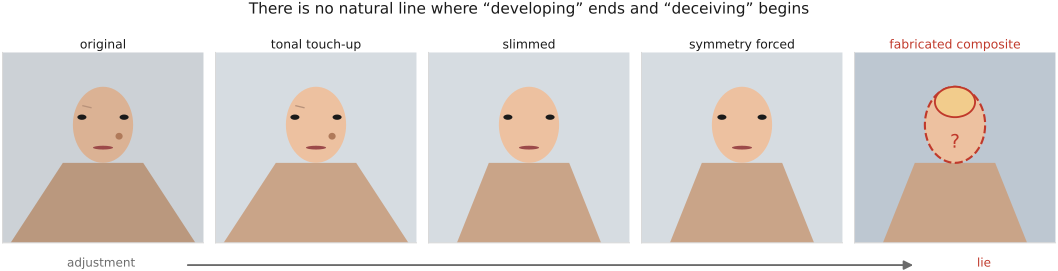
• **Human factors and the art of photography** — making *good* pictures (composition, light, portraiture), the perception of images, and the **ethics** of photography.
• **skippable, but foundational**: a reader who only wants to code can jump straight to BASIC IMAGE PROCESSING — but the **big lessons** of this part recur everywhere later. The ones to carry forward:
• **multiplicative vs additive** — much of imaging is *multiplicative* (illumination × albedo, contrast), some *additive* (incoherent light from different sources, blur); the right **encoding** (linear / log / gamma) follows from which one you are doing (→ [[Big Lessons]]).
• **gamma / ratios matter** — perception is roughly logarithmic, so we store images **gamma-encoded** to spend code levels where the eye looks; what matters is *ratios*, not absolute values.
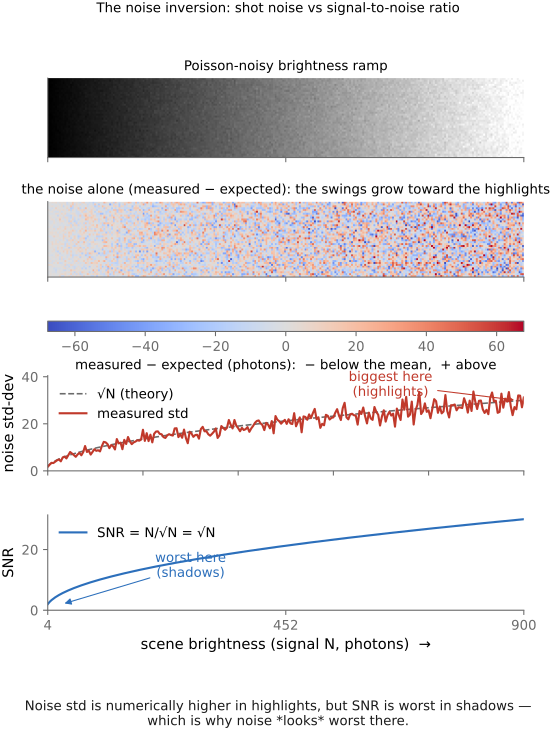
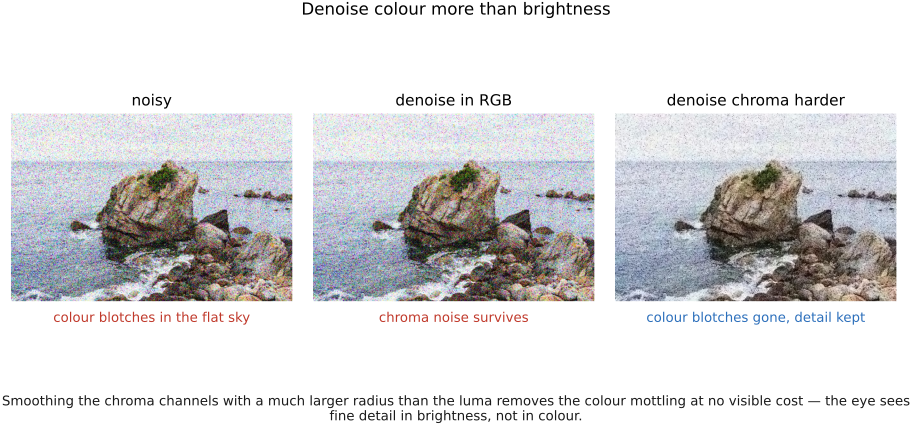
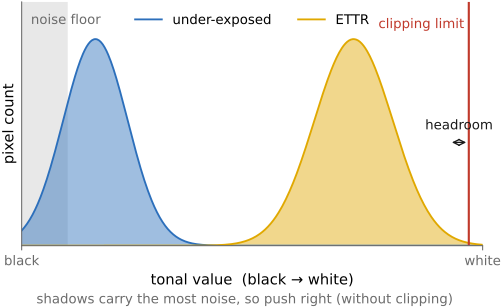
• **noise is affine** — sensor noise is **read + shot** (a constant plus a term that grows with the signal); because shot noise is **Poisson**, SNR is worst in the **shadows**, which is exactly where noise *looks* worst.
• **projective geometry is matrices + a division** — perspective projection is a **linear map in homogeneous coordinates** followed by a divide-by-depth; that single trick handles cameras, warps, and stereo.
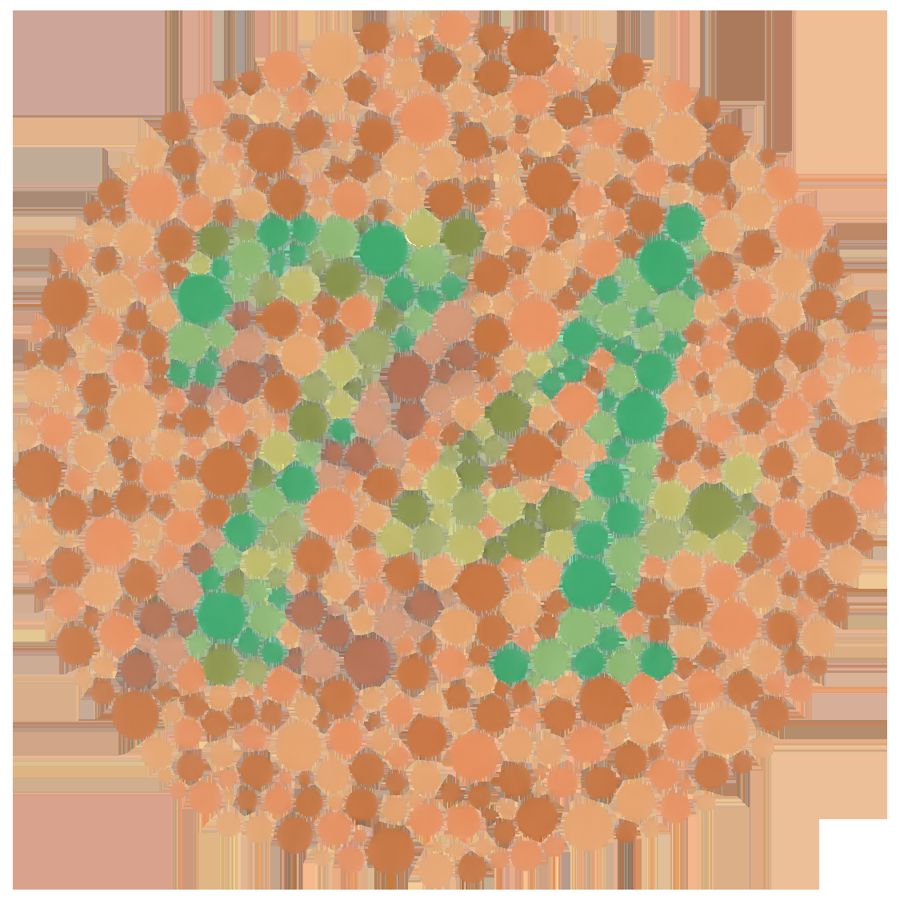
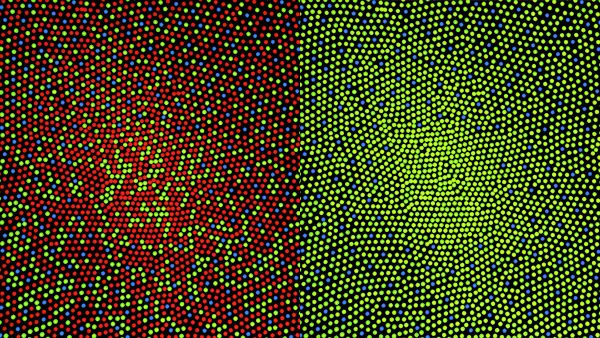
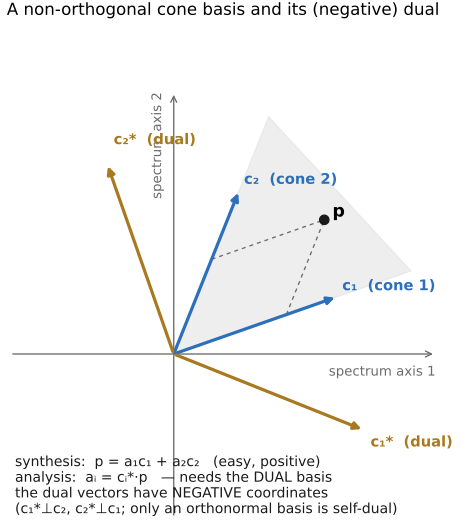
• **color is non-orthogonal and non-negative** — the cone "axes" overlap and light cannot be negative, which is what makes color sensing and reproduction genuinely hard (no perfect set of primaries; white balance is never exact).
• **by the end of this part** you can trace a photon from a lamp to a perceived color, reason quantitatively about exposure and noise, and you will carry the small set of principles the rest of the book keeps reusing.
2.1 Light and physics
• chapter intro: a working model of light — its **color** (spectrum), its **interaction with surfaces**, and its **energy** (radiometry); closes with the **plenoptic function** that ties the pipeline together
2.2 Pinhole image formation and linear perspective
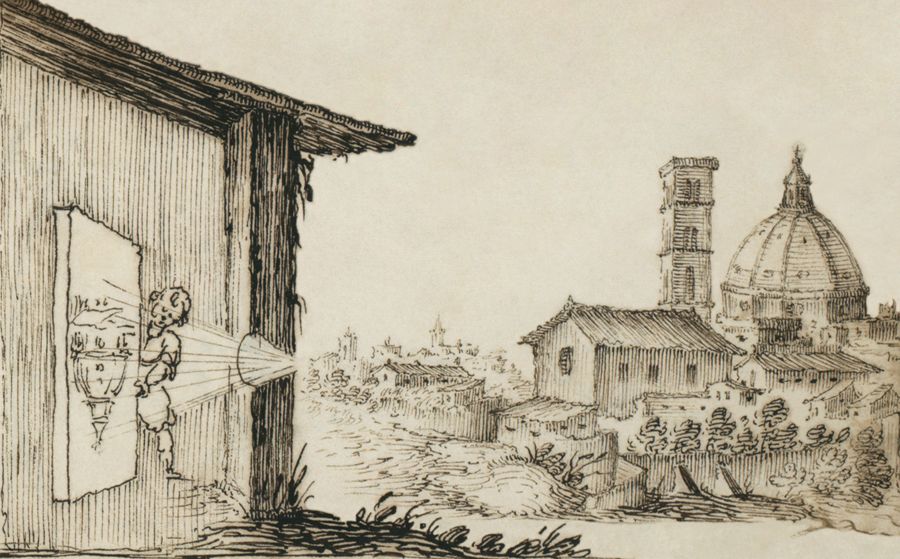
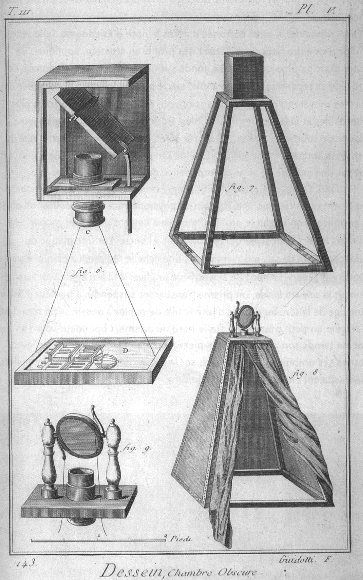
fig-camera-obscura
fig-camera-obscura · camera obscura / pinhole (artist's) 🟨
fig-camera-obscura-apparatus
fig-camera-obscura-apparatus · camera obscura apparatus (Diderot engraving) 🟨
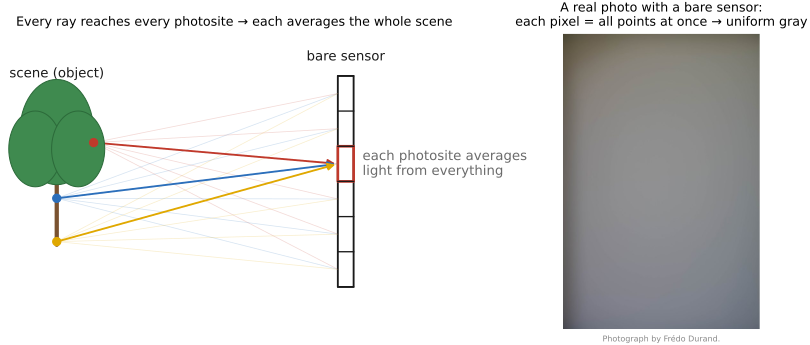
fig-bare-sensor-averaging
fig-bare-sensor-averaging · a bare sensor averages all rays 🟨
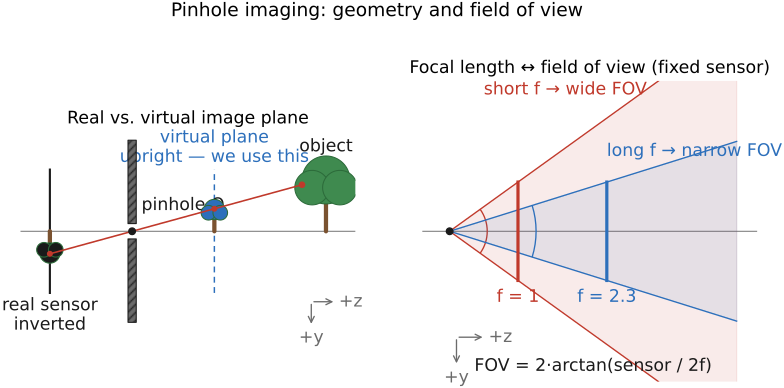
fig-pinhole-fov
fig-pinhole-fov · pinhole geometry: real (inverted) vs virtual (upright) image plane, and focal length → field of view 🟨
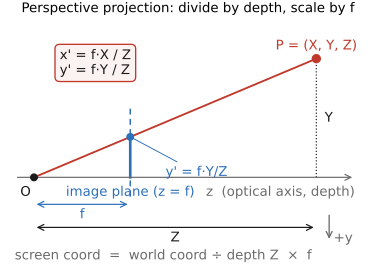
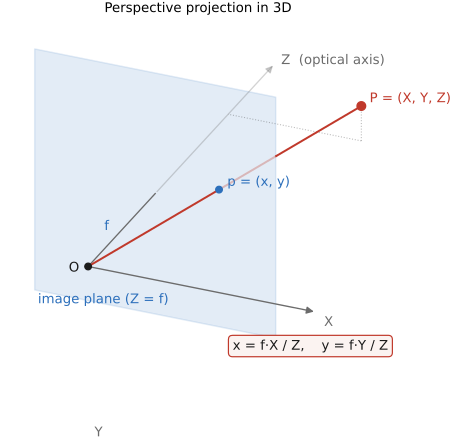
fig-perspective-projection
fig-perspective-projection · perspective projection equation: x'=f·X/Z, y'=f·Y/Z (divide by depth, scale by f) 🟨
fig-perspective-projection-3d
fig-perspective-projection-3d · perspective projection in 3D: P=(X,Y,Z) → p=(x,y) on the image plane through the pinhole 🟨
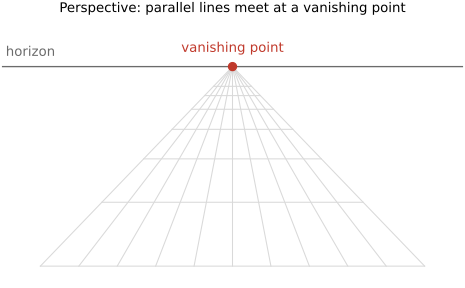
fig-perspective-vanishing-points
fig-perspective-vanishing-points · perspective projection + vanishing points 🟨
⬜ figure not yet created
focal length vs subject distance (background compression) fig-focal-length-compression
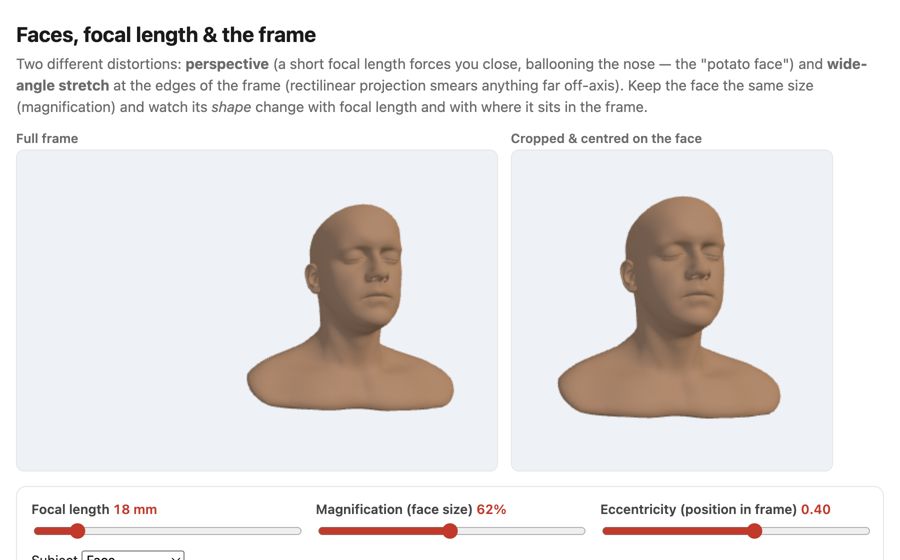
fig-face-distortion-sim
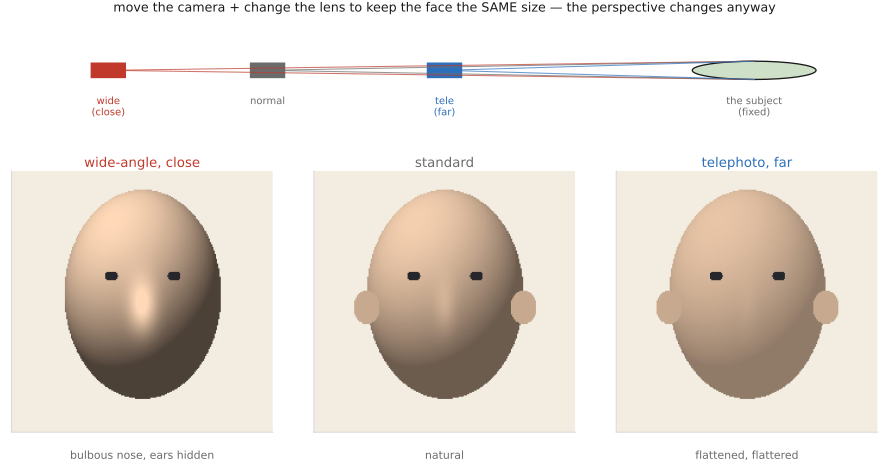
fig-face-distortion-sim · live face-distortion simulator (web edition): focal length + magnification + eccentricity controls with a full-frame view and a face-cropped view, showing the close-wide "big nose" perspective and the wide-angle edge stretch at constant face size; subject = a face, a grid sphere, or one of six diverse Meshy humans framed on the face; static fallback is a screenshot. *Human 3D models generated with Meshy AI.*
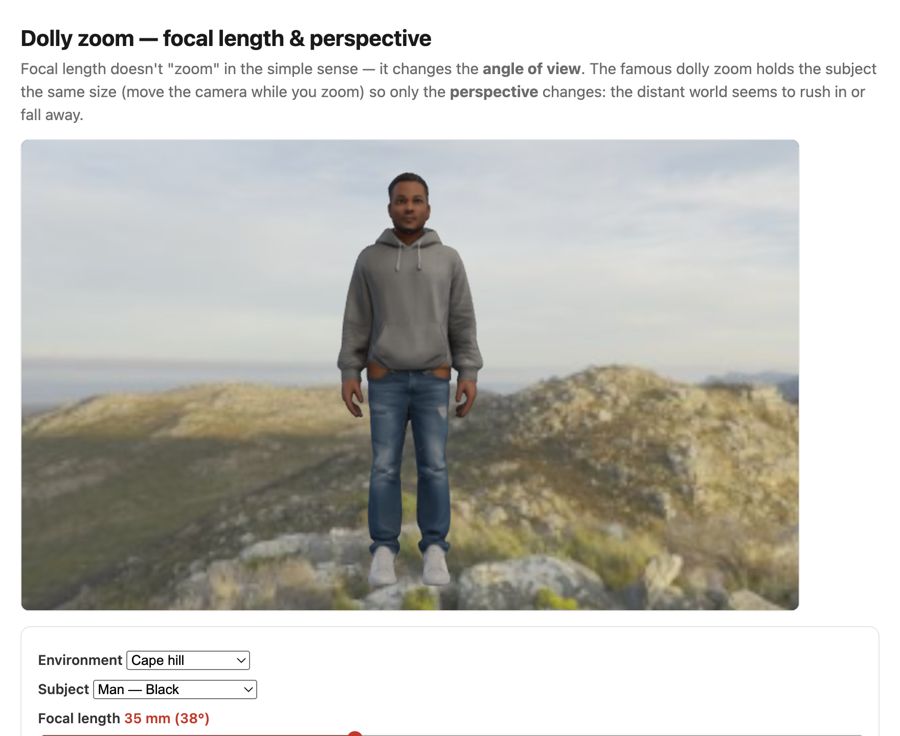
fig-dolly-zoom-sim
fig-dolly-zoom-sim · live dolly-zoom simulator (web edition): hold the subject size while focal length and camera distance trade off so only perspective / background scale changes; log focal (12–200 mm) + distance sliders, realistic Poly Haven environments, subject = head bust or one of six diverse Meshy humans. *Human 3D models generated with Meshy AI.*
fig-portrait-lighting-sim
fig-portrait-lighting-sim · live portrait-lighting simulator (web edition): three soft area lights (key/fill/kicker — az/el/extent/intensity/colour, area-light-supersampled soft shadows) on a 3D face with a physiological melanin/hemoglobin skin model; a from-behind setup view with Meshy studio umbrellas + a camera rig; lighting presets; static fallback is a screenshot. *3D umbrella generated with Meshy AI.*
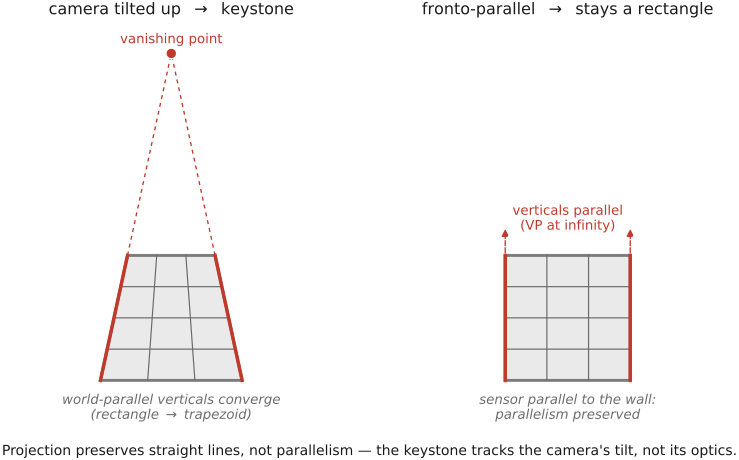
fig-keystoning-cause
fig-keystoning-cause · keystoning is the tilt, not the lens — a camera tilted up makes world-parallel verticals converge (façade → trapezoid), while the fronto-parallel shot keeps them parallel; projection preserves lines, not parallelism 🟨
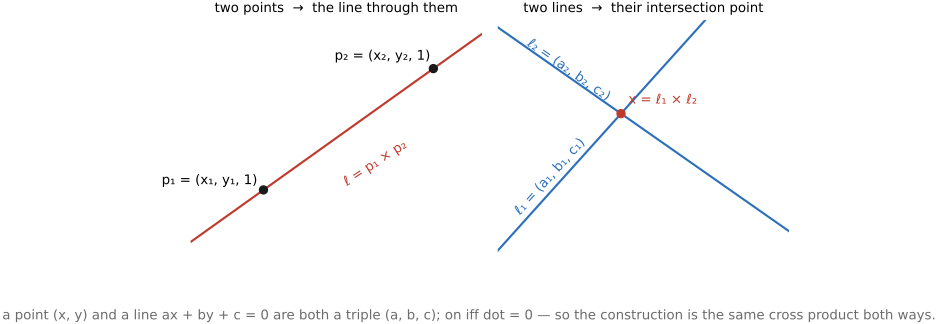
fig-point-line-duality
fig-point-line-duality · point↔line duality in homogeneous 2D: two points → a line, two lines → a point (same cross product) 🟨
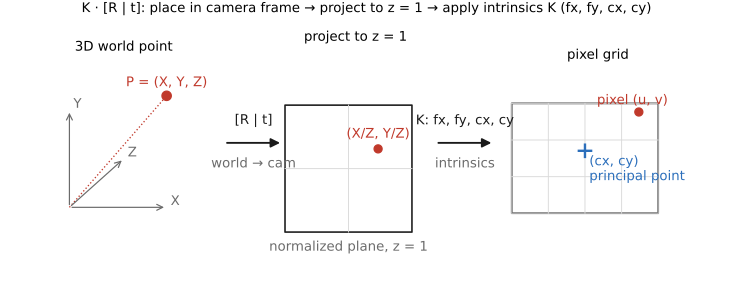
fig-projection-decomposition
fig-projection-decomposition · projection-matrix decomposition K·[R matplotlib, 3-stage pipeline
fig-crop-focal-length
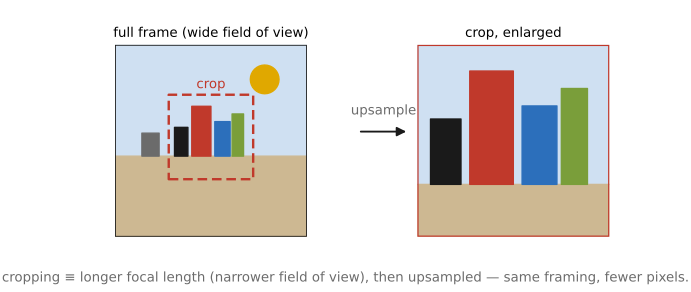
fig-crop-focal-length · cropping = changing focal length: full frame vs a crop box ≡ a longer-focal-length capture, upsampled 🟨
fig-depth-vs-ray-length
fig-depth-vs-ray-length · depth (z coordinate) vs ray length ‖P‖ from camera to a 3D point; unproject (pixel + depth → 3D) 🟨
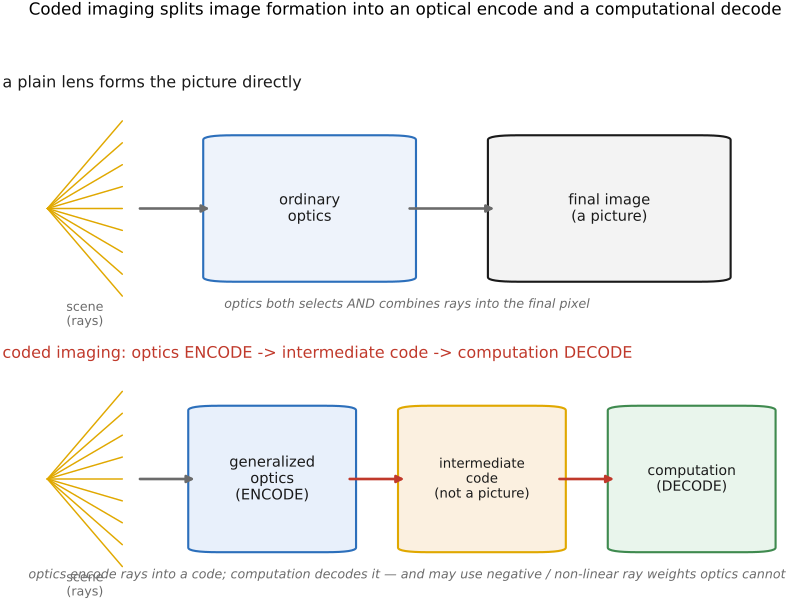
• sensor alone would capture a diffuse light. We need to select which rays from which part of the scene contribute to which pixel.
equations
pinhole projection x = f·X/Z, y = f·Y/Z
homogeneous p ≈ K·[R|t]·P
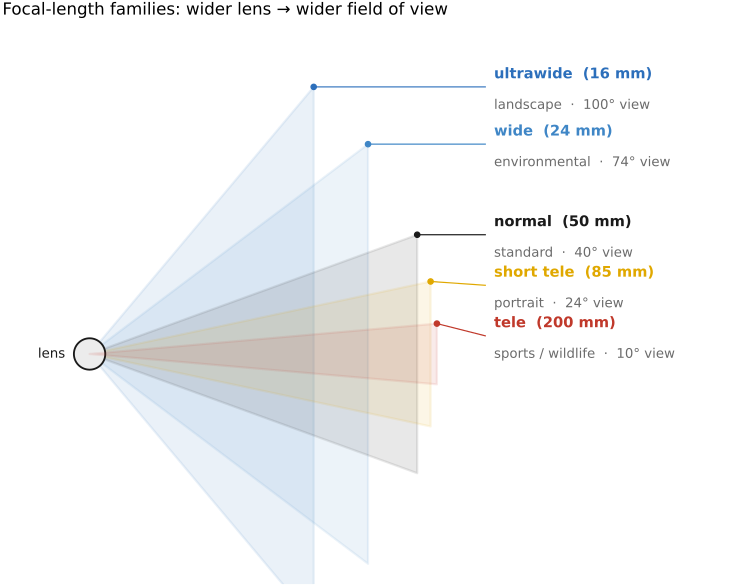
field of view = 2·arctan(sensor / 2f)
2.3 Lens image formation
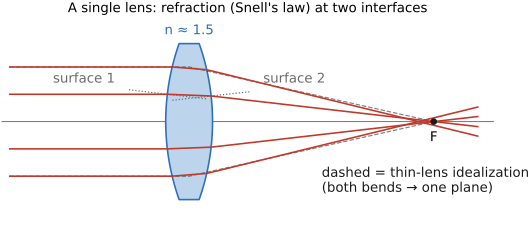
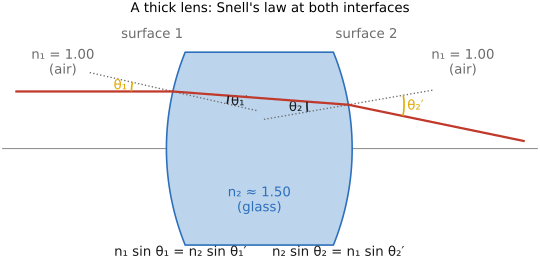
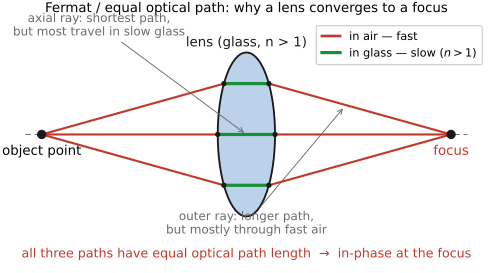
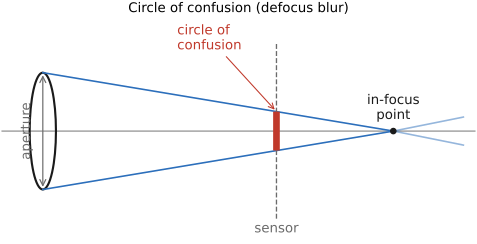
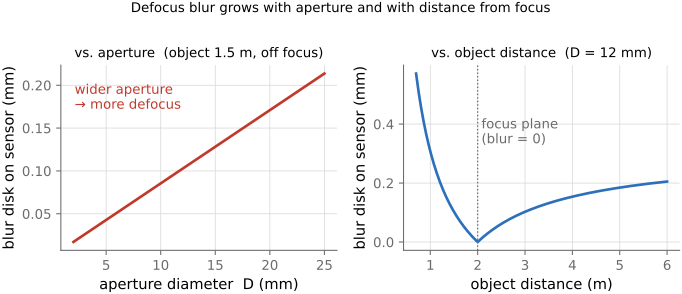
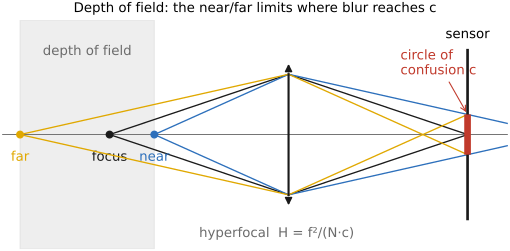
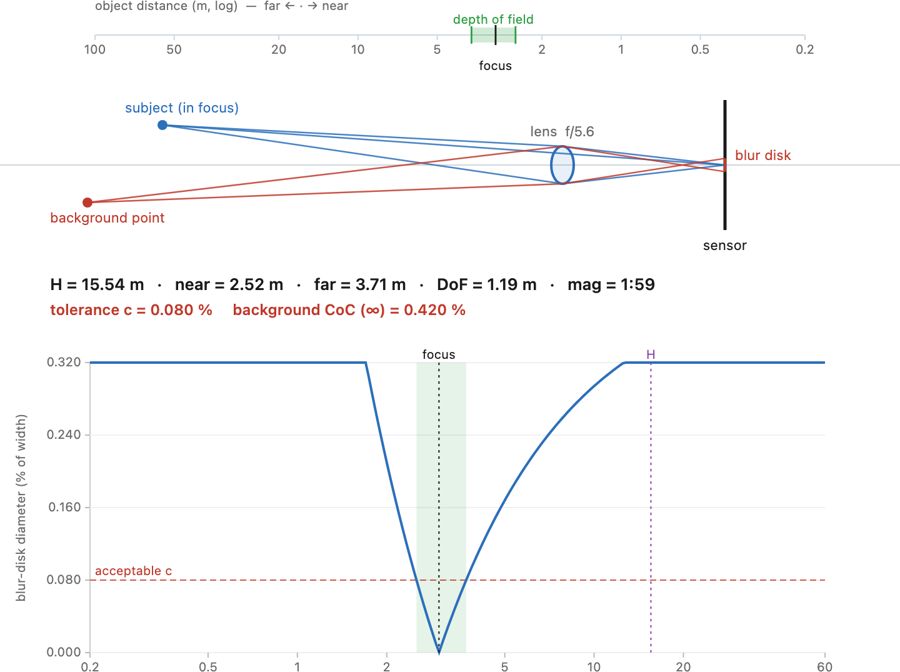
• chapter intro: from the **pinhole** (sharp but dim) to a **lens** (bright but with one focus plane) — refraction at curved surfaces, the thin-lens linearization, and the depth-of-field that the finite aperture forces on us
2.4 Image measurements as integrals
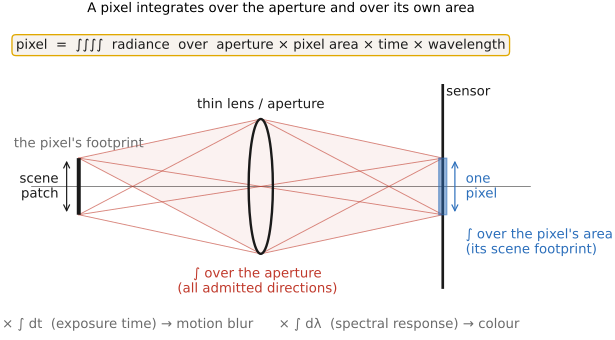
• chapter intro: the unifying idea behind sensing — **measurement = integrating a slice of the plenoptic function** — then the physical sensor that does it (photosites, CCD/CMOS) and the **noise** that limits it
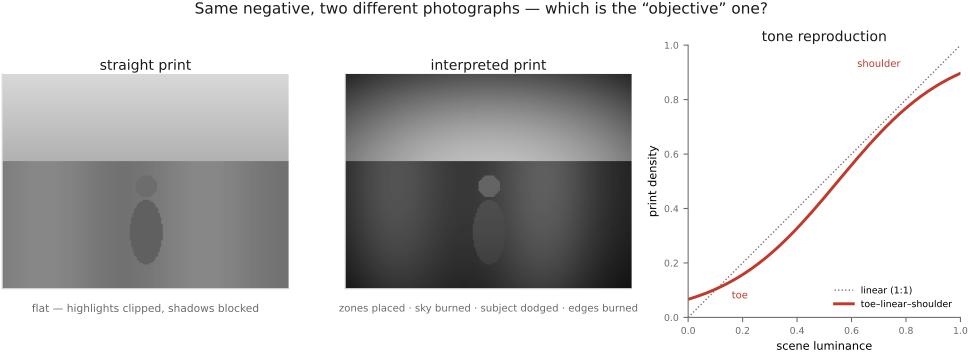
• sidebar — **photography as objective measurement**: the medium's long arc bends toward objective measurement (film/print = a *performance*; → measurement). The **digital sensor** is the far end: because each photosite *counts photons*, a **raw** image is ≈ a **calibrated radiometric measurement** — a physical map of scene radiance, in real units, of one snapshot of time — not just a rendering. This is what makes HDR / depth / deblur possible: the pixel numbers must *mean* something physical. Ties to the intro's **generation → measurement → generation** arc (→ [[01 Intro]]).
2.5 Sensors: photosites, CCD vs CMOS
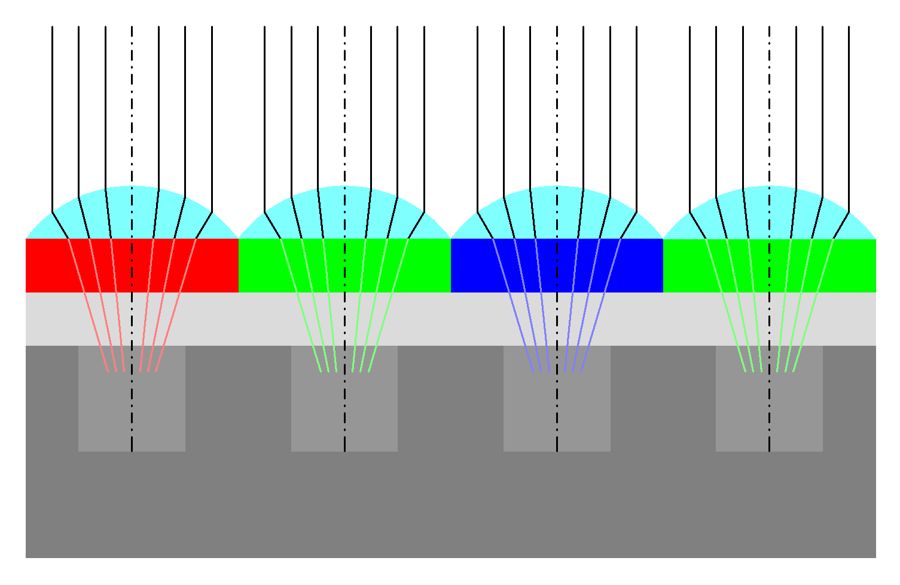
fig-sensor-microlens
fig-sensor-microlens · sensor cross-section: microlens → filter → photosite 🟨
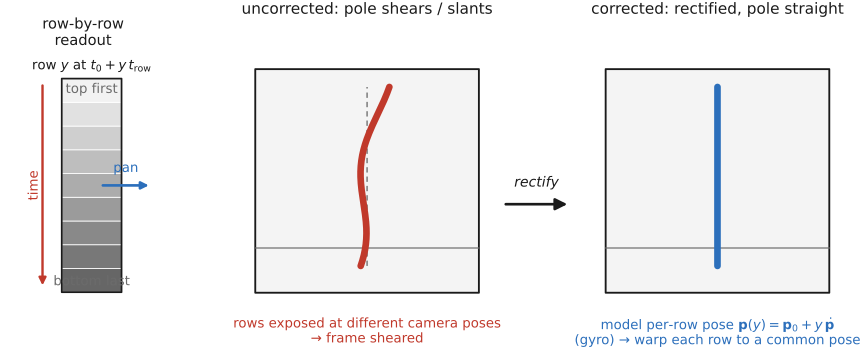
fig-rolling-shutter-pan
fig-rolling-shutter-pan · a slanted, sheared vertical pole from an uncorrected fast pan vs a straightened, rectified version, illustrating line-by-line CMOS readout during camera motion 🟨
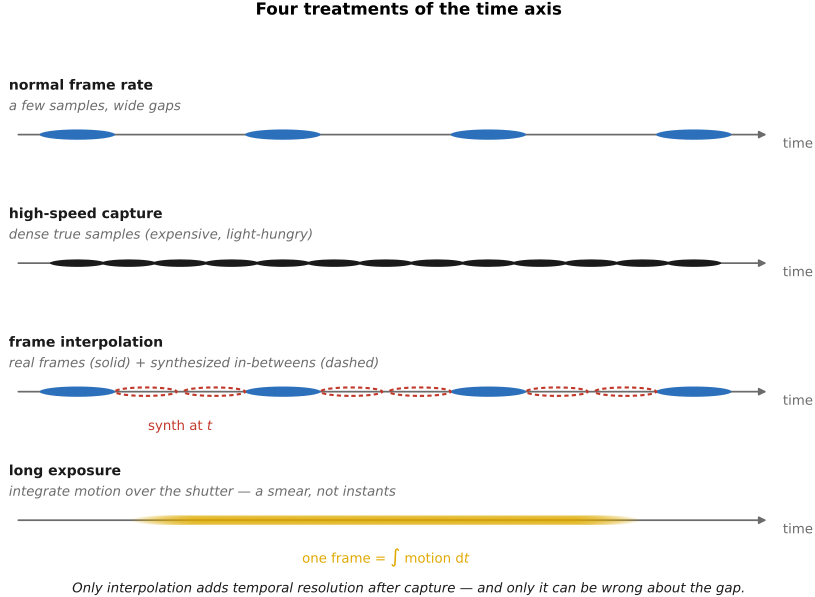
fig-slowmo-axis
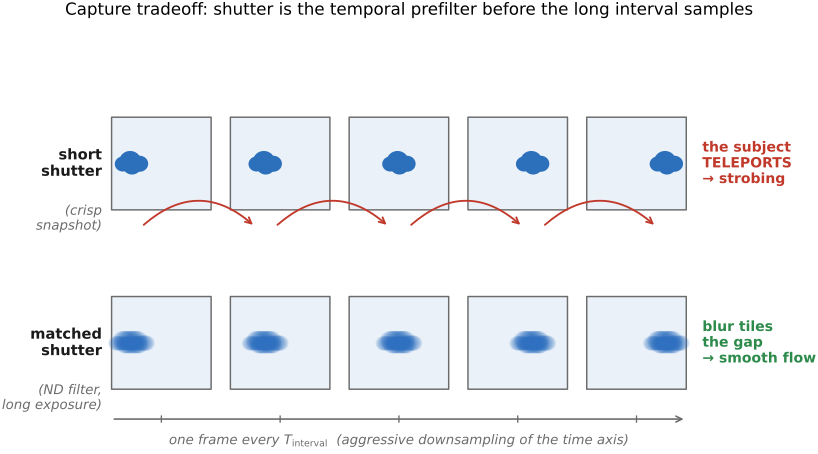
fig-slowmo-axis · four ways to treat the time axis on a shared timeline — normal capture (sparse), high-speed (dense true samples), interpolation (sparse reals with synthesized in-betweens), and long-exposure blur (the integral); only interpolation adds resolution after capture and can be wrong 🟨
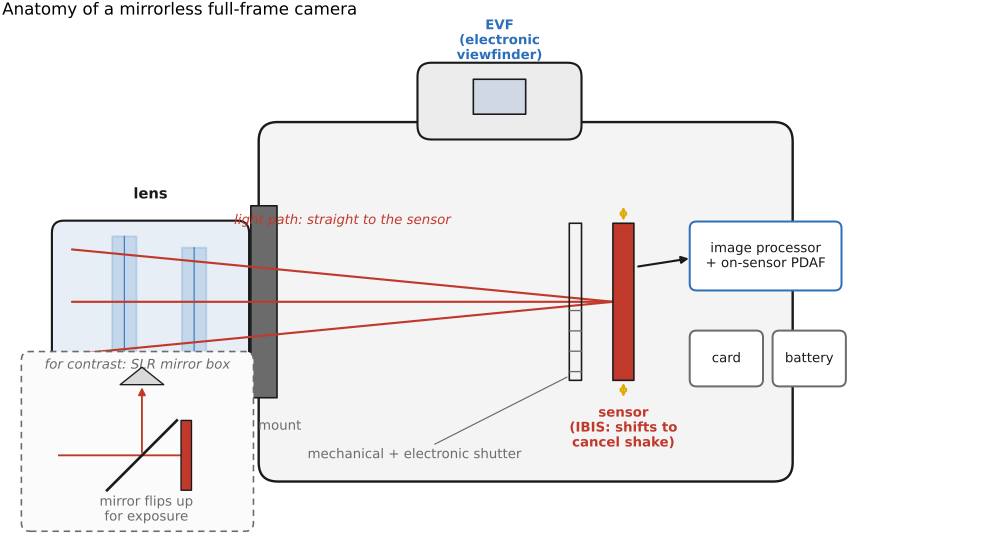
fig-mirrorless-anatomy
fig-mirrorless-anatomy · labeled cutaway of a mirrorless full-frame camera (lens+mount, sensor/IBIS, mech+electronic shutter, EVF, processor/on-sensor PDAF, card+battery); SLR mirror-box inset for contrast
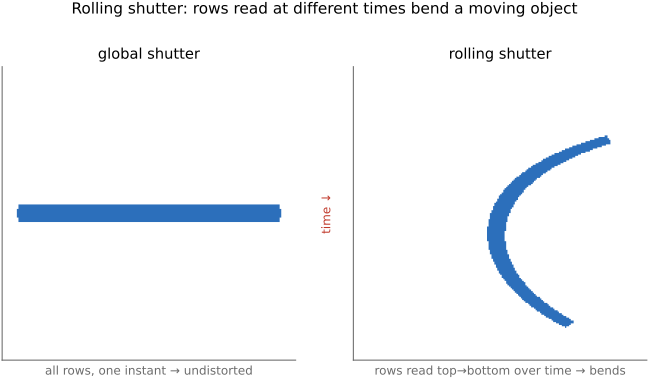
fig-rolling-shutter-skew
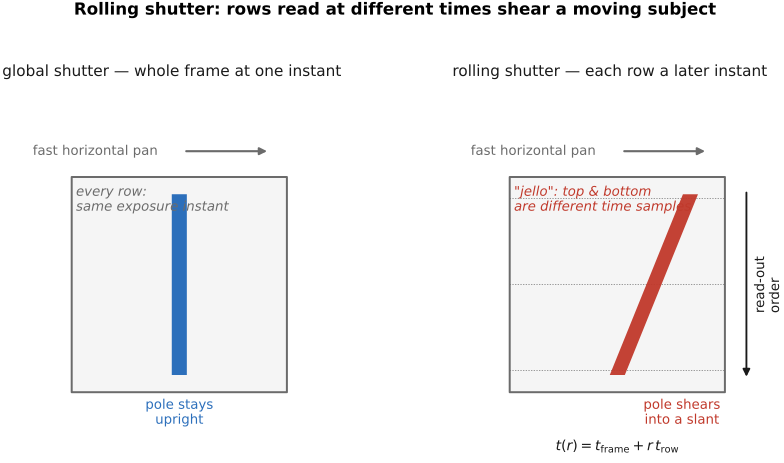
fig-rolling-shutter-skew · rolling-shutter distortion — a global shutter keeping a vertical pole upright under a fast pan vs a rolling shutter where per-row readout $t(r)=t_\text{frame}+r\,t_\text{row}$ shears the pole and smears fan blades (the jello effect) 🟨
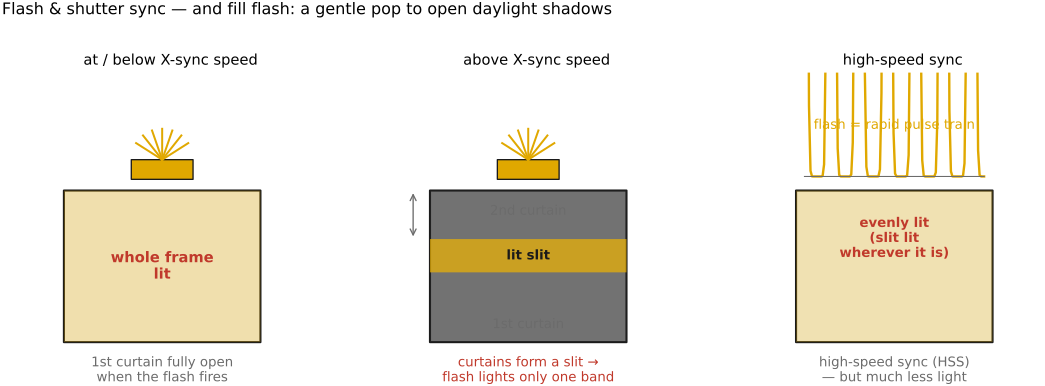
fig-flash-sync
fig-flash-sync · flash & focal-plane-shutter sync: whole frame ≤ X-sync · slit/partial frame above it · high-speed-sync pulse train; fill-flash noted
fig-darkroom-dodge-burn
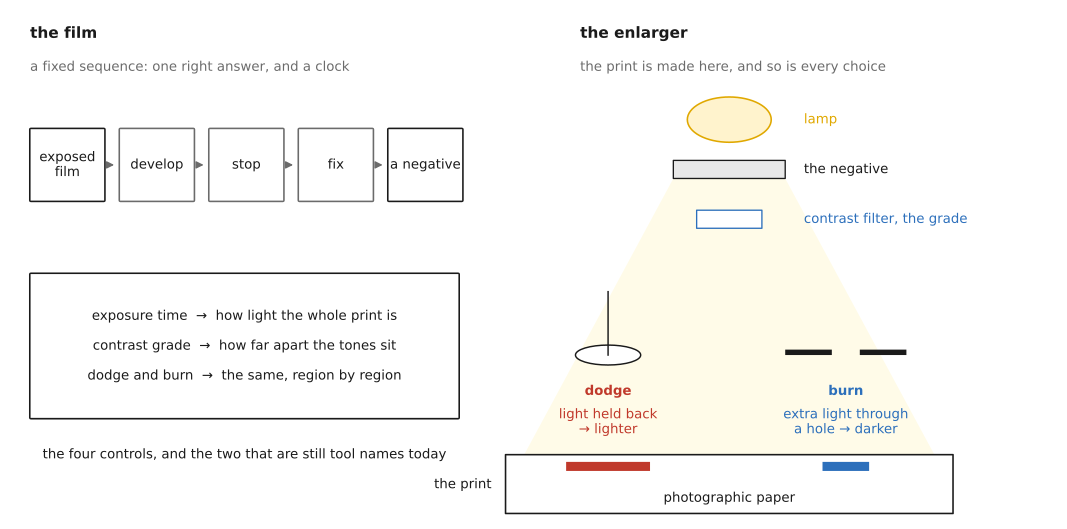
fig-darkroom-dodge-burn · the darkroom ancestor: dodging (hold back light) and burning (add light) under the enlarger as hand-painted spatially-varying exposure 🟨
2.6 Noise, signal-to-noise ratio and dynamic range
⬜ figure not yet created
noisy image + flat-patch histogram (ISO 3200) fig-noise-histogram
⬜ figure not yet created
noise vs ISO fig-noise-vs-iso
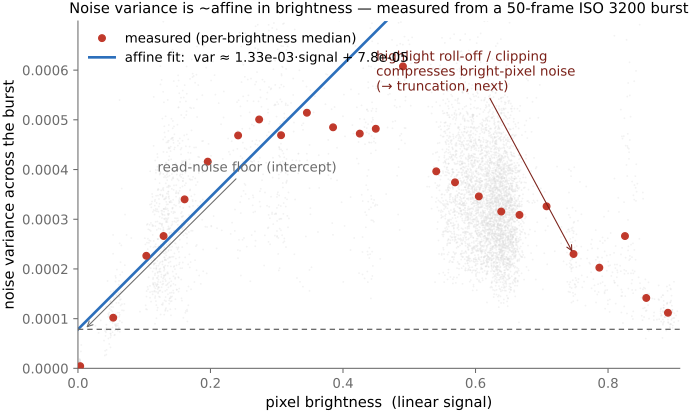
fig-noise-affine
fig-noise-affine · measured noise variance is affine in brightness (σ²≈gain·I+read²) — real per-pixel variance vs mean from a 50-frame aligned ISO-3200 burst, with the affine fit, read-noise floor, and highlight roll-off (Noise, SNR, dynamic range)
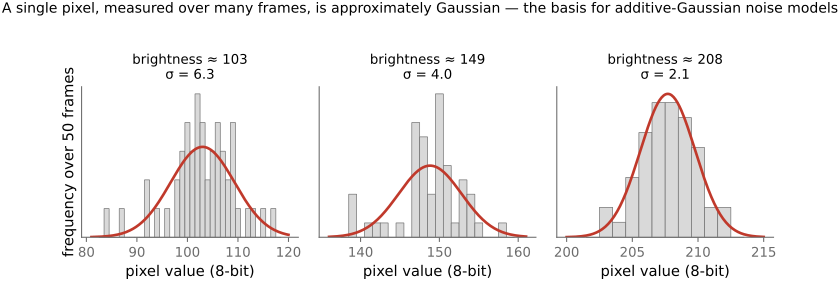
fig-noise-gaussian-pixels
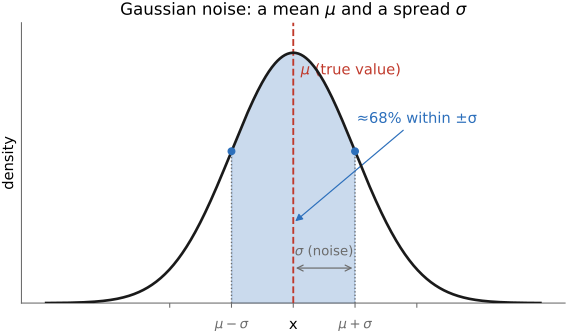
fig-noise-gaussian-pixels · a single pixel's value across many frames is ≈ Gaussian — per-pixel histograms from the ISO-3200 burst with Gaussian overlays (Noise)
fig-noise-truncation
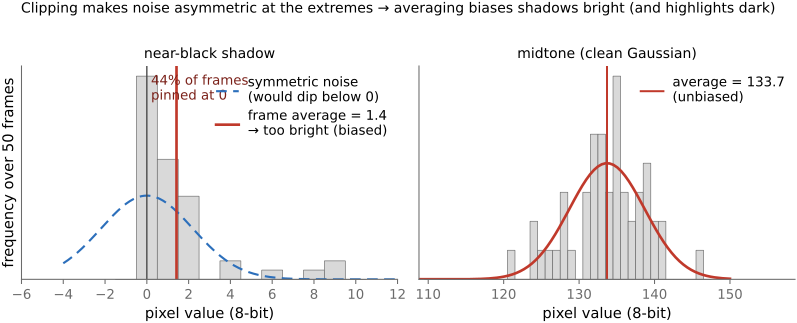
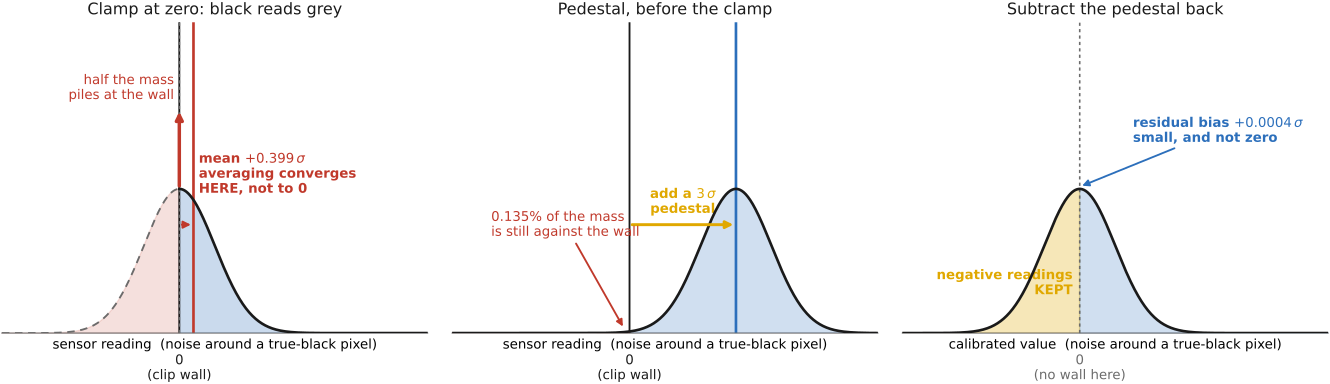
fig-noise-truncation · noise clips at black/white so it is not zero-mean at the extremes — a near-black pixel pinned at 0 ~44% of frames, its average biased bright, vs an unbiased midtone (Noise; denoising trap)
fig-snr-vs-stddev
fig-snr-vs-stddev · noise std-dev map vs SNR map of a brightness ramp: std rises with brightness (∝√N), but SNR=√N is worst in the shadows 🟨
⬜ figure not yet created
**underexposure recovery — full-frame vs phone**: the same underexposed scene pushed up several stops in software, the full-frame frame cleaning up while the phone reveals amplified shadow noise / banding [fig-underexposure-recovery-ff-vs-phone fig-underexposure-recovery-ff-vs-phone
⬜ figure not yet created
photo] fig-results-montage
fig-dynamic-range-comparison
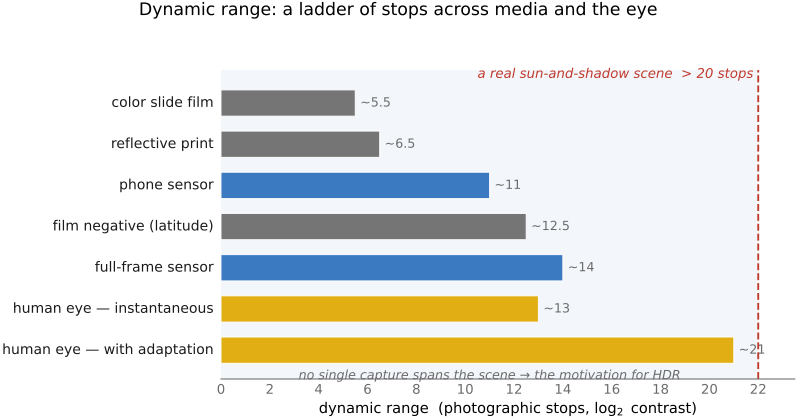
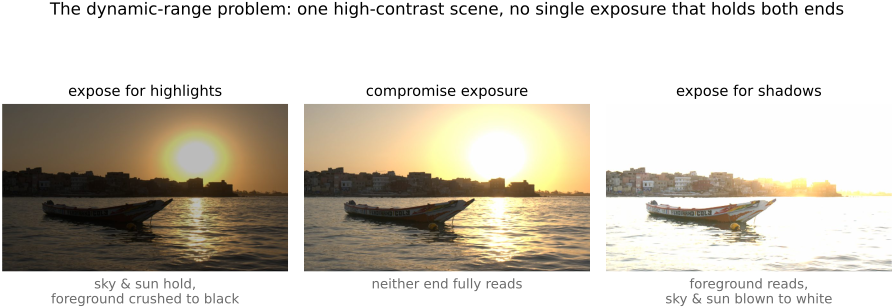
fig-dynamic-range-comparison · dynamic-range ladder in **stops** (horizontal bars): colour slide (~5–6) · reflective print (~6–7) · film negative (~12–13) · phone sensor (~10–12) · full-frame sensor (~14) · human eye instantaneous (~10–14) vs adapted (~20+) · an animal example · a typical sun-and-shadow scene (>20) — shows why no single capture holds a high-contrast scene (→ HDR)
⬜ figure not yet created
an animal or two
• the noise **sources** (their variances add):
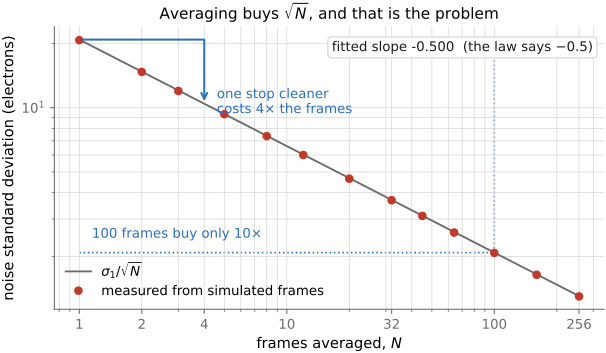
• **photon / shot noise** — the Poisson statistics of *counting photons*: variance = mean, so σ = √N. Fundamental (it's the light itself), dominates the midtones/highlights; averaging N independent frames cuts it by √N.
• **read noise** — added by the amplifier / ADC on readout; signal-independent, dominates the **shadows** and sets the noise floor (hence dynamic range).
• **thermal / dark current** — electrons freed by heat, independent of light; grows with exposure time and temperature (long exposures & astrophotography → sensor cooling, dark-frame subtraction).
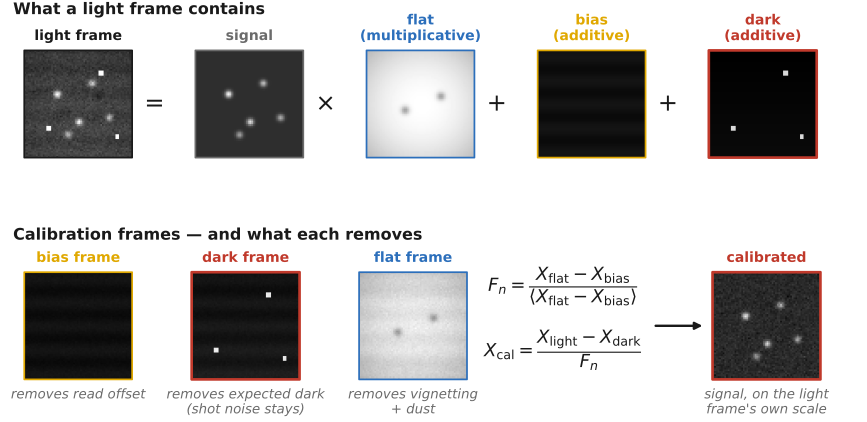
• **fixed-pattern / pattern noise** — per-pixel gain/offset non-uniformity (PRNU/DSNU), hot/stuck pixels, banding; *structured*, so it reads as worse than random noise of equal magnitude, and is removed by calibration (flat / dark fields).
• 💡 **Big lesson — in a *linear* image, noise variance is an *affine* function of brightness.** The variances add: shot noise gives a term **proportional to the signal** (Poisson, variance = mean, scaled by the gain) and read noise a **constant** floor, so the total is **variance ≈ gain·signal + read²** — a straight line in brightness. You can *measure* it: take an aligned **burst** of a static scene and, per pixel, plot the variance across frames against the mean — the points trace that line, slope = photon gain, intercept = the read-noise floor. And a single pixel's value over many frames is **≈ Gaussian**, which is what licenses additive-Gaussian noise models. [`fig-noise-affine` — per-pixel variance vs brightness, measured from a 50-frame ISO-3200 burst; `fig-noise-gaussian-pixels` — per-pixel histograms] → register [[Big Lessons]]
• 💡 **Big lesson — noise is *clipped* at black and white, so near the extremes it is *not* zero-mean.** A recorded value is clamped to [0, max]: near black the negative half of the noise is cut off (frames pile up at 0), near white the positive half is. So at the extremes the noise distribution is **asymmetric** and its mean is pushed **inward**. The consequence for **denoising**: any naive average/smoothing returns that biased mean, so it makes **shadows come out too bright and highlights too dark** — a bias every denoiser has to correct for (carried forward to [[#Denoising]] in BASIC). [`fig-noise-truncation` — a near-black pixel pinned at 0 a third of the time, its average biased bright; from the ISO-3200 burst] → register [[Big Lessons]]
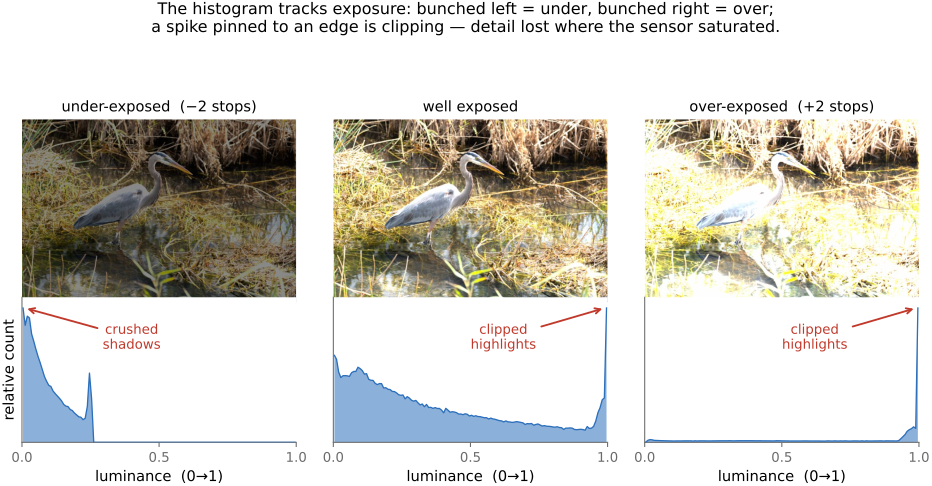
• **the key intuition — it's about ratios (SNR)**: shot noise is **Poisson**, so σ = √N grows with brightness — measured noise is actually **higher in the highlights**. Yet noise *looks* worst in the **shadows**, because perception cares about the **signal-to-noise ratio** SNR = N/√N = √N, which is worst where N is small. "Ratios are all that matters" — the same reason we encode in gamma/log, and the motivation for ETTR (below — Photography 101). [std-dev map vs SNR map figure]
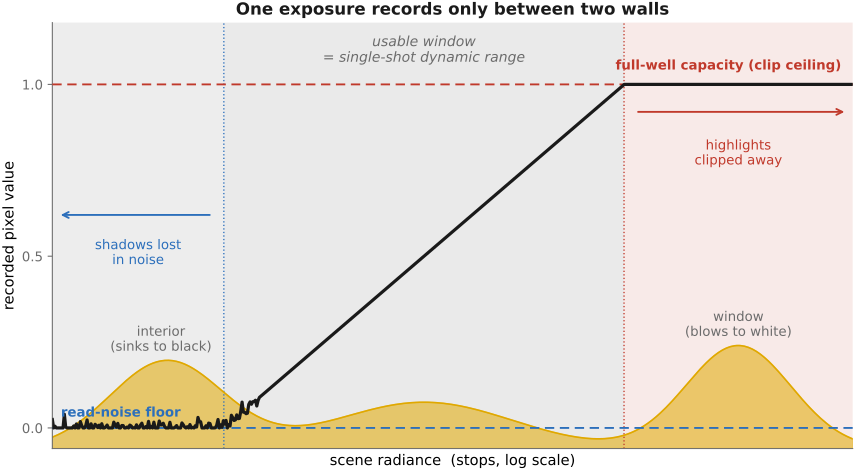
• **dynamic range** = the brightest recordable signal (sensor **saturation / full-well**) ÷ the **noise floor** (read noise in the shadows); it sets how much of a high-contrast scene fits in a *single* exposure → the motivation for **HDR** (Multiple exposure)
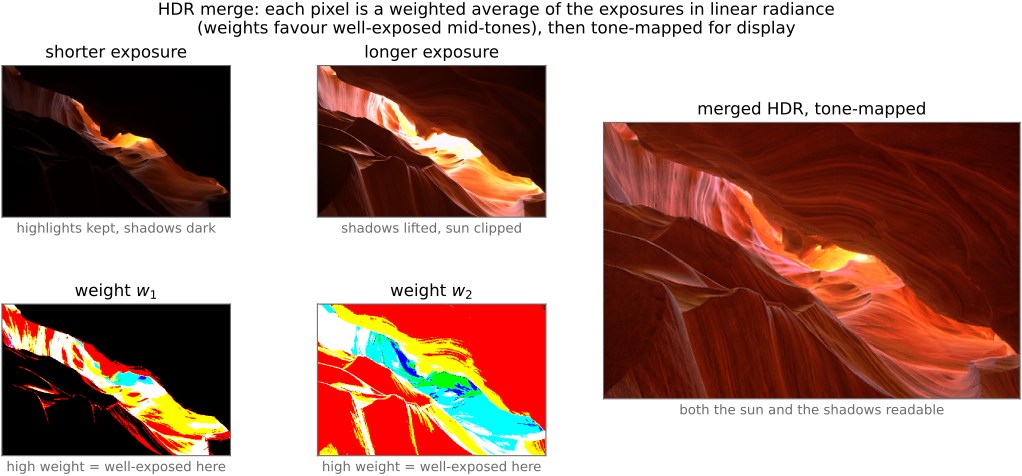
• **HDR (high dynamic range)**, sometimes called **wide dynamic range (WDR)**, is a deliberately **fuzzy** term — flag this. It gets used for at least four different things: the *scene* (a high-contrast world), the *capture* (multi-exposure / a high-DR sensor), the *file/encoding* (float or ≥10-bit radiance, e.g. OpenEXR, HDR10), and the *display* (an HDR monitor) — and, loosely, for the **tone-mapped "HDR look."** There is no single sharp definition; say which sense you mean. (Developed in [[Multiple exposure imaging]].)
• 💡 **Big lesson (L15) — dynamic range is set by full-well capacity over the noise floor**: a single exposure records from a **top** (the photosite's **full-well capacity** — where it clips to white) down to a **bottom** (the **noise floor** — read noise in the shadows); their **ratio is the dynamic range** (quoted in stops). You **widen** it with a **bigger well** (larger photosites — why a full-frame sensor out-ranges a phone) or a **lower floor** (cooling, lower read noise), and you **beat** it altogether by merging **multiple exposures** (HDR). The capture-side companion to **L6**: what bounds a shot is this *range*, not the bit depth. → register [[Big Lessons]]
• **examples, in stops** (the figure): a color **slide** is narrow (~5–6 stops), a reflective **print** ~6–7, **film negative** wide (~12–13 latitude), a **phone** sensor ~10–12, a **full-frame** sensor ~14; the **human eye** is ~10–14 stops *instantaneously* but ~**20+** once **adaptation** is allowed — and some **animals** do better in their niche; an outdoor sun-and-shadow scene can exceed **20 stops**, which is why no single capture holds it [fig-dynamic-range-comparison]
• **see it — recover an underexposed shot, full-frame vs phone**: shoot the *same* underexposed scene as **raw** on a **full-frame** camera and on a **phone**, then **push the exposure up** in software (e.g. +3–4 stops). The full-frame frame cleans up (deep full-well + low read-noise floor → wide dynamic range), while the phone frame breaks down into **shadow noise and banding** as the lift amplifies its read-noise floor — a direct, visible demonstration that **dynamic range scales with photosite / sensor size**, and exactly why phones lean on **burst / HDR+** (Multiple exposure) rather than a single exposure. [fig-underexposure-recovery-ff-vs-phone; photo — paired Fredo full-frame DNG + phone raw] *(also a coding exercise — see [[Exercises & Experiments]])*
• 💡 **Big lesson (L6) — quantization is rarely the real problem**: with enough bits and a sane encoding, it's **noise and dynamic range** (this section) that bite — not the number of levels. The one exception is **gamma / banding in shadows**, which is exactly why gamma encoding exists (allocate codes perceptually); so "rarely" ≠ "never". Reminded again in BASIC → Image representation → *Float vs 8-bit*.
equations
shot noise Poisson (variance = mean), σ ∝ √N, SNR = √N
variances add (shot + read + thermal)
averaging N frames → noise /√N
PSNR = 10·log₁₀(MAX²/MSE)
dynamic range = full-well ÷ read-noise floor
2.7 Multiple view geometry
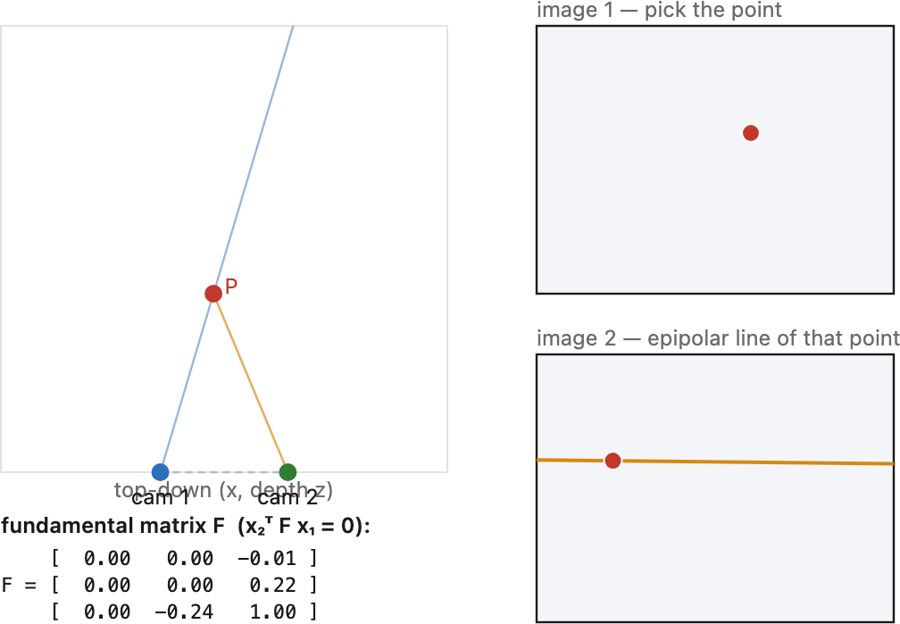
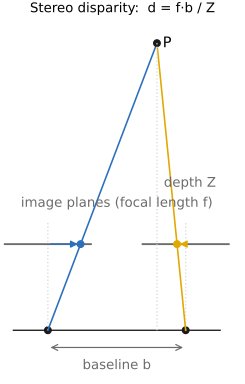
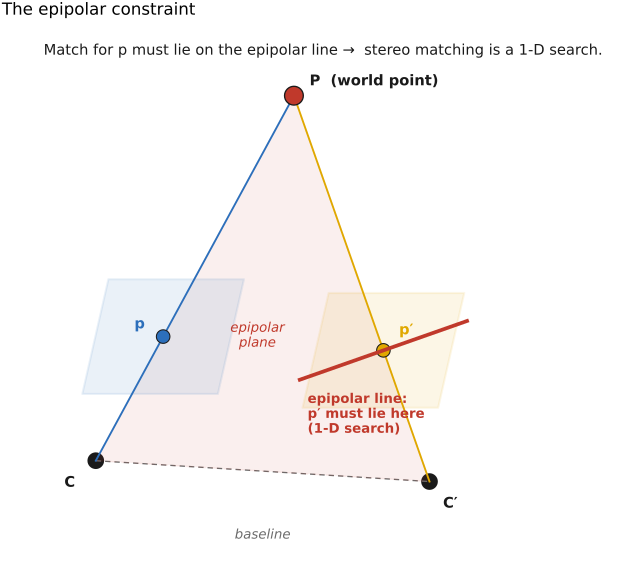
• chapter intro: the leap from one image to **two** — what a second viewpoint buys you (depth), built on the stereo / disparity intuition, then the epipolar-geometry derivation of E/F, with only their estimation and the multi-view scaling-up forwarded
2.8 Human (and animal) vision and color
2.9 Color technology
2.10 Photography and camera 101
• chapter intro: having built the physics, we now sit behind a real camera — its **controls, modes, and guts** — and see how phones reach the same goal by a wholly different (computational) route
Part 3 BASIC IMAGE PROCESSING AND ISP
At the end of this part, the readers will be able to implement a complete ISP or very basic version of a photo editing software (mini lightroom) with exposure, contrast, etc.
3.1 Image representation
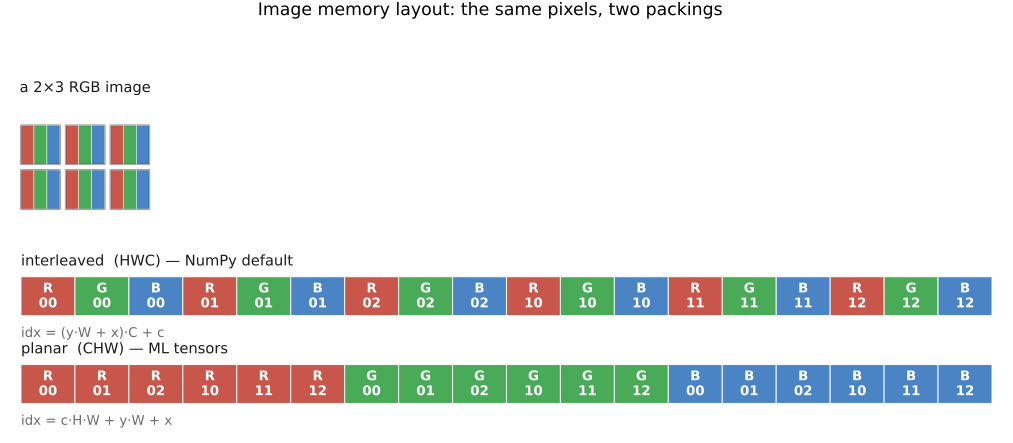
fig-image-memory-layout
fig-image-memory-layout · a 2×3 RGB image packed into 1-D memory two ways — interleaved HWC (NumPy) vs planar CHW (ML), with the stride formulas (Image representation, BASIC) 🟨
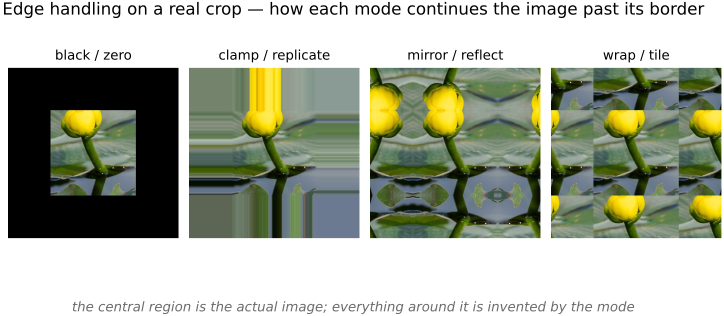
fig-edge-handling-photo
fig-edge-handling-photo · the four edge modes on a real crop — black / clamp / mirror / wrap continued past the border; real-image companion to `fig-edge-handling` (Image representation → falling off the edge, BASIC)
3.2 Developing, Testing and Debugging
3.3 Point operations
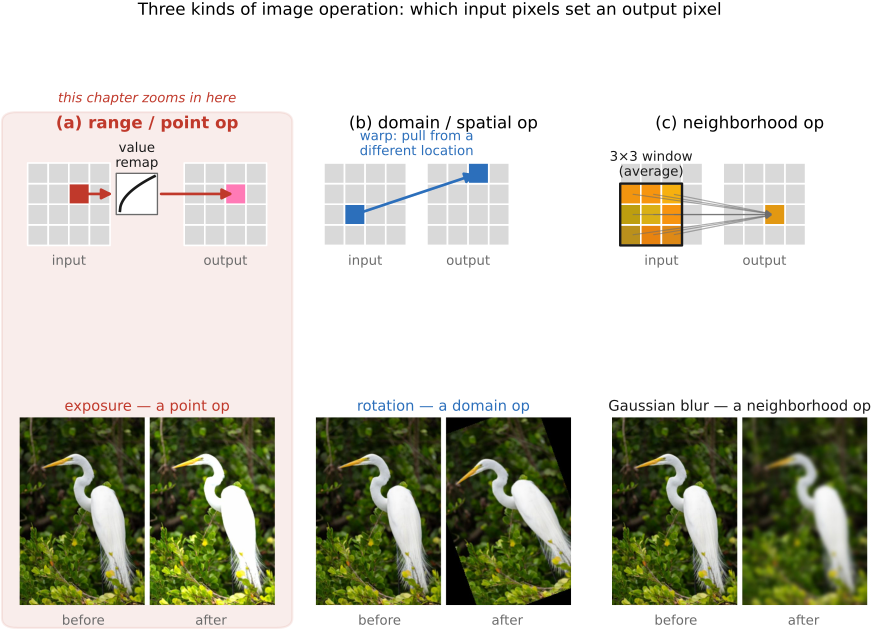
fig-operation-types
fig-operation-types · the three image-operation types — range (point) vs domain (spatial) vs neighborhood (Values / point ops, BASIC) 🟨
3.4 Histograms
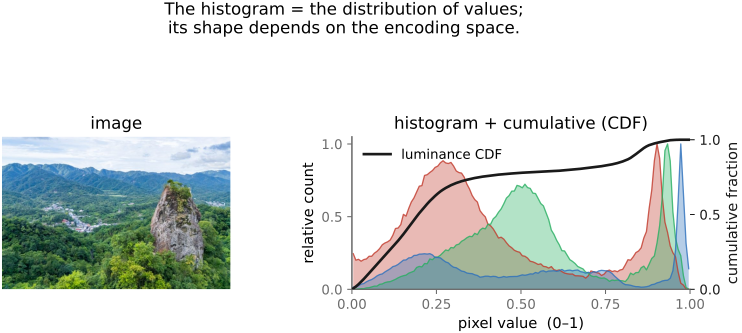
fig-histogram
fig-histogram · an image histogram (per-channel) + cumulative histogram; its shape depends on the encoding space (BASIC tone mapping) 🟨
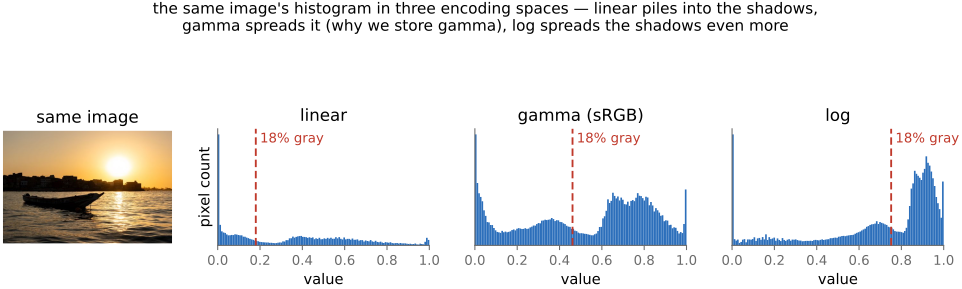
fig-histogram-encoding-spaces
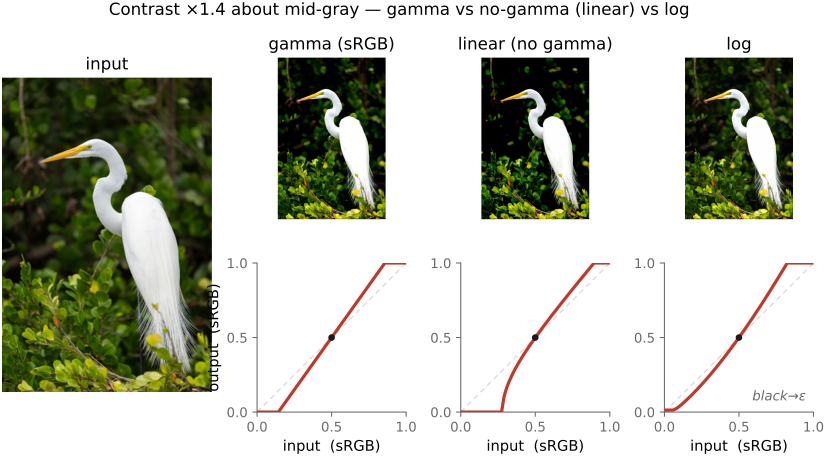
fig-histogram-encoding-spaces · the same image's luminance histogram in linear / gamma (sRGB) / log; 18% gray marked at 0.18 / ~0.46 / ~0.75 — the encoding reshapes the value axis (BASIC histograms) 🟩
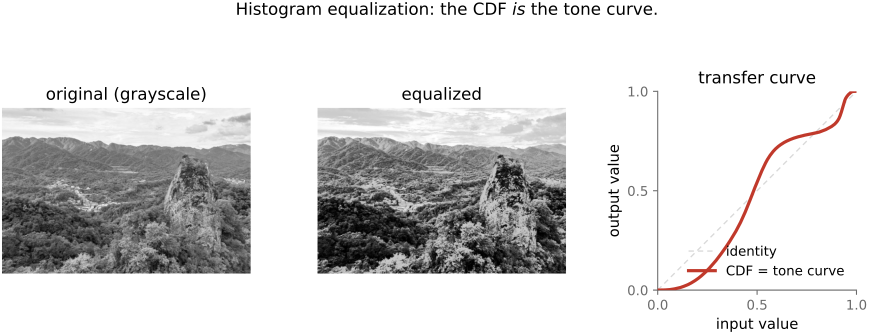
fig-histogram-equalization
fig-histogram-equalization · histogram equalization — the CDF used as the transfer curve, before/after (BASIC) 🟨
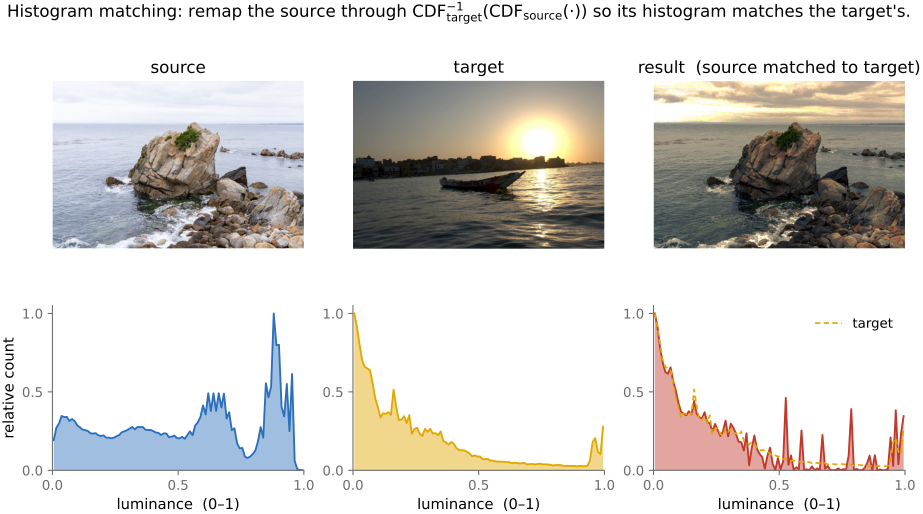
fig-histogram-matching
fig-histogram-matching · histogram matching — source + target images and their histograms → matched result, with the composed transfer curve $\text{CDF}_\text{tgt}^{-1}\circ\text{CDF}_\text{src}$ (BASIC histograms)
• the **histogram** — the distribution of pixel values — is the natural companion to point operations: this short chapter is how to *read* it, and how it can *drive* an automatic tone curve
3.5 Tone mapping
fig-reinhard-curve
fig-reinhard-curve · the Reinhard global tone curve L/(1+L) mapping [0,∞)→[0,1); naive clip vs Reinhard on a simulated-HDR image (BASIC) 🟨
fig-tonemap-real
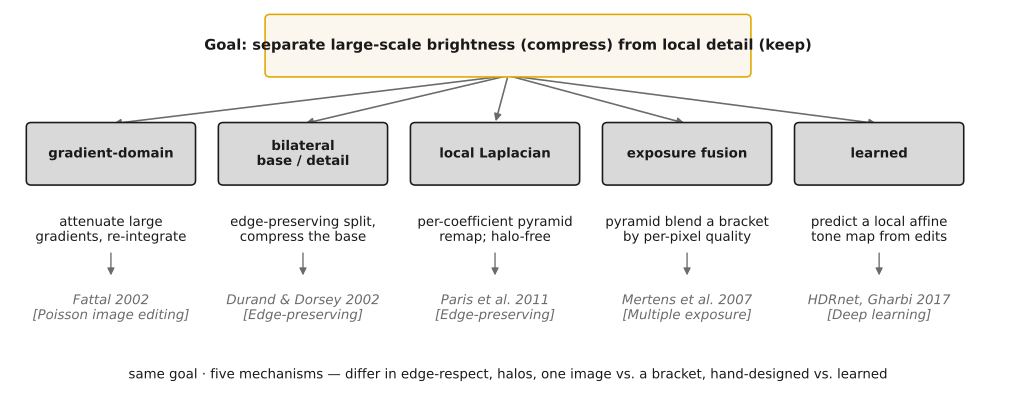
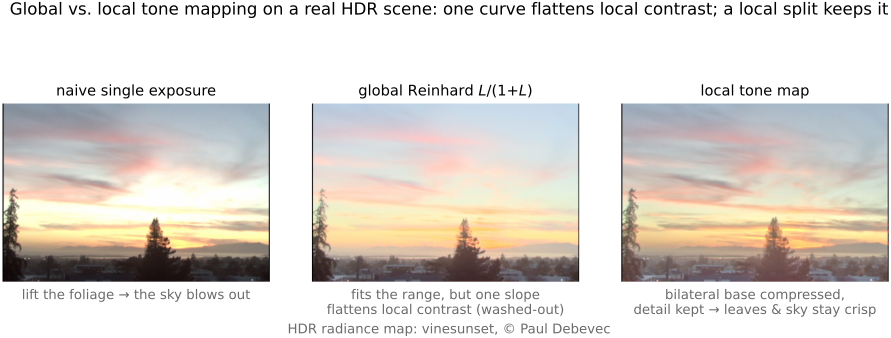
fig-tonemap-real · global vs local tone mapping RESULT on a real HDR photo (seal at marina): naive single exposure · global Reinhard (one slope flattens local contrast → hazy) · local bilateral base+detail split (range fits, detail stays crisp) — real-image companion to `fig-tonemap-global-vs-local` (BASIC tone mapping)
fig-zone-system
fig-zone-system · the Zone System strip 0–X, Zone V = 18% mid-grey (scene → print) (BASIC) 🟨
• a **quick intro** here (full treatment in the HDR chapter): tone mapping = choosing the **mapping from scene tones to display tones**, the natural payoff of point operations
3.6 Neighborhood operations and convolution
fig-convolution-slide
fig-convolution-slide · a kernel sliding over an image, weighted-summing a neighborhood into one output pixel (Convolution, BASIC) 🟨
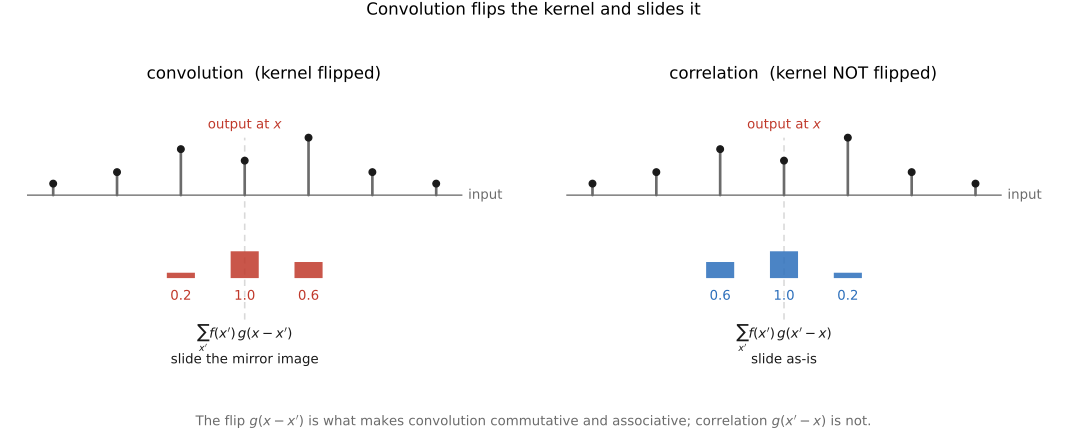
fig-convolution-flip
fig-convolution-flip · the flip: where-from vs where-to — convolution `g(x−x')` vs correlation 🟨
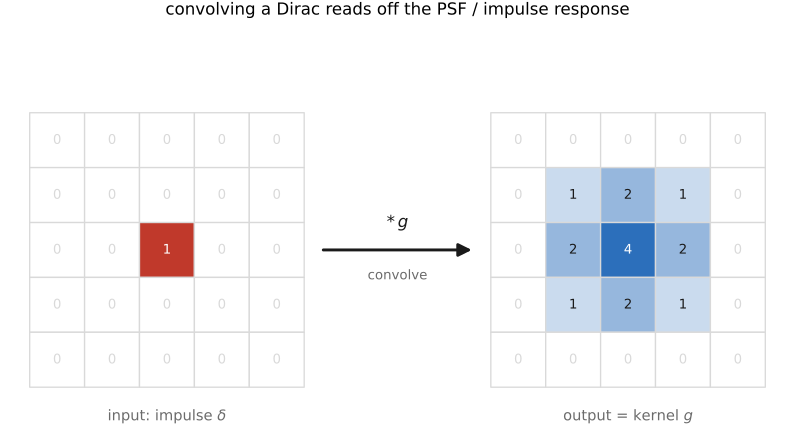
fig-psf-impulse
fig-psf-impulse · impulse in → kernel out: convolving a Dirac reads off the PSF / impulse response 🟨
fig-blur-zoo
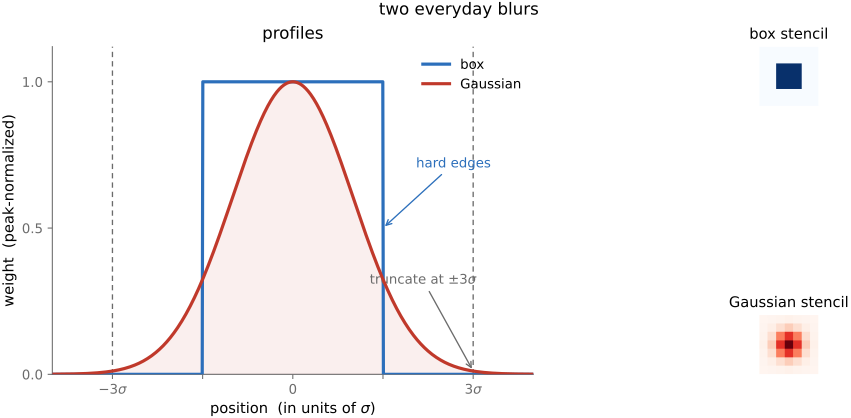
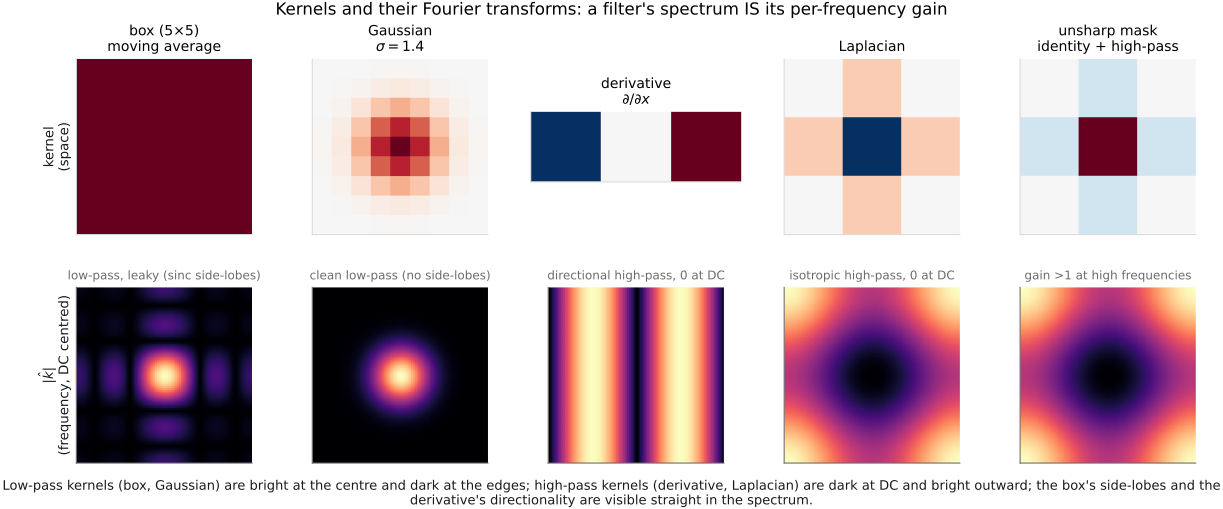
fig-blur-zoo · box vs Gaussian kernels — profiles + 2-D stencils, Gaussian truncated at ~3σ 🟨
fig-unsharp-mask
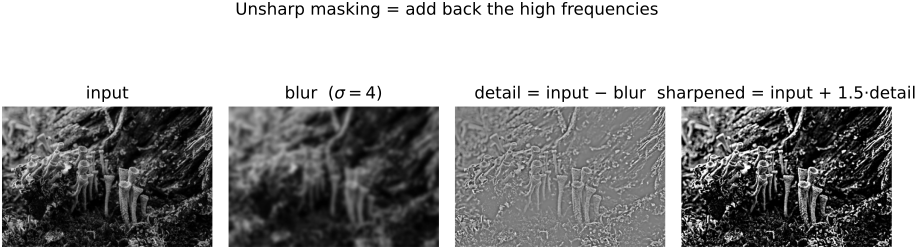
fig-unsharp-mask · unsharp-mask decomposition: input − blur = detail (high-pass), output = input + k·detail 🟨
fig-sharpen-kernel
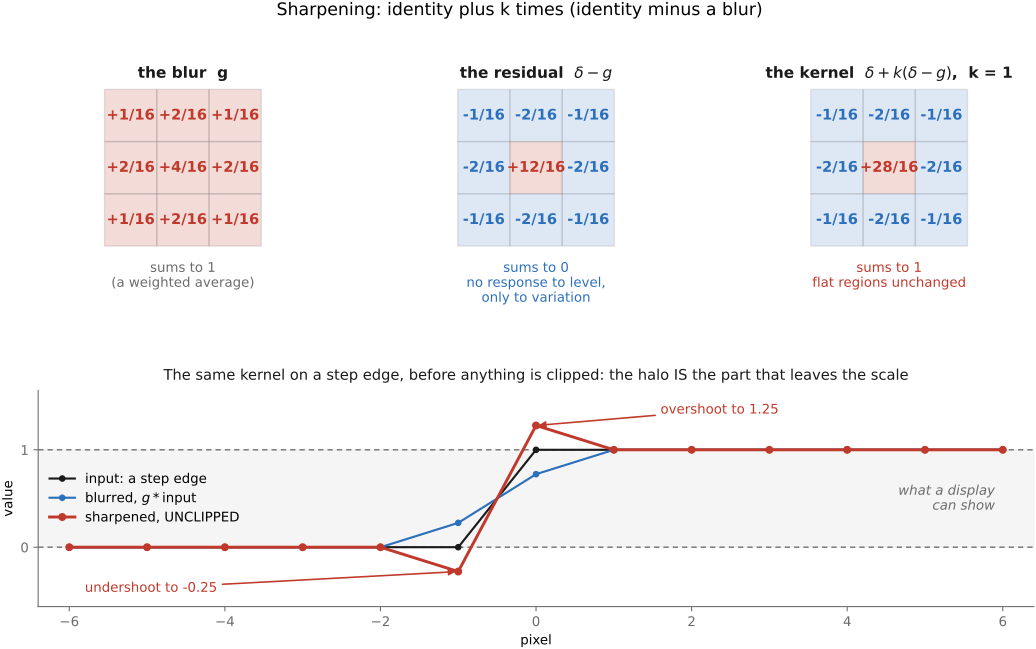
fig-sharpen-kernel · the sharpening kernel δ − blur as a +centre / −surround stencil 🟨
fig-separable
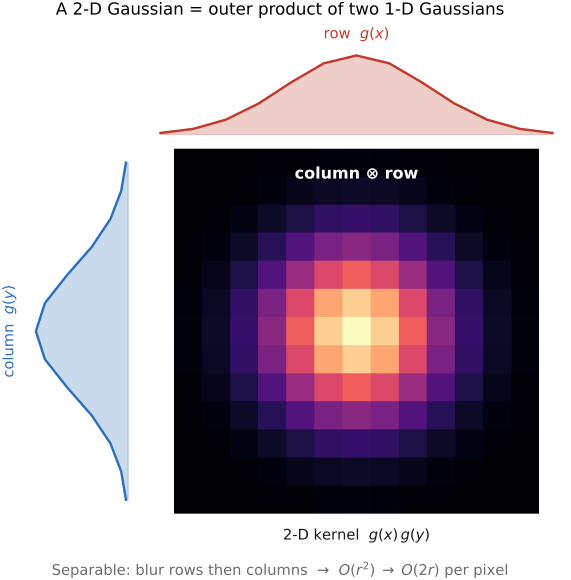
fig-separable · separability — a 2-D Gaussian = 1-D ⊗ 1-D (blur rows then columns); O(r²) → O(2r) 🟨
fig-gradient-sobel
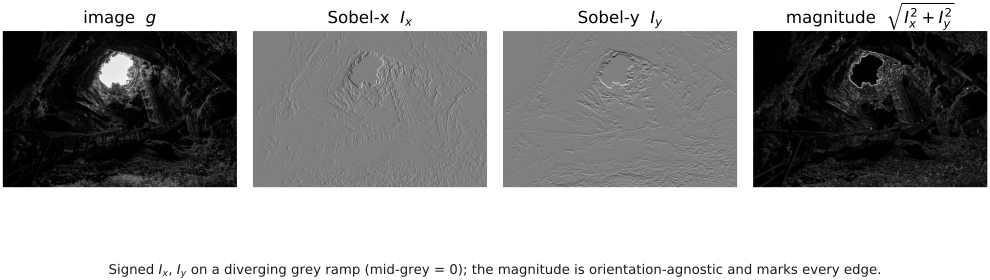
fig-gradient-sobel · Sobel x / y → gradient magnitude (edge strength) on an image 🟨
fig-convolution-probability
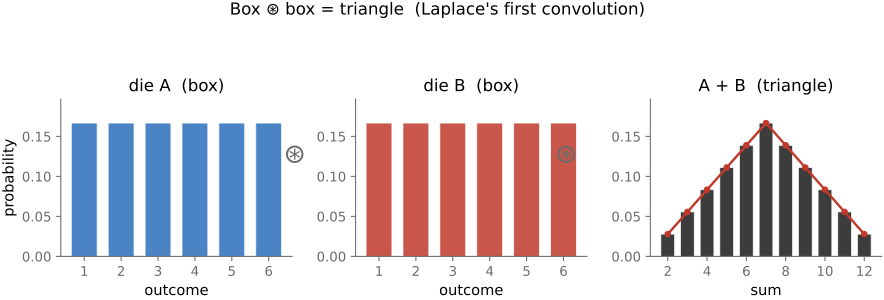
fig-convolution-probability · convolution as the sum of random variables: box ⊛ box = triangle (two dice) 🟨
equations
convolution (I*g)(x) = Σ I(x')·g(x−x')
Gaussian g(x) ∝ exp(−x²/2σ²)
unsharp out = in + k·(in − blur(in))
sharpening kernel δ − g
3.7 Fourier
fig-fourier-basis-matrix
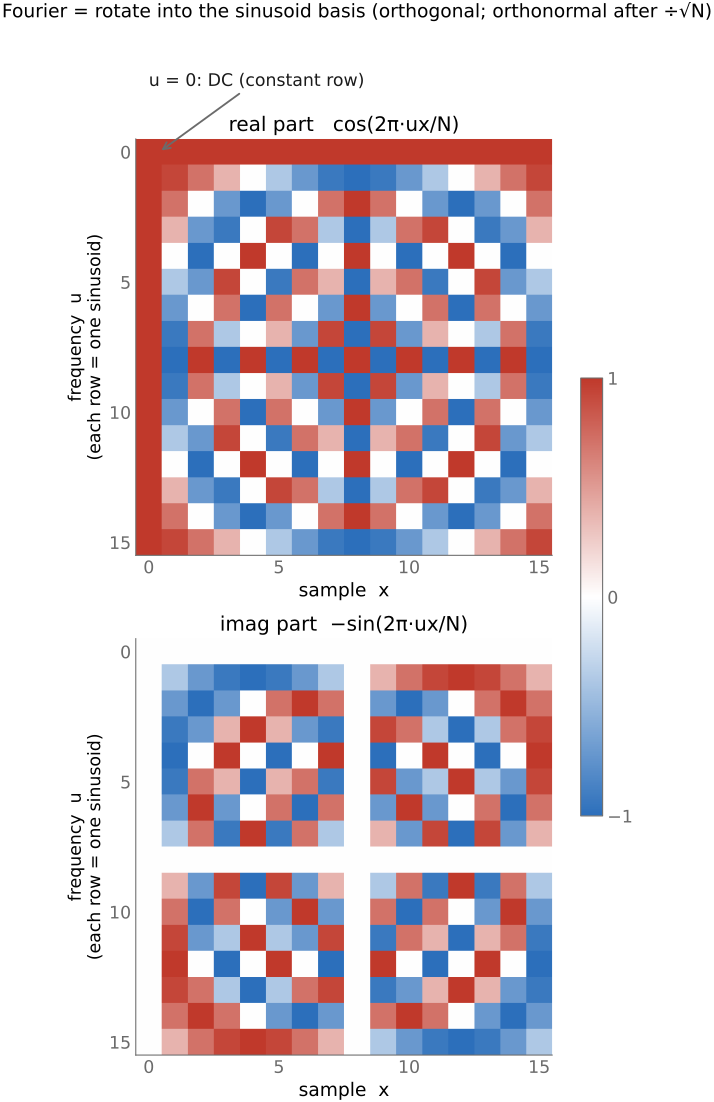
fig-fourier-basis-matrix · the DFT as a change-of-basis matrix (real & imaginary parts) 🟨
fig-sine-eigenvectors
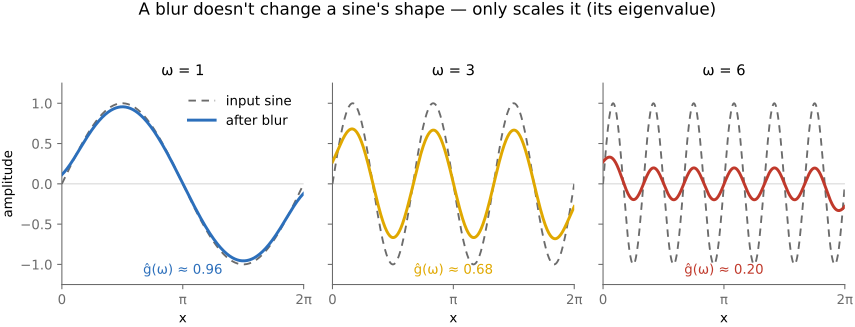
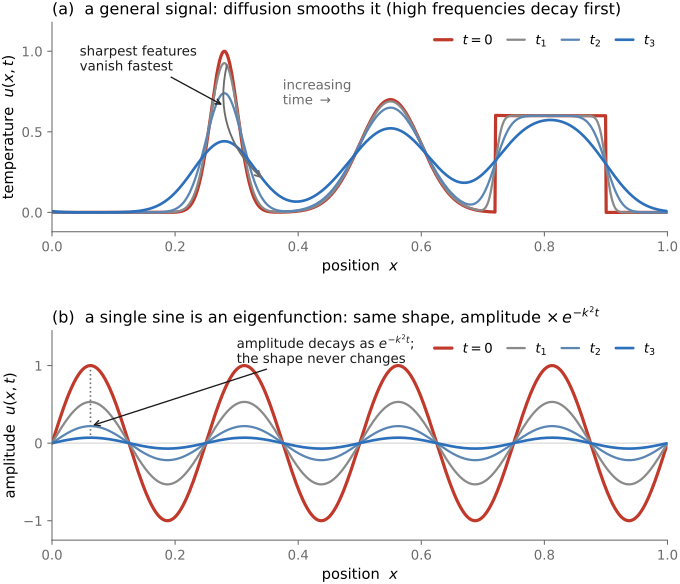
fig-sine-eigenvectors · sine waves are the eigenvectors of convolution: same wave out, only amplitude/phase change 🟨
fig-fourier-2pixel
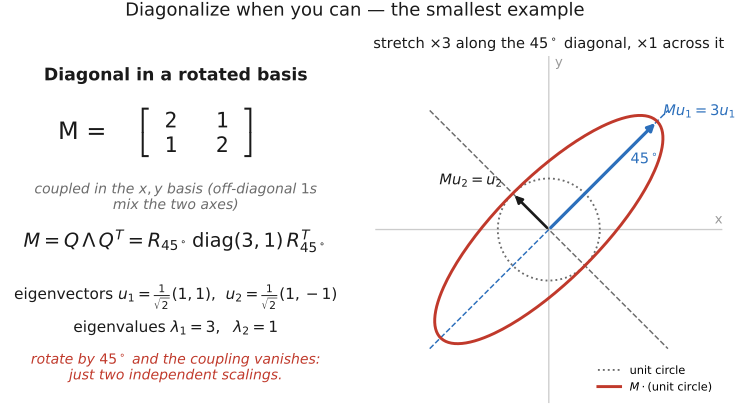
fig-fourier-2pixel · the 2-pixel example: convolution [0.8,0.2] diagonalized by a 45° rotation to [1,1]/[1,−1] 🟨
fig-fourier-magnitude-phase
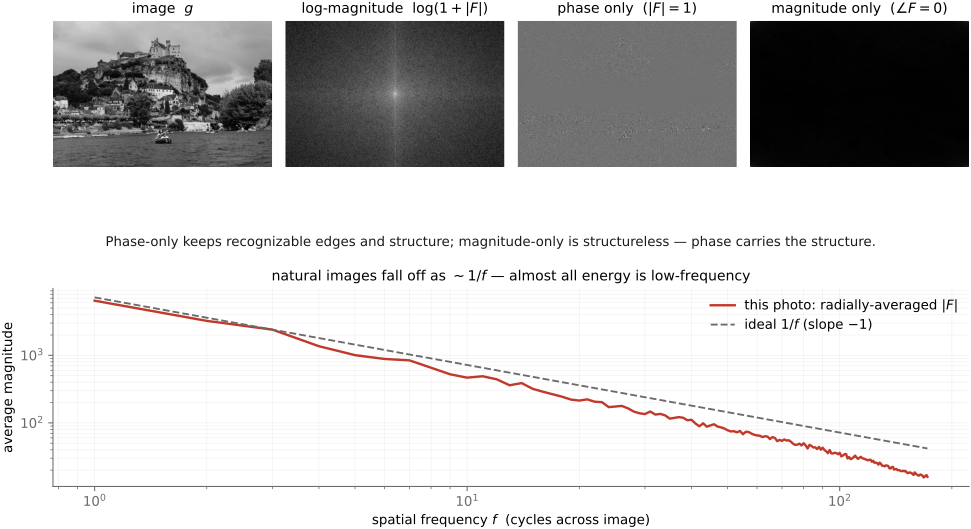
fig-fourier-magnitude-phase · an image's Fourier magnitude & phase, and the phase-swap demo (phase carries structure) 🟨
fig-compact-space-frequency
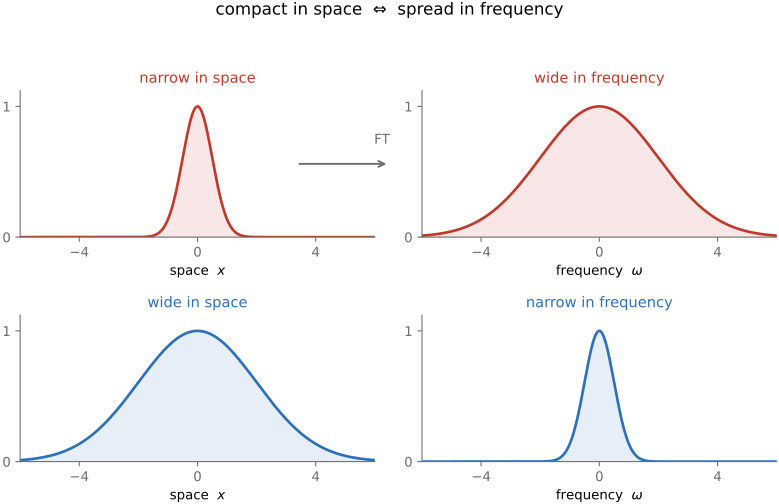
fig-compact-space-frequency · compact in space ⇔ spread in frequency (narrow vs wide Gaussian and its transform) 🟨
fig-aliasing
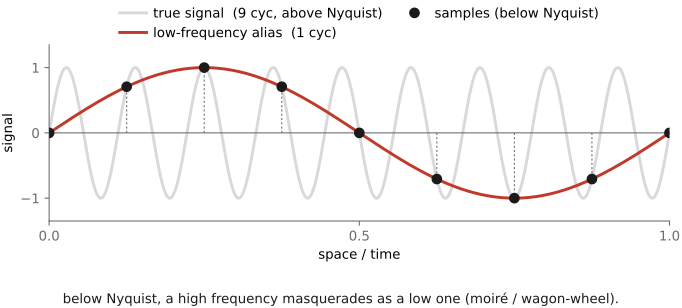
fig-aliasing · sampling a sine too coarsely → aliasing (high frequency folds to a low one) 🟨
fig-sampling-comb
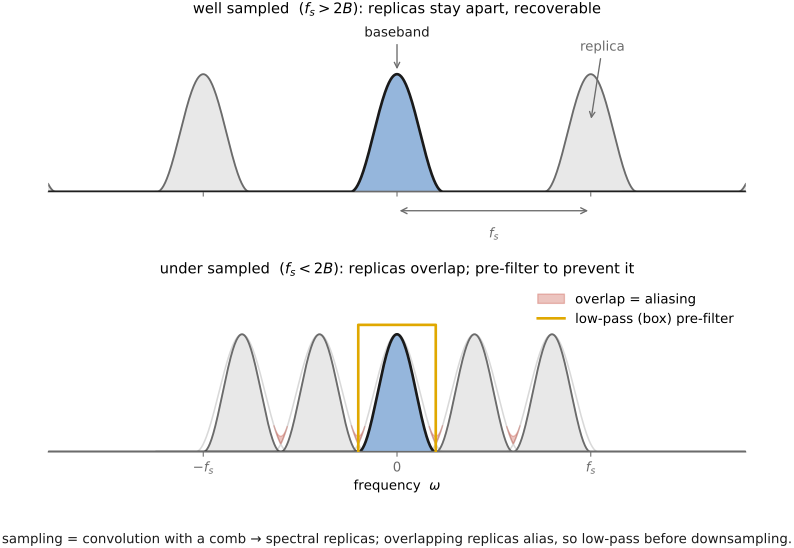
fig-sampling-comb · sampling = multiply by a comb → spectral replicas; pre-filter (low-pass) before downsampling 🟨
fig-sinc-vs-practical
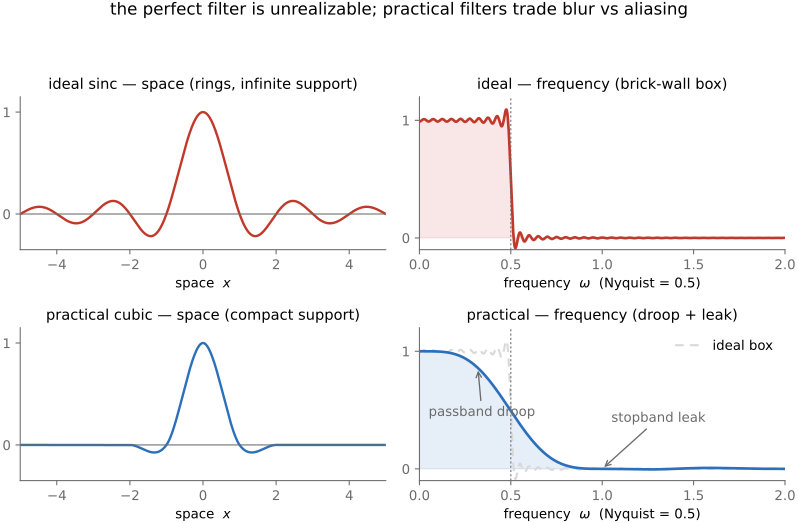
fig-sinc-vs-practical · ideal sinc reconstruction vs a practical filter, in space and frequency 🟨
fig-deblur-preview
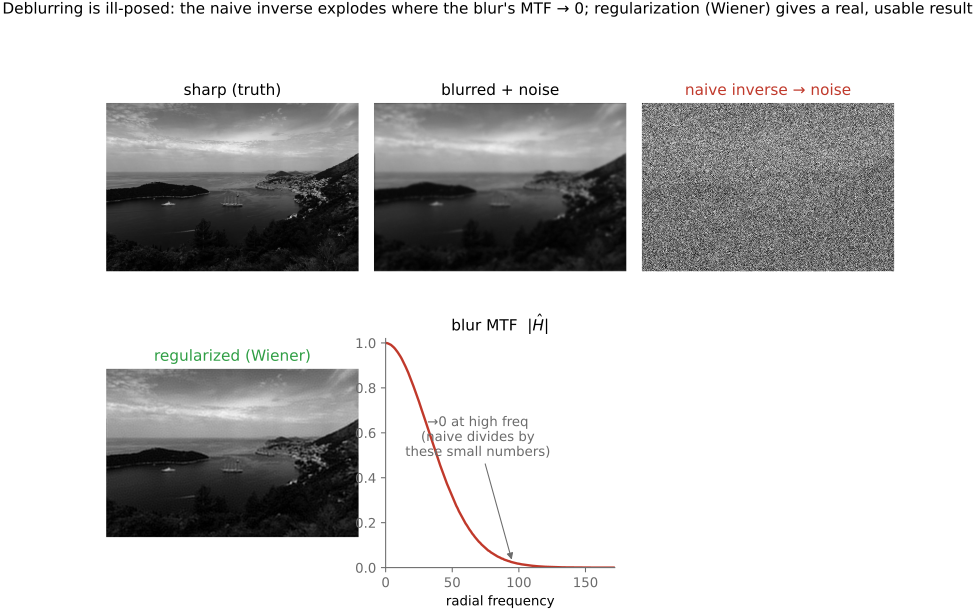
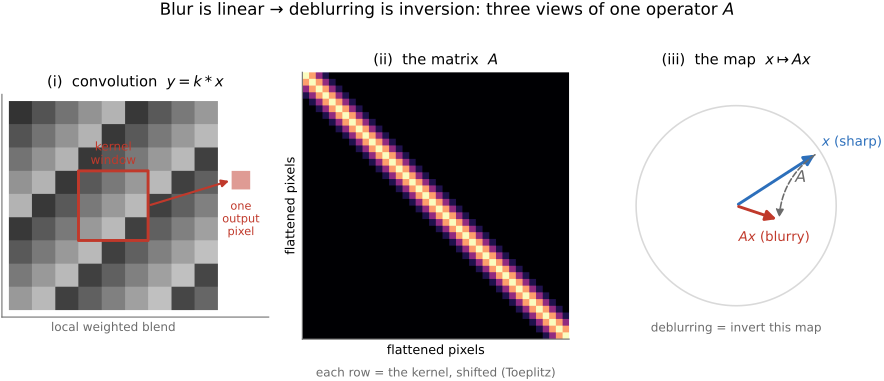
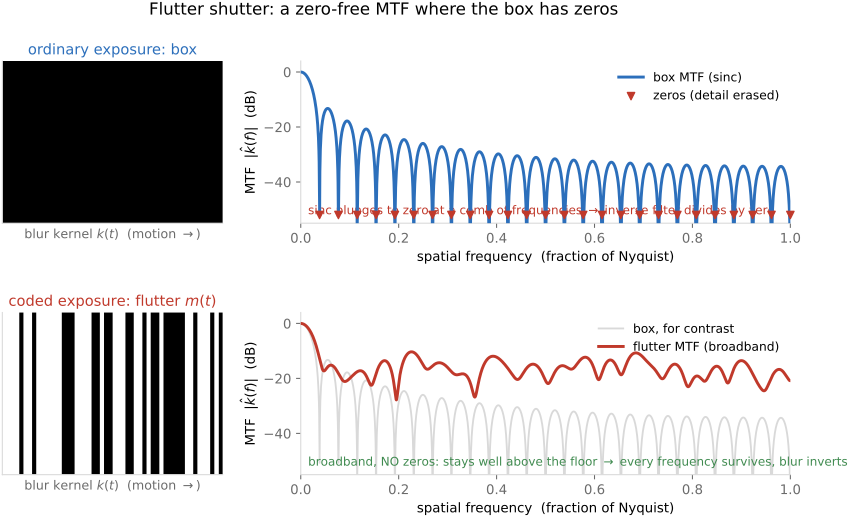
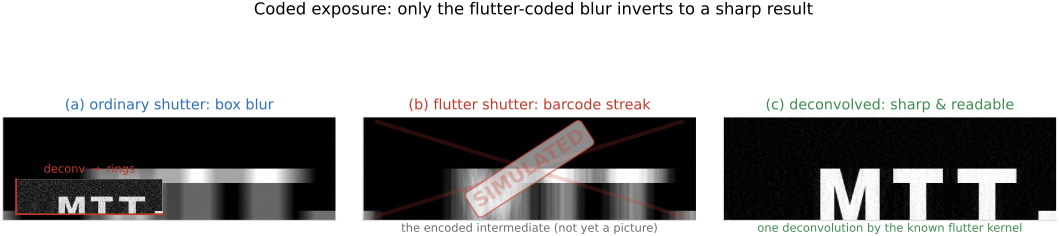
fig-deblur-preview · the deblur preview: sharp → blurred + noise → naive inverse amplifies noise; MTF 🟨
fig-svd-geometry
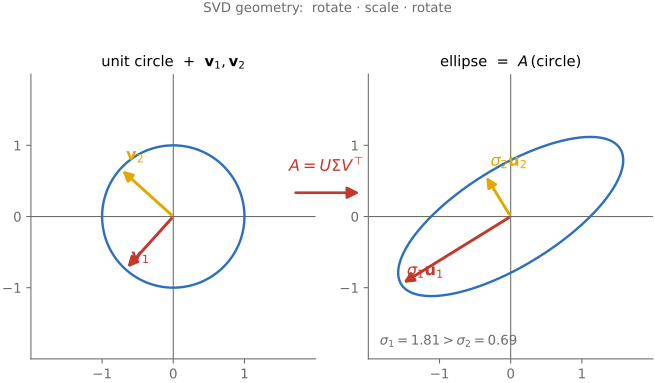
fig-svd-geometry · SVD = rotate·scale·rotate: unit circle → ellipse with semi-axes σ₁u₁, σ₂u₂ (Linear algebra) 🟩
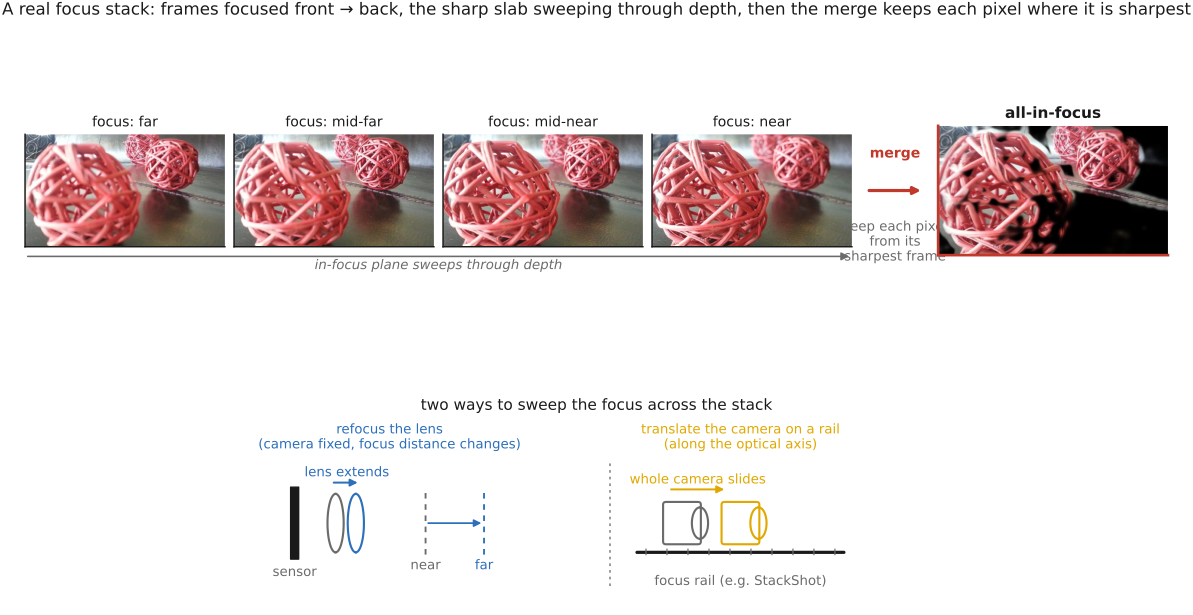
fig-focus-stacking
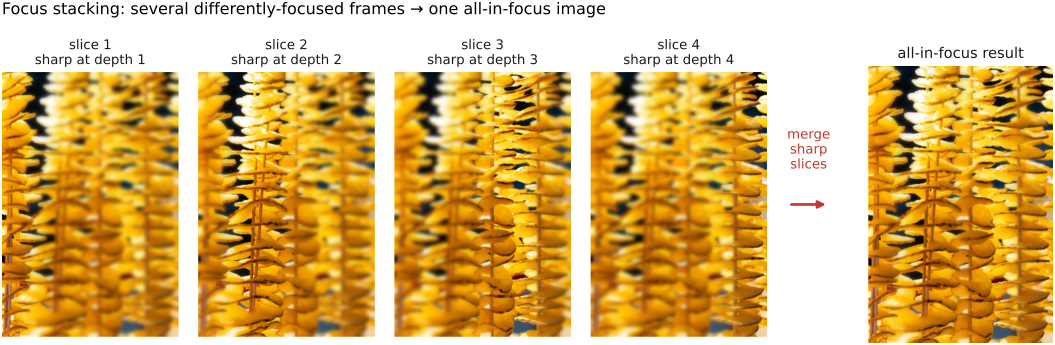
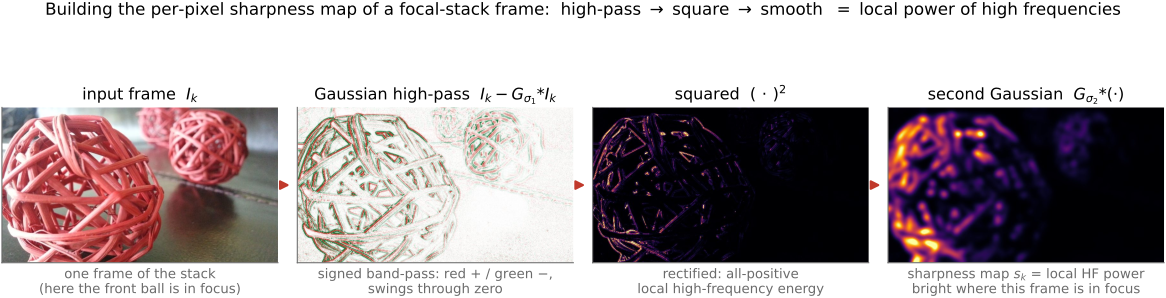
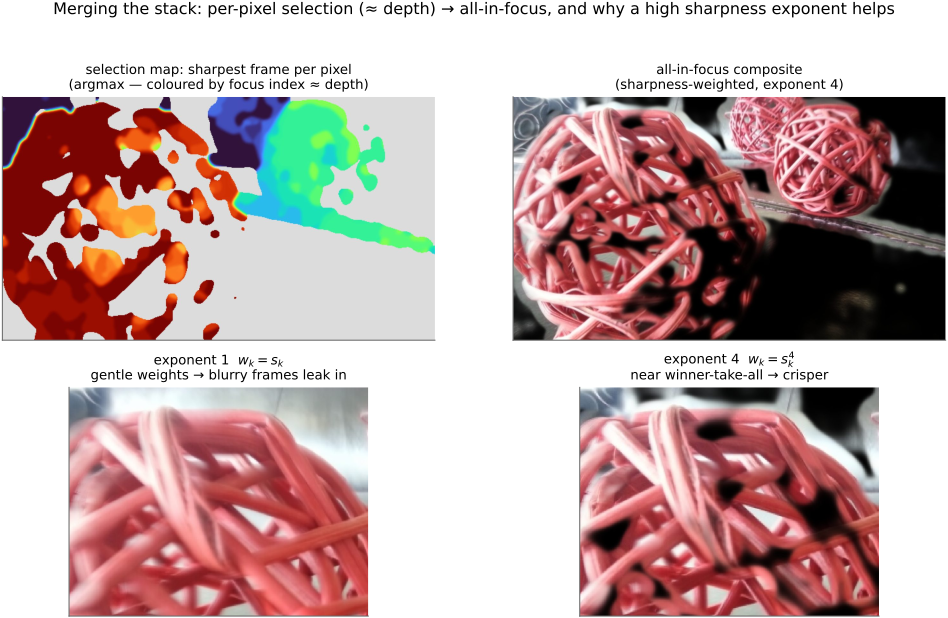
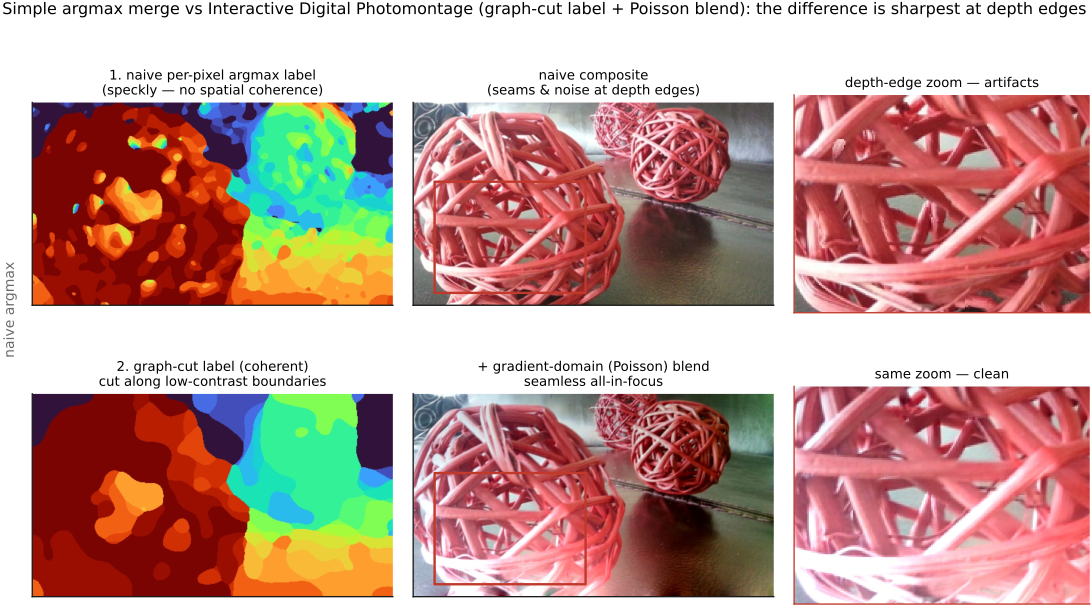
fig-focus-stacking · optics-chapter illustrative figure (07-07 Figure 4): a stepped-focus stack → sharpness selection → all-in-focus composite. Synthetic per-slice defocus on one photo (`sourced/corn-cobs.jpg`, © Frédo Durand) — license-safe. The full real-data treatment lives in part-08 `fig-focalstack-*`
fig-pixel-timeseries-bandpass
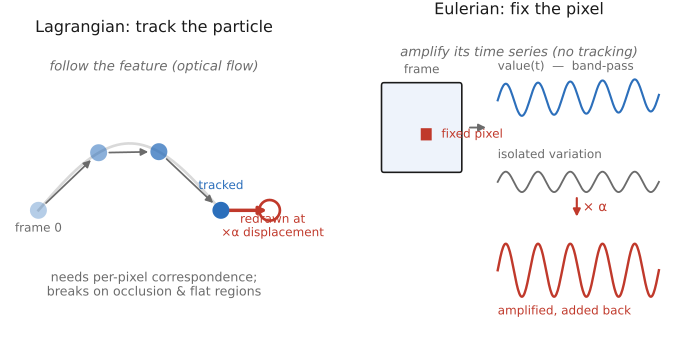
fig-pixel-timeseries-bandpass · one fixed pixel, signal to output — its value over time, its temporal spectrum (a small in-band peak among DC and noise), a band-pass keeping that band, and the band scaled by $\alpha$ and added back; identical at every pixel 🟨
equations
DFT Î(u) = Σ I(x)·e^{−2πi ux/N}
Euler e^{iθ} = cos θ + i sin θ
convolution theorem ℱ{I*g} = ηĝ
eigen-relation g * e^{iωx} = ĝ(ω)·e^{iωx}
Nyquist — sample > 2× the highest frequency
3.8 Resampling
fig-resample-forward-inverse
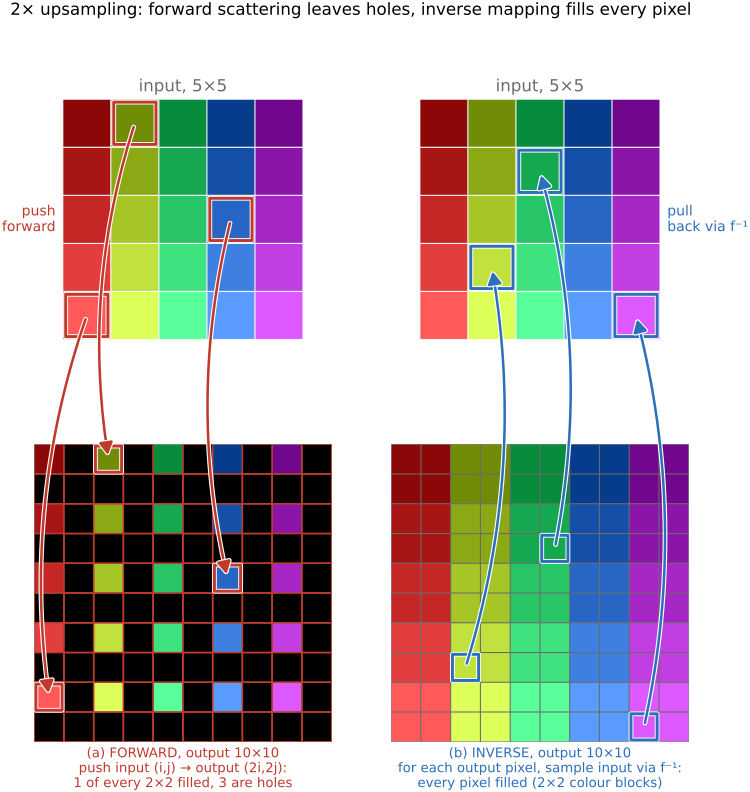
fig-resample-forward-inverse · concrete 2× upsampling on a 5×5 → 10×10 rainbow grid: FORWARD pushes input (i,j)→output (2i,2j) so 1 of every 2×2 output block is filled and 3 are black holes (regular lattice of gaps); INVERSE loops output, samples input via f⁻¹ (nearest) → every pixel filled (2×2 colour blocks). Forward leaves holes, inverse fills everything (Resampling, BASIC)
fig-linear-interp-1d
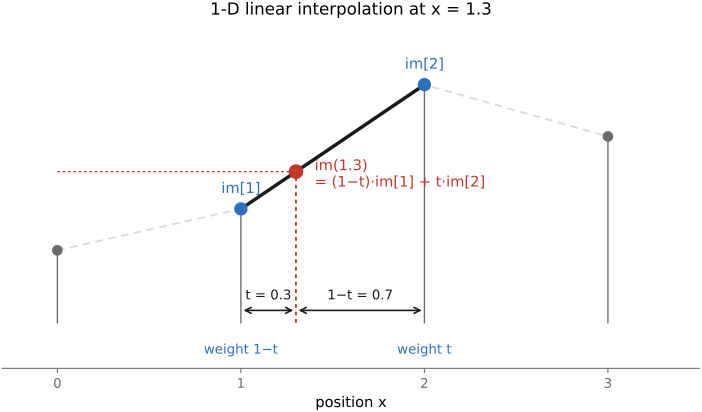
fig-linear-interp-1d · 1-D linear interpolation — `im[1.3]` from its two neighbours 🟨
fig-bilinear
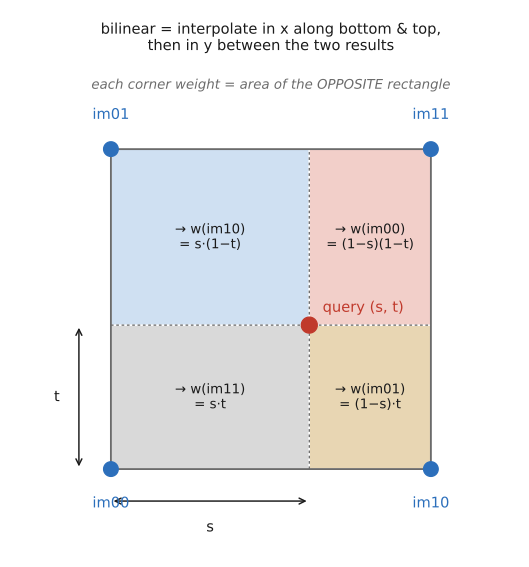
fig-bilinear · bilinear interpolation — the 4-neighbour weighting on the unit square 🟨
fig-resample-kernels-real
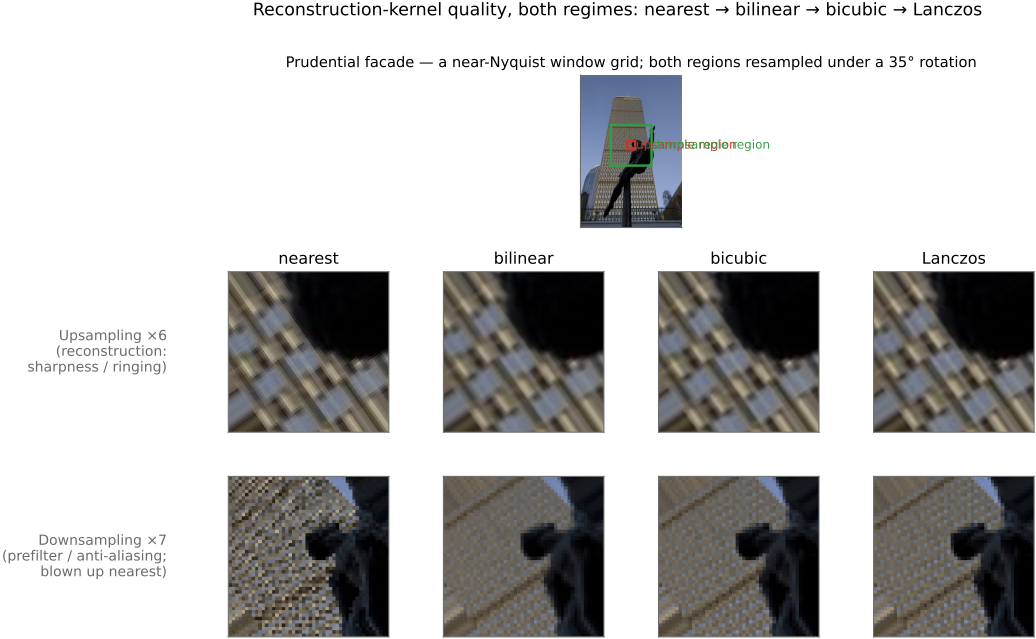
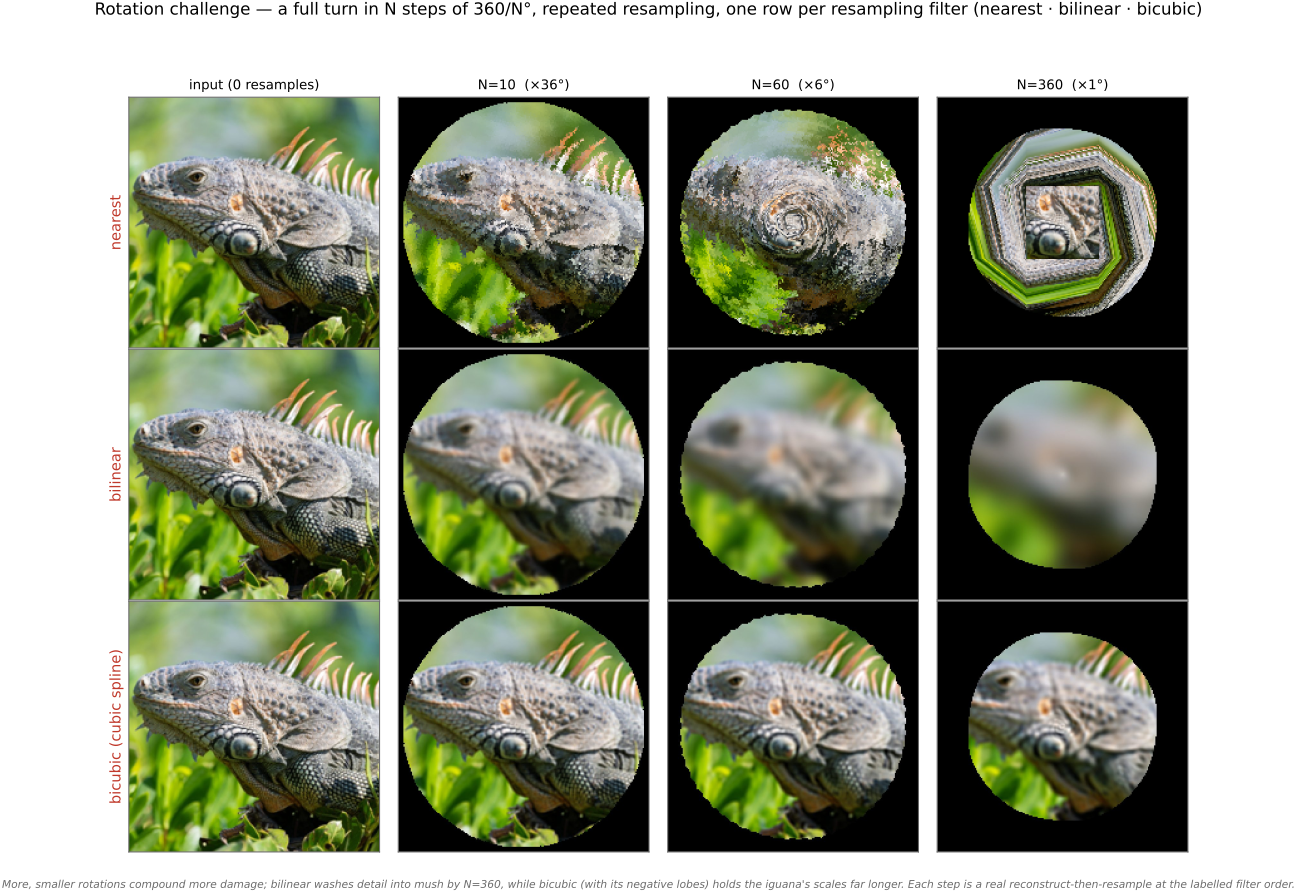
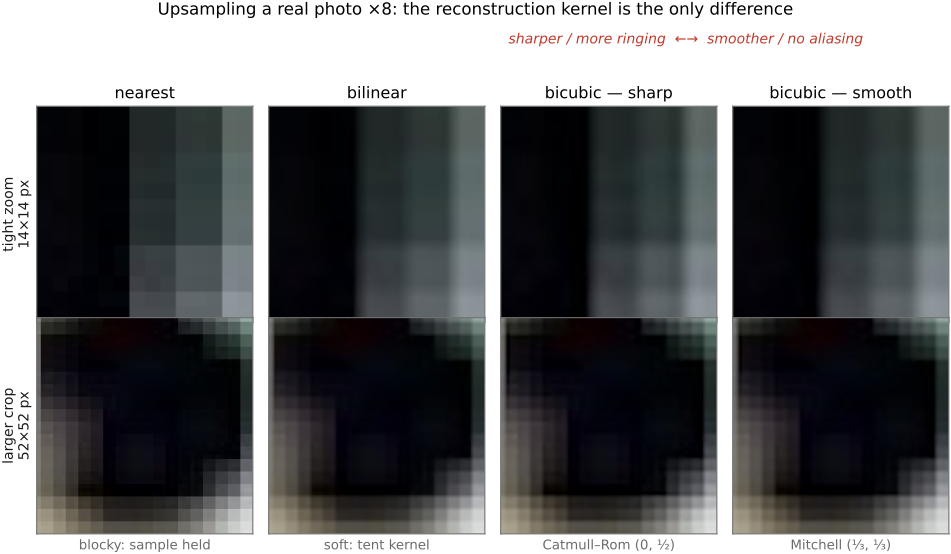
fig-resample-kernels-real · the kernel ladder on a REAL photo (Boston skyline + rainbow) resampled under a 35° rotation, magnified on a detail: nearest (blocky) → bilinear (smeared) → bicubic (edges restored) → Lanczos (sharpest) — adds Lanczos + the rotation case to `fig-interp-comparison`
fig-reconstruction-pipeline
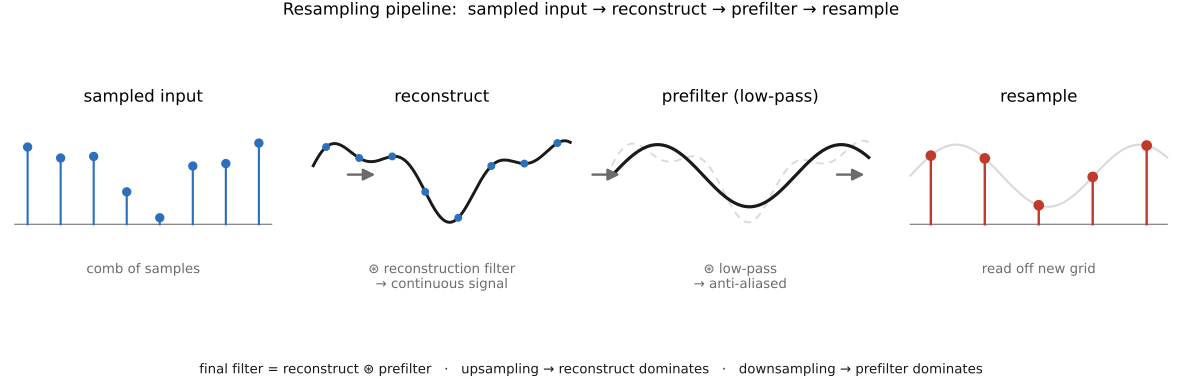
fig-reconstruction-pipeline · the resampling pipeline: sample → reconstruct → prefilter → resample 🟨
fig-aliasing-photo
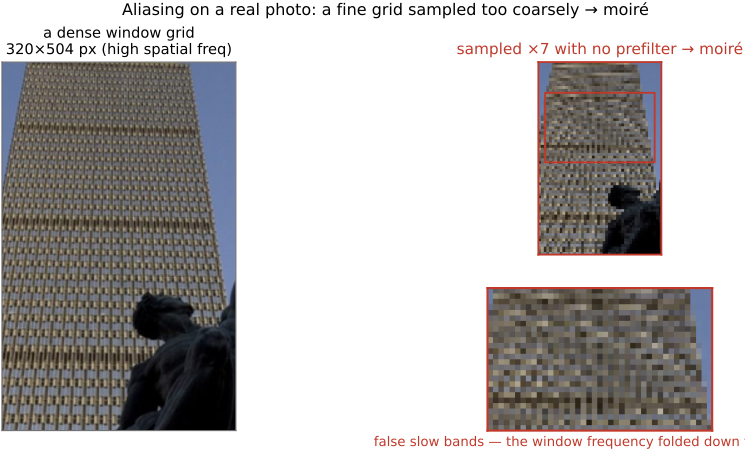
fig-aliasing-photo · aliasing/moiré on a real photo: a window-grid facade decimated with no prefilter folds into moiré bands — the 2-D, real-image companion to `fig-aliasing` (Sampling and aliasing)
equations
1-D linear interp
general resample out(x) = Σ I(x')·k(f⁻¹(x) − x')
Lanczos `sinc(πx)·sinc(πx/a)`
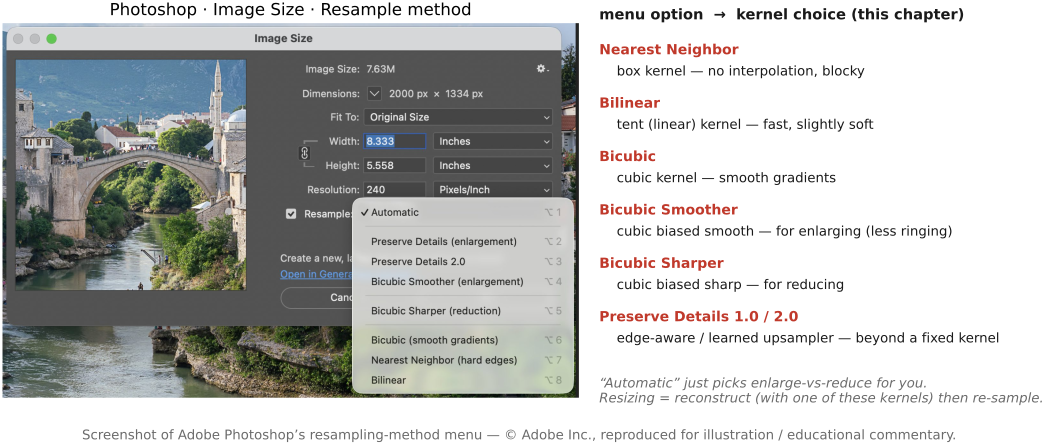
Mitchell–Netravali cubic (B, C)
3.9 Linear pyramids and wavelets
fig-gaussian-pyramid
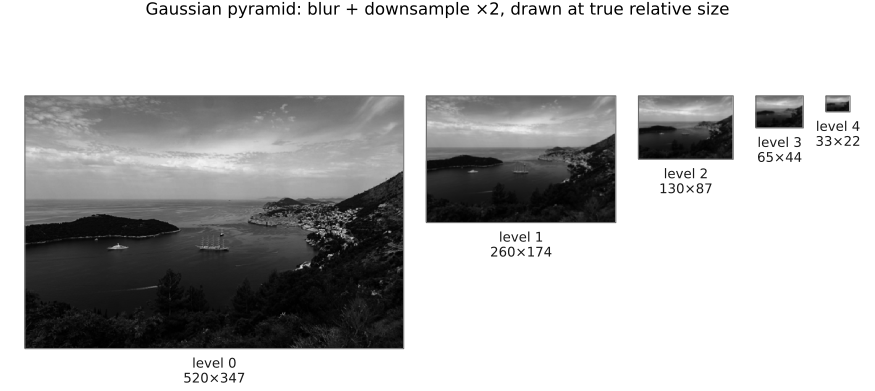
fig-gaussian-pyramid · the Gaussian pyramid — repeated blur + downsample tower (Pyramids, BASIC) 🟨
fig-laplacian-pyramid
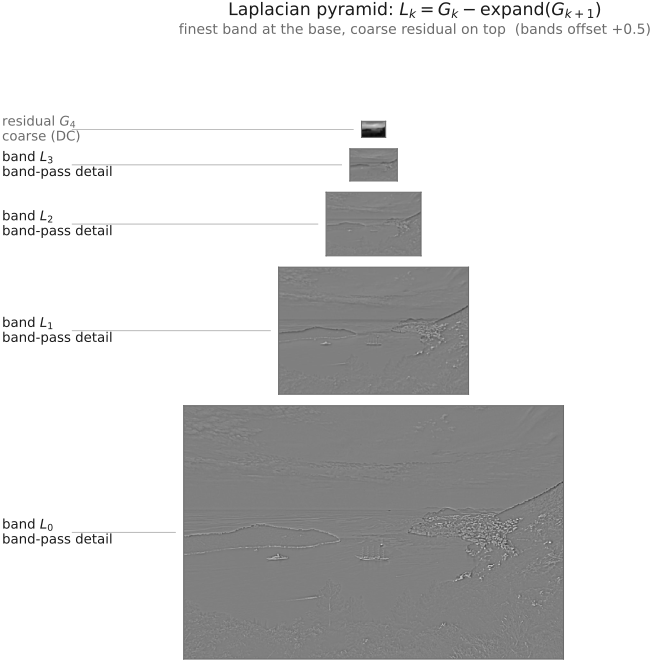
fig-laplacian-pyramid · the Laplacian pyramid — band-pass levels (G_k − expand(G_{k+1})) 🟨
fig-pyramid-encode-decode
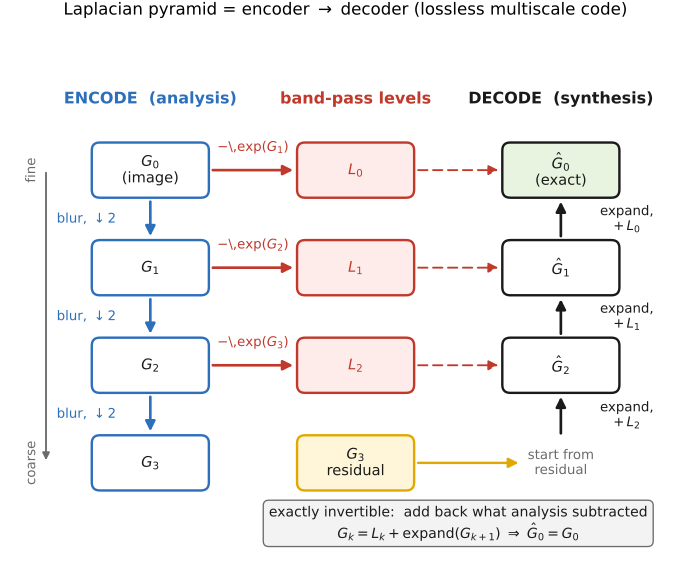
fig-pyramid-encode-decode · the Laplacian pyramid as an encoder → decoder (exact reconstruction) 🟨
fig-pyramid-frequency-bands
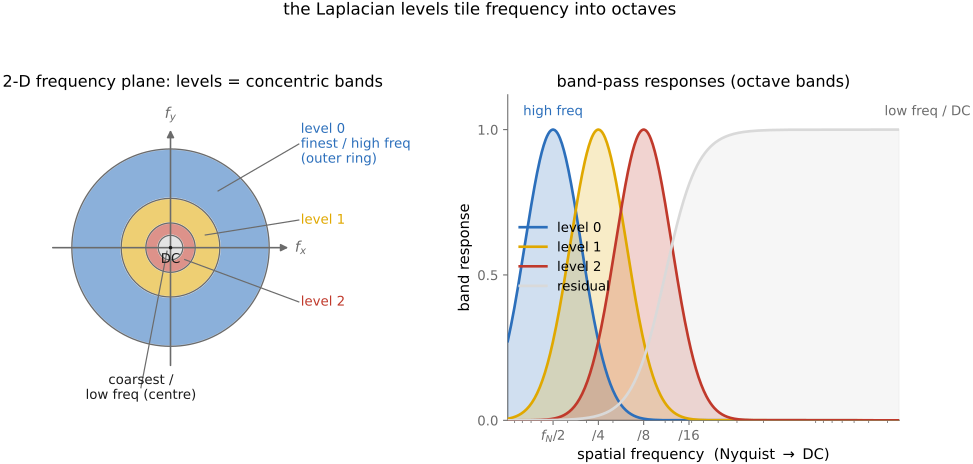
fig-pyramid-frequency-bands · each pyramid level = a frequency band (concentric Fourier rings) 🟨
fig-pyramid-blending
fig-pyramid-blending · pyramid blending walkthrough on Earth+Jupiter — source A · source B · naive (hard mask, visible seam) · pyramid blend (seamless)
fig-coring
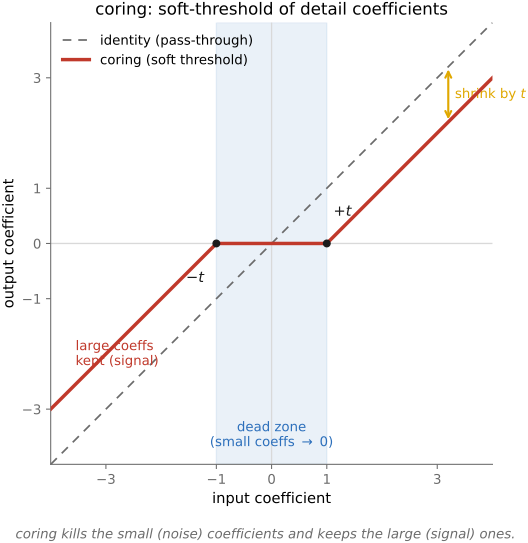
fig-coring · coring — zero the small detail coefficients (noise), keep the large ones 🟨
equations
reduce / expand (blur + ↓2 / ↑2 + blur)
L_k = G_k − expand(G_{k+1})
reconstruction G_k = L_k + expand(G_{k+1})
3.10 Image metrics
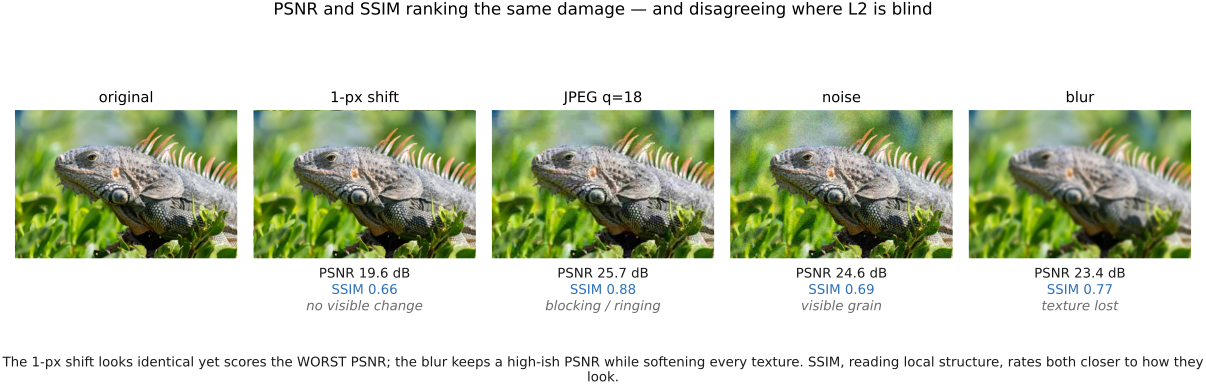
fig-ssim-vs-mse
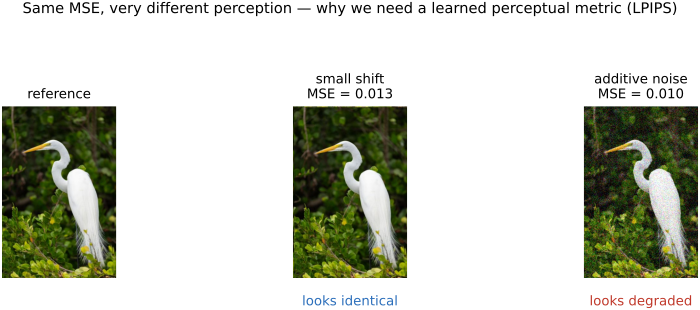
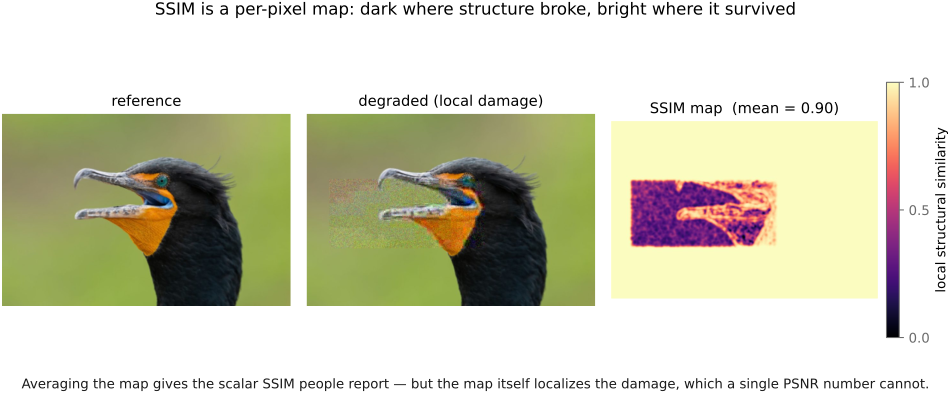
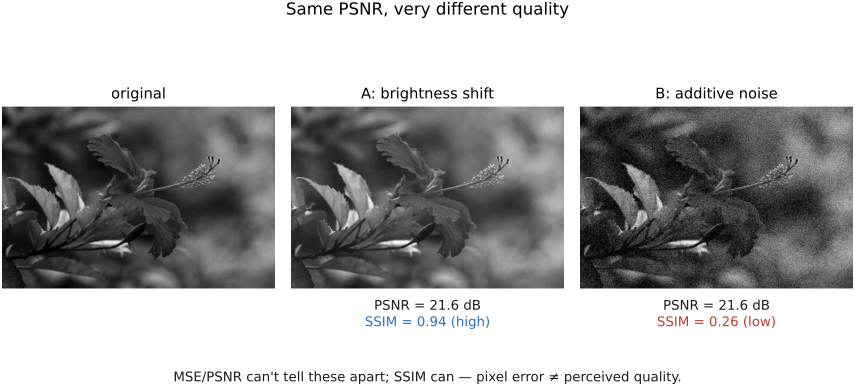
fig-ssim-vs-mse · same PSNR, very different SSIM — pixel error ≠ perceived quality (Image metrics, BASIC) 🟨
• we **often need to compare two images** — fidelity, alignment, an ML training loss
equations
MSE = mean(‖I−J‖²)
PSNR = 10·log₁₀(MAX²/MSE)
SSIM = luminance·contrast·structure (local windows)
3.11 Denoising
fig-denoising-before-after
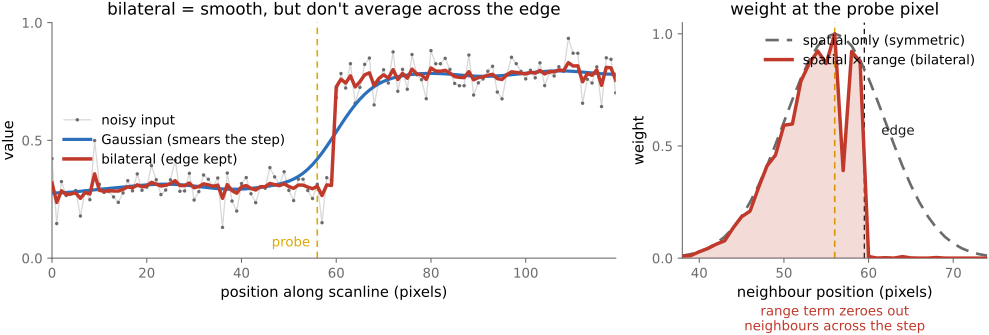
fig-denoising-before-after · denoising a real colour crop (realistic shot+read noise): noisy vs Gaussian (smears edges) vs bilateral (edge-preserving) (Denoising, BASIC)
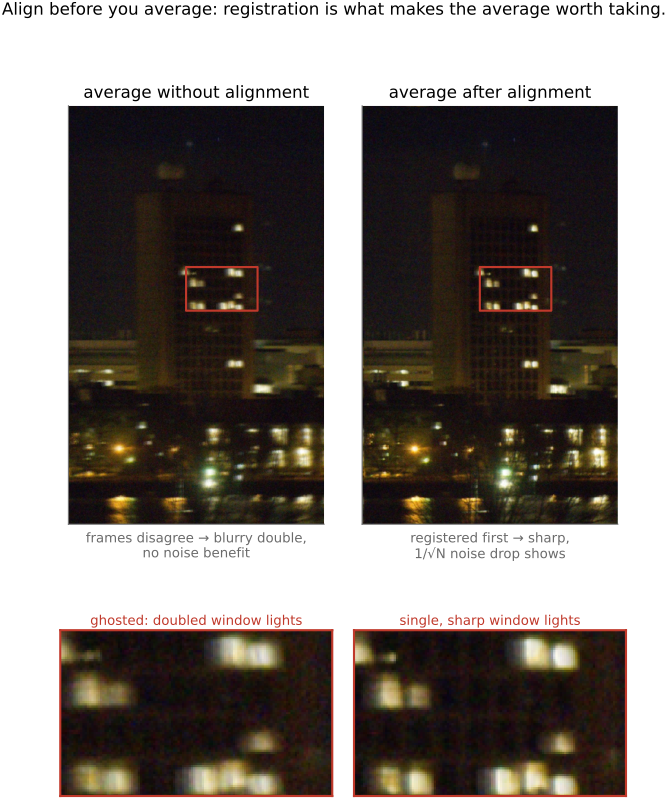
fig-averaging-convergence
fig-averaging-convergence · averaging N noisy frames → noise drops as 1/√N (1, 3, 9, 25 frames), on a real colour photo with realistic shot+read noise (Denoising, BASIC)
3.12 Demosaicking
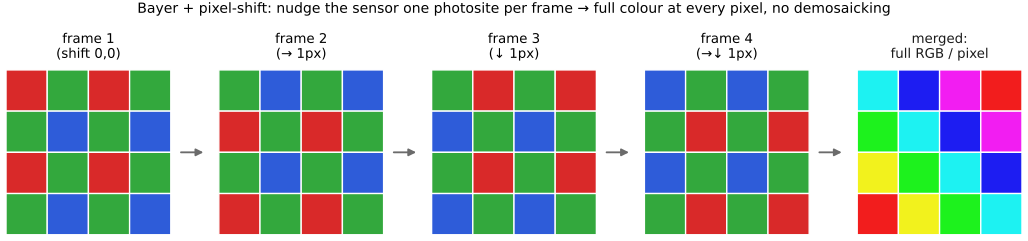
fig-demosaick-real-bayer
fig-demosaick-real-bayer · the PS3 raw mosaic (NO-PARKING sign) demosaicked: ground truth · simulated RGGB Bayer mosaic · naive bilinear (false colour on the window grid) · green-based (clean), with a zoom (Demosaicking, BASIC)
fig-demosaick-before-after
fig-demosaick-before-after · Bayer → RGB: the mosaic, naive bilinear demosaick (zipper / fringing), edge-aware (Demosaicking, BASIC) 🟨
3.12.3 The task: full RGB at every pixel
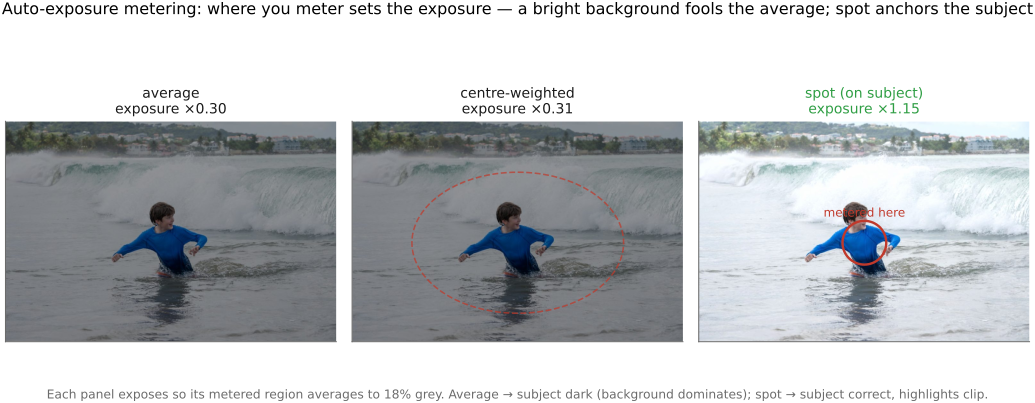
3.13 Auto-exposure and auto white balance
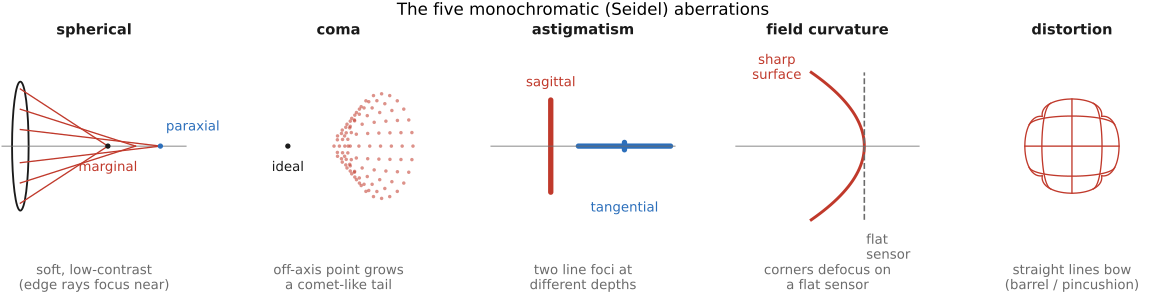
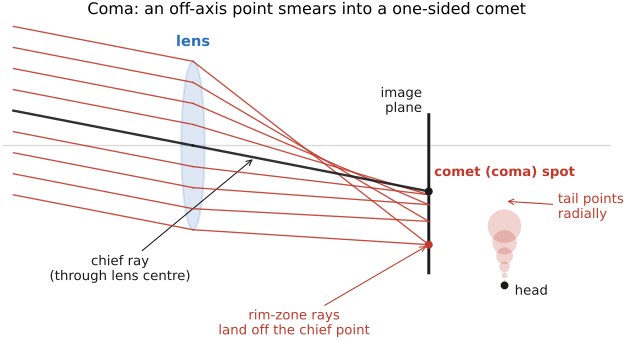
fig-coma
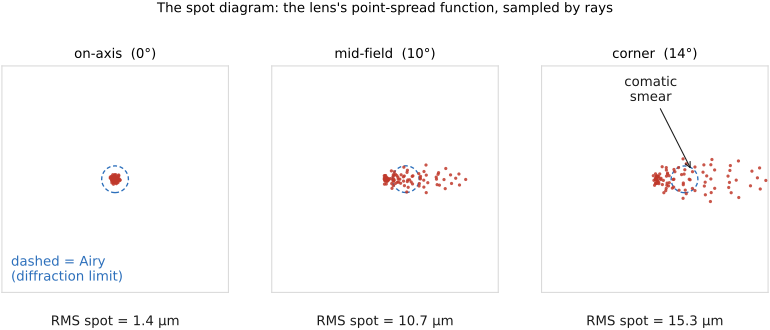
fig-coma · coma: an off-axis parallel bundle where each annular aperture zone images to a different height; chief ray through the lens centre + zonal rays missing a common focus → the one-sided comet ("coma") spot with a head and a radial tail
fig-white-balance-real
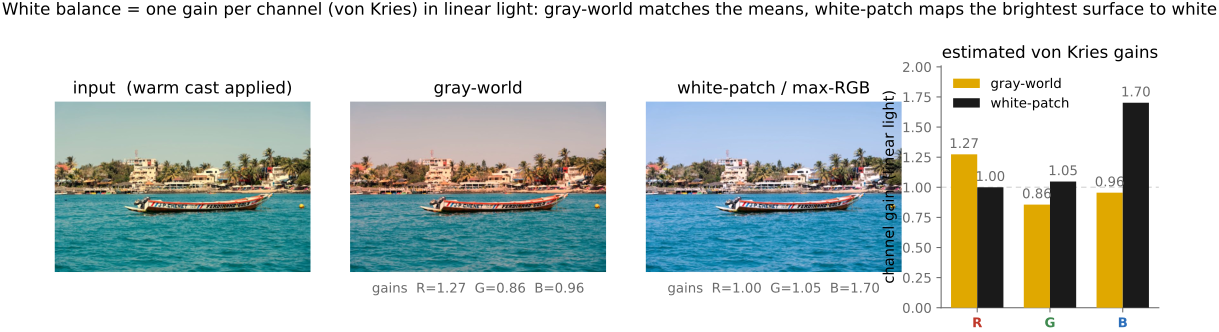
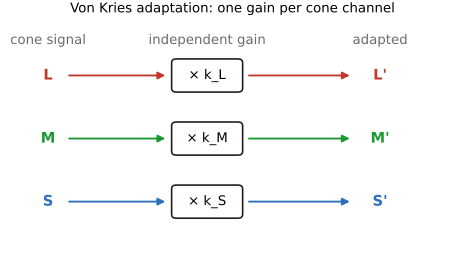
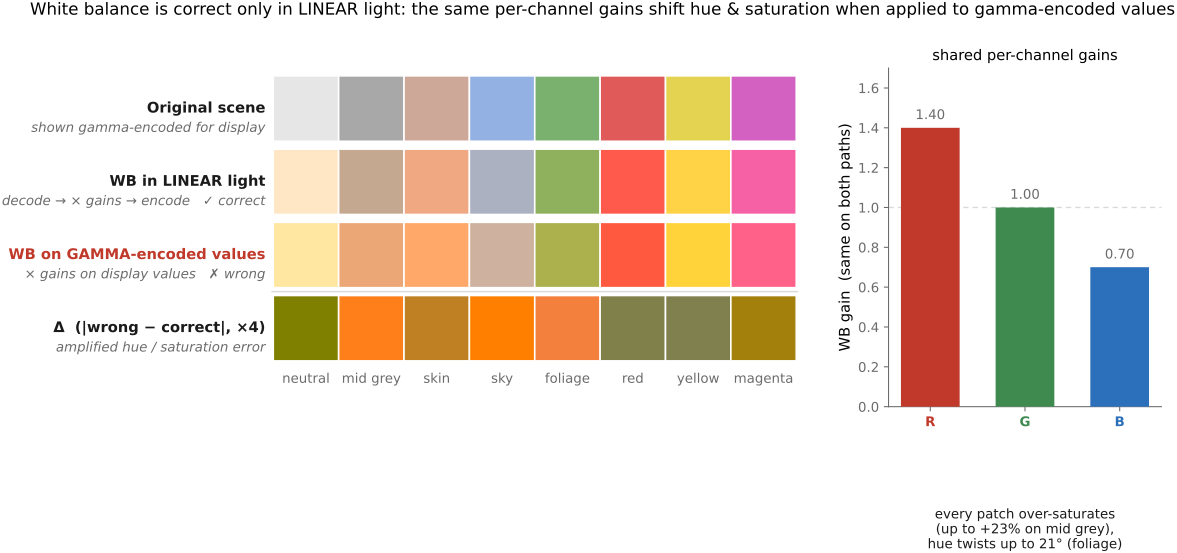
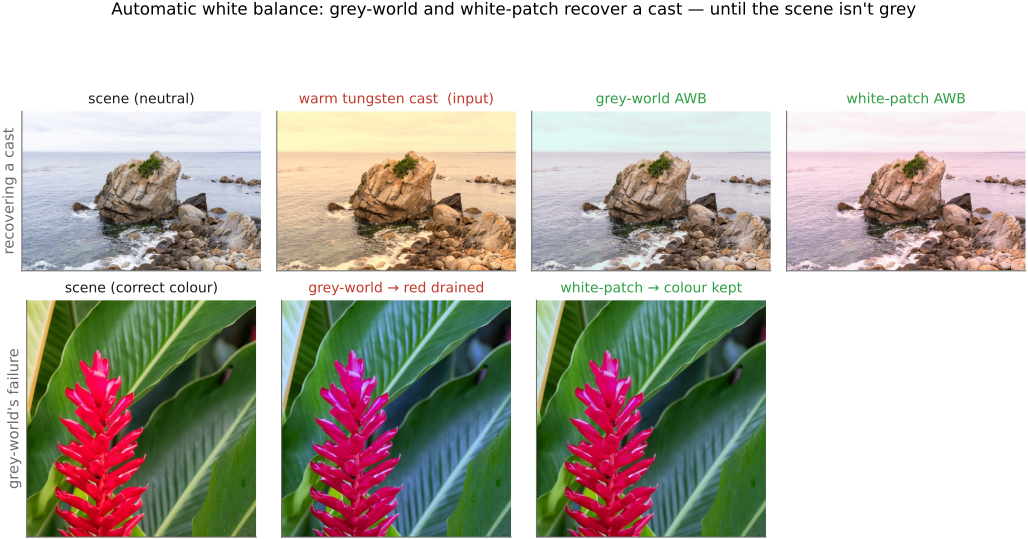
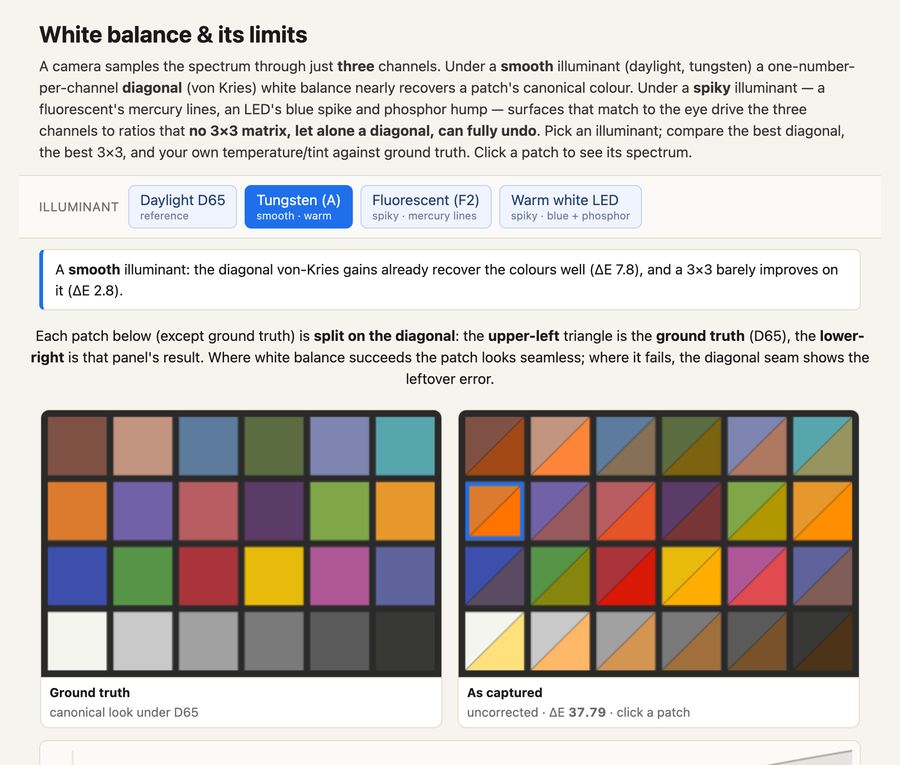
fig-white-balance-real · white balance computed from scratch (von Kries per-channel gain in linear light): a warm-casted photo corrected by gray-world vs white-patch/max-RGB, with the recovered channel gains (PS1)
3.14 File formats and compression
fig-jpeg-pipeline
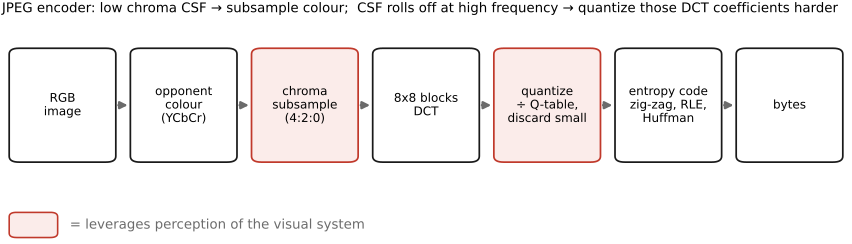
fig-jpeg-pipeline · the JPEG encoder — RGB → opponent colour → chroma subsample → 8×8 DCT → quantize → entropy code (File formats, BASIC) 🟨
fig-dct-basis
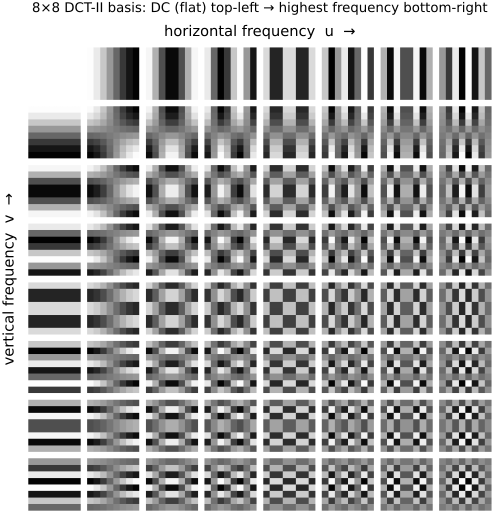
fig-dct-basis · the 8×8 DCT-II cosine basis (DC top-left → high frequency bottom-right) 🟨
fig-chroma-subsampling
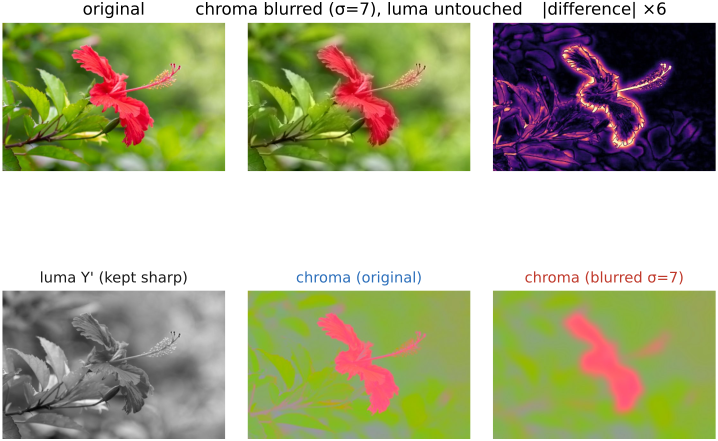
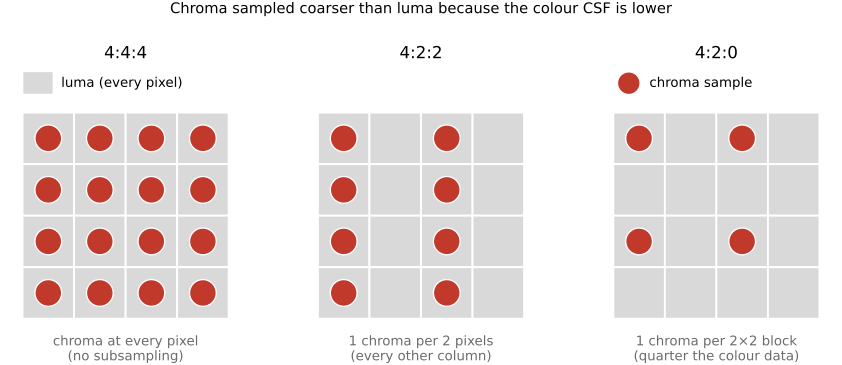
fig-chroma-subsampling · chroma subsampling grids 4:4:4 / 4:2:2 / 4:2:0 (chroma sampled coarser than luma) 🟨
fig-jpeg-artifacts
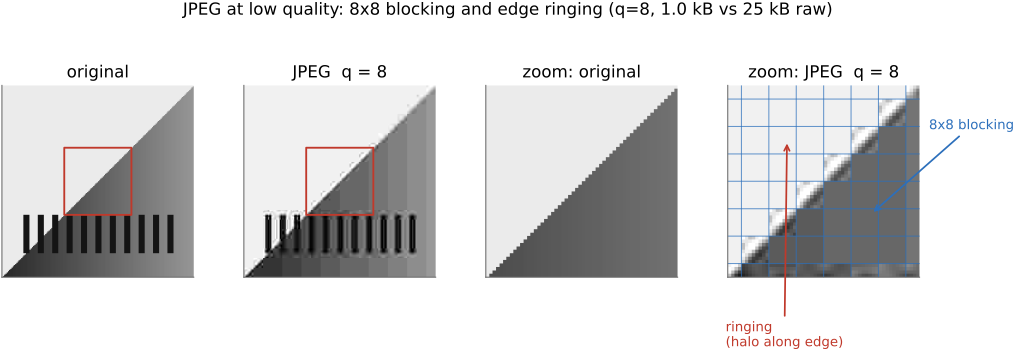
fig-jpeg-artifacts · JPEG blocking & ringing at low quality (original vs q=8, zoomed crop) 🟨
fig-jpeg-quality-levels
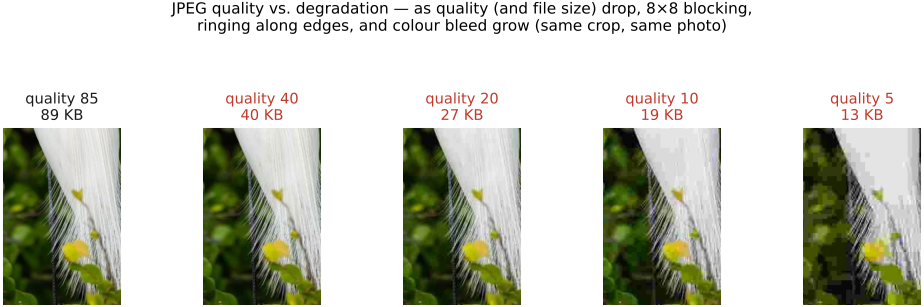
fig-jpeg-quality-levels · JPEG quality sweep (q=85→40→20→10→5): the same photo's edge-crop at each quality with the whole-image file size beneath — degradation grows as size drops (File formats, BASIC) 🟩
3.15 Recap ISP, non-destructive editing:
fig-isp-block-diagram
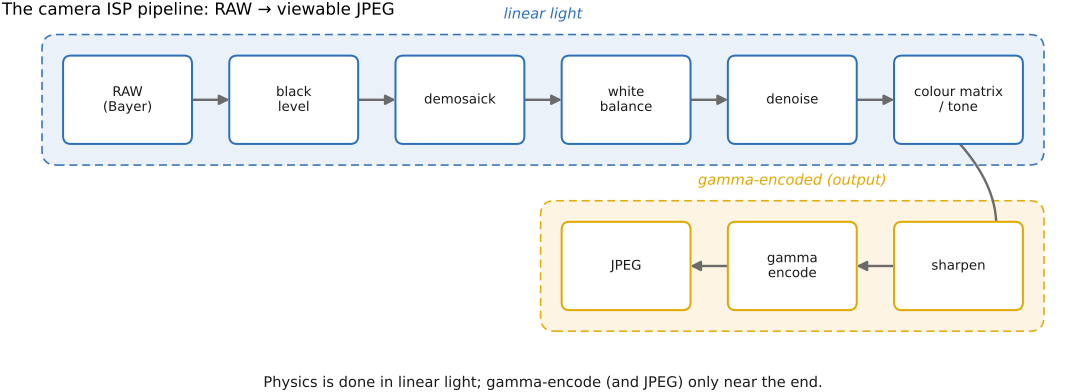
fig-isp-block-diagram · the ISP pipeline: RAW → black level → demosaick → white balance → denoise → tone/colour → sharpen → gamma → JPEG (Recap ISP, BASIC) 🟨
Part 4 COMPUTATIONAL TOOLS
The chapters before this one built images up from physics, perception, and the basic processing pipeline. This part assembles the **general-purpose computational tools** the rest of the book reaches for again and again: casting a recovery task as a **linear inverse problem** and solving it by regression; replacing a hand-designed operator with one **learned from data**; and **generating** plausible images with modern generative models. They are gathered here, before the single-image applications, because nearly every later part — deblurring, super-resolution, compositing, HDR, video — is at bottom an application of one of these three.
4.1 Linear Inverse Problems and Regression
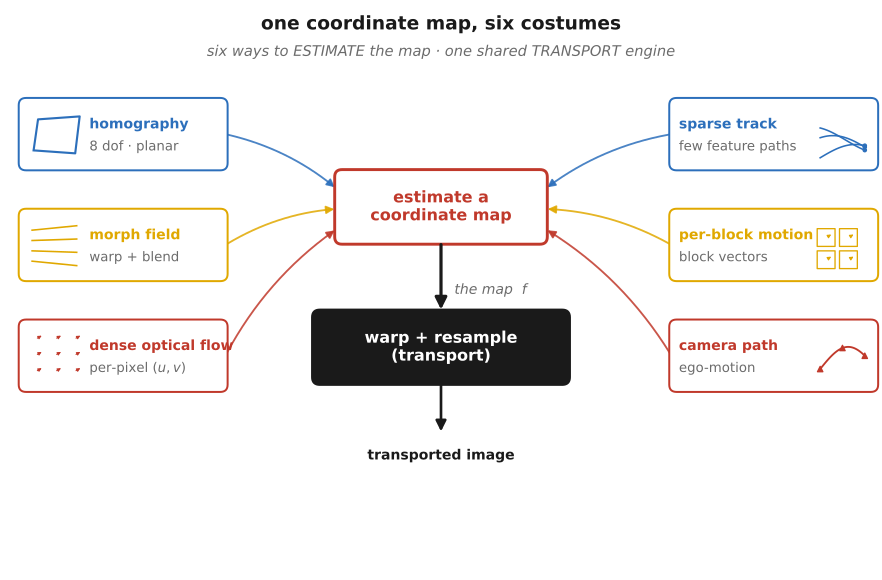
fig-correspondence-then-transport
fig-correspondence-then-transport · the L17 spine — one scene displaced (two views / two faces / two frames / one long frame), each resolved by estimating a coordinate map (homography, morph field, flow, track, motion vector, camera path) then transporting pixels by one shared inverse-warp engine; the finding is hard, the moving is plumbing 🟨
fig-image-as-vector
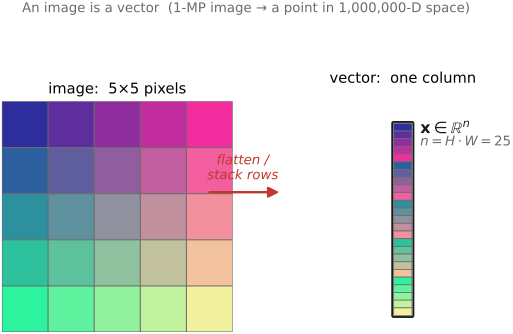
fig-image-as-vector · an image *is* a vector: a 5×5 pixel grid unrolled into a tall column vector; n = H·W (Linear algebra) 🟩
fig-least-squares
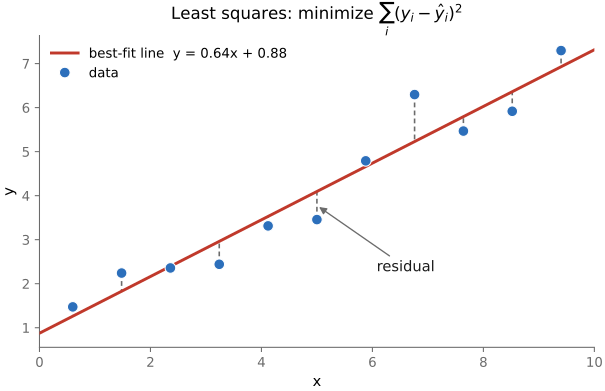
fig-least-squares · line fit minimizing squared vertical residuals (Optimization & regression) 🟩
fig-deblur-preview
fig-deblur-preview · the deblur preview: sharp → blurred + noise → naive inverse amplifies noise; MTF 🟨
fig-gradient-descent
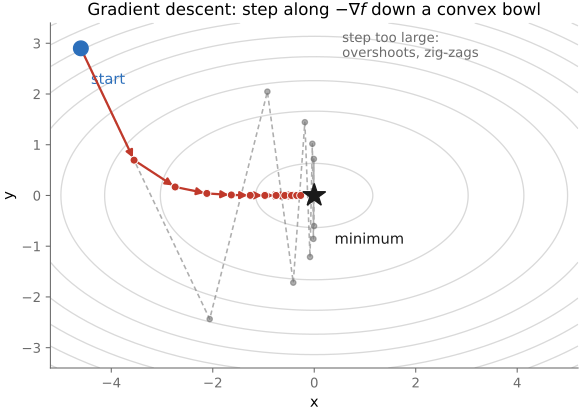
fig-gradient-descent · descent path on a convex-bowl contour (−∇f steps); too-large step overshoots (Optimization) 🟩
fig-pyramid-reconstruction
fig-pyramid-reconstruction · RECONSTRUCTION on a real photo: collapse the Laplacian pyramid coarse→fine (residual → +L_k each octave → exact image), plus an all-black per-pixel error panel (max ~1e-16 = lossless) (Reconstruction, BASIC)
fig-focus-stacking
fig-focus-stacking · optics-chapter illustrative figure (07-07 Figure 4): a stepped-focus stack → sharpness selection → all-in-focus composite. Synthetic per-slice defocus on one photo (`sourced/corn-cobs.jpg`, © Frédo Durand) — license-safe. The full real-data treatment lives in part-08 `fig-focalstack-*`
equations
forward model $y = Ax$
least squares $\hat x = \arg\min_x \tfrac12\|Ax - y\|^2$
normal equations $A^\top A\,x = A^\top y$
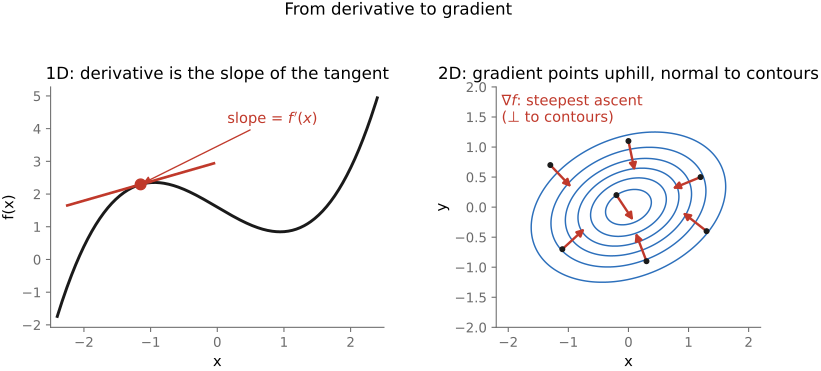
gradient of the data term $\nabla f(x) = A^\top(Ax - y)$
gradient step $x_{t+1} = x_t - \eta\,A^\top(Ax_t - y)$
convolution form $A x = k * x$ and $A^\top y = \tilde k * y$ (flipped kernel $\tilde k$)
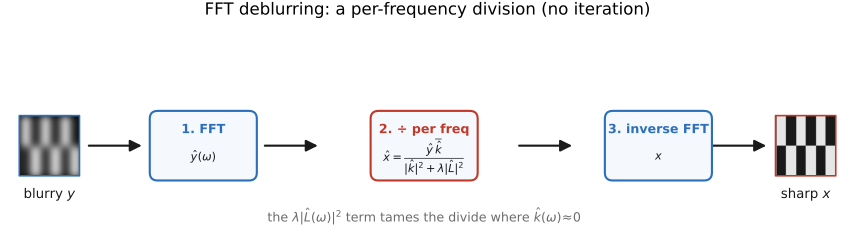
per-frequency inverse $\hat x(\omega) = \hat y(\omega)/\hat k(\omega)$ (when it diagonalizes)
4.2 Efficient solvers
fig-gradient-descent
fig-gradient-descent · descent path on a convex-bowl contour (−∇f steps); too-large step overshoots (Optimization) 🟩
fig-pyramid-reconstruction
fig-pyramid-reconstruction · RECONSTRUCTION on a real photo: collapse the Laplacian pyramid coarse→fine (residual → +L_k each octave → exact image), plus an all-black per-pixel error panel (max ~1e-16 = lossless) (Reconstruction, BASIC)
fig-focus-stacking
fig-focus-stacking · optics-chapter illustrative figure (07-07 Figure 4): a stepped-focus stack → sharpness selection → all-in-focus composite. Synthetic per-slice defocus on one photo (`sourced/corn-cobs.jpg`, © Frédo Durand) — license-safe. The full real-data treatment lives in part-08 `fig-focalstack-*`
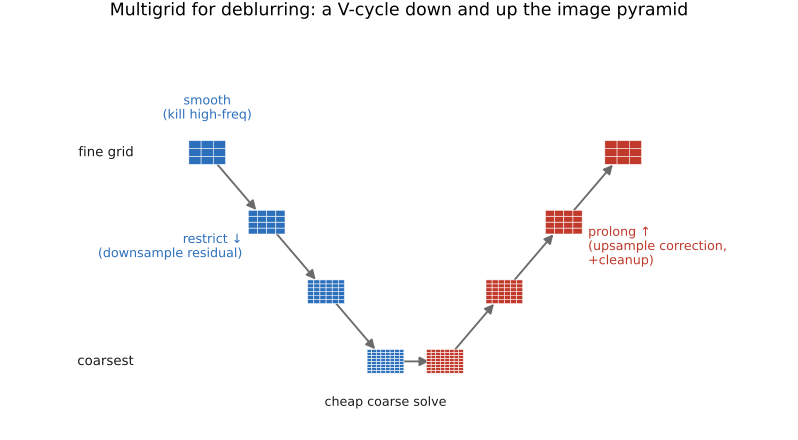
The previous chapter cast recovery as the normal equations $A^\top A\,x = A^\top y$ and made the key point that we **never build $A$** — every solver needs only to *apply* the blur and its transpose. This chapter is the toolkit that actually does the solving: a handful of matrix-free, iterative / multiscale methods, and the rule for which one to reach for. The same machinery returns in [[Poisson image editing]], colorization, matting, and gradient-domain HDR — learn it once here.
equations
matrix-free operator pair $A x = k * x$, $A^\top y = \tilde k * y$
gradient step $x_{t+1}=x_t-\eta\,A^\top(Ax_t-y)$
preconditioned CG ($M\approx(A^\top A)^{-1}$)
FFT one-shot $\hat x(\omega)=\hat y(\omega)\,\overline{\hat k(\omega)}/\big(|\hat k(\omega)|^2+\lambda|\hat L(\omega)|^2\big)$
4.3 Machine learning
fig-learned-vs-handdesigned
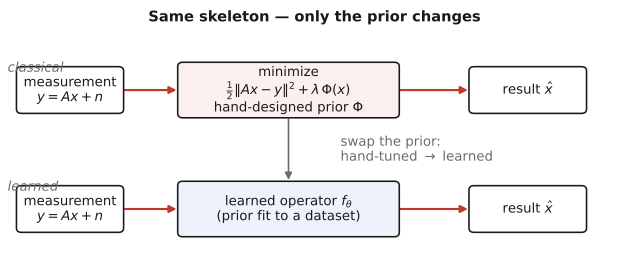
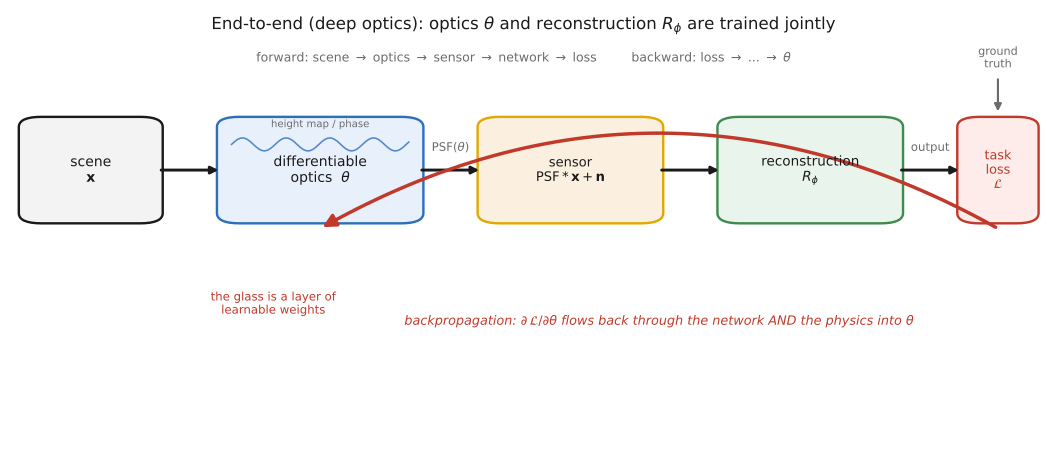
fig-learned-vs-handdesigned · same inverse-problem skeleton, prior swapped: classical (data-fit + hand prior $\Phi$) vs learned ($f_\theta$ fit to data) (ML)
fig-synthetic-data-pipeline
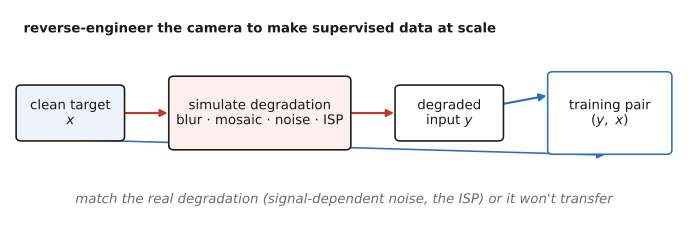
fig-synthetic-data-pipeline · manufacture (degraded, clean) training pairs by simulating the camera/degradation (ML)
reference the ML & deep-learning refresher ([[Refreshers#Machine learning and deep learning]]) up front; this chapter does **not** re-teach networks — it sets up *learning an operator from data* and the **data** that powers it. The concrete deep-network operators are the next chapter, [[Deep learning]].
equations
learned operator $\hat I = f_\theta(\text{measurement})$ trained by $\min_\theta \sum_i \ell\!\big(f_\theta(x_i),\,y_i\big)$
reuse the inverse-problem $\hat I=\arg\min_I \lVert AI-b\rVert^2+\lambda\,R(I)$ from above to contrast a hand-tuned $R$ vs a learned one
4.4 Deep learning
fig-downsample-aliasing
fig-downsample-aliasing · 3 panels: the full **high-res input** zone plate (cos r², rings finer toward the edge — what's being shrunk) → ÷4 naive decimation (drop samples) → moiré aliasing → ÷4 prefilter-then-decimate (Gaussian low-pass first) → clean
fig-colorization-classical-vs-learned
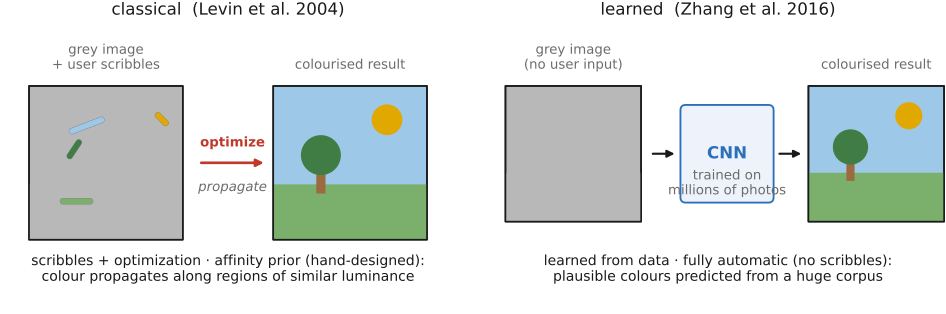
fig-colorization-classical-vs-learned · Levin 2004 scribble-propagation vs Zhang 2016 fully-automatic colorization (ML)
⬜ figure not yet created
fig-depth-anything (one photo → its monocular depth map) fig-depth-anything
fig-gan-pix2pix
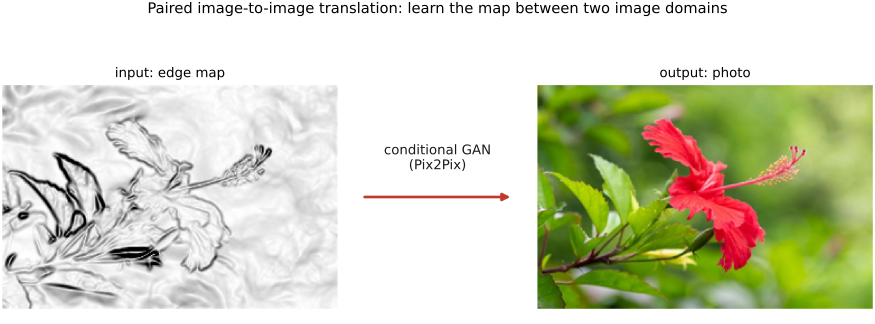
fig-gan-pix2pix · paired image-to-image translation: edge map → photo (conditional GAN) (ML)
fig-metric-degradation-gallery
fig-metric-degradation-gallery · one clean photo vs four degradations (1-px shift, low-q JPEG, noise, blur), each labelled with PSNR + SSIM — PSNR and SSIM mostly agree but disagree where L2 is blind (shift scores worst PSNR yet looks identical; blur keeps high PSNR yet softens texture) (Image metrics, BASIC)
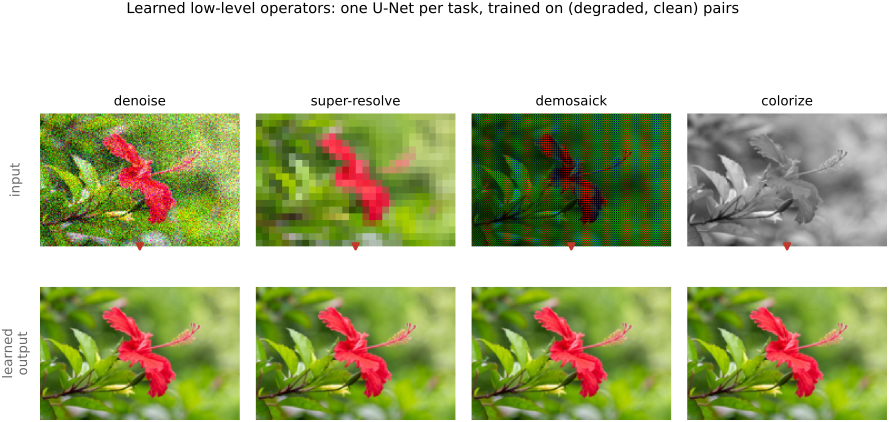
these are the **deep-network** realizations of the learned-operator framing ([[Machine learning]]); architectures and training are the Refreshers' job — here we survey *what gets learned*.
equations
minimal (survey chapter) — perceptual / feature loss $\ell_{\text{feat}}=\sum_l \lVert \phi_l(\hat I)-\phi_l(I)\rVert^2$ over deep features $\phi_l$ (LPIPS)
reuse the learned operator $\hat I = f_\theta(\text{measurement})$ from [[Machine learning]]
4.5 Generative AI and diffusion
fig-genai-evaluate-vs-sample
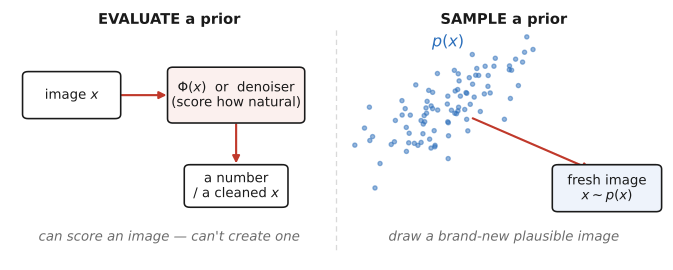
fig-genai-evaluate-vs-sample · the generative leap (L11): a prior you can only *evaluate* ($\Phi$/denoiser) vs one you can *sample* ($x\sim p(x)$) (GenAI)
fig-diffusion-forward-reverse
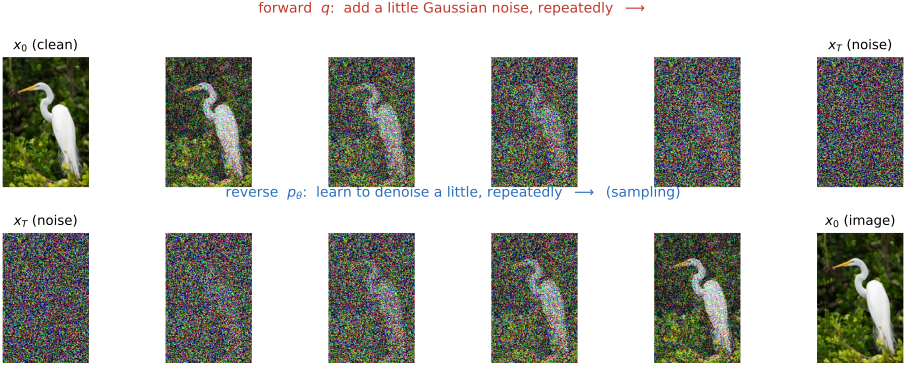
fig-diffusion-forward-reverse · the two chains: forward $q$ adds Gaussian noise to a real photo; reverse $p_\theta$ denoises back (GenAI)
fig-diffusion-demo
fig-diffusion-demo · live interactive demo (web edition): type a prompt and watch the reverse process denoise from noise, step by step; static fallback is a noise→photo filmstrip (GenAI)
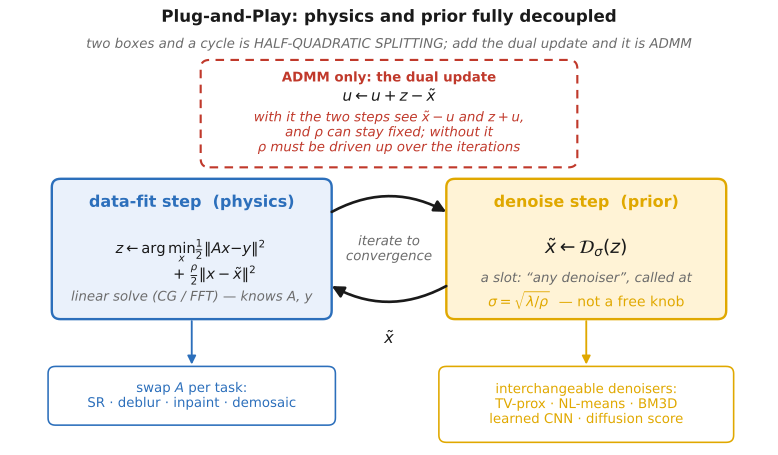
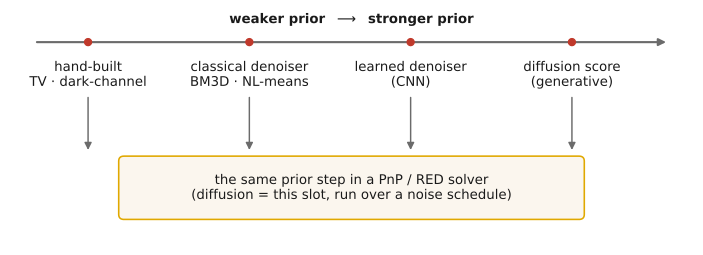
fig-denoiser-as-prior-spectrum
fig-denoiser-as-prior-spectrum · one PnP/RED prior slot, ever-stronger denoisers: hand-built → classical → learned → diffusion score (GenAI / Super-res)
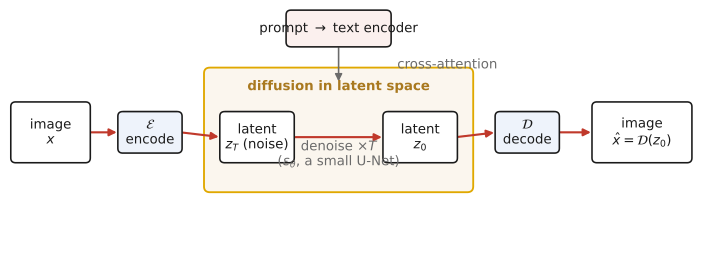
fig-latent-diffusion
fig-latent-diffusion · encode → diffuse in a compressed latent → decode; prompt conditions by cross-attention (Stable Diffusion) (GenAI)
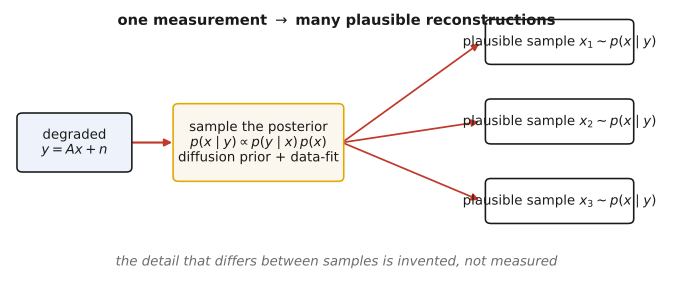
fig-posterior-sampling
fig-posterior-sampling · generative priors for inverse problems: one degraded $y$ → many plausible samples $x\sim p(x\mid y)$ (GenAI)
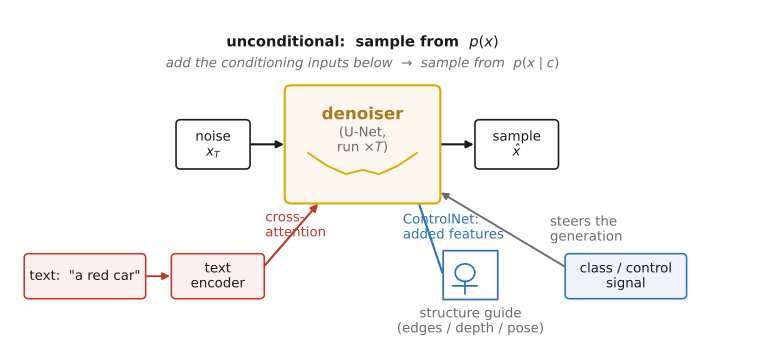
fig-conditioning-controlnet
fig-conditioning-controlnet · one prompt + a spatial hint (edges / pose / depth) → a generated image obeying both (GenAI)
This chapter is the **generative limit** of the two before it. *Machine learning* replaced a hand-designed prior with a **learned** one (L8); *Super-resolution* showed the prior is **not optional** and that a **denoiser is a universal prior** you can plug into any solver (L10, PnP/RED, and the punchline that the **score is a denoiser**). Here that same prior becomes something you can **sample from** — a generative model — and the canonical one, **diffusion**, is literally that denoiser run in a loop. We reference the ML / deep-learning refresher ([[Refreshers#Machine learning and deep learning]]) for U-Nets, transformers, and attention; this chapter does **not** re-teach networks — it surveys the *generative* idea and where it plugs back into the book's inverse-problem spine.
equations
forward (noising) process $x_t = \sqrt{\bar\alpha_t}\,x_0 + \sqrt{1-\bar\alpha_t}\,\epsilon$, $\epsilon\sim\mathcal N(0,I)$
training loss (predict the noise) $\mathbb{E}_{x_0,\epsilon,t}\big\lVert \epsilon - \epsilon_\theta(x_t, t)\big\rVert^2$
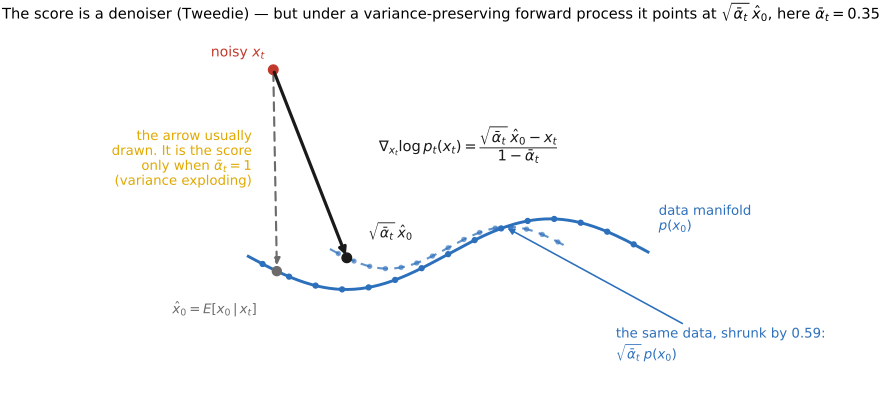
Tweedie / score = denoiser $\hat x_0 = x_t + \sigma_t^2\,\nabla_{x_t}\log p_{\sigma_t}(x_t)$, i.e. the score and a Gaussian denoiser are the same object
reverse (sampling) step — denoise a little, add a little noise, repeat from $x_T\sim\mathcal N(0,I)$ down to $x_0$
classifier-free guidance $\tilde\epsilon_\theta = \epsilon_\theta(x_t,\varnothing) + w\,\big(\epsilon_\theta(x_t,c) - \epsilon_\theta(x_t,\varnothing)\big)$
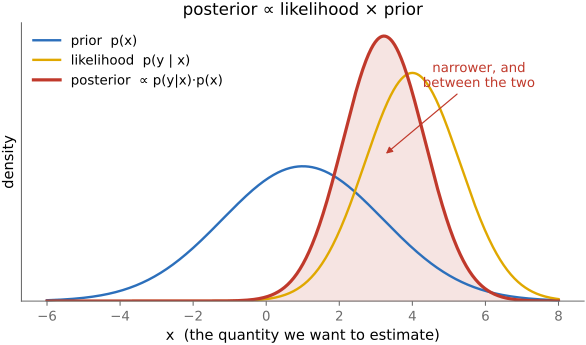
posterior sampling for an inverse problem — sample $x\sim p(x\mid y)\propto p(y\mid x)\,p(x)$ by alternating the diffusion prior step with a data-fit step against the forward model $A$ (a PnP/RED solver with a generative prior)
Part 5 EDGES MATTER
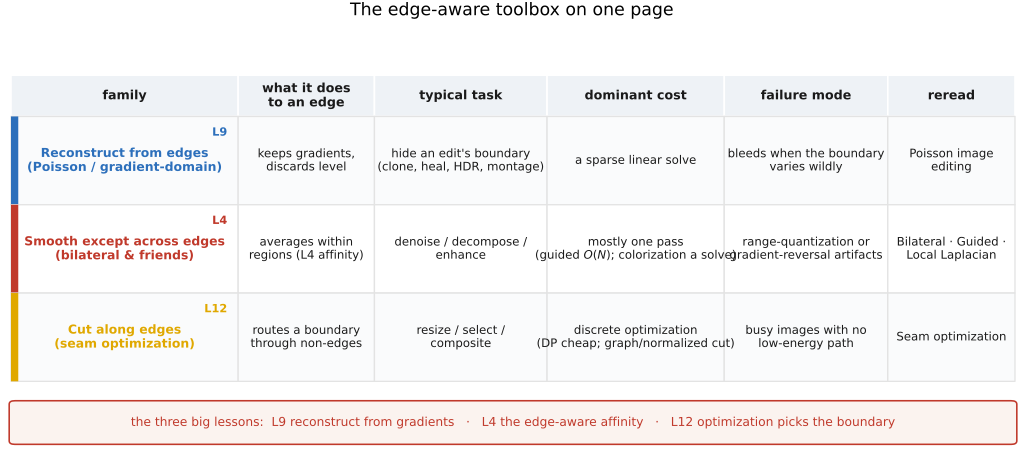
The thread of this part is that **where the edges are** governs the edit. Edges carry most of an image's meaning, so three families of method are organised around them: **gradient-domain (Poisson) editing** reconstructs an image *from* its edges (seamless cloning, gradient-domain HDR, photomontage); **edge-preserving filtering** smooths everything *except* across edges (bilateral, guided, local Laplacian → tone mapping, detail, denoising); and **seam optimization** cuts *along* the least-noticeable edges (seam carving, graph-cut compositing). All three lean on the linear-systems and convolution machinery from earlier parts; they belong together because they share one idea — respect the edges.
5.1 Poisson image editing
fig-seamless-cloning
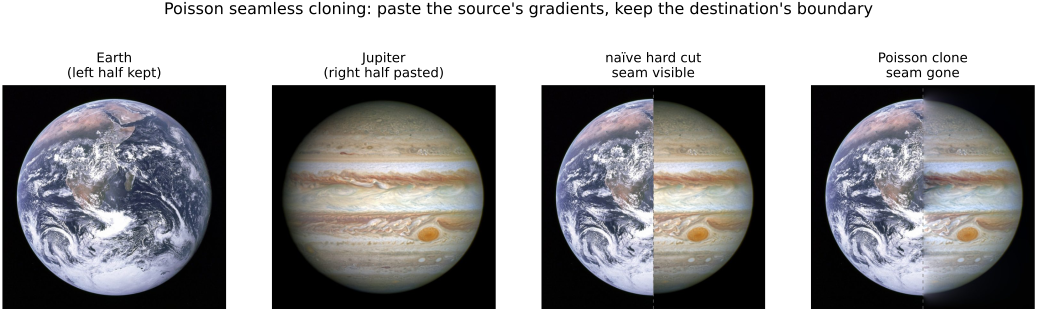
fig-seamless-cloning · Poisson seamless cloning (Pérez 2003), EDGES MATTER → Poisson editing: a disk of Jupiter cloned onto Earth — destination (target ring) · source patch · naive paste (visible ring) · Poisson paste (seam gone)
fig-gradient-domain-pipeline
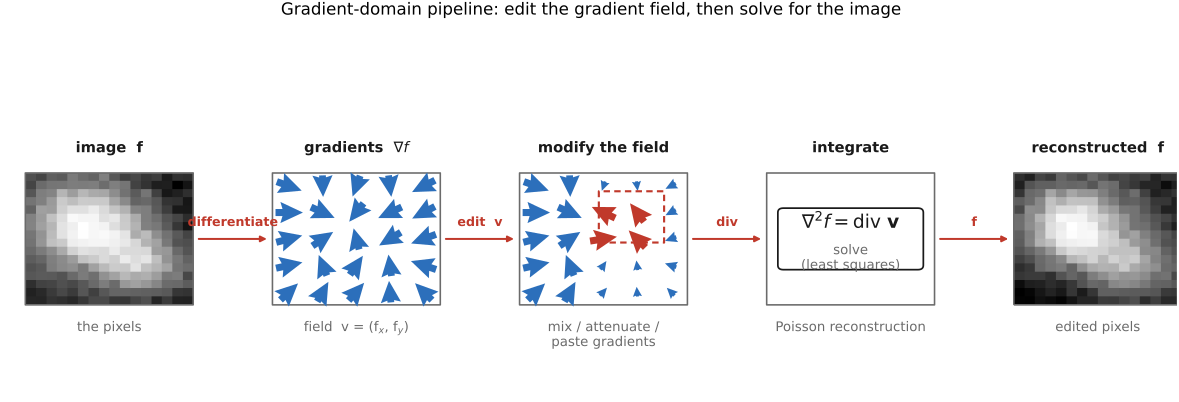
fig-gradient-domain-pipeline · gradient-domain (Poisson) workflow: image → take gradients (∇f) → modify the field → integrate by solving ∇²f=div v → reconstructed (EDGES MATTER → Poisson editing)
fig-mixing-gradients
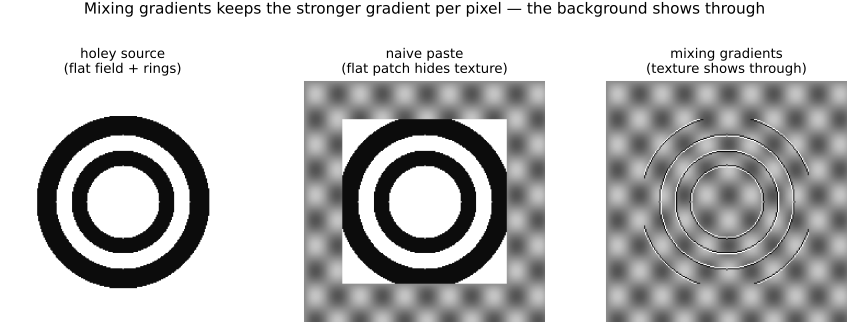
fig-mixing-gradients · mixing gradients — keep the per-pixel *stronger* gradient so destination texture shows through holey / transparent inserts (naive vs max-gradient paste) (Poisson editing)
⬜ figure not yet created
`fig-chong-colorspace-results` — results from Chong, Gortler & Zickler 2008 [placeholder]
fig-poisson-vs-laplacian-blend
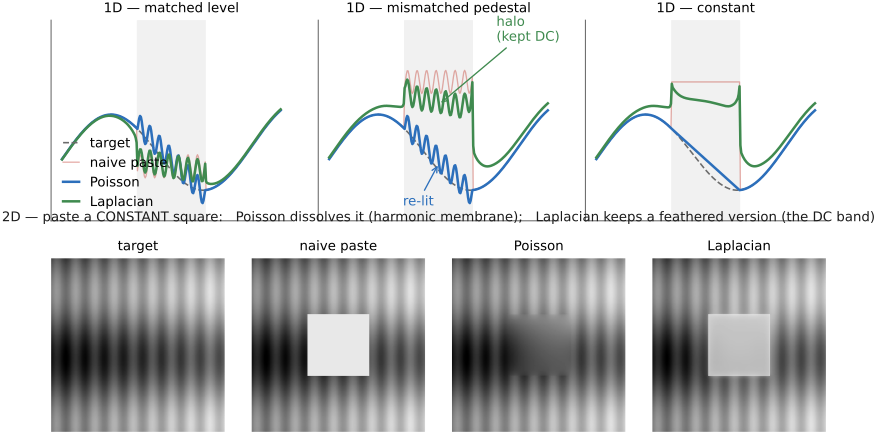
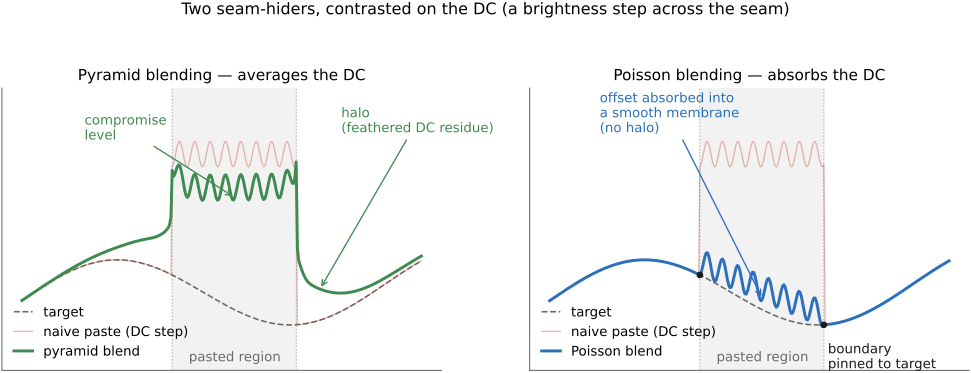
fig-poisson-vs-laplacian-blend · Poisson vs Laplacian-pyramid blending, contrasted on the DC: 1-D three cases (matched level — both agree; mismatched pedestal — Poisson re-lights, pyramid leaves a halo; constant — Poisson ramps/dissolves, pyramid keeps a feathered plateau) + 2-D (paste a constant square — Poisson dissolves it via the harmonic membrane, pyramid keeps a feathered version)
fig-fourier-lowpass-highpass
fig-fourier-lowpass-highpass · low-pass vs high-pass a real photo by masking its spectrum and inverse-transforming: keep center → blurred, drop center → edges only (convolution = mult in frequency, by hand) (Reading an image's Fourier transform)
equations
the **Poisson equation** $\nabla^2 f = \operatorname{div}\mathbf{v}$ (reconstruct the field $f$ whose gradient best matches guidance $\mathbf{v}$)
the **discrete Laplacian** system $4f_{p}-\sum_{q\in N(p)} f_{q}=\sum_{q\in N(p)}\!\big(\,v_{pq}\,\big)$ (one sparse equation per pixel $p$ over its 4-neighbours $N(p)$)
the **seamless-cloning Dirichlet boundary condition** $f|_{\partial\Omega}=f^{*}|_{\partial\Omega}$ (interior gradients from the source, boundary values pinned to the destination $f^{*}$)
5.2 Bilateral filtering
5.3 Locally adaptive regression kernel (LARK)
• **the view**: treat denoising / upsampling as **local regression** — fit a smooth function to nearby pixels, weighted by a kernel
• **steering / adaptive kernels**: shape the kernel to the **local image structure** — estimate the local gradient, then **stretch the kernel *along* edges and squeeze it *across* them** (an anisotropic, data-dependent weight) so it averages along the edge, not across it
• so LARK is the **regression flavour** of the same affinity idea: the kernel geometry is *derived from* local structure, generalizing the bilateral's scalar range weight to an oriented one
• also a **descriptor**: LARK signatures are used for detection / matching (Seo & Milanfar) — note in passing, not developed
5.4 NL-means (non-local means)
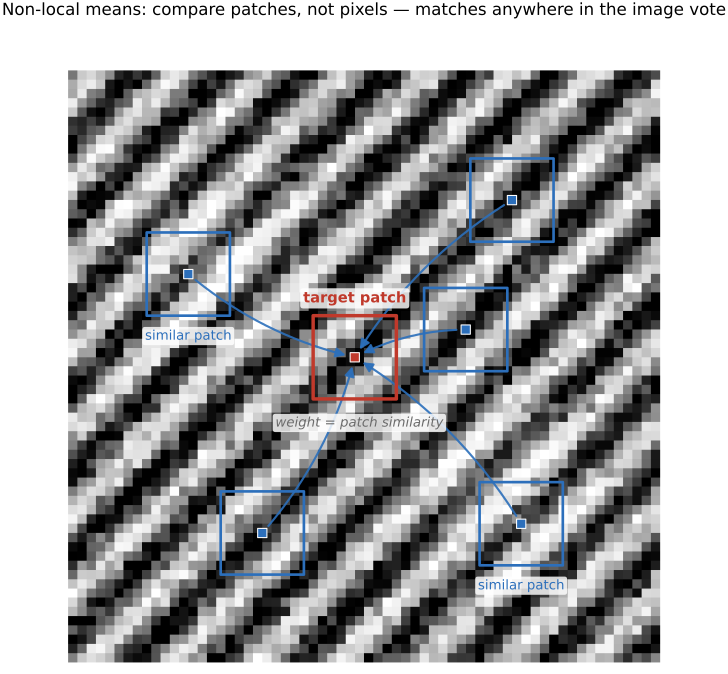
• **the leap — compare patches, not pixels**: the bilateral's affinity uses a single pixel's value; NL-means measures similarity between **small patches** around two pixels, so it matches **texture / structure**, not just brightness. `fig-nlmeans-patches`
• **non-local**: the search is **not limited to a spatial neighbourhood** — any patch anywhere in the image (a repeated texture, another brick, another eye) can vote; the spatial Gaussian is dropped or relaxed
• **patch distance & weight**: $d^2(p,q)=\sum_k g_a(k)\,\lVert I(p+k)-I(q+k)\rVert^2$ over patch offsets $k$ (optionally Gaussian-weighted $g_a$), weight $\propto e^{-d^2/2\sigma^2}$; average the **centre** pixels of the matching patches
• **why it denoises well**: a clean signal repeats, noise does not — so averaging many similar patches cancels noise while preserving structure
• the affinity reading again (now a patch-space affinity); the direct precursor to **BM3D** and to the self-similarity priors used in learned denoising (forward-ref ML)
• **BM3D** (Dabov et al. 2007) — the high-water mark of the patch / self-similarity idea, and for years the classical denoising **gold standard**. Where NL-means *averages* similar patches, BM3D goes further in two stages: (1) **block-matching** groups the most-similar patches into a **3-D stack**; (2) **collaborative filtering** applies a 3-D transform to that stack and **jointly shrinks** the coefficients (hard-threshold, then a Wiener pass using a first-pass estimate), exploiting the fact that aligned similar patches are *sparse together* — far more so than any one patch alone. Aggregate the filtered patches back (weighted by how many survived) and the result beats plain NL-means. Same lesson as the whole chapter — **find what belongs together (here, similar patches) and process them jointly** — pushed from a weighted average to a sparse transform-domain shrinkage; the bridge from bilateral/NL-means affinity to sparsity/dictionary and learned self-similarity denoisers (forward-ref [[Deep learning]]).
5.5 Local Laplacian filters
fig-local-laplacian
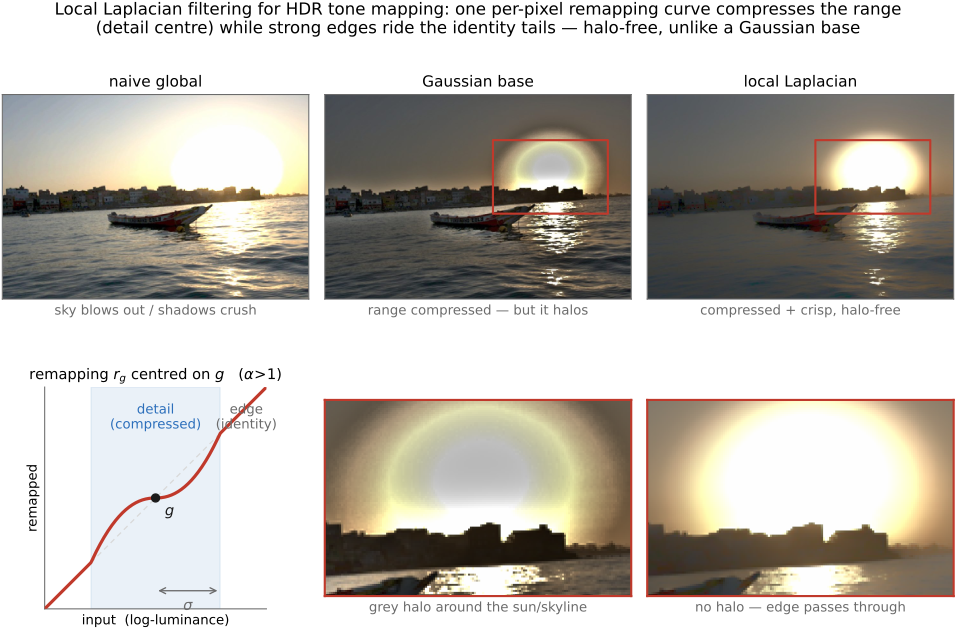
fig-local-laplacian · local Laplacian filters on a real HDR sunset (Paris–Hasinoff–Kautz 2011, implemented from scratch): naive global (blown) vs Gaussian base (halo) vs local Laplacian (halo-free) tone mapping, plus the compressive remapping curve $r_g(\cdot)$ (detail centre + identity tails) and a zoom comparison proving the silhouette stays halo-free (Local Laplacian filters)
⬜ figure not yet created
before/after detail-boost with **no halo** fig-wb-before-after
• **the odd one out — not an affinity method**: every other technique here weights *pairs* of pixels by similarity; local Laplacian instead works **band-by-band in a Laplacian pyramid** with a **pointwise remapping** — no range weight, no base/detail split (so none of the halos / gradient reversals those can produce). The multiscale cousin of the bilateral, by a different mechanism. Cross-ref [[Linear pyramids and wavelets]] (the pyramid it's built on) and [[Bilateral filtering]].
• **the mechanism**: to compute the output's Laplacian coefficient at a pixel and level, take the pixel's value $g$, apply a **remapping function** $r_g(\cdot)$ to the *whole* image (a smooth curve, centred on $g$, that decides what is "detail" vs "edge"), build a Laplacian pyramid of that remapped image, and read off **just this level's coefficient at this pixel**; collapse the resulting pyramid for the result.
• **the knob is the remapping $r$**: near $g$ (small amplitude = **detail**) it **compresses or amplifies** — controlling detail / local contrast; far from $g$ (large amplitude = **edge**) it stays the **identity** — so strong edges pass through untouched. One curve → detail enhancement, tone mapping, or inverse tone mapping, all **artifact-free**.
• **why it matters**: state-of-the-art **edge-aware detail manipulation and HDR tone mapping** with no halos and no gradient reversal — the failure modes that motivated the bilateral in the first place.
• **cost & the fast version**: the naive form rebuilds a pyramid per pixel-and-level (expensive); **Aubry et al. 2014** gives a fast approximation and shows the **unnormalized bilateral** is its single-scale relative (ties back to [[Bilateral filtering#Bilateral filter|the unnormalized bilateral]]).
5.6 Edge-preserving optimization — colorization
• **the shift — filtering → optimization**: instead of one weighted-average *pass*, solve a **global least-squares** problem whose smoothness term uses the affinity as a weight. The same affinity, now inside an energy.
• **colorization** (the demo): the user scribbles a few colors; **propagate** them so that **neighbouring pixels of similar luminance get similar color** — minimize $\sum_p (U_p-\sum_{q\in N(p)} a_{pq} U_q)^2$ over the chrominance $U$, with affinity $a_{pq}$ **large where $I_p\approx I_q$** (small luminance difference) — exactly the bilateral's range idea inside a quadratic energy
• **solve it** with the linear-systems machinery of the regression chapter — sparse, structured, solved by CG / multigrid (cross-ref [[Single-image computational photography#Blind deblurring]], [[Linear Inverse Problems and Regression]])
• the **affinity matrix** here is the same object as the **matting Laplacian** and the graph-cut edge weights → forward-ref [[#Compositing, segmentation and matting]] (matting / segmentation = affinity again)
• also placeable under [[Single-image computational photography#Blind deblurring]] (the "Colorization as optimization?" stub) — keep the *technique* here, cross-ref from there
5.7 Guided image filtering
• **the idea**: like the joint bilateral (filter $I$, take structure from a **guide** $J$) but the output is a **local linear transform of the guide**, $I^{\mathrm{out}}=a_k J + b_k$ fit per window by **least squares** — so it preserves the guide's edges by construction
• **why prefer it**: **$O(N)$**, **no range-quantization artefacts** (the gradient reversal the bilateral can show), and **differentiable** → drops into learning pipelines
• **uses**: edge-preserving smoothing; detail enhancement; **flash / no-flash**; **matting / feathering**; **dehazing** (guide = the hazy image — xref He, Sun & Tang 2009 dark-channel, [[#Dehazing as a prior-driven inverse problem]]); depth upsampling
• the affinity is now **implicit** in the local linear fit — same family, different mechanism; a fitting end-point for the chapter's through-line (bilateral → grid → learned → regression → optimization → guided, all *affinity*)
5.8 Seam optimization
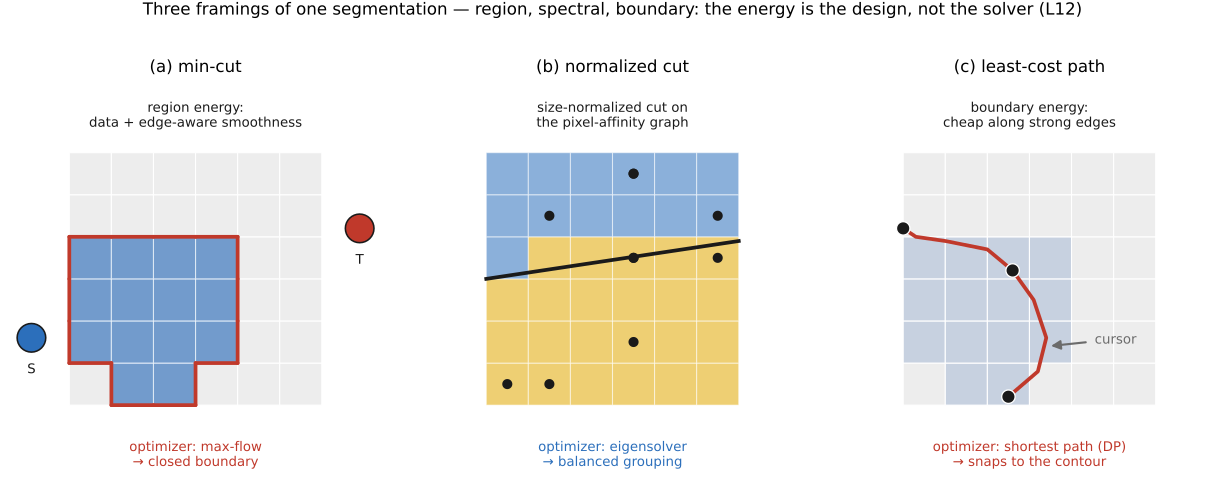
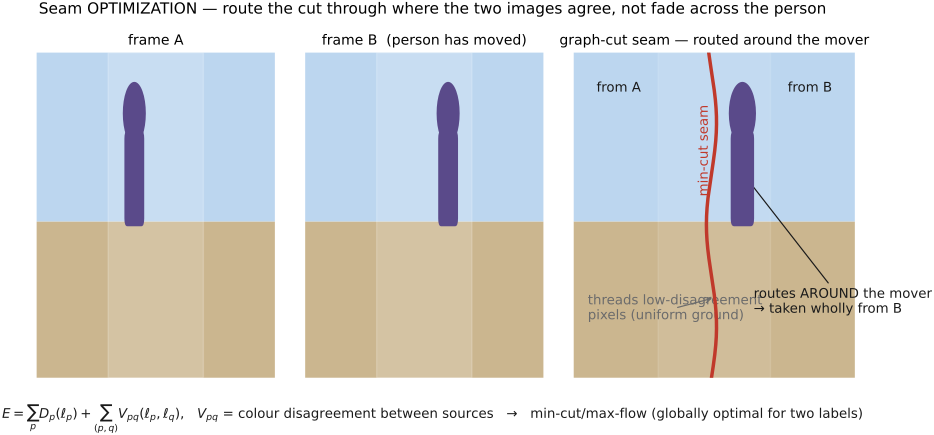
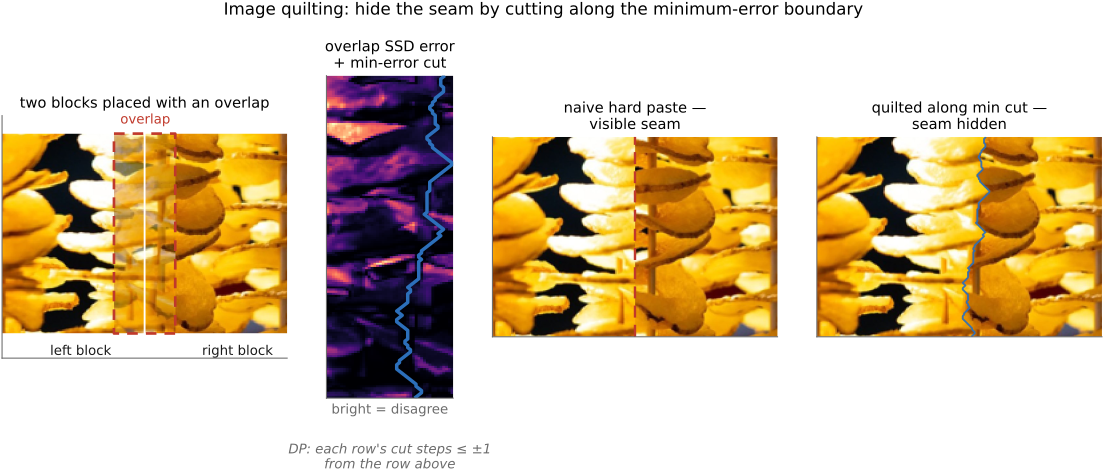
• **the third leg of EDGES MATTER** (the part's framing payoff): Poisson **reconstructs from edges**, bilateral **smooths except across edges**, seam optimization **cuts along edges**. State it as the dual of edge preservation: edge-preserving filtering works *hard to avoid* edges; seam methods *go looking for them* — a transition is invisible exactly where the image is already changing, so we hide the cut **in the edges / busy texture** and keep it **out of smooth regions** where a seam would scream. (Callback to the part intro's "respect the edges.")
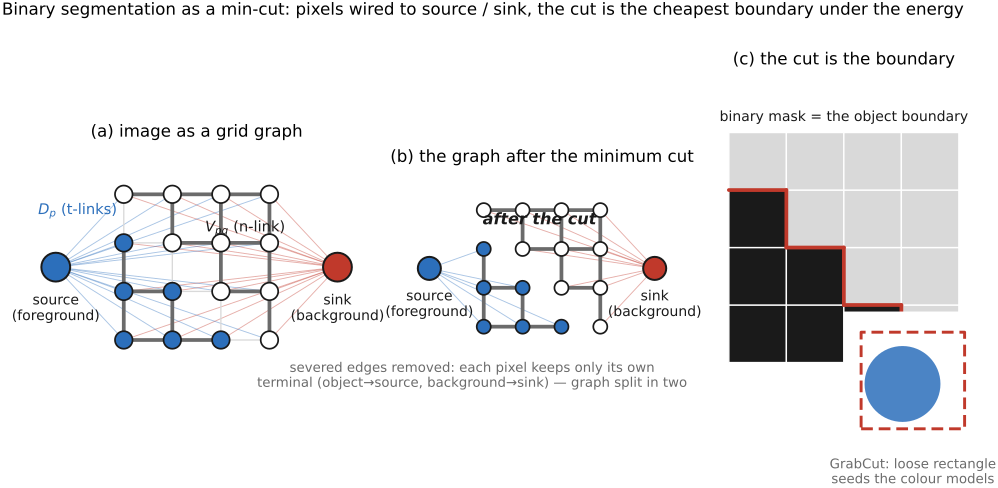
• the **unifying machinery**: all three sub-families are **discrete optimization on a graph or grid** — a 1-D least-cost path (**DP**), a 2-D globally-optimal boundary (**graph cut / min-cut**), or a spectral partition (**normalized cuts**). What changes between methods is **the energy / affinity**, not the optimizer.
💡 **Big lesson:** *many image edits are **discrete optimization on a graph** — dynamic programming, min-cut/max-flow, or spectral relaxation — and the **energy (affinity) you choose is the whole game**.* The optimizer is off-the-shelf; **what** you penalize (gradient magnitude, label disagreement across edges, region/boundary cost) is the design. This is the **L4 affinity** principle (Bilateral) turned into a *cut*: there the affinity said "average these together"; here it says "**don't cut here**." *(Register as new lesson **L12 · Image edits as discrete optimization on a graph (the energy is the design)**, first appearance here; "also relevant": Poisson/photomontage, compositing/segmentation/matting, texture synthesis, stereo/MRF labeling. Full box at this section's head; one-line callback to L4.)*
5.9 Recap: which edge-aware technique when?
fig-pinhole-imaging
fig-pinhole-imaging · imaging-scenario series (2/3): add a pinhole to the bare sensor — one ray per scene point → a dim **inverted** image (same tree+sensor+colours as fig-bare-sensor-averaging)
Part 6 WARPING AND MORPHING
💡 **Big lesson (L17 · transport half):** almost every geometric technique is **(1) establish a correspondence / coordinate map**, then **(2) transport pixels along it** by warping and resampling. This part owns step (2) — one shared engine serving rectification, panoramas, morphing, stabilization, and frame interpolation — and the ways to *build* a map from sparse control. The hard *estimation* half (step 1) is [[Matching pixels across space and time]].
6.1 Warping and resampling
fig-warp-domain-vs-range
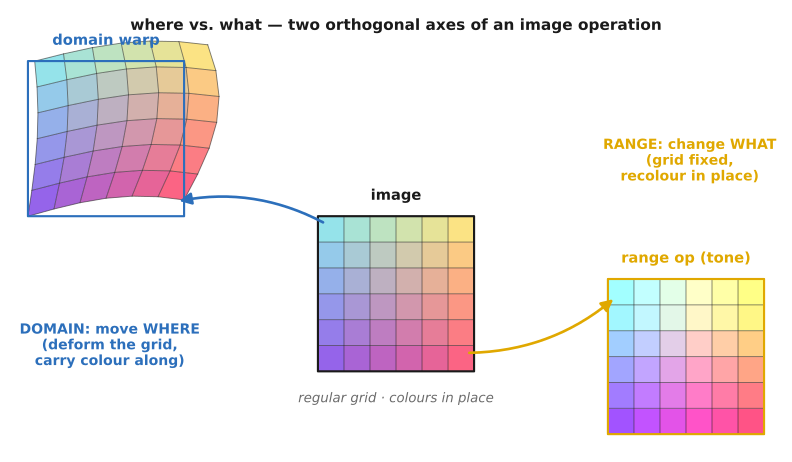
fig-warp-domain-vs-range · one image, two orthogonal arrows — the domain arrow bends the grid (a pixel slides, carrying its colour; a warp), the range arrow recolours in place (a point/tone op); warping moves where, not what 🟨
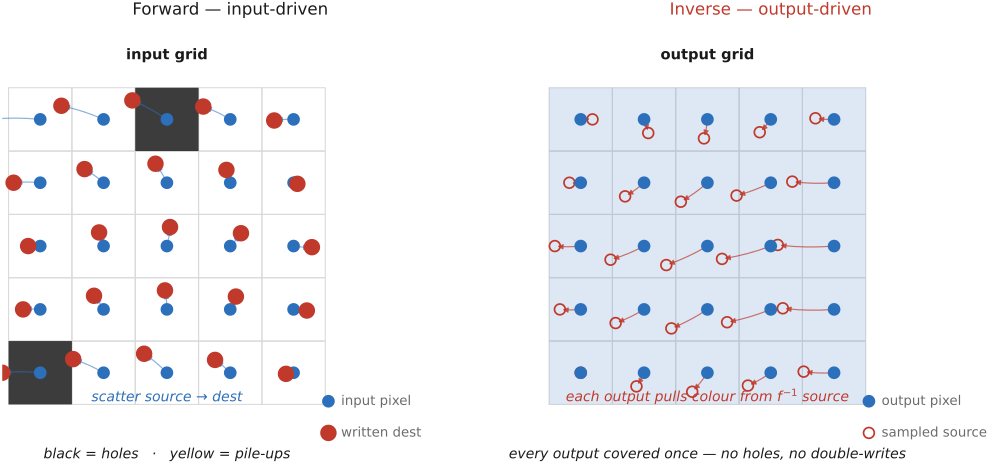
⬜ figure not yet created
`fig-forward-warp-holes` (forward/input-driven warp scatters input pixels to fractional output locations → gaps (uncovered output) and pile-ups (many inputs to one output)) fig-forward-warp-holes
fig-inverse-warp-lookup
fig-inverse-warp-lookup · inverse (output-driven) warping, the useful idiom — loop over output pixels, push each back through $f^{-1}$, sample there; every output covered once, the only difficulty a clean resampling 🟨
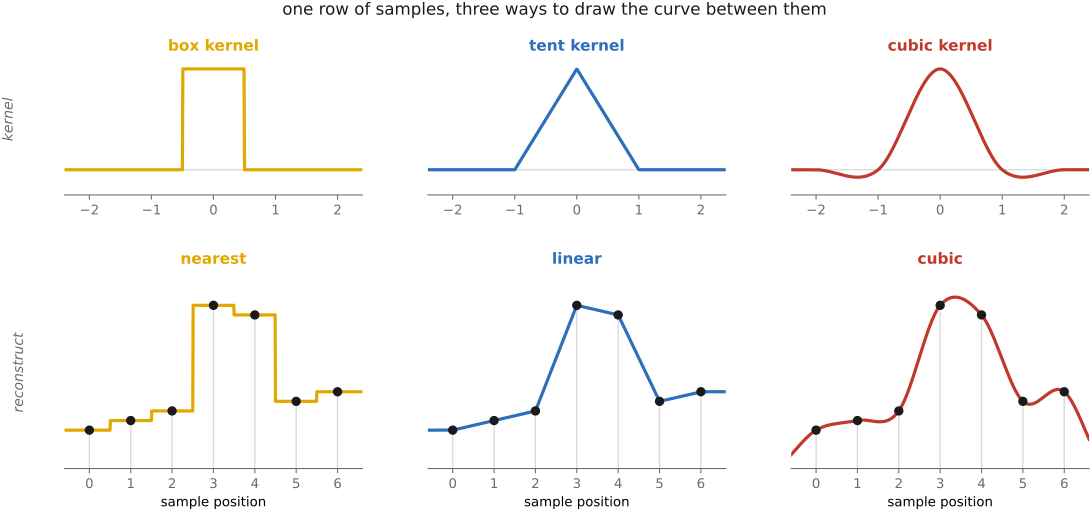
fig-recon-filters-1d
fig-recon-filters-1d · nearest (boxy staircase), linear (kinked through every sample), and cubic (smooth with mild overshoot) reconstruction of the same 1-D sample row — the sharpness/smoothness trade 🟨
⬜ figure not yet created
`fig-bilinear-weights` (the four surrounding pixels and the fractional-coordinate area weights of bilinear interpolation) fig-bilinear-weights
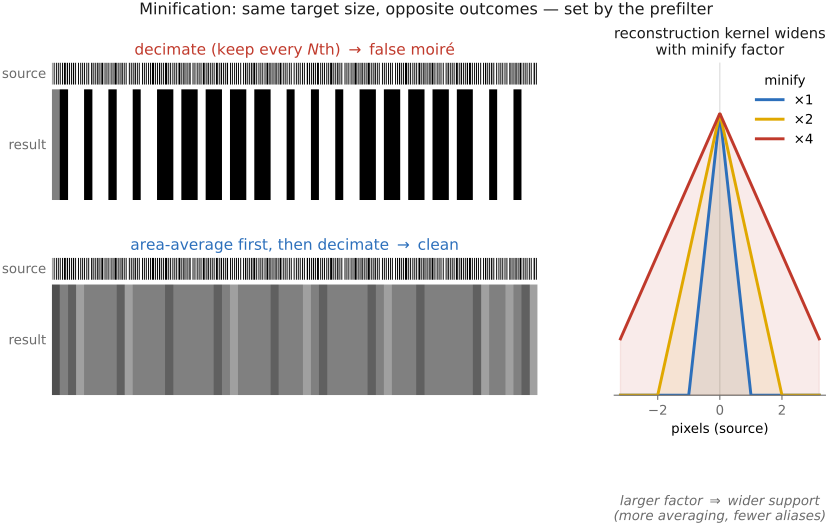
fig-minify-aliasing-moire
fig-minify-aliasing-moire · the L16 picture — a fine grating decimated naively (folds into false moiré) vs area-averaged first then decimated (clean); same size, opposite outcomes, decided by prefiltering 🟨
⬜ figure not yet created
`fig-kernel-scaling-minify` (the reconstruction kernel widened by the downscale factor so it averages over the right footprint — "gather farther when shrinking") fig-kernel-scaling-minify
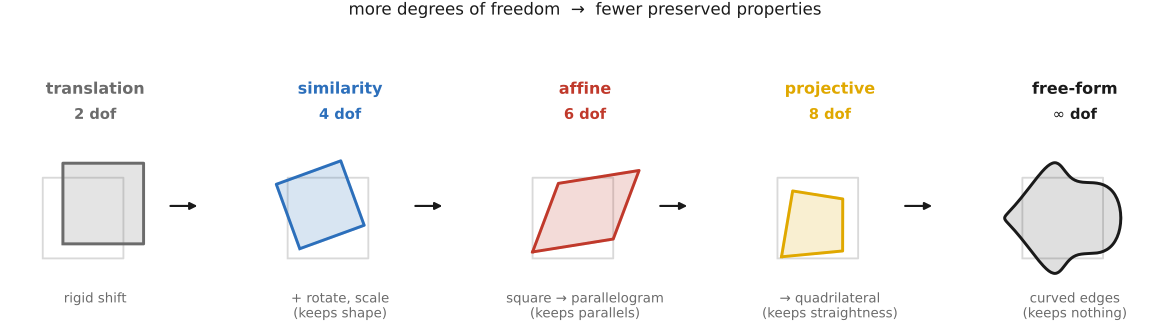
fig-dof-ladder
fig-dof-ladder · the degrees-of-freedom ladder — a unit square under translation (2) → similarity (4) → affine (6) → projective (8) → free-form ($\infty$), each rung breaking a preserved property 🟨
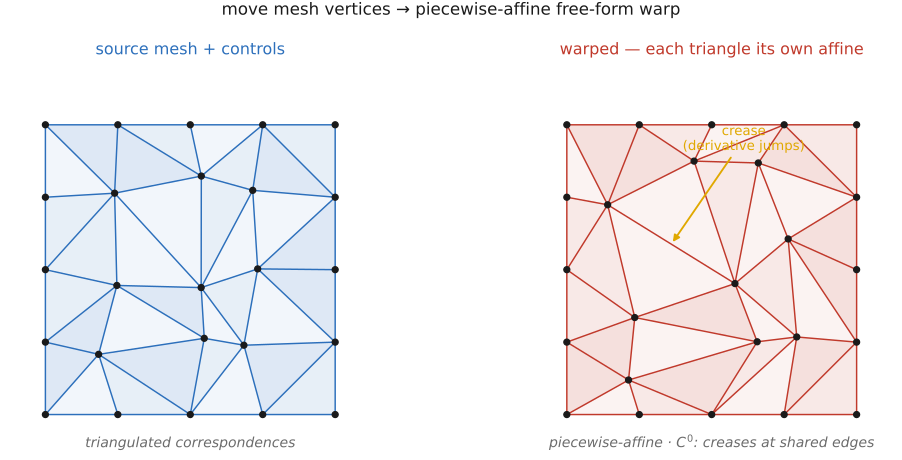
fig-mesh-triangulation-warp
fig-mesh-triangulation-warp · piecewise-affine mesh warp — control matches triangulated, each triangle carrying its own affine map; exact and fast but only $C^0$, creasing along shared edges 🟨
⬜ figure not yet created
`fig-tps-rbf-warp` (a few control points displaced → a smooth thin-plate-spline field filling the gaps, minimal bending) fig-tps-rbf-warp
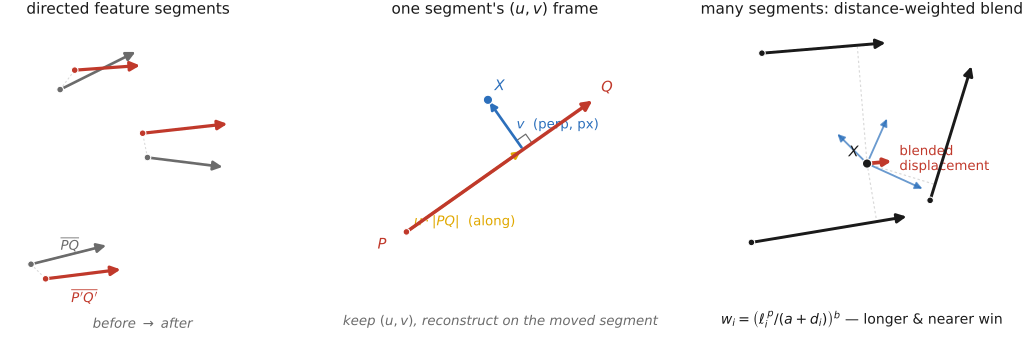
fig-beier-neely-segments
fig-beier-neely-segments · Beier–Neely feature-line warp — before/after directed segments, one segment's $(u,v)$ frame, and the distance-weighted blend of several segments' proposed displacements ($w_i=(\ell_i^p/(a+d_i))^b$) 🟨
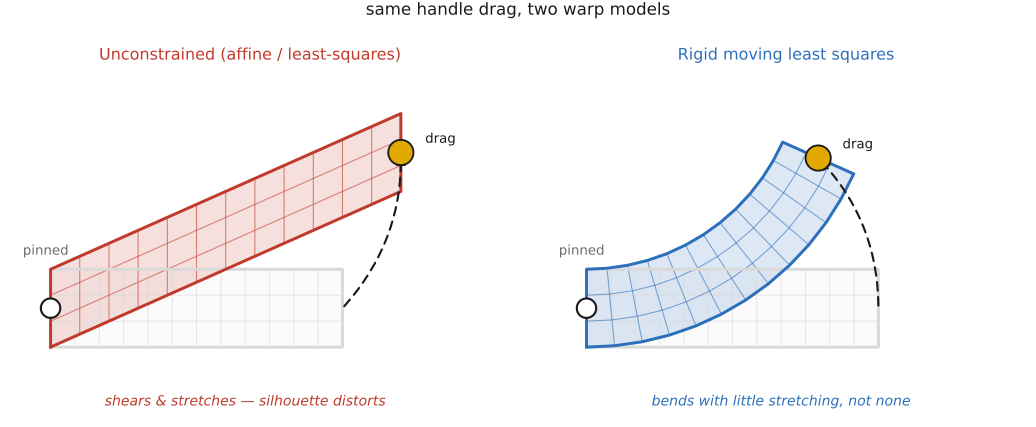
fig-arap-vs-affine
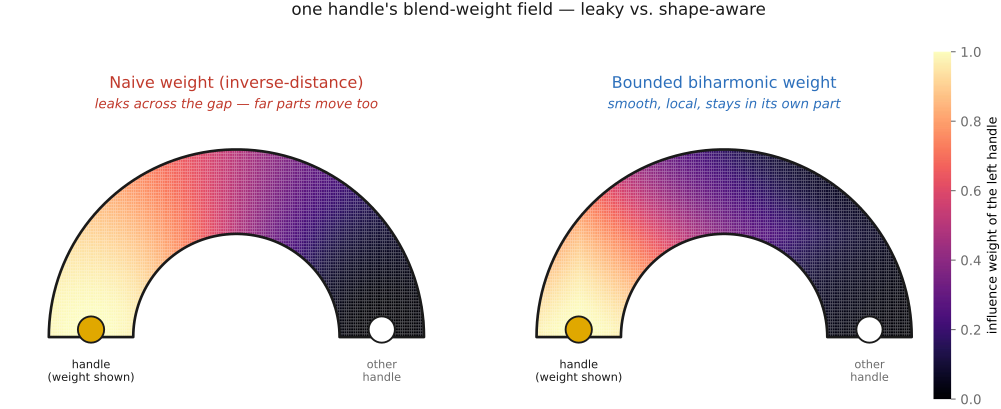
fig-arap-vs-affine · drag one handle — an unconstrained affine/least-squares warp shears and stretches, vs an as-rigid-as-possible / MLS warp that keeps each neighbourhood near a rotation so the shape bends without stretching 🟨
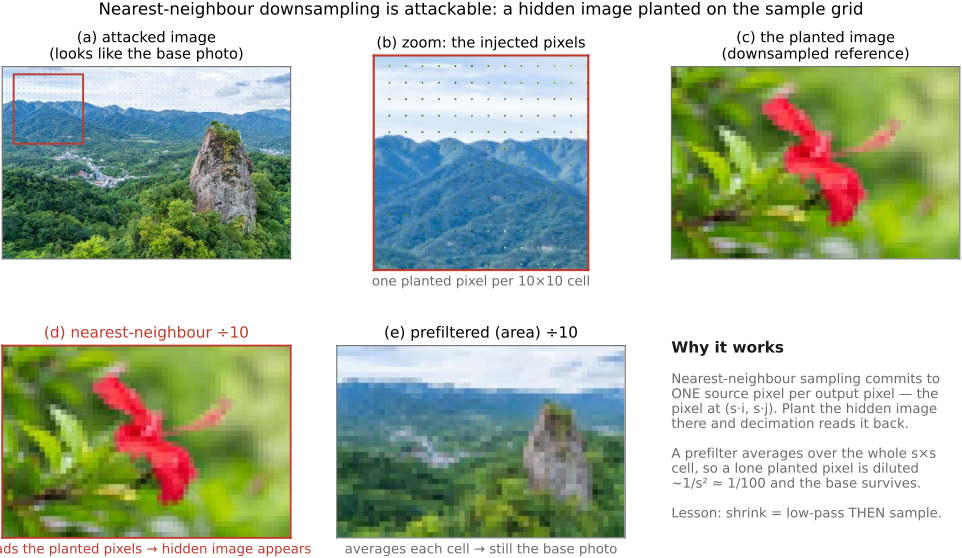
💡 **Big lesson (L16 · Prefilter before you downsample):** a warp that *shrinks* the image (minifies) is throwing samples away — and if you just decimate (keep every $N$th source pixel, or sample a narrow reconstruction kernel) the detail too fine for the new grid **folds down into bold false moiré**, not into nothing. The fix is to **area-average first**: widen the resampling kernel in proportion to the downscale factor $s$ (so it gathers over the whole footprint each output pixel now covers) and renormalize — that low-pass blur is the prefilter. Enlarging needs *no* prefilter (clamp the kernel width to 1); shrinking *always* does. (→ see Big lesson **L16**, first placed in BASIC → Resampling; the frequency-domain *why* is **L5** — aliasing folds frequencies above the new Nyquist. The same lesson governs every geometric resample in this part: rectification corners that shrink, stabilization crops, optical-flow rendering.)
⚠️ **Candidate new part-spine lesson (flag only — not registered).** Almost every algorithm in this part follows one shape: **establish a correspondence / coordinate map between two images (or an image and a target frame), then transport pixels along it.** Warping makes the map explicit and applies it; perspective rectification *solves* the map (a homography) from constraints; panorama stitching *estimates* the map from features; morphing *interpolates between* two maps; optical flow *estimates a dense map* from brightness constancy; stabilization *smooths a map over time*; frame interpolation *renders along* a map. A lesson like **"find the coordinate map, then move the pixels"** would unify the part the way L10 unifies the inverse-problem part. Worth registering as a part-spine lesson for MOTION/WARPING — *noted here, deliberately not registered* (registry-first convention: register in [[Big Lessons]] before placing).
equations
warp as a domain map $\text{out}(x,y)=\text{in}\big(f^{-1}(x,y)\big)$ (move the domain, keep the range)
**forward** warp $\text{out}(f(x,y))\leftarrow \text{in}(x,y)$ (scatters → holes)
1-D **linear** reconstruction $\text{im}(x)= (1-\alpha)\,\text{im}[\lfloor x\rfloor]+\alpha\,\text{im}[\lceil x\rceil]$, $\alpha=x-\lfloor x\rfloor$
**bilinear** = separable 1-D linear in $x$ then $y$ (four-neighbour area weights)
general **convolution resampling** $\text{out}(x)=\sum_{x'}k\big(f^{-1}(x)-x'\big)\,\text{in}(x')$ with analytic kernel $k$ centred at the fractional source location
**minification kernel scaling** $k_s(t)=\tfrac1s\,k(t/s)$ for downscale factor $s$ (widen + renormalize → area-average = prefilter, **L16**)
**affine** $\begin{psmallmatrix}x'\\y'\end{psmallmatrix}=A\begin{psmallmatrix}x\\y\end{psmallmatrix}+\mathbf t$ (6 DOF)
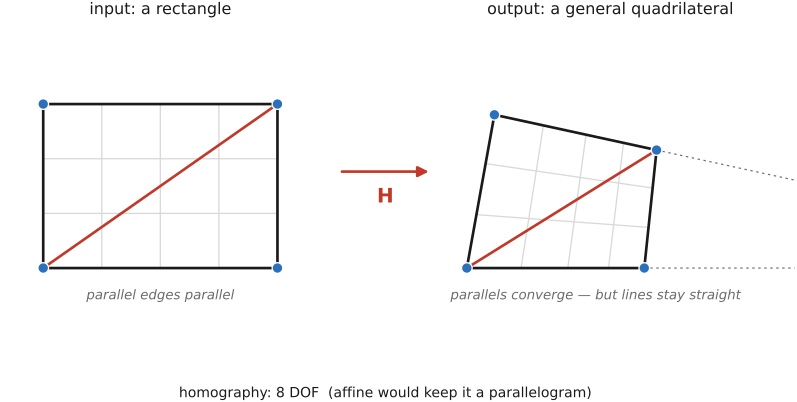
**projective / homography** $\begin{psmallmatrix}x'\\y'\\w'\end{psmallmatrix}=H\begin{psmallmatrix}x\\y\\1\end{psmallmatrix}$, then $(x'/w',y'/w')$ (8 DOF
solve from 4 correspondences — [[Manual panorama stitching from multiple views]])
**TPS / RBF** field $f(\mathbf p)=A\mathbf p+\mathbf t+\sum_i w_i\,\phi(\lVert\mathbf p-\mathbf c_i\rVert)$ with $\phi(r)=r^2\log r$ (thin-plate radial basis)
**Beier–Neely** single-segment map via the segment frame $u=\dfrac{(\mathbf X-\mathbf P)\cdot(\mathbf Q-\mathbf P)}{\lVert\mathbf Q-\mathbf P\rVert^2},\ v=\dfrac{(\mathbf X-\mathbf P)\cdot\perp(\mathbf Q-\mathbf P)}{\lVert\mathbf Q-\mathbf P\rVert}$, then $\mathbf X'=\mathbf P'+u(\mathbf Q'-\mathbf P')+\dfrac{v\,\perp(\mathbf Q'-\mathbf P')}{\lVert\mathbf Q'-\mathbf P'\rVert}$, multi-segment weight $w_i=\Big(\dfrac{\ell_i^{p}}{a+d_i}\Big)^{b}$.
6.2 Resampling for complex spatial transforms
6.3 Morphing
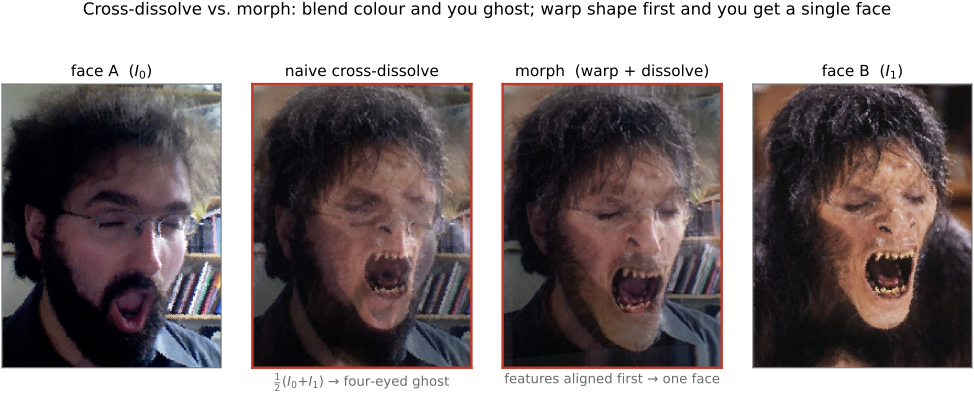
fig-morph-crossfade-ghost
fig-morph-crossfade-ghost · why a cross-dissolve ghosts — two misaligned faces averaged at $t=0.5$ superimpose features into a translucent four-eyed, two-mouthed ghost; the blend handled colour but ignored position
⬜ figure not yet created
the failure that motivates everything)
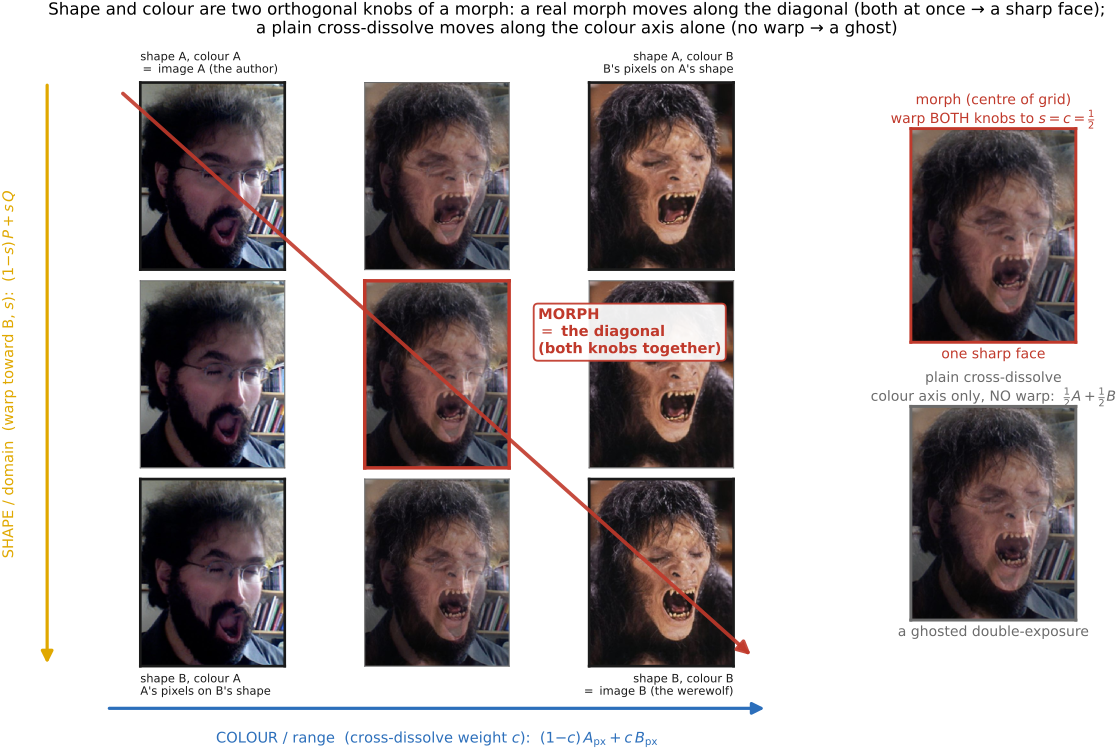
fig-morph-shape-vs-color
fig-morph-shape-vs-color · the two orthogonal knobs of a morph — range (colour) as the cross-dissolve and domain (shape) as feature-position interpolation; a true morph is their product, the square's corners labelling the four extremes 🟨
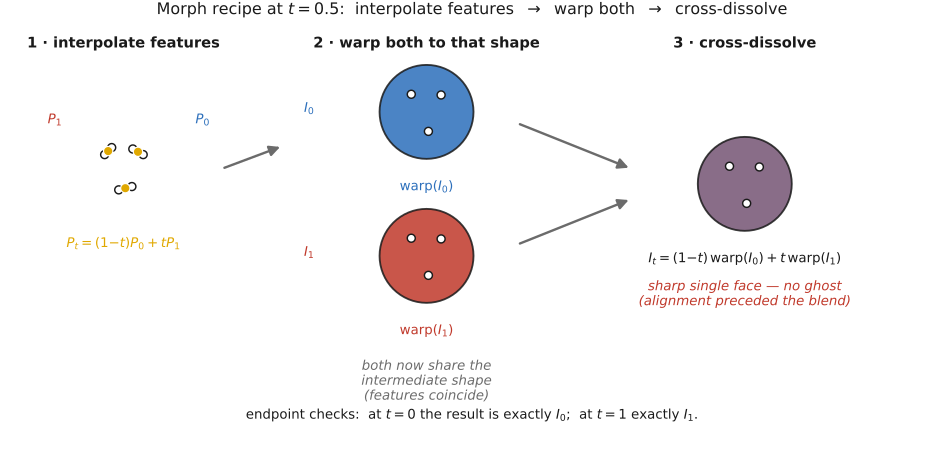
fig-morph-recipe
fig-morph-recipe · the three-step morph at $t=0.5$ — interpolate the features to the midpoint shape, warp both images to that same shape, then cross-dissolve; a sharp single face because alignment preceded the blend 🟨
⬜ figure not yet created
`fig-beier-neely-oneseg` (a single before/after line pair: the $(u,v)$ coordinate frame along/perpendicular to the segment, and how a point $X$ maps to $X'$) fig-beier-neely-oneseg
⬜ figure not yet created
`fig-beier-neely-multiseg` (several line pairs, each proposing an $X'_i$, combined by a distance/length **weighted average** — the field warp) fig-beier-neely-multiseg
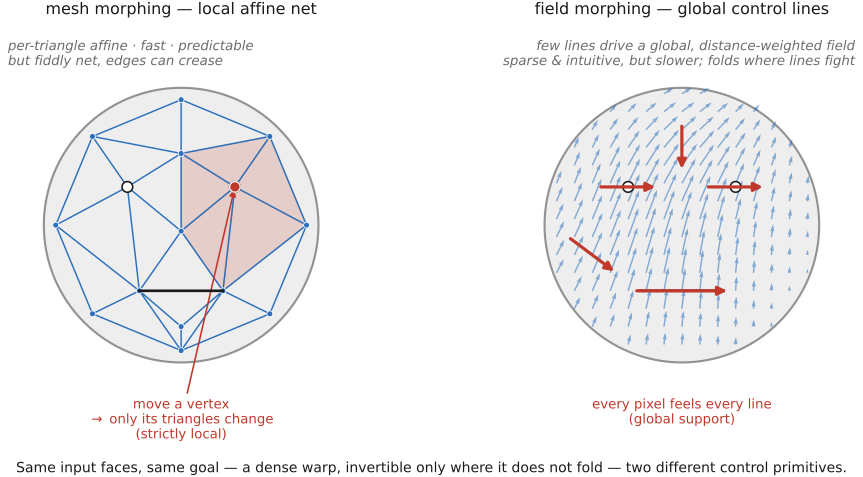
fig-mesh-vs-field-morph
fig-mesh-vs-field-morph · two ways to drive the same morph — mesh (per-triangle affine, strictly local, fiddly, can crease) vs field/Beier–Neely (a few control lines, globally-supported distance-weighted field, sparse but fold-prone) 🟨
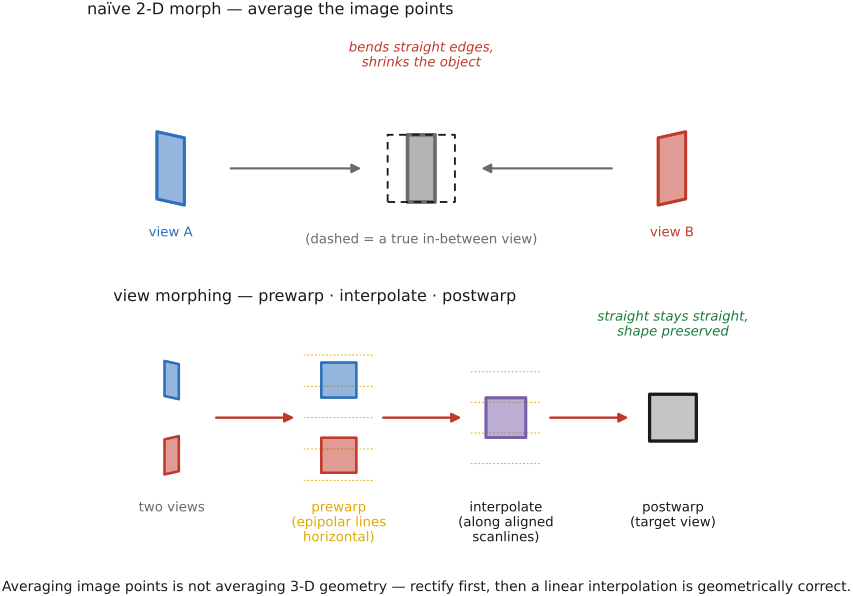
fig-view-morph-prewarp
fig-view-morph-prewarp · why two views need view morphing — a naive 2-D morph bends straight edges and shrinks a rotating object, vs view morphing (prewarp to aligned epipolar lines → interpolate → postwarp) keeping lines straight and shape intact 🟨
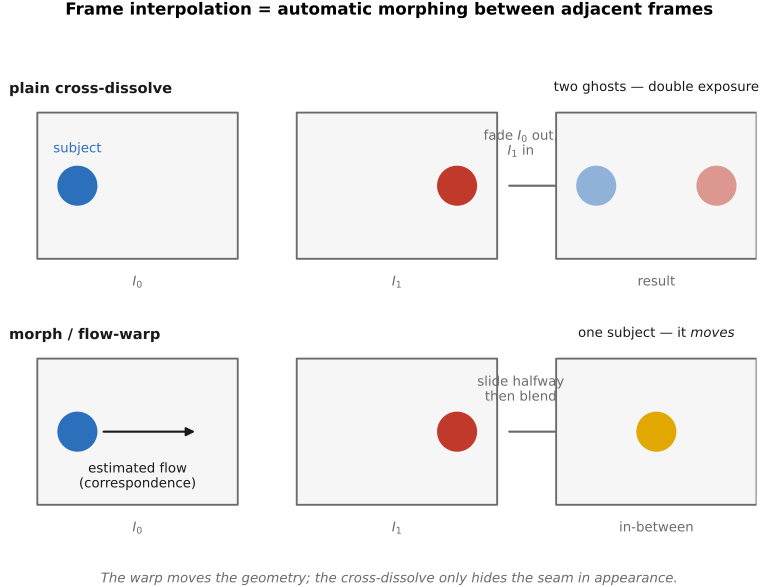
💡 **Big lesson (recurrence — *align before you blend*):** averaging two images only makes sense once their features sit at the *same place*. A plain cross-dissolve blends colors at fixed coordinates, so any misalignment **double-exposes into a ghost**; the cure is to **warp into correspondence first, then average** — the same move as panorama de-ghosting and multi-frame super-resolution's sub-pixel alignment. Morphing is this lesson taken to its limit: not just align-then-average, but interpolate the *alignment itself* over $t$. (Companion to the *capture-then-decide / align-then-merge* family; the dense automatic aligner is [[Optical flow]].)
6.4 Morphable models
6.5 Shape-preserving warping
6.6 Video in-betweening
6.7 Perspective distortion and its correction
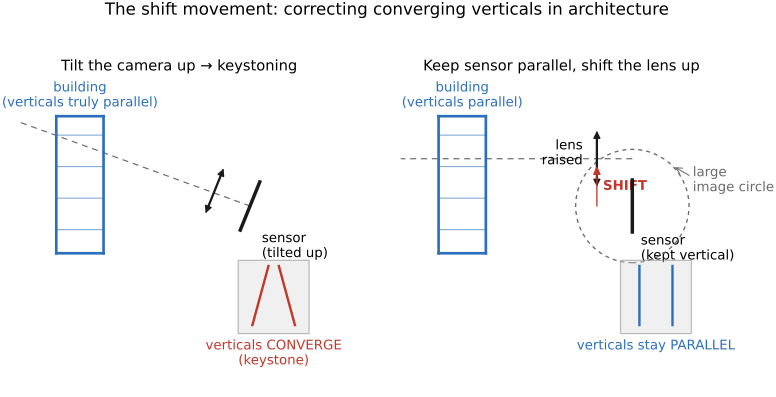
fig-keystoning-cause
fig-keystoning-cause · keystoning is the tilt, not the lens — a camera tilted up makes world-parallel verticals converge (façade → trapezoid), while the fronto-parallel shot keeps them parallel; projection preserves lines, not parallelism 🟨
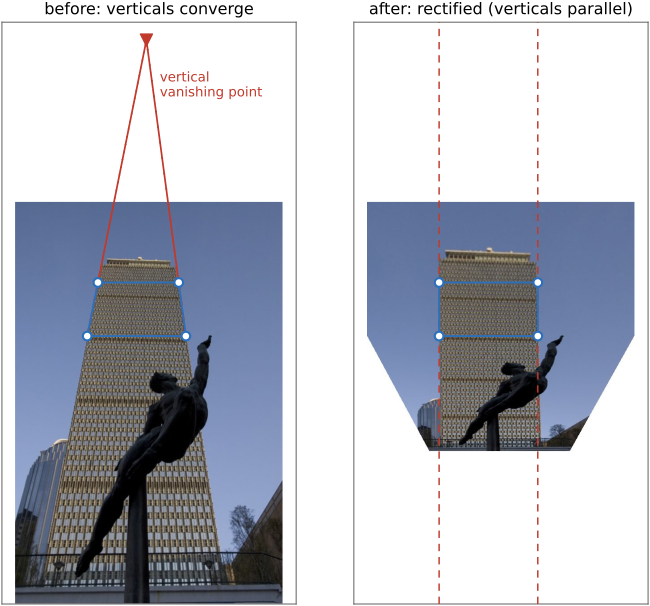
fig-rectify-before-after
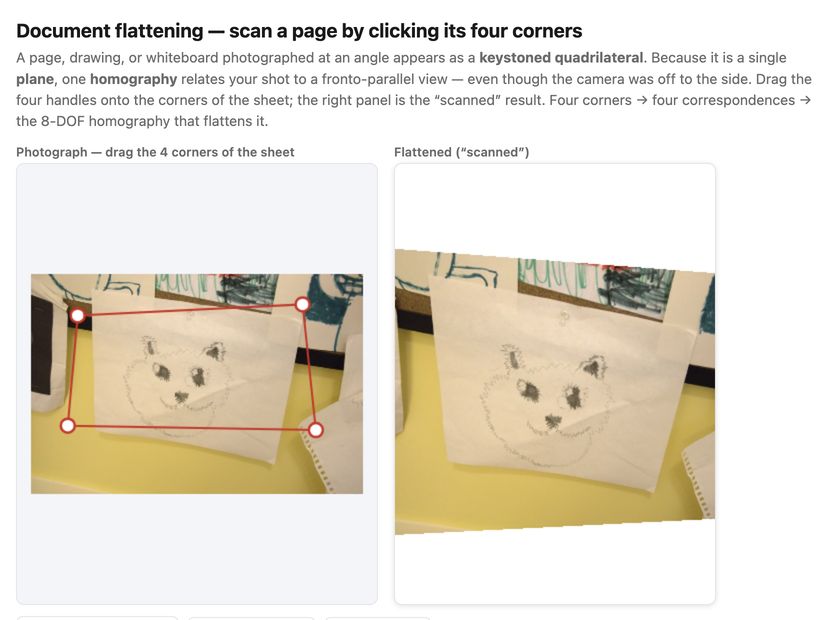
fig-rectify-before-after · rectifying by homography — a keystoned input with four corner handles dragged onto a known rectangle (vanishing point marked) re-rendered fronto-parallel by $\text{out}(\mathbf x)=\text{in}(H^{-1}\mathbf x)$ 🟨
⬜ figure not yet created
`fig-vanishing-point-autosolve` (detected parallel-line bundles meeting at vanishing points → the homography that sends the vertical VP to infinity straightens the verticals) fig-vanishing-point-autosolve
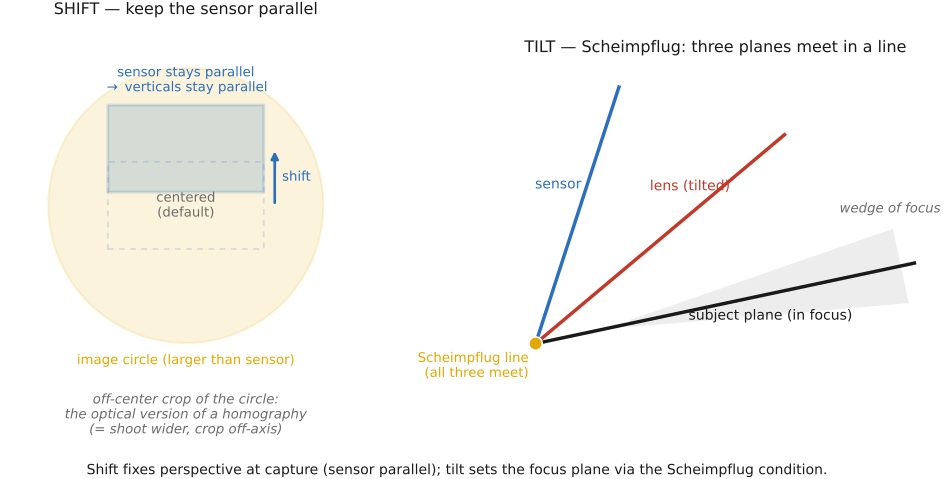
fig-tilt-shift-scheimpflug
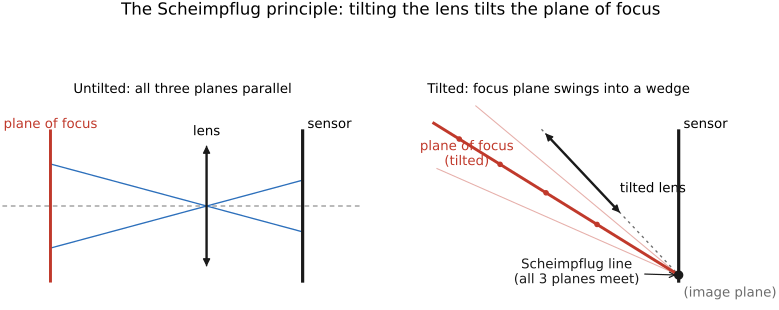
fig-tilt-shift-scheimpflug · fixing perspective in the lens — shift moves the sensor within an oversized image circle while staying parallel to the façade (no converging verticals), tilt sets the focus plane via the Scheimpflug condition 🟨
⬜ figure not yet created
`fig-rectify-resample-stretch` (the rectified output's non-uniform resolution: the far/top corners are enlarged and softened while the near edge is compressed — why one homography only rectifies a *plane*). fig-rectify-resample-stretch
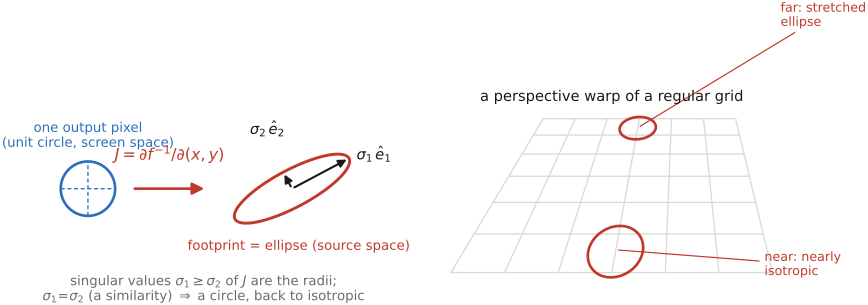
💡 **Big lesson (L16 recurrence · prefilter the shrinking corners):** rectification does not resample uniformly — to make the *far* (top) of the façade as wide as the *near* edge, the homography **enlarges** the top corners (upsample → just interpolate) and **compresses** other regions (downsample → must prefilter, or alias). So a faithful rectifier applies the **prefilter-before-downsample** discipline *per region*, with the kernel footprint set by the **local Jacobian** of $H$ (how much each area shrinks). (→ see Big lesson **L16**, [[Warping and resampling]] / BASIC Resampling.)
equations
the rectifying map is a **homography** $\mathbf x' \simeq H\mathbf x$ (homogeneous
divide by $w'$) — the projective warp of [[Warping and resampling]]
solve $H$ from **4 correspondences** (building corners → target rectangle), each pair giving 2 linear equations, $H$ up to scale → 8 DOF (least squares / SVD, per [[Manual panorama stitching from multiple views]])
applied by **inverse warp + resample** $\text{out}(\mathbf x)=\text{in}\big(H^{-1}\mathbf x\big)$
the **auto** constraint: choose $H$ so the bundle of (imaged) parallel lines maps to a **vanishing point at infinity** (verticals become vertical / parallel).
Part 7 MATCHING PIXELS ACROSS SPACE AND TIME
💡 **Big lesson (L17 · estimation half):** correspondence-then-transport — this part owns the **hard, ill-posed estimation** half (where did each pixel go?), ill-posed by the **aperture problem** and broken by occlusion and large motion; [[Warping and morphing]] owns the transport. Matching is literally the inverse of warping: warping consumes a coordinate map, matching produces one.
7.1 Sparse matching
7.2 Feature tracking
fig-track-vs-flow
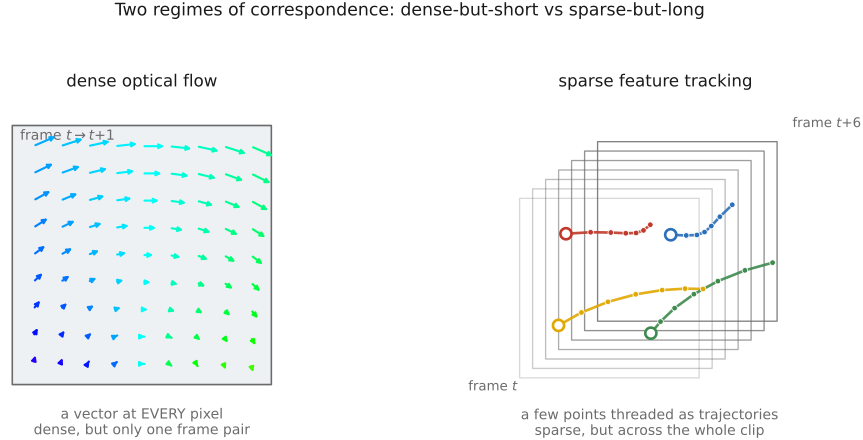
fig-track-vs-flow · two regimes of correspondence — dense flow (one pair, a vector at every pixel; dense but short) vs tracking (a few points threaded as trajectories across many frames; sparse but long) 🟨
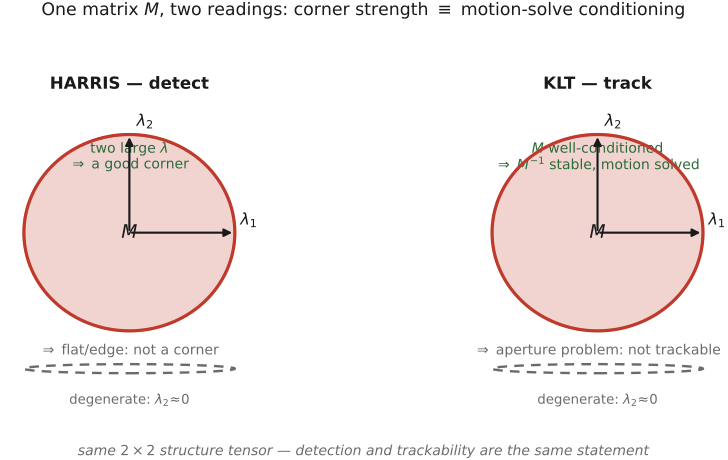
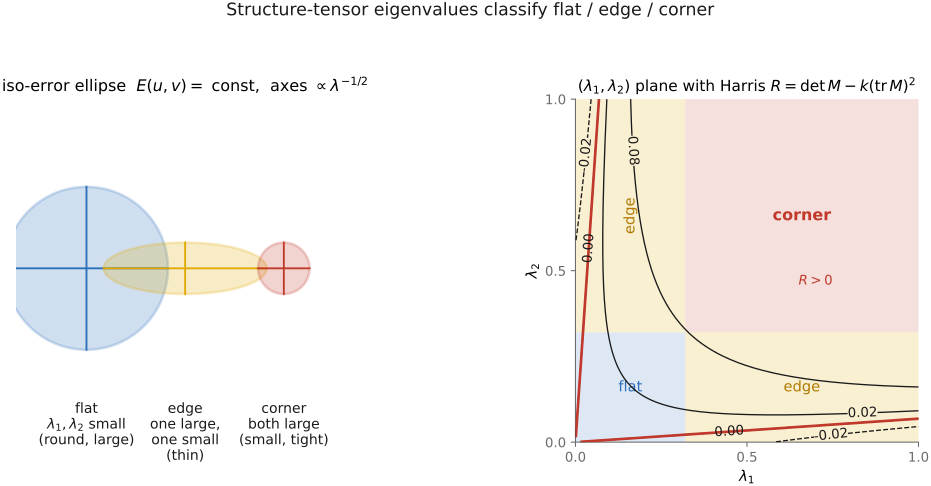
fig-klt-is-harris
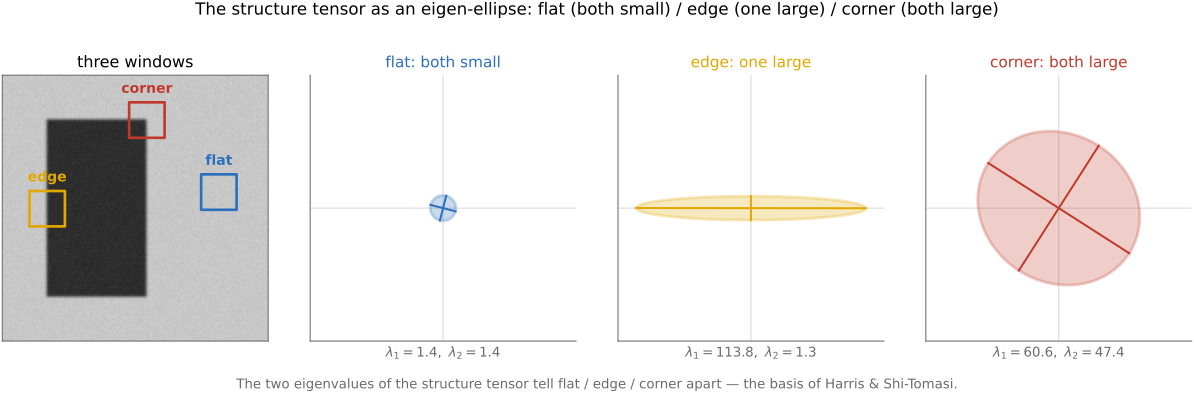
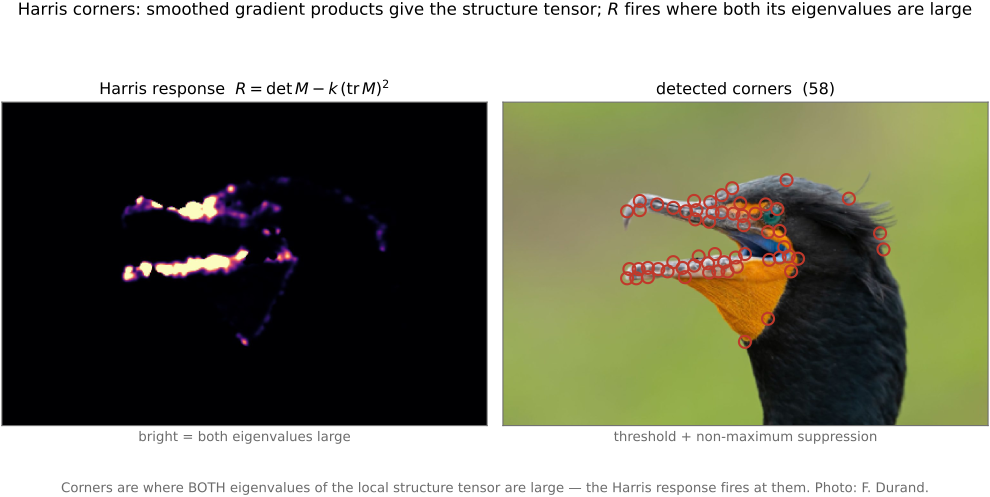
fig-klt-is-harris · one matrix, two readings — the same structure-tensor ellipse read as Harris ("good corner to detect?") and as KLT ("motion well-conditioned?"); detection and trackability are the same statement about $M$ 🟨
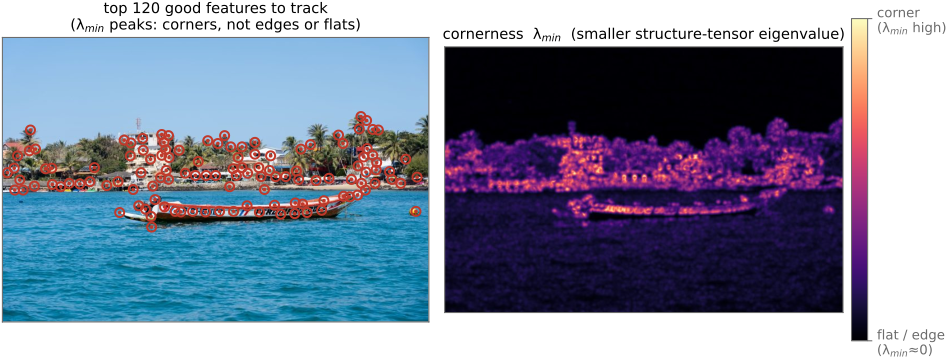
fig-good-features-to-track
fig-good-features-to-track · Shi–Tomasi points land only on corners — markers clustering on corners/junctions, never flat sky or single edges, with windows annotated by their eigenvalue pair; "good feature" = "well-conditioned $M$" = "corner" 🟨
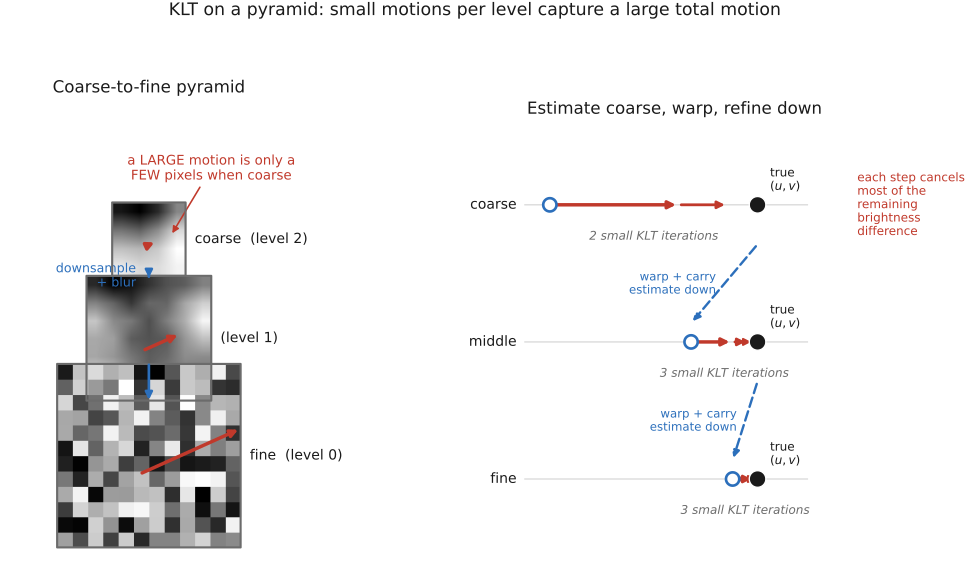
⬜ figure not yet created
`fig-klt-pyramid-iteration` (per-feature coarse-to-fine: predict on a blurred level, warp, re-solve the $2\times2$ system, refine down the pyramid — the LK iteration localised to one patch) fig-klt-pyramid-iteration
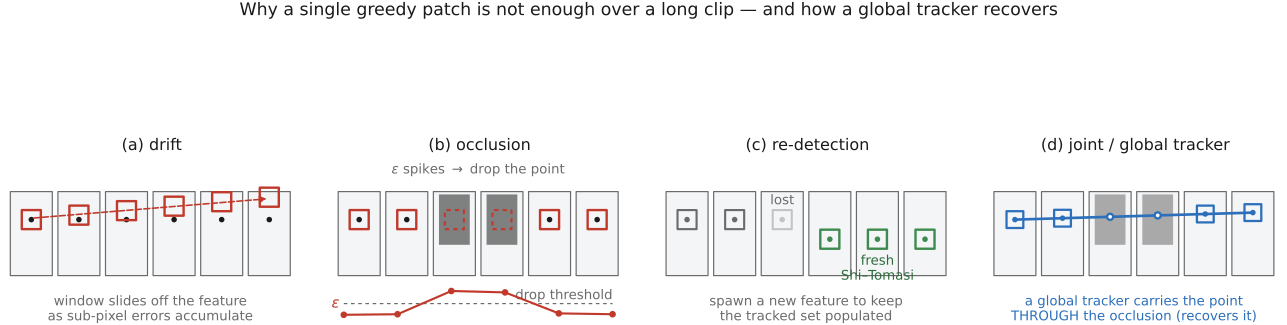
fig-track-drift-occlusion
fig-track-drift-occlusion · three ways a long track fails — drift (window slides off as sub-pixel errors accumulate), occlusion (dissimilarity spikes → drop the feature), re-detection (a fresh Shi–Tomasi point spawned to replace a lost one) 🟨
⬜ figure not yet created
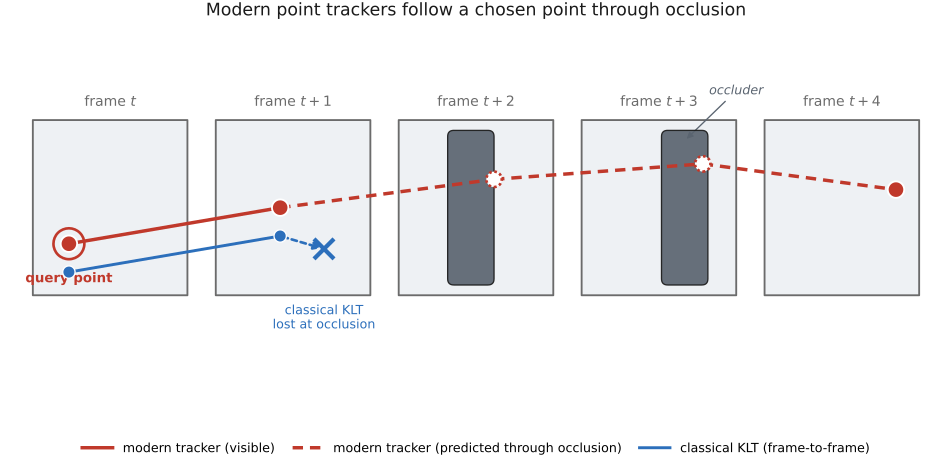
`fig-modern-point-trackers` (KLT's single greedy patch vs a learned tracker — CoTracker — tracking *many* points *jointly* through an occlusion, recovering the point when it reappears) fig-modern-point-trackers
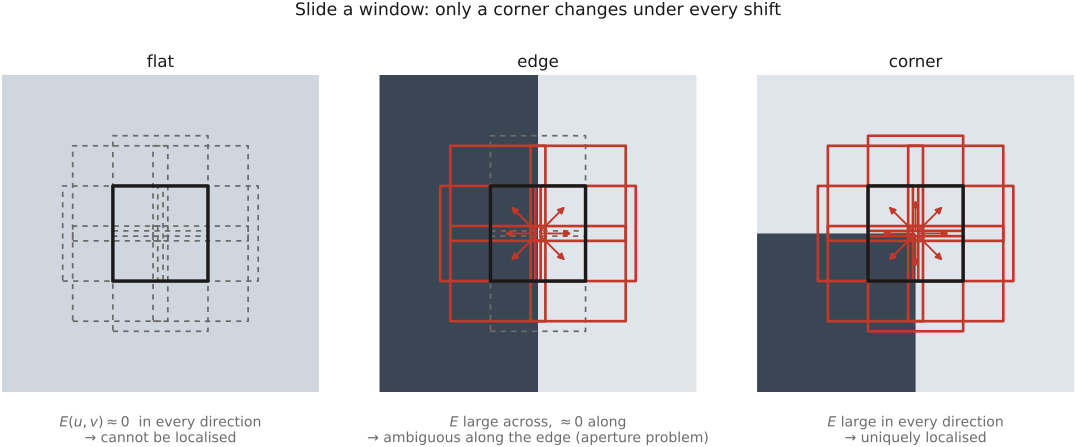
The previous section estimated a **dense** flow field — a motion vector at *every* pixel — between *one* pair of frames. This section does the complementary thing: follow a **sparse** handful of *distinctive* points across *many* frames. It is the same physics (brightness constancy, the aperture problem) restricted to the places where the math is well-behaved, and run forward in time. The payoff of the restriction is the chapter's spine: **the matrix that says a patch is a good corner to *detect* is the same matrix that must be invertible to *track* it.** Detect with it (Harris), track with it (KLT), refuse to track where it is singular (Shi–Tomasi). One $2\times2$ matrix, three jobs.
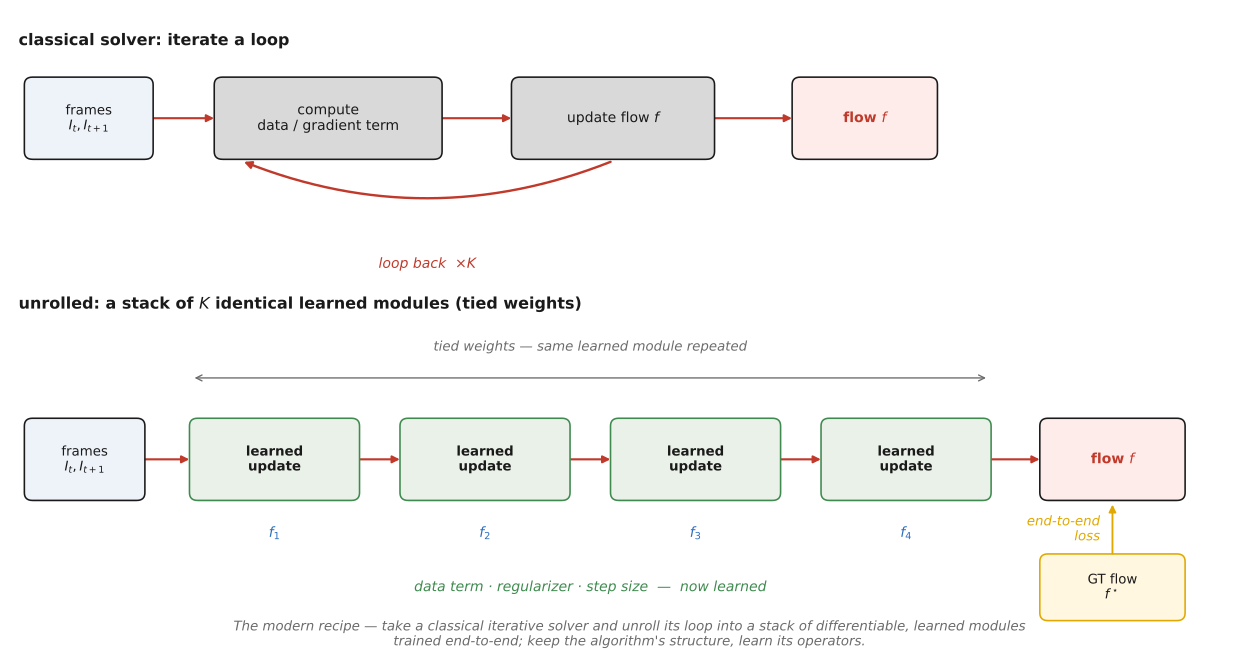
💡 **Big lesson (recurrence of L8 — a learned operator swaps a hand-designed prior for one learned from data):** classical KLT tracks a hand-built brightness patch by a hand-derived least-squares update; modern point trackers (PIPs, CoTracker) keep the *exact same task* — "where did this point go?" — but replace the patch with **learned features** and the greedy per-point update with a **learned, occlusion-aware, track-together** module. The skeleton (initialise a trajectory, iteratively refine it against appearance, predict visibility) is unchanged; only the operator is now fit to data. (→ see Big lesson **L8**; first appears in [[Deep learning]]. The same "neuralise the classical iteration" move powers RAFT in [[Optical flow]].)
equations
per-feature LK normal equations $M\,\Delta\mathbf{u}=\mathbf{b}$, with the **structure tensor** $M=\sum_{\mathbf{x}\in W} \begin{psmallmatrix}I_x^2 & I_xI_y\\ I_xI_y & I_y^2\end{psmallmatrix}$ and $\mathbf{b}=-\sum_{\mathbf{x}\in W} I_t\begin{psmallmatrix}I_x\\ I_y\end{psmallmatrix}$ → update $\Delta\mathbf{u}=M^{-1}\mathbf{b}$
**Shi–Tomasi trackability** $\min(\lambda_1,\lambda_2)>\lambda_{\min}$ (a feature is trackable iff $M$ is well-conditioned)
affine-warp **dissimilarity** $\varepsilon=\sum_W [\,I_2(A\mathbf{x}+\mathbf{d})-I_1(\mathbf{x})\,]^2$ (occlusion / lost-track test)
7.3 Robustness: the ratio test and RANSAC
7.4 Deep learning approaches to sparse matching
7.5 Misc: fast matching
7.6 Optical flow
fig-flow-field-colorkey
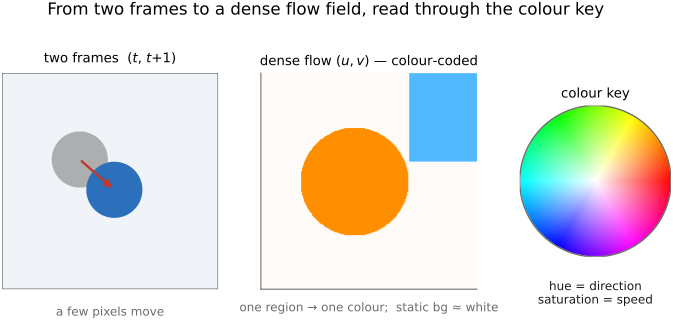
fig-flow-field-colorkey · from two frames to a dense field — a per-pixel flow shown with the standard colour key (hue = direction, saturation = speed, after Baker et al. 2011); coherent regions read as one colour, static background near-white
⬜ figure not yet created
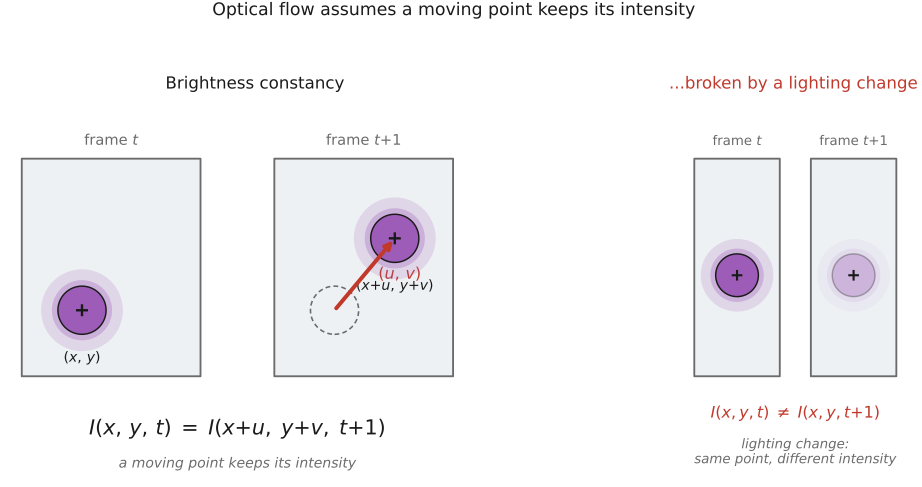
`fig-brightness-constancy` (a patch at $(x,y,t)$ reappears at $(x+u,y+v,t+1)$ with the *same* intensity — the assumption, and where it breaks: lighting change, specularity, occlusion) fig-brightness-constancy
fig-flow-constraint-line
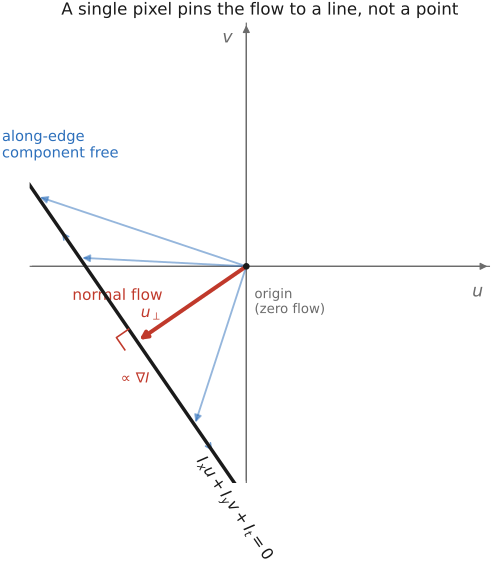
fig-flow-constraint-line · one equation, a line of answers — $I_x u + I_y v + I_t = 0$ as a line in the $(u,v)$ plane; the gradient fixes only the normal component (normal flow), the along-edge tangent undetermined 🟨
fig-aperture-problem
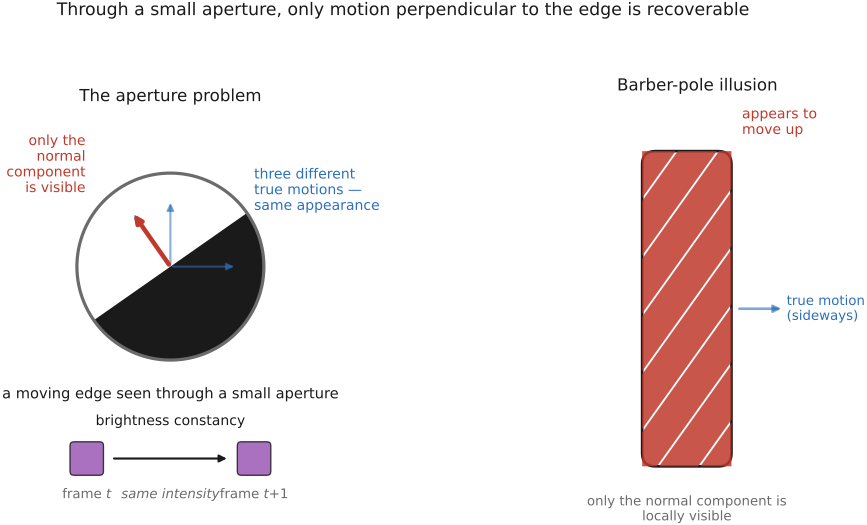
fig-aperture-problem · why one pixel is not enough — a straight edge through an aperture (three true motions, identical appearance, only normal recoverable) and the barber-pole illusion (diagonal stripes appearing to move straight up) 🟨
fig-zoom-mechanism
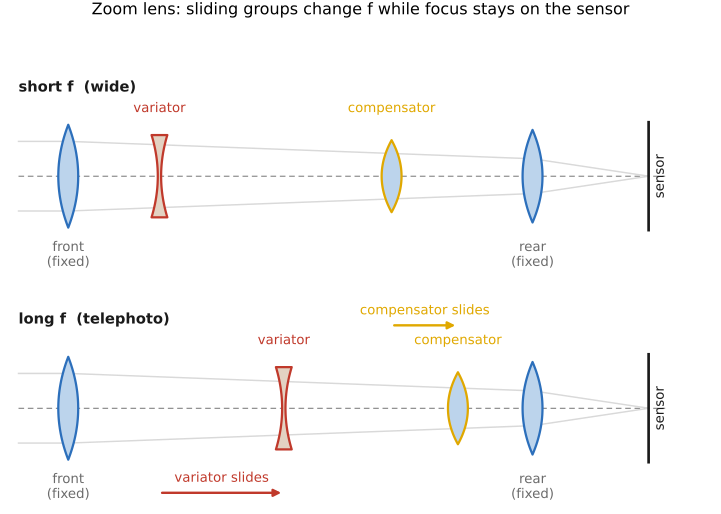
fig-zoom-mechanism · a zoom at two focal lengths (short-f/wide vs long-f/tele): moving variator + compensator groups slide along the axis to change f while the focal plane (sensor) stays fixed; motion arrows between states
fig-flow-corner-edge-flat
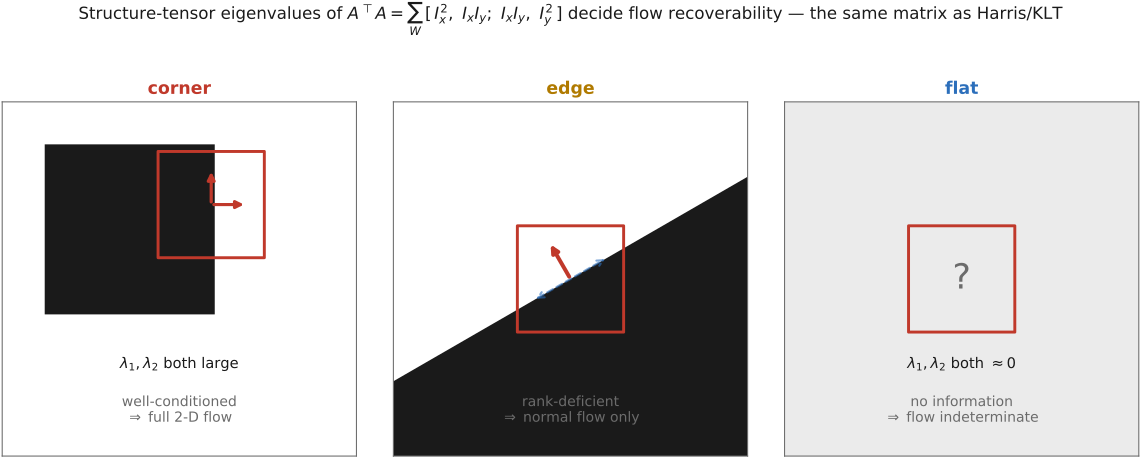
fig-flow-corner-edge-flat · the structure tensor $A^\top A$ deciding where flow is solvable — corner (two large eigenvalues, full 2-D flow), edge (rank-deficient, only normal flow), flat (indeterminate); the same picture that selected Harris corners 🟨
⬜ figure not yet created
`fig-LK-vs-HS` (Lucas–Kanade: solve a tiny system per window, local fig-klt-pyramid-iteration
fig-mc-as-flow
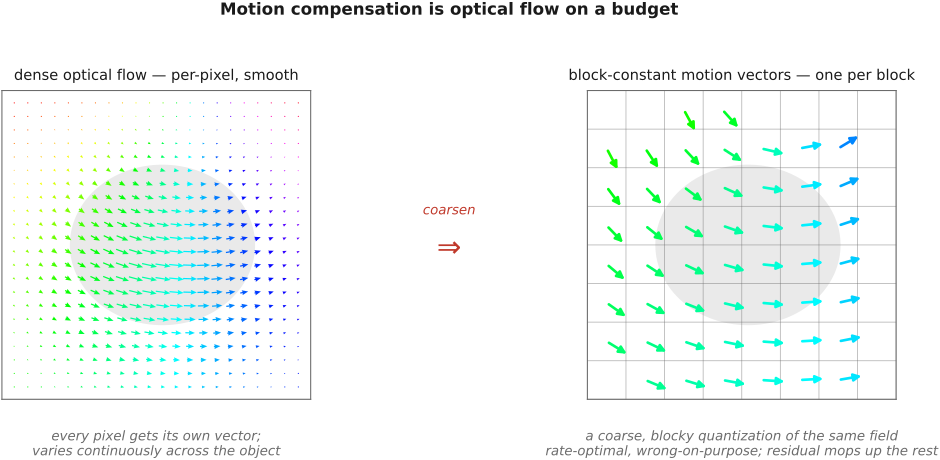
fig-mc-as-flow · same correspondence, two budgets — a dense smooth optical-flow field vs the codec's one-constant-vector-per-block field; the same "where did this come from?" coarsened to what is cheap to estimate and transmit 🟨
fig-coarse-to-fine-flow
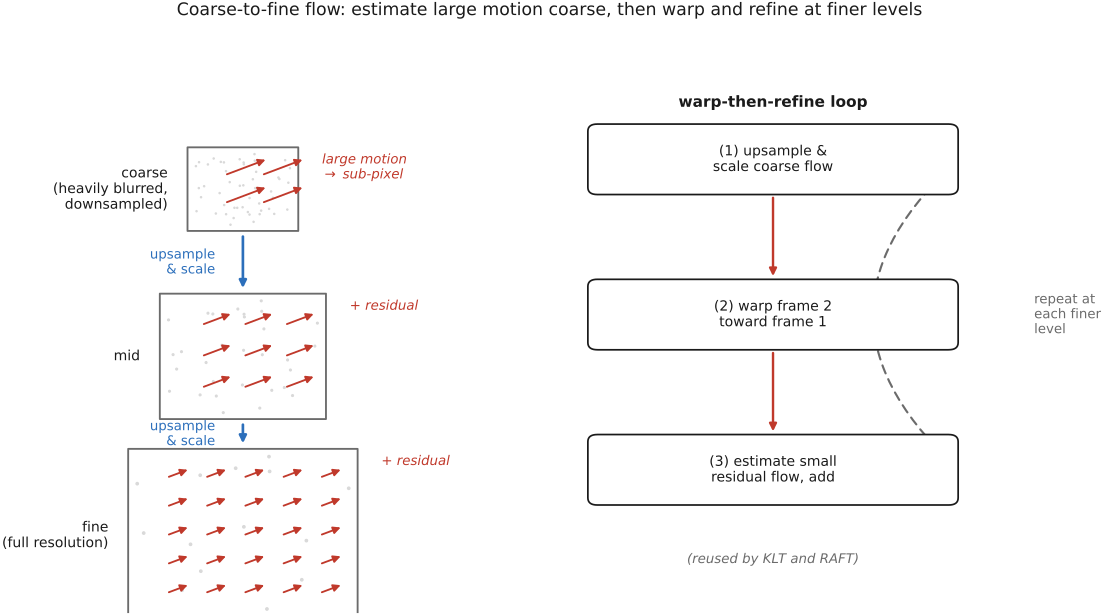
fig-coarse-to-fine-flow · making large motion sub-pixel — a Gaussian pyramid where coarse displacement is fractional; at each level upsample-and-scale, warp, estimate the small residual and add; a Laplacian view of the flow 🟨
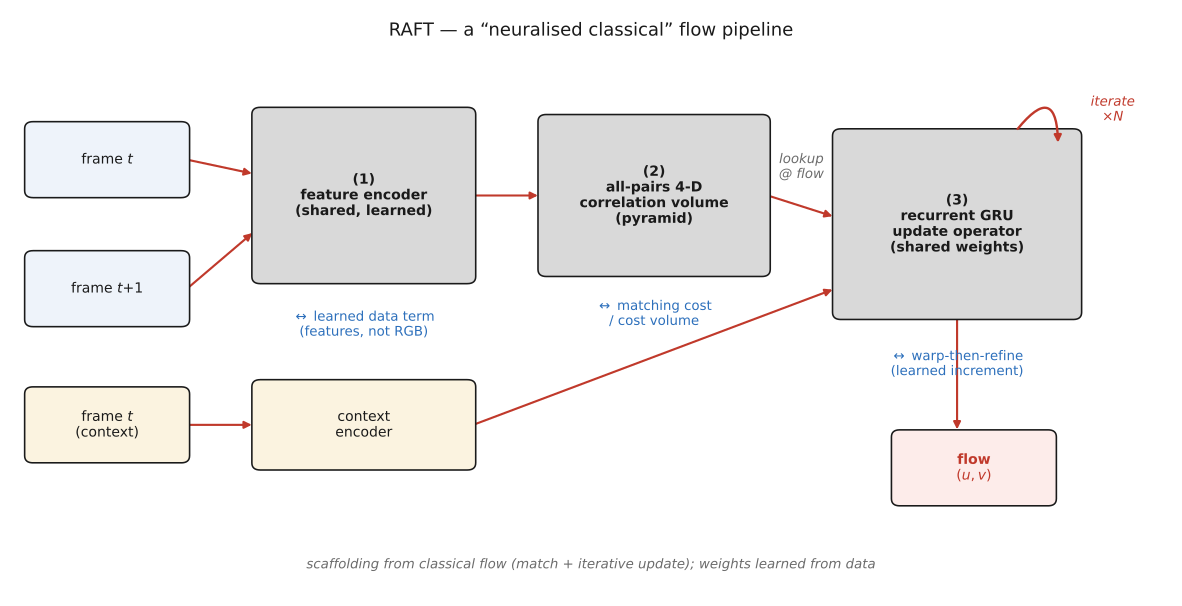
fig-raft-skeleton
fig-raft-skeleton · RAFT, the classical pipeline neuralized — learned feature + context encoders, an all-pairs 4-D correlation volume, and a recurrent GRU update operator iterating; the boxes line up with data term, cost volume, and warp-then-refine 🟨
💡 **Big lesson (the chapter's core — *brightness constancy + the aperture problem*):** track a point by the one thing that's (assumed) conserved — its **brightness**. Linearizing that single scalar equation gives **one constraint per pixel**, $I_x u + I_y v + I_t = 0$, for **two** unknowns $(u,v)$ — so locally motion is **fundamentally underdetermined**: you can only see the component **along the image gradient** (normal flow), never the component **along an edge** (the *aperture problem*). Every flow method is a strategy for supplying the missing second equation — from a **neighbor** (Lucas–Kanade: pixels in a patch share a motion → the well-/ill-posedness is the **same corner/edge/flat structure tensor as Harris**), from a **smoothness prior** (Horn–Schunck), or from **learned context** (RAFT). *Only the gradient carries motion information, and one gradient is never enough.*
7.7 Deep learning approaches to optical flow
Part 8 SINGLE IMAGE COMPUTATIONAL PHOTOGRAPHY
8.1 Recap: tone mapping
fig-tonemap-real
fig-tonemap-real · global vs local tone mapping RESULT on a real HDR photo (seal at marina): naive single exposure · global Reinhard (one slope flattens local contrast → hazy) · local bilateral base+detail split (range fits, detail stays crisp) — real-image companion to `fig-tonemap-global-vs-local` (BASIC tone mapping)
fig-tonemap-taxonomy
fig-tonemap-taxonomy · a taxonomy of local tone mapping — bilateral base/detail, gradient-domain, local Laplacian, exposure fusion, learned — placed on a shared axis 🟨
⬜ figure not yet created
`fig-darkroom-dodge-burn` (a Zone-System / dodge-&-burn darkroom print beside its digital local-tone-mapping analogue) fig-editing-lr-vs-ps
This chapter doesn't introduce new algorithms — it **gathers** the tone-mapping thread that has run since BASIC into one picture, and ties it back to the **analog darkroom** where tone control began. (Scope note: this single-image recap deliberately covers the **single-image** operators; the **multi-image** tone mapping — HDR *merge* / exposure fusion — lives in [[Multiple exposure imaging]] and is only forward-referenced here. **See Known Issue.**)
8.2 Super-resolution and image priors
fig-sr-ill-posed
fig-sr-ill-posed · many sharp HR images collapse to the same blurry LR image — the SR inverse is one-to-many (ill-posed); a prior picks one 🟨
fig-isp-walk-real
fig-isp-walk-real · the ISP pipeline walked on ONE real photo (boatman gathering lotus, overcast lake, Sony DNG): raw (linear, no WB — flat & green) · white balance · tone+colour (gamma encode) · denoise · sharpen · finished JPEG, frame-coloured by linear-light vs encoded regime — real-image companion to `fig-isp-block-diagram` (Recap ISP, BASIC)
⬜ figure not yet created
`fig-sr-recon-vs-halluc` (one low-res crop → reconstruction-based result from a burst (real detail) vs hallucination-based result from a learned prior (invented but plausible detail)) fig-sr-recon-vs-halluc
fig-burst-subpixel
fig-burst-subpixel · hand-jitter across a burst lands samples between the LR grid points; merging the sub-pixel-shifted frames fills the HR grid 🟨
⬜ figure not yet created
aliasing made useful, after Wronski 2019)
fig-pnp-loop
fig-pnp-loop · Plug-and-Play / RED: alternate a data-fidelity step with a denoiser-as-prior step until convergence — the prior is a black-box denoiser 🟨
fig-denoiser-as-prior-spectrum
fig-denoiser-as-prior-spectrum · one PnP/RED prior slot, ever-stronger denoisers: hand-built → classical → learned → diffusion score (GenAI / Super-res)
💡 **Big lesson (L10 · The prior is not optional):** when the measurement genuinely destroys information — super-resolution past the sensor's sampling, deblurring at killed frequencies, inpainting a hole — *no amount of cleverness recovers it from the data alone*. A **prior** (what natural images look like) is what selects an answer; it is a load-bearing part of the algorithm, not a tuning knob. The honest split: **reconstruction** priors fuse genuinely-measured extra samples; **hallucination** priors *invent* plausible detail that was never measured. (Registered in [[Big Lessons]] as **L10**; first appears here; recurs in [[#Blind deblurring]] — blind deblurring & dark-channel prior — and forward in [[Generative AI and diffusion]].)
equations
SR forward model $y = (k * x)\downarrow_s + n$ (blur by PSF $k$, downsample by factor $s$, add noise $n$)
MAP / variational recovery $\hat{x} = \arg\min_x \tfrac{1}{2}\lVert (k*x)\downarrow_s - y\rVert^2 + \lambda\, \Phi(x)$ (data-fit + prior $\Phi$)
PnP iteration (HQS form) — alternate a **data-fit** step $z \leftarrow \arg\min_x \tfrac{1}{2}\lVert (k*x)\downarrow_s - y\rVert^2 + \tfrac{\rho}{2}\lVert x - \tilde{x}\rVert^2$ and a **denoise** step $\tilde{x} \leftarrow \mathcal{D}_\sigma(z)$ (the prior, *any* denoiser $\mathcal{D}$)
RED gradient $\nabla \Phi(x) = x - \mathcal{D}(x)$ (prior gradient = residual of a denoiser)
Tweedie $\hat{x} = z + \sigma^2\, \nabla_z \log p_\sigma(z)$ (the score IS a Gaussian denoiser → diffusion = iterated $\mathcal{D}$)
8.3 Blind deblurring
fig-naive-deconv-noise
fig-naive-deconv-noise · naive inverse filtering explodes: dividing by the blur's spectrum amplifies noise at its near-zeros 🟨
fig-wiener-tradeoff
fig-wiener-tradeoff · the Wiener filter as a regularised inverse — the $1/\mathrm{SNR}$ term trades deconvolution sharpness against noise amplification 🟨
fig-metric-degradation-gallery
fig-metric-degradation-gallery · one clean photo vs four degradations (1-px shift, low-q JPEG, noise, blur), each labelled with PSNR + SSIM — PSNR and SSIM mostly agree but disagree where L2 is blind (shift scores worst PSNR yet looks identical; blur keeps high PSNR yet softens texture) (Image metrics, BASIC)
fig-natural-image-gradient-prior
fig-natural-image-gradient-prior · natural-image gradients are heavy-tailed (mostly flat, rare strong edges) vs a Gaussian — the sparse prior that breaks the blind tie 🟨
fig-camera-shake-nonuniform
fig-camera-shake-nonuniform · camera-shake blur is spatially varying — a rotation gives a different PSF in each corner of the frame 🟨
fig-bw-conversions
fig-bw-conversions · one colour photo → black & white several ways: single channel (R/G/B) · average · weighted luminance · red-filter channel mix (dark sky) · an isoluminant pair collapsing to one grey — the choices differ (Converting to B&W, Color technology)
fig-point-op-contrast-spaces
fig-point-op-contrast-spaces · the same contrast (×gain about mid-gray) in gamma (sRGB) / linear (no gamma) / log: three outputs + remapping curves (linear crushes shadows, log preserves them; black clamped to ε for log) 🟨
⬜ figure not yet created
`fig-colorization-scribbles` (gray photo + a few color scribbles → propagated color, stopping at edges) fig-colorization-scribbles
The previous chapter inverted a **known** blur on a **clean** image — a textbook least-squares solve. Reality breaks both assumptions: sensors add **noise**, and you usually **don't know the blur kernel**. This chapter is what you do then. The unifying frame is one line — *recovery = data-fit + prior* — and each section just swaps in the prior that suits the degradation. Forward-ref the punchline early: when the prior is *learned* rather than hand-designed, this is exactly [[Machine learning]] and [[Super-resolution and image priors]] (PnP/RED).
💡 **Big lesson:** *diagonalize when you can* — shift-invariant blur is a **convolution**, so it's **diagonal in Fourier**: deblurring becomes a per-frequency **division** by the kernel's frequency response, and the Wiener filter is just that division, *regularized* per frequency. (→ see Big lesson L5, first placed in [[Linearity, Fourier, Aliasing and deblurring]] — recurs here as the reason both inverse and Wiener filters have one-line Fourier forms.)
equations
forward model with noise $Y = K * X + n$
**naive (inverse-filter) deconvolution** $\hat X = \mathcal F^{-1}\!\big[\hat Y / \hat K\big]$ — blows up where $\hat K \to 0$
**Wiener / regularized inverse** (Fourier, per frequency) $\hat X = \dfrac{\overline{K}\,Y}{|K|^2 + \mathrm{SNR}^{-1}}$ (equivalently $|K|^2/(|K|^2 + S_n/S_x)$ applied to the inverse filter)
**blind objective** $\displaystyle (\hat X,\hat K) = \arg\min_{X,K}\
\underbrace{\lVert K * X - Y\rVert^2}_{\text{data fit}} + \underbrace{\lambda\,\rho(\nabla X)}_{\text{image prior}} + \underbrace{\mu\,\psi(K)}_{\text{kernel prior}}$ with $\rho$ a **sparse / heavy-tailed** gradient penalty ($\lVert\nabla X\rVert_\alpha,\ \alpha<1$)
**color2gray** objective = match grayscale gradients to (signed) color-difference gradients $\min_g \sum \lVert \nabla g - \theta\rVert^2$
**colorization** objective = minimise color variation between pixels weighted by intensity affinity $\min_U \sum_x \big(U(x) - \sum_{x'\in N(x)} w_{xx'} U(x')\big)^2$ (developed in [[Edge-preserving techniques]])
8.4 Dehazing
fig-tonemap-real
fig-tonemap-real · global vs local tone mapping RESULT on a real HDR photo (seal at marina): naive single exposure · global Reinhard (one slope flattens local contrast → hazy) · local bilateral base+detail split (range fits, detail stays crisp) — real-image companion to `fig-tonemap-global-vs-local` (BASIC tone mapping)
Haze isn't a deblurring problem — light is **scattered**, not convolved — but it's the same *idea* as the previous chapter in a new costume: an image-formation model that is **under-determined**, made solvable by **one well-chosen statistical prior**.
equations
**haze image model** $Y(x)=t(x)\,X(x) + A\,(1-t(x))$ (transmission $t=e^{-\beta d}$, airlight $A$, depth $d$, scattering coeff $\beta$)
**dark channel** $X^{\text{dark}}(x)=\min_c \min_{x'\in\Omega(x)} X_c(x')$
8.5 Style transfer
fig-style-transfer-zoo
fig-style-transfer-zoo · the zoo of style transfer — patch/analogies, texture statistics (Gram), neural optimisation, feed-forward, image-to-image GANs — same skeleton, swap the prior 🟨
fig-point-op-levels
fig-point-op-levels · levels on a real (flat/hazy) photo: bunched-up luma histogram stretched out to fill [0,1] by setting a black point and a white point — input + after + transfer curve with the clip-and-stretch anchors and the two histograms (Point operations → Black point, white point, and levels, BASIC)
fig-neural-style-content-style
fig-neural-style-content-style · neural style: a content loss (deep feature match) balanced against a style loss (Gram-matrix match), summed into one objective 🟨
The thread of this chapter is one sentence: **match the *look* of a reference onto a target, keeping the target's content.** It runs from **classical** methods — match patches or low-order statistics by hand — to **learned** ones — match deep-feature statistics, or learn a whole image-to-image mapping. Several of these pieces appear as *models* in [[Deep learning]]; here they're gathered under the single idea of **style transfer**.
equations
(light) **neural style** objective $\min_{\hat I}\ \alpha\,\lVert\phi_\ell(\hat I)-\phi_\ell(I_{\text{content}})\rVert^2 + \beta\sum_\ell \lVert G_\ell(\hat I)-G_\ell(I_{\text{style}})\rVert^2$, with **Gram matrix** $G_\ell = \phi_\ell\phi_\ell^\top$ (style = feature correlations)
feed-forward variant trains a net to minimize the same **perceptual loss** in one pass
8.6 Inpainting, texture synthesis
fig-inpaint-prior-spectrum
fig-inpaint-prior-spectrum · the hole-filling prior spectrum: PDE/diffusion (smoothness) → exemplar/texture (self-similarity) → learned/generative (semantics) 🟨
fig-pde-isophote-diffusion
fig-pde-isophote-diffusion · PDE inpainting continues isophotes (level lines) smoothly into the hole — diffusion of structure inward (Bertalmío 2000) 🟨
fig-thin-lens-vs-real
fig-thin-lens-vs-real · side-by-side "convenient lie vs reality": ideal thin lens (single plane, all parallel rays → one focus) vs a real thick multi-surface lens where outer rays focus short of the paraxial focus (spherical aberration → blur, no single point)
fig-efros-leung-growth
fig-efros-leung-growth · Efros–Leung non-parametric synthesis: grow one pixel at a time by matching its known neighbourhood against the sample 🟨
fig-quilting-seam
fig-quilting-seam · image quilting: lay overlapping patches and cut along the minimum-error boundary so seams disappear (Efros–Freeman 2001) 🟨
⬜ figure not yet created
`fig-object-removal` (Criminisi: a person erased, the hole filled by confidence-/edge-priority patch order so structures continue across it) fig-object-removal
⬜ figure not yet created
`fig-highlight-recovery` (a clipped specular spot → inpainted plausible surface color) fig-highlight-recovery
This chapter is the most literal instance of 💡 L10. A hole has **no measurement at all** — the only thing that can fill it is a model of what images look like. So inpainting is best read as a **ladder of priors**, from the weakest ("be smooth") to the strongest (a learned generative model), and the whole chapter is *which prior, and where it copies-vs-invents*. The recurring honesty: filled pixels are **plausible, never measured** — verifiable when the prior copies genuine structure from elsewhere, an outright **guess** when it hallucinates.
💡 **Big lesson (recurrence of L10 · the prior is not optional):** filling a hole is the purest case — there is *zero* data inside it, so **100% of the answer comes from the prior.** Smoothness, self-similarity, a photo database, a learned net — each is a different prior, and the result is exactly as good (and as honest) as the prior is. (→ see Big lesson **L10**, first placed in [[#Super-resolution and image priors]]; here taken to its extreme — no data, all prior.)
8.7 Patch match
fig-nnf-field
fig-nnf-field · the nearest-neighbour field: every patch points to its best match elsewhere — visualised as a colour-coded offset map 🟨
fig-patchmatch-three-steps
fig-patchmatch-three-steps · PatchMatch's three moves — random initialisation → propagation (good offsets spread to neighbours) → random search (refine locally) 🟨
⬜ figure not yet created
`fig-patchmatch-apps` (one image → hole-filled, retargeted (wider, no distortion), reshuffled (an object dragged, surround re-synthesized)) fig-patchmatch-apps
fig-shiftmap-labeling
fig-shiftmap-labeling · Shift-Map editing as a graph-cut labelling: each output pixel is assigned a shift, optimised for data + smoothness 🟨
The previous chapter's exemplar methods (Efros–Leung, Criminisi) all live or die on one operation: *for each patch, find its most similar patch elsewhere.* Done naively that's a full search per patch — far too slow to be interactive, and the real reason texture synthesis felt like a batch job. This chapter is the **two ways to make that fast or optimal**: a brilliant **randomized heuristic** (PatchMatch) that gets a near-perfect answer in milliseconds, and a **global graph-cut** (Shift-Map) that gets the *optimal* answer more slowly. The unifying object is the **nearest-neighbour field**; the unifying lesson is 💡 **L12** — *the edit is an optimization over a correspondence, and the energy you pick is the design.*
💡 **Big lesson (recurrence of L12 · image edits as optimization on a graph):** "where does each output pixel come from?" is a **labelling** — assign every output pixel a **shift** into the input. Pick the **energy** — a data term (respect the user's keep/remove/resize constraints) plus a **seam** term (neighbouring pixels should take consistent offsets, so cuts fall on real edges) — and a generic **graph-cut** solver does the rest. PatchMatch is the *fast heuristic* answer to the same labelling; Shift-Map is the *globally-optimal* one. (→ see Big lesson **L12**, first placed in Seam optimization; it is the affinity lesson L4 turned into a *cut*.)
8.8 Compositing, segmentation and matting
fig-matting-equation
fig-matting-equation · the matting equation — one boundary pixel is $\alpha F + (1-\alpha)B$: a foreground colour, a background colour, and a soft coverage $\alpha$ 🟨
fig-graphcut-segmentation
fig-graphcut-segmentation · binary segmentation as a min cut: pixel nodes, source/sink terminals, t-links (Dp) + n-links (Vpq, small across edges), min cut severs the cheap edges (Seam optimization)
fig-segmentation-graphcut
fig-segmentation-graphcut · binary segmentation as a min-cut on a grid graph wired to source/sink terminals; the cut is the object boundary (GrabCut inset) 🟨
fig-segmentation-three-framings
fig-segmentation-three-framings · three framings of segmentation — min-cut, normalized-cut, and least-cost path (intelligent scissors) — on the same boundary 🟨
⬜ figure not yet created
`fig-trimap-to-alpha` (user trimap FG/BG/unknown → recovered continuous $\alpha$ over the unknown band, e.g. hair, after closed-form matting) fig-trimap-to-alpha
fig-key-vs-measure
fig-key-vs-measure · two ways to get the cut-out: *key* it (constrain the background — green screen) vs *measure* the separation (depth / IR / flash) 🟨
⬜ figure not yet created
`fig-harmonization` (a correct-$\alpha$ cutout pasted raw ("stickered on") vs Poisson-blended vs color/lighting-harmonized → "belongs") fig-harmonization
The previous chapters fixed *one* image — denoise, deblur, recover detail. Now we **combine** images: take the subject out of one photo and drop it into another. That splits cleanly into two jobs — **cut** (which pixels are the subject?) and **blend** (lay it down so the join is invisible). The first is **segmentation/matting**; the second is **compositing** (and its seamless cousins, Poisson and pyramid blending, built in EDGES MATTER and only pointed to here). The honest twist is that "which pixels are the subject" has no crisp answer at hair, fur, motion blur and glass — so the right object is not a binary mask but a **soft $\alpha$**, and the model of the world is one line: $C = \alpha F + (1-\alpha)B$.
💡 **Big lesson (recurrence of L12 · image edits as discrete optimization on a graph — the energy is the design):** a *hard* selection is exactly the **graph cut** of [[Seam optimization]] — pixels are nodes, you add a **region data term** (this color looks like foreground / background) and the same **edge-aware smoothness term** (cheap to cut where neighbouring colors differ), and min-cut/max-flow returns the **globally optimal** boundary for two labels. The optimizer is off-the-shelf; *choosing the energy is the whole design.* And the smoothness weight $V_{pq}\propto e^{-\lVert C_p-C_q\rVert^2/2\sigma^2}$ is an **affinity** — so this is also a recurrence of **L4 · edge-preserving = affinity**: the very same "how much do these two pixels belong together" that drove the bilateral filter, now deciding *where not to cut*. (→ see Big lesson **L12**, first placed in [[Seam optimization]], extending **L4**, first placed in [[Bilateral filtering]]; here both recur, as a *cut* and, below, as the *matting Laplacian*.)
equations
**compositing / matting equation** $C = \alpha F + (1-\alpha)B,\ \alpha\in[0,1]$ — *forward* = composite, *inverse* = matting (under-determined: 3 knowns, 7 unknowns per pixel)
**graph-cut segmentation energy** $E(\mathbf{L}) = \sum_p D_p(L_p) + \lambda \sum_{(p,q)\in\mathcal N} V_{pq}(L_p,L_q)$ with **data term** $D_p$ (color fit FG vs BG) and **edge-aware smoothness** $V_{pq}\propto \exp(-\lVert C_p-C_q\rVert^2/2\sigma^2)$ (an **affinity**, **L4**), minimized **exactly** for two labels by min-cut/max-flow (**L12**)
**closed-form matting** $\hat\alpha = \arg\min_\alpha \alpha^\top L\,\alpha$ s.t. trimap, where $L$ is the **matting Laplacian** (a pixel-affinity matrix from a local color-line model) — *the same affinity-Laplacian as colorization*
⬜ figure not yet created
`fig-intrinsic-decomp` (one photo → its **reflectance** layer (flat albedo) × **shading** layer (smooth illumination, no texture)) fig-intrinsic-decomp
fig-retinex-thresholding
fig-retinex-thresholding · Retinex: threshold the log-gradient (small steps = shading, large steps = reflectance edges), then re-integrate 🟨
⬜ figure not yet created
`fig-multi-illuminant-wb` (a scene lit warm tungsten on one side, cool window light on the other → one global white balance leaves *one* half wrong fig-multi-illuminant-wb
fig-hdr-merge-antelope
fig-hdr-merge-antelope · the HDR merge on a REAL bracket (Antelope Canyon): two exposures (short/long) + their per-pixel reliability weight maps → reliability-weighted radiance average → tone-mapped result; both sun and shadows readable
fig-reflection-removal-cues
fig-reflection-removal-cues · cues that separate a window reflection from the transmitted scene — ghosting/double-image, polarization, focus difference 🟨
fig-dichromatic-model
fig-dichromatic-model · the dichromatic reflection model: observed colour = a body (diffuse) component + a specular (illuminant-coloured) component — a plane in colour space 🟨
A single photograph mixes things the eye effortlessly keeps apart: it instantly reads a white shirt in shadow as *white-and-shadowed*, not as a grey shirt. The camera can't — it records the **product**, $I = R\cdot S$, illumination times surface (**L1**). This chapter is the project of **un-mixing** that product from one image — separating light from surface, or one layer of light from another. And it is the same story as super-resolution and deblurring: the un-mixing is **under-determined**, so a **prior** does the work (**L10**). The unifying frame is the **intrinsic-image decomposition**; everything else here is a special case of it. (These are the *single-image* methods; their easier *multi-image* cousins — flash/no-flash, a rotating polarizer, a light stage — live in **Computational illumination (Advanced)**.)
💡 **Big lesson (recurrence of L1 + L10):** because the world is **multiplicative** — what you measure is light **×** surface — recovering *either factor* from one image is **ill-posed**: a dark patch can be a dim surface in bright light or a bright surface in dim light, and the pixel can't tell you which. So separating illumination from reflectance (or a reflection from a transmission, a shadow from a stain, a highlight from a color) always needs a **prior** about how surfaces, light, and natural images behave — not a tuning knob but the load-bearing part of the method. (→ see **L1** · multiplicative world, FUNDAMENTALS; → see **L10** · the prior is not optional, [[#Super-resolution and image priors]].)
equations
**image as product** $I(x) = R(x)\,S(x)$ — log makes it additive $\log I = \log R + \log S$ (**L1/L2**)
**Retinex / gradient classification** — assign $\nabla(\log I)$ to $\nabla R$ if $|\nabla\log I| > \tau$ (sharp = reflectance) else to $\nabla S$ (smooth = shading), then **Poisson-integrate** each layer (**L9**)
**layer superposition (reflection)** $I = T + R$ (transmitted + reflected), under-determined → priors
**dichromatic model** $I(x) = m_d(x)\,\Lambda_{\text{body}} + m_s(x)\,\Lambda_{\text{illum}}$ (diffuse in the **surface** color direction + specular in the **illuminant** color direction — two color vectors, separable per pixel)
8.10 Non-photorealistic rendering
fig-npr-painterly-layers
fig-npr-painterly-layers · painterly rendering in coarse-to-fine brush layers: big strokes lay the ground, smaller strokes add detail where it matters (Hertzmann 1998) 🟨
fig-npr-cartoon-real
fig-npr-cartoon-real · the Winnemöller edge-preserving abstraction pipeline on a real photo: input → iterated bilateral flatten → luminance quantise → thresholded DoG ink → cartoon composite (NPR)
fig-npr-flow-dog
fig-npr-flow-dog · isotropic Difference-of-Gaussians lines vs flow-based coherent lines that follow the local edge tangent (Kang et al. 2007) 🟨
fig-npr-brush-pset
fig-npr-brush-pset · the brush-stroke problem-set figure: placing, orienting and sizing strokes from image gradients (course p-set) 🟨
Everything before this chapter tried to make images **truer** — sharper, cleaner, better-exposed. NPR does the opposite on purpose: it throws information **away** to make a photograph more like a **drawing or a painting** — to *communicate* rather than reproduce. The surprising lesson is that the tools are the **same** ones from EDGES MATTER: the operation that makes a good cartoon — **flatten the unimportant texture, keep and darken the meaningful edges** — is exactly the **edge-preserving / base–detail** decomposition (**L4**), used to *abstract* instead of *enhance*. A light chapter and a coda: *learned* stylization is in [[#Style transfer]] above and [[Deep learning]]; here we cover the **classical, structure-driven** core and the course **brush p-set**.
equations
(light) **stroke placement** — paint where the canvas differs from a **blurred reference** (error $> T$), stroke **orientation $\perp \nabla I$**, **size coarse→fine** across pyramid levels
**DoG edges** $D = G_{\sigma_1}*I - G_{\sigma_2}*I$, thresholded → ink lines
**abstraction** = **bilateral**-flattened (quantized) color **+** DoG edges overlaid
Part 9 OPTICS, LENSES, AND ABERRATION CORRECTION
Bottom line: in theory (thin-lens optics) everything converges nicely. In practice it is hard to make **all** the rays, from **all** field points, at **all** wavelengths, through **all** of the aperture, converge to the right place.
• because Snell's law is **non-linear** (the cubic term the thin lens dropped) and lenses are **not infinitely thin**;
• because the refractive index depends on **wavelength** (dispersion);
• because real surfaces, mounts, and air gaps add stray light, manufacturing error, and motion.
But with **computation** we can calibrate and correct — so the optics only has to get *close*, and software finishes the job. That partnership is the spine of the part.
---
9.1 Aberrations and optical challenges
fig-thin-lens-vs-real
fig-thin-lens-vs-real · side-by-side "convenient lie vs reality": ideal thin lens (single plane, all parallel rays → one focus) vs a real thick multi-surface lens where outer rays focus short of the paraxial focus (spherical aberration → blur, no single point)
fig-doublet-triplet-gauss
fig-doublet-triplet-gauss · cross-sections of three classic designs as stacked glass elements — achromatic doublet (2), Cooke triplet (3, + − +), double-Gauss (6, ≈symmetric about the stop); each labels element count and the aperture stop
fig-double-gauss
fig-double-gauss · a labelled double-Gauss cross-section: 6 elements ≈symmetric about the central aperture stop, parallel ray bundle traced to the focal plane; notes near-mirror symmetry cancels odd aberrations (coma, distortion, lateral colour)
fig-telephoto-vs-retrofocus
fig-telephoto-vs-retrofocus · two two-group schematics — telephoto (+ then −, principal plane H′ pushed in front → physical length < f) vs retrofocus/inverted-telephoto (− then +, long back-focal distance to clear the SLR mirror); marks f vs physical length, H′, F′
fig-zoom-mechanism
fig-zoom-mechanism · a zoom at two focal lengths (short-f/wide vs long-f/tele): moving variator + compensator groups slide along the axis to change f while the focal plane (sensor) stays fixed; motion arrows between states
fig-principal-planes-pupils
fig-principal-planes-pupils · a thick-lens cardinal-points diagram: principal planes H, H′, nodal points N, N′, entrance & exit pupils (the stop imaged by front/rear groups), focal points F, F′; f measured from H′ via the H→H′ equivalent-thin-lens construction
equations
thick-lens / system focal length via the two principal planes (FUNDAMENTALS' $1/f=1/u+1/v$ holds when $u,v$ are measured from $H, H'$)
f-number from the **entrance-pupil** diameter $N = f/D_{\text{EP}}$ (not the front element)
T-stop $T = N/\sqrt{\tau}$ (transmittance $\tau<1$)
effective vs back focal length.
9.2 Aberrations correction
fig-achromat-doublet
fig-achromat-doublet · an achromatic doublet: positive crown cemented to negative flint; singlet panel (red & blue split = chromatic aberration) vs doublet panel (red = blue at a common focus); labels crown/flint, low/high dispersion
⬜ figure not yet created
the dispersion cancels)
fig-lens-profile-correction
fig-lens-profile-correction · computational lens correction: a real window-grid facade degraded (barrel + vignette + lateral CA) → a measured profile's three radial maps (warp / gain / per-channel rescale) → corrected; note: geometric defects only, not blur (Aberrations correction)
fig-psf-deconvolution
fig-psf-deconvolution · non-blind deconvolution by the measured PSF: a real crop convolved with a comatic PSF (inset) + noise → Wiener deconvolution (sharper) → under-regularized (noise amplified); image = scene ∗ PSF (Aberrations correction)
equations
**achromat condition** $\phi_1/V_1 + \phi_2/V_2 = 0$ (powers weighted by dispersion cancel the chromatic term — Abbe number $V_d=(n_d-1)/(n_F-n_C)$ from the challenges chapter)
image = scene $*$ **PSF** $\to$ correction = **deconvolution** by the *measured, spatially-varying* PSF (cross-ref Wiener $\hat X = \overline K Y/(|K|^2+\mathrm{SNR}^{-1})$).
9.3 Lens optimization
fig-merit-function-loop
fig-merit-function-loop · lens design as optimization, a closed loop: parameters → ray-trace (fields × wavelengths × pupil zones) → merit function Φ (weighted spot/wavefront + constraints) → damped-least-squares step → repeat; the book's forward-model+loss+optimizer pattern (Lens optimization)
⬜ figure not yet created
before/after optimization) fig-wb-before-after
fig-lens-design-tradeoff
fig-lens-design-tradeoff · lens-design Pareto cartoon as a 6-axis radar (sharpness, speed, size, weight, cost, distortion): fast pro prime vs compact phone lens overlaid, plus a dashed polygon showing where software correction shifts the phone lens (Lens optimization)
fig-rms-spot-vs-field
fig-rms-spot-vs-field · RMS spot radius (µm) vs field (center→corner) for 3 wavelengths, rising toward the edge, with the Airy diffraction limit as a shaded dashed floor (Lens optimization)
• the move: add elements → add **surfaces, glasses, and air gaps** → add free parameters to *trade off* aberrations against each other. The art is doing it with as few elements as the quality target allows (cost, weight, flare).
equations
ray-trace forward model — apply Snell's law $n_1\sin\theta_1=n_2\sin\theta_2$ surface-by-surface (no paraxial approximation)
merit function $\Phi = \sum_{\text{fields}}\sum_{\lambda}\sum_{\text{pupil rays}} w_i\,\lVert (x_i,y_i) - (\bar x,\bar y)\rVert^2 \
+\
(\text{constraints on } f, \text{length, edge thickness}\dots)$ — a weighted sum of squared transverse ray errors plus penalties
damped-least-squares (Levenberg–Marquardt-style) update on the parameter vector.
9.4 A short bestiary of classic designs
• **achromatic doublet**: a positive crown + negative flint, usually cemented; the *minimum* system that corrects color (two wavelengths) and is also used to tame spherical aberration. (Full treatment in *Aberrations correction*.) [`fig-doublet-triplet-gauss`]
• **Cooke triplet**: three elements (+ − +) — the smallest design with enough freedom to correct **all** the primary (Seidel) aberrations *and* color; the ancestor of most simple lenses. [`fig-doublet-triplet-gauss`]
• **double-Gauss (Planar)**: roughly **symmetric about the aperture stop**, 6–7 elements; symmetry automatically cancels the *odd* aberrations (coma, distortion, lateral color), which is why it dominates fast normal lenses ($f$/2 and faster). [`fig-double-gauss`]
• **telephoto vs. retrofocus** — two ways to decouple physical length from focal length: [`fig-telephoto-vs-retrofocus`]
• **telephoto** (positive group then negative): the rear negative group pushes the rear principal plane *forward*, so a long-focal-length lens is **physically shorter** than its $f$.
• **retrofocus / inverted telephoto** (negative then positive): pushes the rear principal plane *back*, giving a long **back-focal distance** — needed so a wide-angle lens clears the SLR mirror box (and historically why mirrorless can go wider/smaller).
• **zoom**: a variable-focal-length system — groups slide so $f$ changes (the *variator*) while a *compensator* group keeps the image plane fixed; many elements, many compromises, the hardest thing to optimize. [`fig-zoom-mechanism`]
9.5 Special optics
fig-scheimpflug-tilt
fig-scheimpflug-tilt · the Scheimpflug principle: tilting the lens makes the lens plane, image plane & plane of focus meet in a common line → the focus plane tilts into a wedge of sharpness; contrasted with the parallel (untilted) case
fig-fisheye-projection
fig-fisheye-projection · projection mappings — image radius r vs incidence angle θ for rectilinear (r=f·tanθ, blows up near 90°), equidistant (r=f·θ) and equisolid (r=2f·sin(θ/2)); why fisheye reaches ~180° where rectilinear can't
fig-seidel-aberrations
fig-seidel-aberrations · the five monochromatic (Seidel) aberrations at a glance — spherical, coma, astigmatism, field curvature, distortion — each a tiny ray/spot icon + a one-line "what it looks like" note
fig-catadioptric-mirror-lens
fig-catadioptric-mirror-lens · a mirror (catadioptric) lens: light folds via primary + secondary mirror (Cassegrain); central obstruction → ring-shaped (doughnut) bokeh — folded path + doughnut-highlight inset
fig-wide-angle-perspective-distortion
fig-wide-angle-perspective-distortion · wide-angle perspective distortion: off-axis spheres image as radially-stretched ellipses (flat-sensor geometry), and faces near a wide frame's edge are widened — not a lens flaw; forward-ref to correction (Pinhole image formation)
fig-anamorphic-squeeze
fig-anamorphic-squeeze · anamorphic optics: 2× horizontal squeeze at capture → de-squeeze in post; a circle → vertical oval on sensor → restored; oval bokeh + horizontal flares noted
fig-fresnel-zones
fig-fresnel-zones · a Fresnel lens: collapse a thick convex lens into concentric ring "zones" that keep the local surface slope but drop the bulk; cross-section of a normal lens vs its Fresnel equivalent
fig-grin-vs-metalens
fig-grin-vs-metalens · three ways to bend light: shaped bulk lens (refraction), a GRIN rod (curved ray through a varying-index medium, flat faces), and a metalens (flat surface, sub-wavelength nanostructures setting a phase profile); "keep the phase, drop the thickness"
fig-tilt-shift-perspective
fig-tilt-shift-perspective · the *shift* movement (not tilt): tilting the camera up keystones a building (converging verticals) vs. keeping the sensor vertical/parallel and raising the lens within a large image circle, so verticals stay parallel — architectural perspective control
fig-telescope-types
fig-telescope-types · refractor (doublet objective → focus) vs. reflectors — Newtonian (concave primary + flat 45° secondary → side focus) and Cassegrain (primary + convex secondary → focus through a hole behind the primary); glass vs. mirrors to a focus
fig-microscope-objective
fig-microscope-objective · high-NA objective at a short working distance: finite (fixed tube length, objective forms the image directly) vs. infinity-corrected (subject at front focus → parallel "infinity space" → separate tube lens forms the image)
fig-soft-focus
fig-soft-focus · a soft-focus portrait lens: under-corrected spherical aberration (marginal rays cross nearer than paraxial → halo at the paraxial plane) and the resulting PSF — a sharp core inside a broad glow vs. a well-corrected lens; a *wanted* aberration
fig-apodization-pupil
fig-apodization-pupil · an apodizing filter: pupil transmission profile (hard-edged plain aperture vs. radially graded) → the defocus disk each makes (flat disk with a hard ring vs. a smoothly fading disk, no ring) — shaping the bokeh PSF in hardware
equations
**Scheimpflug condition** (lens plane, image plane, focus plane meet in one line) + the **Hinge rule** for where the focal wedge pivots
fisheye projection laws $r = f\theta$ (equidistant), $r = 2f\sin(\theta/2)$ (equisolid-angle) vs. rectilinear $r = f\tan\theta$
anamorphic squeeze factor (typ. 2×)
Fresnel = local surface slope preserved, bulk removed.
9.6 Focus, autofocus
fig-focus-conjugate-move
fig-focus-conjugate-move · focusing geometry: as subject distance u changes the image distance v must change (1/f=1/u+1/v); the lens slides to keep the image plane on the fixed sensor — near vs far focus (lens extends vs retracts)
fig-contrast-af-curve
fig-contrast-af-curve · contrast-detect AF: high-frequency contrast (sharpness) vs focus position, peaked at best focus; hill-climb arrows that must overshoot past the peak then step back (no direction cue)
⬜ figure not yet created
hunting to find it)
fig-pdaf-principle
fig-pdaf-principle · phase-detect AF: a separator splits the beam to two line sensors; the signed phase (separation) of the two profiles gives direction + amount of defocus ("stereo in the lens"); in-focus vs front/back-focus
fig-dual-pixel-af
fig-dual-pixel-af · on-sensor / dual-pixel AF: a photodiode split into L/R halves under one microlens; the L vs R images give per-pixel disparity → defocus; split-pixel cross-section + the two readout images
fig-depth-from-defocus
fig-depth-from-defocus · depth from defocus: the blur-disk diameter grows with distance from the focus plane; two shots at different focus/aperture → estimate depth from the relative blur
equations
focus error → sensor shift via $1/f=1/u+1/v$ (differentiate to get sensor move per diopter)
contrast metric (sum of squared gradients / high-pass energy) maximized
phase-detect: **disparity between the two pupil half-images is proportional to defocus** (it is stereo with a baseline = the pupil split — ties to FUNDAMENTALS $Z=fB/d$)
defocus blur radius $\propto$ distance from focus and aperture (from *Depth of field*).
9.7 Depth of field
fig-dof-double-cone
fig-dof-double-cone · object-space DoF as a double cone in front of the lens, waist on the focus plane (the blur for one scene point) 🟨
fig-dof-coc
fig-dof-coc · depth of field via the circle of confusion: the double cone behind the lens; points whose blur disk stays within the CoC limit c at the sensor are "acceptably sharp" → near/far DoF limits; CoC + hyperfocal H=f²/(N·c) labeled
⬜ figure not yet created
pointer to FUNDAMENTALS for the full geometry)
fig-bokeh-shapes
fig-bokeh-shapes · bokeh: out-of-focus highlights take the aperture's shape — circular (many blades / wide open) vs polygonal (few blades, stopped down); synthetic defocus-disk fields + aperture insets
fig-cats-eye-vignetting
fig-cats-eye-vignetting · cat's-eye bokeh: off-axis defocus disks clipped into lemon / cat's-eye shapes by optical (mechanical) vignetting toward the frame edge; round at centre → clipped at edge, tilted toward centre
fig-focus-stacking
fig-focus-stacking · optics-chapter illustrative figure (07-07 Figure 4): a stepped-focus stack → sharpness selection → all-in-focus composite. Synthetic per-slice defocus on one photo (`sourced/corn-cobs.jpg`, © Frédo Durand) — license-safe. The full real-data treatment lives in part-08 `fig-focalstack-*`
equations
**all imported** from FUNDAMENTALS (circle of confusion, hyperfocal $H=f^2/(Nc)$, near/far limits, DoF scaling). New here: aperture-shape ⇒ defocus-disk shape (the disk is the **image of the aperture stop**)
cat's-eye area loss from off-axis pupil clipping.
9.8 Fake (synthetic) depth of field
---
9.9 Glare suppression
fig-lens-flare-ghosting
fig-lens-flare-ghosting · stray light: a bright source, a ray reflecting off two internal lens surfaces → a "ghost" landing displaced on the sensor, plus a veiling-glare wash; ghost vs flare labelled
fig-dr-clip-vs-noise
fig-dr-clip-vs-noise · one exposure's two walls — clipping at full-well above, the noise floor below — shading the narrow band of scene contrast that fits between them 🟨
fig-ar-coating-interference
fig-ar-coating-interference · anti-reflection coating: a quarter-wave film cancels the front-surface reflection by destructive interference (top-surface reflection vs film–glass reflection, extra path λ/2 → out of phase); two emergent wavelets summing to ~0 + design rules $n_c=\sqrt{n_1 n_2}$, $d=\lambda/4n_c$
fig-lens-hood-baffles
fig-lens-hood-baffles · lens hood + internal blackened baffles: an off-axis source (sun outside the frame) is blocked by the hood; stray light that sneaks in is trapped/absorbed by baffles; wanted image-forming rays (within the angle of view) pass through to the sensor
fig-veiling-glare-psf
fig-veiling-glare-psf · a PSF with a bright core + a broad low-level skirt (veiling glare) on a log-radial profile; second panel shows the integrated veil lifting blacks / reducing contrast
equations
Fresnel reflectance at an interface $R=\left(\frac{n_1-n_2}{n_1+n_2}\right)^2$ (~4%/surface for air–glass → why an uncoated multi-element lens loses huge contrast)
**quarter-wave AR condition** — coating index $n_c=\sqrt{n_1 n_2}$ and thickness $\lambda/4$ for destructive interference
veiling glare modeled as the image $*$ a **broad glare PSF** → deconvolution.
9.10 Optical stabilization
fig-handshake-motion-blur
fig-handshake-motion-blur · hand-shake motion blur: a small angular shake $\Delta\theta$ over the exposure smears a point into a streak of length $\approx f\,\Delta\theta$ on the sensor (lens as pivot, focal length $f$); the $t<1/f$ shutter rule of thumb
fig-ois-vs-ibis
fig-ois-vs-ibis · two stabilization strategies side-by-side: lens-shift OIS (floating lens group moves) vs sensor-shift IBIS (sensor moves on a magnetic stage), moving element highlighted, same gyro/IMU input
fig-gyro-feedback-loop
fig-gyro-feedback-loop · the stabilization control loop as a block diagram: gyro/IMU senses angular rate → controller → actuator moves the lens group/sensor → position sensor feeds residual error back (sense→control→actuate→measure, ~kHz)
fig-digital-vs-optical-stab
fig-digital-vs-optical-stab · optical (in lens/sensor, before capture, full resolution & FOV) vs digital/electronic IS (crop-and-warp in software after capture): the EIS safety-margin crop + warp costing resolution/field of view vs the optical in-lens/sensor correction
equations
image-plane shift for a camera rotation $\Delta\theta$ is $\approx f\,\Delta\theta$ (so **longer $f$ ⇒ more blur ⇒ more correction needed**)
stabilization benefit quoted in **stops** = $\log_2$ of the shutter-time ratio it allows
the actuator must move the element/sensor to make the **net image displacement ≈ 0** over the exposure.
9.11 The eye as an optical instrument: vision and its correction
fig-eye-as-camera
fig-eye-as-camera · the eye as a camera: cornea + crystalline lens = objective, iris/pupil = aperture, retina = sensor (fovea), accommodation = autofocus — labelled cross-section
fig-refractive-errors
fig-refractive-errors · the four refractive errors — myopia / hyperopia / astigmatism / presbyopia — where the image focuses vs the retina and the correcting (negative / positive / cylindrical / add) lens
⬜ figure not yet created
bifocal vs progressive vs AF-glasses focal zones [schem] fig-bifocal-progressive-af
Part 10 MULTIPLE EXPOSURE IMAGING
fig-mei-axes
fig-mei-axes · one scene captured along six axes (time/exposure/viewpoint/focus/wavelength/illumination) — many captures → one better image; the L14 spine 🟨
fig-slr-cross-section
fig-slr-cross-section · labelled cross-section of an SLR: 45° main reflex mirror sends light UP to the focusing screen + pentaprism → optical viewfinder; the semi-transparent main mirror + secondary (sub) mirror fold light DOWN to the phase-detect AF module in the mirror-box floor; focal-plane shutter + sensor/film behind; inset shows the mirror flipping up for exposure (companion to `fig-mirrorless-anatomy`)
💡 **Big lesson (L14 · Capture the full set, decide later):** the unifying move of the whole part. Instead of forcing one capture to make every tradeoff at once — exposure, focus, viewpoint, even which moment — **take many captures that each commit differently, and resolve the tradeoff per-pixel in software afterward.** Averaging defers the noise/exposure tradeoff; HDR defers "expose for highlights or shadows?"; focal stacks defer "focus near or far?"; panoramas defer "which field of view?"; hyperspectral defers "which three colors?"; time-lapse defers "which illumination?". Capture is cheap and parallel; the decision is a downstream computation. (Registered in [[Big Lessons]] as **L14**; recurs across every chapter of this part and forward in [[Advanced computational photography]] — light fields are the same idea for *viewpoint/focus*.)
**A very old idea.** Long before digital, photographers combined multiple captures by hand: Gustave Le Gray's 1850s seascapes sandwiched a separately-exposed sky negative with a sea negative to beat the medium's dynamic range; others physically cut and pasted prints to widen the field of view (e.g. W. H. Fox Talbot's printing establishment at Reading, c. 1845). The arithmetic is now done in software and per-pixel, but the instinct — *one frame isn't enough, so take several and combine* — is the same. (Historical figures: Le Gray combination prints; Talbot establishment — see `fig-le-gray-historical`.)
**Roadmap.** The part walks the axes of "more than one capture." **[[#Denoising by averaging]]** adds *time* to beat noise ($1/\sqrt N$), with deep-sky astrophotography as the extreme. **[[#Image alignment]]** is the glue every later chapter needs — you must register before you combine. **[[#HDR merging]]** adds *exposure* to beat dynamic range, and **[[#Application to cell phones: HDR+ and burst imaging]]** shows the burst form that ships in every phone. **[[#Manual panorama stitching from multiple views]]** and **[[#Automatic panorama stitching from multiple views and feature matching]]** add *viewpoint* — the homography that needs no depth, found automatically via features + RANSAC. **[[#Blending]]** hides the seams, and **[[#Bells and whistles]]** plus **[[#Continuous panoramas (e.g. on cell phones)]]** handle projections, drift, motion, and the phone sweep. **[[#Focal stacks and depth of field extension]]** adds *focus*, **[[#Hyperspectral imaging, color wheels]]** adds *wavelength*, and **[[#Intrinsic images with time lapse]]** adds *illumination* — all the same stack-and-decide idea on a new axis.
equations
averaging $\operatorname{Var}[\bar z] = \sigma^2/N \Rightarrow \text{std} \propto 1/\sqrt N$
HDR radiance $\hat L = \frac{\sum_i w(z_i)\,z_i/t_i}{\sum_i w(z_i)}$
homography $\mathbf x' \simeq H\mathbf x$, pure rotation $H = K R K^{-1}$
RANSAC $N = \log(1-p)/\log(1-w^s)$
all-in-focus $k^*(p) = \arg\max_k s_k(p)$
10.1 Denoising by averaging
⬜ figure not yet created
`fig-averaging-N-frames` (one noisy frame → mean of 3 → mean of 5 → mean of 45: the grey patch's histogram visibly narrows, after the Canon-1D ISO-3200 slide sequence) fig-noise-histogram
fig-snr-vs-stddev
fig-snr-vs-stddev · noise std-dev map vs SNR map of a brightness ramp: std rises with brightness (∝√N), but SNR=√N is worst in the shadows 🟨
⬜ figure not yet created
doubling cleanliness costs 4× the frames)
⬜ figure not yet created
`fig-iid-variance-adds` (schematic of the derivation: $N$ independent noise samples, variance adds then $\div N^2$ → $\sigma^2/N$) fig-iid-variance-adds
fig-mean-vs-median-stack
fig-mean-vs-median-stack · plain-mean stack (residual ghost streak from one outlier frame) vs median / sigma-clip stack (streak rejected) of the same frames, with the per-pixel sample distribution inset
fig-calibration-triad
fig-calibration-triad · a light frame's bias / dark / flat components and the calibration formula $X_\text{cal}=(X_\text{light}-X_\text{dark})/(X_\text{flat}-X_\text{bias})$ that subtracts the additive terms and divides out the multiplicative one 🟨
fig-clipping-bias
fig-clipping-bias · how clamping noise at zero biases a dark region bright under averaging, and how a pre-read positive offset restores zero-mean behaviour 🟨
⬜ figure not yet created
`fig-astro-stack-reveal` (a single 30-s sub of a faint galaxy — almost noise — vs 200 subs stacked: structure emerges) fig-astro-stack-reveal
⬜ figure not yet created
`fig-sub-length-tradeoff` (read-noise floor vs total integration time: fewer-longer beats more-shorter once read noise is sub-dominant) fig-sub-length-tradeoff
💡 **Big lesson (the $1/\sqrt N$ law — averaging $N$ independent measurements halves the noise every 4× frames):** model each pixel as a true value plus **independent, zero-mean** noise. Averaging $N$ frames leaves the true value alone (its average is the true value) but the **noise variance falls as $1/N$**, so the **standard deviation — the visible error — falls as $1/\sqrt N$**. This is the part's recurring quantitative result: it is the same law behind HDR's noise-weighted merge, burst low-light (HDR+ / Night Sight), burst super-resolution, and astrophotography's hours of integration. The diminishing-returns sting is built in — *each extra stop of cleanliness costs four times the frames*. (It ties to **L15** — averaging is the algorithmic way to lower the effective **noise floor**, the complement to widening the well; the two together set how much real signal you can pull from shadow. Registered in [[Big Lessons]] alongside L15; first developed here.)
💡 **Big lesson (L14 · capture the full set, decide later):** rather than commit at the instant of exposure, **record the whole set and choose afterward**. Averaging is the first instance in this part: don't take *one* careful frame and hope — take a **burst** and combine. The same move recurs as exposure bracketing (capture all exposures → [[#HDR merging]]), focus stacks (capture all focal planes), and panoramas (capture all directions). The cost is data and a reconstruction step; the payoff is deferring an irreversible decision out of the moment of capture. (Registered in [[Big Lessons]] as **L14**; this part is its natural home.)
The previous part measured and characterised noise. This part *fights* it — and the bluntest, most trustworthy weapon is to take the **same picture many times and average**. No prior, no model of what images look like: just repeated measurement and the law of large numbers. Where single-image denoising ([[Bilateral filtering]]) must *guess* which neighbours to trust, averaging multiple frames adds **genuine independent information** with each shot. The whole chapter is one derivation and its consequences.
equations
noise model per pixel per frame $X_i = \mu + n_i$, with $\mathbb{E}[n_i]=0$ (zero-mean) and $\operatorname{Var}[n_i]=\sigma^2$, the $n_i$ **independent** across frames
the average $\bar X = \tfrac1N\sum_{i=1}^N X_i$
**unbiased** in the signal $\mathbb{E}[\bar X]=\mu$
the two variance rules $\operatorname{Var}[kX]=k^2\operatorname{Var}[X]$ and (independence) $\operatorname{Var}\big[\sum_i X_i\big]=\sum_i\operatorname{Var}[X_i]$
hence $\operatorname{Var}[\bar X]=\tfrac{1}{N^2}\cdot N\sigma^2=\dfrac{\sigma^2}{N}$, so $\boxed{\sigma_{\bar X}=\dfrac{\sigma}{\sqrt N}}$
sample-variance estimator with **Bessel correction** $\hat\sigma^2=\tfrac{1}{N-1}\sum_i (X_i-\bar X)^2$ (divide by $N{-}1$, not $N$ — removes the downward bias from reusing the same samples for mean and variance)
SNR $=\mu/\sigma$, in dB $20\log_{10}(\mu/\sigma)$, improving by $10\log_{10}N$ ($\approx 3$ dB per doubling)
calibration $\
X_\text{cal}=\dfrac{X_\text{light}-X_\text{dark}}{X_\text{flat}-X_\text{bias}}$ (subtract additive fixed-pattern, divide out multiplicative).
10.2 Image alignment
fig-align-before-average
fig-align-before-average · averaging an unregistered hand-held burst (a blurry double) vs averaging the same burst after alignment (sharp, clean, $1/\sqrt N$ benefit visible)
fig-ssd-search-surface
fig-ssd-search-surface · the SSD score over candidate $(dx,dy)$ shifts drawn as a single-welled basin whose minimum marks the true alignment 🟨
⬜ figure not yet created
`fig-shifted-copy-debug` (an image aligned to a copy of itself shifted by +2 px → the score map's minimum must sit exactly at $(+2,0)$: the hand-checkable test) fig-shifted-copy-debug
fig-phase-correlation-spike
fig-phase-correlation-spike · two shifted frames producing, via the inverse FFT of the normalized cross-power spectrum, a single sharp delta whose position is the inter-frame shift 🟨
⬜ figure not yet created
**L5** in one picture)
fig-coarse-to-fine-pyramid
fig-coarse-to-fine-pyramid · alignment estimated cheaply at the coarsest pyramid level then propagated and refined down to full resolution, capturing large motions while avoiding local minima 🟨
Every method in this part — averaging just now, HDR and panorama and focal stacks to come — assumes that *corresponding scene points already sit on the same pixel across frames*. They don't: hands tremble, the Earth rotates, even a "locked" tripod drifts. **Alignment is the unglamorous precondition** of all of it, and it is unforgiving — averaging two frames that disagree by a pixel doesn't clean the image, it **blurs** it into a double exposure. This chapter is the shared registration toolbox, and because the same machinery — find the motion between frames — is exactly what **video stabilization and optical flow** need, it hands off naturally to the video part.
equations
alignment as $\hat{T}=\arg\min_T \sum_{x}\big(I_1(x)-I_2(T x)\big)^2$ (find the transform that makes one image match the other)
**SSD** over a shift $\mathrm{SSD}(dx,dy)=\sum_{x,y}\big(I_1(x,y)-I_2(x{+}dx,y{+}dy)\big)^2$
**NCC** (gain/offset-invariant) $\mathrm{NCC}=\dfrac{\sum (I_1-\bar I_1)(I_2-\bar I_2)}{\sqrt{\sum(I_1-\bar I_1)^2}\sqrt{\sum(I_2-\bar I_2)^2}}$
the **shift theorem** $I_2(x)=I_1(x-d)\
\Leftrightarrow\
\hat I_2(\omega)=\hat I_1(\omega)\,e^{-i\,\omega\cdot d}$ (a translation is a pure phase ramp — **L5**)
**phase correlation** — the normalised cross-power spectrum $R(\omega)=\dfrac{\hat I_1\,\overline{\hat I_2}}{|\hat I_1\,\overline{\hat I_2}|}=e^{i\,\omega\cdot d}$, whose inverse transform $\mathcal F^{-1}\{R\}$ is a **delta at the shift $d$**.
10.3 HDR merging
fig-dr-clip-vs-noise
fig-dr-clip-vs-noise · one exposure's two walls — clipping at full-well above, the noise floor below — shading the narrow band of scene contrast that fits between them 🟨
fig-exposure-stack-slices
fig-exposure-stack-slices · N exposures as overlapping reliable bands of the (log) radiance axis that slide with exposure time and together tile a range no single shot could hold 🟨
fig-vary-exposure-knobs
fig-vary-exposure-knobs · the four exposure knobs and their side effects — none for shutter, depth-of-field for aperture, noise for ISO, color cast plus camera contact for ND 🟨
fig-depth-of-field-sim
fig-depth-of-field-sim · live macro depth-of-field simulator (web edition): a to-scale thin-lens diagram + a 3D photo (aperture-supersampled bokeh) + a circle-of-confusion plot all sharing one optics model; subject dropdown (Meshy beetle / bee / ladybug) over a flower background, focus landing on the front of the face so the body and antennae blur; static fallback is a screenshot. *Bug & flower 3D models generated with Meshy AI.*
fig-exposure-triangle-sim
fig-exposure-triangle-sim · live exposure-triangle simulator (web edition): two 3D subjects at different depths walking opposite ways; shutter/aperture/ISO/scene-light/sensor sliders with brute-force time + aperture supersampling (real motion blur, depth of field, shot+read noise) and an auto-set triangle; static fallback is a screenshot
⬜ figure not yet created
`fig-pixel-ratio-calibration` (two adjacent exposures, scatter of $I_i$ vs $I_j$ over the jointly-good pixels → slope $= k_i/k_j$ fig-pixel-ratio-calibration
⬜ figure not yet created
median is robust)
fig-response-curve-debevec
fig-response-curve-debevec · a camera's non-linear response $f(kL)$ and the recovered inverse $g(z)$ mapping pixel value to log-radiance, constrained by multiply-exposed pixels up to a global scale (Debevec–Malik) 🟨
fig-histogram-exposure
fig-histogram-exposure · one real scene at three exposures (−2 / as-shot / +2 stops), each with its luminance histogram — distribution slides left→right, clipping spikes pin to the edge; crushed-shadow / clipped-highlight callouts (BASIC histograms)
fig-weight-triangle
fig-weight-triangle · the reliability weight $w(z)$ as a hat that vanishes at both clipping and noise extremes, with an SNR-optimal variant skewed toward brighter samples, plus per-frame contribution bands 🟨
⬜ figure not yet created
`fig-naive-vs-optimal-weights` (same bracket merged with binary/hat weights vs inverse-variance weights — shadow noise visibly lower, after the Hasinoff "Nancy Church" result) fig-naive-vs-optimal-weights
fig-hasinoff-snr-optimal-set
fig-hasinoff-snr-optimal-set · SNR vs log scene brightness for naive bracketing, an SNR-optimal high-ISO short-exposure set, and an ideal sensor, the optimal set nearly matching the ideal and beating naive in the shadows (Hasinoff–Durand–Freeman) 🟨
fig-hdrplus-pipeline
fig-hdrplus-pipeline · the HDR+ flow: under-exposed raw burst → pick reference → align → robust raw-domain merge → demosaic → tone-map → JPEG, highlighting that merge precedes demosaic 🟨
💡 **Big lesson (L15 · Dynamic range = full-well capacity ÷ noise floor):** a single exposure records from a **top** — the photosite's **full-well capacity**, where values saturate/clip — down to a **bottom** — the **read-noise floor** in the shadows. Their **ratio is the dynamic range** (in stops): how much scene contrast fits in *one* shot, typically far less than the 10–12 orders of magnitude the world throws at us. You can **widen** the range with a bigger well (larger photosites — a full-frame sensor beats a phone) or a lower floor (cooling, lower read noise) — but the photographic workhorse is to **beat it by merging multiple exposures**: bracket the scene, let each shot own a different slice of the radiance axis, and stitch the slices into one radiance map. That merge is this chapter. (Registered in [[Big Lessons]] as **L15**; first appears in FUNDAMENTALS — Noise/SNR/DR; this is its capture-side **HDR** recurrence. The companion is **L6** — with a sane encoding it's *range*, not bit depth, that bounds a shot.)
💡 **Big lesson (L14 · Capture the full set, decide later):** rather than commit to one exposure at the instant of capture, **record the whole bracket and choose afterward**. HDR bracketing is the exposure-axis instance of the same move that gives focus stacks (capture every focal plane) and light-field cameras (capture every ray → refocus later). The cost is data and a harder reconstruction (alignment, merge); the payoff is deferring an irreversible decision — *which exposure?* — out of the moment of capture. (→ see Big lesson **L14**; first placed with light-field / plenoptic cameras; recurs here as HDR exposure bracketing and again in the next chapter as the **burst**.)
equations
image formation with clipping $I_i(x,y)=\mathrm{clip}\big(k_i\,L(x,y)+n\big)$, exposure factor $k_i\propto t_i\cdot(\text{ISO})/N_{\!f}^2$ (shutter $t_i$, aperture $f$-number $N_f$, ISO gain)
**linear radiance estimate** $\displaystyle \hat L(x,y)=\frac{\sum_i w(z_i)\,z_i/t_i}{\sum_i w(z_i)}$ ($z_i=I_i(x,y)$)
**pairwise scale** $k_i/k_j=\mathrm{median}_{x:\,w_i,w_j>0}\big(I_i(x,y)/I_j(x,y)\big)$ (linear capture)
**Debevec response recovery** $g(z_i)=\ln L + \ln t_i$ — solve for the response $g=\ln f^{-1}$ and the $\ln L$ jointly by least squares with a smoothness term, up to one additive constant
**Debevec merge (log domain)** $\ln \hat L=\dfrac{\sum_i w(z_i)\,(g(z_i)-\ln t_i)}{\sum_i w(z_i)}$
**two-observation optimal blend** $\hat L = a x+(1-a)y$, $a^\*=\sigma_y^2/(\sigma_x^2+\sigma_y^2)$ → general **inverse-variance** weights $w_i=1/\sigma_i^2$, $\hat L=\sum_i (z_i/k_i)/\sigma_i^2 \big/ \sum_i 1/\sigma_i^2$
**per-pixel noise variance** $\sigma^2(x)=a\,x + \sigma_{\text{read}}^2$ (photon term ∝ signal + constant read term).
10.4 Application to cell phones: HDR+ and burst imaging
fig-hdrplus-pipeline
fig-hdrplus-pipeline · the HDR+ flow: under-exposed raw burst → pick reference → align → robust raw-domain merge → demosaic → tone-map → JPEG, highlighting that merge precedes demosaic 🟨
⬜ figure not yet created
redraw from the Hasinoff 2016 system diagram)
fig-dynamic-range-comparison
fig-dynamic-range-comparison · dynamic-range ladder in **stops** (horizontal bars): colour slide (~5–6) · reflective print (~6–7) · film negative (~12–13) · phone sensor (~10–12) · full-frame sensor (~14) · human eye instantaneous (~10–14) vs adapted (~20+) · an animal example · a typical sun-and-shadow scene (>20) — shows why no single capture holds a high-contrast scene (→ HDR)
fig-burst-vs-bracket
fig-burst-vs-bracket · a few-frame varied-exposure bracket (needs tripod, ghosts on motion) vs a many-frame identical-short-exposure burst (hand-held, motion frozen, denoised by averaging) 🟨
fig-pinhole-imaging
fig-pinhole-imaging · imaging-scenario series (2/3): add a pinhole to the bare sensor — one ray per scene point → a dim **inverted** image (same tree+sensor+colours as fig-bare-sensor-averaging)
⬜ figure not yet created
robust merge rejects the outlier frames per tile → clean) fig-ghost-from-misalignment
⬜ figure not yet created
`fig-burst-superres-link` (the same aligned burst, but sub-pixel hand-tremor shifts sampled on a finer grid → recovered resolution, demosaic replaced — pointer to [[Single-image computational photography]], after Wronski 2019). fig-burst-superres-link
equations
burst formation $I_i(x,y)=\mathrm{clip}\big(k\,L(W_i(x,y)) + n_i\big)$ — **same** small exposure $k$ every frame, each warped by an estimated alignment $W_i$ (≈ identity + sub-pixel hand motion)
**merged estimate** = robust weighted average over aligned frames, $\hat L(x,y)=\sum_i w_i\,I_i(W_i^{-1}x)\big/\sum_i w_i$, with $w_i$ down-weighting frames that disagree with the reference (motion/occlusion) — outlier rejection on top of the inverse-variance weighting of [[#HDR merging]]
**noise after merge** $\sigma_{\text{merged}}\approx \sigma_{\text{single}}/\sqrt{N}$ for the static, well-aligned pixels (the denoise)
**why underexpose** — choose $k$ so that the brightest scene radiance stays below clip ($k\,L_{\max}<1$), accepting a higher relative noise that the $1/\sqrt N$ merge then removes.
10.5 Manual panorama stitching from multiple views
fig-pano-rotate-vs-translate
fig-pano-rotate-vs-translate · pure camera rotation about a fixed center (views related by one homography) vs camera translation (parallax, no single map) 🟨
fig-depth-cancels-ray
fig-depth-cancels-ray · points at different depths along one ray collapsing to a single pixel after rotation and reprojection — depth drops out of the view-to-view map 🟨
⬜ figure not yet created
`fig-pinhole-divide-by-z` (3D point $(x,y,z)$ → image $(x/z,y/z)$: projection = divide by depth) fig-pinhole-divide-by-z
fig-homography-quad
fig-homography-quad · a homography sending a rectangle to a general quadrilateral, keeping lines straight while letting parallels converge (8 DOF; affine would keep a parallelogram) 🟨
fig-pinhole-imaging
fig-pinhole-imaging · imaging-scenario series (2/3): add a pinhole to the bare sensor — one ray per scene point → a dim **inverted** image (same tree+sensor+colours as fig-bare-sensor-averaging)
⬜ figure not yet created
reprojecting to another line is *linear* up there and depth-independent — the toy version of the whole idea) fig-iid-variance-adds
⬜ figure not yet created
`fig-pano-warp-to-reference` (pick one image as reference fig-pano-warp-to-reference
fig-pano-4clicks
fig-pano-4clicks · the manual stitching pipeline: click four correspondences across the overlap, solve $H$, warp, blend into one wide frame 🟨
fig-doc-flatten
fig-doc-flatten · a skewed photo of a page rectified to a flat scan by clicking its four corners and warping by the recovered homography (the planar-scene case) 🟨
💡 **Big lesson (L14 · Capture the full set, decide later):** *the move that drives this whole part is — instead of committing one capture parameter at the instant of exposure, **record the whole set and choose afterward**.* A panorama defers your **field of view**: shoot several overlapping frames now, decide the final framing/crop of the wide view later. It is the same move as exposure bracketing → HDR (capture all exposures), focus stacks (all focal planes), and burst imaging (every instant). The cost is data and a harder reconstruction (alignment + blending); the payoff is taking an irreversible decision *out* of the moment of capture. (Registered in [[Big Lessons]] as **L14** — *first appears* with light-field/plenoptic cameras, but it is the **spine of this part** and surfaces in every section here; one-line callbacks at HDR, focus stacks, and panoramas.)
A panorama is the oldest computational-photography trick: a single shot can't see wide enough, so take **several overlapping photos** and stitch them into one wide image. The deep question is *what relates two overlapping photos of the same scene?* — and the surprisingly clean answer (no 3D, no depth) is what makes stitching a tractable problem rather than a full reconstruction. This chapter does the geometry by hand; the **manual** version asks the user to click the correspondences, and the [[#Automatic panorama stitching from multiple views and feature matching|next chapter]] automates them.
equations
pinhole projection $(x,y,z)\mapsto(x/z,\,y/z)$ (project = divide by depth)
homography $\mathbf{x}' \simeq H\mathbf{x}$ with $H\in\mathbb{R}^{3\times3}$, **8 DOF** (defined up to scale, $H\sim kH$)
pure-rotation view-to-view map $H = K R K^{-1}$ — **independent of depth**
for the calibrated/normalised case $H = R$ acting on rays $(x,y,1)$
the per-point divide $\big(x',y'\big)=\big(\tfrac{a x+by+c}{gx+hy+i},\,\tfrac{dx+ey+f}{gx+hy+i}\big)$
the linear system $A\mathbf{h}=\mathbf{0}$ (each correspondence → 2 rows
4 correspondences → 8 equations in 8 free unknowns).
10.6 Automatic panorama stitching from multiple views and feature matching
fig-stata-stitch-pipeline
fig-stata-stitch-pipeline · the full automatic-stitching pipeline on a REAL pair (Stata Center): Harris corners → oriented descriptors → putative matches → RANSAC inliers → homography warp & blend → seamless panorama (real-image capstone for `fig-feature-pipeline`)
fig-corner-flat-edge
fig-corner-flat-edge · why corners are the best keypoints — only a corner's small window changes under a shift in every direction (flat / edge / corner columns, aperture problem) 🟨
fig-harris-eigen-ellipse
fig-harris-eigen-ellipse · the structure tensor's eigenvalues linked to the flat / edge / corner classification and the sign of the Harris response $R=\det M-k(\operatorname{tr}M)^2$ 🟨
⬜ figure not yet created
axes $\propto\lambda^{-1/2}$
fig-harris-not-scale-invariant
fig-harris-not-scale-invariant · one scene corner classified "corner" at one scale and "edge" at another under a fixed window, motivating scale selection 🟨
⬜ figure not yet created
`fig-scale-space-bumps` (1D bumps of three widths blurred over a stack of Gaussians fig-scale-space-bumps
fig-dog-pyramid
fig-dog-pyramid · the Difference-of-Gaussians pyramid and the 26-neighbour space-and-scale extremum test that detects SIFT keypoints 🟨
fig-sift-descriptor
fig-sift-descriptor · the $16\times16$ window → $4\times4$ grid of 8-bin orientation histograms → 128-D normalised vector that is the SIFT descriptor 🟨
⬜ figure not yet created
`fig-canonical-orientation` (gradient-orientation histogram of the patch fig-canonical-orientation
fig-ratio-test-histograms
fig-ratio-test-histograms · overlapping raw-distance histograms vs well-separated ratio $d_1/d_2$ histograms for correct/incorrect matches, showing why the ratio test discriminates 🟨
fig-ransac-line
fig-ransac-line · RANSAC's sample → fit → count-inliers → keep-best → re-fit loop on a toy line-fitting example, four panels 🟨
⬜ figure not yet created
`fig-ransac-pano-inliers` (a real overlap: matches colored — rejected-by-ratio-test, RANSAC outliers, inliers — and the resulting clean stitch) fig-ransac-pano-inliers
⬜ figure not yet created
`fig-ransac-iterations-graph` (probability-of-failure vs inlier fraction $w$, family of curves for $N=10,10^2,\dots,10^6$ iterations — the exponentials at work) fig-ransac-iterations-graph
The [[#Manual panorama stitching from multiple views|manual pipeline]] is complete except for one human step: someone clicked the corresponding points. That step is the bottleneck — slow, and impossible at scale (gigapixel mosaics, photo collections, video). This chapter replaces the clicks with **automatic feature matching**, which Durand's slides rightly call *"perhaps the most important innovation in computer vision and computational photography in the last twenty years"* — the same machinery powers 3D reconstruction, tracking, object recognition, retrieval, and robot navigation. We keep the homography solve from before; we only manufacture its inputs.
equations
window SSD under a shift $E(u,v)=\sum_{x,y} w(x,y)\,[I(x+u,y+v)-I(x,y)]^2$
**Taylor → quadratic form** $E(u,v)\approx \begin{psmallmatrix}u&v\end{psmallmatrix} M \begin{psmallmatrix}u\\ v\end{psmallmatrix}$ with the **structure tensor** $M=\sum w\begin{psmallmatrix}I_x^2&I_xI_y\\ I_xI_y&I_y^2\end{psmallmatrix}$
**Harris response** $R=\det M-k(\operatorname{tr}M)^2=\lambda_1\lambda_2-k(\lambda_1+\lambda_2)^2$ ($k\approx0.04$–$0.06$)
Shi–Tomasi $R=\min(\lambda_1,\lambda_2)$
**scale-space** $L(\cdot,\sigma)=G_\sigma*I$, **DoG** $D=L(\cdot,k\sigma)-L(\cdot,\sigma)\approx(k{-}1)\sigma^2\nabla^2 G*I$ (scale-normalised Laplacian)
**descriptor distance** SSD $d=\lVert \mathbf{f}_i-\mathbf{f}_j\rVert^2$
**ratio test** $d_1/d_2<\tau$ ($\tau\approx0.8$, $d_1\le d_2$ the two nearest neighbours)
**RANSAC inlier test** $\lVert \mathbf{x}_i'-H\mathbf{x}_i\rVert<\varepsilon$
probability a random $s$-sample is all-inlier $w^s$
**iteration count** $N=\dfrac{\log(1-p)}{\log(1-w^s)}$ (succeed with prob. $p$
inlier fraction $w$
sample size $s{=}4$ for a homography).
10.7 Blending
⬜ figure not yet created
`fig-blend-visible-seam` (a registered two-image mosaic with a hard photometric seam — exposure + white-balance + vignetting mismatch — the problem statement) fig-blend-visible-seam
⬜ figure not yet created
`fig-blend-feather-ghost` (single distance-weighted average → the same scene where small misregistration produces a doubled/ghosted edge and overall blur) fig-blend-feather-ghost
fig-blend-twoscale-split
fig-blend-twoscale-split · a source split into low and high bands, the low band blended smoothly and the high band composited winner-take-all, plus a hard-cut / feather / two-scale comparison 🟨
fig-blend-mask-pyramid
fig-blend-mask-pyramid · the blend mask decomposed by a Gaussian pyramid, the transition wide at coarse levels and sharp at fine levels, explaining why width tracks frequency band 🟨
⬜ figure not yet created
`fig-blend-laplacian-bands` (per-band blend $L^k_{out}=m^k L^k_A+(1-m^k)L^k_B$ then collapse → the seamless multiband result) fig-blend-laplacian-bands
fig-blend-poisson-vs-pyramid
fig-blend-poisson-vs-pyramid · pyramid vs Poisson blending on a paste with a DC offset — the pyramid leaves a faint low-frequency halo, Poisson absorbs the offset into the boundary 🟨
fig-blend-seam-graphcut
fig-blend-seam-graphcut · two overlapping frames with a moving person and the min-cut seam routed through low-disagreement pixels around the person, taking them entirely from one source 🟨
💡 **Big lesson (L9 · the eye cares about gradients, not absolute values):** a stitch seam is jarring not because the *average* brightnesses differ but because the **gradient is wrong right at the boundary** — a sudden jump the visual system reads as an edge that isn't in the scene. So the entire blending ladder is a sequence of ways to *fix the gradients at the seam*: smooth-blend the low frequencies so the jump is spread out (two-scale, multiband), or paste the gradients and solve for values so the jump is **absorbed into an invisible DC shift** (Poisson), or route the seam through pixels whose gradients already match so there is nothing to fix (graph cut). A constant brightness/color offset between two frames is **invisible once the boundary gradient is right** — exactly why gradient-domain blending works. (→ first appears in [[Poisson image editing]] — *the key idea*; recurs here as the organizing principle of stitch blending.)
equations
**feathering / alpha** $I_{out}(p)=\dfrac{\sum_i w_i(p)\,I_i(p)}{\sum_i w_i(p)}$ with $w_i$ a distance-to-boundary weight
**two-scale** — split $I_i=L_i+H_i$ ($L_i=G_\sigma * I_i$, $H_i=I_i-L_i$)
blend low band by feathering, high band winner-take-all $H_{out}(p)=H_{\arg\max_i w_i(p)}(p)$
**multiband / Laplacian** per band $L^k_{out}=m^k\,L^k_A+(1-m^k)\,L^k_B$ where $m^k$ is the **Gaussian-pyramid** level-$k$ of the mask, then collapse $\sum_k \mathrm{expand}(L^k_{out})$
**Poisson blend** $\displaystyle \min_f \iint_\Omega \lVert\nabla f - \mathbf v\rVert^2\ \text{s.t. } f|_{\partial\Omega}=I_{\text{target}}|_{\partial\Omega}$, Euler–Lagrange $\nabla^2 f=\operatorname{div}\mathbf v$
**seam energy** $E=\sum_p D_p(\ell_p)+\sum_{(p,q)}V_{pq}(\ell_p,\ell_q)$ (data + smoothness, minimized by graph cut)
10.8 Bells and whistles
fig-projections-three
fig-projections-three · the same wide scene unrolled three ways — plane (lines straight, FOV limited), cylinder (verticals straight, full horizontal sweep), sphere (full surround, everything curves) — with a "use when" each 🟨
⬜ figure not yet created
`fig-projection-line-bending` (a straight architectural edge: planar keeps it straight but can't exceed ~120° fig-projection-line-bending
fig-bundle-drift
fig-bundle-drift · a chained-homography 360° panorama (visible gap from accumulated drift) vs a bundle-adjusted one (error distributed around the loop, closure seamless) 🟨
⬜ figure not yet created
`fig-gain-vignette-solve` (per-image gain + a vignetting falloff recovered jointly so overlaps agree — before/after) fig-gain-vignette-solve
fig-deghost-seam
fig-deghost-seam · a blended overlap where a walking person is doubled into a ghost vs a deghosted result that routes the seam to take the person from one frame only 🟨
fig-parallax-breaks-homography
fig-parallax-breaks-homography · two shots from a translated camera where aligning the background doubles the foreground and aligning the foreground tears the background — one homography cannot handle depth-dependent parallax 🟨
The pairwise pipeline (match → RANSAC → homography → blend) makes a *demo*. A *tool* has to survive 360° loops, lens imperfections, people who wander through the shot, and a photographer who took a step sideways. Each subsection below is one such assumption breaking, and the repair. The recurring fix is the same: **treat the whole panorama as one global estimation problem instead of a chain of independent local ones.** *(To consult Ce Liu & Miki Rubinstein for the production deghosting / motion-handling and continuous-capture details — queue marker.)*
equations
**bundle adjustment** $\displaystyle \min_{\{\theta_j\}} \sum_{j,k}\sum_{i} \rho\big(\lVert \hat{\mathbf x}^j_i(\theta_j,\theta_k) - \mathbf x^k_i \rVert\big)$ — jointly over all camera params $\theta_j$ (rotation $R_j$, focal $f_j$, distortion, gain), summed over all feature correspondences $i$ across all overlapping image pairs $(j,k)$, $\rho$ a robust loss
**gain compensation** $\min_{\{g_j\}} \sum_{(j,k)}\sum_{p\in \text{overlap}} (g_j I_j(p) - g_k I_k(p))^2 + \lambda\sum_j (g_j-1)^2$
**radial distortion** $r_d = r(1+\kappa_1 r^2 + \kappa_2 r^4)$ folded into $\theta_j$
10.9 Continuous panoramas (e.g. on cell phones)
⬜ figure not yet created
`fig-sweep-incremental` (a phone panning fig-sweep-incremental
fig-sweep-central-strip
fig-sweep-central-strip · a single frame with only its central strip retained, annotated low-vignetting / low-distortion / low-parallax, and narrow overlaps feathered between strips 🟨
⬜ figure not yet created
strips overlap just enough to feather)
fig-rolling-shutter-pan
fig-rolling-shutter-pan · a slanted, sheared vertical pole from an uncorrected fast pan vs a straightened, rectified version, illustrating line-by-line CMOS readout during camera motion 🟨
fig-portrait-undistortion
fig-portrait-undistortion · distortion-free wide-angle portraits (Shih, Lai & Liang 2019): stretched edge face → content-aware warp mesh (locally stereographic over faces, perspective elsewhere) → corrected face with straight lines preserved (Perspective distortion and its correction)
A cell-phone "sweep" panorama is the same goal — one wide image from many views — but the *capture model* is inverted: instead of shooting N discrete frames and stitching offline, the phone **captures a continuous video while you pan** and builds the mosaic **as the frames arrive**. That streaming constraint, plus the fact that you're hand-holding and continuously translating, reshapes every design choice. *(To consult Ce Liu & Miki Rubinstein for the mobile-pipeline specifics — queue marker.)*
equations
**per-strip registration** incremental homography $H_{t} = H_{t-1}\,\Delta H_t$ ($\Delta H_t$ = frame-to-frame, often near pure rotation, predicted from the **gyroscope**)
**rolling-shutter** per-row pose $\mathbf p(y)=\mathbf p_0 + y\cdot \dot{\mathbf p}$ (camera moves *during* a frame's readout → row $y$ captured at time $t_0+y\,t_{\text{row}}$)
**strip feather** $I_{out}=\alpha I_{\text{new strip}} + (1-\alpha)I_{\text{mosaic}}$ across the narrow overlap
10.10 Focal stacks and depth of field extension
⬜ figure not yet created
`fig-focalstack-problem` (a macro/close-up scene at one aperture: only a thin slab is sharp, foreground and background mush — "even f/16 isn't enough") fig-focalstack-problem
fig-focalstack-capture
fig-focalstack-capture · a focus stack — several frames of one scene focused at different distances, the sharp slab moving through depth — plus an inset on refocusing the lens vs translating on a rail 🟨
fig-focalstack-sharpness
fig-focalstack-sharpness · one frame walked through high-pass → square → smooth to produce its per-pixel sharpness map $s_k$ (pipeline layout with arrows + $\LaTeX$ labels)
fig-focalstack-why-square
fig-focalstack-why-square · a 1-D edge whose signed band-pass averages to ~0, and how squaring it makes the local average register the presence of detail 🟨
fig-focalstack-argmax-composite
fig-focalstack-argmax-composite · the per-pixel argmax selection map (which-frame-won / coarse depth) beside the all-in-focus image, plus a zoom comparing $\gamma=1$ vs $\gamma=4$ weighting
⬜ figure not yet created
exponent-1 vs exponent-4 weighting)
fig-focalstack-photomontage
fig-focalstack-photomontage · a weighted-sum merge (ghosting and blur at depth edges) vs a graph-cut-plus-Poisson merge (clean seams) of the same focal stack (Agarwala et al.) 🟨
fig-focalstack-magnification
fig-focalstack-magnification · a focus-at-infinity frame overlaid with a focus-close frame to show that refocusing changes scale, so frames must be registered before merging 🟨
💡 **Big lesson (L14 · Capture the full set, decide later):** instead of committing the focus distance at the instant of exposure, **record a whole stack of focal planes and choose per pixel afterward**. The slogan: *focus stacking is to the focus distance what HDR bracketing is to exposure and what the light-field camera is to the aperture* — defer an irreversible capture decision out of the moment of exposure, paying with **more data** and a **harder reconstruction (a per-pixel merge)** for the payoff of an all-in-focus image no single shot could make. (Registered in [[Big Lessons]] as **L14**; its full first-appearance box sits at the light-field / plenoptic introduction — here it recurs on the **focus axis**, the third sibling after HDR's **exposure axis** and panorama's **viewpoint axis**.)
equations
per-pixel **sharpness** $s_k(p)=\sum_{q\in w(p)} \lVert \nabla I_k(q)\rVert^2$ (local **high-frequency energy** — squared band-pass / Laplacian power, then window-summed/Gaussian-smoothed)
**all-in-focus selection** $k^\*(p)=\arg\max_k s_k(p)$, output $I(p)=I_{k^\*(p)}(p)$
**soft weighted composite** $I(p)=\dfrac{\sum_k w_k(p)\,I_k(p)}{\sum_k w_k(p)}$ with $w_k(p)=s_k(p)^\gamma$ (exponent $\gamma\!\approx\!4$ → near-argmax but smoother)
**Photomontage energy** $E(\ell)=\sum_p D_p(\ell_p)+\sum_{p\sim q}V_{pq}(\ell_p,\ell_q)$ minimized by graph cut (data $D$ = $-$sharpness of label $\ell_p$
smoothness $V$ = seam-cost penalizing visible transitions), then **Poisson** reconstruction across the chosen labels.
10.11 Hyperspectral imaging, color wheels
fig-hyperspectral-cube
fig-hyperspectral-cube · the cube as an image stack indexed by wavelength, contrasting a pixel's full spectrum against the three numbers RGB retains 🟨
fig-hyperspectral-rgb-vs-spectrum
fig-hyperspectral-rgb-vs-spectrum · two materials identical in RGB but clearly distinct in their measured reflectance spectra (with the three RGB sensitivities overlaid) — the metamer case for many bands 🟨
fig-hyperspectral-capture
fig-hyperspectral-capture · the three capture architectures (spectral scan, pushbroom line-scan, snapshot mosaic) and the spatial-vs-spectral-vs-time tradeoff triangle 🟨
⬜ figure not yet created
pushbroom slit+prism scanning lines in space
fig-demosaick-snapshot
fig-demosaick-snapshot · even a plain snapshot needs computation: one colour per pixel (Bayer mosaic) → demosaicked RGB
⬜ figure not yet created
`fig-hyperspectral-uses` (material map / NDVI vegetation map / art-conservation pigment or underdrawing reveal). fig-hyperspectral-uses
💡 **Big lesson (L14 · Capture the full set, decide later — wavelength axis):** RGB throws away the spectrum at the instant of capture (three broad bands, irreversibly mixed). Hyperspectral imaging **records the whole spectrum per pixel and decides spectral questions afterward** — the same defer-the-decision move as HDR (exposure axis), focal stacks (focus axis) and light fields (aperture axis), now on the **wavelength axis**. Cost: data, light, capture time. Payoff: you can ask *what is this made of* long after the shutter. (→ see Big lesson **L14**, [[Big Lessons]]; first-appearance box at the light-field introduction.)
equations
**measurement as projection** — a camera channel $c$ records $I_c(x,y)=\int S(x,y,\lambda)\,R_c(\lambda)\,d\lambda$
RGB is this with **3** broad $R_c$
hyperspectral is the same with **many narrow** band responses $R_b(\lambda)$ (near-delta), recovering the spectrum $S(x,y,\lambda)$ sampled at the bands — i.e. the cube $I(x,y,\lambda_b)$
**NDVI** $=\dfrac{I_{\mathrm{NIR}}-I_{\mathrm{red}}}{I_{\mathrm{NIR}}+I_{\mathrm{red}}}$ (a band ratio — a per-pixel multiplicative/normalized index, L1).
10.12 Intrinsic images with time lapse
⬜ figure not yet created
`fig-intrinsic-timelapse-stack` (a fixed-camera day sequence: shadows sweep across a constant scene fig-intrinsic-timelapse-stack
fig-intrinsic-weiss-median
fig-intrinsic-weiss-median · noisy per-frame log-gradient maps with moving shadow edges, their per-pixel median over time giving clean reflectance gradients, then a Poisson integration to a flat-lit reflectance plus residual shading (Weiss) 🟨
💡 **Big lesson (L14 · Capture the full set, decide later — time/illumination axis):** one image can't separate **reflectance** from **shading** (the split is ambiguous — L10). A **time-lapse stack under changing light** breaks the tie: record the **whole sequence** and decide per-pixel afterward — **what stays constant is reflectance, what varies is shading**. Same defer-the-decision move as HDR (exposure), focal stacks (focus), hyperspectral (wavelength) and light fields (aperture) — here the deferred axis is **time / illumination**. (→ see Big lesson **L14**, [[Big Lessons]]; and **L10**, the prior-not-optional ambiguity this resolves.)
equations
image model $I(x,y,t)=R(x,y)\cdot S(x,y,t)$ (reflectance constant in $t$, shading varies)
in **log** $\log I = \log R + \log S$ (product → sum, L1/L2)
spatial gradient $\nabla\log I(t)=\nabla\log R+\nabla\log S(t)$
**Weiss estimator** $\widehat{\nabla\log R}(x,y)=\operatorname{median}_t\,\nabla\log I(x,y,t)$ (shading gradients vary/cancel, reflectance gradient persists)
recover $\log R$ by **gradient-domain reconstruction** (Poisson, $\nabla^2\log R=\operatorname{div}\,\widehat{\nabla\log R}$)
then $\log S(t)=\log I(t)-\log R$.
Part 11 MANY IMAGES AND PHOTO COLLECTIONS
reference ML
11.1 Database, Lightroom-style
11.2 Retrieval
11.3 Auto curation
standard criteria (sharpness
ML
11.4 Life logging cameras
• always-on **wearable cameras** that passively capture your day (Microsoft **SenseCam**, **Narrative Clip**, **Google Clips**, Memoto) → a firehose of thousands of images/day
• **SenseCam** (Microsoft Research, **Hodges et al. 2006**) is the seminal device: a small chest-worn camera with a fish-eye lens that fires **automatically from onboard sensors** (accelerometer, ambient-light, and passive-infrared body-heat triggers) — no shutter press — grabbing ~2,000–3,000 images a day. Tellingly, it was built and studied less as a *camera* than as a **memory prosthesis**: clinical trials found that reviewing SenseCam image streams helped patients with amnesia re-consolidate **autobiographical memory** far better than a written diary. That reframes the wearable lifelog as a tool for *recall* rather than photography — and it is exactly what spawns the big-data **curation, summarization, retrieval, and privacy** problems below.
• the big-data problem they *create*: **curation, summarization, retrieval, and privacy** at personal-archive scale (ties to auto-curation / retrieval above)
• selection becomes the product: **what to keep** — Google Clips ran on-device ML to grab candid moments (the blind / anticliché camera idea, automated, below)
• **privacy & ethics**: bystander consent, always-on recording, lifelog security (→ Human factors ethics; adjacent fields)
11.5 Lucky imaging (planetary / lunar astro)
• bright targets (the Moon, planets) are blurred and wobbled by atmospheric **seeing**; instead of one exposure, shoot **thousands of fast frames** (usually video) and **keep only the sharpest few %** — the brief moments when the turbulence settles
• a **big-data selection** problem: score every frame by a **sharpness metric**, **rank**, keep the best, then **align + stack** the survivors (1/√N again) → ground-based resolution approaching the telescope's diffraction limit, cheaply (a poor-man's adaptive optics)
• ties to **auto curation** above (rank-and-select from a huge frame set) and to **Denoising by averaging** (stack the keepers, Multiple exposure); refs: Law et al. 2006
11.6 Inpainting Hays and Efros
11.7 Photo tourism
11.8 Photobios
• **Photobios** (the *Exploring Photobios* project of **Ira Kemelmacher-Shlizerman** and **Steve Seitz**): face photo collections **over time** — align many portraits of one person to a common frame and order them → a smooth **time-lapse of a face aging** (Kemelmacher-Shlizerman et al. 2011). A big-collection instance of [[Morphing]] + alignment, where the **data** (not a model) supplies the in-betweens; kin to [[#Photo tourism]] (a collection becomes an experience).
11.9 Blind camera
11.10 Anticliche camera
11.11 Pix 2 GPS
11.12 Personalized priors
11.13 Photomosaics, Salavon
Part 12 VIDEO
**Roadmap.** **[[Motion blur and temporal sampling]]** sets up the time axis (a frame is an integral; time is sampled; the Lagrangian-vs-Eulerian framing). The applications follow: **[[Video compression and motion compensation]]** (correspondence on a budget), **[[Video magnification]]** (the Eulerian reveal), **[[Video stabilization and rolling-shutter correction]]** (estimate → smooth → re-render), **[[Frame interpolation and slow-motion synthesis]]** (transport to the in-between), and a closing **[[Video editing]]** coda (timelines, summarization, reduce-over-time filters, transcript-based editing).
equations
motion blur $B(\mathbf x)=\tfrac1\tau\int_0^\tau I(\mathbf x-\mathbf v t)\,dt$
Eulerian magnification $I'(\mathbf x,t)=I(\mathbf x,t)+\alpha\,\mathcal B\{I(\mathbf x,t)\}$
12.1 Motion blur and temporal sampling
fig-motion-blur-integral
fig-motion-blur-integral · a frame is an integral over the exposure — a bright point traversing the frame while the shutter is open records a streak of length $\lVert\mathbf v\rVert\tau$; motion blur is a 1-D box convolution along $\mathbf v$ 🟨
⬜ figure not yet created
`fig-blur-spatial-vs-temporal` (side-by-side: a spatial Gaussian PSF blurring a static edge vs a temporal box PSF blurring a *moving* edge — same convolution, different axis) fig-blur-spatial-vs-temporal
fig-shutter-angle
fig-shutter-angle · shutter angle sets the blur — a rotating-disc shutter at $0°/180°/360°$ admitting a smaller/larger fraction of the frame interval $T$; $180°$ ($\tau=T/2$) is the cinematic film-look, small angles strobe 🟨
fig-temporal-aliasing-wagonwheel
fig-temporal-aliasing-wagonwheel · the wagon-wheel effect — a spoked wheel sampled below temporal Nyquist appears to stall near it and spin backward past it; the temporal twin of moiré 🟨
⬜ figure not yet created
`fig-temporal-nyquist` (a sinusoidal motion signal sampled at frame rate $f_s$: $f_s>2f_{\text{motion}}$ reconstructs the true motion fig-temporal-nyquist
fig-blur-as-temporal-prefilter
fig-blur-as-temporal-prefilter · one knob, two outcomes — the same fast motion captured long (blurred but not aliased; the window low-passed before sampling) vs short/high-angle (sharp but strobing); the exposure window is the temporal anti-alias filter, L16 in time 🟨
fig-lagrangian-vs-eulerian
fig-lagrangian-vs-eulerian · the organizing diagram — Lagrangian (arrows following particles over time → flow and tracking, output trajectories) vs Eulerian (a fixed grid, each pixel plotting intensity-over-time → magnification, never asking where anything went) 🟨
The two great themes of spatial imaging are **convolution** (a measurement integrates over a region — the PSF) and **sampling** (a discrete grid can only represent frequencies below Nyquist, else they alias). This section's single claim is that **both recur, identically, on the *time* axis** — and together they organise the entire part. A frame is an *integral over the exposure* → **motion blur** is convolution *in time*. A video is a *sequence of temporal samples* → motion faster than the frame rate **aliases** (the wagon wheel) *in time*. And the question "do I think of motion as *particles I follow* or *a time-series at each fixed pixel*?" is the **Lagrangian vs Eulerian** distinction that separates flow/tracking from video magnification.
💡 **Big lesson (recurrence of L5 / L16 — Nyquist, and *prefilter before you downsample*, on the time axis):** the spatial sampling laws apply unchanged in **time**. **L5:** a frame rate $f_s$ can only faithfully capture temporal frequencies below $f_s/2$; faster motion **folds down** to a false low frequency — the **wagon-wheel effect** is temporal moiré. **L16:** the cure for aliasing is to **prefilter before sampling** — and in time the prefilter is *built into the camera*: integrating over the exposure window (which produces motion blur) is exactly the temporal **anti-alias filter**. So motion blur and temporal aliasing are not two problems but **the same tradeoff** — a longer exposure removes strobing by *blurring*, a shorter one gives sharp frames that *strobe*. (→ see Big lessons **L5** & **L16**, first placed in [[Linearity, aliasing and deblurring]] / [[Basic image processing and ISP]]; the **wagon-wheel** is L16's named temporal instance.)
equations
**motion blur** $B(\mathbf{x})=\dfrac{1}{\tau}\displaystyle\int_0^\tau I(\mathbf{x}-\mathbf{v}\,t)\,dt$ (a directional integration along the motion vector $\mathbf v$ over exposure $\tau$) $= I * k_{\mathbf v}$ with **path kernel** $k_{\mathbf v}$ a 1-D box of length $\|\mathbf v\|\tau$ oriented along $\mathbf v$ (constant-velocity case)
**shutter angle** $\theta=360^\circ\cdot\tau/T$ (exposure $\tau$ as a fraction of frame interval $T=1/f_s$)
**temporal Nyquist** $f_s > 2\,f_{\text{motion}}$ (sample faster than twice the motion's highest temporal frequency, else alias)
**aliased apparent frequency** $f_{\text{app}}=|f_{\text{motion}} - n f_s|$ (the folded-down false frequency — wagon wheel)
12.2 Time-lapse photography
12.3 Video compression and motion compensation
fig-video-temporal-redundancy
fig-video-temporal-redundancy · temporal redundancy made visible — three near-identical consecutive frames whose per-pixel difference $I_t-I_{t-1}$ is near-black except a thin fringe at moving edges and a disoccluded patch; the only new information to code 🟨
fig-mc-prediction-loop
fig-mc-prediction-loop · the motion-compensated prediction loop — encoder (block-match → motion vectors, residual $r=I_t-\hat I_t$ → DCT → quantize → entropy-code, plus a reconstruction branch storing the lossy reference) and the mirror-image decoder; $\min D+\lambda R$ in the mode-decision box 🟨
⬜ figure not yet created
decoder mirrors it)
⬜ figure not yet created
`fig-block-matching-search` (one macroblock in frame $t$, its search window in the reference frame, the best-match offset = the motion vector) fig-block-matching-search
⬜ figure not yet created
`fig-residual-vs-naive` (left: code the whole block fig-residual-vs-naive
fig-ipb-gop
fig-ipb-gop · a GOP timeline — an I-frame opening the group, P-frames predicting forward, B-frames predicting from past and future references; arrows are prediction dependencies, so coding order $\neq$ display order 🟨
fig-mc-as-flow
fig-mc-as-flow · same correspondence, two budgets — a dense smooth optical-flow field vs the codec's one-constant-vector-per-block field; the same "where did this come from?" coarsened to what is cheap to estimate and transmit 🟨
The still-image part of this book taught one compression idea over and over: **don't store what the viewer won't miss, and don't store what you can predict.** JPEG ([[File formats and compression]]) throws away high-frequency chroma and finely-quantizes the DCT because perception won't notice. Video adds a second, far larger redundancy that stills can't touch: **the next frame looks almost exactly like this one.** At 30–60 fps the camera and the world barely move between frames; most of the picture is *already on screen*. Coding each frame independently (so-called **Motion-JPEG** — literally JPEG-per-frame) ignores this entirely and is wildly wasteful. Real codecs **predict each frame from its neighbours and code only the prediction error.** That is the whole subject.
💡 **Big lesson (correspondence on a budget):** **motion compensation is optical flow you can afford.** A codec needs, for every block, *where did this come from in a frame we already have?* — exactly the correspondence question of [[Optical flow]]. But it does not need a physically correct, dense, sub-pixel flow field; it needs a **coarse, block-constant** field that is **cheap to estimate** and, crucially, **cheap to transmit** — and it chooses that field to **minimise total bits**, not endpoint error. So decades before learned optical flow, video codecs were already estimating dense-ish correspondence at massive scale — just optimised for rate, not accuracy. The recurring move: *reuse what the decoder already has, and code only the difference.* (Recurs as the framing for [[Video magnification]], which keeps the difference instead of discarding it; and is the rate-aware cousin of the correspondence story in [[Optical flow]].)
equations
motion-compensated **residual** $r(x,y)=I_t(x,y)-\hat I_t(x,y)$ where $\hat I_t(x,y)=I_{\text{ref}}\big(x-u,\,y-v\big)$ is the reference frame shifted by the block's motion vector $(u,v)$
**block-matching cost** $(u,v)=\arg\min_{(u,v)}\sum_{(x,y)\in B}\big|I_t(x,y)-I_{\text{ref}}(x-u,y-v)\big|$ (SAD over a block $B$, sometimes SSD)
**rate–distortion** objective $\min\ D+\lambda R$ — choose motion vectors/modes to minimise distortion $D$ *plus* $\lambda$ times the bits $R$ (the codec optimises bits, not physical accuracy)
coded frame $\approx$ entropy-code$\big(\text{quantize}(\text{DCT}(r))\big)$ + motion vectors
12.4 Video magnification
⬜ figure not yet created
`fig-eulerian-vs-lagrangian-mag` (two routes to amplify small motion: **Lagrangian** — estimate flow $\delta(t)$, scale it, re-render fig-eulerian-vs-lagrangian-mag
fig-pixel-timeseries-bandpass
fig-pixel-timeseries-bandpass · one fixed pixel, signal to output — its value over time, its temporal spectrum (a small in-band peak among DC and noise), a band-pass keeping that band, and the band scaled by $\alpha$ and added back; identical at every pixel 🟨
⬜ figure not yet created
`fig-pulse-color-mag` (a face video fig-pulse-color-mag
fig-firstorder-motion-mag
fig-firstorder-motion-mag · intensity amplification is motion amplification to first order — a 1-D edge displaced by $\delta(t)$ giving temporal change $\delta(t)I_x$, amplified to a $(1+\alpha)\delta(t)$ shift; right panel where a large $\delta$ or sharp edge breaks it (haloing, clipping) 🟨
⬜ figure not yet created
`fig-phase-vs-linear-mag` (same clip: linear intensity magnification (haloing, noise blow-up) vs phase-based magnification in a steerable pyramid (clean, larger $\alpha$)) fig-phase-vs-linear-mag
⬜ figure not yet created
`fig-visual-microphone` (sound vibrates a plant/chip-bag
You cannot see a heartbeat in a face, or a skyscraper sway, or a wall flex under a passing truck — these changes are real but **below the threshold of perception**, buried in pixel values that look constant. Yet the information is *there* in an ordinary video: the green channel of a cheek really does brighten and dim with each pulse; an edge really does move a fraction of a pixel as a structure vibrates. **Video magnification** is the family of methods that **pulls out these tiny temporal variations and scales them up** until they're plainly visible — turning a normal camera into an instrument for the invisible.
💡 **Big lesson (Eulerian vs Lagrangian — the cheaper view often wins):** there are two ways to amplify small motion, the same dichotomy from [[Motion blur and temporal sampling]]. The **Lagrangian** way *follows points*: estimate the optical-flow displacement $\delta(t)$ of each feature, multiply it, and re-render the frame with the exaggerated motion. It's intuitive but **fragile** — it inherits every failure of [[Optical flow]] (occlusion, aperture problem, sub-pixel error), and tracking *tiny* motions accurately is exactly where flow is weakest. The **Eulerian** way *stays put*: at each **fixed pixel** treat the value over time as a signal, **band-pass** it, amplify, add back — **no motion estimation at all**. For small variations this is dramatically simpler and more robust, and it amplifies **color** changes (a pulse) just as naturally as motion. The recurring moral: *picking the right frame of reference (fixed grid vs moving point) can turn a hard estimation problem into a trivial filtering one.*
equations
**Eulerian linear amplification** $I'(x,t)=I(x,t)+\alpha\,B\{I(x,t)\}$, where $B\{\cdot\}$ is a temporal **band-pass** of the per-pixel signal and $\alpha$ the magnification factor
**first-order motion link** — a feature translating as $I(x,t)=f(x+\delta(t))$ band-passes to $B\approx\delta(t)\,I_x$, and adding $\alpha B$ gives $I'(x,t)\approx f\big(x+(1+\alpha)\delta(t)\big)$ (amplifying the band-passed intensity ≈ amplifying the displacement by $(1+\alpha)$)
**phase-based** — in a complex steerable sub-band $S(x,t)=A(x,t)\,e^{i\phi(x,t)}$, temporally band-pass the **local phase** $\phi$ and amplify it ($\phi\to\phi+\alpha\,B\{\phi\}$), which shifts the sub-band signal without amplifying amplitude noise
12.5 Video stabilization and rolling-shutter correction
fig-stab-pipeline
fig-stab-pipeline · the stabilization pipeline — estimate (fit inter-frame $F_t$ from KLT/RANSAC, chain into the real path $C_t$) → smooth ($C_t\to P_t$) → re-render (warp by $W_t=P_t C_t^{-1}$, crop to a valid window); the path is the correspondence, the warp the transport 🟨
fig-stab-trajectory-smoothing
fig-stab-trajectory-smoothing · smoothing the camera-path signal — a jittery raw trajectory $C_t$, a Gaussian low-pass that removes tremor but lags/overshoots at pans, and an $L_1$-optimal path snapping to static/constant-velocity/eased segments with sharp transitions 🟨
fig-stab-crop-window
fig-stab-crop-window · the stabilization↔crop tradeoff on one frame — the captured rectangle warped by $W_t$ to a tilted quad with empty margins, the crop window the largest rectangle valid for every frame (upscaled back); more shake removed forces a smaller crop 🟨
⬜ figure not yet created
`fig-l1-cinematic-paths` (the three allowed motion primitives — static hold, constant pan, smooth ease-in/out — that L1 stitches together) fig-l1-cinematic-paths
fig-rolling-shutter-skew
fig-rolling-shutter-skew · rolling-shutter distortion — a global shutter keeping a vertical pole upright under a fast pan vs a rolling shutter where per-row readout $t(r)=t_\text{frame}+r\,t_\text{row}$ shears the pole and smears fan blades (the jello effect) 🟨
⬜ figure not yet created
`fig-rolling-shutter-perrow` (the row-time diagram: each scanline exposed at $t_0 + r\,\Delta t$, each reading a different camera pose, then rectified to one virtual instant) fig-rolling-shutter-perrow
The previous chapters made motion an *enemy to estimate* (optical flow) or a *cue to track* (KLT). Here motion is the thing we want to **edit**: handheld footage carries an involuntary high-frequency camera path on top of the intended one. Every method in this chapter is one pipeline — **measure the real path, design a better path, warp the frames onto it** — and the only thing you give up is the **border pixels** that the better path no longer sees.
💡 **Big lesson (recurrence of L16 · prefilter before you downsample / temporal aliasing):** stabilization is *temporal* signal processing on the camera-path signal — and the same Nyquist intuition applies. We **low-pass the trajectory** to remove jitter, and rolling-shutter "jello" is precisely a **temporal aliasing** artifact (rows sampled at different times under fast motion, the video cousin of the wagon-wheel effect). (→ see Big lesson **L16**, first placed in BASIC → Resampling; here it recurs as *smooth the path in time, and beware time-varying sampling within a frame*.)
equations
cumulative path $C_t = F_t F_{t-1}\cdots F_1$ from inter-frame transforms $F_t$ (each a homography or affine fit to feature matches)
update/correction warp $W_t = P_t\, C_t^{-1}$ sending real pose $C_t$ to smoothed pose $P_t$
low-pass smoothing $P_t = \sum_k g_k\, C_{t-k}$ (Gaussian weights $g_k$)
**L1 objective** $\min_{P}\ \lVert D^1 P\rVert_1 + \lVert D^2 P\rVert_1 + \lVert D^3 P\rVert_1$ (penalize 1st/2nd/3rd path derivatives in $L_1$ → mostly-zero derivatives = static / constant-velocity / constant-acceleration segments) subject to the crop-window inclusion constraints
rolling-shutter row time $t(r) = t_{\text{frame}} + r\cdot t_{\text{row}}$ and per-row pose $R(t(r))$, rectify pixel $(r,c)$ by reprojecting through $R(t_{\text{ref}})\,R(t(r))^{-1}$
12.6 Frame interpolation and slow-motion synthesis
fig-interp-as-morph
fig-interp-as-morph · interpolation as a morph — a plain cross-dissolve of two frames yielding two ghosts vs a flow-warp where corresponded points slide halfway before blending so the subject moves rather than fades; the correspondence here is automatic optical flow 🟨
fig-flow-warp-blend
fig-flow-warp-blend · the flow-based interpolation pipeline — estimate bidirectional flow, backward-warp each frame to time $t$ ($-t\mathbf F_{0\to1}$ and $(1-t)\mathbf F_{1\to0}$), convex-blend by $(1-t),t$; a highlighted disocclusion hole present in only one warped frame 🟨
⬜ figure not yet created
`fig-forward-vs-backward-warp` (splatting a pixel forward leaves holes/collisions fig-forward-vs-backward-warp
⬜ figure not yet created
`fig-occlusion-disocclusion` (a moving foreground: the background it *uncovers* exists in only one of the two frames → which frame to copy from) fig-occlusion-disocclusion
fig-slowmo-axis
fig-slowmo-axis · four ways to treat the time axis on a shared timeline — normal capture (sparse), high-speed (dense true samples), interpolation (sparse reals with synthesized in-betweens), and long-exposure blur (the integral); only interpolation adds resolution after capture and can be wrong 🟨
⬜ figure not yet created
`fig-film-largemotion` (a fast-moving subject where small-motion flow fails and FILM's scale-agnostic pyramid still tracks it) fig-film-largemotion
A normal camera shoots, say, 30 fps; to play a moment 8× slower and smooth you'd need ~240 distinct instants per second that were never recorded. You can either **capture** them (a high-speed camera — true, but expensive and light-hungry) or **synthesize** them. Frame interpolation synthesizes: given two real frames, invent the ones that belong **between** them. The whole problem reduces to a question you already met in [[Morphing]] — *what moved where?* — answered here by **optical flow** or by a **learned** model.
💡 **Big lesson (recurrence of L14 · capture the full set, decide later — and its limits):** high-speed photography is the honest way to own every instant (capture the full temporal set, pick the moment/shutter later). Interpolation is the **budget substitute**: when you *didn't* capture the full set, a **prior** invents the missing instants. So this chapter sits at the seam between **L14** (capture everything) and **L10** (the prior is not optional) — the in-between frames are partly **reconstructed** (where flow is reliable) and partly **hallucinated** (across occlusions). (→ see Big lessons **L14**, first in MULTIPLE EXPOSURE, and **L10**, first in Super-resolution.)
equations
linear motion assumption $x_t = (1-t)\,x_0 + t\,x_1$ along a flow vector
backward-warp synthesis $I_t(\mathbf{p}) = (1-t)\,I_0(\mathbf{p} - t\,\mathbf{F}_{0\to 1}(\mathbf{p})) + t\,I_1(\mathbf{p} + (1-t)\,\mathbf{F}_{1\to 0}(\mathbf{p}))$ (warp each source to $t$, then convex-blend by temporal distance)
occlusion-aware blend $I_t = \dfrac{(1-t)\,V_0\,W_0 + t\,V_1\,W_1}{(1-t)\,V_0 + t\,V_1}$ with visibility masks $V_0,V_1$ (down-weight the frame where a pixel is occluded)
flow consistency check $\lVert \mathbf{F}_{0\to1}(\mathbf p) + \mathbf{F}_{1\to0}(\mathbf p + \mathbf F_{0\to1}(\mathbf p))\rVert \le \tau$ (forward-backward agreement → trust map)
12.7 Video editing
fig-nle-timeline
fig-nle-timeline · the non-linear timeline — parallel video/audio tracks, clips with trim handles, a playhead, a labelled hard cut and a cross-dissolve transition; the random-access reference-list model that replaced sequential tape splicing 🟨
⬜ figure not yet created
`fig-reduce-over-time` (one stacked video → four outputs side by side: **mean** (motion-blur/long-exposure), **median** (people vanish), **max** (bright streaks / star trails), **min** (darkest-pixel) — the per-pixel reduce family) fig-reduce-over-time
⬜ figure not yet created
`fig-median-deghost` (a busy plaza, N frames → median → empty plaza: transient people removed) fig-median-deghost
⬜ figure not yet created
`fig-everyone-smiling` (a burst of a group portrait → per-region best-frame selection → one frame where everyone's eyes open / smiling, after photomontage) fig-everyone-smiling
fig-hyperlapse
fig-hyperlapse · hyperlapse vs naive fast-forward — a shaky first-person walk, a jagged frame-dropping $10\times$ speed-up (nauseating), and a hyperlapse that reconstructs the 3-D trajectory, fits a smooth virtual path, and renders along it (stable); speed-up and stabilisation together 🟨
fig-transcript-edit
fig-transcript-edit · transcript-based editing — a word-timestamped transcript with a filler "um" struck through, and the timeline below with the aligned micro-segment removed and clips closed up; speech-to-text as a 1-D handle on video 🟨
This closing chapter spends the part's machinery. Editing is where alignment, flow, warping, and robust per-pixel statistics stop being algorithms and become **tools an editor reaches for**. It's deliberately lighter and demo-driven — and honest where a specific product or paper is uncertain (marked *queue*). The through-line: almost every "video effect" is **align the frames, then reduce or select across time**, or **re-time the timeline**.
equations
per-pixel temporal reduce $O(\mathbf p) = \operatorname*{reduce}_{t} I_t(\mathbf p)$ for $\operatorname{reduce}\in\{\text{mean},\ \text{median},\ \max,\ \min\}$ (after alignment)
mean = long-exposure $O = \tfrac1N\sum_t I_t$
median = robust background $O(\mathbf p)=\operatorname{median}_t I_t(\mathbf p)$ (transients are outliers → rejected)
selection composite $O(\mathbf p) = I_{t^\star(\mathbf p)}(\mathbf p)$ with $t^\star(\mathbf p)=\arg\max_t s(I_t,\mathbf p)$ (pick the frame maximizing a per-region score $s$ — e.g. "eyes open / smiling")
Part 13 ADVANCED COMPUTATIONAL PHOTOGRAPHY ON THE BLEEDING EDGE
13.1 Exotic / advanced optics
13.1.1 GRIN
13.1.2 Metalenses and advanced crazy optics à la Barbastathis (coherent though)
13.1.3 Non-linear optics
13.2 Coded imaging,
13.2.1 Wavefront coding
13.2.2 Coded aperture
13.2.3 Code in time (phase, amplitude)
13.2.5 Theorems
13.2.6 End-to-end optimization
13.2.7 Lensless imaging?
13.2.8 Compressive sensing
13.2.9 Discuss optical computing
13.3 Light field and multi-aperture imaging
13.3.5 Aberration correction
13.3.7 Dual pixel autofocus
13.3.9 Lenticular displays here
13.3.11 Dave Brady’s gigapixel stuff
13.4 Extra sensors and non-visual data
13.4.1 Accelerometer, gyro
13.4.2 Sound
13.4.3 GPS
13.4.4 Compass
13.4.5 Near IR
13.4.6 Temperature
13.5 Computational illumination
13.5.1 Flash / no flash
13.5.2 Ramesh’s multiflash
13.5.3 Removing flash artifacts
13.5.4 Dark flash, (plus Stasi version!)
13.5.6 Matting again?
13.5.7 Direct/indirect
13.5.8 Polarization?
13.5.9 Smart flash
13.5.10 Light domes
13.5.11 Tabletop version
13.5.13 Lukas multi-illumination
13.5.15 Intrinsic images with time lapse
13.5.16 Structured light scanning
13.5.18 Coherent imaging
13.5.19 Confocal, Ioannis
13.5.20 Schlieren
13.5.22 Reflection removal
13.5.23 In general, what to say about intrinsic images?
13.6 Computational sensors
13.6.1 Assorted pixels
13.6.2 Fuji
13.6.4 Time of flight
13.6.5 Single-photon sensors (SPAD, avalanche, photon counting)
13.6.7 Event sensors
13.6.8 Lincoln lab sensors
13.7 More temporal and Video stuff
13.7.1 High-speed cameras
13.7.2 Ultra high speed imaging (Velten, etc.)
13.8 De-weathering (fog, rain)
Part 14 3D AND DEPTH
14.1 What "depth" means, and where it comes from
• recap, don't re-teach: **depth = the z-coordinate**, *not* the ray length to the point; **unprojection** (pixel + depth → 3-D point) inverts perspective projection (defined in [[Multiple view geometry]] / Fundamentals). A **depth map** is just a per-pixel z image; a **point map** (DUSt3R's term, below) is its unprojected 3-D field.
• the cues/sensors that *give* depth, as a quick inventory (each lives in its home chapter; collected here for contrast):
• **stereo / disparity** — two views, triangulate matched points (baseline + correspondence) → [[Multiple view geometry]]
• **multi-view** — many views (the SfM/MVS pipeline below)
• **active depth** — **time-of-flight**, **structured light** (project a known pattern), **LiDAR** — return z directly (pointer to sensors/optics; RealSense & phone face-ID dot projectors)
• **defocus / focus** — depth-from-defocus and focal stacks → [[Advanced computational photography#Light field and multi-aperture imaging]], Depth of field
• **dual-pixel** — the half-aperture parallax phones already capture for autofocus, reused for portrait depth → Optics (dual-pixel AF)
• **motion** — structure-from-motion / optical-flow parallax → [[Matching pixels across space and time]]
• **monocular cues** — a *single* still already implies depth to a human (occlusion, perspective, texture gradient, shading, familiar size, haze); turning those into numbers is the next chapter
• the recurring catch: most reconstructions recover geometry only **up to a similarity** (scale/rotation/translation) unless something fixes the **absolute scale** — a known baseline, a calibration target, or a metric sensor. Keep "relative" vs "metric" depth distinct.
14.2 Monocular depth estimation (one image → depth)
⬜ figure not yet created
`fig-monocular-cues` (one photo annotated with each depth cue) fig-depth-anything
fig-pinhole-imaging
fig-pinhole-imaging · imaging-scenario series (2/3): add a pinhole to the bare sensor — one ray per scene point → a dim **inverted** image (same tree+sensor+colours as fig-bare-sensor-averaging)
fig-depth-of-field-sim
fig-depth-of-field-sim · live macro depth-of-field simulator (web edition): a to-scale thin-lens diagram + a 3D photo (aperture-supersampled bokeh) + a circle-of-confusion plot all sharing one optics model; subject dropdown (Meshy beetle / bee / ladybug) over a flower background, focus landing on the front of the face so the body and antennae blur; static fallback is a screenshot. *Bug & flower 3D models generated with Meshy AI.*
14.3 Single-image 3-D: tour into the picture, photo pop-up, 3-D Ken Burns
fig-pinhole-imaging
fig-pinhole-imaging · imaging-scenario series (2/3): add a pinhole to the bare sensor — one ray per scene point → a dim **inverted** image (same tree+sensor+colours as fig-bare-sensor-averaging)
⬜ figure not yet created
`fig-popup-ground-vertical-sky` (geometric-context labels → folded pop-up)
fig-resample-forward-inverse
fig-resample-forward-inverse · concrete 2× upsampling on a 5×5 → 10×10 rainbow grid: FORWARD pushes input (i,j)→output (2i,2j) so 1 of every 2×2 output block is filled and 3 are black holes (regular lattice of gaps); INVERSE loops output, samples input via f⁻¹ (nearest) → every pixel filled (2×2 colour blocks). Forward leaves holes, inverse fills everything (Resampling, BASIC)
14.4 Multi-view 3-D reconstruction: the classic pipeline
fig-light-models
fig-light-models · three models of light: wave (λ) vs ray vs particle/photon propagation, and what each is good for 🟨
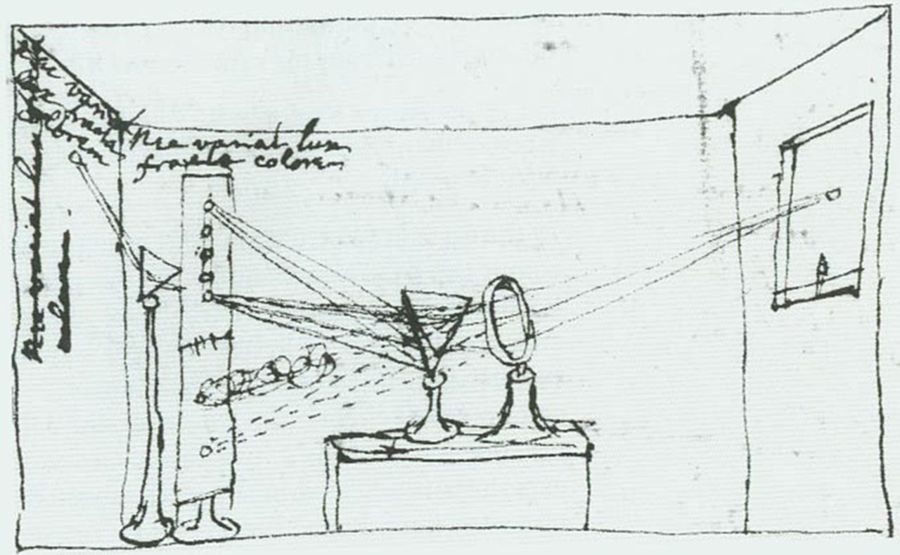
fig-slr-cross-section
fig-slr-cross-section · labelled cross-section of an SLR: 45° main reflex mirror sends light UP to the focusing screen + pentaprism → optical viewfinder; the semi-transparent main mirror + secondary (sub) mirror fold light DOWN to the phase-detect AF module in the mirror-box floor; focal-plane shutter + sensor/film behind; inset shows the mirror flipping up for exposure (companion to `fig-mirrorless-anatomy`)
14.5 Photos → radiance fields and Gaussian splatting (NeRF, 3DGS)
⬜ figure not yet created
`fig-nvs-vs-reconstruction` (the 3-D↔2-D triangle: rendering, reconstruction, NVS)
fig-pinhole-imaging
fig-pinhole-imaging · imaging-scenario series (2/3): add a pinhole to the bare sensor — one ray per scene point → a dim **inverted** image (same tree+sensor+colours as fig-bare-sensor-averaging)
⬜ figure not yet created
`fig-3dgs-splat` (anisotropic 3-D Gaussians → projected & alpha-blended)
fig-isp-walk-real
fig-isp-walk-real · the ISP pipeline walked on ONE real photo (boatman gathering lotus, overcast lake, Sony DNG): raw (linear, no WB — flat & green) · white balance · tone+colour (gamma encode) · denoise · sharpen · finished JPEG, frame-coloured by linear-light vs encoded regime — real-image companion to `fig-isp-block-diagram` (Recap ISP, BASIC)
14.6 Feed-forward (amortized) 3-D: skip the per-scene optimization
fig-pinhole-imaging
fig-pinhole-imaging · imaging-scenario series (2/3): add a pinhole to the bare sensor — one ray per scene point → a dim **inverted** image (same tree+sensor+colours as fig-bare-sensor-averaging)
14.7 Re-photography
fig-portrait-lighting-sim
fig-portrait-lighting-sim · live portrait-lighting simulator (web edition): three soft area lights (key/fill/kicker — az/el/extent/intensity/colour, area-light-supersampled soft shadows) on a 3D face with a physiological melanin/hemoglobin skin model; a from-behind setup view with Meshy studio umbrellas + a camera rig; lighting presets; static fallback is a screenshot. *3D umbrella generated with Meshy AI.*
⬜ figure not yet created
the estimated relative-pose vector) fig-rolling-shutter-perrow
14.8 The landscape, and is 3-D a "fake task"?
• a deliberately reflective close (slides 84–86): the field is a **complex landscape** along several axes — *reconstruction* (output 3-D) vs *NVS* (output 2-D); *overfit-per-scene* (NeRF, 3DGS) vs *amortized* (DUSt3R, VGGT); *baked illumination* vs *relightable*; **number of input views** (1 → 360° → ∞); the **3-D representation** used (volumetric/fuzzy vs hard surface vs 4-D ray space — or none); how much **prior** is learned; world-space vs camera-space.
• the provocation worth leaving the reader with: the **Bitter Lesson** (Sutton) and the **"parable of the parser"** — when data + compute are plentiful, the hand-built intermediate (here, *explicit 3-D*) may be an unnecessary **"fake task"** that learning can skip. **Is 3-D still needed, or is it scaffolding we'll discard?** (Counterpoint: real applications — robotics, AR, fabrication, autonomous driving — keep wanting *actual* geometry. → [[Adjacent fields and applications]].)
• frontier (slide 50): scalability / long context, beyond shape+texture (materials, **relightability**), **motion** (dynamic scenes), less supervision, fewer inductive biases.
14.9 3-D displays
• the *output* counterpart to all of the above — once you have a 3-D scene, how do you *show* it with parallax? Brief pointer, since the optics live with light fields: **lenticular / parallax-barrier** autostereoscopic displays, **light-field displays**, head-tracked & VR/AR stereo, and research like **Project Starline**. Cross-link to the light-field display material in [[Advanced computational photography#Light field and multi-aperture imaging]] (lenticular displays, 3-D TV) rather than re-deriving.
Part 15 REVEALING THE INVISIBLE
15.1 Near-infrared (NIR) photography
fig-atmospheric-scattering
fig-atmospheric-scattering · Rayleigh scattering: blue sky (short path) vs red sunset (long path) 🟨
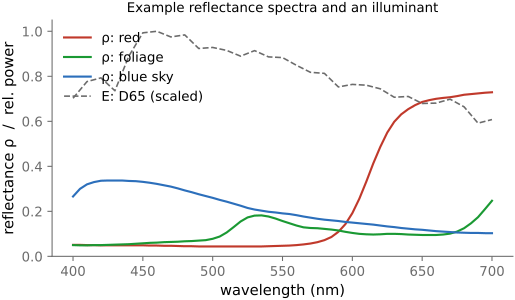
fig-bw-conversions
fig-bw-conversions · one colour photo → black & white several ways: single channel (R/G/B) · average · weighted luminance · red-filter channel mix (dark sky) · an isoluminant pair collapsing to one grey — the choices differ (Converting to B&W, Color technology)
• **how**: silicon photodiodes respond well into the **near-infrared**, so every camera ships with an **IR-cut filter** to keep IR from contaminating color. Two routes to NIR imaging: (1) **convert the camera** — remove the internal IR-cut filter (and optionally replace it with clear glass or an IR-pass filter); (2) **filter the lens** — an **IR-pass (visible-blocking) filter** (e.g. R72 / 720 nm) on a stock camera, at the cost of long exposures since most IR is being thrown away by the still-present internal cut filter.
• **what changes — the look**: **foliage glows bright white** (chlorophyll/leaf cell structure reflects NIR strongly) — the classic **"Wood effect"** (after R. W. Wood, 1910); **skin** goes smooth and waxy (NIR penetrates the surface, veins show); **blue sky darkens** and **haze is cut** (less Rayleigh scattering at longer wavelengths → see further); **water** goes inky black.
• **false-color IR**: since NIR is invisible, render it by **mapping bands to visible channels** (e.g. NIR→red, red→green, …) — the surreal magenta-foliage "Aerochrome" look; a channel-remapping choice, not a measurement.
• **uses beyond art**: **forensics & art conservation** (read faded ink, underdrawings, alterations beneath paint); **agriculture / remote sensing** — **NDVI** $=(\text{NIR}-\text{Red})/(\text{NIR}+\text{Red})$, the vegetation-health index that exploits the foliage-glows-in-NIR effect; **astronomy** (NIR pierces dust, redshifted light — e.g. JWST); and as an **extra channel** for computational photography (NIR-assisted denoising / dehazing / dark flash, cross-ref).
15.2 Accidental cameras
15.3 Motion and video magnification
15.4 Visual microphone
15.5 Corner camera
15.6 Active non-line-of-sight
15.7 Passive non-line-of-sight
fig-photoshop-resample
fig-photoshop-resample · the resampling kernel zoo as a shipping product's UI: Photoshop *Image Size* resample-method dropdown screenshot + on-figure legend mapping each menu option to its kernel — Nearest Neighbor→box, Bilinear→tent, Bicubic→cubic, Bicubic Smoother→cubic biased smooth (enlarge), Bicubic Sharper→cubic biased sharp (reduce), Preserve Details 1.0/2.0→edge-aware/learned upsampler. © Adobe Inc., educational commentary
fig-nn-downsample-adversarial
fig-nn-downsample-adversarial · "decimation reveals hidden content": plant single pixels of a 2nd image at the NN sample sites (s·i, s·j) of a base photo — naive NN ÷s reconstructs the **hidden** image, prefiltered (area) ÷s averages it away and keeps the base. Panels: attacked image, pixel-zoom showing the planted dots, hidden reference, NN result, prefiltered result, "why it works". Image-scaling attack — cite arXiv:2104.11222 (Tamkin et al.) & arXiv:2104.08690 (Quiring et al.) 🟨
• **the setup**: no laser, no time-of-flight — only **ambient light** from the hidden scene spilling onto a **relay surface** you can see (a floor, a wall). An **accidental occluder** — a vertical **edge**, a **doorframe**, an opaque object — selectively blocks rays, so different parts of the visible surface "see" different parts of the hidden region. The occluder is what makes the problem solvable: a fully open scene blurs everything together.
• **occluder as a crude lens / coded aperture**: the edge or object **modulates** the hidden light, much like a **pinhole or coded aperture** modulates a normal scene. The light measured on the visible surface is (hidden image) **convolved** with the occluder's transfer/visibility function — so recovering the hidden image is a **deconvolution / inverse problem**, where the **occluder geometry** is itself part of the unknown.
• **corner camera (1-D)**: at a wall corner, the vertical edge acts as a 1-D **angular** aperture — the **penumbra** gradient on the floor encodes a 1-D image of the hidden scene **vs. angle around the corner**; differencing/inverting the penumbra yields a 1-D **video** of motion in the hidden room (Bouman et al. 2017). Cross-ref `[[#Corner camera]]`.
• **computational periscopy (2-D, single photo)**: with an **opaque occluder** of known or estimated shape between the hidden scene and the wall, a **single photograph** of the wall contains enough structure to **invert** for a full **2-D image** of the hidden scene — the occluder's cast shadow plays the role of a coded aperture (Saunders, Murray-Bruce & Goyal 2019).
• **passive vs active — the contrast**: **active** NLOS (above) sends a controlled light pulse and times its return, buying strong signal and depth at the cost of specialized hardware; **passive** NLOS is **photon-starved and ill-conditioned** (faint penumbra signal, unknown occluder), trading robustness for working with **ordinary cameras and existing light** — and it degrades gracefully as the accidental occluder becomes less ideal.
15.8 Mm-wave, wifi
Part 16 ADJACENT FIELDS AND APPLICATIONS
16.1 Modern sensors
16.2 Astro
16.3 X-ray
16.4 Medical
16.5 Microscopy
• confocal
16.6 Mm-wave
16.7 Music, sound
16.8 Fluorescence
16.9 Opto-acoustic
16.10 Ultrasound
16.11 Aerial imaging
16.12 Computer vision
16.13 Robotics, driving
Part 17 HUMAN FACTORS
17.1 Human factors and the art of photography
17.2 Ethics of computational photography
• photography has **never been "the truth"** — framing, exposure and selection are choices; computation only widens the gap between scene and image
• **manipulation & provenance**: retouching → deepfakes; the line between *enhancement* and *deception*; **forensics** (detecting edits) and **provenance** (C2PA / content credentials, watermarking) — see forensics (Missing stuff)
• **fairness & representation**: film and auto-exposure / AWB were tuned for light skin (**Shirley cards**) — a bias that persists in metering, white balance and face detection; design for **diverse skin tones** (→ Skin tones)
• **privacy & consent**: faces, surveillance, always-on cameras, face / plate recognition; the right not to be captured
• **generative AI**: training-data consent & copyright, synthetic "photographs", and what *photographic evidence* means when any image can be generated (→ Generative AI)
• the book's stance: name each capability *and* its misuse, and prefer transparency (disclose computation) — an editorial line to keep consistent
17.3 Computational models of perception
fig-interp-comparison
fig-interp-comparison · UPSAMPLING ×8 on a real photo (iguana eye + scales): nearest vs bilinear vs **two** bicubics bracketing the sharpness↔aliasing/ringing tradeoff — Catmull–Rom (0, ½) sharp vs Mitchell (⅓, ⅓) smooth; tight zoom (blocky) + larger crop (real pixel size) 🟨
fig-coma
fig-coma · coma: an off-axis parallel bundle where each annular aperture zone images to a different height; chief ray through the lens centre + zonal rays missing a common focus → the one-sided comet ("coma") spot with a head and a radial tail
17.4 Spatial (and spatio-temporal) vision
fig-csf-chromatic
fig-csf-chromatic · three contrast-sensitivity functions: luminance (band-pass) vs red–green and blue–yellow (low-pass, lower cutoff) — we resolve colour more coarsely than brightness 🟨
fig-blur-as-temporal-prefilter
fig-blur-as-temporal-prefilter · one knob, two outcomes — the same fast motion captured long (blurred but not aliased; the window low-passed before sampling) vs short/high-angle (sharp but strobing); the exposure window is the temporal anti-alias filter, L16 in time 🟨
17.5 User studies
17.6 Accessibility: photography by and for blind users
17.7 The social and personal practice of photography
Part 18 IMAGE FORENSICS AND AUTHENTICATION
The rest of this book is mostly about *making* images — better, brighter, sharper, or out of nothing. This part is about *believing* them. Cheap editing tools, and now generative models that synthesize a convincing photograph from a sentence, have severed the old reflexive link between "photograph" and "something that happened." Two responses run in parallel. **Forensics** works on an image you are handed cold — no cooperation, possibly an adversary on the other side — and looks for the statistical and physical fingerprints that authentic capture leaves and editing or generation disturbs. **Authentication** works the other way around: it asks creators and cameras to *sign* their work and every edit to it, so trust comes from a verifiable record rather than a hunt for tells. Neither is sufficient alone — forensics gives evidence, not proof, and provenance is opt-in — so the honest position is that they are complementary.
18.1 Image Forensics
fig-focus-stacking
fig-focus-stacking · optics-chapter illustrative figure (07-07 Figure 4): a stepped-focus stack → sharpness selection → all-in-focus composite. Synthetic per-slice defocus on one photo (`sourced/corn-cobs.jpg`, © Frédo Durand) — license-safe. The full real-data treatment lives in part-08 `fig-focalstack-*`
fig-telephoto-vs-retrofocus
fig-telephoto-vs-retrofocus · two two-group schematics — telephoto (+ then −, principal plane H′ pushed in front → physical length < f) vs retrofocus/inverted-telephoto (− then +, long back-focal distance to clear the SLR mirror); marks f vs physical length, H′, F′
fig-correspondence-then-transport
fig-correspondence-then-transport · the L17 spine — one scene displaced (two views / two faces / two frames / one long frame), each resolved by estimating a coordinate map (homography, morph field, flow, track, motion vector, camera path) then transporting pixels by one shared inverse-warp engine; the finding is hard, the moving is plumbing 🟨
fig-thick-lens-wave-sim
fig-thick-lens-wave-sim · live 2-D FDTD wave sim of a **thick biconvex lens** focusing: a point source's diverging wave is reshaped by the slower glass into a converging one that meets at an image point; focus tracks 1/f=(n−1)2/R and 1/v=1/f−1/u (Fundamentals → Lens image formation, Fermat/equal-path)
fig-jpeg-artifacts
fig-jpeg-artifacts · JPEG blocking & ringing at low quality (original vs q=8, zoomed crop) 🟨
fig-illum-times-reflectance
fig-illum-times-reflectance · light = illumination × reflectance (per-wavelength)
fig-portrait-lighting-sim
fig-portrait-lighting-sim · live portrait-lighting simulator (web edition): three soft area lights (key/fill/kicker — az/el/extent/intensity/colour, area-light-supersampled soft shadows) on a 3D face with a physiological melanin/hemoglobin skin model; a from-behind setup view with Meshy studio umbrellas + a camera rig; lighting presets; static fallback is a screenshot. *3D umbrella generated with Meshy AI.*
The premise of all blind forensics: a real photograph is the output of a specific **physical pipeline** — a particular sensor, a color-filter mosaic, a demosaicking algorithm, a lens, a JPEG encoder, a single illumination of a single 3-D scene — and that pipeline stamps the pixels with **consistent low-level regularities**. Splice two photos together, paint something out, scale a pasted region, or synthesize an image from a network, and those regularities are broken locally or never reproduced. Forensics is the art of modeling the expected regularity and flagging where it fails.
18.2 Authentication and Provenance (C2PA)
fig-diffraction-aperture-size
fig-diffraction-aperture-size · two apertures: a smaller one diffracts more (spread θ ≈ λ/D) 🟨
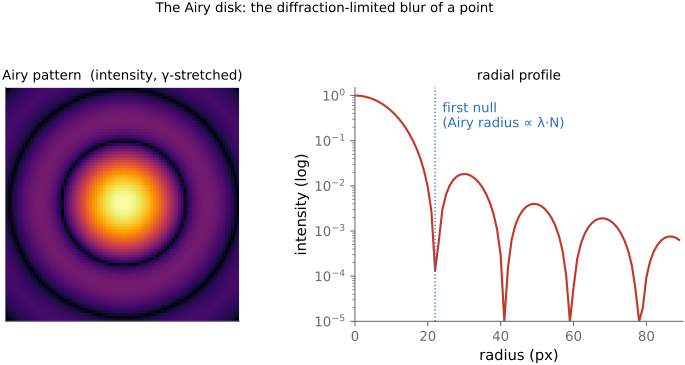
⬜ figure not yet created
their complementarity [fig-provenance-vs-forensics
fig-telephoto-vs-retrofocus
fig-telephoto-vs-retrofocus · two two-group schematics — telephoto (+ then −, principal plane H′ pushed in front → physical length < f) vs retrofocus/inverted-telephoto (− then +, long back-focal distance to clear the SLR mirror); marks f vs physical length, H′, F′
fig-crop-focal-length
fig-crop-focal-length · cropping = changing focal length: full frame vs a crop box ≡ a longer-focal-length capture, upsampled 🟨
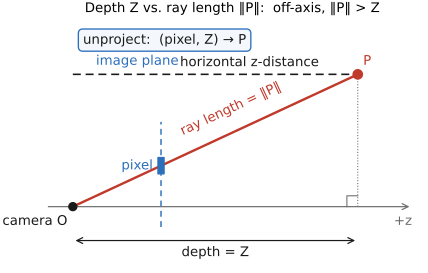
fig-rotation-challenge
fig-rotation-challenge · Andrew Adams' rotation challenge: rotate a full turn in N steps of 360/N° (each step bilinear-resamples the PREVIOUS result), for N∈{10,60,360}; track a validity mask through identical rotations so corners that ever leave the frame go black. Result returns to 0° but is resampled N times → accumulated blur/mush + shrinking valid region toward the inscribed disc. More, smaller rotations compound MORE damage (rotate k× by 360/N, not once by k·360/N)
⬜ figure not yet created
**Durable Content Credentials** — manifest + invisible **watermark** + **fingerprint**, so a screenshot that strips the metadata can still be **recovered** by matching the watermark/fingerprint to a provenance store [fig-durable-credentials fig-editing-lr-vs-ps
fig-pinhole-imaging
fig-pinhole-imaging · imaging-scenario series (2/3): add a pinhole to the bare sensor — one ray per scene point → a dim **inverted** image (same tree+sensor+colours as fig-bare-sensor-averaging)
fig-cos4-vignetting
fig-cos4-vignetting · natural vignetting: relative illumination ∝ cos⁴θ falling toward the corner, with an image-corner darkening illustration (companion to `fig-cos4-falloff`, ties θ to image radius + a picture)
Forensics is a losing race in the limit: as generators improve, the pixel-level tells vanish. Authentication changes the game by **not relying on the pixels to confess**. Instead it asks the *honest* parts of the pipeline — the camera, the editing app, the AI tool, the publisher — to **cryptographically sign what they did**, and binds that signed record to the image. A reader then **verifies a signature against a trust list** rather than hunting for artifacts. The catch, which we keep front and center, is that this is **opt-in**: it can prove an image *is* what it claims, but a missing or stripped credential proves nothing — so it complements forensics rather than replacing it.
Part 19 SYSTEMS
19.1 Programmable cameras
19.2 Image processing libraries
19.3 Lightroom-style raw developers
19.4 Photoshop-style editors
19.5 Networking and image transport
19.6 Photography programming on phones
Part 20 PERFORMANCE ENGINEERING AND HALIDE
20.1 8-bit and fixed-point arithmetic
• how about fp16???
20.2 Algorithmic speedups
• separable
• recursive filters
• **integral images / summed-area tables** — precompute a running 2-D prefix sum of the image once; afterwards **any** axis-aligned box sum is just **four array lookups** ($S_{D}-S_{B}-S_{C}+S_{A}$), independent of the box size, so a box filter is **O(1) per pixel** at any radius (and multi-scale features cost the same). First introduced in graphics as the **summed-area table** (Crow 1984) for mip-free texture filtering, then **re-invented as the "integral image"** by **Viola & Jones (2001)** to sum Haar-like features fast enough for real-time face detection — a clean example of the same trick rediscovered across fields. (Watch precision: the running sum grows large, so it wants wide integer/float accumulators.)
20.3 Performance engineering and scheduling (Halide)
• Modern machines
• challenges: parallelism, locality/cache behavior
• solutions: slice, fuse
• **Why low-level matters — the language speed differential**: when you write the **low-level pixel code yourself** (e.g. **your own convolution**), the speed gaps are dramatic — in Fredo's experience roughly **~1000× from Python to optimized C++**, and **at least another ~10× from C++ to Halide**, won back through scheduling (tiling, vectorization/SIMD, multithreading, producer-consumer fusion). This is exactly **why** Python is right for prototyping, glue, and deep learning, but **C++/Halide earn their place for the inner loops**. See [[Appendices#Programming: Python, C++, and PyTorch]] and [[Intro#What language for computational photography?]].
• **historical example — Photoshop 1.0 (1990), the split done by hand**: the discipline predates the tools. Thomas Knoll wrote **Photoshop 1.0** ≈75 % in **Pascal** but dropped into **68000 assembly** for the speed-critical inner loops — *productive language for the bulk, hand-tuned machine code for the hot pixels* (≈128,000 lines total; source released by the Computer History Museum, 2013). That **manual** algorithm-vs-hand-optimization split is exactly what **Halide** automates with its algorithm/schedule separation — the same idea, now mechanized and retargetable. (Full tidbits in the language sidebar, [[Intro#What language for computational photography?]].)
• Halide
• **the scheduling primitives — `compute_at` and the locality/recompute trade-off**: a Halide schedule is mostly choosing, for each stage, **where it is computed relative to its consumer** — `compute_root` (compute the whole stage once, store it all), `compute_at` (compute just the slice needed inside the consumer's loop, trading **recomputation** for **locality / less memory traffic**), and `store_at`/`fold` in between. This producer–consumer granularity *is* the core of the algorithm/schedule split. [📺 **embed Fredo's `compute_at` explainer** → https://www.youtube.com/watch?v=ViFfigvV418 — see [[Video Resources]]]
• **Benchmarking and the development loop** (the part people skip): you do **not** get fast code by *one-shotting* it — not by hand, and not by asking an LLM to write it in one go. Fast code comes from a **loop**: change the code → **verify correctness** → **measure** performance → repeat. Wire an LLM into exactly that loop (give it a correctness check and a benchmark whose output it can read) and it will converge to fast *and* correct code; the bottleneck is that the model needs some **benchmarking hygiene** trained in, or it does naïve things — e.g. running several benchmarks **in parallel**, so they fight over cores and cache and every number is garbage.
• **a little statistics is mandatory.** A trap worth naming: run *one* benchmark several times, see that the runtimes are **stable**, and conclude your measurements are reliable — then run a **thousand different** benchmarks in one big batch and read the **outliers** as real performance regressions. Low variance *within* a single benchmark tells you nothing about the **tail across a thousand** of them: with that many trials, extreme outliers are *expected from noise alone*, so without accounting for the multiple comparisons (and for shared-machine contention) you will chase regressions that aren't there.
20.4 Hardware backends: GPU, NPU, DSP
*(Parked here for now; the real-world ways imaging code is made fast on devices, beyond hand-written C++/Halide.)*
• **GPU compute — OpenCL / Vulkan for image processing**: the per-pixel work (filters, pyramids, warps, blending, demosaicking) is **embarrassingly parallel**, so it maps naturally to the GPU. **OpenCL** kernels and **Vulkan compute shaders** are the cross-platform ways to run it on mobile and desktop GPUs; **Halide can target these backends**, so the same algorithm retargets from CPU SIMD to GPU compute. The GPU is the workhorse for **real-time** image processing (camera preview, video).
• **On-device ML framework (e.g. LiteRT)**: trained imaging models — denoise, super-resolution, segmentation/portrait, semantic ISP, HDR fusion — increasingly run **locally on the device** for latency, privacy, and offline use. **LiteRT** (formerly TensorFlow Lite), Core ML, and ONNX Runtime Mobile load **quantized (int8/fp16)** models and **delegate** the heavy layers to the GPU or NPU. Cross-ref [[Deep learning]] (the models) and [[On-device, mobile and real-time considerations]] if present.
• **NPU acceleration for imaging models**: dedicated **neural processing units** (Apple **Neural Engine**, Qualcomm **Hexagon** AI, Google **Tensor** TPU) run CNN/transformer inference at **far higher throughput per watt** than CPU/GPU — the engine behind Night mode, learned demosaicking/denoising, face & scene understanding in the live pipeline. The scheduling problem shifts from cache tiling to **operator fusion, quantization, and keeping the NPU fed**.
• **DSP programming for real-time 3A control**: the **3A** loop — **auto-exposure, auto-focus, auto-white-balance** — needs per-frame scene statistics and control at video rate with minimal power, so it typically runs on a low-power **DSP** (e.g. Hexagon) inside the camera subsystem/ISP rather than the application CPU. Real-time, deadline-driven, and tightly coupled to the sensor — a different optimization regime from batch image processing.
Part 21 CONCLUSIONS, DISCUSSION
Measurement, generation
Sociology
21.1 Recap in context
21.1.1 Modern phones, multiple apertures, pano, HDR+
21.1.2 Recap: a modern mirrorless camera
21.1.3 Recap: a modern cell phone multi camera
21.1.4 Lightroom
21.1.5 Photoshop
Part 22 APPENDICES
22.1 Refreshers
The book is built on a small kit of mathematical tools, used over and over: images are **vectors**, operations on them are **linear maps** (so we get to use all of linear algebra and the Fourier transform), recovering an image from measurements is an **optimization**, noise is **probability**, and the modern workhorses are **learned**. This appendix is the kit — each tool sketched just far enough to read the chapters that use it, with a pointer to where to go deeper.
22.2 Problem Set 0 — Environment and C++ basics
22.3 Problem Set 1 — Image class, point operations, and color
22.4 Problem Set 2 — Convolution and the bilateral filter
22.5 Problem Set 3 — Denoising and demosaicking
22.6 Problem Set 4 — High dynamic range
22.7 Problem Set 5 — Resampling, warping, and morphing
22.8 Problem Set 6 — Homographies and manual panoramas
22.9 Problem Set 7 — Automatic panoramas
22.10 Problem Set 8 — Non-photorealistic rendering
22.11 Problem Set 9 — Make-your-own, video, and ethics
22.12 EXIF and image metadata
fig-pinhole-imaging
fig-pinhole-imaging · imaging-scenario series (2/3): add a pinhole to the bare sensor — one ray per scene point → a dim **inverted** image (same tree+sensor+colours as fig-bare-sensor-averaging)
• **What EXIF is.** Structured **metadata embedded in the image file itself** (JPEG, TIFF, and most RAW/DNG), not a sidecar — the camera's record of *how* the shot was taken. In JPEG it rides in the **APP1 marker segment**; the payload is a little **TIFF/IFD** structure (tags → values). Standardized as **Exif** (JEITA/CIPA), with **DCF** governing on-card file/folder naming.
• **EXIF is not the only block.** A photo commonly carries two more metadata standards alongside EXIF: **XMP** (Adobe's XML-based metadata — where Lightroom/ACR edit settings, keywords, and ratings live, often in a **sidecar `.xmp`** for raw files) and **IPTC** (the press/captioning standard — caption, byline, credit, keywords, location). The three **co-occur** and can **disagree** (e.g. a date or copyright string present in more than one and edited in only one); a tool like `exiftool` reads all three at once.
• **Field groups** — the metadata sorted by what it describes:
• **capture settings**: exposure time / **shutter speed**, **f-number** (aperture), **ISO**, **exposure program / mode**, metering mode, **exposure bias** (compensation), flash fired/mode
• **optics**: **focal length** (and **35 mm-equivalent**), lens make / model, subject / focus distance
• **image**: pixel width & height, **orientation** flag (the in-camera rotation the viewer must apply), **color space** / embedded ICC profile, white-balance tag
• **time**: **DateTimeOriginal** (when the photo was taken) vs **DateTimeDigitized** (when it was written/scanned) — they differ for film scans and edits; plus sub-second and time-zone tags
• **place**: **GPS** latitude / longitude / altitude (and heading, timestamp)
• **MakerNotes**: proprietary, undocumented per-vendor blobs (often where the interesting bits — true ISO, lens corrections, shot count — hide)
• **embedded thumbnail / preview**: a small JPEG (and, in RAW, a full-res preview) carried alongside the full image
• **identity / file**: software, artist / copyright, camera & lens serial numbers, owner name
• ⚠️ **caveats** (why EXIF frustrates): coverage is **incomplete** (not every camera writes every field) and **inconsistent** across makers; some values — notably **ISO** and **shutter speed** — are **approximate / rounded** and **not radiometrically correct**, so never read them as calibrated radiometry.
• 🔒 **privacy.** EXIF leaks more than people expect: **GPS** coordinates (home/where a photo was taken), camera & lens **serial numbers** (links photos to one device), and **owner name** / copyright. Many platforms strip EXIF on upload; if sharing matters, strip it yourself (`exiftool -all=`).
• **Tools.** `exiftool` (the reference, widest tag coverage), `exiv2`; in Python `piexif` and `Pillow` (`Image.getexif()`), the C `libexif`.
• **How the book's pipeline reads EXIF.** The capture chapter pulls orientation, exposure triangle, and lens info from EXIF to annotate and correctly display the book's own photos — see [[Basic image processing and ISP]] → "Beyond the pixels: basic metadata and EXIF" and "Data versus metadata: EXIF".
22.13 DNG: the Digital Negative
• **What DNG is.** An **open, documented raw format** introduced by **Adobe in 2004**, built on **TIFF/EP**: a single, vendor-neutral, **archival** container for camera raw data — *one* published format instead of a proprietary raw per camera model (Canon CR2/CR3, Nikon NEF, Sony ARW, Fuji RAF, …). The spec is public, so anyone can read and write it.
• **The problem it solves.** Every camera ships its **own undocumented raw**; software must reverse-engineer each one, and old proprietary raws risk becoming **unreadable** as cameras and decoders age. DNG is a **stable, documented target** for long-term archiving and interchange — a "digital negative" you can still open decades later.
• **What's inside (the container).** A **TIFF/IFD** structure (same family as EXIF): the **raw image data**, full **EXIF + MakerNote** metadata, **XMP** (edit settings, ratings), one or more embedded **JPEG previews** + a **thumbnail**, and the **color/calibration** data a converter needs to render the raw.
• **Two flavors of raw payload.** **Mosaic ("raw") DNG** keeps the original **Bayer CFA** samples — demosaick later, the usual case (→ [[Demosaicking]]); **Linear DNG** stores already-**demosaicked** data (one RGB triple per pixel) — used after processing/remosaic or for non-Bayer sensors.
• **Color-rendering data (how raw → color).** DNG carries the math to turn sensor counts into colorimetric values: **ColorMatrix / ForwardMatrix / CameraCalibration** tags for (typically) **two reference illuminants** (e.g. Standard-A and D65) interpolated by correlated color temperature, plus **AsShotNeutral / AsShotWhiteXY** (the camera's white-balance estimate). **DNG camera profiles (DCP)** add hue/saturation/tone maps. (→ [[Color technology]] — camera color matrices & white balance.)
• **DNG opcodes.** A small list of **opcodes** the raw processor applies at decode: **WarpRectilinear / WarpFisheye** (geometric distortion correction), **FixVignetteRadial** (vignetting), **GainMap** (per-channel lens-shading / color cast), **TrimBounds**, defective-pixel maps. This is how DNG bakes in **lens corrections declaratively** (→ Optics, lens-profile correction).
• **Compression.** **Lossless JPEG** (default) or **uncompressed**; an optional **lossy DNG** trades some fidelity for size. (→ [[File formats and compression]].)
• **Embed-the-original.** A DNG can **wrap the original proprietary raw** inside itself, so conversion is **reversible** (extract the untouched original later).
• **Adoption & relatives.** Native raw on some cameras (**Leica, Pentax/Ricoh**), most Android phones via the **Camera2** API, and Apple **ProRAW** (which *is* DNG); the **Adobe DNG Converter** transcodes proprietary raws; **CinemaDNG** is the motion/video raw variant. Not universal — **Canon, Nikon, Sony** keep their own raw formats.
• **Trade-offs.** *Pros*: open, documented, archival; one pipeline; embedded corrections + profiles; lossless and often smaller than the native raw. *Cons*: a transcoding step; some maker-note / "secret-sauce" raw features may not map; not every tool round-trips a DNG perfectly.
• **Relation to EXIF.** DNG **contains** EXIF and XMP — it is a **superset container**, so the trust/coverage caveats of [[Appendices#EXIF and image metadata]] apply to the metadata it carries.
22.14 Datasets
A pointer index, not a survey: the workhorse public datasets behind the methods in this book, grouped by task. Each entry is a name, a one-line description, and a link.
**Classification / features**
• **ImageNet** — million-image labelled classification set; the pretraining backbone behind most vision features. https://image-net.org
• **COCO** — common objects in context: detection, segmentation, captioning. https://cocodataset.org
• **Places** — scene-recognition dataset (millions of images, hundreds of scene categories). http://places2.csail.mit.edu
**Super-resolution**
• **DIV2K** — 2K-resolution high-quality images, the standard SR training set. https://data.vision.ee.ethz.ch/cvl/DIV2K
• **Flickr2K** — 2K Flickr images, often paired with DIV2K for training. *(verify URL)* https://github.com/limbee/NTIRE2017
• **Set5 / Set14 / BSD100 / Urban100** — small standard SR **test** sets (classic images, natural scenes, urban self-similar structure). *(verify URL)* https://github.com/jbhuang0604/SelfExSR
**Deblurring & restoration**
• **GoPro (Nah et al. 2017)** — sharp/blurry video-frame pairs synthesized from high-fps GoPro footage; the standard dynamic-scene motion-deblurring benchmark. *(verify URL)* https://seungjunnah.github.io/Datasets/gopro
• **REDS** — REalistic and Dynamic Scenes (NTIRE challenge set): high-quality video for deblurring, super-resolution, and denoising. *(verify URL)* https://seungjunnah.github.io/Datasets/reds
**Denoising**
• **SIDD** — Smartphone Image Denoising Dataset: real noisy/clean smartphone pairs. https://www.eecs.yorku.ca/~kamel/sidd/
• **DND** — Darmstadt Noise Dataset: real-photograph denoising benchmark (held-out ground truth). https://noise.visinf.tu-darmstadt.de
• **Kodak** — the 24 "kodim" lossless test images, a long-standing denoising/compression benchmark. *(verify URL)* https://r0k.us/graphics/kodak/
**HDR / tone mapping**
• **HDR+ burst dataset** — Google's raw burst dataset behind HDR+ computational photography. https://hdrplusdata.org
• **Kalantari HDR (dynamic scenes)** — multi-exposure bursts with motion, for HDR merging with moving content. *(verify URL)* https://www.robots.ox.ac.uk/~szwu/storage/hdr/kalantari17.html
• **Laval HDR (sky / indoor)** — high-dynamic-range outdoor-sky and indoor panoramas (lighting estimation). *(verify URL)* http://hdrdb.com
• **Fairchild HDR Photographic Survey** — calibrated HDR scenes for tone-mapping evaluation. *(verify URL)* http://markfairchild.org/HDR.html
**Retouching / enhancement**
• **MIT-Adobe FiveK** — 5,000 raw photos each retouched by five expert artists; the standard learned-enhancement set. https://data.csail.mit.edu/graphics/fivek
**Depth / flow**
• **NYU Depth V2** — indoor RGB-D (Kinect) for monocular depth. https://cs.nyu.edu/~silberman/datasets/nyu_depth_v2.html
• **KITTI** — driving stereo / depth / flow benchmark. https://www.cvlibs.net/datasets/kitti/
• **Middlebury stereo** — classic high-accuracy stereo benchmark. https://vision.middlebury.edu/stereo/
• **MPI Sintel** — synthetic optical-flow benchmark with long-range, large-motion sequences. http://sintel.is.tue.mpg.de
**Color / white balance**
• **NUS / Gehler-Shi** — color-constancy sets with measured ground-truth illuminant (color-checker in scene). *(verify URL)* https://www2.cs.sfu.ca/~color/data/shi_gehler/
• **Cube+** — single-illuminant color-constancy images with a calibration cube. *(verify URL)* https://ipg.fer.hr/ipg/resources/color_constancy
**Faces**
• **CelebA / CelebA-HQ** — celebrity faces with attributes; HQ is the high-res variant for generative work. https://mmlab.ie.cuhk.edu.hk/projects/CelebA.html
• **FFHQ** — Flickr-Faces-HQ: 70k high-quality aligned faces (the StyleGAN set). https://github.com/NVlabs/ffhq-dataset
• **LFW** — Labeled Faces in the Wild: the classic face-verification benchmark. http://vis-www.cs.umass.edu/lfw/
**Inpainting / segmentation / matting**
• **Places2** — same scene corpus as *Places / Places2* (Classification, above); also the standard set for **inpainting** and scene parsing.
• **ADE20K** — densely annotated scene parsing / semantic segmentation. https://groups.csail.mit.edu/vision/datasets/ADE20K/
• **Composition-1k** — the standard alpha-matting benchmark (foregrounds composited over many backgrounds). *(verify URL)* https://sites.google.com/view/deepimagematting
22.15 A camera-feature wish list
• **framing**: most asks are not hard *algorithms* — the book covers them — they are missing because of conservative firmware, cramped UI, and closed software. The list is the book held up as a mirror to real products.
• **exposure, ISO, HDR**: tiered **auto-ISO** (minimum shutter speed as a first-class rule); **ambient/flash balance** control; **in-camera HDR bracket → 16-bit raw merge** (→ [[HDR merging]]); **auto-ETTR** with a pull flag recorded in metadata; **frame averaging** for a low-ISO, low-noise long exposure (→ [[Denoising]], the $\sqrt{N}$ argument).
• **bracketing the controls**: alternate settings *within a burst* — flash/no-flash pairs, slow+fast shutter pairs, and **aperture bracketing** at constant exposure for post-hoc depth-of-field choice (→ [[Depth of field]]; light field).
• **focus & DoF**: **focus stacking** with step-size control and blur-boundary detection (→ [[Depth of field]]); focus-shift compensation; cycle through detected **faces/AF subjects** when it locks on the wrong one (→ [[Focus, autofocus]]).
• **computational raw / sensor**: a **true per-channel raw histogram** (not the JPEG proxy); **lossless-compressed raw**; **pixel-shift multi-shot high-res** (→ [[Super-resolution and image priors]]).
• **motion data & metadata**: record the **gyro/accelerometer** streams for shake removal, blur assessment, stabilization (→ [[Video stabilization and rolling-shutter correction]]) and automatic **perspective correction** (→ [[Perspective distortion and its correction]]); in-camera **rating/sorting** that round-trips to the editor (cross-ref [[Appendices#EXIF and image metadata]] — XMP/IPTC); save/restore settings as a text file; separate stills/video settings.
• **panorama**: an electronic **sweep-panorama** mode like a phone's (→ [[Automatic panorama stitching from multiple views and feature matching]]).
• **UI & ecosystem**: better self-timer / long-exposure / **AF-ON** ergonomics; **automatic Wi-Fi offload** at home; and the wish that subsumes the rest — **open the software ecosystem** so third parties can add exactly these features. The recurring lesson: the bottleneck is openness, not optics.
22.16 How this book was created
This book was written **with an AI collaborator** (Anthropic's Claude), as a deliberate experiment in AI-assisted authoring — a fitting, slightly meta exercise for a book about computational imaging. The short version: an AI did much of the drafting, building, and checking; a human did all of the deciding. The longer version (below) matters because the failure modes everyone worries about — hallucinated facts, inconsistent notation, prose that drifts over hundreds of pages — are exactly what the method is built to prevent.
22.17 The course tutor: a local, book-grounded AI teaching assistant
• **What it is.** A terminal **and** browser chatbot tutor for the course, grounded in *this book* plus the lecture slides and pset handouts. It answers conceptual questions fully and, for problem-set work, **guides** — concept, the section to read, the next step — without handing over answers or solution code.
• **Local-first.** The default runs an open-weights model (**Gemma**, via Ollama) **on the student's own machine** — no API key, no per-token cost, works offline. An install-time probe picks a model tier that fits the hardware (a small model on any laptop; a larger, multimodal one on a GPU / Apple Silicon).
• **Retrieval-augmented (RAG).** The book drafts, outline, companion files, slide digests, and pset *handouts* are chunked, embedded, and stored in a small local vector index; each question retrieves the most relevant passages, which are fed to the model as grounded context — the same "write from the sources, not memory" rule the authoring pipeline uses. **Solutions and answer keys are deliberately never indexed.**
• **Guide, don't solve.** Enforced by a Socratic system prompt + worked exemplars, *not* by a brittle filter (a student can get answers from any frontier model anyway — the point is a genuinely useful *guided* tool, the CS50 stance). A **grounding gate** makes the tutor say "the material doesn't cover this" rather than confabulate when retrieval is weak (the Jill-Watson "decline when uncovered" behaviour).
• **It links and shows.** Answers cite the book by name and **link** to the published section; in the browser it renders **equations** (LaTeX/KaTeX) and shows the relevant **figures** inline — the reasons a browser UI beats a terminal for a visual, mathematical subject. A **vision-capable** model lets a student upload an image (their result, an artifact) and ask about it.
• **Two front-ends, one core.** A terminal client (lives in the dev shell, can see code, works over SSH) and a local browser app (equations, figures, image upload, a model dropdown) share the same retrieval + inference + logging core. An optional **online backup** (instructor-hosted) serves students whose machines can't run a local model.
• **Logging and analytics for the instructor.** Every interaction (question, retrieved sources, response) is logged and delivered to the instructor. A batch pipeline produces a **dashboard**: what help students seek, usage over time, per-student activity, retrieval-coverage gaps, and a **pedagogy audit** — an independent model reviews each turn for quality (correct / confusing / harmful), grounding, and answer-leaks, surfacing problem turns. Student identities are **pseudonymized and PII-scrubbed** before any third-party model sees a trace.
• **Privacy & honesty.** Interaction logs are student records (FERPA): disclosed in the syllabus, access-restricted, anonymized before external analysis. The tutor is labelled as an AI that can be wrong; it points students *back into the book* rather than substituting for it.
22.18 The semi-automatic grading system
• **The shape (to confirm).** Each pset ships a **test harness** + reference data; submissions are built and run against it, image/numeric outputs compared to references **within a tolerance**, and a provisional score produced for a human to review and adjust.
• **What is automatic vs human (to confirm).** *Automatic:* compiles, runs without crashing, output matches reference within tolerance, performance within budget where relevant. *Human:* partial credit for near-misses, code style/clarity, the open-ended make-your-own / video / ethics components, and any appeal.
• **To fill in (from Frédo):** the exact harness and languages (Python/C++), per-pset reference outputs and tolerances, the rubric and point allocation, how grades + feedback are returned to students, the academic-integrity / permitted-AI-use policy (and how it interacts with [[Appendices#The course tutor: a local, book-grounded AI teaching assistant|the tutor]]), and any plagiarism/similarity checks.
Part 23 BIBLIOGRAPHY
The book's references — the **books, papers, and sites** cited throughout — collected in one place. Every in-text citation (written `[@key]` in the drafts) links here, and in the HTML build hovering a citation shows the full reference as a tooltip.
The list is maintained as machine-readable data in [[bibliography|Sources/bibliography.md]] and **rendered** to the bibliography page, grouped into **Textbooks & books**, **Papers**, and **Web, standards & misc**, sorted alphabetically. Each entry carries a stable **citation key**; drafts cite it as `[@key]` (optionally `[@key|custom text]`).
*(The rendered list is generated — edit `Sources/bibliography.md` and rebuild rather than hand-editing the page.)*
Part 24 MISSING STUFF, BUGS
24.1 Tone mapping doesn't have its own chapter. Just an application of edge aware stuff.
24.2 Denoising by averaging is after basic denoising
24.3 Photomosaics, my self organizing maps
24.4 Rephotography
in multiple images?
24.5 Extreme low light
24.6 Perspective disortion
with warping? Homography?
24.7 Tilt shift,
24.8 Connectivity
Sharing
Network
24.9 Misc.
Something about plugins
Something about software engineering and image processing libraries
Zero lag shutter
Beautification????
Decluttering
Hybrid images
Depth map extraction, especially for fake Depth of field