5.9 Recap: which edge-aware technique when?⧉
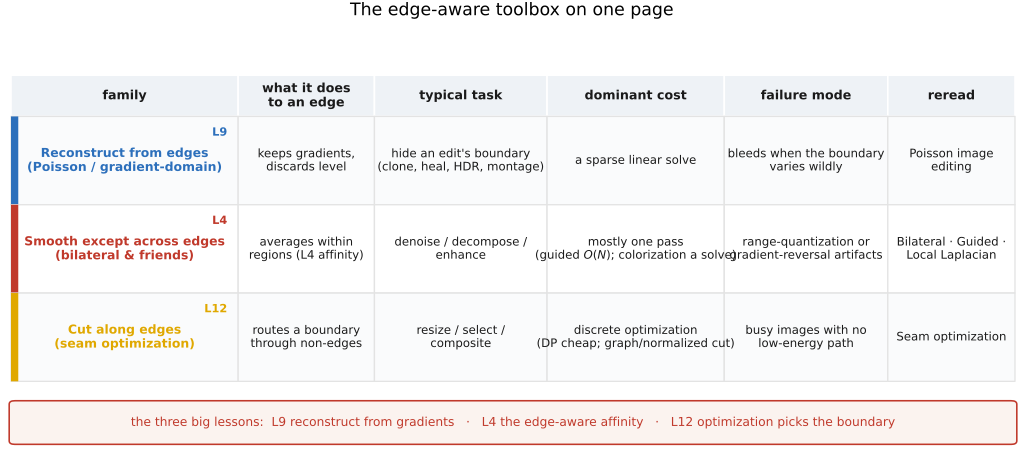
The EDGES MATTER part has a single thesis stated four different ways: where the edges are governs the edit. But "respect the edges" turned out to mean three genuinely different things, and the methods we built relate to an edge in three opposite ways. One family throws the image away and keeps only its edges, then rebuilds from them. A second averages freely within regions but refuses to average across an edge. A third does neither — it goes looking for a place to cut, and wants that cut to fall exactly on an edge so no one sees it. Reconstruct from edges, smooth except across edges, cut along edges: three relationships, three families, and — this is the payoff — the task you are trying to do picks the relationship for you. This recap turns the part's standing advice into a decision: name the job, and the family follows.
5.9.1 The three relationships to edges⧉
Begin with the three families themselves, each summarized by what it does to an edge and the job it is for.
Reconstruct from edges — Poisson / gradient-domain. Throw away the absolute level, keep the gradients, integrate them back into an image. This is Poisson image editing, and its reason for existing is big lesson L9: the eye reads local contrast, not absolute brightness, so an edit that gets the gradients right can be free with the level. Reach for this family when the artifact you are fighting lives at a boundary — when you need to hide the seam of an edit. Seamless cloning, the healing brush, gradient-domain high-dynamic-range (HDR) tone compression, photomontage and panorama blending are all the same move: prescribe a guidance field, then solve $\nabla^2 f = \operatorname{div}\mathbf{v}$ for the image whose gradients match it. The level sorts itself out, and the seam vanishes.
Smooth except across edges — bilateral and friends. Average the pixels that belong together, and only those. The measure of "belong together" is big lesson L4, the affinity: the color or intensity difference between two pixels, read as how much they should influence each other. This is the engine of Bilateral filtering and the whole cluster around it — joint/cross bilateral and bilateral upsampling, the bilateral grid, the guided filter (Guided image filtering), local Laplacian filters (Local Laplacian filters), non-local means (NL-means) (NL-means (non-local means)), the locally adaptive regression kernel (LARK) (Locally adaptive regression kernel (LARK)), and edge-preserving smoothing posed as an optimization (Edge-preserving optimization — colorization — colorization, the matting Laplacian). Reach for this family when you must process within regions but not bleed across edges — to denoise, decompose into base and detail, or enhance, without haloes or bleeding.
Cut along edges — seam optimization. Find the least-noticeable path or boundary and put your cut there. This is Seam optimization, and its governing idea is big lesson L12: a great many image edits are discrete optimization on a graph, and the energy you choose is the whole game — the optimizer (dynamic programming, min-cut/max-flow, spectral relaxation) is off the shelf. Reach for this family when the right answer is fundamentally where to put a boundary — to resize, select, or composite by routing a seam through the busy regions where the eye will not catch it. Seam carving, intelligent scissors and snakes, graph cut, normalized cuts, and GraphCut textures all live here.
Notice the symmetry between the second and third families, because it is the part's deepest connection. The L4 affinity that tells the bilateral filter "average these two pixels together" is the same quantity that tells the graph cut "do not cut between these two pixels." Edge-preserving smoothing and seam-finding are two readings of one affinity — one says stay together, the other says don't separate here. The matting Laplacian, the guided filter's local model, and the graph-cut smoothness weight $V_{pq}$ are, underneath, the same edge-respecting affinity wearing different clothes (Edge-preserving optimization — colorization, Guided image filtering, Seam optimization).
5.9.2 Pros, cons, and cost — when to reach for each⧉
The relationship picks the family; within a job the trade-offs pick the specific tool. The recurring axes are the ones the part kept returning to: local versus global, filter versus optimization, and speed versus quality. Here is each family priced honestly.
Poisson / gradient-domain. Global, seamless, and encoding-sensitive — the space you integrate in matters, which is why tone- or exposure-mismatched edits and gradient-domain HDR are done in log, not linear (Poisson image editing). The cost is a sparse linear solve: conjugate gradient, multigrid, or a fast Fourier transform (FFT) on a periodic/Neumann domain, with the cheap membrane shortcut (a Laplace solve on the boundary mismatch) available whenever the guidance field is conservative, as in a plain clone. Pick it when the artifact lives at a boundary. Its failure mode is the flip side of L9: because it discards the absolute level, it will re-light and bleed when the boundary varies wildly, and it erases flat regions (a constant patch collapses to a membrane). When both halves of a composite are equally real and you want to keep both their appearances — panorama stitching of two true photographs — Laplacian-pyramid blending, which feathers the DC (zero-frequency) component rather than discarding it, is the more honest choice (Poisson image editing).
Bilateral and friends. Mostly a single pass, which is the family's great virtue, but the specific cost spreads across a wide range (Bilateral filtering, Guided image filtering, Local Laplacian filters). The brute-force bilateral is slow; the bilateral grid makes it real-time; the guided filter is $O(N)$ and exact (Guided image filtering); local Laplacian filters are heavier but artifact-free (Local Laplacian filters); colorization and matting are not filters at all but a sparse solve of the same kind as Poisson (Edge-preserving optimization — colorization). Pick this family when you must process within regions but not across edges. Watch its two characteristic artifacts: range-quantization banding (from coarse intensity bins, e.g. the grid) and gradient reversal (overshoot near strong edges in aggressive detail manipulation) — the guided filter and local Laplacian filters were designed precisely to avoid both. The local/global and filter/optimization axes cut straight through this family: the plain bilateral is local and a filter; colorization is global and an optimization; the guided filter sits in between with a local linear model.
Seam optimization. Discrete optimization, and the algorithm follows the dimensionality of the boundary (Seam optimization). A 1-D path — a seam for carving, an intelligent-scissors trace — is dynamic programming, cheap and exact. A 2-D binary boundary is graph cut via min-cut/max-flow: globally optimal but it needs seeds (scribbles, a data term). An unsupervised split is the normalized cut, a spectral relaxation that is approximate and heavier. Pick this family when the right answer is genuinely where to put the boundary. It fails on busy images with no low-energy path — when every cut crosses something salient, there is no seam to hide, and seam carving will visibly distort.
And they compose. The part's true payoff is that these families are not rivals; the headline application uses two of them together. Photomontage and panorama blending are a graph-cut seam plus a Poisson blend (Agarwala et al. 2004; Seam optimization, Poisson image editing): the graph cut (L12) decides where to switch between sources, routing the boundary along edges, and the gradient-domain blend (L9) hides whatever residual mismatch the seam leaves — cut along the edges, then reconstruct across them. That one pipeline is the EDGES MATTER part in miniature: the three relationships to an edge, used in concert.
5.9.3 A worked chooser⧉
To make the guide operational, run the jobs the part actually targeted and read off the answer.
- Paste or clone an object and kill the seam. Reconstruct from edges: Poisson seamless cloning, or its multiplicative sibling the healing brush; use the membrane shortcut for interactive speed (Poisson image editing).
- Compress an HDR scene without flattening local contrast. Either reconstruct from edges (gradient-domain HDR: attenuate the large gradients, re-integrate in log) or smooth except across edges (bilateral base/detail decomposition, compress the base) — the part offers both routes (Poisson image editing, Bilateral filtering).
- Denoise while keeping edges crisp. Smooth except across edges: bilateral for speed, NL-means or LARK when self-similar structure is the signal worth preserving (Bilateral filtering, NL-means (non-local means), Locally adaptive regression kernel (LARK)).
- Propagate sparse user input — scribbled colors, a few depth or matte values — to the whole image. Edge-preserving optimization: colorization / the matting Laplacian, a sparse solve whose affinity stops the propagation at edges (Edge-preserving optimization — colorization).
- Transfer one image's structure onto another's smoothing — flash/no-flash, upsampling a low-res result. The joint/cross bilateral and joint bilateral upsampling (Bilateral filtering); or, for a single fast linear model, the guided filter (Guided image filtering).
- Resize, select an object, or stitch a composite. Cut along edges: seam carving (resize), intelligent scissors or graph cut (select), graph-cut seam plus Poisson blend (stitch) (Seam optimization).
The chooser is the whole chapter. Name the job, find the relationship to the edge, then let the trade-offs — local or global, filter or optimization, fast or careful — pick the exact tool. And when no single family fits, recall the payoff: they compose.