6.1 Warping and resampling⧉
PS5 implements resampling kernels and Beier–Neely segment warps. → Problem sets (appendix).
Print a photograph onto a sheet of rubber and stretch it — pinch a corner, bow the middle, slide one edge. The pixels glide to new positions and the picture rides along: a face slims, a bent line straightens, a tilted building stands up. Nothing about the colors changed; what changed is where each color lives. That is a warp, and it is the single operation underneath an astonishing range of this book's geometry — lens-distortion correction, video stabilization, panorama reprojection, morphing, image-based rendering, even the cosmetic "liquify" slider. One primitive, reused everywhere, which is exactly why it opens this part.
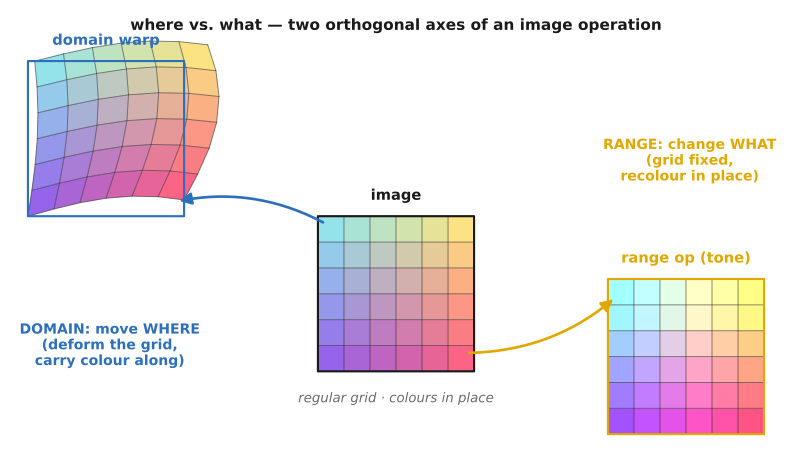
Formally a warp is a map of the image domain: a function $f:\mathbb{R}^2\to\mathbb{R}^2$ that moves positions while leaving the range — the colors — untouched. If the input had color $c$ at $(x,y)$, the output has that same $c$ at $f(x,y)$. It is the geometric twin of a point operation: a point operation edits the range (the colors) and leaves the domain fixed; a warp edits the domain (the positions) and leaves the range fixed.
That clean picture hides two genuinely hard questions, and this chapter is those questions. First, which direction do we transport pixels — push each input forward to where it goes, or pull each output back to where it came from? (The answer, almost always, is the second.) Second, once we are reading the input at a non-integer location, how do we read a color there — the resampling question, which forks again into enlarging (reconstruct and read) versus shrinking (where we must blur first or pay in moiré). And a third, half-question that arises only for hand-built deformations: how do we even specify $f$ from a handful of user inputs? We take these in turn, and everything downstream in the part — stitching, morphing, flow rendering, stabilization — is built from the answers.
6.1.1 Warping is a domain transform — move where, not what⧉
Hold onto the rubber-sheet image, because it is the correct mental model for every warp in the book, from a sub-pixel lens-distortion correction to a full perspective rectification to "slim the subject." The warp deforms where pixels live and leaves their colors alone. Contrast it once more with a tone or point operation, which recolors each pixel in place: warping is the domain operation to that range operation, and the two are orthogonal — you can do either without the other, and morphing (later in the part) does both at once, a domain warp plus a range cross-fade.
It is worth pausing on why this one primitive is everywhere before we build the machinery, because the motivation is the whole reason the chapter comes first. Optical-aberration and lens-distortion correction are warps. Video stabilization is a warp (a different one per frame). Panorama reprojection — aligning each photo to a reference view, fixing the apparent shift of a rotated camera — is a warp. Wide-angle distortion correction, morphable face models, image-based rendering, the cosmetic slim: all warps. Learn to transport pixels along a map once and you have the engine for all of them. That observation, that nearly every geometric operation in this part is "build a map, then move the pixels along it," is the part-spine lesson L17, and it is worth restating before going further.
Almost every algorithm in this part has the same two-part shape: first establish a coordinate map between two images (or between an image and a target frame), then transport the pixels along it. Warping makes the map explicit and applies it. Perspective rectification solves the map — a homography — from geometric constraints. Panorama stitching estimates the map from matched features. Morphing interpolates between two maps. Optical flow estimates a dense map from brightness constancy. Stabilization smooths a map over time. Frame interpolation renders along a map. Separating the two halves — what the map is versus how you transport pixels through it — is what lets one transport engine (inverse warp + resample, built in the next two sections) serve the entire part; only the map changes from task to task. (L17 is registered in the part introduction, Warping and morphing; this chapter is the transport engine, and the chapters that follow are different ways of finding the map.)
6.1.2 Forward vs inverse warping — why output-driven wins⧉
There are two ways to transport pixels along $f$, and only one of them works cleanly.
The intuitive one is forward warping (input-driven). Loop over every input pixel $(x,y)$, compute its destination $f(x,y)$, and write its color there:
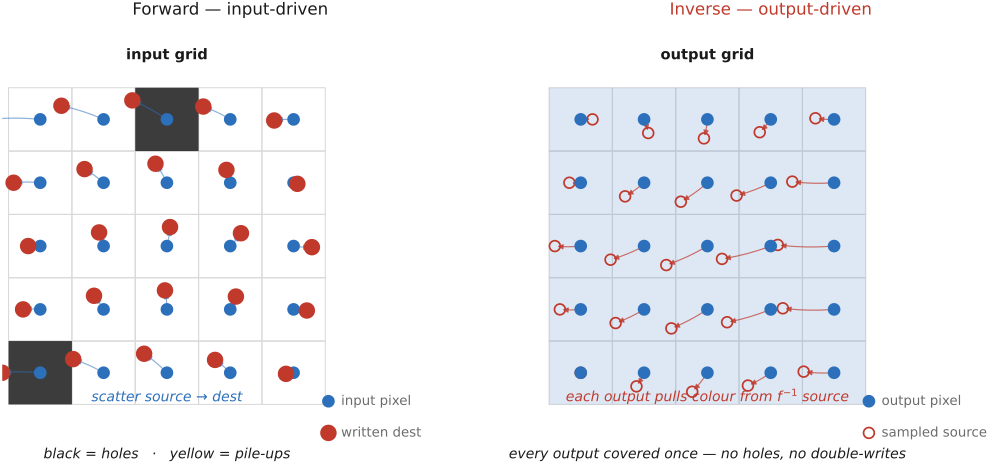
"Push each pixel to where it goes." It reads like the obvious thing to do, and it has two failure modes baked straight into it. The first is holes: the destinations $f(x,y)$ are generally non-integer and do not cover the output grid evenly — where the warp stretches a region, neighbouring inputs land far apart and leave output pixels that no input ever writes, a speckle of black cracks. The second is pile-ups: where the warp compresses a region, many inputs land on the same output pixel, and now you must arbitrate — splat with weights, accumulate, and normalize — which is fiddly and still leaves the gaps unfilled elsewhere. Forward warping forces you to fight the output grid.
The fix is to turn the loop inside out. Inverse warping (output-driven) loops over every output pixel $(x,y)$, pushes it backward through $f^{-1}$ to find where it came from, and looks up that color:
This is the useful one, and the reason is structural, not incidental. Because the main loop runs over output pixels, every output pixel is filled exactly once — no gaps and no double-writes, by construction, with nothing to arbitrate. The non-integer problem has not vanished; it has been relocated to the input lookup, where it is no longer a messy scatter but a clean, well-posed resampling question — "what is $\text{in}$ at this fractional location?" — answered in the next section. State it as a rule and it will recur verbatim across the part:
Main loop over output pixels; apply the inverse transform; resample the input (Figure 6.1.2). In code it is three lines, and the whole lesson is in which grid the loop runs over:
for each output pixel (x, y):
    (x', y') = f⁻¹(x, y)          # pull back to the source location
    out[x, y] = resample(in, x', y')   # read in at the fractional spot
Every output pixel is visited once and assigned once; the fractional read on the last line is the resampling question of the next section.
The catch is that inverse warping needs the backward map $f^{-1}$, and you do not always have it. For parametric warps it is free: invert a matrix, and for a homography use $H^{-1}$. But for a warp you only know forwards — most importantly a dense optical-flow field, which gives each input pixel's motion — there is no closed-form inverse, and you must either invert the field numerically or fall back to forward splatting. So forward warping is not wrong; it is the right tool precisely when the field is only available input-side. Rendering a new frame along an estimated flow is exactly that case (cross-ref Optical flow).
One more practical point that is not a corner case: $f^{-1}(x,y)$ can land outside the input. You must pick a boundary policy — zero/black padding, clamp-to-edge (replicate the border pixel), mirror, or mark as undefined (transparent, via an alpha channel). This matters constantly, because rectification and stabilization both produce outputs whose corners read past the original image border. Reading off the edge is the common case, not the exception.
6.1.3 Resampling — reading a value at a non-integer location⧉
Inverse warping leaves us with one question: read $\text{in}$ at the fractional coordinate $f^{-1}(x,y)$. But an image is not a continuous picture — it is a grid of samples of an underlying continuous signal, and there is no stored value between samples. So to read between them we must reconstruct the continuous signal from the samples and then evaluate it at the location we want. That is resampling: reconstruct, then re-sample. The reconstruction filter we choose is the whole story, and it is the same reconstruction-filter picture developed in Resampling, now put to geometric work.
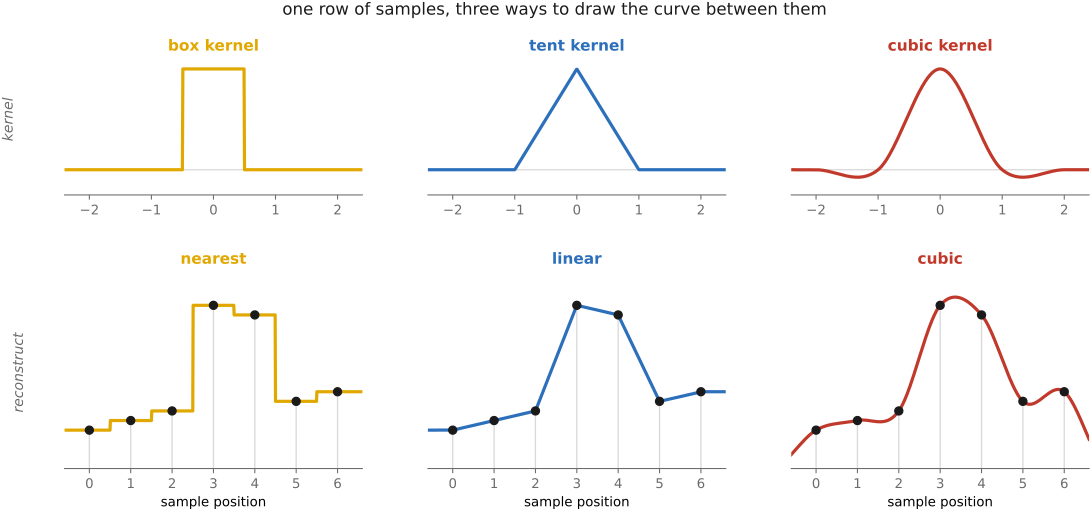
The cheapest filter is nearest neighbour: round the fractional coordinate to the closest sample and copy it. Fast, but blocky — it reconstructs with a box kernel, so a rotated or scaled image shows hard stair-steps. It is the right choice only for label maps or any data where inventing an in-between value would be wrong (you must not average label 3 and label 7 into 5).
The workhorse is bilinear interpolation. In 1-D it is just the straight-line blend of the two bracketing samples,
with $\alpha$ the fractional part. In 2-D it is separable: interpolate along $x$ on the two top neighbours and the two bottom neighbours, then interpolate those two results along $y$ — and doing $y$ first then $x$ gives the identical answer (a worthwhile exercise to confirm). Equivalently, it is the four surrounding pixels weighted by the areas of the opposite sub-rectangles. It is smooth, cheap, and the sensible default, with one mild cost: a tent/triangle kernel attenuates high frequencies, so the result is slightly soft.
For sharper results, bicubic and Lanczos, but only if you frame them correctly. Do not think "fit a cubic polynomial to the four data points." Think convolution with an analytic kernel:
where $k$ is a fixed kernel centred at the fractional source location and sampled at the surrounding integer inputs. From this view the filters are just choices of $k$. Bicubic — the Mitchell–Netravali family Mitchell & Netravali — uses a wider, sharper kernel with small negative lobes over a $4\times4$ neighbourhood, giving more apparent sharpness than bilinear at the cost of slight ringing/overshoot you can dial in by choosing the family's two parameters. Lanczos, a windowed sinc, is the sharpest of the common kernels and the ringiest. All of them are separable (run the 1-D filter in $x$, then in $y$), and in general the weights cannot be precomputed because the fractional offset differs at every output pixel — though for integer or rational scale factors the offsets become periodic and can be tabulated.
So far we have been reconstructing and reading. The crucial split — and the lead-in to this chapter's recurring lesson — is enlarging versus shrinking, and the convolution view makes it precise. When upsampling (enlarging), you are reading more densely than the samples sit; you discard nothing, so reconstruction alone is honest — clamp the kernel width to one input pixel and read. When downsampling (minifying), you are throwing samples away, and reconstruction alone aliases: detail too fine for the new, coarser grid does not vanish — it folds down into bold, false low-frequency moiré. This is the same Nyquist folding that Linearity, Fourier, aliasing and deblurring accounts for in the frequency domain (big lesson L5), now wearing a geometric hat.
The fix is the discipline you met in BASIC, restated for warps: prefilter before you downsample. Blur — area-average — before you decimate. In the convolution-resampling view this is one clean move: scale the kernel up by the downscale factor $s$,
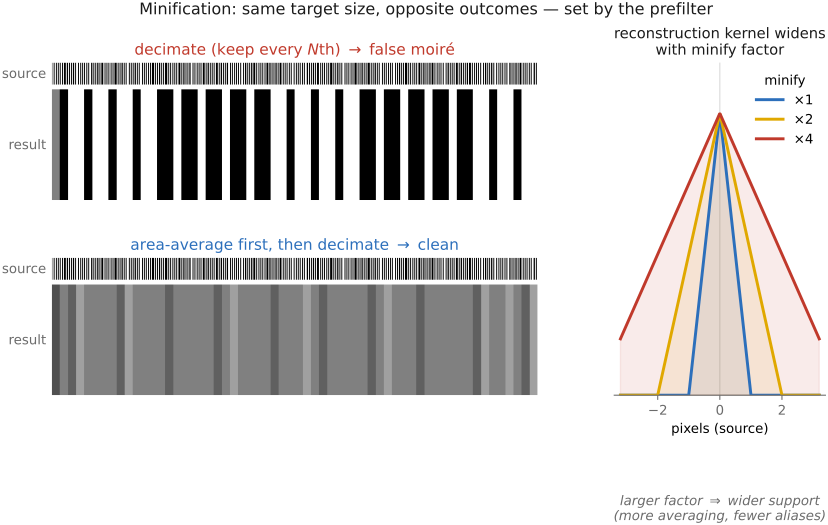
and renormalize. The widened-and-renormalized kernel now gathers over the entire footprint that each output pixel covers back in the input — it averages instead of point-sampling — and that average is the low-pass prefilter. The infamous bug is the opposite: keep-every-$N$th decimation (or, equivalently, a width-1 kernel on minify), which point-samples a signal too fine for the grid and folds fine detail into bold moiré or herringbone (Figure 6.1.4). The honest rule has two halves: upsampling clamps the kernel to width 1; downsampling widens it in proportion to the scale.
A warp that shrinks the image is throwing samples away, and if you simply decimate — keep every $N$th source pixel, or sample a width-1 reconstruction kernel — the detail too fine for the new grid does not disappear. It folds down into bold false moiré. The fix is to area-average first: widen the resampling kernel in proportion to the downscale factor $s$ so it gathers over the whole footprint each output pixel now covers, $k_s(t)=\tfrac1s\,k(t/s)$, and renormalize. That low-pass blur is the prefilter. Enlarging needs no prefilter (clamp the kernel to width 1); shrinking always does. This same lesson governs every geometric resample in this part — the corners of a rectification that shrink, a stabilization crop, optical-flow rendering — so it is not a one-off precaution but a standing discipline. (Big lesson L16; first placed in BASIC — Resampling. The frequency-domain why — aliasing folds everything above the new Nyquist — is L5; see Linearity, Fourier, aliasing and deblurring and Resampling.)
A few practical notes. Resampling is separable: scale in $x$ to produce an intermediate image with anisotropic dimensions, then scale in $y$; doing the $y$ pass first often vectorizes better. The clean implementation trick (Andrew Adams) is to form the tiny sparse 1-D resampling matrix — one row's worth of weights, with the boundary handling and renormalization already folded in — and apply it to every row (then every column); that weight matrix is negligible beside the image. And for repeated minification, MIP-maps — a prefiltered image pyramid — precompute the area-averages once and read them back per query, which is the standard real-time answer to L16.
Finally, the honest limit, flagged here and paid off later: resampling adds pixels, never new frequencies. Bicubic or Lanczos upsampling looks soft because the high frequencies were never measured — interpolation cannot recover what was not sampled. Inventing plausible detail is a different problem, super-resolution, a prior-driven inverse problem rather than a resampling one (cross-ref Super-resolution and image priors — reconstruction versus hallucination).
6.1.4 Specifying the warp I — parametric models and the degrees-of-freedom (DOF) ladder⧉
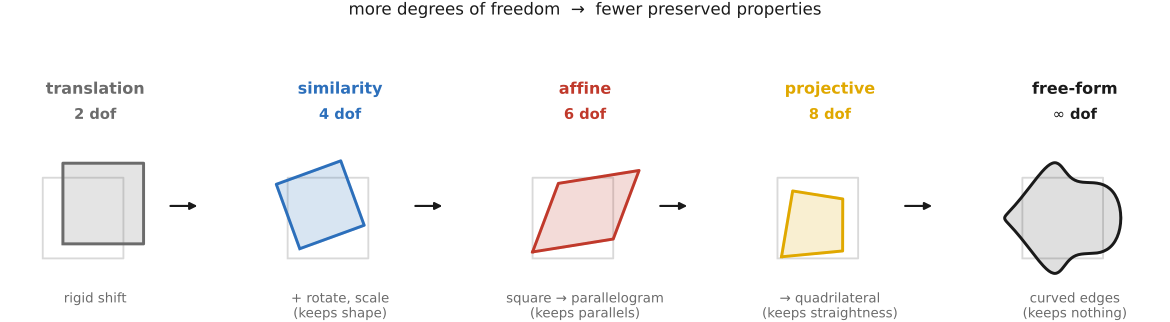
We have a transport engine; we now need maps $f$ to feed it. The easiest maps are parametric — low-parameter functions you fit to a handful of correspondences and then apply everywhere. They form a natural degrees-of-freedom ladder, each rung adding freedom and, in exchange, giving up a preserved property (Figure 6.1.5).
At the bottom is translation (2 DOF) — it preserves everything but absolute position. Add rotation and you get a rigid / Euclidean transform (3 DOF), which preserves lengths and angles. Add uniform scale and you get a similarity (4 DOF), which preserves angles and length ratios — that is, shape. Loosen further to an affine map (6 DOF),
which preserves parallelism and ratios along a line but no longer angles or lengths: straight lines stay straight, parallel lines stay parallel, and a square becomes a parallelogram. At the top of the practical ladder is the projective transform or homography (8 DOF),
which preserves straight lines only — parallels may now converge to a vanishing point, and a square can become any quadrilateral. This is the rung that does genuine perspective, and it is the engine of the next chapter's rectification and of panorama stitching.
The homography looks non-linear in $(x,y)$ because of the division by $w'$, and that is exactly why we use homogeneous coordinates: in homogeneous coordinates it is a single $3\times3$ matrix multiply followed by the perspective divide, restoring linearity to the part that matters. Geometrically the homography is the reprojection of a plane viewed under a 3-D camera rotation — project, rotate, reproject — which is the deep reason a planar scene or a purely rotating camera can be aligned with no knowledge of depth. We do not re-derive any of this here; the full development lives in FUNDAMENTALS — Pinhole, and the solve for $H$ from correspondences is built in Manual panorama stitching from multiple views, whose homography machinery this chapter shares wholesale.
Fitting a parametric warp is a clean instance of regression. Each point correspondence supplies two equations (one per coordinate), so an affine map (6 unknowns) needs 3 correspondences and a homography (8 unknowns, up to scale) needs 4. With more correspondences than that the system is overdetermined, and you solve it by least squares — or, for the homography, by taking the null vector of the constraint matrix via the singular value decomposition (SVD). This is precisely the setup of Linear Inverse Problems and Regression, with the warp parameters playing the role of the regression unknowns. (Real correspondence sets contain wrong matches; robustifying the fit against them is random sample consensus (RANSAC), developed in the stitching chapter.)
The strengths and the limit are two sides of one coin. Parametric warps are global, smooth, few-parameter, and robust — the perfect choice when the deformation really is rigid, affine, or projective: a flat surface, a rotating camera, a lens model. But by the same token they cannot express a local, free-form deformation — a smile, a face morph, a hand-drawn stretch of one limb. For that we need a field built from sparse, local control, which is the next section.
6.1.5 Specifying the warp II — free-form warps from sparse correspondences⧉
When the deformation is genuinely local, the user supplies a sparse set of correspondences — a few control points, or pairs of feature segments — and we must manufacture a dense warp field $f$, defined at every pixel, by interpolating those sparse constraints. There are three standard constructions, trading smoothness against locality against the kind of control they accept; a fourth idea then layers a shape-preserving regularizer on top. The canonical reference across all of this is Wolberg's Digital Image Warping.
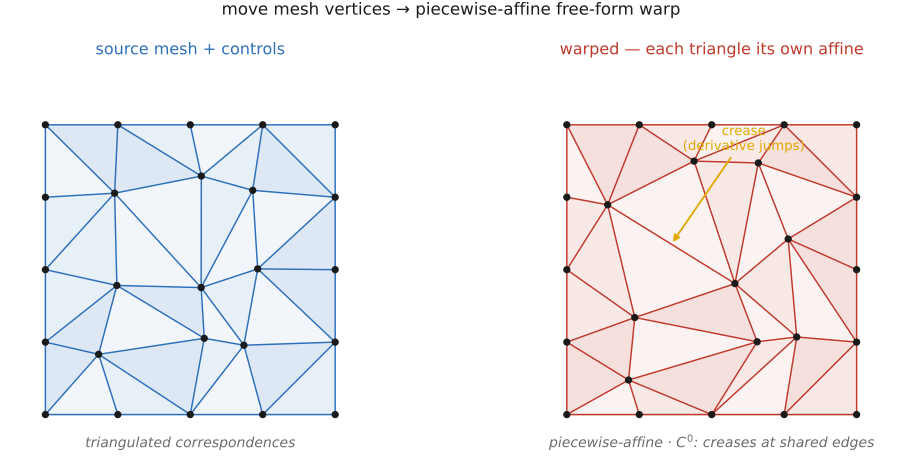
The simplest is the mesh / triangulation warp, which is piecewise-affine. Triangulate the control points (Delaunay, say); inside each triangle, the three vertex correspondences exactly determine an affine map (6 DOF, 3 points), so you warp each triangle by its own affine. It is fast, exact at the controls, and the standard morphing workhorse. Its weakness is that it is only $C^0$ — continuous but creased, with derivative jumps at triangle edges — and its quality depends on how well the triangulation is chosen (Figure 6.1.6).
For smoothness without creases, the thin-plate spline (TPS), a radial-basis-function interpolant. Fit a field that passes through the control displacements while bending as little as possible:
an affine "global" part plus a sum of radial basis functions centred at the control points $\mathbf{c}_i$. The thin-plate kernel $\phi(r) = r^2 \log r$ is the one that minimizes integrated second-derivative (bending) energy — the smoothest possible interpolant, with the literal physical analogy of a thin metal plate bent to pass through pins at the constraints. The weights $w_i$ (together with $A,\mathbf{t}$) come from a small linear system. The result is smooth everywhere — no creases — but has global support: every control point influences every pixel, so it can be less local than a mesh, and the solve costs roughly $O(n^2)$–$O(n^3)$ in the number of controls. It is the go-to for smooth medical and facial registration and for morphometrics, following Bookstein.
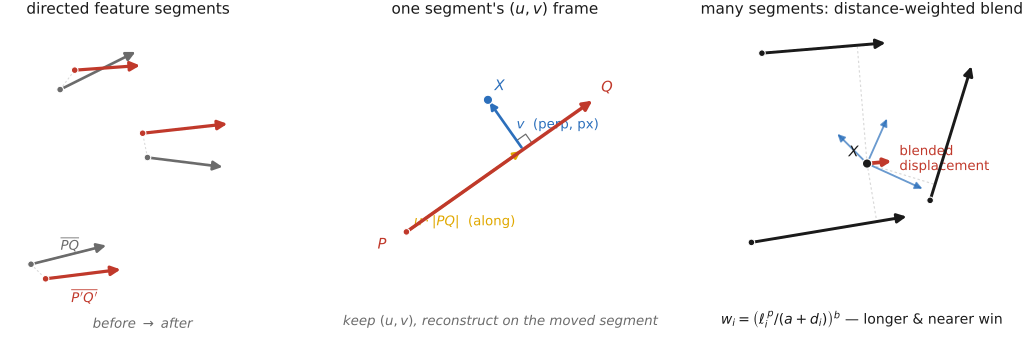
Some features are more naturally specified by lines than by points — an eyebrow, a jawline, the edge of a roof. Feature-based field warping Beier & Neely lets the user draw pairs of directed line segments, before and after. Each segment pair $(\mathbf{P}\mathbf{Q}\to\mathbf{P}'\mathbf{Q}')$ sets up a local coordinate frame: a coordinate $u$ measured along the segment (normalized, $0$ at $\mathbf{P}$ and $1$ at $\mathbf{Q}$) and a coordinate $v$ measured perpendicular to it (in absolute distance units). For a single segment we inverse-warp: read a destination point $\mathbf{X}$'s coordinates $(u,v)$ in the destination frame and reconstruct the matching point in the source frame,
with $\perp(\cdot)$ the $90°$ rotation. A reported subtlety from the original work: $u$ scales with the segment (so a stretched feature carries its interior along) but $v$ is kept absolute — the authors tried scaling $v$ too and it looked worse. With multiple segments, each segment $i$ proposes its own displaced point $\mathbf{X}'_i$, and the final position is a distance-weighted average of those proposals, with weight
where $\ell_i$ is the segment's length (longer segments carry more authority), $d_i$ is the distance from the point to the segment (nearer segments dominate), and $a,b,p$ tune the falloff. This is the technique behind the morph in Michael Jackson's Black or White video and a perennial course project; it is built here and used in Morphing (Figure 6.1.7).
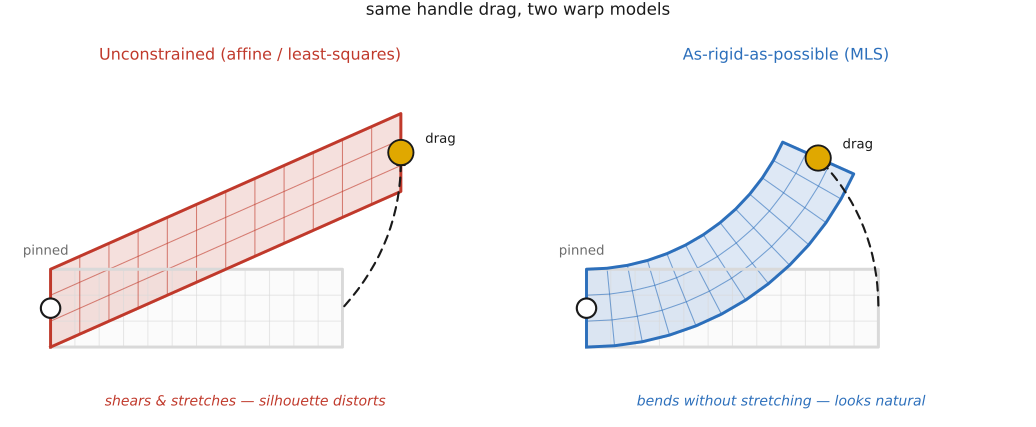
The catch shared by all three constructions is that interpolating positions alone lets shapes shear and squash unnaturally: drag one handle and an unconstrained fit will stretch and skew the whole region. The fix is to add an explicit shape-preserving regularizer. as-rigid-as-possible (ARAP) deformation Igarashi, Moscovich & Hughes and moving least squares (MLS) rigid/similarity deformation Schaefer, McPhail & Warren both ask each local neighbourhood to transform as close to a pure rotation-plus-translation as possible — they minimize the deviation from rigidity rather than merely matching the controls. The deformation then preserves local shape: a dragged limb bends but does not stretch, which is exactly what makes interactive handle-dragging look natural. Conceptually it is the same "dense field from sparse handles," but with a regularizer on local rigidity in place of plain smoothness — kin to the edge-aware, affinity-driven spirit of big lesson L4 elsewhere in the book (Figure 6.1.8).
Whichever construction you pick, the application is identical, and that is the point of having built the engine first: produce the map $f$, then inverse-warp and resample — exactly the primitive of the first two sections, exactly the part-spine lesson L17. The map changes from task to task; the transport does not. A plane, a camera rotation, or a lens model wants a parametric fit by least squares; a fast face morph that tolerates creases wants a mesh; a smooth registration from a few controls wants a TPS; feature-line control wants Beier–Neely; interactive handle-dragging that must not shear wants ARAP / MLS.
Big lessons of this chapter
The recurring principles from this chapter, gathered for review.
Almost every algorithm in this part has the same two-part shape: first establish a coordinate map between two images (or between an image and a target frame), then transport the pixels along it. Warping makes the map explicit and applies it. Perspective rectification solves the map — a homography — from geometric constraints. Panorama stitching estimates the map from matched features. Morphing interpolates between two maps. Optical flow estimates a dense map from brightness constancy. Stabilization smooths a map over time. Frame interpolation renders along a map. Separating the two halves — what the map is versus how you transport pixels through it — is what lets one transport engine (inverse warp + resample, built in the next two sections) serve the entire part; only the map changes from task to task. (L17 is registered in the part introduction, Warping and morphing; this chapter is the transport engine, and the chapters that follow are different ways of finding the map.)