6.3 Morphing⧉
PS5 implements a full Beier–Neely morph (warp + cross-dissolve). → Problem sets (appendix).
Two photographs of two different faces, and the goal is a film clip that turns one into the other — not a cut, not a fade, but a single face that becomes another, the way the dancers shapeshift through each other at the end of Michael Jackson's Black or White. The obvious tool is the cross-dissolve: at each in-between time $t$, set every output pixel to the linear blend of the two inputs,
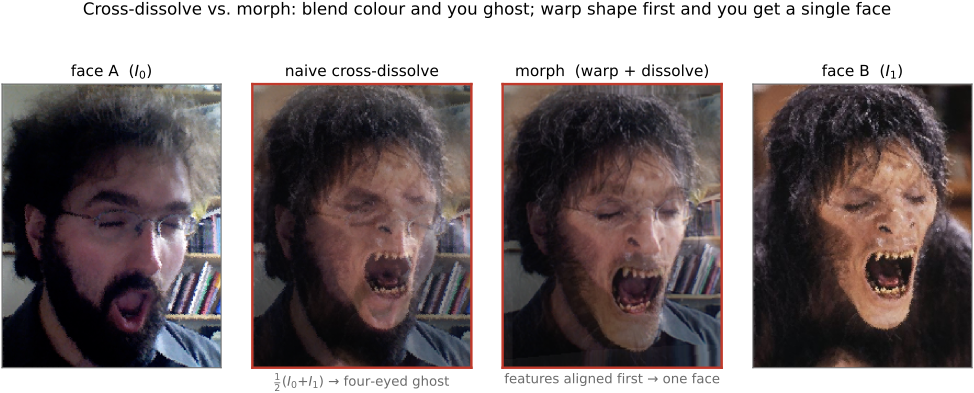
Run it and the result disappoints in one very specific way. Halfway through, at $t=0.5$, you do not see a plausible single face — you see a ghost: four faint eyes, two noses, a doubled mouth, all translucent and superimposed. The blend is doing exactly what you asked, averaging colors at fixed pixel locations, but the two faces' features sit at different pixels. The left image's left eye lands on the right image's eyebrow; the right image's mouth lands on the left image's chin. Averaging colors across that misalignment double-exposes every feature.
The diagnosis is sharp, and it is the whole chapter. A cross-dissolve interpolates only the range — the color at each location. To get a believable in-between you must also interpolate the domain — the location of every feature, so that both pairs of eyes travel to the same place before you average them. Metamorphosis is what you get when you do both: warp each image so its features move toward a common intermediate shape, then cross-dissolve the now-aligned images. The single throughline is the separation of shape and color — interpolate where things are and what color they are as two independent linear blends, applied together.
This chapter builds that recipe and the two classic ways to drive it. Field morphing (Beier & Neely) gets a dense warp from a handful of user-drawn line-segment correspondences; mesh morphing gets it from a triangulated control net. Both turn sparse correspondence into a dense, invertible warp — the same job, two different bases. And when the two images are two views of the same 3-D scene, a flat 2-D morph is silently wrong — it bends straight lines and shrinks the object — so we close with view morphing (Seitz & Dyer), the projectively-correct version that prewarps, interpolates, and postwarps.
A morph is a correspondence field plus transport, then a blend. To interpolate between two images you cannot average their colors where they sit; you must first establish a correspondence between their features, transport (warp) both images along that correspondence to a common intermediate shape, and only then blend. Separating the manipulation into a domain part (the warp — where features are) and a range part (the color blend — what they are), and interpolating each linearly, is what makes the in-between read as one object transforming rather than two pictures fighting. The same three-part shape — correspond, transport, blend — drives panorama de-ghosting, multi-frame super-resolution's sub-pixel alignment, and flow-driven frame interpolation; the only thing that changes is how the correspondence is obtained (here, sparse user lines; in Optical flow, a dense automatic field).
Averaging two images only makes sense once their features sit at the same place. A plain cross-dissolve blends colors at fixed coordinates, so any misalignment double-exposes into a ghost; the cure is always to warp into correspondence first, then average. You have already met this move under other names — panorama de-ghosting registers overlapping frames before feathering them, and multi-frame super-resolution aligns sub-pixel-shifted shots before merging (cross-ref Blending). Morphing is the lesson taken to its limit: not just align-then-average once, but interpolate the alignment itself smoothly over $t$. The dense, automatic aligner that makes this work without hand-drawn lines is Optical flow.
6.3.1 Why a cross-dissolve isn't enough — the ghosting motivation⧉
The goal is to smoothly turn one image into another, where "smooth" carries a strong requirement: each in-between $I_t$ should look like a plausible single image, not a visible blend of two. A face becoming a face; one video keyframe becoming the next.
The naive attempt is cross-fading (a.k.a. cross-dissolve): linearly interpolate colors pixel by pixel, $\text{out}[y,x]=(1-t)\,I_0[y,x]+t\,I_1[y,x]$. This is the right idea for color — at $t=0$ you get $I_0$, at $t=1$ you get $I_1$, and the color glides linearly between — but it ignores position entirely.
It ghosts because the two images' features are not aligned: eyes, mouth, and silhouette sit at different pixels. Blending colors at fixed locations superimposes a left-image eye onto a right-image cheek, and the result is a translucent double exposure — four eyes, two mouths (Figure 6.3.1). And you generally cannot repair this with a single global alignment. Translating, rotating, or scaling one image as a whole can register a couple of features at the cost of the rest, because two faces differ locally and non-rigidly: the jaws are differently shaped, the eyes differently spaced. No one rigid motion brings all the features into register at once.
So cross-fading interpolates only the range (color). A believable in-between demands that we also interpolate the domain — the location of every feature — and that is a warp, the missing half. The plan for the rest of the chapter: get a dense shape interpolation from sparse correspondence, and combine it with the color interpolation we already have.
6.3.2 Two interpolations: domain (shape) and range (color)⧉
The cure has two knobs, and it is worth naming them precisely because the whole method is their product.
Range interpolation (color) is the cross-dissolve we already have: at a location $x$, blend the two colors,
a straight linear blend of pixel values.
Domain interpolation (location) treats a feature point as a vector and interpolates where it is. For a corresponding pair — a point $P$ in $I_0$ and the matching point $Q$ in $I_1$ — the in-between location is
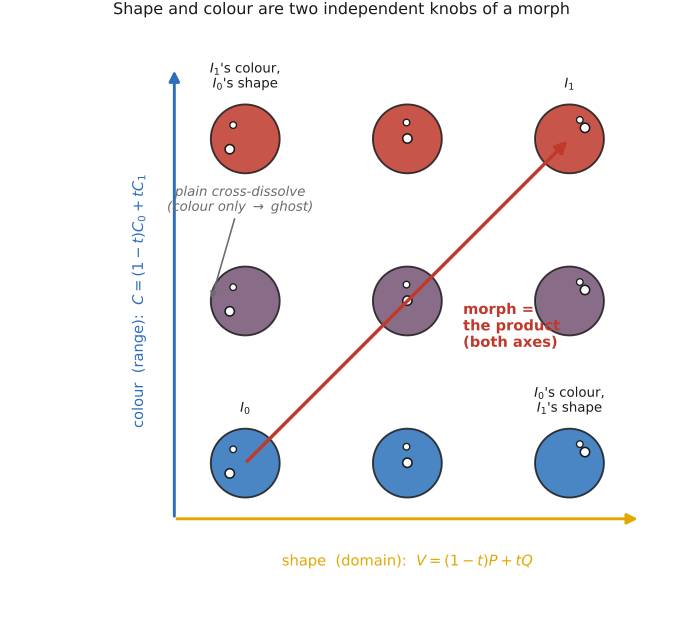
At $t=0$ the feature sits where $I_0$ put it; at $t=1$ where $I_1$ put it; in between it travels straight along the segment $PQ$ (Figure 6.3.2). This is interpolation of the domain — the coordinate grid itself — as opposed to the color living on it.
To realise a domain interpolation as an image operation we warp: move pixels spatially while leaving their colors alone, $C'(x,y) = C\big(f(x,y)\big)$. In practice we use the inverse / backward map — for each output pixel, look up where it came from, $\text{out}(x,y)=\text{im}\big(f^{-1}(x,y)\big)$ — so every output pixel is filled (no holes) and resampling is well-defined. This is exactly the engine of Warping and resampling; morphing is one of its biggest customers, calling it twice per frame (once for each source image).
The morph in one line: interpolate the domain like a vector, then interpolate the range (color). A morph is the product of a shape interpolation and a color interpolation — two independent linear blends, applied together (Figure 6.3.2).
6.3.3 The morphing recipe (combine both)⧉
The inputs are the two images $I_0$ and $I_1$, plus sparse correspondences the user marks on both — matching line segments, or matching mesh vertices (which primitive is the next two sections). The output is a sequence of in-betweens $I_t$, $t\in(0,1)$. Each frame is built in four steps:
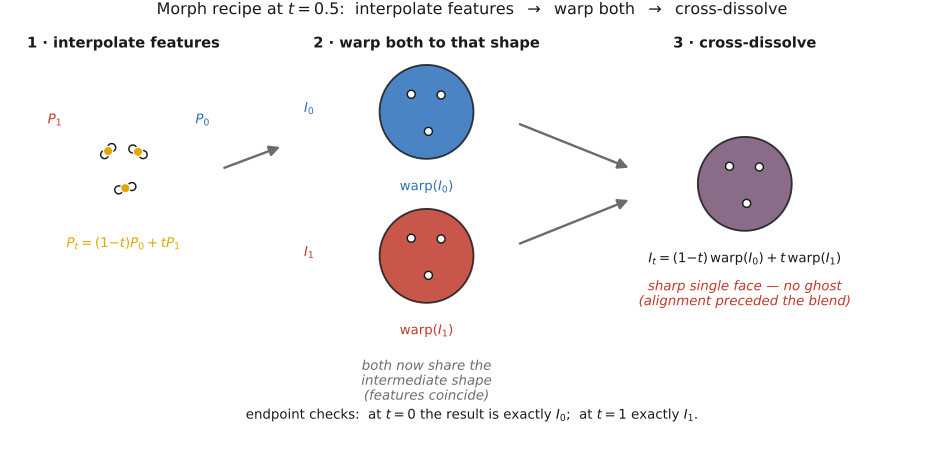
- Interpolate the feature geometry to an intermediate shape: each corresponding pair (point, segment, or vertex) goes to its in-between location $P_t=(1-t)\,P_0+t\,P_1$.
- Build two dense warp fields from the sparse pairs — one carrying $I_0$'s features onto the intermediate shape, the other carrying $I_1$'s features onto the same intermediate shape.
- Warp both images to that common shape. Now $I_0$ and $I_1$ are feature-aligned: both pairs of eyes land on the same pixels, both mouths coincide.
- Cross-dissolve the two warped images, $I_t=(1-t)\,\text{warp}(I_0)+t\,\text{warp}(I_1)$. Because they are now aligned, the blend is sharp — no ghosting (Figure 6.3.3).
A natural question is why warp both images, not just one. You could warp $I_0$ all the way onto $I_1$'s shape and dissolve — but then features would slide the whole distance while colors merely faded, and the early and late frames would be badly over-distorted (one image stretched to fit the other's geometry while still wearing its own colors). Meeting in the middle — both images warped only partway, to the shared intermediate shape — keeps each warp small and symmetric, and is what makes the motion read as a single object transforming rather than one picture deforming into another.
The recipe is a genuine interpolation, not a fancy blend, and the endpoints prove it. At $t=0$ the intermediate shape equals $I_0$'s own shape, so the warp of $I_0$ is the identity, and the color weight on $I_1$ is zero — the output is exactly $I_0$. Symmetrically at $t=1$ the output is exactly $I_1$. The morph passes cleanly through both originals.
One cross-reference closes the loop. The correspondences here are user-specified and sparse — a person draws a few lines or drags a few vertices. The automatic, dense way to obtain correspondence between two images is Optical flow, and that is precisely what frame-interpolation and slow-motion methods use to morph between video frames without any hand-drawn lines (Frame interpolation and slow-motion synthesis).
6.3.4 Field morphing: the Beier–Neely line-pair warp⧉
The first way to turn sparse correspondence into a dense warp is due to Beier and Neely (1992), whose Feature-Based Image Metamorphosis is the technique behind the Black or White video and a perennial problem-set favourite. The primitive is a pair of directed line segments — one drawn on the "before" image, one on the "after" — declaring "this feature edge here corresponds to that feature edge there" (the jaw line, the bridge of the nose, the line of an eye). A handful of segments is enough; the warp interpolates everywhere between them.
The mechanics of that warp are built in full in Warping and resampling, and we only recall them here. A before/after pair $\overline{PQ}\to\overline{P'Q'}$ sets up a segment-relative coordinate frame — a normalized coordinate $u\in[0,1]$ along the segment and a signed perpendicular distance $v$ in pixels — and a query point keeps its $(u,v)$ as it is reconstructed against the primed segment ($u$ scales with the segment's length, $v$ stays in absolute pixels). Several line pairs are reconciled by the distance- and length-weighted average of their proposed displacements, $w_i=(\operatorname{length}_i^{\,p}/(a+\operatorname{dist}_i))^{b}$ with the capped point-to-segment distance (cross-ref the figure in Warping and resampling, where the $(u,v)$ frame and the weight are derived). As always the map runs backward — $(u,v)$ is computed in the destination and looked up in the source — so every output pixel is filled.
What matters for morphing is only how that warp is driven: at parameter $t$ the line pairs are interpolated to an intermediate set $\overline{P_tQ_t}=(1-t)\overline{PQ}+t\overline{P'Q'}$, and each source is warped to that shared intermediate geometry before the cross-dissolve. The same handful of feature lines thus does double duty — defining the dense field and, by their own interpolation, the in-between shape.
Strengths and weaknesses. The strength is sparse, intuitive control: draw a few feature lines and get a smooth field, with no mesh to manage. The weakness is that every line affects every pixel — global support, so each frame costs $O(\#\text{pixels}\times\#\text{lines})$ — and far-apart lines can fight, producing "ghost" pulls and folds where their proposed displacements disagree; getting $a,b,p$ right and debugging the distance function are a real part of the work. Two practical bells and whistles: morph the foreground only (matte it first) so an unconstrained background does not drag artifacts into the result, and use non-uniform timing (let different features morph at different rates) for more lifelike transitions — a turning head might lead with the nose.
6.3.5 Mesh / triangulation morphing (the alternative warp)⧉
The second way to get a dense warp swaps lines for a mesh of corresponding control points placed on both images (or a regular grid deformed to match features). Triangulate the points; each triangle in $I_0$ corresponds to the matching triangle in $I_1$.
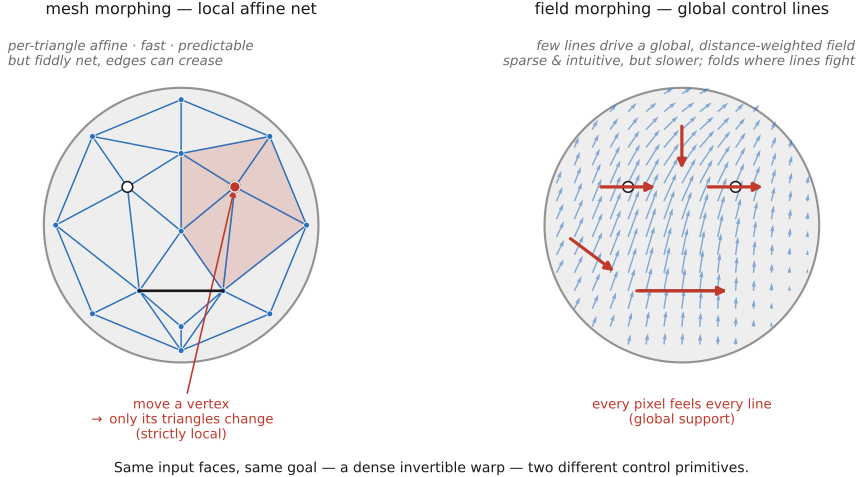
The warp is then trivially local: within each triangle the map is a single affine (barycentric) transform — fast to evaluate, and exactly invertible. The intermediate shape is the mesh with its vertices interpolated to $P_t=(1-t)P_0+tP_1$; warp each source by its per-triangle affine onto that mesh, then cross-dissolve. Spline and free-form mesh variants (Wolberg's Digital Image Warping; multilevel free-form warps) trade the piecewise-affine creases at triangle edges for a smoother field.
Field versus mesh — the trade-off (Figure 6.3.4). A mesh warp has local support: moving a vertex disturbs only its incident triangles, which makes it fast, predictable, and free of the far-line fights that plague field warps — but the control net is fiddly to author, and triangle edges can crease if the triangulation is poor. A field (Beier–Neely) warp has global, line-based control that is sparse and intuitive to draw — but it is slower and can fold. Same job — turn sparse correspondence into a dense, invertible warp — expressed in two different bases (a triangulation versus a set of influence lines).
Either way, the warp is a domain transform that must reconstruct and prefilter as it resamples — minified regions averaged down, magnified regions smoothly interpolated up — exactly the elliptical weighted average (EWA) / mip machinery of Warping and resampling. Because a morph stretches some regions hard while crushing others, it is a genuine stress test for good resampling: cut corners on the prefilter and the in-betweens alias and shimmer.
6.3.6 View morphing — the geometrically-correct in-between of two views⧉
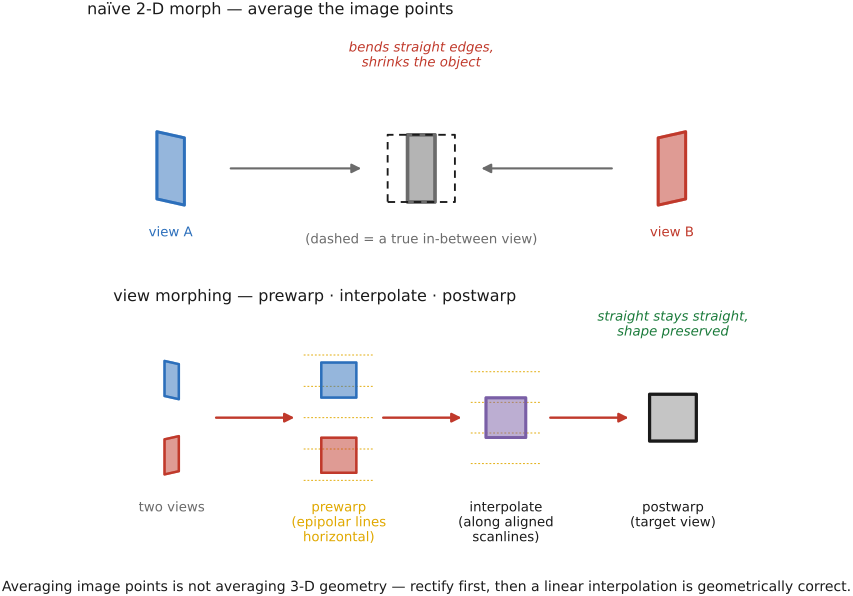
There is a case where the flat 2-D morph above is silently wrong. Suppose $I_0$ and $I_1$ are not two arbitrary pictures but two photographs of the same 3-D scene from different viewpoints — a face rotating between two camera angles, say. A naive linear morph then bends straight lines and shrinks the object: the in-between is not a valid view of any rigid scene (Figure 6.3.5). The reason is fundamental — linearly interpolating image positions is not the same as interpolating the underlying 3-D geometry. A straight edge in the world projects to a straight line in both photos, but the midpoint of its two image projections is generally not where that edge would project from an in-between camera; the linear average cuts a chord across the true projective path, so straight lines sag and the silhouette pinches inward.
The fix, due to Seitz and Dyer (1996) in View Morphing, restores physical validity with three steps:
- Prewarp both images by homographies that rectify them to a common plane — so the two image planes become parallel and corresponding epipolar lines are horizontal and aligned (the same rectification used in stereo).
- Linearly interpolate the now-rectified images — a plain morph. But in this rectified frame the linear interpolation is geometrically correct, because corresponding points are constrained to move along aligned scanlines, so averaging their positions tracks the true motion.
- Postwarp the interpolated result by an interpolated homography to the desired in-between view.
Why does rectification rescue the linear blend? Because it converts the general two-view geometry into the parallel-camera, pure-translation case. When two cameras differ only by a translation along their shared baseline, moving the camera fraction $t$ of the way does correspond exactly to interpolating image positions linearly — straight lines stay straight, the object keeps its size and shape, and the in-between is a true perspective view. View morphing is thus the projectively-aware upgrade of the plain morph: prewarp into the case where linear is correct, interpolate, postwarp back out.
The connection outward is direct. View morphing needs corresponding points between the two views and the epipolar geometry relating them — exactly the correspondence problem of Optical flow and stereo. Supply that correspondence densely and automatically and you can synthesise in-between views with no hand-drawn lines at all — the bridge from morphing to image-based rendering, and to flow-driven frame interpolation (Frame interpolation and slow-motion synthesis), where the two "views" are simply adjacent video frames.
6.3.7 Recap and significance⧉
Three ideas last past this chapter. First, interpolating color alone introduces blur and ghosts — to get a plausible in-between you must interpolate position too. Second, separate shape and color, interpolate each as its own linear blend, and recombine them. Third, non-rigid alignment of two different images is a reusable primitive — once you can warp one image into correspondence with another, you can interpolate between them, average them, exaggerate the difference, or re-render from a new viewpoint.
That last sentence is where morphing reaches into the rest of the book. The canonical face morph is only the showpiece. Video frame interpolation and slow-motion are morphing between adjacent frames; MPEG-style motion prediction is morph-by-motion-field; morphable face models warp a mean face by shape parameters; and motion magnification (Liu et al. 2005) analyses a motion field, magnifies it, and warps by the magnified field — a morph whose correspondence comes from motion analysis. The common thread is that everything here hinged on correspondence, which we obtained by hand. Getting that correspondence automatically and densely is the subject of the next chapter, Optical flow.
Big lessons of this chapter
The recurring principles from this chapter, gathered for review.
A morph is a correspondence field plus transport, then a blend. To interpolate between two images you cannot average their colors where they sit; you must first establish a correspondence between their features, transport (warp) both images along that correspondence to a common intermediate shape, and only then blend. Separating the manipulation into a domain part (the warp — where features are) and a range part (the color blend — what they are), and interpolating each linearly, is what makes the in-between read as one object transforming rather than two pictures fighting. The same three-part shape — correspond, transport, blend — drives panorama de-ghosting, multi-frame super-resolution's sub-pixel alignment, and flow-driven frame interpolation; the only thing that changes is how the correspondence is obtained (here, sparse user lines; in Optical flow, a dense automatic field).
Averaging two images only makes sense once their features sit at the same place. A plain cross-dissolve blends colors at fixed coordinates, so any misalignment double-exposes into a ghost; the cure is always to warp into correspondence first, then average. You have already met this move under other names — panorama de-ghosting registers overlapping frames before feathering them, and multi-frame super-resolution aligns sub-pixel-shifted shots before merging (cross-ref Blending). Morphing is the lesson taken to its limit: not just align-then-average once, but interpolate the alignment itself smoothly over $t$. The dense, automatic aligner that makes this work without hand-drawn lines is Optical flow.