2.9 Color technology⧉
The previous chapter ended on a liberating thought: because the eye keeps only three projections of a spectrum, a photograph or a screen never has to reproduce the original light — only some light, a metamer, that lands on the same three cone responses. This chapter is the engineering consequence of that single idea. We will see how color is measured against an agreed standard, how the three numbers are packed into a file so that quantization and noise fall where the eye won't notice, how different devices speak different color dialects and how we translate between them, how a sensor splits one color into three measurements and a display recombines three into one, and finally how a camera guesses what the light was so it can tell you what the colors are. The recurring obstacle behind almost every difficulty is the lesson the perception chapter boxed — color is non-orthogonal and non-negative — and a new one this chapter contributes about the arithmetic of light itself.
2.9.1 analysis vs synthesis and non-orthogonality⧉
It pays to split the whole field of color technology into two mirror-image operations before we touch any of the machinery. Analysis is sensing a color: take an incoming spectrum and project it onto three responses — what the cones do, and what a camera's three color channels do. Synthesis is reproducing a color: take three numbers and build a spectrum that produces them — what a display does by adding a few primaries, what an ink does by subtracting them (Figure 2.9.1). Every device in this chapter is one or the other (and the full imaging pipeline is analysis at the sensor followed by synthesis at the display, with a great deal of bookkeeping in between).
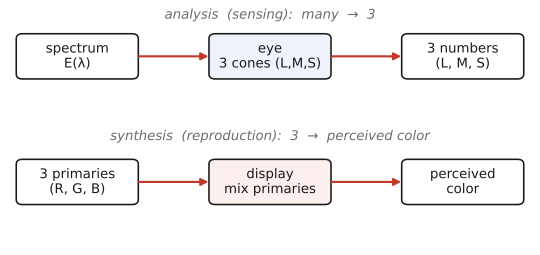
Both directions lose information, and for the same two reasons we met in the perception chapter. The projection is non-orthogonal — the response curves overlap heavily, so the three "axes" are nowhere near perpendicular — and physical light is non-negative, so we cannot freely take the differences that an orthonormal basis would allow. This tension is not a one-time annoyance; it returns at every stage. It is why analysis and synthesis need different sets of vectors (the sensor's spectral responses are not the display's primaries), why no set of real primaries can reach every color, and why white balance is never exact. Keep the two arrows of Figure 2.9.1 in mind: most of this chapter is about doing one of them well, and translating cleanly between the two.
2.9.2 Measuring color⧉
Before we can reproduce a color we need a way to name it that everyone agrees on, independent of any particular eye or device. The historical route to that standard is the color-matching experiment (Figure 2.9.2). An observer looks at a split field: on one side a test light of some spectrum, on the other a mixture of three fixed primary lights whose intensities the observer can dial up and down. The task is to adjust the three knobs until the two halves of the field look identical. The three settings that achieve the match are the color's coordinates in that primary system. This works at all only because of metamerism — the observer is not reproducing the test spectrum, just a metamer of it — which is the same good news the perception chapter delivered.
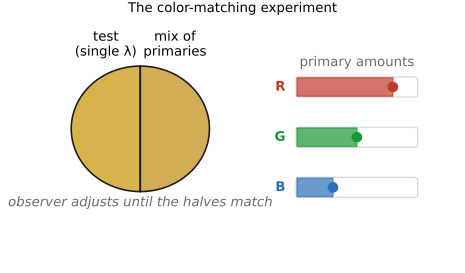
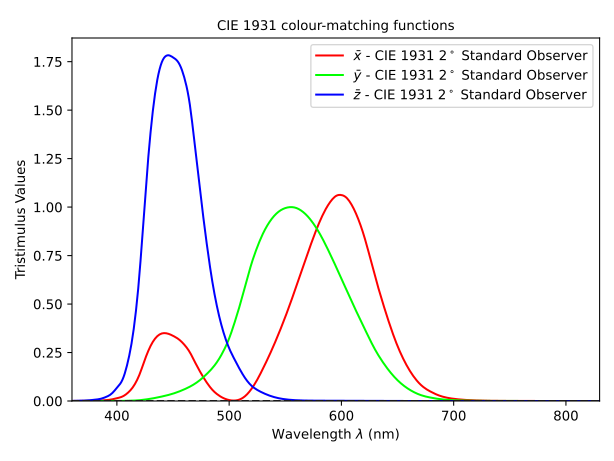
Run this experiment for every monochromatic wavelength across the spectrum and you obtain three curves — the amount of each primary needed to match a unit of light at each wavelength. These are the color-matching functions. Because any spectrum is a sum of monochromatic pieces, and matching is linear, the curves let you predict the match for any spectrum by integration. This is the quantitative form of the trichromatic theory (von Helmholtz, 1859), and the coordinates it produces are the tristimulus values. In 1931 the CIE (Commission Internationale de l'Éclairage, the International Commission on Illumination) standardized one such system for an average human observer, defining the color-matching functions $\bar x(\lambda), \bar y(\lambda), \bar z(\lambda)$ and the tristimulus values
These three integrals are the analysis projection of the previous section, made into an international standard (Figure 2.9.3). The curve $\bar y(\lambda)$ was deliberately chosen to equal the eye's luminance sensitivity, so $Y$ alone is luminance — the perceptual brightness — a convenience we lean on repeatedly below.
It is convenient to factor brightness out and look only at which color we have, regardless of how bright. Dividing each tristimulus value by their sum gives the chromaticity coordinates
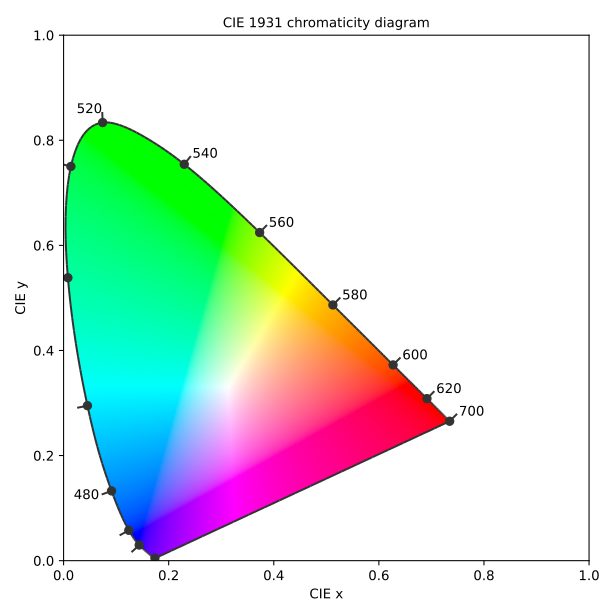
and plotting $(x, y)$ produces the famous horseshoe-shaped chromaticity diagram (Figure 2.9.4). Its curved boundary, the spectral locus, is the trail of the pure monochromatic wavelengths; the straight line closing the bottom is the line of purples, which have no single wavelength. Every realizable color lives inside this region, with the neutral white point near the middle. We will hang a great deal on this diagram — gamuts, primaries, white points — so it is worth getting comfortable with it now.
One detail on Figure 2.9.3 deserves a flag because it foreshadows the next several sections: the color-matching curves go negative in places. In the real experiment that means some test colors — highly saturated cyans — cannot be matched by adding the three primaries; the only way to balance the field is to add a primary to the test side instead, which counts as a negative amount. This is the non-negativity wall again. The CIE dodged it by choosing imaginary, "super-saturated" primaries $X, Y, Z$ that lie outside the spectral locus, so that all real colors get non-negative coordinates — at the cost of primaries no lamp can actually emit. That trade (impossible primaries to keep the numbers positive) is exactly the difficulty we confront for real when we try to reproduce color with physical light.
2.9.3 Linear vs Gamma vs. log encoding⧉
We now have three numbers per pixel; how should we store them as bits? The naïve answer — quantize the linear-light value uniformly — is wrong, and seeing why introduces the most important encoding idea in imaging. The eye's response to light is roughly multiplicative: doubling the light from $1$ to $2$ units looks like the same step as doubling from $100$ to $200$ (the Weber–Fechner law from the perception chapter). A storage scheme that spends equal numbers of code values on equal linear increments therefore wastes precision in the highlights, where the eye cannot tell neighbouring levels apart, and starves the shadows, where it can — producing visible banding in dark regions and forcing more bits than necessary (Figure 2.9.5).
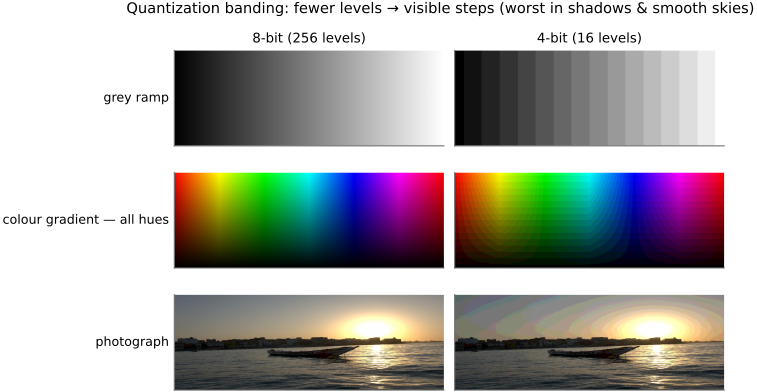
The fix is to gamma-encode: store a compressed value $V = L^{1/\gamma}$ instead of the linear light $L$, and decode with $L = V^{\gamma}$, where $\gamma \approx 2.2$. The encoding curve devotes more code values to the dark end (where small ratios matter) and fewer to the bright end, matching the eye's sensitivity so that the quantization steps are perceptually even (Figure 2.9.5, left panel — slide γ to watch the code levels redistribute). In practice the sRGB standard uses a piecewise curve — a short linear segment near black, where a pure power law misbehaves, splicing into a $\gamma = 2.4$ power law — but its overall shape is close to $2.2$. Most image files, JPEGs included, hold gamma-encoded values, which is why operations done blindly on pixel numbers (averaging, blurring, resizing) are subtly wrong: they should be done in linear light, a point we return to repeatedly in the image-processing part.
The specific value $2.2$ is a historical accident worth knowing, because it explains why we still use it. Old cathode-ray tube (CRT) displays had a natural power-law response: screen luminance was proportional to (grid voltage)$^{\gamma}$ with $\gamma \approx 2.2$–$2.5$, a consequence of electron-gun physics (the beam current is a power law in the control-grid voltage). So a CRT automatically decoded a gamma-encoded signal — feed it $V = L^{1/\gamma}$ and the tube emitted $L = V^{\gamma}$, linear light, with no decoding hardware at all. sRGB's $\approx 2.2$ simply codifies that tube curve. The bonus is that this same curve is roughly the inverse of human lightness perception (Weber–Fechner), so it also puts the code levels where the eye is sensitive. That is why we kept gamma after CRTs vanished: a modern liquid-crystal display (LCD) or organic light-emitting diode (OLED) panel emulates the old tube curve purely for compatibility, even though its physics no longer demands it.
The word gamma comes from photography, where it means something related but distinct. Film's response is its characteristic curve (the Hurter–Driffield curve): optical density plotted against log exposure, with a toe in the shadows, a straight middle section, and a shoulder in the highlights. Film gamma is the slope of that straight portion, $\gamma = \Delta D / \Delta \log H$ — the medium's contrast, set by development (push-processing raises it). So film gamma is a contrast/rendering knob while display gamma is an encoding power law; both are log–log slopes, but they do different jobs. End-to-end system gamma (capture $\times$ display) is deliberately tuned slightly above $1$ (about $1.1$–$1.5$) so that images look right when viewed in a dim surround, which washes out apparent contrast.
The sRGB transfer curve that every web image lives in is piecewise: a short linear toe near black, $V = 12.92\,L$ for $L \le 0.0031308$, splicing into a power segment $V = 1.055\,L^{1/2.4} - 0.055$ above it. The two pieces are meant to join smoothly at the knee — but the standardized constants ($12.92$, the breakpoint $0.0031308$, the $0.055$ offset, the $1/2.4$ exponent) are rounded and not mutually consistent, so they miss each other: at the breakpoint the linear part gives $\approx 0.04045$ while the power part gives $\approx 0.04059$, a tiny discontinuity of order $10^{-4}$, on top of the slope kink that is there by design. So even the encoding underneath every JPEG is, strictly, not continuous at the join. The lesson is small but practical — real transfer functions are messier than the clean "$\gamma \approx 2.2$" story, so check the actual curve (and its inverse) before you do arithmetic or quantize in that space. (A "corrected" sRGB nudges the breakpoint and scale so the two pieces meet exactly.)
A third option appears in high-end work: log encoding, $V \propto \log L$, which spreads code values evenly across ratios (stops) of light. This is the native language of multiplicative processes, and it is the standard for camera RAW capture in cinema and for high dynamic range (HDR) grading, where the scene spans far more stops than a display can show. The choice among the three encodings is not arbitrary — it follows from the arithmetic of the operation you intend to perform.
Log encoding is, in fact, becoming the standard for video: high-end and now prosumer cameras shoot in named log profiles — S-Log / S-Log3 (Sony), Log-C (ARRI), V-Log (Panasonic), C-Log (Canon), RED Log3G10 — and the ACES (Academy Color Encoding System) pipeline standardizes a log working space (ACEScc / ACEScct). The appeal is that log packs a wide scene dynamic range into limited bits while keeping the grade malleable: a stop becomes a roughly constant code increment, so exposure and contrast moves are uniform across the tonal range. The catch is that the footage looks flat and desaturated straight out of the camera — it is not meant to be viewed, but color-graded down to a display encoding afterward. On the display side the broadcast-HDR transfer functions HLG (hybrid log-gamma) and PQ (perceptual quantizer, SMPTE ST 2084) play the role gamma plays for standard dynamic range. So in modern video the trio increasingly resolves to a single slogan: log for capture, gamma / PQ / HLG for display. The canonical references for all of this — gamma, the luma-versus-luminance distinction below, and video encoding generally — are Charles Poynton's Digital Video and HD: Algorithms and Interfaces and his widely-circulated Gamma FAQ and Color FAQ.
Whether light adds or multiplies should dictate how you encode it. Light from independent sources adds (two lamps, the blur of an out-of-focus lens, the accumulation of photons on a sensor) — these are linear operations, and they are correct only on linear-light values, which is why deconvolution, resizing, and physically-based blur must decode the gamma first. Surface reflectance and perceived contrast, on the other hand, multiply (a grey card under twice the light, a filter cutting a fraction of each wavelength) — and a log encoding makes the multiplicative native, turning products into sums. Gamma is the pragmatic compromise: a power law that behaves better than $\log$ near zero (where $\log$ blows up) while still matching perception. Get this wrong — average gamma values, or sharpen in log — and you get milky blurs, wrong colors, and crushed shadows. The same additive-vs-multiplicative split organizes tone mapping, HDR, and point operations later (→ Big Lessons).
Finally, a notational trap that this encoding choice creates and that confuses everyone at least once: luma versus luminance. Luminance $Y$ is the true, perceptual brightness — a weighted sum of linear RGB (the CIE $Y$ above). Luma $Y'$ is the same-shaped weighted sum, but computed on the gamma-encoded RGB, as a coding convenience (it is the brightness channel inside the luma-chroma formats YUV (luma Y plus U and V chroma) and YCbCr, and in JPEG). They are not equal, because applying the weights and applying the gamma do not commute. Our convention in this book, matching video, JPEG, and the programming exercises, is the Rec. 601 luma weighting
with green dominating because the eye's brightness sense is mostly green. We will mention the Rec. 709 weights ($0.2126 / 0.7152 / 0.0722$), the high-definition television (HDTV) alternative applied to linear light, where context calls for radiometric correctness.
2.9.4 linear (kind of) color spaces⧉
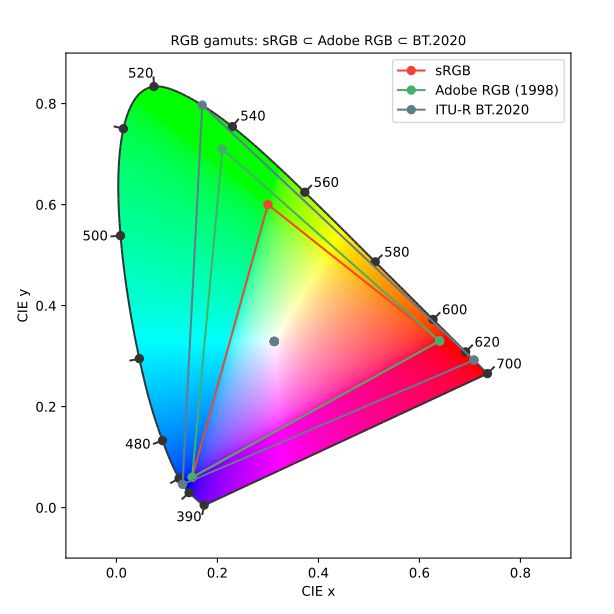
With a way to measure color ($XYZ$) and a way to encode it (gamma), we can organize the zoo of named color spaces. The first family is built on RGB. There is no single "RGB" — there are many RGB spaces, differing only in their primaries (which fix the reachable gamut) and their white point (Figure 2.9.6). sRGB / Rec. 709 is the small, safe space of the web and HDTV; Adobe RGB and Display P3 are wider; Rec. 2020 (ultra-high-definition) is wider still; ProPhoto RGB is enormous and used as an editing working space. The crucial fact is that any two of these, or any of them and $XYZ$, are related by a single $3 \times 3$ matrix $M$ — converting between color spaces is one matrix multiply, provided it is done in linear light.
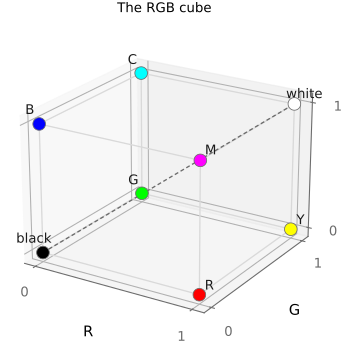
The same matrix idea gives a second, differently-purposed family: the opponent or luma–chroma spaces — YCbCr, YUV, YCoCg — each a fixed $3 \times 3$ map that separates a luma axis from two chroma axes. Splitting brightness from color this way is what lets compression throw away color resolution cheaply (chroma subsampling, since the eye's color acuity is low), and it gives editing tools clean handles. We can even visualize the RGB family geometrically as the RGB cube (Figure 2.9.7), with black at the origin, white at the far corner, and the neutral grey axis running between them.
A caveat to forestall confusion: "linear" in the title of this section means a linear map between spaces (a matrix), not that the values are linear-light. sRGB carries a gamma; $XYZ$ is linear-light. The two senses of "linear" are independent, and conflating them is a common source of color bugs.
2.9.5 Non-linear space: CIELAB⧉
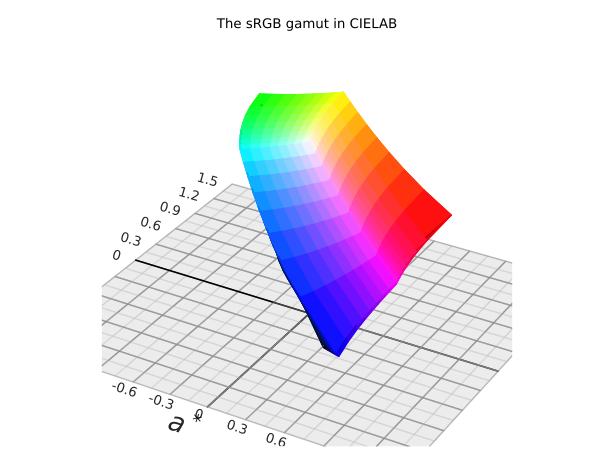
Matrices preserve straight lines but they do not make equal coordinate steps look equally different to the eye. A fixed numerical change in sRGB is a large perceived jump in some colors and an invisible nudge in others. For tasks that need perceptual uniformity — color-difference tolerances, gradients, palette design — we need a deliberately non-linear space. The standard one is CIE L\a\b\ (CIELAB), which applies a cube-root compression of $XYZ$ about a reference white and recombines the result into a lightness axis L\ and two opponent chroma axes a\ (green–red) and b\ (blue–yellow):
with $f$ the cube-root nonlinearity and $Y_n$ the white reference. In this space equal distances correspond, roughly, to equal perceived differences, so color difference is just a Euclidean distance, $\Delta E = \lVert \Delta \mathbf{Lab} \rVert$ (with the refined ΔE2000 formula correcting the residual non-uniformities). Its close cousin CIE L\u\v\* (CIELUV) makes the same move with a different chromaticity scaling, favoured in lighting and display work.
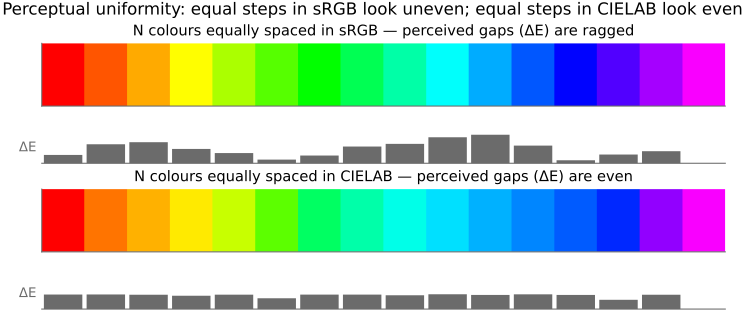
The deeper reason a uniform space must be non-linear is the same reason gamma encoding exists: perception is roughly a power law (Weber–Fechner, Stevens), so any space that turns perceived difference into geometric distance has to warp $XYZ$ accordingly (Figure 2.9.9). CIELAB is not the last word — it has known non-uniformities, especially in saturated blues — and modern replacements — the uniform color space (UCS) variant CAM02-UCS, and Oklab — fix them while keeping the same intent. Distinct from these perceptual spaces are the hue-saturation-lightness (HSL) and hue-saturation-value (HSV) spaces: convenient cylindrical re-parameterizations of RGB for user interfaces, but not perceptually uniform, a distinction that matters the moment you try to use them for anything quantitative.
2.9.6 Reproducing color⧉
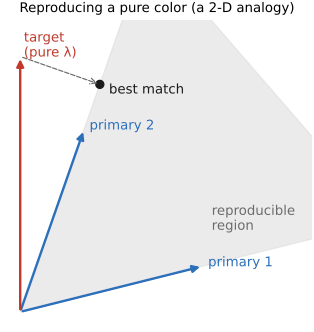
Synthesis — building a color from primaries — is where the non-orthogonal, non-negative wall stops being abstract. Suppose we want to reproduce a single monochromatic test color, a pure wavelength, using three fixed primaries (Figure 2.9.10). In the linear-algebra picture this is asking for weights $w_i$ such that $\sum_i w_i \mathbf{P}_i$ matches the target. The 2-D analogy makes the trouble plain: with two non-perpendicular basis vectors you can reach any point in the plane if you are allowed negative coefficients — but a primary is a light, and you cannot emit a negative amount of it. So the reachable colors are not the whole plane but only the convex cone of non-negative combinations. Non-orthogonality plus non-negativity turns some perfectly real colors into impossible reproductions: the saturated cyans that needed negative matches in the color-matching experiment simply cannot be made by adding three real primaries.
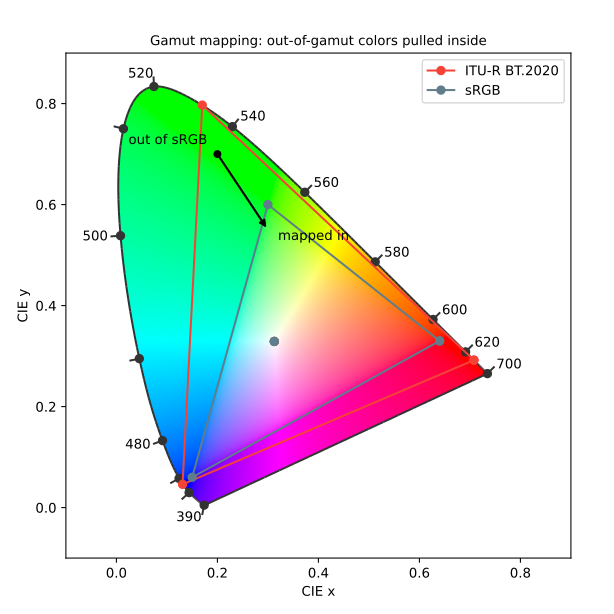
The set of colors a device can make is its gamut: the convex hull of its primaries, the triangle we already saw on the chromaticity diagram (Figure 2.9.6). Colors outside it must be gamut-mapped in (Figure 2.9.11) — clipped to the boundary, or compressed inward to keep relationships, a choice we formalize as rendering intents in the next section.
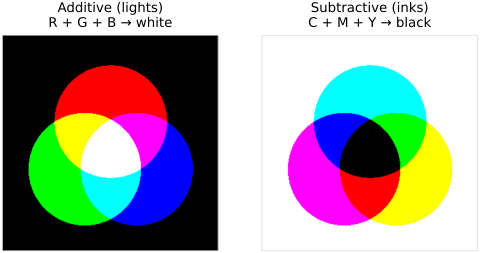
There are two physically distinct ways to mix color, and the distinction is more subtle than the names suggest. Split the spectrum into three coarse bands and pretend they are pure B, G, R (Figure 2.9.12). Additive mixing — lights — starts from black and adds bands: $R + G + B$ gives white, and the pairs give yellow, cyan, magenta. Subtractive mixing — filters and inks — starts from white and each layer removes a band, with cyan, magenta, yellow stacking toward black. But "subtractive" is a misleading name: stacking filters is really a wavelength-by-wavelength multiplication of the spectrum.
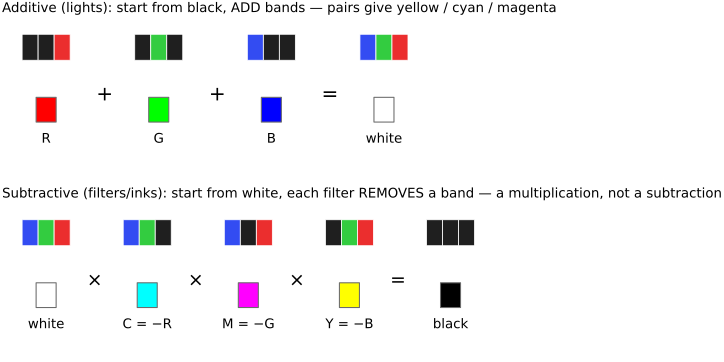
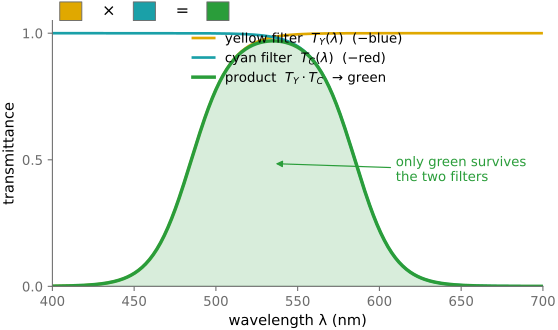
The proof that subtraction is really multiplication is concrete. A yellow filter blocks blue; a cyan filter blocks red. Stack them and the only band that survives is the overlapping green — so yellow $\times$ cyan = green, which is a product of the two transmittance spectra $T_Y(\lambda)\cdot T_C(\lambda)$, not any kind of sum (Figure 2.9.13). The overlapping-disks picture captures both regimes at a glance: RGB lights overlapping toward white versus cyan-magenta-yellow (CMY) inks overlapping toward black (Figure 2.9.14). And real systems are often hybrid — an LCD projector, for instance, uses a white lamp, panels that subtract (modulate) each channel, and then adds the three channels on the screen.
This additive/subtractive split organizes the display and print technologies: CRTs and LCDs and modern OLEDs are additive emitters; projectors come in digital micromirror device (DMD), LCD, and laser flavours; film, printers, and halftoning are subtractive, building tones from overlapping dye or dots. All of them live and die by their gamut and the gamut mapping that squeezes an image into it.
2.9.7 Color management, ICC, and industry standards⧉
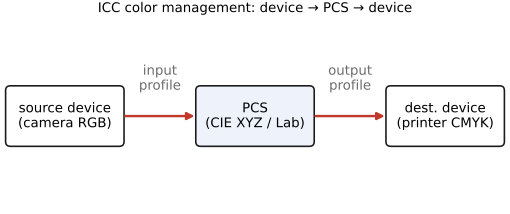
A color is now a triple in some space, but a naked triple is ambiguous: the same numbers $(200, 50, 50)$ are a different red on every device, because each camera, monitor, and printer has its own primaries, white point, gamut, and transfer curve. The result is the everyday complaint that a photo looks different on the screen than in the print. The solution is color management, standardized by the ICC (International Color Consortium). Each device carries a profile that maps its values to and from a device-independent profile-connection space (PCS), which is $XYZ$ or CIELAB (Figure 2.9.15). To move an image from camera to printer you go device → PCS → device: convert the camera's numbers into the absolute PCS, then out into the printer's numbers. The PCS is the lingua franca that makes color portable.
When the destination gamut is smaller than the source (Figure 2.9.11), the profile must decide what to do with out-of-gamut colors, and ICC offers four rendering intents: perceptual (compress the whole gamut inward, preserving relationships — good for photographs), relative colorimetric (leave in-gamut colors untouched, clip the rest, and match white points — good for most prints), saturation (favour vividness over accuracy — for charts and graphics), and absolute colorimetric (reproduce exact colors including the paper white — for proofing). A second job profiles handle is chromatic adaptation between differing white points, computed with a Bradford $3 \times 3$ transform (Bradford chromatic-adaptation transform) — the engineering descendant of the von Kries adaptation from the perception chapter, and the same machinery reused for white balance in Auto-exposure and auto white balance (BASIC). In practice, profiles are embedded in image files, monitors are calibrated against a reference, soft-proofing previews the print on screen, and sRGB serves as the safe default whenever a file arrives with no profile attached.
2.9.8 Sensing color: multiplexing strategies⧉
Analysis again, but now in hardware. A bare image sensor is color-blind — each photosite counts photons regardless of wavelength — so to capture color we must somehow take three (or more) measurements where there was room for one. Every color camera multiplexes those measurements across some axis, and there are four classic ways to do it (Figure 2.9.16).
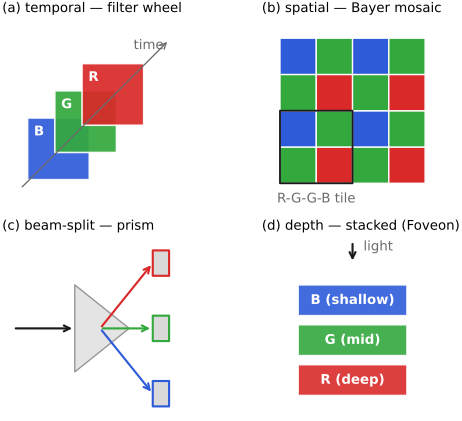
In time: shoot red, green, and blue frames sequentially through colored filters. This is how Maxwell made the first color photograph (Maxwell 1861), how Prokudin-Gorskii (Prokudin-Gorskii) captured the Russian Empire, and how flatbed scanners and astronomy filter wheels still work. It is cheap and full-resolution, but it fails on motion — anything that moves between frames shows colored fringes (Figure 2.9.17).
In space (the dominant choice): lay a color filter array directly over the sensor — the Bayer mosaic, two green photosites for each red and blue, so each site records one color and the missing two are filled in afterward by demosaicking (Figure 2.9.18). The eye does the same thing with its interleaved cone mosaic, and the two-green bias mirrors the eye's green-weighted luminance. The cost is the need for an optical anti-aliasing (low-pass) filter to tame high-frequency color artifacts, plus some channel crosstalk. The Bayer tile is not the only CFA: Fuji's X-Trans uses a larger, less-periodic $6\times6$ tile whose irregularity scatters the moiré that a strictly periodic Bayer grid produces (so it can drop the anti-aliasing filter), and complementary filter arrays — CMY or CYGM (cyan-yellow-green-magenta) — pass more light through each filter than the primary RGB dyes do, buying sensitivity at the cost of messier, harder-to-separate color. Beam-splitter (prism): a dichroic prism splits the incoming rays onto three charge-coupled device (CCD) sensors — the 3-CCD / 3-chip design, long the standard in the broadcast video camera — wasting no photons and keeping full per-channel resolution, at the price of bulk, expense, and the difficulty of aligning the three chips precisely. In depth: stack wavelength-selective layers so that longer wavelengths are absorbed deeper in the silicon — the Foveon sensor used in Sigma cameras, conceptually like Kodachrome's stacked dye layers. Because every layer sits at the same location, it captures full color at every pixel with no demosaicking — at the cost of trickier color separation between the broad, overlapping layer responses and more chroma noise.
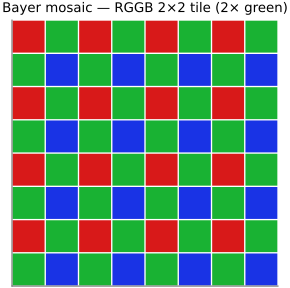
Two more strategies round out the picture. The spectral / Lippmann method records the standing-wave interference of the full incoming spectrum (Lippmann, 1908 Nobel; a precursor to holography), giving true spectral capture rather than three numbers — the limiting case. And real systems are often hybrid, combining strategies (spatial and temporal in video, say). All of this is analysis, the mirror of the synthesis section; the demosaicking algorithm itself we defer to the image-processing part, which is why this is only the sensing half. One conceptual fork is worth naming: almost every camera aims at trichromatic capture — three numbers that reproduce what a human would see, so metamers are indistinguishable by design — whereas multispectral / hyperspectral imaging samples the physical spectrum in tens or hundreds of narrow bands, deliberately keeping the distinctions the eye throws away. The latter serves remote sensing, agriculture, art conservation, and machine vision, where what matters is the material, not the appearance, and metamers must be told apart.
2.9.9 Processing color: saturation and beyond⧉
Once color is captured we often want to push it, and the color-space reasoning of this chapter says exactly which axis to push. Saturation scales the chroma: move each color away from the grey (luma) axis in an opponent or HSV space. The trouble is that a uniform scale over-saturates colors that were already vivid (they clip and go garish) and, worse, distorts skin, which viewers notice instantly. Vibrance is the smarter version — a non-linear, hue-aware gain that boosts the less-saturated colors more while protecting already-vivid ones and skin tones (Figure 2.9.19). Beyond a single global knob, selective / HSL color (the per-hue-band mixer in Lightroom) lets you re-tune hue, saturation, and luminance one color family at a time, and color grading tints shadows, midtones, and highlights separately — a habit inherited from film and video.
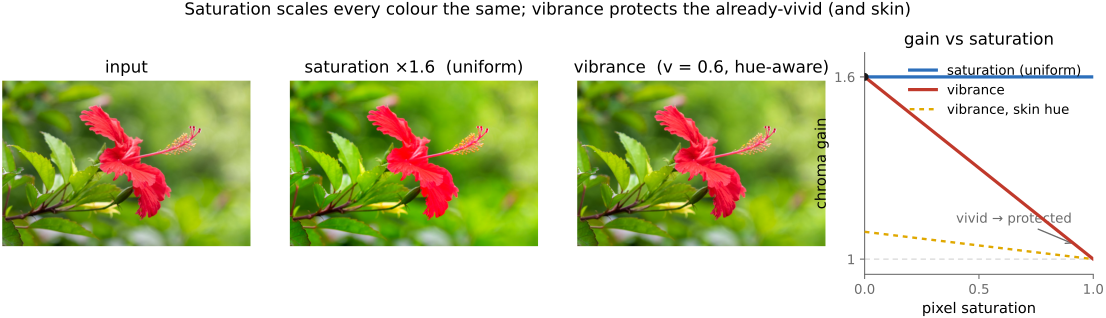
The point here is the which space, which axis, why — the color-space reasoning. The mechanics — curves, lookup tables, where in the pipeline these operations sit — belong to point operations in the image-processing part, and we hand them off there rather than duplicate them.
2.9.10 Converting to black and white⧉
"Convert to black and white" sounds like a single operation, but it is the cleanest illustration in this chapter of the non-orthogonal, non-negative theme turned into a question of intent. You are projecting three numbers to one — an inherently many-to-one, lossy map — so there is no single correct grey; there are many valid answers, and the right one depends on what you want, not on correctness (Figure 2.9.20). The general recipe is a weighted sum
with the constraint chosen to hold exposure, and the interesting questions are which weights and in which space.
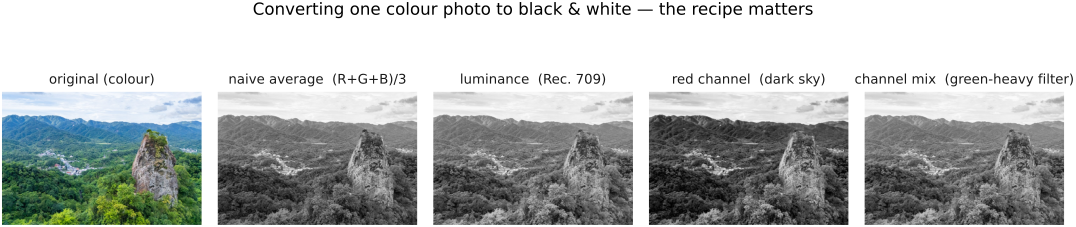
The options form a ladder of sophistication. Pick a single channel (R, G, or B): fast, occasionally useful — the green channel is close to luminance and usually least noisy, the red channel smooths skin and darkens skies — but it throws away two-thirds of the data. Average $(R+G+B)/3$ is simplest but perceptually wrong: it makes blue as bright as green, so skies and foliage come out muddy. Weighted luminance is the perceptual default — the cone-weighted sum where green dominates and blue counts little, the Rec. 601 ($0.299/0.587/0.114$) or Rec. 709 ($0.2126/0.7152/0.0722$) weights from earlier — but in which space? The recurring luma-versus-luminance distinction bites here: the cheap version weights the gamma-encoded values (luma $Y'$, what most software does), the radiometrically correct version weights linear RGB (luminance $Y$) and re-encodes, and the two give visibly different greys (linear-light is darker in saturated reds and blues). One can also take lightness, not luminance — the perceptually uniform L\* from CIELAB — or the UI shortcuts HSL "lightness" $(\max + \min)/2$ and HSV "value" $\max(R, G, B)$, each a different grey again.
The expressive end of the ladder is the custom channel mixer: choose the weights yourself (keeping $\sum w_i \approx 1$ to hold exposure). This is Lightroom and Photoshop's black-and-white mixer, and it is the digital descendant of putting a color filter on black-and-white film — a red filter darkens a blue sky for dramatic clouds (Ansel Adams's black skies are a red filter on panchromatic film), a yellow or green filter lightens foliage, an orange filter smooths skin. So a conversion is really a decision about how each color should map to grey. The hard case exposes the lossiness directly: two distinct hues with the same luminance (a red and a green of equal brightness) map to the same grey, erasing the edge between them. Contrast-preserving decolorization methods (Color2Gray, Gooch et al. 2005; Grundland & Dodgson 2007) optimize the mapping to keep color contrast rather than only luminance — the principled answer to "the green apple and the red apple should not vanish into one grey."
Converting to grey is a $3 \to 1$ projection: many-to-one, non-invertible, and therefore underdetermined. There is no single correct grey — only choices that trade perceptual fidelity against drama against contrast preservation. This is the same non-orthogonal, non-negative lesson from Human (and animal) vision and color, now staring back at you from a routine menu command.
2.9.11 Color appearance models⧉
CIELAB already warps color to match perceived difference, but perceived color depends on more than the stimulus alone — on the surround, the adapting light, the brightness. To predict what a color will actually look like we describe it along its perceptual dimensions: hue, chroma (or colorfulness), and lightness (or brightness), the natural cylindrical coordinates of a perceptual color solid (Figure 2.9.21). The UI spaces HSV and HSL are crude, cheap approximations of these axes — useful as handles, unreliable as predictions.
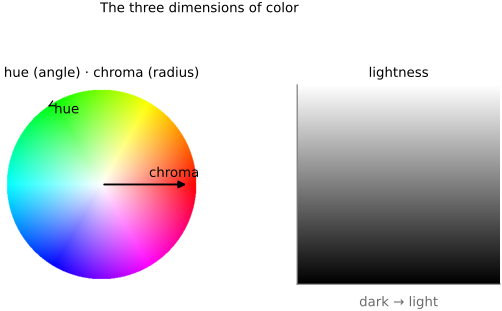
Color appearance models (CIECAM02 and its successors; see Fairchild, Color Appearance Models) take this further, folding in the chromatic adaptation and surround effects (the Hunt and Bezold–Brücke phenomena from the perception chapter) to predict appearance across viewing conditions. They are the rigorous engine behind tone mapping and high-end color management; here we only need the vocabulary — hue, chroma, lightness — and the fact that appearance is not a fixed function of the cone triple.
2.9.12 Skin tones⧉
The chapter closes on the color the whole pipeline is quietly tuned around. Skin is a memory color: viewers carry a strong internal expectation of how it should look and notice the slightest error, far more than for grass or sky. Plotted on a vectorscope, skin tones of all people fall along a remarkably tight line — the skin-tone locus, a single hue axis (the I line, between red and orange) — varying mostly in lightness and saturation, not hue (Figure 2.9.22). Cameras and film are deliberately tuned to render that locus pleasingly, which is why "good color science" in a camera is, in large part, good skin.
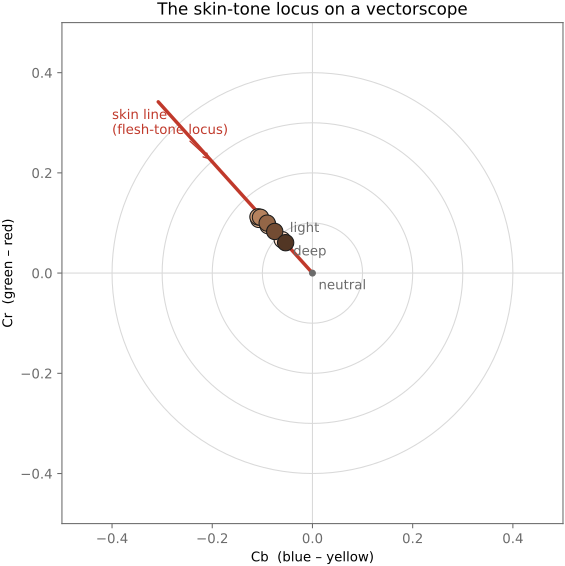
That tuning carries a history the book is obliged to confront. Color film and early video were calibrated against light-skinned reference subjects — the infamous Shirley cards — so that darker skin tones were rendered poorly for decades, a bias baked into chemistry and electronics alike (Figure 2.9.23). Modern sensors and pipelines render a far wider range of skin faithfully, and should, but the lesson generalizes: a color system tuned for one population fails others unless diversity is designed in from the start. We pick the fairness thread back up in the ethics chapter; here the technical point is that skin is the color by which a whole imaging chain is judged, and rendering it well for everyone is an engineering requirement, not a courtesy.
Big lessons of this chapter
The recurring principles from this chapter, gathered for review.
Whether light adds or multiplies should dictate how you encode it. Light from independent sources adds (two lamps, the blur of an out-of-focus lens, the accumulation of photons on a sensor) — these are linear operations, and they are correct only on linear-light values, which is why deconvolution, resizing, and physically-based blur must decode the gamma first. Surface reflectance and perceived contrast, on the other hand, multiply (a grey card under twice the light, a filter cutting a fraction of each wavelength) — and a log encoding makes the multiplicative native, turning products into sums. Gamma is the pragmatic compromise: a power law that behaves better than $\log$ near zero (where $\log$ blows up) while still matching perception. Get this wrong — average gamma values, or sharpen in log — and you get milky blurs, wrong colors, and crushed shadows. The same additive-vs-multiplicative split organizes tone mapping, HDR, and point operations later (→ Big Lessons).
Converting to grey is a $3 \to 1$ projection: many-to-one, non-invertible, and therefore underdetermined. There is no single correct grey — only choices that trade perceptual fidelity against drama against contrast preservation. This is the same non-orthogonal, non-negative lesson from Human (and animal) vision and color, now staring back at you from a routine menu command.