45.15 Rendering a raw DNG⧉
A raw DNG is not a picture. It is a grid of sensor measurements plus a recipe for turning them into one (this is the thesis of Chapter 45.14, DNG, the Digital Negative). "Render it" hides two different jobs that this book keeps deliberately separate:
- The radiometric job. Recover a scene-linear image: values proportional to the light that fell on the sensor, white-balanced and in a known color space (we use linear sRGB primaries). This is useful input for algorithms whose forward models assume linear light, including HDR merging and optical blur. Demosaicking itself starts from mosaic samples, and some denoising or editing methods deliberately use other representations (see Chapter 8.1, Image representation).
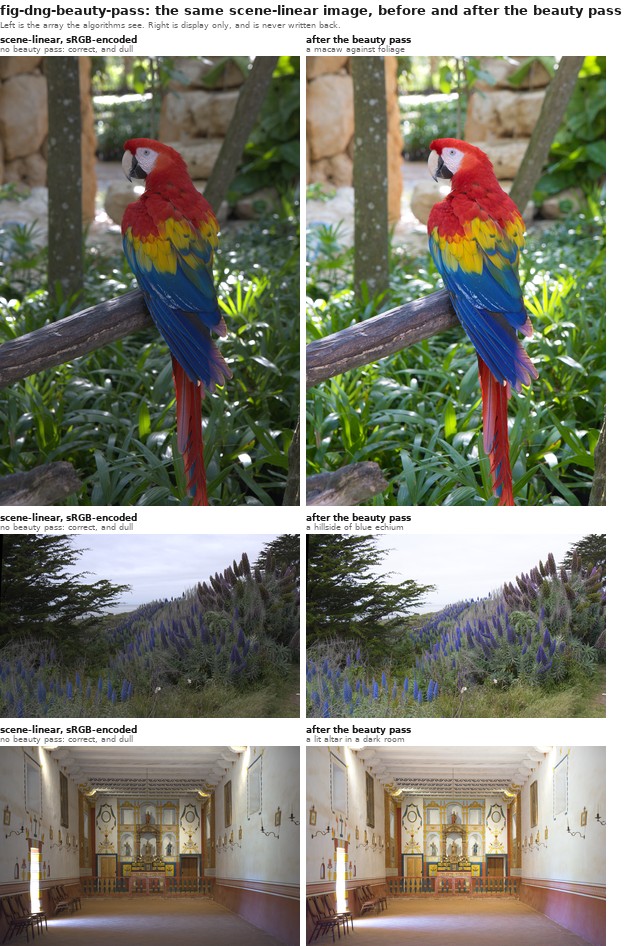
- The cosmetic job. Produce a pleasing displayed image that matches what the photographer saw in Lightroom. Interpreting linear numbers directly as sRGB makes them too dark. Even after correct display encoding, a neutral render may look flatter than the photographer's Lightroom result, which also includes a baseline tone curve that lifts the midtones, a gentle highlight roll-off, and a touch of saturation. We call that final step the beauty pass.
Do all processing in scene-linear; apply the beauty pass only at the very end, for display. Never blend, blur, merge, or solve on the beautified image, and never bake the beauty pass into a file you will later compute on. The beauty pass is a display transform, not data.
45.15.1 The pipeline, step by step⧉
Inputs: the original Bayer DNG (libraw/rawpy can read it) and its embedded XMP develop settings written by Lightroom. Our reference implementation lives in dng_linear_correct.py (the radiometric job, baked once into a demosaicked LinearRaw DNG) and figures/imageops.py (load_linear_dng, then linear_to_display, the beauty pass).
1. Read the Lightroom develop settings (XMP). From the DNG's XMP packet, read the crs: fields: Exposure2012 (in stops), Temperature and Tint (white balance), WhiteBalance (As Shot / Custom), and the crop rectangle (HasCrop, CropTop/Left/Bottom/Right, CropAngle). These are the photographer's artistic decisions; honoring them is what makes the render match Lightroom rather than some neutral default.
2. Demosaic to camera-native linear. Demosaic the Bayer mosaic with no gamma, no auto-brighten, and no white balance yet: rawpy.postprocess(gamma=(1,1), no_auto_bright=True, user_wb=[1,1,1,1], output_color=raw, output_bps=16). Here raw means rawpy.ColorSpace.raw. The result is a 16-bit camera-native RGB rendering with linear encoding. Decoder normalization, clipping, and demosaicking have already affected the samples; it is not untouched sensor data.
3. White balance from Temperature/Tint. Convert Lightroom's Temperature/Tint to camera-channel multipliers using Adobe's own dng_temperature algorithm (the kTempTable/kTintScale from the DNG SDK: temperature→$xy$ chromaticity, then through the DNG ColorMatrix/CameraCalibration to camera-neutral multipliers), and multiply the camera RGB by them (green normalized to 1). Using Temperature/Tint (not the camera's as-shot neutral) is what reproduces a custom white balance set in Lightroom.
4. Color: camera-native linear → linear sRGB. The current _color_matrix_to_srgb helper first forms B = ColorMatrix @ sRGB_to_XYZ, divides each row of B by its row sum, and inverts the result. The row normalization makes a neutral input map to output white. It prefers ColorMatrix2 and uses ColorMatrix1 if necessary. This is the implemented approximation, not a complete implementation of every DNG color-profile option.
The earlier path, retained as a fallback when ColorMatrix is absent, uses ForwardMatrix (reference camera coordinates → XYZ D50) and CameraCalibration (CC). Its composition is
with AB the AnalogBalance (identity for us). Then $\text{linear sRGB} = M_{\text{XYZ(D50)}\to\text{sRGB}}\cdot \text{cameraToXYZ}_{D50}\cdot \text{cameraRGB}$. The reference-neutral normalization and inverse calibration belong together. In the intermediate files, white balance is already baked in and AsShotNeutral is written as $[1,1,1]$; with identity AB, refNeutral is then $\mathrm{CC}^{-1}\mathbf{1}$. For diagonal CC, those calibration factors cancel in this composition. Do not apply the original white-balance gains a second time. A general decoder must also honor the profile's calibration conventions and illuminant interpolation.
5. Exposure. Multiply the linear image by $2^{\,\text{Exposure2012}}$. In linear light, exposure is a plain multiply (see Chapter 8.3, Tone point operations).
6. Crop (and straighten). Apply the crop rectangle and any straightening angle.
The stored intermediate is a processed camera-RGB image with white balance, exposure, and crop baked in; the loader then converts it to linear-sRGB primaries. The implementation clips values to $[0,1]$, and its optional max_px path resizes through an 8-bit encoded image before decoding again. Thus output="linear" describes the returned encoding, not calibrated ground truth or lossless preservation of all sensor information. These distinctions matter when interpreting quantitative demonstrations.
s     = read_xmp(dng)                         # crs:Exposure2012, Temperature, Tint, Crop*
cam   = rawpy.postprocess(dng,               # demosaic only — camera-native LINEAR
          output_color=raw, gamma=(1,1), no_auto_bright=True,
          user_wb=[1,1,1,1], output_bps=16) / white_level     # → [0,1]
mult  = wb_multipliers(s.Temperature, s.Tint, color_tags)     # Adobe dng_temperature
cam  *= mult                                  # white balance (green-normalized)
CC, FM, AB = color_tags.CameraCalibration2, ForwardMatrix2, AnalogBalance(or I)
refN  = inv(AB·CC) · AsShotNeutral            # AsShotNeutral now [1,1,1] (WB baked)
M     = XYZ_D50_to_sRGB · FM · diag(1/refN) · inv(AB·CC)
lin   = clip(cam · Mᵀ, 0, 1)                  # linear sRGB primaries
lin  *= 2**s.Exposure2012                     # exposure (a multiply in linear)
lin   = crop(lin, s.Crop*)                    # crop + straighten
# `lin` is the scene-linear ground truth. Beauty pass (step 7) is display-only.
(The two reference 3×3s: XYZ_D50_to_sRGB is the standard Bradford-adapted matrix; FM/CC come from the DNG tags, interpolated between the two calibration illuminants by correlated color temperature; we use the higher-CCT pair, index 2, e.g. D65.)
7. The beauty pass (display only). To display, encode to sRGB and apply the camera/Lightroom look: a fitted baseline tone curve, whose midtone lift depends on the chosen look and input exposure, a highlight roll-off, and modest saturation. Our linear_to_display uses a smooth, monotone baseline curve, a logistic S about a pivot, settled against twenty-two of our own photographs at once (an earlier version was fitted to Lightroom's luminance distribution, which worked but carried more parameters than the shape needs; see Chapter 8.4, Beauty curves: the camera "look"). It applies that curve with a highlight-weighted hybrid roll-off: midtones are toned hue-preserving so saturated colors stay saturated, but as luminance approaches white the curve goes per-channel so bright skies and the sun desaturate cleanly to white instead of taking on a magenta/cyan cast. The color half is a small vibrance rather than a flat saturation: chroma is scaled in Oklab, by a gain that fades as the pixel's own chroma rises and is notched down on skin hues, and it eases off in the same highlights the roll-off is whitening. How colorful a pixel already is, and whether its hue is skin, are both measured in Oklab rather than as HSV saturation and hue on the encoded value, because HSV saturation ignores lightness and so cannot tell a dark plum from a bright pink.
45.15.2 Where Lightroom's "look" actually comes from⧉
Lightroom's render is not just the color matrix. With an "Adobe Standard" or "Adobe Color" DNG camera profile (DCP), the chain is: matrix → HueSatMap (an HSV calibration table) → LookTable (the creative "look") → the baseline tone curve. Our pipeline uses the matrix approximation described above and approximates a display look with the beauty pass, but it does not apply the profile's HueSatMap/LookTable. In testing, the matrix-plus-beauty render matches the Lightroom JPG closely; applying our own re-implementation of the HueSatMap/LookTable helped only marginally and risked worse color (a too-purple blue), because the LookTable's value-encoding and HSV conventions are easy to get subtly wrong. So we deliberately stop at matrix + beauty. A close visual match on these examples does not establish a complete Camera Raw reproduction. Profile tables, illuminant interpolation, and process-version behavior can matter on other photographs.
45.15.3 What we would ask an Adobe engineer to check⧉
The implementation raises useful questions for validating any independent raw developer. The earlier ForwardMatrix investigation is retained here because it explains the calibration factors, even though the current default uses ColorMatrix:
- The forward transform. Is
cameraToXYZ_D50 = FM · diag(1/refNeutral) · (AB·CC)⁻¹, withrefNeutral = (AB·CC)⁻¹ · AsShotNeutral, the correct composition? Our bug was applyingFM · CC(un-inverted, no reference-neutral); the relevant check is whether the full conversion, including white balance and profile selection, matches the intended Camera Raw behavior, and that picking the index-2 (higher-CCT)FM/CCrather than CCT-interpolating between illuminants 1 and 2 is acceptable for daylight scenes. - Skipping HueSatMap / LookTable. We apply the matrix + a baseline tone curve but not the profile's HueSatMap or LookTable. Is matrix-plus-baseline-curve a defensible approximation of "Adobe Standard"/"Adobe Color," or does omitting those tables introduce errors that matter (and if we did apply them, what are the exact value-encoding and HSV-space conventions for the LookTable)?
- The baseline tone curve. We recovered a baseline curve empirically (fitting our linear-render luminance to the Lightroom-JPG luminance). Is there a canonical baseline tone curve for the current Process Version we should use instead, and is it applied per-channel, on luminance, or in some other space?
- Highlight roll-off. We desaturate highlights toward white with a luminance-weighted blend toward a per-channel curve. How does Camera Raw actually roll highlights to white?
45.15.4 Two kinds of DNG, and the special cases⧉
- The original Bayer DNG is read with
rawpy/LibRaw in this workflow. The demosaicked LinearRaw DNG thatdng_linear_correct.pywrites (steps 1–6 baked in) is not a mosaic; the workflow usestifffileto read this intermediate rather than assumingrawpysupports it. Read it withtifffile(load_linear_dng). Confusing the two is a common error. - HDR and panorama DNGs are different animals: a merged HDR DNG holds extended-range (>1.0) linear data and needs a tone-map, not a plain beauty pass; a panorama DNG may contain processed linear data in JPEG-XL tiles. Compression format alone does not determine tone encoding, and white balance may already be baked into the merge. Both need handling outside the normal path.
45.15.5 Easy mistakes (most of which we made)⧉
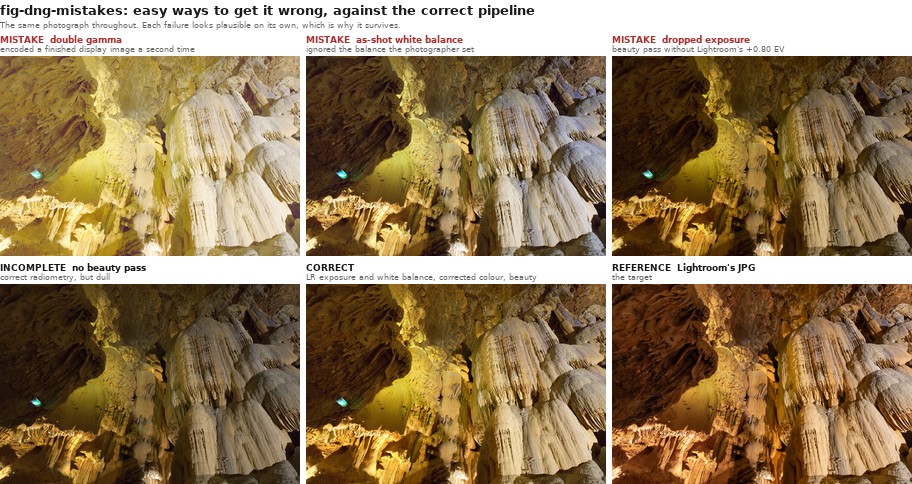
This pipeline is a minefield, and a wrong render looks almost right. In rough order of how badly each bit us:
- Forgetting the beauty pass. Linear values shown without display encoding look too dark; correctly encoded neutral data can still lack the intended photographic tone rendering. These are two distinct issues, and the temptation is to "fix" it with ad-hoc brightness/contrast/saturation hacks. The principled fix is a tone curve (the baseline "beauty" curve), applied only for display.
- Double gamma. Encoding an already-sRGB image to sRGB again (or running the beauty pass, which re-applies gamma, on data that is already gamma-encoded). The image goes washed-out and milky. Symmetric mistake: feeding linear data to something expecting sRGB. Always know the encoding of the array in your hand (the thesis of Chapter 8.1, Image representation).
- CameraCalibration applied wrong. The headline bug. Composing the color transform as
FM · CC(theCCun-inverted, with no reference-neutral normalization) instead ofFM · diag(1/refNeutral) · CC⁻¹. For a neutral already baked to ones, diagonalCCcancels against the reference-neutral factors in the correct composition. Multiplying by it directly therefore adds an unintended camera-channel scale; its final color error depends on the ForwardMatrix and image values. Check neutral patches and colored patches rather than inferring a universal RGB percentage error. - As-shot white balance instead of the photographer's. Letting
rawpyuse the camera's as-shot neutral (use_camera_wb) instead of converting Lightroom's Temperature/Tint. On any frame where the WB was adjusted in Lightroom this gives visibly wrong skies (too warm, too cyan). - Auto-exposing instead of honoring the exposure. Normalizing every image to a fixed mid-gray to "make it bright" ignores the photographer's
Exposure2012and flattens artistic intent: every photo comes out the same brightness. Bake the LR exposure; don't auto-expose. - Hue-preserving highlights. Applying the tone curve as a luminance ratio scaled across all channels preserves hue into the highlights, so a clipping sky keeps its blue/magenta tint instead of rolling off to clean white. Many camera looks desaturate near-white highlights, but this is a rendering choice rather than a universal physical requirement. Our fix is the highlight-weighted hybrid (per-channel roll-off near white).
- A kinked tone curve. A tone curve that plateaus then jumps to 1.0 produces banded, ugly highlights. Use a smooth, monotone curve with a soft shoulder: a parametric S is smooth by construction, and a table of knots needs a monotone interpolant (we use a Fritsch–Carlson monotone cubic where a table is what we have).
- Over-reaching on the profile. Re-implementing the DCP HueSatMap/LookTable badly (wrong value-encoding, wrong HSV space, premature gamut clipping in a narrow space) gives harsh, oversaturated greens and purple-ish blues, worse than skipping them. Know when to stop.
- Baking the beauty pass into data. Saving beautified images and then computing on them (Poisson blending, HDR merge) does the math in the wrong space. The beauty pass is the last step, for display only.
- Wrong DNG, wrong reader. Trying to
rawpy.imreada demosaicked LinearRaw DNG (or matching files by filename when the content has been swapped). Read LinearRaw withtifffile; match by content, not name.