18.8 Display rendering transforms and color⧉
The research literature treats tone mapping as an operator applied to one HDR image. Production pipelines in film, games, rendering and raw development work differently: every shot, frame or photograph goes through the same fixed view transform, which takes scene-referred values to a particular display, and creative changes are made before it, as a grade or a look (Part 18, Tone mapping and display). The transform has to be robust to anything a scene can contain, from a dim interior to a saturated neon sign, and consistent from one shot to the next. Once the luminance curve of such a transform was well understood, the behavior of hue and chroma through the compression turned out to be the hard part, and the supposedly neutral half of the rendering turned out to carry aesthetic choices nobody had made deliberately. This chapter follows that story, and closes with a short note on learned tone mapping.
18.8.1 From operators to view transforms⧉
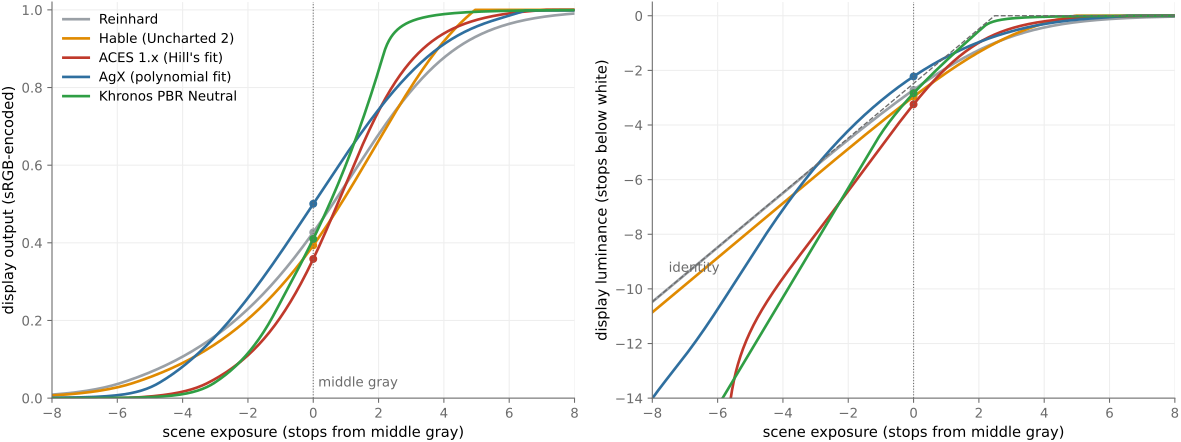
The model for a view transform is film. A negative records the scene, and a print stock with a fixed characteristic curve renders every negative the same way, with its toe, its shoulder and its colors; a cinematographer chooses the look through lighting, exposure and stock, not by redesigning the print film for each shot (Chapter 18.9, High dynamic range in traditional photography). Digital pipelines imitated this. Visual effects studios built print-film emulations to view their renders as they would appear on film, and in real-time rendering, John Hable's "filmic" curve for the game Uncharted 2 in 2010 popularized a fixed S-shaped curve with a toe and a shoulder as the standard last step of a game renderer (Hable 2010). The Academy Color Encoding System, ACES, standardized the same architecture for the film industry in 2014: scene-referred images in a wide-gamut linear space, a Reference Rendering Transform that gives every image the same filmic rendering, and an Output Device Transform for each display.
A fixed transform is not a tone-mapping operator in the sense of the previous chapters. It does not adapt to the image's histogram, and it has no local processing. Its virtues are consistency and predictability: two shots of the same scene look the same, and a colorist's grade means the same thing on every shot. Local tone mapping, where it is used, happens before the transform, as part of the grade.
Figure 18.8.1 compares the curves of five of them on a gray input.
18.8.2 Per-channel curves and the hue problem⧉
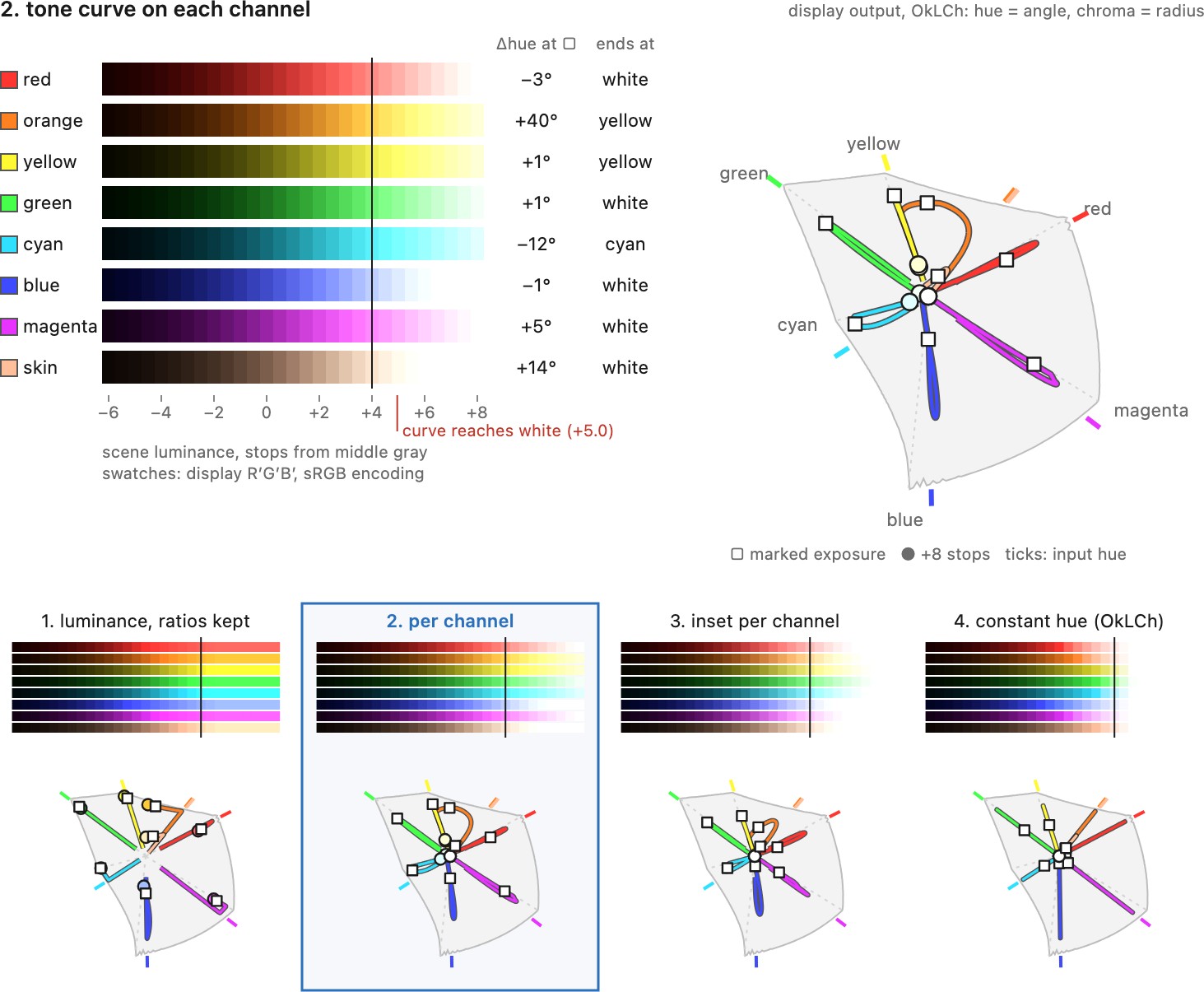
A tone curve can be applied in two ways (Chapter 18.2, Global tone mapping). Applied to luminance, with the color restored by scaling all channels by the same ratio, it preserves the ratios between the channels, and with them the hue and saturation in a linear sense. But a bright saturated color then stays saturated however bright it gets: a red light at many times the display's white keeps a red channel far above one, which the display must clip, and clipping one channel shifts the hue. Applied to each channel separately, the curve compresses the brightest channel more than the others, so bright colors move toward white as they brighten, a desaturation that film also shows, through dye saturation, and that viewers expect: very bright lights look white at their center. This path to white is the main reason pipelines applied their curves per channel.
The cost of per-channel curves is hue. A curve applied to each channel changes the ratios between channels by different amounts depending on their values, so a color's hue drifts as its brightness changes, toward the nearest of the six directions where one or two channels dominate: the primaries red, green and blue, and the secondaries cyan, magenta and yellow. A bright orange fire slides toward yellow, a saturated sky toward cyan, a skin tone toward yellow in the highlights. ACES 1.0 applied its tone scale per channel in a wide-gamut space, and its saturated blues and some reds were notorious: a bright saturated blue light skewed toward purple and clipped harshly, and the Academy had to publish a corrective look transform for blue highlights. Figure 18.8.2 runs eight saturated colors through four transforms that share one tone curve and differ only in how they treat color.
18.8.3 The responses: AgX, OpenDRT, ACES 2.0 and PBR Neutral⧉
The transforms of the last few years each answer the hue problem differently while keeping a path to white.
AgX, designed by Troy Sobotka and the default view transform of Blender since version 4.0 in 2023, keeps a per-channel curve but applies it in a working space whose primaries are pulled inward from the image's own and slightly rotated. In that space, per-channel compression bends colors toward white with smaller hue skews while they are still saturated; how far a hue swings as it finally fades to white depends on the rotation and the curve, and the uniform inset of Figure 18.8.2, which omits the rotation, still lets orange swing by about 56 degrees on its way to white; a matching outset afterwards restores saturation in the midtones. OpenDRT, by Jed Smith, is an open display rendering transform that compresses brightness and chroma with explicit control over how hues travel toward white, and it influenced the design of the next ACES. ACES 2.0 rebuilt the Output Transforms on a color appearance model: lightness and chroma are compressed along lines of constant hue in a perceptually uniform space, and a gamut compression adapted to each display brings the result inside its gamut, the same rendering family serving standard-range and HDR displays of any peak. Khronos's PBR Neutral, written for product rendering in online commerce, takes a different priority: the base colors of materials must come out unchanged, so the transform is close to the identity below a threshold and compresses, and desaturates toward white, only the highlights.
The lesson runs through the whole part. A rendering that was meant to be neutral, an output transform rather than a look, made hue choices that nobody intended and many people disliked, and fixing them required treating color, not just luminance, as part of the tone-mapping problem.
18.8.4 Looks and grading⧉
The creative part of the rendering lives before the view transform. In ACES terms it is a Look Modification Transform; in practice it is a grade, a set of curves and color adjustments made by a colorist, often stored as a three-dimensional lookup table, and applied to scene-referred values so that the same look can be rendered for any display. Camera makers' picture styles and raw developers' profiles play the same role for stills (Chapter 42.3, Lightroom-style raw developers).
Stills and motion picture developed their tonal tools on parallel tracks, and the vocabularies never fully merged. Video tends to be less radiometric (colorists work with lift/gamma/gain wheels rather than stops of exposure) yet film grading developed an extraordinarily rich craft of its own, including elaborate local and color manipulations. The underlying operations are the same tone curves and local adjustments; only the dialect differs. (See Video color grading in the point-operations chapter.)
18.8.5 Learned tone mapping, in brief⧉
Learned methods predict the rendering from data. HDRnet trains a network to predict, from a low-resolution copy of the image, the coefficients of local affine color transforms stored in a bilateral grid, which are then applied at full resolution; trained on expert retouching Gharbi et al. 2017 Bychkovsky et al. 2011, it reproduces an editor's local tone and color adjustments in real time on a phone (Chapter 10.1, Bilateral filtering). For the forward problem, rendering a radiance map for a standard display, learned operators mostly match the handcrafted ones of this part; the field is mature. The active learning work has moved to inverse tone mapping, expanding standard-range content for HDR displays (Chapter 17.5, Single-shot range and inverse tone mapping), and to the local tone mapping inside camera pipelines, where the interesting part is not the objective but the constraint of running on every frame within a few milliseconds.