💬Comments welcome. To leave a note, select any text and click the note / highlight button that pops up — or open the panel with the tab at the top-right (‹). Notes are visible only inside our private review group.
Computational Photography, an AI-powered Slopendium — 28 Photo collections
expand to📖 Full book outline1 parts · 12 chapters · 44 sections · 17 figures embedded · 0 placeholders · double-click a figure to enlarge
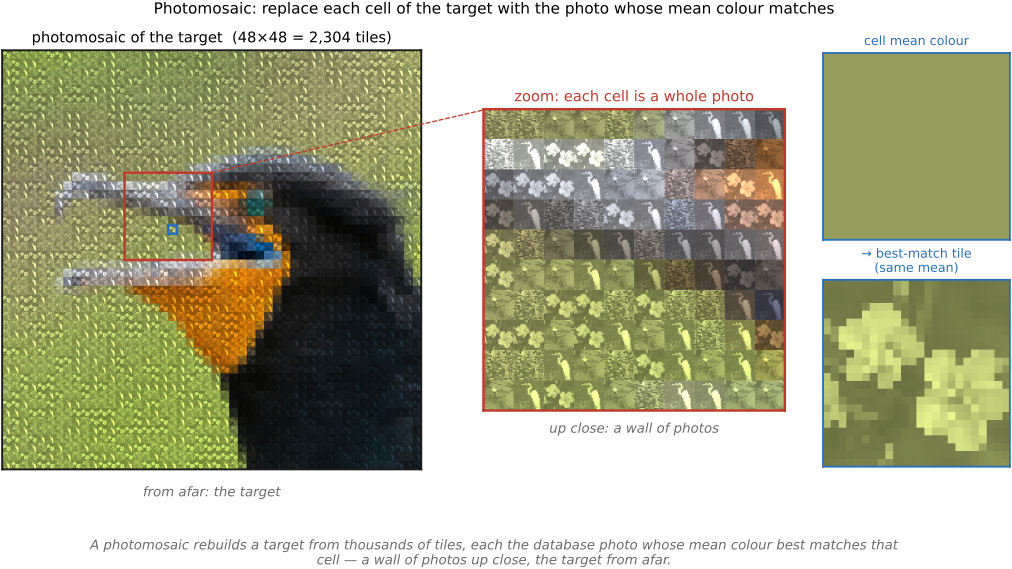
fig-photomosaic · a target photo rebuilt as a photomosaic — each cell a database thumbnail tinted to the cell's mean color; full view reads as the target, a zoom reveals the tiles, a side panel shows one cell's mean-color match (Photo Mosaics, 11.1) ✅
Build one image from thousands of small photos as tiles: downsample the target to a coarse grid, and for each cell pick the library photo whose appearance — mean color, or a small low-resolution descriptor — best matches, a per-cell nearest-neighbor search over the tile database ([[Retrieval]]). Up close it is a wall of distinct photographs; from a distance the eye's spatial integration ([[Human vision]]) fuses the tiles back into the target. The craft is all in the matching and the color balancing: keep tiles from repeating, optionally color-correct each toward its cell, and allow multi-scale tiles where detail demands. It sets up the artistic-collection projects later in the part.
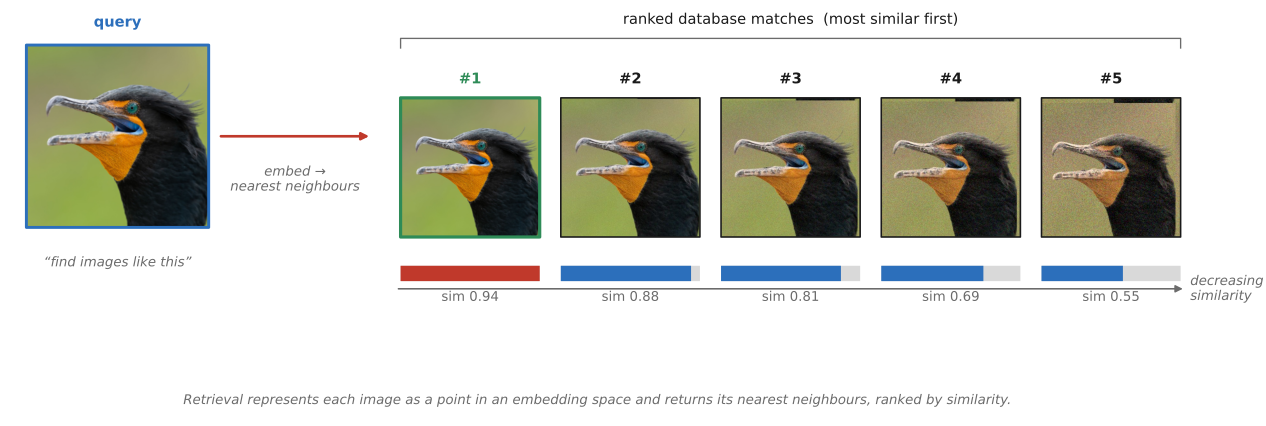
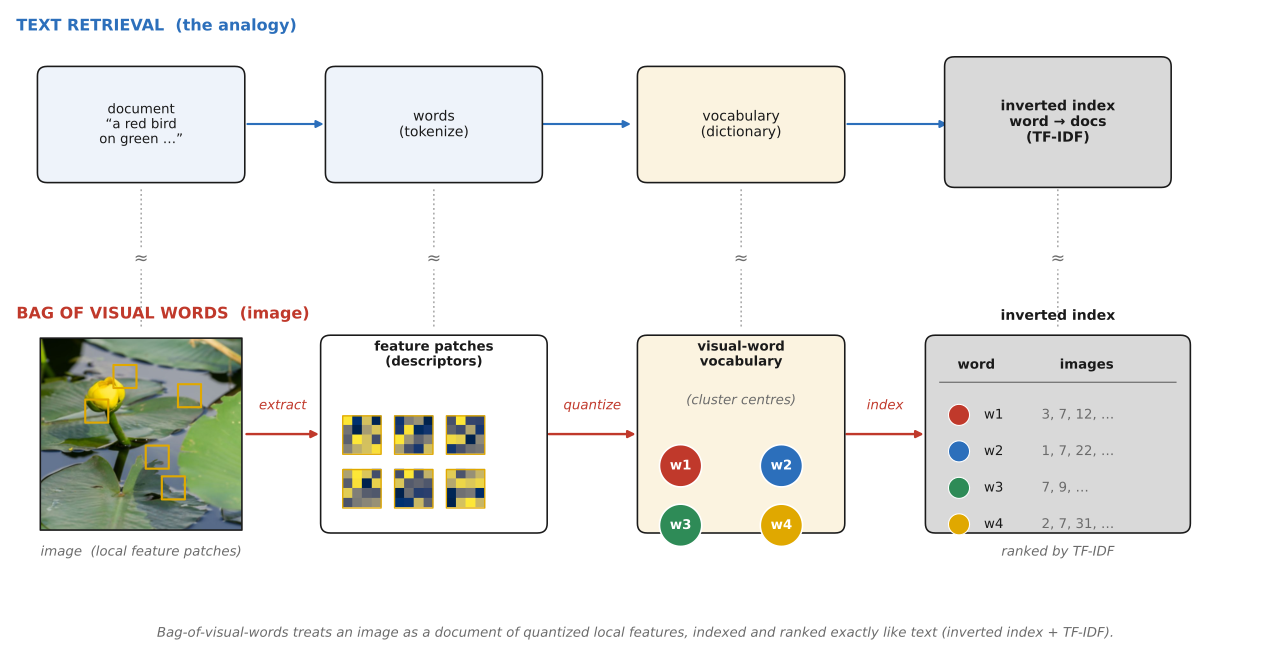
fig-image-retrieval · content-based retrieval: a query image → a ranked row of nearest database matches, decreasing similarity left→right (Retrieval, 11.2) ✅fig-bag-of-visual-words · the text-retrieval analogy: local features → quantized visual words against a vocabulary → an inverted index + TF-IDF, drawn beside the document→words→index text pipeline (Retrieval, 11.2) ✅
Search a database by *appearance*, not metadata: represent each image as a point in a space where distance is dissimilarity, and return its nearest neighbors. The classic pipeline is text retrieval in disguise — local features quantized to "visual words," indexed, and ranked — while the modern one learns an embedding so that nearness means *semantic* likeness, even across modalities (search images with a sentence). Both live or die on doing the nearest-neighbor search fast enough at web scale ([[Fast matching]]).
equations
**TF-IDF** weight $w_{t,d}=\mathrm{tf}_{t,d}\cdot\log\frac{N}{n_t}$ (visual-word frequency in an image, down-weighted by how common the word is across the corpus)
cosine similarity $\cos\theta=\frac{\mathbf q\cdot\mathbf d}{\lVert\mathbf q\rVert\lVert\mathbf d\rVert}$ between embedding/BoW vectors.
▸28.2.1 Classic CBIR — histograms and the text-retrieval analogy⧉
• **global descriptors first**: the earliest systems matched whole-image **color and texture histograms** — cheap, rotation/translation-tolerant, but blind to layout and easily fooled (a red barn and a red sunset collide). They set the template — image → vector → nearest neighbor — without much discrimination.
• **bag-of-visual-words** (Sivic & Zisserman, *Video Google* 2003): extract local features ([[Sparse matching]]), **quantize** their descriptors against a learned **vocabulary** of cluster centers, and treat each image as a *bag of visual words* exactly like a text document. Build an **inverted index** (word → list of images containing it) and weight words by **TF-IDF** so distinctive words count more and ubiquitous ones less — then a query is answered by a sparse dot product. [`fig-bag-of-visual-words`]
• **scaling the vocabulary** (Nistér & Stewénius 2006): a flat vocabulary of a few thousand words is too coarse for millions of images; a hierarchical **vocabulary tree** (recursive k-means) gives a vocabulary of *millions* of words and quantizes a descriptor in log-time, making real-time recognition over huge databases practical.
• **spatial verification**: bag-of-words throws away *where* the features were, so true matches and coincidences score alike. Re-rank the top candidates with a geometric check — fit a transform to the matched words and count inliers (RANSAC, [[Robustness: the ratio test and RANSAC]]) — keeping only images whose words are *spatially consistent* with the query. [`fig-image-retrieval`]
▸28.2.2 Deep retrieval — learned embeddings and CLIP⧉
• **learned embeddings**: train a network so that visually or semantically similar images land close in a fixed-length vector space (metric/contrastive learning), then retrieval is plain nearest-neighbor in that space — far more robust to viewpoint, lighting, and clutter than hand-built histograms ([[Deep learning]]).
• **CLIP — text↔image in one space** (Radford et al. 2021): jointly embed images and captions so a *sentence* and a matching *photo* land near each other. Now you can search a photo library with a phrase ("a dog on a skateboard") with no tags at all — cross-modal retrieval, and the quiet engine behind much of modern semantic search and generative conditioning.
▸28.2.3 Retrieval at scale: approximate nearest neighbor⧉
• **the bottleneck is the search**: with billions of embedding vectors, exact nearest-neighbor is hopeless; the field runs on **approximate NN** — inverted-file + product quantization (FAISS), graph indexes (HNSW), LSH — trading a sliver of recall for orders-of-magnitude speed ([[Fast matching]]).
• **the everyday payoffs**: **reverse image search** (find where this picture came from), **near-duplicate detection** (the same shot resized/recompressed/watermarked), and copyright/provenance matching — all the same nearest-neighbor query, just with the right descriptor and a fast index.
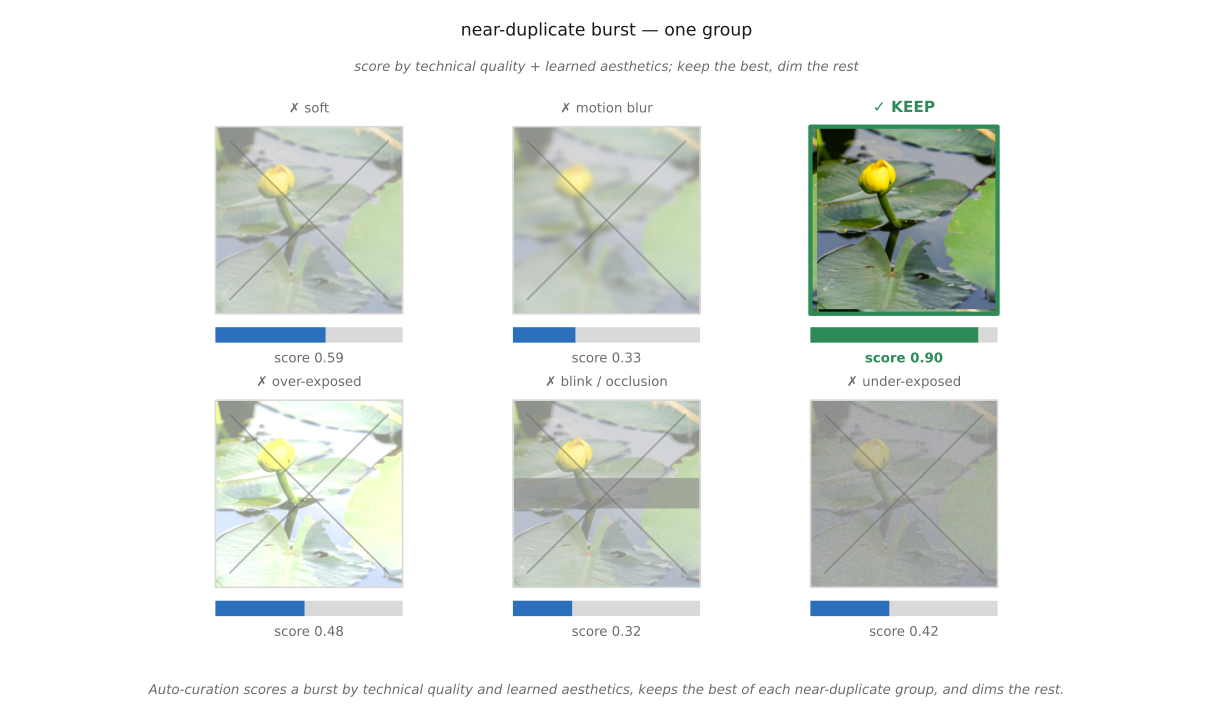
fig-auto-curation · a cluster of near-duplicate shots scored by quality + aesthetics → the single best kept (green), the rest dimmed (Auto curation, 11.3) ✅
From a huge personal set, automatically keep the few that are worth keeping. The pipeline reads like a triage: reject the technically broken (blurry, blown-out, blinked), score the survivors for aesthetic appeal, collapse near-duplicate bursts to their best member, and finally choose a small set that is both good *and* varied. It is retrieval's selective sibling — not "find images like this" but "find the ones worth keeping." Three criteria really combine — **technical** (sharpness, focus, noise), **aesthetic** (a learned sense of a good photo), and **personal relevance** (whether the shot matters *to you*) — and only the first is fully objective, which is why automatic curation can propose but not decide.
• **measurable defects first**: estimate **sharpness/blur** (gradient energy, variance of the Laplacian), **exposure** (histogram clipping in shadows/highlights), and **noise** — cheap, interpretable scores that flag the obviously broken before any taste enters.
• **faces are special**: for people shots, run **eyes-open / blink** detection and **smile / expression** scoring — a technically perfect frame with everyone mid-blink is a reject, and "best shot" features on phones lean heavily on exactly these face cues. [`fig-auto-curation`]
• **beyond defect-free**: a sharp, well-exposed photo can still be boring. **Learned aesthetics** predicts human appeal from large rated datasets (AVA); **NIMA** (Talebi & Milanfar 2018) notably predicts the *distribution* of human ratings rather than a single number, capturing both mean quality and how *divisive* an image is.
• **the honest caveat**: aesthetics is subjective and culturally loaded ([[Human factors]]); a learned scorer encodes the *average* taste of its annotators, which is useful for ranking but not a verdict — and it can systematically undervalue unconventional, anticliché shots ([[Artistic projects with photo collections]]).
• **interactive demo** (`fig-clip-iqa`): a learned, **zero-shot** quality/aesthetics scorer you can run on your own photos. **CLIP-IQA** (Wang, Chan & Loy 2023, [@wang-etal-2022-clipiqa]) scores an image by how much more it matches the caption "Good photo." than "Bad photo." in CLIP's shared text–image space (cosine to each prompt, softmaxed over the pair); the same antonym trick gives **sharpness**, **brightness**, **noise**, and **aesthetics**. It needs no rated dataset (unlike NIMA's AVA fine-tuning) — it borrows CLIP's prior ([[Retrieval]]). Upload a set; the demo runs the real CLIP model in-browser, scores each photo per-axis, and **ranks the set by Quality**, flagging the top pick as the keeper. Standalone in `interactive-sandbox/clip-iqa/` (iframe-embedded, static PNG fallback), like the white-balance and Poisson demos.
• **near-duplicate grouping then pick-the-best**: bursts and re-tries produce clusters of nearly identical frames; group them (via retrieval-style embeddings, [[Retrieval]]) and keep only the **best member of each cluster** — the single biggest win on a real camera roll. [`fig-auto-curation`]
• **diversity, not just quality**: a highlight reel of the twelve *highest-scoring* photos is often twelve takes of the same hero shot. Summary selection adds an explicit **diversity / coverage** objective (submodular maximization, clustering) so the kept set spans the trip's people, places, and moments — the same problem life-logging makes acute ([[Life logging cameras]]).
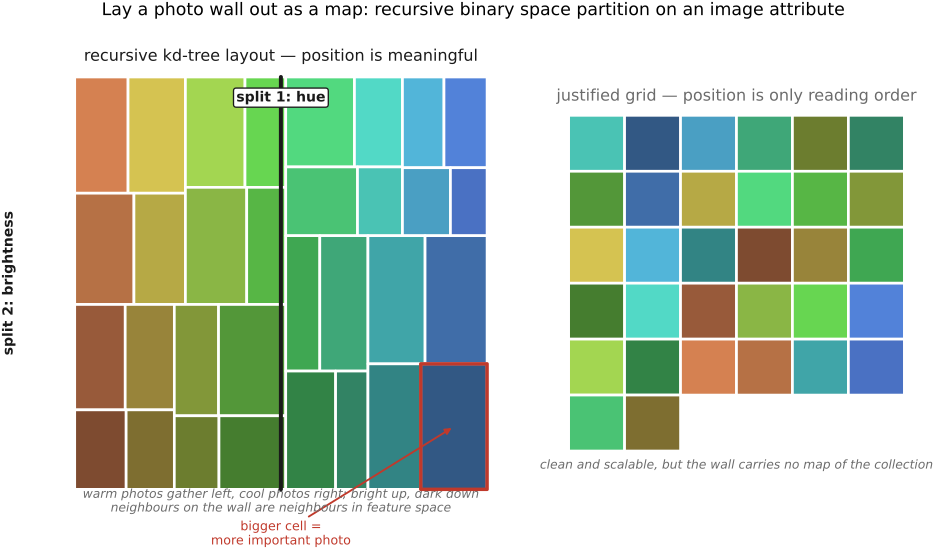
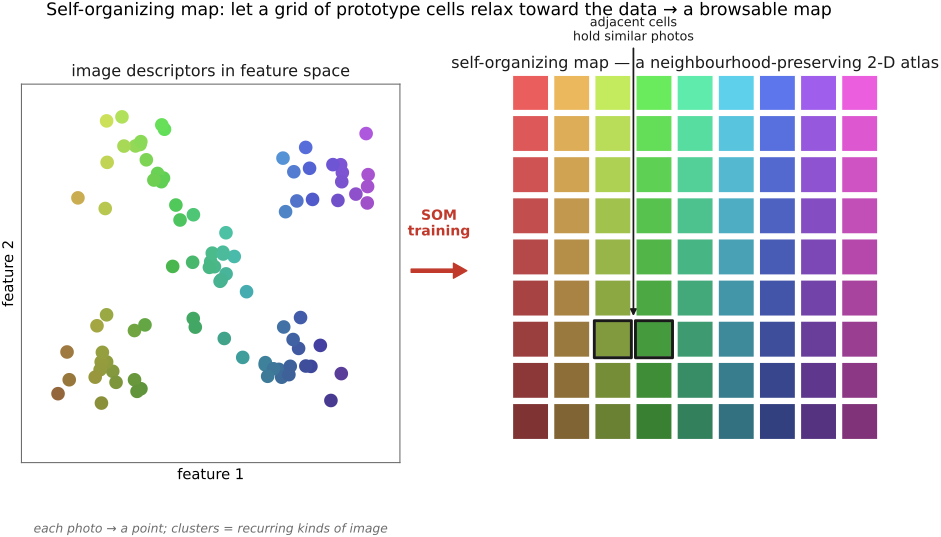
• culling answers *what to keep*; the other half of curation is *how to lay it out* to browse — **by content**, not by date. Three arrangements, side by side in an interactive viewer (`fig-collage-viewer`, hover-loupe + selectable example collages, from the author's library): **kd-tree** (recursively bisect the canvas → every photo its own cell, the whole collection on one screen), **photomosaic** (lay photos out to reproduce a target image at a distance while staying real photos up close → [[Photo Mosaics]]), **self-organizing map** (a learned 2-D grid pulling visually similar photos into neighboring cells, using [[Retrieval]]'s embeddings → a browsable similarity atlas). The layout can carry as much of the curation as the culling.
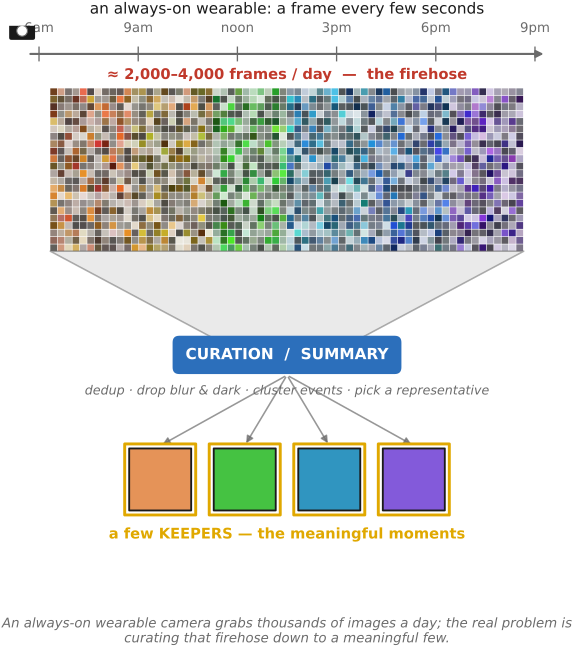
fig-lifelog-firehose · a wearable camera's day → a firehose of thousands of thumbnails funnelling through curation/summary down to a few keepers (Life logging cameras, 11.4) ✅
Always-on wearable cameras passively photograph your whole day, producing thousands of images with no decision per shot. The seminal one, SenseCam, was studied as a memory aid more than a camera — which is the point: the value is in *recall*, and that only works once the unmanageable stream is curated, summarized, and made searchable. Passive capture thus hands the rest of this part its hardest workload, and hands ethics a thorny case.
• **always-on, no shutter**: a small chest- or clip-worn camera that captures continuously — Microsoft **SenseCam**, the **Narrative Clip** / Memoto, **Google Clips** — yielding a *firehose* of thousands of images per day rather than deliberate frames. [`fig-lifelog-firehose`]
• **SenseCam, the seminal device** (Hodges et al. 2006): a fish-eye, chest-worn camera that fires **automatically from onboard sensors** — accelerometer, ambient-light, and passive-infrared body-heat triggers — grabbing roughly 2,000–3,000 images a day with no shutter press, capturing the day as the body moves through it.
• **a recall tool, not a camera**: SenseCam was built and studied less as photography than as a **memory prosthesis** — reviewing the image stream to re-consolidate experience. Clinical trials found that patients with amnesia who reviewed SenseCam streams recovered **autobiographical memory** markedly better than with a written diary.
• **why this matters for the part**: framing capture as *recall* reframes the whole problem as one of *re-experiencing* a collection — which is exactly the data-driven "collection as experience" thread running through [[Photo tourism]] and [[Photobios]], and it is what makes curation a *memory* problem, not just a storage one.
▸28.4.3 The big-data problem passive capture creates⧉
• **nobody can watch a firehose**: thousands of near-redundant, often poorly-framed images a day make manual review impossible, so **curation, summarization, and retrieval** become the *only* way the archive is usable — the lifelog is the purest motivation for [[Auto curation]] and [[Retrieval]]. [`fig-lifelog-firehose`]
• **selection becomes the product**: the camera's real output is *what it chose to keep* — **Google Clips** ran on-device ML to grab candid moments automatically, an automated candid/anticliché camera ([[Artistic projects with photo collections]]) where the editing *is* the feature.
• **always-on, everyone-included**: passive recording sweeps in **bystanders who never consented**, in private and public spaces alike — a categorically different ethical footprint from deliberate photography, and a recurring reason these products struggle to ship ([[Human factors]]).
• **the archive is a liability too**: a searchable, geolocated, face-rich record of a person's every day is a uniquely sensitive dataset — its **security, ownership, and retention** are as much the design problem as the optics.
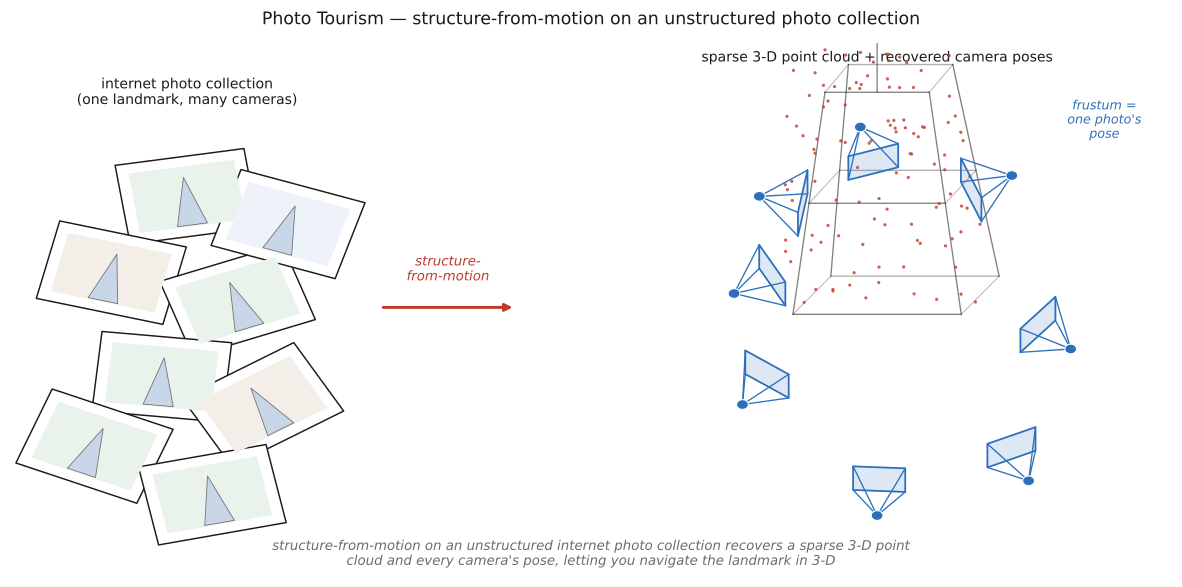
fig-photo-tourism · SfM on an internet photo collection: a pile of tourists' photos of one landmark → a sparse 3-D point cloud with recovered camera frusta around it (Photo tourism, 11.6) ✅
Photo Tourism showed that the uncoordinated photographs the internet already holds of any famous place are, collectively, a 3-D scanner. Structure-from-motion ties them together — matching features across radically different viewpoints, rejecting the garbage with RANSAC, and solving for both the scene points and every camera at once — yielding a point cloud studded with the recovered cameras. The application is experiential: navigate the place in 3-D and glide between real photographs. The technique is foundational SfM; the data is the crowd's.
▸28.5.1 Structure-from-motion on internet collections⧉
• **the input is unstructured**: not a calibrated rig but **thousands of strangers' photos** of one landmark — every lens, exposure, crop, occluding tourist, and lighting condition. The challenge is matching and reconstructing despite that wild heterogeneity.
• **the pipeline**: detect and match features across image pairs ([[Sparse matching]]); robustly estimate two-view geometry, rejecting outlier matches with **RANSAC** and the fundamental matrix ([[Robustness: the ratio test and RANSAC]]); then **incrementally** add cameras, running **bundle adjustment** to jointly refine all 3-D points, camera poses, and intrinsics by minimizing reprojection error ([[3D and depth]]).
• **the output**: a sparse **3-D point cloud** of the landmark plus a recovered **camera frustum** for every photo, all in one coordinate frame — the snapshots placed where they were actually taken. [`fig-photo-tourism`]
• **navigate in 3-D**: with poses known, you can fly through the point cloud and, for any viewpoint, snap to the photo that best matches it — turning a static gallery into a spatial browse. Photosynth productized exactly this.
• **smooth transitions**: moving between two photos isn't a hard cut but a **morph / 3-D-aware transition** that uses the recovered geometry to interpolate, so the collection feels like a continuous space rather than a slideshow — the "collection becomes an experience" idea it shares with [[Photobios]].
• **scaling up**: the same machinery, parallelized, reconstructs whole cities from internet photos (**Building Rome in a Day**), and matured into the standard incremental-SfM tool **COLMAP** that underpins much of modern 3-D and **NeRF** capture.
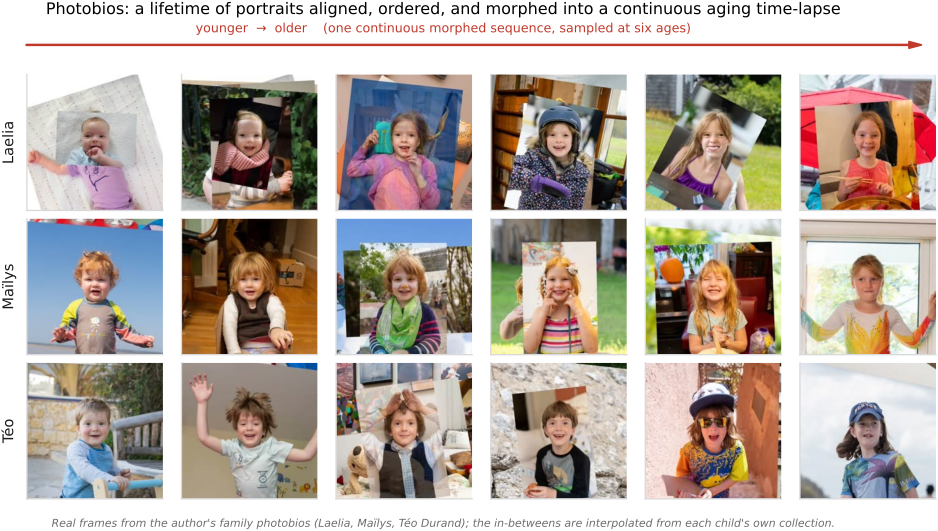
fig-photobio-timelapse · one person's face photos aligned to a common frame (eyes registered) and time-ordered into a smooth aging sequence (Photobios, 11.7) ✅
A photobio takes the unsorted portraits a person amasses over decades and turns them into a smooth, navigable life of the face. Align them all to one frame, order them sensibly, and morph across the gaps — and the data supplies a continuous experience no single photo holds. It is morphing-plus-alignment at collection scale, and a personal-faces echo of the landmark navigation in Photo Tourism.
• **a common frame**: detect facial landmarks and **align** every portrait to a canonical pose and scale ([[Brute force|alignment]]), so that, registered, the faces differ only by what actually changed — age, expression, lighting — not by framing. [`fig-photobio-timelapse`]
• **find a smooth path**: define a similarity between aligned faces (appearance, pose, expression) and build a graph, then find a **smooth ordering / path** through it — chronological for an aging sequence, or appearance-based for a continuous walk through expressions and poses. The ordering *is* the experience.
• **morph the in-betweens**: consecutive real photos still jump; **morphing** ([[Warping and morphing]]) warps and cross-dissolves between adjacent aligned faces to manufacture smooth transitions, so the sequence flows rather than flickers. The crucial point: the **data supplies the in-betweens** — no aging model, no generative network, just interpolation between real captures.
• **aging as the headline result**: ordered by time and morphed, a person's lifetime of portraits becomes a seamless **time-lapse of a face aging**; the follow-on work added illumination-aware age progression to synthesize *future* ages from the same collection. [`fig-photobio-timelapse`]
• **the recurring idea**: as in [[Photo tourism]], the value isn't any one image but the *navigable whole* — a collection re-rendered as something you move smoothly through, here a face through time rather than a place through space.
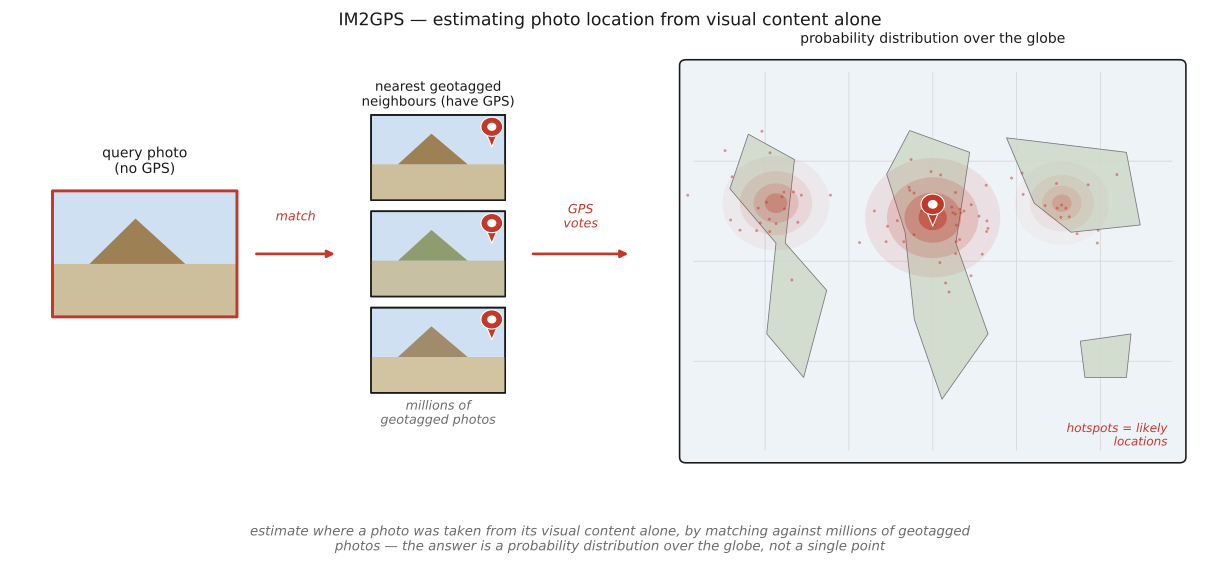
fig-im2gps · IM2GPS geolocation: a query photo → nearest geotagged matches → a world-map probability heatmap of likely locations (Pix 2 GPS, 11.8) ✅
IM2GPS asks the audacious question — *where on Earth is this?* — and answers it with nothing but pixels and a giant geotagged collection. Retrieve the visually nearest photos, look at *their* coordinates, and the planet itself becomes the model. Crucially the answer is a distribution, not a point: a nondescript field stays vague, while distinctive architecture or vegetation pins the location sharply. It is the geolocation member of the "millions of photos" family.
equations
a posterior over location $p(\text{lat,lon}\mid I)\propto$ the geotag density of the nearest visual neighbors (a kernel/Parzen estimate over the retrieved matches' coordinates).
▸28.8.1 Geolocation as retrieval over a geotagged corpus⧉
• **match against the geotagged web**: describe the query with scene/color/texture features and retrieve its nearest neighbors from **millions of geotagged Flickr photos** ([[Retrieval]]); the neighbors' GPS tags are the evidence for where the query was shot. [`fig-im2gps`]
• **the data is the geographic model**: no map, no per-place classifier in the original — just the collection's empirical "what places look like," exactly the data-as-prior wager of [[Inpainting Using Millions of Photographs]] (same authors, same year-adjacent lineage).
• **a heatmap, not a pin**: aggregate the retrieved neighbors' coordinates into a **probability distribution over the globe** — a kernel estimate over their geotags — rather than committing to one location. [`fig-im2gps`]
• **uncertainty is the result**: a generic beach or forest spreads the probability mass across every plausible region; a photo with distinctive cues concentrates it. Reporting *how unsure* the estimate is — and where the alternatives lie — is the honest and useful output.
• **geolocation as classification** (PlaNet, 2016): partition the globe into geo-cells and train a network to *classify* a photo into a cell, learning the planet's appearance directly — the deep-era reframing of the same task, trading explicit retrieval for learned features but keeping the distribution-over-the-globe output ([[Deep learning]]).
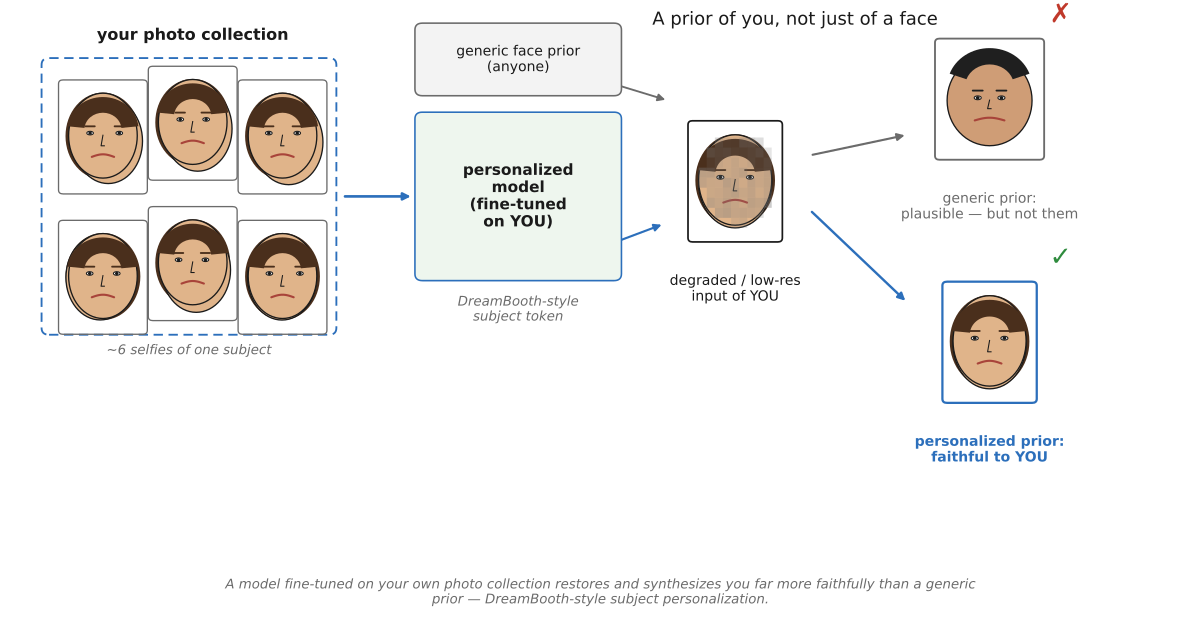
fig-personalized-prior · a prior fine-tuned on one person's own photos restores/synthesizes *them* faithfully vs a generic prior (wrong identity) — DreamBooth-style personalization (Personalized priors, 11.9) ✅
A prior is whatever the model assumes before it sees the degraded input — and for restoring or generating a specific person, the best assumption is *their own past photographs*. Personalized priors fold an individual's collection into the model so that super-resolution, restoration, and generation snap toward the real subject instead of a generic average. It is this part's data-as-prior philosophy aimed at a single person: the collection is small, but it is *exactly the right* collection.
• **your photos as the identity constraint**: for super-resolution, denoising, or deblurring of a *known* person, a prior built from their own clean photographs supplies identity-specific detail — the exact eye shape, mole, hairline — that a generic face prior can only invent. [`fig-personalized-prior`]
• **why specificity wins**: restoration is ill-posed ([[What can super-resolution actually do?]]); the prior decides among the infinitely many sharp images consistent with a blurry input. A generic prior picks the most *plausible* face; a personalized one picks the most plausible *you* — and for a recognizable subject, those are very different answers.
• **DreamBooth** (Ruiz et al. 2023): fine-tune a pretrained diffusion model on just a handful of images of a subject, binding it to a unique token, so the model can then place *that* subject in new scenes and styles — subject-driven generation that preserves identity ([[Deep learning]]).
• **textual inversion** (Gal et al. 2022): the lighter-weight cousin — freeze the model and learn a *new embedding* (a new pseudo-word) that captures the subject, so prompts can summon it without touching the weights. Both encode a person/object into a generative prior from a tiny personal set.
• **personalized beats generic — for that subject**: the recurring finding is that, for restoring or synthesizing a *specific* person, the personalized prior wins decisively on **identity fidelity**, at the cost of generality and a risk of **overfitting / memorization** (regurgitating training images).
• **consent and likeness**: a model that faithfully reproduces a particular person is also a tool for impersonation and deepfakes; the same specificity that makes the prior good makes its **consent, ownership, and misuse** the central ethical question — the personal-scale echo of the lifelogging privacy problem ([[Life logging cameras]]).
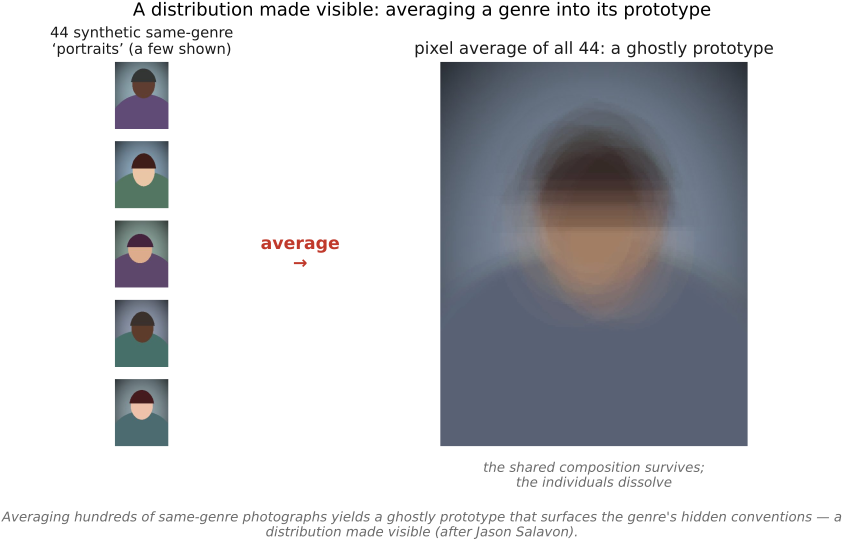
fig-salavon-average · averaging many same-genre photos into one ghostly prototype that surfaces the genre's shared conventions (Artistic projects, 11.10) ✅
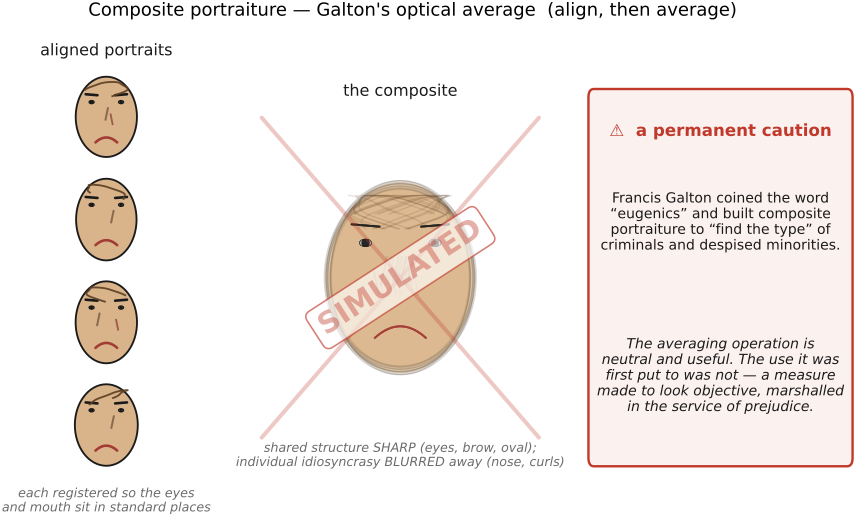
• **Jason Salavon** treats a *set* of photographs as the work: **average** hundreds of same-genre images (newspaper wedding announcements, MLS home listings, *Playboy* centerfolds by decade) into one **ghostly prototype**, or recombine/sort them by color and content. The average is uncanny precisely because it surfaces the genre's hidden **conventions** — pose, framing, lighting that every individual shares — a *distribution* made visible. [`fig-salavon-average`]
• the computational kin: averaging aligned images is exactly [[Denoising by averaging|averaging]] turned into a content statement; sorting/retrieving by appearance is [[Retrieval]] as an aesthetic act.
• the **cliché** is the most-photographed view — the postcard angle on the Eiffel Tower, the exact sunset everyone shoots. The **anticliché camera** inverts auto-curation: instead of "is this a good (canonical) shot?", it asks "is this **unlike** what everyone already has?" and steers you toward the un-photographed. (The flip side of the **blind / candid camera** idea now in Accessibility — both are *machines deciding what to shoot*.)
• mechanics: score a candidate frame against a **distribution of existing photos** of the same place (a collection or a geotagged web corpus) and reward **novelty / low density** rather than canonicality — retrieval and density estimation put to a contrarian aesthetic end.
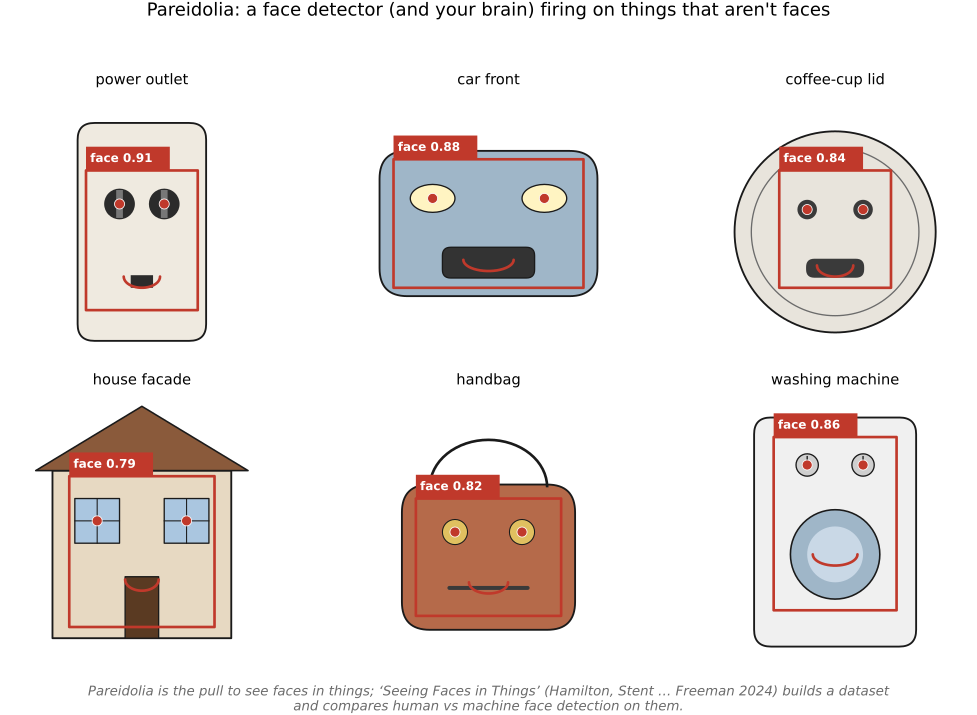
fig-pareidolia-faces · objects whose arrangement triggers a face percept, with a face-detector box + eye/mouth overlay — human vs machine pareidolia (Artistic projects, 11.10) ✅
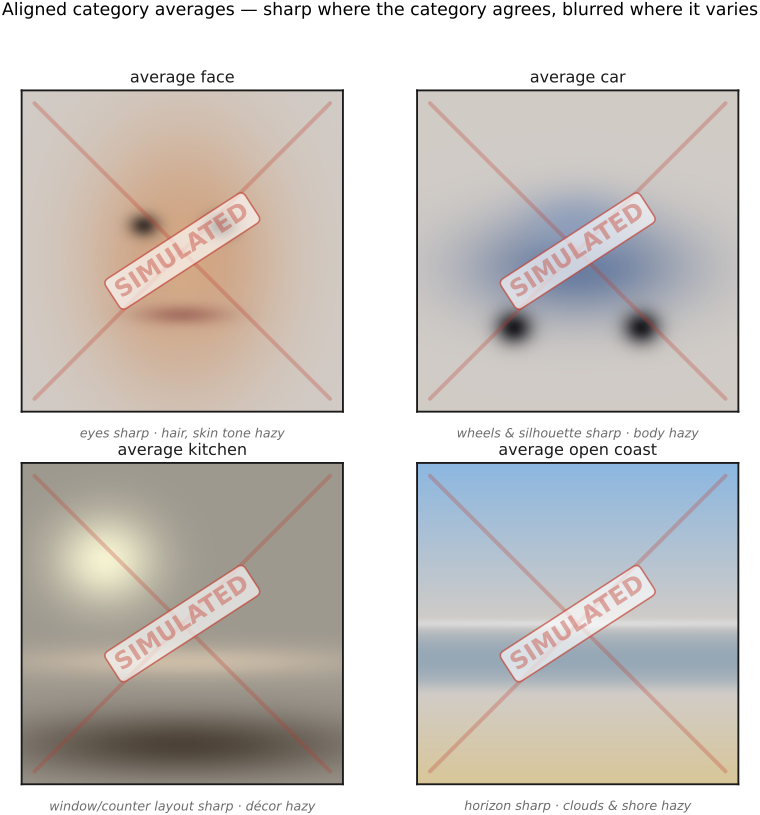
**Pareidolia** is the human tendency to see **faces (and patterns) in things** — the outlet on the wall, the front of a car, a cloud. It is a perception quirk with real bite for computational photography, where face detectors are run indiscriminately across every image. *Seeing Faces in Things* (**Hamilton, Stent, … Freeman, 2024**, [arXiv:2409.16143](https://arxiv.org/abs/2409.16143)) turns the phenomenon into a computational object: a dataset of **~5,000 human-annotated "faces in things"** and a study comparing **human vs. machine** face detection on them. [`fig-pareidolia-faces`]
The findings worth telling: face detectors *partly* fire on these illusory faces but **diverge from humans**, and the authors argue an evolutionary pressure to detect **animal** faces may explain why humans over-detect. It is a clean case where a **photo collection** exposes something about *perception itself* — the data-as-instrument creed of this part turned on the visual system, tying the artistic thread back to [[Human vision]].
fig-kdtree-layout · fig-som-photo-map · fig-photomosaic · a target photo rebuilt as a photomosaic — each cell a database thumbnail tinted to the cell's mean color; full view reads as the target, a zoom reveals the tiles, a side panel shows one cell's mean-color match (Photo Mosaics, 11.1) ✅