BookNotesSlidesP-sets Syllabusdraft · v0.2.49.1
💬Comments welcome. To leave a note, select any text and click the note / highlight button that pops up — or open the panel with the tab at the top-right (‹). Notes are visible only inside our private review group.
Computational Photography, an AI-powered Slopendium — 45 Appendices
expand to📖 Full book outline1 parts · 34 chapters · 348 sections · 15 figures embedded · 1 placeholders · double-click a figure to enlarge
▸Part 45 APPENDICES⧉
<!--uid: appendices-->
▸45.1 C++ for Python programmers⧉
The problem sets are in C++; this is the bridge from Python. Why C++ (compiled, close to the metal, often 100–1000× faster on the per-pixel loops of image processing, and the language Halide plugs into), then the shifts that matter (static types, `;` and `{}`, header vs implementation, value vs reference vs `const`, `std::vector` and strides, and the debugging traps where errors surface far from their cause), a side-by-side brighten example plus further Python-to-C++ comparisons (clamp, grayscale, blend, image mean) in the multi-language code tabs, and pointers onward to the first problem set.
45.1.1 What changes, coming from Python⧉
45.1.2 A first taste, side by side⧉
45.1.3 A few more comparisons⧉
45.1.4 Files and compilation⧉
45.1.5 Value, reference, and `const`⧉
45.1.6 Memory, briefly⧉
45.1.7 Images in C++⧉
45.1.8 Debugging, and the parts that hurt⧉
45.1.9 Where to go next⧉
▸45.2 Refreshers⧉
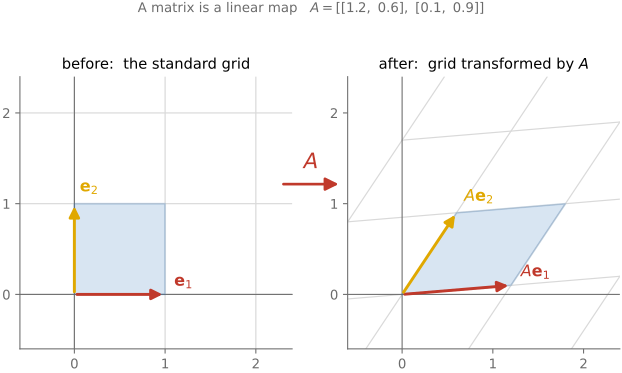
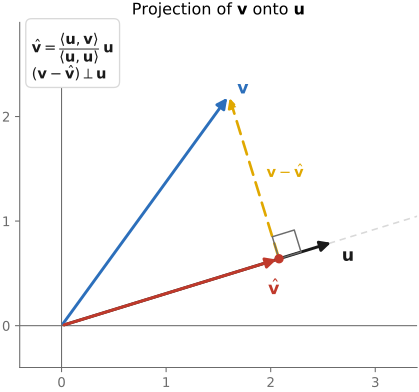
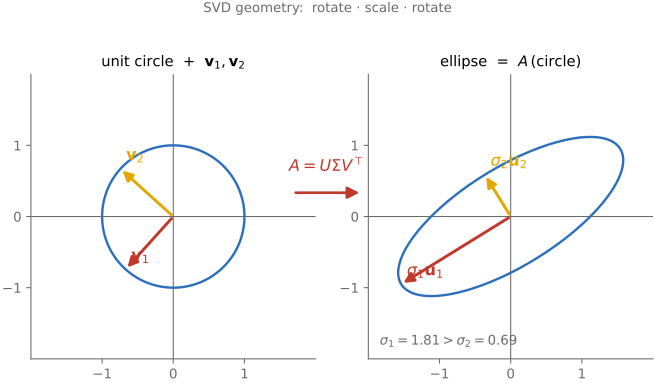
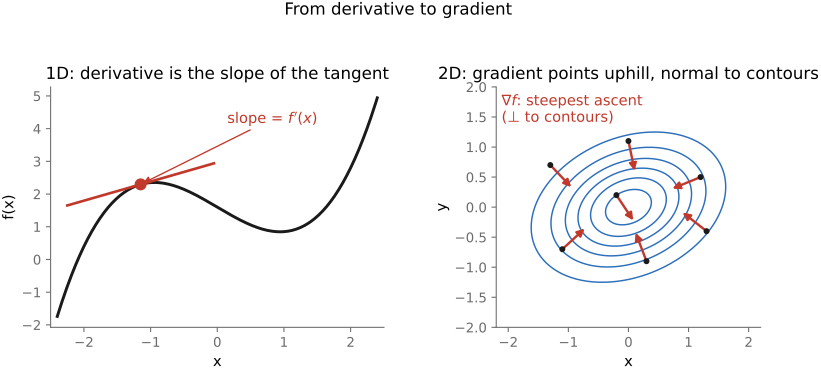
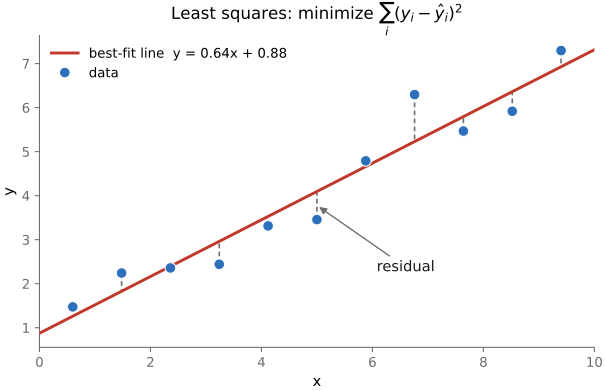
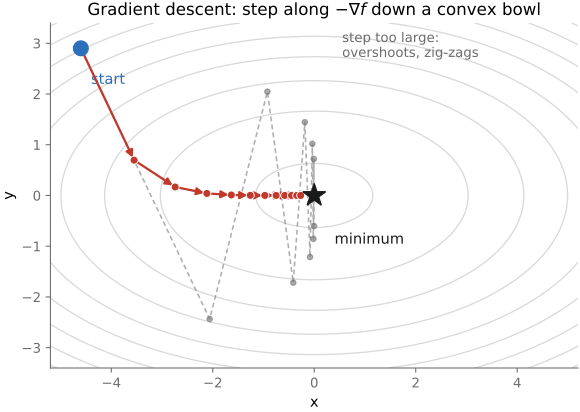
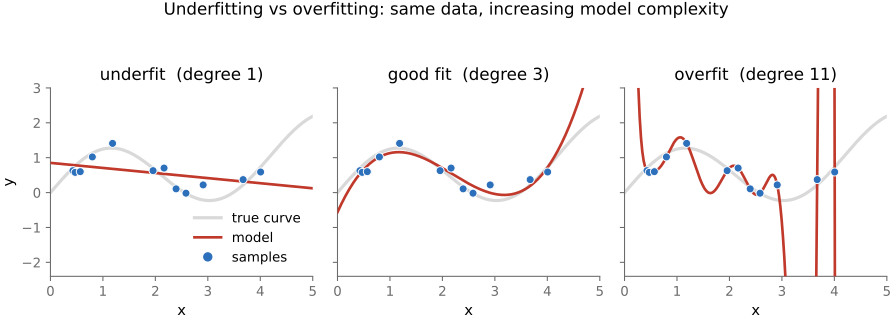
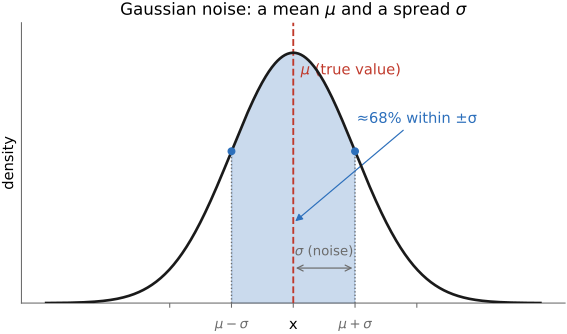
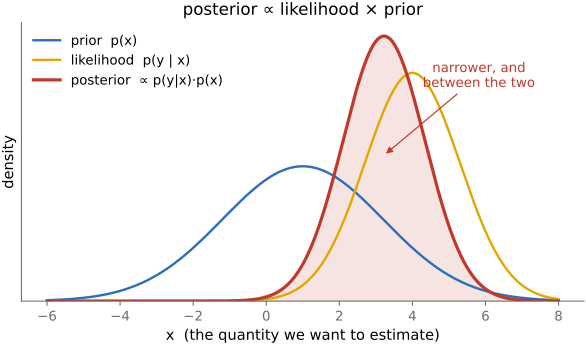
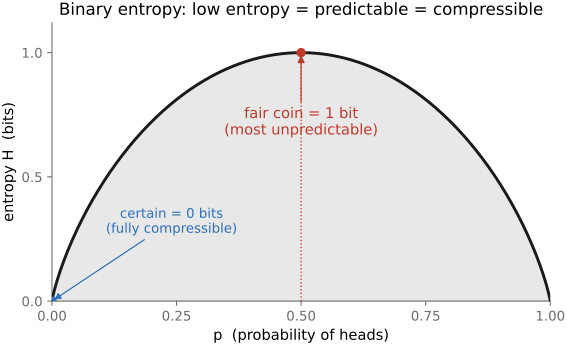
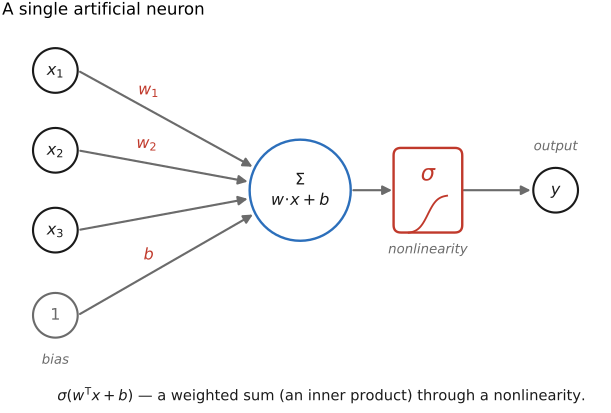
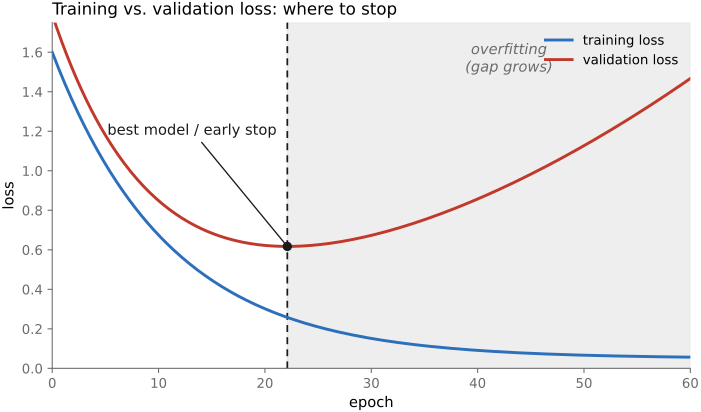
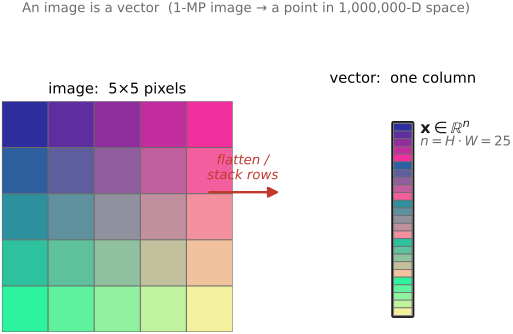
The book is built on a small kit of mathematical tools, used over and over: images are **vectors**, operations on them are **linear maps** (so we get to use all of linear algebra and the Fourier transform), recovering an image from measurements is an **optimization**, noise is **probability**, and the modern workhorses are **learned**. This appendix is the kit — each tool sketched just far enough to read the chapters that use it, with a pointer to where to go deeper.
▸45.3 Problem Set 0 — Environment and C++ basics⧉
45.3.1 Summary⧉
45.3.2 Installation and environment setup⧉
45.3.3 Compilers⧉
45.3.4 Makefiles⧉
45.3.5 Submission System⧉
45.3.6 Debugging⧉
45.3.7 Image Input/Output⧉
45.3.8 C++⧉
45.3.9 Headers and Source Files⧉
45.3.10 Static Typing⧉
45.3.11 Text Input/Output⧉
45.3.12 Simple Image Class⧉
45.3.13 A Better Image Class⧉
45.3.14 Submission⧉
▸45.4 Problem Set 1 — Image class, point operations, and color⧉
45.4.1 Summary⧉
45.4.2 The image class⧉
45.4.3 Pixel Accessors and Setters⧉
45.4.4 Creating Basic Images/Shapes⧉
45.4.5 Brightness and contrast⧉
45.4.6 More image class methods⧉
45.4.7 Colorspaces⧉
45.4.8 Luminance-Chrominance⧉
45.4.9 YUV⧉
45.4.10 Discussion⧉
45.4.11 Gamma-Encoding⧉
45.4.12 Spanish castle illusion⧉
45.4.13 White balance⧉
▸45.5 Problem Set 2 — Convolution and the bilateral filter⧉
45.5.1 Summary⧉
45.5.2 Smart accessor⧉
45.5.3 Blurring⧉
45.5.4 Box blur⧉
45.5.5 General kernels⧉
45.5.6 Gradients⧉
45.5.7 Gaussian Filtering⧉
45.5.8 Sharpening⧉
45.5.9 Denoising using bilateral filtering⧉
45.5.10 6.8370 only (or 5% Extra Credit): YUV version⧉
45.5.11 Extra credit⧉
45.5.12 Submission⧉
▸45.6 Problem Set 3 — Denoising and demosaicking⧉
45.6.1 Summary⧉
45.6.2 Denoising from a sequence of images⧉
45.6.3 Basic sequence denoising⧉
45.6.4 ISO⧉
45.6.5 Variance⧉
45.6.6 Alignment⧉
45.6.7 Demosaicing⧉
45.6.8 Basic green channel⧉
45.6.9 Basic red and blue⧉
45.6.10 Edge-based green⧉
45.6.11 Red and blue based on green⧉
45.6.12 6.865 only (or 5% extra credit): Sergey Prokudin-Gorsky⧉
45.6.13 Cropping and splitting⧉
45.6.14 Alignment⧉
45.6.15 Extra credit (maximum of 10%)⧉
▸45.7 Problem Set 4 — High dynamic range⧉
45.7.1 Summary⧉
45.7.2 HDR merging⧉
45.7.3 Tone mapping⧉
45.7.4 Extra credit (10% max)⧉
▸45.8 Problem Set 5 — Resampling, warping, and morphing⧉
45.8.1 Summary⧉
45.8.2 Resampling⧉
45.8.3 Basic scaling with nearest-neighbor⧉
45.8.4 Scaling with bilinear interpolation⧉
45.8.5 Bicubic and Lanczos (required for 6.8370, 5% Extra credit for 6.8371)⧉
45.8.6 Rotations (5% extra credit)⧉
45.8.7 Warping and morphing⧉
45.8.8 Basic Vector Tools⧉
45.8.9 Segments⧉
45.8.10 Warping according to one pair of segments⧉
45.8.11 Warping according to multiple pairs of segments⧉
45.8.12 UI⧉
45.8.13 Morphing⧉
45.8.14 Class morph⧉
45.8.15 Extra credit⧉
▸45.9 Problem Set 6 — Homographies and manual panoramas⧉
45.9.1 Summary⧉
45.9.2 Class morph⧉
45.9.3 Homogeneous coordinates⧉
45.9.4 Linear algebra⧉
45.9.5 Warp and image with a homography⧉
45.9.6 Compute homography from 4 pairs of points⧉
45.9.7 Bounding boxes⧉
45.9.8 Transform a bounding box⧉
45.9.9 Bounding box union⧉
45.9.10 Translation⧉
45.9.11 Putting it all together⧉
45.9.12 6.8370 only (Or 5% Extra Credit for 6.8371): Speed up Warping using Bounding Boxes⧉
45.9.13 6.8370 only (Or 5% Extra Credit for 6.8371): Extra Test Cases and Images⧉
45.9.14 Extra credit (up to 10% total)⧉
▸45.10 Problem Set 7 — Automatic panoramas⧉
45.10.1 Summary⧉
45.10.2 Previous problem set code⧉
45.10.3 Class morph⧉
45.10.4 Harris corner detection⧉
45.10.5 Structure tensor⧉
45.10.6 Harris corners⧉
45.10.7 Descriptor and correspondences⧉
45.10.8 Descriptors⧉
45.10.9 Features⧉
45.10.10 Best match and 2nd best match test⧉
45.10.11 RANSAC⧉
45.10.12 Automatic panorama stitching⧉
45.10.13 Blending⧉
45.10.14 Linear blending⧉
45.10.15 Better Blending⧉
45.10.16 Mini planet⧉
45.10.17 6.8370: Stitch N Images (6.8371: Extra Credit 5%)⧉
45.10.18 Make your own panorama⧉
45.10.19 Extra credits (10% max)⧉
▸45.11 Problem Set 8 — Non-photorealistic rendering⧉
45.11.1 Summary⧉
45.11.2 Paintbrush splatting⧉
45.11.3 Painterly rendering⧉
45.11.4 Single scale⧉
45.11.5 Importance sampling with rejection⧉
45.11.6 Two-scale painterly rendering⧉
45.11.7 Oriented painterly rendering⧉
45.11.8 Orientation extraction⧉
45.11.9 Single-scale⧉
45.11.10 Two scale⧉
45.11.11 Your image⧉
45.11.12 Paper review (6.865 only)⧉
45.11.13 Extra credits⧉
▸45.12 Problem Set 9 — Make-your-own, video, and ethics⧉
45.12.1 Summary⧉
45.12.2 Make your own assignment⧉
45.12.3 Deliverables⧉
45.12.4 Ethical issues in computational photography⧉
45.12.5 Assignment lists⧉
45.12.6 Previous Years' Assignments⧉
45.12.7 Additional - Easy⧉
45.12.8 Additional - Normal (with instructions)⧉
45.12.9 Additional - Normal⧉
45.12.10 Additional - Normal (but requires hardware)⧉
45.12.11 Additional - Harder⧉
▸45.13 EXIF and image metadata⧉
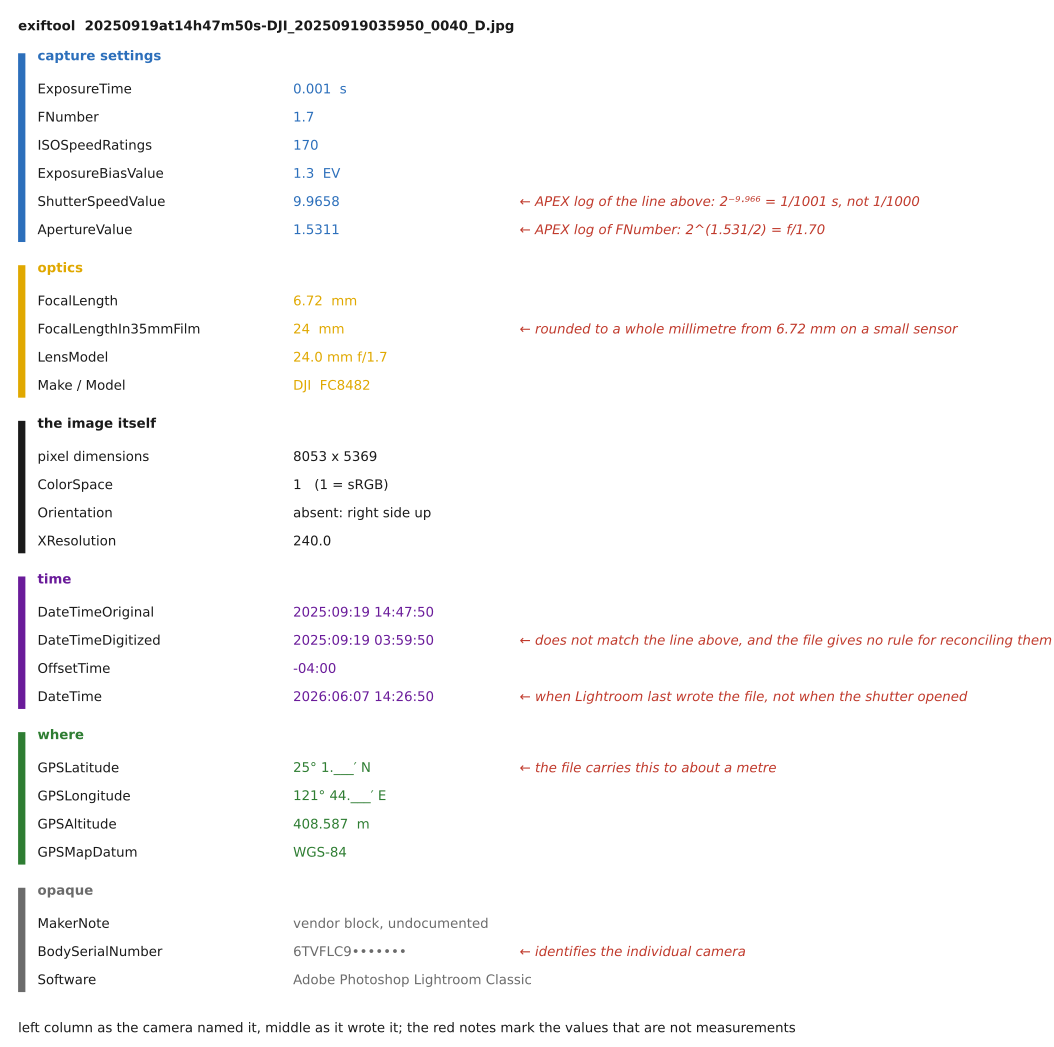
fig-exif-dump
fig-exif-dump ·
• **What EXIF is.** Structured **metadata embedded in the image file itself** (JPEG, TIFF, and most RAW/DNG), not a sidecar — the camera's record of *how* the shot was taken. In JPEG it rides in the **APP1 marker segment**; the payload is a little **TIFF/IFD** structure (tags → values). Standardized as **Exif** (JEITA/CIPA), with **DCF** governing on-card file/folder naming.
• **EXIF is not the only block.** A photo commonly carries two more metadata standards alongside EXIF: **XMP** (Adobe's XML-based metadata — where Lightroom/ACR edit settings, keywords, and ratings live, often in a **sidecar `.xmp`** for raw files) and **IPTC** (the press/captioning standard — caption, byline, credit, keywords, location). The three **co-occur** and can **disagree** (e.g. a date or copyright string present in more than one and edited in only one); a tool like `exiftool` reads all three at once.
• **Field groups** — the metadata sorted by what it describes:
• **capture settings**: exposure time / **shutter speed**, **f-number** (aperture), **ISO**, **exposure program / mode**, metering mode, **exposure bias** (compensation), flash fired/mode
• **optics**: **focal length** (and **35 mm-equivalent**), lens make / model, subject / focus distance
• **image**: pixel width & height, **orientation** flag (the in-camera rotation the viewer must apply), **color space** / embedded ICC profile, white-balance tag
• **time**: **DateTimeOriginal** (when the photo was taken) vs **DateTimeDigitized** (when it was written/scanned) — they differ for film scans and edits; plus sub-second and time-zone tags
• **place**: **GPS** latitude / longitude / altitude (and heading, timestamp)
• **MakerNotes**: proprietary, undocumented per-vendor blobs (often where the interesting bits — true ISO, lens corrections, shot count — hide)
• **embedded thumbnail / preview**: a small JPEG (and, in RAW, a full-res preview) carried alongside the full image
• **identity / file**: software, artist / copyright, camera & lens serial numbers, owner name
• ⚠️ **caveats** (why EXIF frustrates): coverage is **incomplete** (not every camera writes every field) and **inconsistent** across makers; some values — notably **ISO** and **shutter speed** — are **approximate / rounded** and **not radiometrically correct**, so never read them as calibrated radiometry.
• 🔒 **privacy.** EXIF leaks more than people expect: **GPS** coordinates (home/where a photo was taken), camera & lens **serial numbers** (links photos to one device), and **owner name** / copyright. Many platforms strip EXIF on upload; if sharing matters, strip it yourself (`exiftool -all=`).
• **Tools.** `exiftool` (the reference, widest tag coverage), `exiv2`; in Python `piexif` and `Pillow` (`Image.getexif()`), the C `libexif`.
• **How the book's pipeline reads EXIF.** The capture chapter pulls orientation, exposure triangle, and lens info from EXIF to annotate and correctly display the book's own photos — see [[Basic image processing and ISP]] → "Beyond the pixels: basic metadata and EXIF" and "Data versus metadata: EXIF".
45.13.1 What EXIF is⧉
45.13.2 The fields, grouped by what they describe⧉
45.13.3 How far to trust it⧉
45.13.4 Privacy: the metadata that follows the picture⧉
45.13.5 Reading and writing EXIF⧉
▸45.14 DNG: the Digital Negative⧉
• **What DNG is.** An **open, documented raw format** introduced by **Adobe in 2004**, built on **TIFF/EP**: a single, vendor-neutral, **archival** container for camera raw data — *one* published format instead of a proprietary raw per camera model (Canon CR2/CR3, Nikon NEF, Sony ARW, Fuji RAF, …). The spec is public, so anyone can read and write it.
• **The problem it solves.** Every camera ships its **own undocumented raw**; software must reverse-engineer each one, and old proprietary raws risk becoming **unreadable** as cameras and decoders age. DNG is a **stable, documented target** for long-term archiving and interchange — a "digital negative" you can still open decades later.
• **What's inside (the container).** A **TIFF/IFD** structure (same family as EXIF): the **raw image data**, full **EXIF + MakerNote** metadata, **XMP** (edit settings, ratings), one or more embedded **JPEG previews** + a **thumbnail**, and the **color/calibration** data a converter needs to render the raw.
• **Two flavors of raw payload.** **Mosaic ("raw") DNG** keeps the original **Bayer CFA** samples — demosaick later, the usual case (→ [[Slopendium/Demosaicking and joint methods]]); **Linear DNG** stores already-**demosaicked** data (one RGB triple per pixel) — used after processing/remosaic or for non-Bayer sensors.
• **Color-rendering data (how raw → color).** DNG carries the math to turn sensor counts into colorimetric values: **ColorMatrix / ForwardMatrix / CameraCalibration** tags for (typically) **two reference illuminants** (e.g. Standard-A and D65) interpolated by correlated color temperature, plus **AsShotNeutral / AsShotWhiteXY** (the camera's white-balance estimate). **DNG camera profiles (DCP)** add hue/saturation/tone maps. (→ [[Measuring and encoding color|Color technology]] — camera color matrices & white balance.)
• **DNG opcodes.** A small list of **opcodes** the raw processor applies at decode: **WarpRectilinear / WarpFisheye** (geometric distortion correction), **FixVignetteRadial** (vignetting), **GainMap** (per-channel lens-shading / color cast), **TrimBounds**, defective-pixel maps. This is how DNG bakes in **lens corrections declaratively** (→ Optics, lens-profile correction).
• **Compression.** **Lossless JPEG** (default) or **uncompressed**; an optional **lossy DNG** trades some fidelity for size. (→ [[File formats and compression]].)
• **Embed-the-original.** A DNG can **wrap the original proprietary raw** inside itself, so conversion is **reversible** (extract the untouched original later).
• **Adoption & relatives.** Native raw on some cameras (**Leica, Pentax/Ricoh**), most Android phones via the **Camera2** API, and Apple **ProRAW** (which *is* DNG); the **Adobe DNG Converter** transcodes proprietary raws; **CinemaDNG** is the motion/video raw variant. Not universal — **Canon, Nikon, Sony** keep their own raw formats.
• **Trade-offs.** *Pros*: open, documented, archival; one pipeline; embedded corrections + profiles; lossless and often smaller than the native raw. *Cons*: a transcoding step; some maker-note / "secret-sauce" raw features may not map; not every tool round-trips a DNG perfectly.
• **Relation to EXIF.** DNG **contains** EXIF and XMP — it is a **superset container**, so the trust/coverage caveats of [[Appendices#EXIF and image metadata]] apply to the metadata it carries.
45.14.1 What DNG is, and the problem it solves⧉
45.14.2 Inside the container⧉
45.14.3 What the raw payload looks like: mosaic vs linear⧉
45.14.4 The color recipe: matrices, profiles, and white balance⧉
45.14.5 Opcodes: corrections the decoder must apply⧉
45.14.6 Compression, and embedding the original⧉
45.14.7 Where you meet DNG: adoption and relatives⧉
45.14.8 Trade-offs, and DNG's relation to EXIF⧉
▸45.15 Rendering a raw DNG⧉
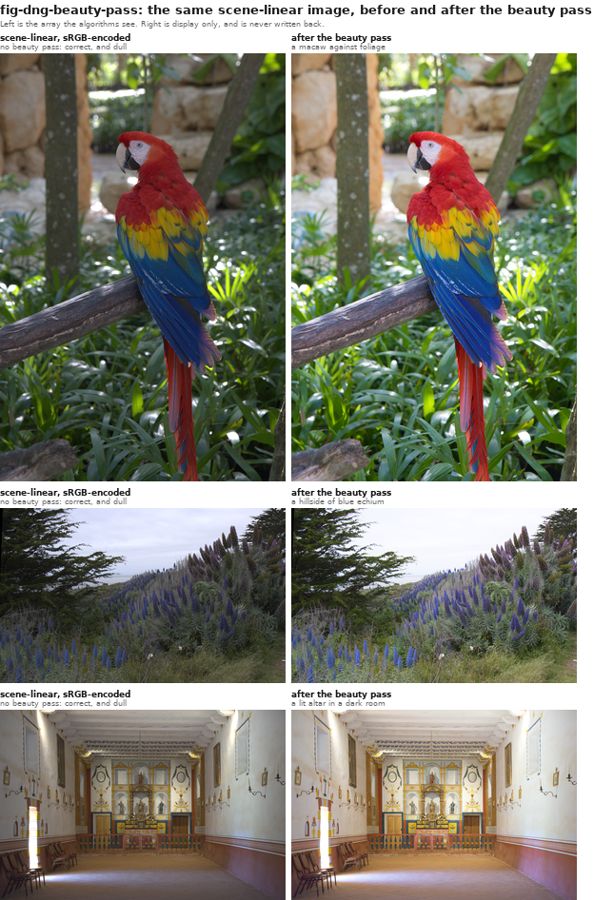
fig-dng-beauty-pass
fig-dng-beauty-pass · the same scene-linear DNG render before/after the beauty pass — dull (correct radiometry) vs developed (display) (appendix → Rendering a raw DNG) ✅
• **Two jobs, kept separate.** The *radiometric* job (recover scene-linear: demosaic + LR exposure/WB/crop + corrected color matrix) and the *cosmetic* job (the **beauty pass**: baseline tone curve + highlight roll-off + saturation). Rule: **process in scene-linear; apply the beauty pass only at display, last.**
• **The pipeline.** read XMP develop settings → demosaic camera-native linear (no gamma/WB/auto-bright) → WB from Temperature/Tint (Adobe `dng_temperature`) → color via `ForwardMatrix · diag(1/refNeutral) · (AB·CC)⁻¹` → exposure `×2^EV` → crop. That is the scene-linear ground truth; the beauty pass renders it for display.
• **Where Lightroom's "look" comes from.** matrix → HueSatMap → LookTable → baseline tone curve (the DCP profile). We reproduce matrix + an empirically-recovered baseline tone curve, and deliberately skip HueSatMap/LookTable (marginal, easy to get wrong). The thing to have an Adobe engineer confirm.
• **Easy mistakes (we made several).** forgetting the beauty pass (dull, ~1–1.6 stops dark); **double gamma**; **CameraCalibration applied as `FM·CC`** (un-inverted → fixed ~4% blue/warm cast — the headline bug); as-shot WB instead of the photographer's; auto-exposing instead of honoring `Exposure2012`; **hue-preserving highlights** (magenta sky vs clean white); kinked tone curve; over-reaching on the profile; baking the beauty pass into data; wrong-DNG/wrong-reader (Bayer original = rawpy; demosaicked LinearRaw = tifffile).
• **Special cases.** HDR DNGs (extended-range linear → needs a tone-map) and Lightroom panoramas (bake their own look) fall outside the normal path.
45.15.1 The pipeline, step by step⧉
45.15.2 Where Lightroom's "look" actually comes from⧉
45.15.3 What we would ask an Adobe engineer to check⧉
45.15.4 Two kinds of DNG, and the special cases⧉
45.15.5 Easy mistakes (most of which we made)⧉
▸45.16 Datasets⧉
A pointer index, not a survey: the workhorse public datasets behind the methods in this book, grouped by task. Each entry is a name, a one-line description, and a link.
**Classification / features**
• **ImageNet** — million-image labeled classification set; the pretraining backbone behind most vision features. https://image-net.org
• **COCO** — common objects in context: detection, segmentation, captioning. https://cocodataset.org
• **Places** — scene-recognition dataset (millions of images, hundreds of scene categories). http://places2.csail.mit.edu
**Super-resolution**
• **DIV2K** — 2K-resolution high-quality images, the standard SR training set. https://data.vision.ee.ethz.ch/cvl/DIV2K
• **Flickr2K** — 2K Flickr images, often paired with DIV2K for training. *(verify URL)* https://github.com/limbee/NTIRE2017
• **Set5 / Set14 / BSD100 / Urban100** — small standard SR **test** sets (classic images, natural scenes, urban self-similar structure). *(verify URL)* https://github.com/jbhuang0604/SelfExSR
**Deblurring & restoration**
• **GoPro (Nah et al. 2017)** — sharp/blurry video-frame pairs synthesized from high-fps GoPro footage; the standard dynamic-scene motion-deblurring benchmark. *(verify URL)* https://seungjunnah.github.io/Datasets/gopro
• **REDS** — REalistic and Dynamic Scenes (NTIRE challenge set): high-quality video for deblurring, super-resolution, and denoising. *(verify URL)* https://seungjunnah.github.io/Datasets/reds
**Denoising**
• **SIDD** — Smartphone Image Denoising Dataset: real noisy/clean smartphone pairs. https://www.eecs.yorku.ca/~kamel/sidd/
• **DND** — Darmstadt Noise Dataset: real-photograph denoising benchmark (held-out ground truth). https://noise.visinf.tu-darmstadt.de
• **Kodak** — the 24 "kodim" lossless test images, a long-standing denoising/compression benchmark. *(verify URL)* https://r0k.us/graphics/kodak/
**HDR / tone mapping**
• **HDR+ burst dataset** — Google's raw burst dataset behind HDR+ computational photography. https://hdrplusdata.org
• **Kalantari HDR (dynamic scenes)** — multi-exposure bursts with motion, for HDR merging with moving content. *(verify URL)* https://www.robots.ox.ac.uk/~szwu/storage/hdr/kalantari17.html
• **Laval HDR (sky / indoor)** — high-dynamic-range outdoor-sky and indoor panoramas (lighting estimation). *(verify URL)* http://hdrdb.com
• **Fairchild HDR Photographic Survey** — calibrated HDR scenes for tone-mapping evaluation. *(verify URL)* http://markfairchild.org/HDR.html
**Retouching / enhancement**
• **MIT-Adobe FiveK** — 5,000 raw photos each retouched by five expert artists; the standard learned-enhancement set. https://data.csail.mit.edu/graphics/fivek
**Depth / flow**
• **NYU Depth V2** — indoor RGB-D (Kinect) for monocular depth. https://cs.nyu.edu/~silberman/datasets/nyu_depth_v2.html
• **KITTI** — driving stereo / depth / flow benchmark. https://www.cvlibs.net/datasets/kitti/
• **Middlebury stereo** — classic high-accuracy stereo benchmark. https://vision.middlebury.edu/stereo/
• **MPI Sintel** — synthetic optical-flow benchmark with long-range, large-motion sequences. http://sintel.is.tue.mpg.de
**Color / white balance**
• **NUS / Gehler-Shi** — color-constancy sets with measured ground-truth illuminant (color-checker in scene). *(verify URL)* https://www2.cs.sfu.ca/~color/data/shi_gehler/
• **Cube+** — single-illuminant color-constancy images with a calibration cube. *(verify URL)* https://ipg.fer.hr/ipg/resources/color_constancy
**Faces**
• **CelebA / CelebA-HQ** — celebrity faces with attributes; HQ is the high-res variant for generative work. https://mmlab.ie.cuhk.edu.hk/projects/CelebA.html
• **FFHQ** — Flickr-Faces-HQ: 70k high-quality aligned faces (the StyleGAN set). https://github.com/NVlabs/ffhq-dataset
• **LFW** — Labeled Faces in the Wild: the classic face-verification benchmark. http://vis-www.cs.umass.edu/lfw/
**Inpainting / segmentation / matting**
• **Places2** — same scene corpus as *Places / Places2* (Classification, above); also the standard set for **inpainting** and scene parsing.
• **ADE20K** — densely annotated scene parsing / semantic segmentation. https://groups.csail.mit.edu/vision/datasets/ADE20K/
• **Composition-1k** — the standard alpha-matting benchmark (foregrounds composited over many backgrounds). *(verify URL)* https://sites.google.com/view/deepimagematting
45.16.1 Classification and features⧉
45.16.2 Super-resolution⧉
45.16.3 Deblurring and restoration⧉
45.16.4 Denoising⧉
45.16.5 HDR and tone mapping⧉
45.16.6 Retouching and enhancement⧉
45.16.7 Depth and motion⧉
45.16.8 Light fields⧉
45.16.9 Color and white balance⧉
45.16.10 Faces⧉
45.16.11 Inpainting, segmentation, and matting⧉
45.16.12 Image quality⧉
▸45.17 A camera-feature wish list⧉
• **framing**: most asks are not hard *algorithms* — the book covers them — they are missing because of conservative firmware, cramped UI, and closed software. The list is the book held up as a mirror to real products.
• **exposure, ISO, HDR**: tiered **auto-ISO** (minimum shutter speed as a first-class rule); **ambient/flash balance** control; **in-camera HDR bracket → 16-bit raw merge** (→ [[HDR merging]]); **auto-ETTR** with a pull flag recorded in metadata; **frame averaging** for a low-ISO, low-noise long exposure (→ [[Slopendium/Denoising]], the $\sqrt{N}$ argument).
• **bracketing the controls**: alternate settings *within a burst* — flash/no-flash pairs, slow+fast shutter pairs, and **aperture bracketing** at constant exposure for post-hoc depth-of-field choice (→ [[Bokeh, focus stacking, and depth-of-field control|depth of field]]; light field).
• **focus & DoF**: **focus stacking** with step-size control and blur-boundary detection (→ [[Bokeh, focus stacking, and depth-of-field control|depth of field]]); focus-shift compensation; cycle through detected **faces/AF subjects** when it locks on the wrong one (→ [[Autofocus]]).
• **computational raw / sensor**: a **true per-channel raw histogram** (not the JPEG proxy); **lossless-compressed raw**; **pixel-shift multi-shot high-res** (→ [[Multi-frame super-resolution]]).
• **motion data & metadata**: record the **gyro/accelerometer** streams for shake removal, blur assessment, stabilization (→ [[Video stabilization and rolling-shutter correction]]) and automatic **perspective correction** (→ [[Perspective distortion and its correction]]); in-camera **rating/sorting** that round-trips to the editor (cross-ref [[Appendices#EXIF and image metadata]] — XMP/IPTC); save/restore settings as a text file; separate stills/video settings.
• **panorama**: an electronic **sweep-panorama** mode like a phone's (→ [[Automatic panorama stitching from multiple views and feature matching]]).
• **UI & ecosystem**: better self-timer / long-exposure / **AF-ON** ergonomics; **automatic Wi-Fi offload** at home; and the wish that subsumes the rest — **open the software ecosystem** so third parties can add exactly these features. The recurring lesson: the bottleneck is openness, not optics.
45.17.1 Exposure, ISO, and dynamic range⧉
45.17.2 Bracketing more than exposure⧉
45.17.3 Focus and depth of field⧉
45.17.4 Computational raw and the sensor⧉
45.17.5 Motion data, metadata, and workflow⧉
45.17.6 Panorama and multi-shot⧉
45.17.7 The interface and the ecosystem⧉
▸45.18 How this book was created (the early process)⧉
This book was written **with an AI collaborator** (Anthropic's Claude), as a deliberate experiment in AI-assisted authoring — a fitting, slightly meta exercise for a book about computational imaging. The short version: an AI did much of the drafting, building, and checking; a human did all of the deciding. The longer version (below) matters because the failure modes everyone worries about — hallucinated facts, inconsistent notation, prose that drifts over hundreds of pages — are exactly what the method is built to prevent.
45.18.4 Generative imagery: cover art and 3D⧉
▸45.19 How this book is made now⧉
The companion to [[How this book was created (the early process)]], which is frozen as the account of the first method. This one describes the process as it actually runs today: the author edits the rendered draft rather than a specification, and eleven agents with written ownership of separate parts of the project coordinate through files rather than through a conversation. It carries the working relationship (how a prompt becomes work, what the author decides, what an agent decides on its own), the internals of the multi-agent system (the ownership map, the state files, the inboxes, the shared contract, the objections file, the skills), the gates that enforce all of it, and a downloadable bundle of the real files so the method can be studied rather than believed.
▸45.20 The course tutor: a local, book-grounded AI teaching assistant⧉
• **What it is.** A terminal **and** browser chatbot tutor for the course, grounded in *this book* plus the lecture slides and pset handouts. It answers conceptual questions fully and, for problem-set work, **guides** — concept, the section to read, the next step — without handing over answers or solution code.
• **Local-first.** The default runs an open-weights model (**Gemma**, via Ollama) **on the student's own machine** — no API key, no per-token cost, works offline. An install-time probe picks a model tier that fits the hardware (a small model on any laptop; a larger, multimodal one on a GPU / Apple Silicon).
• **Retrieval-augmented (RAG).** The book drafts, outline, companion files, slide digests, and pset *handouts* are chunked, embedded, and stored in a small local vector index; each question retrieves the most relevant passages, which are fed to the model as grounded context — the same "write from the sources, not memory" rule the authoring pipeline uses. **Solutions and answer keys are deliberately never indexed.**
• **Guide, don't solve.** Enforced by a Socratic system prompt + worked exemplars, *not* by a brittle filter (a student can get answers from any frontier model anyway — the point is a genuinely useful *guided* tool, the CS50 stance). A **grounding gate** makes the tutor say "the material doesn't cover this" rather than confabulate when retrieval is weak (the Jill-Watson "decline when uncovered" behavior).
• **It links and shows.** Answers cite the book by name and **link** to the published section; in the browser it renders **equations** (LaTeX/KaTeX) and shows the relevant **figures** inline — the reasons a browser UI beats a terminal for a visual, mathematical subject. A **vision-capable** model lets a student upload an image (their result, an artifact) and ask about it.
• **Two front-ends, one core.** A terminal client (lives in the dev shell, can see code, works over SSH) and a local browser app (equations, figures, image upload, a model dropdown) share the same retrieval + inference + logging core. An optional **online backup** (instructor-hosted) serves students whose machines can't run a local model.
• **Logging and analytics for the instructor.** Every interaction (question, retrieved sources, response) is logged and delivered to the instructor. A batch pipeline produces a **dashboard**: what help students seek, usage over time, per-student activity, retrieval-coverage gaps, and a **pedagogy audit** — an independent model reviews each turn for quality (correct / confusing / harmful), grounding, and answer-leaks, surfacing problem turns. Student identities are **pseudonymized and PII-scrubbed** before any third-party model sees a trace.
• **Privacy & honesty.** Interaction logs are student records (FERPA): disclosed in the syllabus, access-restricted, anonymized before external analysis. The tutor is labeled as an AI that can be wrong; it points students *back into the book* rather than substituting for it.
45.20.1 What it is, and what it is for⧉
45.20.2 Local-first⧉
45.20.3 Grounded in the book: retrieval-augmented generation⧉
45.20.4 How the retrieval works⧉
45.20.5 Indexing other people's books⧉
45.20.6 Measuring it, and keeping it from going stale⧉
45.20.8 Two front-ends, one core⧉
45.20.9 What the instructor sees⧉
45.20.10 Privacy and disclosure⧉
45.20.11 Privacy and honesty⧉
▸45.21 The semi-automatic grading system⧉
• **The shape (to confirm).** Each pset ships a **test harness** + reference data; submissions are built and run against it, image/numeric outputs compared to references **within a tolerance**, and a provisional score produced for a human to review and adjust.
• **What is automatic vs human (to confirm).** *Automatic:* compiles, runs without crashing, output matches reference within tolerance, performance within budget where relevant. *Human:* partial credit for near-misses, code style/clarity, the open-ended make-your-own / video / ethics components, and any appeal.
• **To fill in (from Frédo):** the exact harness and languages (Python/C++), per-pset reference outputs and tolerances, the rubric and point allocation, how grades + feedback are returned to students, the academic-integrity / permitted-AI-use policy (and how it interacts with [[Appendices#The course tutor: a local, book-grounded AI teaching assistant|the tutor]]), and any plagiarism/similarity checks.
45.21.1 The shape (to be confirmed)⧉
45.21.2 Automatic versus human (to be confirmed)⧉
45.21.3 To be filled in (from the instructor)⧉
▸45.22 Under the hood: prompts, patterns, and verifiers⧉
• a **companion to [[Appendices#How this book was created (the early process)|How this book was created]]**, one level deeper: the recurring **prompt patterns** that made the AI a dependable co-author (registry-first single-source-of-truth; source-grounding + "flag, don't fabricate"; fresh context per section; outline↔prose split with write-back; hand-checkable verification for numeric/image code; an adversarial reviewer panel; a verbatim prompt log; repeated house-style directives).
• the **verifier suite** (V1–V24) as a table — what each catches, which are mechanical build-gates vs human-facing reviewer warnings.
• thesis: the value of an AI collaborator is bounded by the **scaffolding** built around it; the scaffolding, not the model, is where the craft lives. For the reader who wants to *reproduce* the method.
45.22.1 Prompt patterns that made it work⧉
45.22.2 The verifier suite⧉
45.22.3 Why this is the interesting part⧉
▸45.23 Reading a Lytro light field⧉
45.23.1 The container: the LFP/LFR format⧉
45.23.2 The pipeline, step by step⧉
45.23.3 From hexagonal lenslets to a uniform grid⧉
45.23.4 Why a white image⧉
45.23.5 Open questions and where we approximate⧉
45.23.6 Easy mistakes (most of which we made)⧉
▸45.24 File conversion tools⧉
45.24.1 JPG → PNG, without an alpha channel⧉
45.24.2 DNG → a linear PNG⧉
45.24.3 A Lytro capture → a Stanford-style light-field archive⧉
45.24.4 How they run in the browser⧉
45.24.5 Easy mistakes⧉
▸45.25 The interactive figures — a prompt-by-prompt making-of⧉
45.25.1 Summary⧉
45.25.2 Lorentz resonance: `fig-lorentz-resonance` (Figure 2.1.8)⧉
45.25.3 Rainbow droplet: `fig-rainbow-droplet` (Figure 2.1.14)⧉
45.25.4 Diffraction wave simulation: `fig-diffraction-wave-sim` (Figure 2.1.29)⧉
45.25.5 Exposure-triangle simulator: `fig-exposure-triangle-sim` (Figure 2.11.5)⧉
45.25.6 Repeated quantization: `fig-repeated-quantization` (Figure 3.1.4)⧉
45.25.7 JPEG generation loss: `fig-jpeg-generation-loss` (Figure 3.17.9)⧉
45.25.8 Exposure round-trip (JPEG): `fig-exposure-jpeg-roundtrip` (Figure 3.17.10)⧉
45.25.9 1-D sampling pipeline: `fig-sampling-1d-demo` (Figure 3.10.4)⧉
45.25.10 2-D sampling pipeline: `fig-sampling-2d-pipeline` (Figure 3.10.6)⧉
45.25.11 Mitchell–Netravali bicubic (B,C): `fig-bicubic-bc` (Figure 3.11.13)⧉
45.25.12 Rotation resample challenge: `fig-rotation-resample-interactive` (Figure 3.11.18)⧉
45.25.13 Mini-Lightroom: `fig-mini-lightroom` (Figure 3.18.4)⧉
45.25.14 Poisson blending: `fig-poisson-blend` (Figure 5.1.5)⧉
45.25.15 Bilateral grid (3-D): `fig-bilateral-grid-3d` (Figure 5.2.15)⧉
45.25.16 Perspective montage: `fig-perspective-montage` (Figure 6.6.13)⧉
45.25.17 Beier–Neely morph: `fig-beier-neely-demo` (Figure 6.3.4)⧉
45.25.18 Live face landmarks: `fig-face-landmarks-live` (Figure 7.10.2)⧉
45.25.19 Lens optimizer: `fig-lens-optimizer-demo` (Figure 9.4.4)⧉
45.25.20 Full auto-panorama: `fig-pano-stitch` (Figure 10.7.9)⧉
45.25.21 CLIP-IQA curation: `fig-clip-iqa` (Figure 11.3.2)⧉
45.25.22 Photobio time-lapse: `fig-photobio-demo` (Figure 11.7.2)⧉
45.25.23 Refocus shift geometry: `fig-refocus-shift-geometry` (Figure 13.4.2)⧉
45.25.24 Chroma key: `fig-chroma-key` (Figure 8.11.7)⧉
45.25.25 Portrait-lighting simulator: `fig-portrait-lighting-sim` (Figure 2.11.26)⧉
45.25.26 Aberration explorer: `fig-aberration-explorer` (Figure 9.1.6)⧉
45.26.1 Find a demo⧉
45.26.2 Sharing, linking, and embedding a demo⧉
45.26.3 Introduction⧉
45.26.4 Fundamentals — light, optics, sensors⧉
45.26.5 Visual perception and color⧉
45.26.6 Color spaces and color technology⧉
45.26.7 Photography⧉
45.26.8 Linear methods and Fourier analysis⧉
45.26.9 Probabilistic approaches and machine learning⧉
45.26.10 Basic image processing and the ISP⧉
45.26.11 Making computational-photography code fast⧉
45.26.12 Edges matter⧉
45.26.13 Computational tools — machine learning and diffusion⧉
45.26.14 Edges matter — gradient-domain and edge-preserving⧉
45.26.15 Warping and morphing⧉
45.26.16 Matching pixels across space and time⧉
45.26.17 Single-image computational photography⧉
45.26.18 Compound lenses and aberration correction⧉
45.26.19 Multiple-exposure imaging⧉
45.26.20 Many images and photo collections⧉
45.26.21 Video⧉
45.26.22 Light fields and plenoptic cameras⧉
45.26.23 Computational illumination⧉
45.26.24 3-D and depth⧉
45.26.25 Revealing the invisible⧉
45.26.26 Appendices and end matter⧉
45.26.27 Not yet placed⧉
▸45.27 Course slides⧉
45.27.1 The lectures⧉
45.28 Course slides, 2026 edition⧉
▸45.29 Course slides, earlier years⧉
45.29.1 2006, the first offering⧉
45.29.2 The ENS / INRIA edition (around 2009)⧉
45.29.3 2011–2012, the Keynote editions⧉
45.29.4 The MIT year-by-year editions (2007–2015)⧉
▸45.30 The Computational Photographer⧉
45.30.1 Faculty jobs: why and how to get them⧉
45.30.2 Can academia compete with the resources of industry?⧉
45.30.3 Family in a box⧉
45.30.4 Do good research, run a great lab⧉
45.30.5 AI image synthesis is the biggest innovation in image making since photography⧉
45.30.6 Lidar for autofocus⧉
45.30.7 TedFest 2022⧉
45.30.8 I want a light field camera⧉
45.30.9 Lloyd Chambers's feature Christmas list⧉
45.30.10 Ethics and computational photography⧉
45.30.11 The DSLR will probably die. Are mirrorless the future of large standalone cameras?⧉
45.30.12 Eurographics keynote slides⧉
45.30.13 Halide talk⧉
45.30.14 Do good research⧉
45.30.15 Slides from my Siggraph talk about computational photography⧉
45.30.16 No telephoto on cell phones⧉
45.30.17 A perfect flat lens with metamaterials⧉
45.30.18 Why video compression fails on confettis⧉
45.30.19 This camera shows you a similar picture instead of the one you are taking⧉
45.30.20 Project idea: automatic composite portrait⧉
45.30.21 Lytro Cinema Camera: guestimates of characteristics⧉
45.30.22 Auto white balance for flash and LEDs⧉
45.30.23 Autofocus noise and microphone array⧉
▸45.31 How to do research⧉
45.31.1 Frédo's own notes⧉
45.31.2 A few more starting points⧉
45.31.3 Further reading, talks, and advice⧉
45.31.4 Odds and ends⧉
▸45.32 The Art and Science of Depiction⧉
45.32.1 Introduction⧉
45.32.2 There is no passive recording⧉
45.32.3 What is a picture?⧉
45.32.4 Introduction to human vision⧉
45.32.5 Vision solves problems⧉
45.32.6 Picture organization and Gestalt⧉
45.32.7 Gaze movements and focal points⧉
45.32.8 Color⧉
45.32.9 Limitations and compensations I: the picture is flat⧉
45.32.10 Limitations and compensations II: viewpoint and frame⧉
45.32.11 The image is static; contrast and gamut are limited⧉
45.32.12 Contrast⧉
45.32.13 Representation systems⧉
45.32.14 Perspective⧉
45.32.15 Drawing and line drawing⧉
45.32.16 Denotation systems⧉
45.32.17 Tone system⧉
45.32.18 Non-photorealistic rendering, and style⧉
▸45.33 Photoshop 1.0, running⧉
45.33.1 What is on the menu bar⧉
45.33.2 Running it in a browser⧉
45.33.3 What to try⧉
45.33.4 The source code is public, and that is not the same as buildable⧉
45.33.5 How the program is put together⧉
45.33.6 What the assembly relies on⧉
▸45.34 Photoshop 1.0 ported to JavaScript⧉
45.34.1 Gaussian Blur, and five boxes⧉
45.34.2 Unsharp Mask is thirty lines⧉
45.34.3 Find Edges, without a square root⧉
45.34.4 Add Noise, and the same theorem again⧉
45.34.5 Median, and what happens at the border⧉
45.34.6 Despeckle and Sharpen Edges are not kernels⧉
45.34.7 Custom is the general case, and the built-ins are the special cases⧉
45.34.8 On reading source code⧉