7.9 Face tracking⧉
The single most-photographed, most-matched object in the world is the human face, and a whole sub-industry of computer vision exists to find it, pin down its features, and follow them through a video. It is correspondence again — the spine of this part — but specialised to one deformable, semantically rich, and economically important object. Where stereo matched a pixel to a pixel and optical flow matched a frame to the next, face tracking matches an image to a model of a face: where is it, which way is it pointing, where are the eyes and mouth, and how are they moving? The pipeline that answers those questions is the same four steps almost everywhere — detect, landmark, track, and (optionally) lift to 3-D — so we take them in turn and name the tool of choice for each.
7.9.1 Detecting the face⧉
Before you can analyse a face you must find it. The historic breakthrough is Viola–Jones (Viola & Jones 2004): a cascade of simple Haar-like features, made fast by the integral image (a summed-area table that lets any rectangle's sum be read in four lookups) and selected by AdaBoost, with a cascade of ever-stricter classifiers that rejects most of the image in the first few cheap tests. It put real-time face detection in every point-and-shoot camera of the 2000s, and it is still the textbook example of "cheap features + boosting + early rejection." Modern detectors are neural: MTCNN (Zhang et al. 2016 (MTCNN)) runs a three-stage cascade of small convolutional networks that jointly detect and roughly landmark the face, and RetinaFace (Deng et al. 2020 (RetinaFace)) is a single-stage dense detector that returns a box, five keypoints, and a confidence in one pass, robust to scale, pose, and occlusion in the wild. You will essentially never implement these; you call them.
7.9.2 Landmarks: pinning down the features⧉
Detection gives a box; landmarks give the geometry. A landmark detector returns a fixed set of named points — the corners of the eyes, the tip of the nose, the contour of the jaw — in a canonical order, so that point i means the same facial feature in every face. Two standards dominate. The classic 68-point scheme comes from dlib's implementation of an ensemble of regression trees (Kazemi & Sullivan 2014) that refines an initial guess to the true landmarks in under a millisecond — cheap enough to run every frame on a CPU. The modern dense standard is MediaPipe Face Mesh (Kartynnik et al. 2019 (Face Mesh)), which regresses 468 3-D surface points from a single monocular frame on a phone GPU, effectively reconstructing the face's surface geometry rather than a sparse set of corners (Figure 7.9.1).
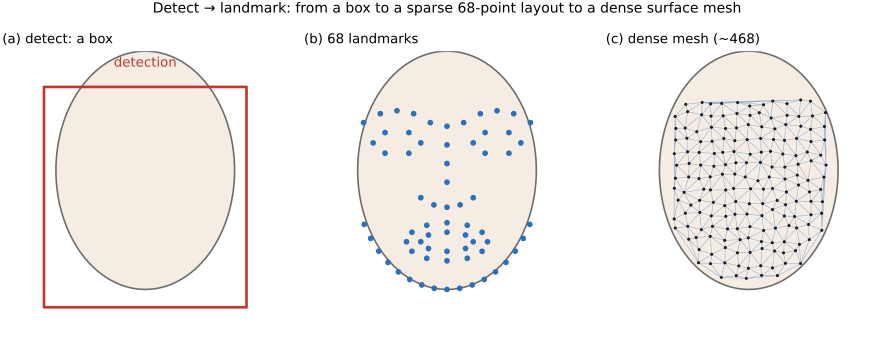
You can run exactly this on your own face (Figure 7.9.2), which makes concrete why the dense mesh is the enabling representation: once every frame carries 478 points in a known order, anything anchored to those points tracks the face for free.

The landmarks are not the end; they are the correspondence you wanted. With a handful of matched points you can align the face — warp it (an affine or thin-plate-spline, the warps of the Warping and morphing part) into a canonical, upright, fixed-size frame — which is exactly the preprocessing every downstream task (recognition, expression analysis, AR) relies on, because it removes the nuisance variation of pose and scale before the hard work begins.
7.9.3 Tracking across time⧉
A video adds the time axis, and a face moves smoothly between frames, so re-detecting from scratch every frame is wasteful and jittery. The cheap fix is detect-then-track: find the face once, then on each new frame initialise the landmark search from the previous frame's result (the face has barely moved), and only re-run the full detector when tracking is lost. Light temporal smoothing of the landmark trajectories (a small filter over time, the same Eulerian value-on-a-grid idea) removes the frame-to-frame jitter that otherwise makes an AR overlay shimmer. The MediaPipe and similar pipelines do this for you.
7.9.4 Lifting to 3-D: the morphable model⧉
The dense mesh hints at the richest representation: a 3-D morphable model (Blanz & Vetter 1999) describes any face as a low-dimensional combination of basis shapes for identity, expression, and pose, fit to the image so that the projected model lands on the observed landmarks. Once fit, you have a fully parametric face you can re-pose, re-light, transfer expressions onto (the engine behind avatars and many filters), or analyse for gaze and blendshape coefficients. This is the same morphable-model idea developed in Morphable models, here driven by tracked landmarks.
7.9.5 Recognition, and the dark side⧉
Matching a face to a model is tracking; matching a face to an identity is recognition. The dominant approach learns an embedding — a vector per face such that two photos of the same person land close and different people land far apart — trained with a margin loss like ArcFace (Deng et al. 2019 (ArcFace)); identification is then a nearest-neighbour lookup in embedding space. The same machinery that powers phone unlock and photo-library grouping also powers surveillance and, in its generative cousin, deepfakes — face swapping and reenactment driven by exactly the detect-landmark-track-model pipeline above, which is why authentication and forgery detection get their own treatment in Image Forensics and Authentication.
7.9.6 Which library to use optional⧉
Do not reinvent any of this. For most work, MediaPipe (Face Detection, Face Mesh, and the newer Tasks API) gives you detection, 468-point mesh, and blendshapes in a few lines, on-device and cross-platform. dlib remains the classic CPU choice for 68-point landmarks; OpenCV ships detectors and a DNN face module; InsightFace is the go-to for state-of-the-art detection and ArcFace recognition; face_recognition wraps dlib for quick prototyping. Pick one, align with the landmarks, and spend your effort on the application, not the detector.