10.6 Blending⧉
Once the images are geometrically registered (RANSAC + homography), the picture still looks wrong — a hard, visible seam runs where one source ends and the next begins, because exposure, white balance, and vignetting differ frame to frame. Blending is the color, photometric half of stitching. This chapter is a ladder of increasingly principled answers to "how do I hide the seam without blurring detail or duplicating objects": (1) feathering / alpha — a single distance-weighted average, and why it ghosts; (2) two-scale blending — the pset method that fixes feathering: blend low frequencies smoothly, pick a winner for high frequencies; (3) multiband / Laplacian-pyramid blending — blend each frequency band over a transition matched to that band's scale; (4) Poisson / gradient-domain blending — paste gradients across the seam, solve for pixel values, so the eye never sees the DC offset; (5) seam optimization — don't blend a fixed seam, route the seam through pixels where the images already agree, via graph cut. The throughline is one idea: the seam is visible because the eye reads local contrast — gradients — so every good method either matches gradients across the boundary or hides the boundary where the gradients already match.
That last sentence is big lesson L9 wearing its stitching clothes, and it is worth stating before any algorithm, because it is the criterion every rung is judged against.
A stitch seam is jarring not because the average brightnesses differ but because the gradient is wrong right at the boundary — a sudden jump the visual system reads as an edge that isn't in the scene. So the entire blending ladder is a sequence of ways to fix the gradients at the seam: smooth-blend the low frequencies so the jump is spread out (two-scale, multiband); paste the gradients and solve for values so the jump is absorbed into an invisible DC shift (Poisson); or route the seam through pixels whose gradients already match so there is nothing to fix (graph cut). A constant brightness or color offset between two frames is invisible once the boundary gradient is right — exactly why gradient-domain blending works. (First appears in Poisson image editing — the key idea; recurs here as the organizing principle of stitch blending.)
Part spine (L14 · capture the full set, decide later): blending commits the many overlapping frames per pixel, in software, long after the shutter — the seam-optimization rung most literally, as an explicit choice of which captured frame to trust. (L14 first appears in this part's intro; light-field refocus in Advanced computational photography is its special case.)
10.6.1 Why a hard seam is visible — the photometric mismatch⧉
By this point the images are geometrically aligned — a homography from RANSAC, then reprojected into a common frame. Geometry is not the problem anymore. The problem is color. Three culprits, all real and all unavoidable in a hand-held panorama, conspire to make the same scene point land at different pixel values in different frames:
- Exposure / auto-exposure drift. The camera re-meters between shots — or you nudged the shutter or ISO — so the same wall is brighter in one frame than the next.
- White-balance drift. Auto white balance shifts per frame, leaving a color cast that differs across the seam.
- Vignetting. Every lens darkens toward the corners, so the same scene point is darker when it lands near a frame edge than when it lands center — guaranteeing a brightness ramp that disagrees across the overlap.
Why does the eye pounce on this? Because a hard seam is a discontinuity in the gradient field — a step edge the visual system flags as a real boundary in the scene. A smooth brightness difference of the very same magnitude is nearly invisible. So "hide the seam" really means, precisely, "do not leave a gradient discontinuity at the boundary." That is the L9 hook above, and it is the bar the whole ladder is built to clear.
One encoding note before any arithmetic, by our standing rule of declaring the space every operation lives in: do all blending in linear light (un-gamma first). Light from overlapping frames adds linearly; averaging gamma-encoded values darkens the midtones and warps the blend. This is the same linear-light discipline the rest of the book insists on whenever we add or average radiance.
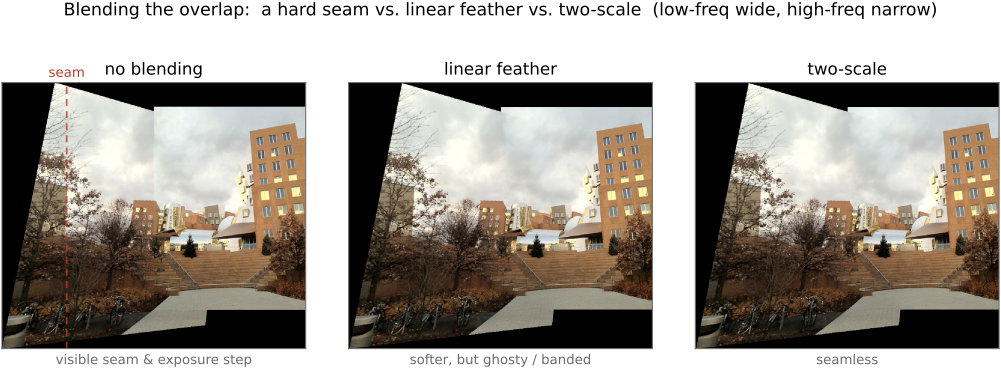
The naive non-answer is the hard cut — "basic reprojection," in which each output pixel is simply painted from whichever source happens to cover it. The result is a sharp, ugly seam exactly where exposure, white balance, and vignetting disagree. This is the baseline every rung below beats.
10.6.2 Feathering / alpha blending — and why it ghosts⧉
The first real idea — call it smooth blending — is to make each output pixel a weighted average of the sources, with each source's weight falling off toward its own frame boundary:
A source counts fully in its interior and fades to zero at its edge, so the transition is gradual and the seam softens into a cross-fade rather than a step.
Computing that weight is cheaper than it looks. Distance-to-boundary is awkward in the output frame — the homography has warped each frame into an irregular quadrilateral — but it is trivial in each source frame, where the frame is a plain rectangle: a separable, piecewise-linear ramp, $1$ in the middle and $0$ at the edge, in $x$ and again in $y$. Compute the ramp in source space, then warp it along with the image so it arrives in the output frame already correct. A small engineering note that pays off in code: keep an extra sum-of-weights image alongside the color accumulator and divide once at the end — that makes the normalization $\sum_i w_i$ a one-liner and handles arbitrary overlap counts (three frames meeting at a corner, say) without special cases.
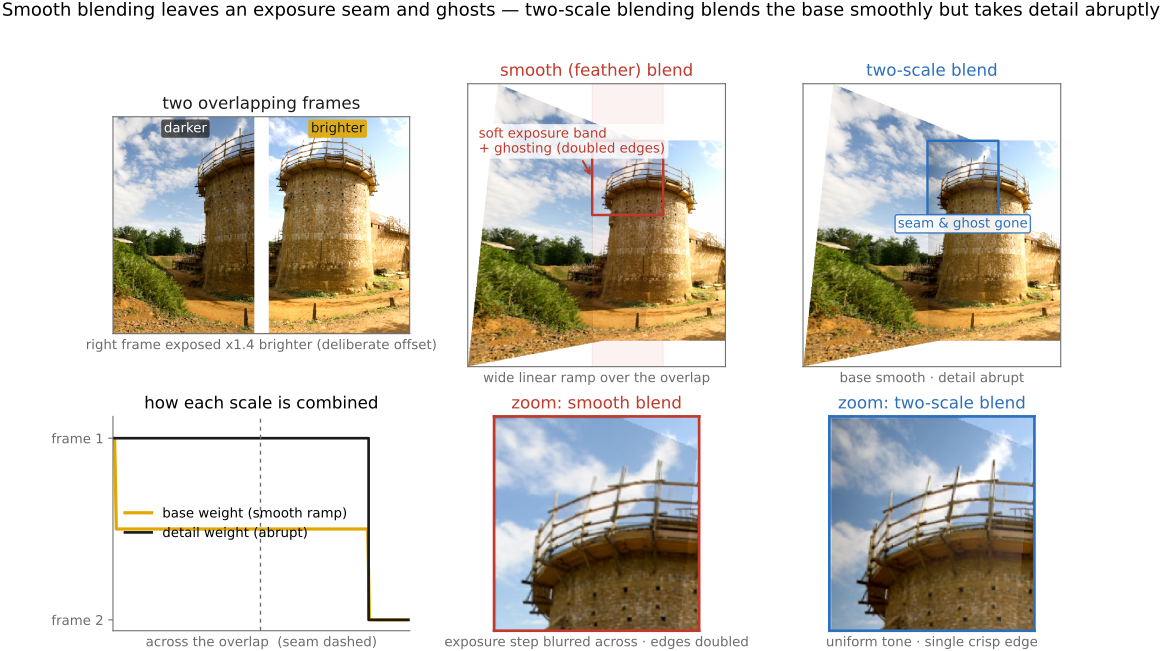
The catch is ghosting and blur (Figure 10.6.1). Feathering averages pixels that are supposed to be aligned, but registration is never perfect — parallax, moving objects, residual lens distortion all leave a sub-pixel-to-pixel disagreement. Averaging slightly-misaligned high-frequency detail doubles edges (the ghost) and smears texture, and the wider the feather, the worse the damage.
The diagnosis is what motivates everything that follows. Feathering uses one transition width for all frequencies. But the right width is frequency-dependent: the low frequencies — the exposure and vignetting ramp we actually want to merge — need a wide, smooth blend; the high frequencies — the sharp detail we want crisp and un-ghosted — need a narrow, almost-abrupt transition. One width cannot serve both. That single realization is the entire rest of the ladder.
10.6.3 Two-scale blending — the simple split (the pset method)⧉
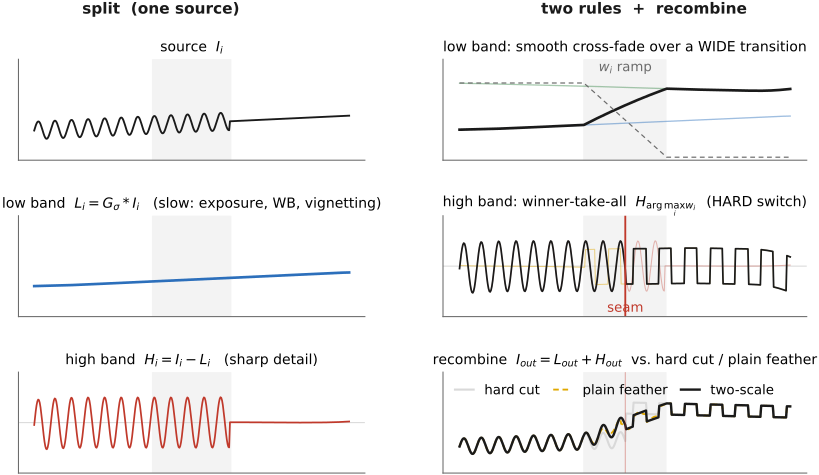
The cheapest fix that respects "different widths for different frequencies" is to use just two widths. Split each source into two bands — after Brown and Lowe's two-band simplification of the full pyramid (Brown & Lowe 2007) — and blend the bands by different rules:
- The low band $L_i = G_\sigma * I_i$ (a Gaussian blur) carries exposure, white balance, and vignetting — the slow stuff we want to merge smoothly. Smooth-blend it with the feathering weights above. A wide transition here corrects the exposure and vignetting differences without ever introducing a visible step.
- The high band $H_i = I_i - L_i$ (the residual detail) carries the sharp edges and texture. Here a smooth average is exactly what causes ghosting, so we do the opposite — winner-take-all: at each pixel keep the high-frequency detail from the single source with the highest weight,
An abrupt switch keeps detail sharp and never duplicates an object.
Recombine by simple addition, $I_{\text{out}} = L_{\text{out}} + H_{\text{out}}$ (Figure 10.6.2). The one-line justification: blend smoothly where the eye tolerates smoothness (low frequencies), abruptly where the eye demands sharpness (high frequencies). This is "match the transition width to the scale," implemented with two scales instead of a continuum. On a real exposure-mismatched pair the payoff is plain: feathering leaves a soft exposure band and ghosts the detail, while two-scale removes both (Figure 10.6.3).
Where does it sit on the ladder? It is the two-level special case of Laplacian-pyramid blending, next. Brown and Lowe showed that two bands are often enough for panoramas — which is why this makes such a good problem set: most of the benefit for a fraction of the code. Its limitation is exactly its virtue inverted: two scales is a coarse quantization of "frequency," so with strong exposure differences or fine repeating texture straddling the seam, two bands can still leave a faint transition. The principled cure is a full pyramid.
10.6.4 Multiband / Laplacian-pyramid blending — a transition per band⧉
Two scales is a quantization; the principled version uses a continuum of scales, and the structure that delivers one is the Laplacian pyramid of Burt and Adelson (Burt & Adelson 1983 (Laplacian pyramid), Burt & Adelson 1983 (spline blending)). Decompose each source into band-pass levels $L^k_A$ and $L^k_B$, blend each band over a transition matched to that band's scale, then collapse the blended pyramid back to a single image. We use the pyramid here strictly as a tool; its construction and the reasons it works live in Linear pyramids and wavelets.
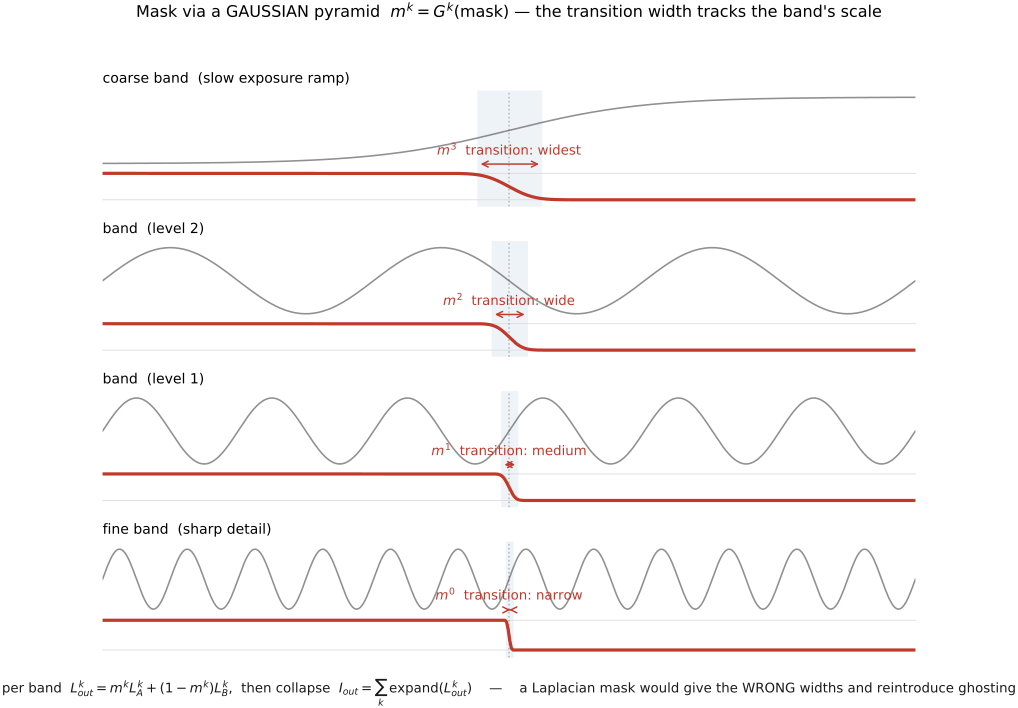
The per-band blend is one line. At each level $k$ take a convex combination governed by a mask $m^k$,
and reconstruct by collapsing, $I_{\text{out}} = \sum_k \operatorname{expand}(L^k_{\text{out}})$. The whole method is build-two-pyramids, blend-each-band, collapse:
LA = laplacian_pyramid(A)
LB = laplacian_pyramid(B)
GM = gaussian_pyramid(mask)        # mask blurred more at coarse levels
for each level k:
    L_out[k] = GM[k] · LA[k] + (1 - GM[k]) · LB[k]
return collapse(L_out)
The crucial detail — the thing that makes the whole method work and is easiest to get wrong — is that the mask is decomposed with a Gaussian pyramid, not a Laplacian one: $m^k = G^k(\text{mask})$. Blurring the binary mask more and more as you descend to coarser levels means the transition gets wider at coarse scales and stays sharp at fine scales — exactly the frequency-dependent width that feathering could not deliver and that two-scale only approximated. The fine bands switch over a few pixels (no ghosting); the coarse exposure-and-vignetting band blends over a wide region (no visible step). Every frequency gets its own transition width, automatically, for free (Figure 10.6.5). That is precisely why this beats two-scale: it is the optimal frequency trade-off, made continuous by the pyramid.
Building the Gaussian and Laplacian pyramids correctly requires blurring before you decimate at every level. Skip the prefilter and high frequencies alias into the coarse levels — and once aliased, they masquerade as genuine low frequencies. The blend then produces bold false low-frequency artifacts (moiré, color blotches) that no amount of clever masking can remove, because the masking operates band-by-band and the corruption is in the wrong band. The pyramid's quality is only ever as good as its prefilter. This is why the pyramid construction, not merely the blend formula, is load-bearing here. (Big lesson L16; first appears in BASIC — Resampling. See Linear pyramids and wavelets.)
A forward-looking aside, because it costs one sentence: replace the spatial mask $m$ with a per-pixel quality weight — well-exposedness, local contrast, saturation — and the identical machinery fuses an exposure bracket straight into a tone-mapped image. That is exposure fusion (Mertens et al. (exposure fusion)), which ships on phones: same pyramid blend, different mask, no high-dynamic-range (HDR) radiance map ever formed. We return to it in the HDR and cell-phone chapters.
10.6.5 Poisson / gradient-domain blending — paste gradients, solve for values⧉
The next rung changes the object of manipulation entirely. Instead of mixing pixel values across the seam, we mix the gradient field (Pérez et al. 2003). Inside the region being pasted, demand that the result's gradient match the source's gradient; on the boundary, demand that the result match the target's values; then solve for the pixels whose gradients best satisfy both. This is the same solve as seamless cloning — here the "source region" is one panorama image and the "background" is the other — and the worked single-image version, with its derivation, discretization, and solvers, is the subject of Poisson image editing. We state the objective and read off the consequence; we do not re-derive.
The objective is a least-squares fit of the output's gradient to the prescribed guidance field $\mathbf{v}$ (the pasted source gradient), with the boundary pinned to the target:
Setting the derivative of that quadratic energy to zero gives its Euler–Lagrange condition, the Poisson equation $\nabla^2 f = \operatorname{div}\mathbf{v}$ — a large sparse linear system, solved matrix-free with conjugate gradient (never forming the matrix, just repeated Laplacian convolutions), as worked out in Poisson image editing.
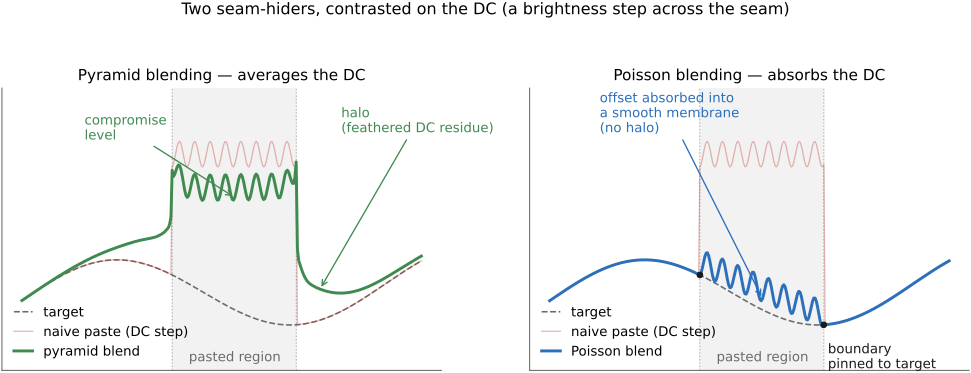
Why does this kill the seam? It is the L9 payoff in its purest form (box above). The visual system reads gradients, and we have made the gradients across the boundary continuous by construction. Any constant brightness or color offset between the two frames is simply spread out and absorbed as an invisible low-frequency shift — in 1-D, a linear ramp that interpolates the boundary mismatch across the interior. The seam vanishes because there is no gradient discontinuity left to see, even when the two exposures differ substantially.
The cleanest way to understand Poisson blending is to contrast it with the other heavyweight rung on exactly the point where they differ — what becomes of the DC, the overall level. Both hide the seam; they part on the absolute brightness. Pyramid blending treats the level mismatch as just another band: it blends the coarsest, DC-ish band over a wide transition, which averages the two levels — leaving a compromise brightness and sometimes a faint low-frequency halo. Poisson does not average the level at all; it pins the boundary to the target and lets the interior float, re-deriving absolute values from gradients alone — so it can slide the pasted region's entire brightness to match its surroundings, but it also inherits the target's lighting. That inheritance is the right behaviour for compositing and sometimes the wrong behaviour for panoramas, where each half is equally real and you may want to keep a source's own exposure. This DC-handling contrast is developed at length in Poisson image editing — its Poisson-vs-pyramid section is the place to go for the 1-D membrane picture and the flat-patch thought experiment (Figure 10.6.6).
Two honest caveats. First, Poisson assumes the two backgrounds are photometrically similar: pasting from a dark region into a bright one loses contrast, because the solve reproduces linear differences while perceived contrast is multiplicative — the standard fix is to run the Poisson solve in a log or perceptual color space (or with the covariant derivatives behind Photoshop's healing brush), again as detailed in Poisson image editing. This is the usual "contrast is multiplicative, so work in log" discipline. Second, as a free bonus, you may take per pixel the stronger of the source and target gradient (a max instead of always the source), which lets a textured background show through holes in the pasted region — the gradient-mixing variant.
10.6.6 Seam optimization — route the seam instead of fading it⧉
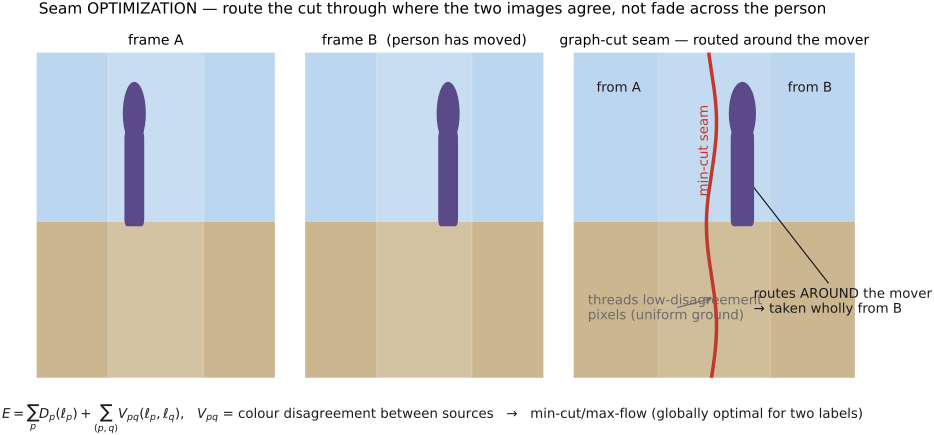
Every rung so far blends over a fixed seam — wherever the overlap happens to fall — and then works to disguise it. Seam optimization asks the prior question (Agarwala et al. 2004, Kwatra et al. 2003): where should the seam even be? Choose the boundary so it threads through pixels where the two images already agree, and there is barely anything left to blend. Route it along a uniform patch of sky rather than across a face, and the seam is half-hidden before any blending begins (Figure 10.6.7).
This is naturally posed as discrete optimization on a graph. Label each output pixel with the source it comes from, $\ell_p$, and minimize an energy with two terms,
a data term $D_p$ (a label must respect coverage — a pixel can only take a source that actually covers it) plus a smoothness term $V_{pq}$ that penalizes a label change between neighbours by how much the two sources disagree there. Minimizing $E$ over the two-source case is a min-cut / max-flow computation — a graph cut — which is globally optimal for two labels. The mechanics are the subject of Seam optimization.
The optimizer here is entirely off-the-shelf — graph cut / min-cut is a solved problem. The energy is the entire design. Set $V_{pq}$ to the color disagreement between the sources at this edge, and the min-cut automatically prefers to cut where the images match — along a uniform sky, not through a person's face. This is the affinity principle turned inside out: instead of "average things that belong together," it is "do not cut between things that belong together." The art is choosing what counts as disagreement, not running the solver. (Big lesson L12; first appears in Seam optimization.)
How does this compose with the rest of the ladder? Seam optimization decides where to put the boundary; you then still run a Poisson or pyramid blend across that optimal seam to mop up whatever residual exposure mismatch survives. Graph-cut then gradient-domain reconstruction is the canonical photomontage recipe (Agarwala et al. 2004): cut along the edges, then reconstruct across them. It is the explicit meeting point of this part's blend ladder with the gradient-domain leg of EDGES MATTER.
And it is the natural bridge to what follows. Because the seam can route around a region, graph cut is also how you handle moving objects: pick the seam — and therefore the single source — so a walking person is taken entirely from one frame, never half from each. That is deghosting, picked up in the next section.
Big lessons of this chapter
The recurring principles from this chapter, gathered for review.
A stitch seam is jarring not because the average brightnesses differ but because the gradient is wrong right at the boundary — a sudden jump the visual system reads as an edge that isn't in the scene. So the entire blending ladder is a sequence of ways to fix the gradients at the seam: smooth-blend the low frequencies so the jump is spread out (two-scale, multiband); paste the gradients and solve for values so the jump is absorbed into an invisible DC shift (Poisson); or route the seam through pixels whose gradients already match so there is nothing to fix (graph cut). A constant brightness or color offset between two frames is invisible once the boundary gradient is right — exactly why gradient-domain blending works. (First appears in Poisson image editing — the key idea; recurs here as the organizing principle of stitch blending.)