💬Comments welcome. To leave a note, select any text and click the note / highlight button that pops up — or open the panel with the tab at the top-right (‹). Notes are visible only inside our private review group.
Computational Photography, an AI-powered Slopendium — 22 Appendices
expand to📖 Full book outlinejump to1 parts · 18 chapters · 17 sections · 11 figures embedded · 4 placeholders · double-click a figure to enlarge
Part 22 APPENDICES
22.1 Refreshers
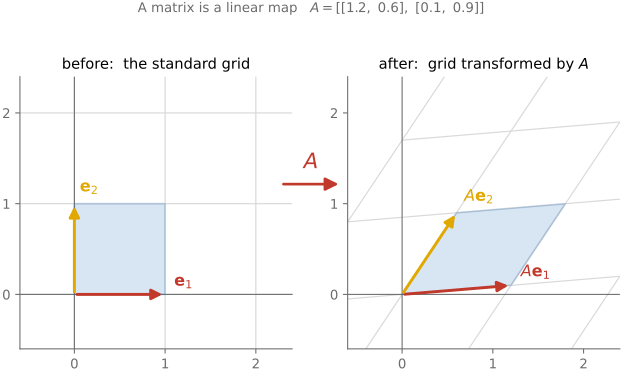
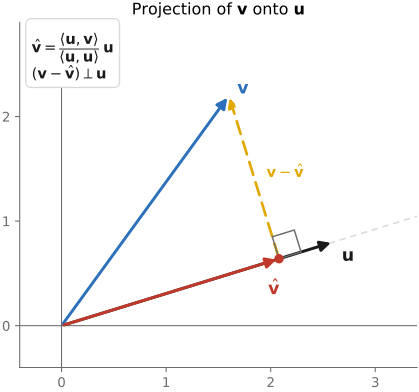
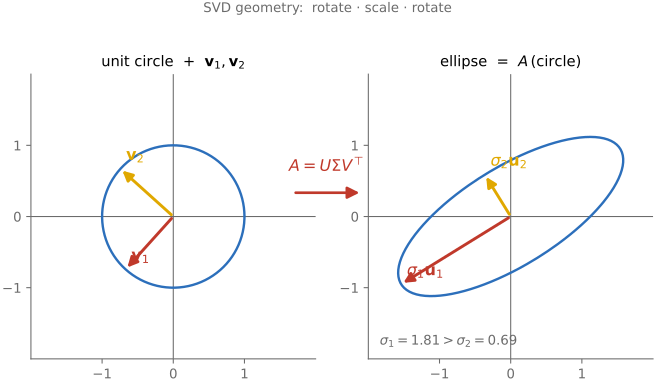
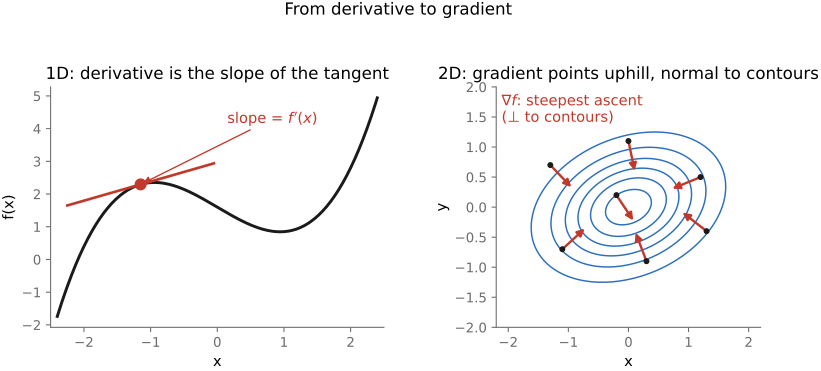
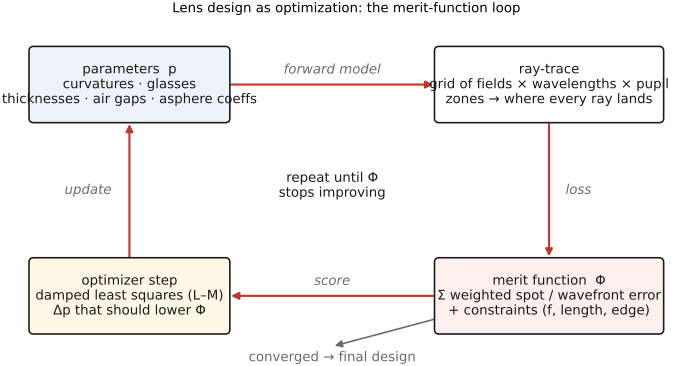
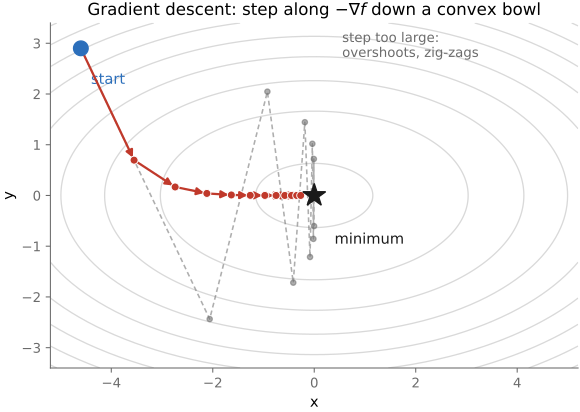
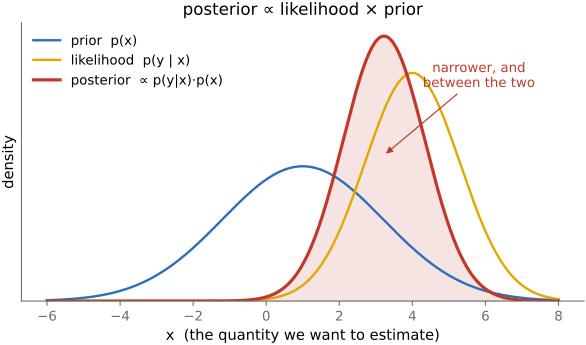
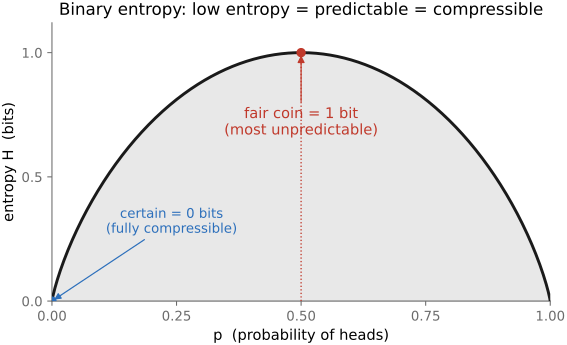
The book is built on a small kit of mathematical tools, used over and over: images are **vectors**, operations on them are **linear maps** (so we get to use all of linear algebra and the Fourier transform), recovering an image from measurements is an **optimization**, noise is **probability**, and the modern workhorses are **learned**. This appendix is the kit — each tool sketched just far enough to read the chapters that use it, with a pointer to where to go deeper.
22.2 Problem Set 0 — Environment and C++ basics
22.3 Problem Set 1 — Image class, point operations, and color
22.4 Problem Set 2 — Convolution and the bilateral filter
22.5 Problem Set 3 — Denoising and demosaicking
22.6 Problem Set 4 — High dynamic range
22.7 Problem Set 5 — Resampling, warping, and morphing
22.8 Problem Set 6 — Homographies and manual panoramas
22.9 Problem Set 7 — Automatic panoramas
22.10 Problem Set 8 — Non-photorealistic rendering
22.11 Problem Set 9 — Make-your-own, video, and ethics
22.12 EXIF and image metadata
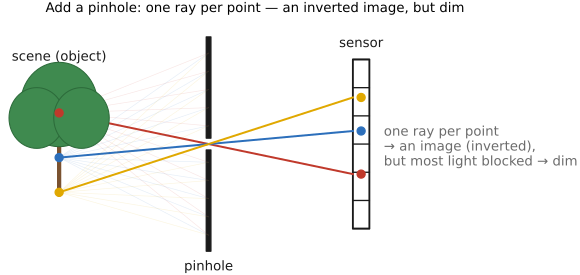
fig-pinhole-imaging
fig-pinhole-imaging · imaging-scenario series (2/3): add a pinhole to the bare sensor — one ray per scene point → a dim **inverted** image (same tree+sensor+colours as fig-bare-sensor-averaging)
• **What EXIF is.** Structured **metadata embedded in the image file itself** (JPEG, TIFF, and most RAW/DNG), not a sidecar — the camera's record of *how* the shot was taken. In JPEG it rides in the **APP1 marker segment**; the payload is a little **TIFF/IFD** structure (tags → values). Standardized as **Exif** (JEITA/CIPA), with **DCF** governing on-card file/folder naming.
• **EXIF is not the only block.** A photo commonly carries two more metadata standards alongside EXIF: **XMP** (Adobe's XML-based metadata — where Lightroom/ACR edit settings, keywords, and ratings live, often in a **sidecar `.xmp`** for raw files) and **IPTC** (the press/captioning standard — caption, byline, credit, keywords, location). The three **co-occur** and can **disagree** (e.g. a date or copyright string present in more than one and edited in only one); a tool like `exiftool` reads all three at once.
• **Field groups** — the metadata sorted by what it describes:
• **capture settings**: exposure time / **shutter speed**, **f-number** (aperture), **ISO**, **exposure program / mode**, metering mode, **exposure bias** (compensation), flash fired/mode
• **optics**: **focal length** (and **35 mm-equivalent**), lens make / model, subject / focus distance
• **image**: pixel width & height, **orientation** flag (the in-camera rotation the viewer must apply), **color space** / embedded ICC profile, white-balance tag
• **time**: **DateTimeOriginal** (when the photo was taken) vs **DateTimeDigitized** (when it was written/scanned) — they differ for film scans and edits; plus sub-second and time-zone tags
• **place**: **GPS** latitude / longitude / altitude (and heading, timestamp)
• **MakerNotes**: proprietary, undocumented per-vendor blobs (often where the interesting bits — true ISO, lens corrections, shot count — hide)
• **embedded thumbnail / preview**: a small JPEG (and, in RAW, a full-res preview) carried alongside the full image
• **identity / file**: software, artist / copyright, camera & lens serial numbers, owner name
• ⚠️ **caveats** (why EXIF frustrates): coverage is **incomplete** (not every camera writes every field) and **inconsistent** across makers; some values — notably **ISO** and **shutter speed** — are **approximate / rounded** and **not radiometrically correct**, so never read them as calibrated radiometry.
• 🔒 **privacy.** EXIF leaks more than people expect: **GPS** coordinates (home/where a photo was taken), camera & lens **serial numbers** (links photos to one device), and **owner name** / copyright. Many platforms strip EXIF on upload; if sharing matters, strip it yourself (`exiftool -all=`).
• **Tools.** `exiftool` (the reference, widest tag coverage), `exiv2`; in Python `piexif` and `Pillow` (`Image.getexif()`), the C `libexif`.
• **How the book's pipeline reads EXIF.** The capture chapter pulls orientation, exposure triangle, and lens info from EXIF to annotate and correctly display the book's own photos — see [[Basic image processing and ISP]] → "Beyond the pixels: basic metadata and EXIF" and "Data versus metadata: EXIF".
22.13 DNG: the Digital Negative
• **What DNG is.** An **open, documented raw format** introduced by **Adobe in 2004**, built on **TIFF/EP**: a single, vendor-neutral, **archival** container for camera raw data — *one* published format instead of a proprietary raw per camera model (Canon CR2/CR3, Nikon NEF, Sony ARW, Fuji RAF, …). The spec is public, so anyone can read and write it.
• **The problem it solves.** Every camera ships its **own undocumented raw**; software must reverse-engineer each one, and old proprietary raws risk becoming **unreadable** as cameras and decoders age. DNG is a **stable, documented target** for long-term archiving and interchange — a "digital negative" you can still open decades later.
• **What's inside (the container).** A **TIFF/IFD** structure (same family as EXIF): the **raw image data**, full **EXIF + MakerNote** metadata, **XMP** (edit settings, ratings), one or more embedded **JPEG previews** + a **thumbnail**, and the **color/calibration** data a converter needs to render the raw.
• **Two flavors of raw payload.** **Mosaic ("raw") DNG** keeps the original **Bayer CFA** samples — demosaick later, the usual case (→ [[Demosaicking]]); **Linear DNG** stores already-**demosaicked** data (one RGB triple per pixel) — used after processing/remosaic or for non-Bayer sensors.
• **Color-rendering data (how raw → color).** DNG carries the math to turn sensor counts into colorimetric values: **ColorMatrix / ForwardMatrix / CameraCalibration** tags for (typically) **two reference illuminants** (e.g. Standard-A and D65) interpolated by correlated color temperature, plus **AsShotNeutral / AsShotWhiteXY** (the camera's white-balance estimate). **DNG camera profiles (DCP)** add hue/saturation/tone maps. (→ [[Color technology]] — camera color matrices & white balance.)
• **DNG opcodes.** A small list of **opcodes** the raw processor applies at decode: **WarpRectilinear / WarpFisheye** (geometric distortion correction), **FixVignetteRadial** (vignetting), **GainMap** (per-channel lens-shading / color cast), **TrimBounds**, defective-pixel maps. This is how DNG bakes in **lens corrections declaratively** (→ Optics, lens-profile correction).
• **Compression.** **Lossless JPEG** (default) or **uncompressed**; an optional **lossy DNG** trades some fidelity for size. (→ [[File formats and compression]].)
• **Embed-the-original.** A DNG can **wrap the original proprietary raw** inside itself, so conversion is **reversible** (extract the untouched original later).
• **Adoption & relatives.** Native raw on some cameras (**Leica, Pentax/Ricoh**), most Android phones via the **Camera2** API, and Apple **ProRAW** (which *is* DNG); the **Adobe DNG Converter** transcodes proprietary raws; **CinemaDNG** is the motion/video raw variant. Not universal — **Canon, Nikon, Sony** keep their own raw formats.
• **Trade-offs.** *Pros*: open, documented, archival; one pipeline; embedded corrections + profiles; lossless and often smaller than the native raw. *Cons*: a transcoding step; some maker-note / "secret-sauce" raw features may not map; not every tool round-trips a DNG perfectly.
• **Relation to EXIF.** DNG **contains** EXIF and XMP — it is a **superset container**, so the trust/coverage caveats of [[Appendices#EXIF and image metadata]] apply to the metadata it carries.
22.14 Datasets
A pointer index, not a survey: the workhorse public datasets behind the methods in this book, grouped by task. Each entry is a name, a one-line description, and a link.
**Classification / features**
• **ImageNet** — million-image labelled classification set; the pretraining backbone behind most vision features. https://image-net.org
• **COCO** — common objects in context: detection, segmentation, captioning. https://cocodataset.org
• **Places** — scene-recognition dataset (millions of images, hundreds of scene categories). http://places2.csail.mit.edu
**Super-resolution**
• **DIV2K** — 2K-resolution high-quality images, the standard SR training set. https://data.vision.ee.ethz.ch/cvl/DIV2K
• **Flickr2K** — 2K Flickr images, often paired with DIV2K for training. *(verify URL)* https://github.com/limbee/NTIRE2017
• **Set5 / Set14 / BSD100 / Urban100** — small standard SR **test** sets (classic images, natural scenes, urban self-similar structure). *(verify URL)* https://github.com/jbhuang0604/SelfExSR
**Deblurring & restoration**
• **GoPro (Nah et al. 2017)** — sharp/blurry video-frame pairs synthesized from high-fps GoPro footage; the standard dynamic-scene motion-deblurring benchmark. *(verify URL)* https://seungjunnah.github.io/Datasets/gopro
• **REDS** — REalistic and Dynamic Scenes (NTIRE challenge set): high-quality video for deblurring, super-resolution, and denoising. *(verify URL)* https://seungjunnah.github.io/Datasets/reds
**Denoising**
• **SIDD** — Smartphone Image Denoising Dataset: real noisy/clean smartphone pairs. https://www.eecs.yorku.ca/~kamel/sidd/
• **DND** — Darmstadt Noise Dataset: real-photograph denoising benchmark (held-out ground truth). https://noise.visinf.tu-darmstadt.de
• **Kodak** — the 24 "kodim" lossless test images, a long-standing denoising/compression benchmark. *(verify URL)* https://r0k.us/graphics/kodak/
**HDR / tone mapping**
• **HDR+ burst dataset** — Google's raw burst dataset behind HDR+ computational photography. https://hdrplusdata.org
• **Kalantari HDR (dynamic scenes)** — multi-exposure bursts with motion, for HDR merging with moving content. *(verify URL)* https://www.robots.ox.ac.uk/~szwu/storage/hdr/kalantari17.html
• **Laval HDR (sky / indoor)** — high-dynamic-range outdoor-sky and indoor panoramas (lighting estimation). *(verify URL)* http://hdrdb.com
• **Fairchild HDR Photographic Survey** — calibrated HDR scenes for tone-mapping evaluation. *(verify URL)* http://markfairchild.org/HDR.html
**Retouching / enhancement**
• **MIT-Adobe FiveK** — 5,000 raw photos each retouched by five expert artists; the standard learned-enhancement set. https://data.csail.mit.edu/graphics/fivek
**Depth / flow**
• **NYU Depth V2** — indoor RGB-D (Kinect) for monocular depth. https://cs.nyu.edu/~silberman/datasets/nyu_depth_v2.html
• **KITTI** — driving stereo / depth / flow benchmark. https://www.cvlibs.net/datasets/kitti/
• **Middlebury stereo** — classic high-accuracy stereo benchmark. https://vision.middlebury.edu/stereo/
• **MPI Sintel** — synthetic optical-flow benchmark with long-range, large-motion sequences. http://sintel.is.tue.mpg.de
**Color / white balance**
• **NUS / Gehler-Shi** — color-constancy sets with measured ground-truth illuminant (color-checker in scene). *(verify URL)* https://www2.cs.sfu.ca/~color/data/shi_gehler/
• **Cube+** — single-illuminant color-constancy images with a calibration cube. *(verify URL)* https://ipg.fer.hr/ipg/resources/color_constancy
**Faces**
• **CelebA / CelebA-HQ** — celebrity faces with attributes; HQ is the high-res variant for generative work. https://mmlab.ie.cuhk.edu.hk/projects/CelebA.html
• **FFHQ** — Flickr-Faces-HQ: 70k high-quality aligned faces (the StyleGAN set). https://github.com/NVlabs/ffhq-dataset
• **LFW** — Labeled Faces in the Wild: the classic face-verification benchmark. http://vis-www.cs.umass.edu/lfw/
**Inpainting / segmentation / matting**
• **Places2** — same scene corpus as *Places / Places2* (Classification, above); also the standard set for **inpainting** and scene parsing.
• **ADE20K** — densely annotated scene parsing / semantic segmentation. https://groups.csail.mit.edu/vision/datasets/ADE20K/
• **Composition-1k** — the standard alpha-matting benchmark (foregrounds composited over many backgrounds). *(verify URL)* https://sites.google.com/view/deepimagematting
22.15 A camera-feature wish list
• **framing**: most asks are not hard *algorithms* — the book covers them — they are missing because of conservative firmware, cramped UI, and closed software. The list is the book held up as a mirror to real products.
• **exposure, ISO, HDR**: tiered **auto-ISO** (minimum shutter speed as a first-class rule); **ambient/flash balance** control; **in-camera HDR bracket → 16-bit raw merge** (→ [[HDR merging]]); **auto-ETTR** with a pull flag recorded in metadata; **frame averaging** for a low-ISO, low-noise long exposure (→ [[Denoising]], the $\sqrt{N}$ argument).
• **bracketing the controls**: alternate settings *within a burst* — flash/no-flash pairs, slow+fast shutter pairs, and **aperture bracketing** at constant exposure for post-hoc depth-of-field choice (→ [[Depth of field]]; light field).
• **focus & DoF**: **focus stacking** with step-size control and blur-boundary detection (→ [[Depth of field]]); focus-shift compensation; cycle through detected **faces/AF subjects** when it locks on the wrong one (→ [[Focus, autofocus]]).
• **computational raw / sensor**: a **true per-channel raw histogram** (not the JPEG proxy); **lossless-compressed raw**; **pixel-shift multi-shot high-res** (→ [[Super-resolution and image priors]]).
• **motion data & metadata**: record the **gyro/accelerometer** streams for shake removal, blur assessment, stabilization (→ [[Video stabilization and rolling-shutter correction]]) and automatic **perspective correction** (→ [[Perspective distortion and its correction]]); in-camera **rating/sorting** that round-trips to the editor (cross-ref [[Appendices#EXIF and image metadata]] — XMP/IPTC); save/restore settings as a text file; separate stills/video settings.
• **panorama**: an electronic **sweep-panorama** mode like a phone's (→ [[Automatic panorama stitching from multiple views and feature matching]]).
• **UI & ecosystem**: better self-timer / long-exposure / **AF-ON** ergonomics; **automatic Wi-Fi offload** at home; and the wish that subsumes the rest — **open the software ecosystem** so third parties can add exactly these features. The recurring lesson: the bottleneck is openness, not optics.
22.16 How this book was created
This book was written **with an AI collaborator** (Anthropic's Claude), as a deliberate experiment in AI-assisted authoring — a fitting, slightly meta exercise for a book about computational imaging. The short version: an AI did much of the drafting, building, and checking; a human did all of the deciding. The longer version (below) matters because the failure modes everyone worries about — hallucinated facts, inconsistent notation, prose that drifts over hundreds of pages — are exactly what the method is built to prevent.
22.17 The course tutor: a local, book-grounded AI teaching assistant
• **What it is.** A terminal **and** browser chatbot tutor for the course, grounded in *this book* plus the lecture slides and pset handouts. It answers conceptual questions fully and, for problem-set work, **guides** — concept, the section to read, the next step — without handing over answers or solution code.
• **Local-first.** The default runs an open-weights model (**Gemma**, via Ollama) **on the student's own machine** — no API key, no per-token cost, works offline. An install-time probe picks a model tier that fits the hardware (a small model on any laptop; a larger, multimodal one on a GPU / Apple Silicon).
• **Retrieval-augmented (RAG).** The book drafts, outline, companion files, slide digests, and pset *handouts* are chunked, embedded, and stored in a small local vector index; each question retrieves the most relevant passages, which are fed to the model as grounded context — the same "write from the sources, not memory" rule the authoring pipeline uses. **Solutions and answer keys are deliberately never indexed.**
• **Guide, don't solve.** Enforced by a Socratic system prompt + worked exemplars, *not* by a brittle filter (a student can get answers from any frontier model anyway — the point is a genuinely useful *guided* tool, the CS50 stance). A **grounding gate** makes the tutor say "the material doesn't cover this" rather than confabulate when retrieval is weak (the Jill-Watson "decline when uncovered" behaviour).
• **It links and shows.** Answers cite the book by name and **link** to the published section; in the browser it renders **equations** (LaTeX/KaTeX) and shows the relevant **figures** inline — the reasons a browser UI beats a terminal for a visual, mathematical subject. A **vision-capable** model lets a student upload an image (their result, an artifact) and ask about it.
• **Two front-ends, one core.** A terminal client (lives in the dev shell, can see code, works over SSH) and a local browser app (equations, figures, image upload, a model dropdown) share the same retrieval + inference + logging core. An optional **online backup** (instructor-hosted) serves students whose machines can't run a local model.
• **Logging and analytics for the instructor.** Every interaction (question, retrieved sources, response) is logged and delivered to the instructor. A batch pipeline produces a **dashboard**: what help students seek, usage over time, per-student activity, retrieval-coverage gaps, and a **pedagogy audit** — an independent model reviews each turn for quality (correct / confusing / harmful), grounding, and answer-leaks, surfacing problem turns. Student identities are **pseudonymized and PII-scrubbed** before any third-party model sees a trace.
• **Privacy & honesty.** Interaction logs are student records (FERPA): disclosed in the syllabus, access-restricted, anonymized before external analysis. The tutor is labelled as an AI that can be wrong; it points students *back into the book* rather than substituting for it.
22.18 The semi-automatic grading system
• **The shape (to confirm).** Each pset ships a **test harness** + reference data; submissions are built and run against it, image/numeric outputs compared to references **within a tolerance**, and a provisional score produced for a human to review and adjust.
• **What is automatic vs human (to confirm).** *Automatic:* compiles, runs without crashing, output matches reference within tolerance, performance within budget where relevant. *Human:* partial credit for near-misses, code style/clarity, the open-ended make-your-own / video / ethics components, and any appeal.
• **To fill in (from Frédo):** the exact harness and languages (Python/C++), per-pset reference outputs and tolerances, the rubric and point allocation, how grades + feedback are returned to students, the academic-integrity / permitted-AI-use policy (and how it interacts with [[Appendices#The course tutor: a local, book-grounded AI teaching assistant|the tutor]]), and any plagiarism/similarity checks.