6.7 Perspective distortion and its correction⧉
You photograph a cathedral. Standing at its foot, you tilt the camera up to fit the spire in the frame, and the result has a defect you did not put there and cannot quite name: the two towers, which you know to be plumb and parallel, lean toward each other as they rise, as though the building were tapering to a point somewhere above the clouds. This is keystoning — converging verticals — and architectural photographers find it objectionable enough that an entire class of equipment, and an entire panel of software tools, exists to undo it. A building, the saying goes, looks more formal if its verticals stay vertical.
The first instinct is to blame the lens. It is the wrong instinct, and correcting it is the whole point of this chapter. Keystoning is not an optical defect; it is perspective projection doing exactly its job. The same geometry that makes railroad tracks meet at the horizon makes a bundle of parallel verticals converge when you tilt the sensor off the wall — and once you see it that way, the cure writes itself. Because the leaning-tower image is a perspective image of a real, flat, rectangular façade, a single projective warp — a homography, the top rung of the degrees-of-freedom ladder from Warping and resampling — can re-render that façade as if the camera had been aimed straight at it, sensor parallel to the wall, verticals plumb. This chapter is that one move: why the distortion is projection and not optics, how to recover the homography (by hand from four corners, or automatically from vanishing points), the optical way to dodge it at capture (the tilt-shift lens), and the price you pay for fixing it in software (you resample, and only a plane comes out exactly right).
6.7.1 Keystoning is projection, not a lens flaw⧉
Start with the symptom and pin down exactly when it appears. Aim the camera up at a tall building and its parallel verticals converge toward the top; aim it down and they splay apart toward the bottom. A wide-angle lens makes the same projective effect read as an exaggerated near/far stretch — the close end of a façade looms huge, the far end shrinks away. None of this is the glass misbehaving.
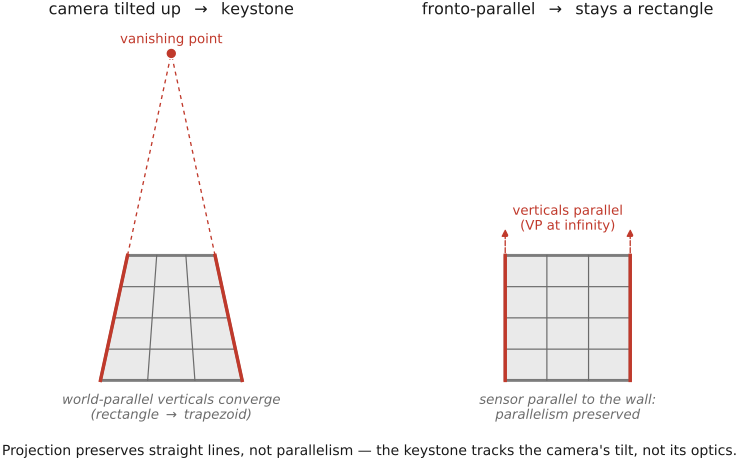
The cause is the single fact about perspective projection worth carrying everywhere: projection preserves straight lines, but not parallelism, angles, or lengths. A straight line in the world images as a straight line — that survives. But a bundle of lines that are parallel in the world need not stay parallel in the image; instead they image as a bundle of lines converging to a single point, the vanishing point (the image of the point at infinity where the world parallels "meet"). The towers stay perfectly straight in your photograph; they simply stop being parallel. That is projection, not aberration (Figure 6.7.1).
This is worth contrasting sharply with the one perspective-like artifact that is an optical defect: radial lens distortion — barrel and pincushion — which bends straight lines into curves and comes from the lens. Keystoning bends nothing. If you lay a ruler along a keystoned tower the edge is dead straight; the lines have only lost their parallelism. The two corrections are different operations on different causes: radial distortion is undone by a nonlinear radial warp (a lens-distortion model), keystoning by the linear projective warp of this chapter — a contrast developed in detail in Optics, lenses, and aberration correction (Aberrations correction — radial distortion correction), where that lens defect and its cure now live.
The giveaway that fixes the cause precisely: if the image plane is parallel to the subject plane — sensor parallel to the façade — then world lines that are parallel to the sensor stay parallel in the image, and there is no convergence at all. Convergence appears exactly when you tilt the sensor off the wall. So keystoning is a function of nothing but camera orientation relative to the plane you care about — and a quantity that depends only on orientation is precisely the kind of thing a homography can undo.
6.7.2 The fix is a homography — re-render the façade fronto-parallel⧉
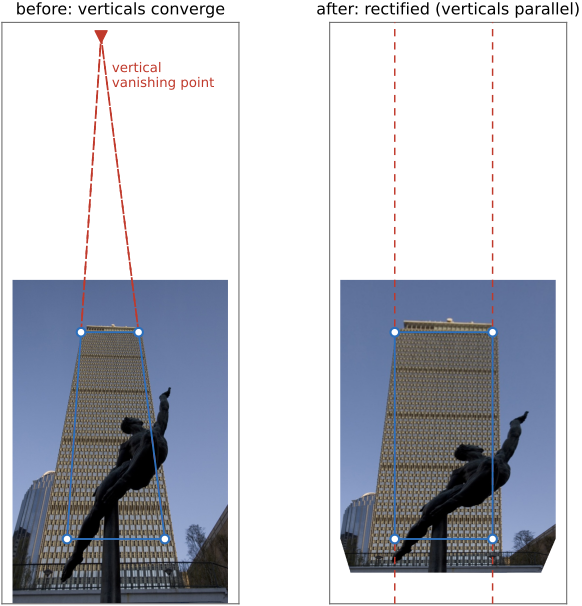
Here is the idea the rest of the chapter turns on. Your keystoned photograph is a perspective image of a genuine planar rectangle — the façade. And a basic fact of projective geometry is that a homography maps between any two images of a plane. So there exists a single $3\times3$ projective warp $H$ that takes your tilted-sensor image of the façade to the image you would have captured with the sensor parallel to the wall — sending the converging lines back to parallel, the trapezoid back to a rectangle. This is precisely the projective rung of the degrees-of-freedom ladder from Warping and resampling, used here with the target being a fronto-parallel rectangle of your choosing (Figure 6.7.2).
Why does one homography suffice for a plane? Because reprojecting a plane is exactly "project, rotate the camera, reproject," and that composition is a homography — the depth of the plane drops out. Every point on the façade (indeed every point along each viewing ray) reprojects identically under $H$, so you never need to know how far away the wall is. This is the very same "depth doesn't matter for a planar-or-rotation warp" fact that makes panorama stitching work, and it is the right moment to make the cross-reference explicit: this is the identical machinery of Manual panorama stitching from multiple views. There, the second image is another view of the scene; here, the second image is the target rectangle you decree. The solver, the eight degrees of freedom, the inverse warp — all the same.
There are two ways to recover $H$.
Method 1 — four corner correspondences. Pick four points in the photograph that you know bound a real rectangle — the four corners of a window, or of the façade outline — and specify where each should land: the four corners of a true rectangle, verticals vertical, horizontals horizontal. A homography has 8 degrees of freedom (DOF) (a $3\times3$ matrix up to overall scale), and each point correspondence contributes two linear equations, so four correspondences exactly determine $H$; more than four overdetermine it and you solve by least squares / singular value decomposition (SVD). This is the manual perspective crop: drag four handles to the corners, declare the output a rectangle, done (Figure 6.7.2).
Method 2 — automatically, via vanishing points. Detect the bundles of imaged-parallel lines in the scene — the verticals, the horizontals — each of which converges to a vanishing point. Then choose the homography that sends the relevant vanishing point to infinity: a vertical vanishing point pushed to infinity makes the verticals parallel (and vertical) again; do it for the horizontals too and you have squared the whole façade. This needs no user clicks — the software finds the straight lines and straightens their bundles itself. It is the basis of automatic single-view rectification (Liebowitz & Zisserman 1998; Criminisi et al. 2000 on single-view metrology) and of the auto mode of the consumer tools below.
Either way, once $H$ is known you apply it by the primitive from Warping and resampling: inverse-warp and resample. Loop over the output pixels, push each one back through $H^{-1}$ to find where it came from in the input, and resample the input there,
with the same forward-versus-inverse reasoning (loop over output, never over input, so every output pixel is filled exactly once) and the same reconstruction-filter care as every other warp in the part. Nothing about rectification is special in the applying; the only work is the solving of $H$.
In practice this is Lightroom's Transform / "Upright" panel (with auto and guided modes — guided lets you draw the lines that should be vertical or horizontal), Photoshop's perspective crop, and the dedicated tools in architecture software. The user experience is "drag the building straight"; the engine underneath is the four-point or vanishing-point homography.
6.7.3 The optical alternative at capture — tilt-shift / Scheimpflug⧉
The homography fixes perspective in post. There is an older way to fix it at capture, in the lens, so that the verticals never converge in the first place — the view camera and its modern descendant the tilt-shift lens.
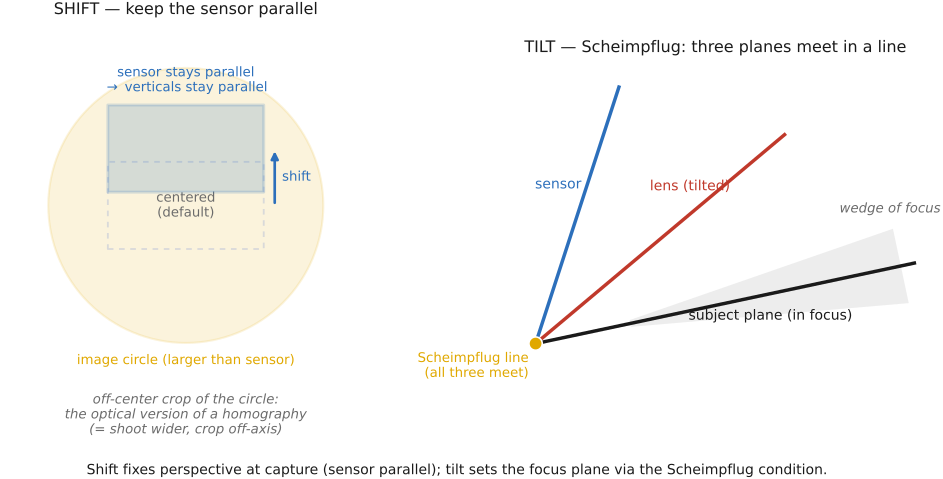
The trick is geometric. A normal lens projects an image circle just big enough to cover the sensor, centered on the sensor. A view-camera (or tilt-shift) lens projects an image circle larger than the sensor, and lets you shift the lens (or the back) sideways or up to select an off-center part of that larger circle — all while keeping the sensor parallel to the façade. Because the sensor stays parallel to the subject plane, the world verticals stay parallel in the image: no convergence, no post-warp, no resampling penalty (Figure 6.7.3). You compose the tall building by shifting the lens up rather than by tilting the camera up.
A useful way to see the shift: it is geometrically the same as taking a wider, centered shot and cropping to the off-axis region you wanted — which is exactly why a software "perspective crop" can approximate a shift lens (at the cost of resolution, since you are throwing away the rest of the frame). The shifted-sensor image and the would-be-tilted image of the same façade differ by — unsurprisingly — a homography, which is the precise sense in which the optical fix and the software fix are two routes to the same place.
The view camera's other movement, tilt, does something different: it controls the plane of focus rather than perspective, via the Scheimpflug condition (the lens plane, sensor plane, and subject plane all meet along a single line). Tilt is how you get a steeply receding plane — a tabletop, a landscape — entirely in focus at a wide aperture; reversed, it is the trick behind the "miniature/tilt-shift" toy-town look. We only note tilt-shift here as the at-capture counterpart of the rectifying homography; the optical derivation belongs to Optics, lenses, and aberration correction (Scheimpflug, image circle, the view-camera movements), cross-referenced and not repeated.
The trade-off is the familiar capture-versus-post one. The optical correction preserves resolution and avoids resampling artifacts entirely, but it demands special, expensive, manual gear and must be decided at capture — you cannot un-tilt a shot you took with an ordinary lens. The software homography is free and deferrable — decide later, in front of the computer — but it resamples, which is the catch of the next section.
6.7.4 A different perspective distortion — wide-angle portraits, and a content-aware fix⧉
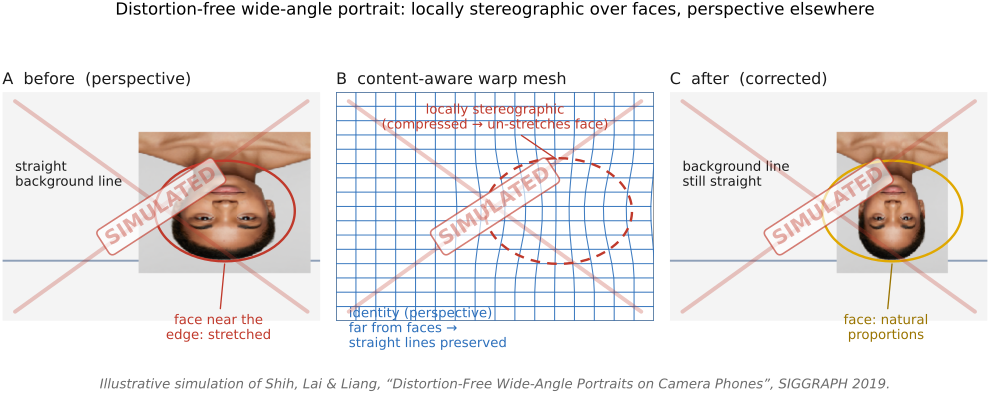
Keystoning is the perspective distortion that comes from tilting the camera. There is a second kind that comes from a wide field of view, and it needs a different cure. As Pinhole Image Formation and linear perspective showed, rectilinear projection onto a flat sensor stretches solid shapes toward the frame edges — a sphere images as a radial ellipse, and faces near the edge of a wide-angle or group photo look widened and skewed. Nothing is bent (straight lines stay straight), so this is not lens distortion and a homography cannot undo it: a single projective warp re-renders one plane, but here the offenders are 3-D faces scattered across the field, each wanting a different local correction.
There is a deeper reason to bother, and it is perceptual, not merely geometric. A face shot up close with a wide lens — the nose looming, the ears receding — does not just look stretched; it looks like a different person. Pietro Perona's A new perspective on portraiture (Perona 2007, J. Vision 7(9):992) made the point sharply: the perceived shape of a face, and even the personality we read off it, depend on the camera-to-subject distance, because near and far parts of a 3-D face foreshorten differently at close range and barely at all from afar. Follow-up work confirms that the traits viewers attribute to a face — trustworthiness, competence, attractiveness — shift measurably with shooting distance (Bryan et al., PMC4114730). This is the same focal-length-and-distance fact behind the classic advice to shoot portraits from a few meters back with a moderate telephoto rather than up close with a wide lens — cross-ref the portrait-lens discussion in Fundamentals (Photography 101). So correcting wide-angle face distortion is not cosmetic fussiness: it is restoring the face we would actually recognize.
The fix is to change the projection locally. A stereographic projection maps the sphere of viewing directions to the plane conformally — it preserves local shapes (a face stays face-shaped) at the cost of gently bending some straight lines. Applying it everywhere would bow the architecture; keeping perspective everywhere stretches the faces. Shih, Lai & Liang's distortion-free wide-angle portraits (Shih et al. 2019) get both right with a content-aware mesh warp: the mesh follows the stereographic map inside detected face regions (so faces look natural) and the original perspective map elsewhere (so background lines stay straight), with a smooth transition between, recovered by minimizing a per-vertex energy. It corrects the edge faces while leaving the room straight — the warp engine of Warping and resampling, steered by where the faces are (Figure 6.7.4).
6.7.5 The catch — resampling cost, and "only a plane rectifies exactly"⧉
The software homography is free, but it is not free of consequences. Two caveats bound what it can honestly do.
Rectification resamples, and resamples non-uniformly. To make the far (top) of a tilted façade as wide as the near (bottom) edge, the homography must enlarge the top of the image and compress the bottom. The output therefore has non-uniform resolution: the formerly-far corners are stretched and come out soft (interpolation invents no new detail — recovering plausible high frequencies would be super-resolution, a different, prior-driven problem — cross-ref Super-resolution and image priors), while other regions are squeezed. And wherever the warp shrinks the image, you are throwing samples away, so you must prefilter before downsampling or the fine detail folds into moiré — this is big lesson L16 again. A faithful rectifier applies the prefilter per region, with the kernel footprint set by the local Jacobian of $H$ — how much area each output pixel covers in the input — so the shrinking regions are area-averaged and the enlarging regions are merely interpolated.
Prefilter the shrinking corners. Rectification does not resample uniformly. To square up a tilted façade the homography enlarges the far/top corners (upsampling — just interpolate, no prefilter) and compresses other regions (downsampling — you must prefilter, or alias). So a faithful rectifier applies the prefilter-before-downsample discipline region by region, with the reconstruction kernel widened according to the local Jacobian of $H$ — the local shrink factor — exactly as a global minify widens its kernel by the downscale factor. (L16, first placed in Warping and resampling / BASIC — Resampling; this is one of its geometric recurrences.)
You lose frame and pixels. The rectified rectangle generally does not fill the original frame: its corners read outside the input (handled by the boundary policy from Warping and resampling — pad, clamp, or mark undefined), and you usually crop to the valid interior, sacrificing field of view and resolution. "Upright" with auto-crop is just managing exactly this — finding the largest upright rectangle that stays inside the warped image.
Only a plane is exact. This is the fundamental limit. A single homography rectifies a single plane. A real three-dimensional scene — a building with depth, foreground statuary, a street receding past the façade — contains many planes at different depths, and one $H$ can square up only one of them; everything off that plane is left distorted, and the parallax between depths cannot be removed by any flat 2-D warp at all. Genuinely correcting the perspective of a 3-D scene needs depth or multiple views — image-based rendering, view morphing, multi-view geometry (cross-ref Manual panorama stitching from multiple views and its parallax caveat). The honest scope of this chapter is planar perspective correction: pick your plane, square it up, accept that the rest comes along for the ride.
6.7.6 Where this sits — one map, then transport⧉
Step back and the chapter is a single instance of the move the whole part is built on (the part spine, L17, registered in the part introduction Warping and morphing): establish a coordinate map, then transport the pixels along it. Here the map is the rectifying homography $H$ — solved, not estimated, from four corners or from vanishing points — and the transport is the inverse-warp-and-resample engine of Warping and resampling. It is the simplest member of the family: the map is parametric, the scene is a single plane, the input is one image — whereas the next time the same homography machinery appears it aligns two views into a panorama (Manual panorama stitching from multiple views, where the map must be estimated from feature matches), and after that the maps become dense and estimated (optical flow) rather than parametric and solved. Same two steps throughout; only the map gets harder.
The throughline to keep: keystoning is projection, the cure is one homography on one plane, you can solve it by hand or from vanishing points or sidestep it with a shift lens, and the price of the software route is a non-uniform resample that only ever rectifies the plane you chose.
Big lessons of this chapter
The recurring principles from this chapter, gathered for review.
Prefilter the shrinking corners. Rectification does not resample uniformly. To square up a tilted façade the homography enlarges the far/top corners (upsampling — just interpolate, no prefilter) and compresses other regions (downsampling — you must prefilter, or alias). So a faithful rectifier applies the prefilter-before-downsample discipline region by region, with the reconstruction kernel widened according to the local Jacobian of $H$ — the local shrink factor — exactly as a global minify widens its kernel by the downscale factor. (L16, first placed in Warping and resampling / BASIC — Resampling; this is one of its geometric recurrences.)