3.12 Demosaicking⧉
PS3 implements Bayer demosaicking — edge-directed green and color-difference R/B. → Problem sets (appendix).
Here is a fact that surprises most people the first time they meet it: the sensor in your camera does not measure color. Each photosite — each light-sensitive well etched into the silicon — counts photons, and a count of photons is a single number, a shade of grey. To produce a color photograph, that grey-measuring sensor has to be coaxed into recording red, green, and blue, and the trick almost every camera uses is to glue a tiny colored filter over each photosite: some pixels see only red light, some only green, some only blue. The consequence is that at any given pixel the camera knows one of the three color channels and is simply missing the other two. Demosaicking is the computation that fills them back in. It is the first genuine image-processing stage in the pipeline — the step that turns a grid of single-color measurements into the full-color image that everything downstream takes for granted.
It is worth dwelling on how routine this is. Every JPEG out of every phone, and every RAW file you have ever opened, has passed through demosaicking (or is waiting to). It runs millions of times a second inside the camera in your pocket, and a computer-science (CS) undergraduate can write a serviceable version in an afternoon. It is also a small case study in a theme that recurs through this whole book: a measurement is incomplete, and we recover what is missing by knowing something about how real images behave.
3.12.1 Quad-Bayer sensors: remosaic before demosaicking⧉
The Bayer mosaic, as described above, places one filter per photosite. Many high-megapixel phone sensors instead use a quad-Bayer (or Tetracell / quad CFA) layout: a 2×2 block of same-color photosites shares a single color-filter tile, so the CFA is, at the native resolution, a grid of 2×2 red, 2×2 green, and 2×2 blue patches rather than the usual alternating single-pixel tiles. (A 3×3 Nonacell variant uses nine same-color cells.) This is how sensors described in 02 Fundamentals deliver quiet low-light images — by binning — at the cost of an extra step before demosaicking.
That extra step is a CFA-conversion stage. In full-resolution mode the 2×2-grouped samples are remosaiced — rearranged and interpolated into a standard, same-resolution RGGB Bayer pattern (no pixels discarded); normal demosaicking then runs unchanged. The remosaic is itself a small reconstruction problem, since the quad layout samples each color on a coarser grid than a true Bayer would. In low-light (binning) mode the four sub-pixels of each block are summed or averaged into one pixel, producing a quarter-resolution standard Bayer mosaic at a much better signal-to-noise ratio, and demosaicking follows on that smaller image. Either way, what the demosaicking algorithms in this chapter receive is a conventional single-sample-per-site Bayer grid — the remosaic or bin stage is a CFA-format adapter. If you skip it and run a standard Bayer demosaicker on the raw quad-Bayer data, you feed it the wrong pattern and the output shows a regular mosaic artifact at the block pitch.
3.12.2 Reminder: the Bayer mosaic⧉
We met the sensor side of this in the color and sensors material; here is the part we need. To give each photosite a color, the manufacturer lays a regular grid of color filters directly on top of the sensor — a color filter array (CFA). By far the most common one is the Bayer mosaic, named after Bryce Bayer, the Kodak scientist who patented it in the 1970s. The pattern is a repeating 2×2 tile: one red filter, one blue filter, and two green filters on the diagonal (Figure 3.12.1). Tile it across the sensor and you get rows that alternate green–red–green–red interleaved with rows that alternate blue–green–blue–green — the layout usually written RGGB. (Which color lands in the top-left corner is arbitrary and varies by camera; you may see the same four filters ordered GRBG (green–red–blue–green) or BGGR (blue–green–green–red). The structure is always one red, one blue, and two green per tile.)
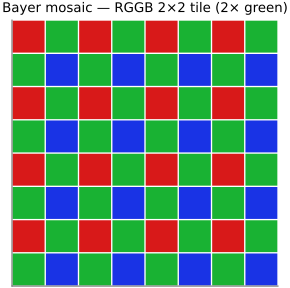
Two things about that tile matter for everything below. First, green gets twice as many photosites as red or blue. There is a boring reason and an important one. The boring reason is geometry: a square lattice repeats most naturally as a 2×2 block, and if you have three colors to place in four cells, one color must appear twice — square lattices do not like odd numbers. The important reason is perception. Green sits in the middle of the visible spectrum, very nearly where our sense of luminance — overall brightness, the channel our eyes resolve most sharply — lives. We are far more sensitive to fine detail in luminance than in color (the same fact that lets JPEG throw away color resolution and get away with it; see file formats). So spending extra photosites on green spends them where our acuity is highest. As we will see, this pays off twice over: green is the channel we can reconstruct best, and the other two will piggyback on it.
Second — and this is the crux of the chapter — the three colors are measured at different places. Red is sampled on one sparse grid, blue on another, green on a denser checkerboard, and no two of them coincide. When the scene has a sharp edge, the three channels cross it at slightly different pixels, and that misregistration is the source of the artifacts we spend the rest of the chapter fighting.
A RAW file is, to a first approximation, the mosaic straight off the sensor: each pixel a single measurement, recorded just after the analog-to-digital converter, before demosaicking. Two properties matter here. It is linear — the value is proportional to the light that hit the pixel, with no gamma encoding (which is exactly why RAW files carry 12–14 bits, to keep precision in the shadows without gamma's help; see Image representation). And it is one color per pixel — a RAW image shown as grey looks like a faintly textured version of the scene, the texture being the mosaic itself. RAW formats are mostly proprietary, one per manufacturer; Adobe's digital negative (DNG) is the standardization attempt, and tools like dcraw / LibRaw read the rest (see file formats). One caveat worth repeating: "RAW" is a spectrum, not a guarantee — some cameras quietly denoise or correct before they hand it over.
What this looks like in practice deserves to be seen on the lecture's own test image, not a cartoon. Figure 3.12.2 takes the problem-set photograph — the Prudential tower, whose dense regular grid of windows is the classic demosaicking stress test — samples it through the Bayer CFA exactly as a sensor would, and reconstructs it both ways: naive per-channel bilinear, and the green-based method we are about to build. A zoom on the windows shows the whole argument of the chapter in one crop; the rest is just explaining each panel.
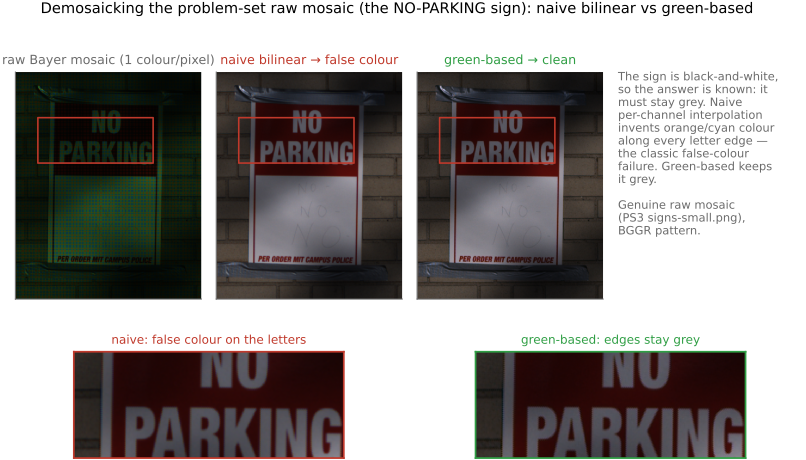
pru.png (© Frédo Durand); the mosaic is simulated from it, the standard problem-set procedure.3.12.3 The task: full RGB at every pixel⧉
State it plainly. The input is the Bayer mosaic: a single array in which each pixel holds one number, and we know — from the camera's known pattern — whether that number is a red, green, or blue measurement. The output is an ordinary color image: three numbers, an (R, G, B) triple, at every pixel. For green we are missing half the pixels; for red and blue we are missing three out of every four. Demosaicking is the interpolation that recovers the two missing channels at each location.
Because all of this happens on linear RAW values — before white balance, color correction, and tone mapping — we are squarely in linear light for the entire chapter. That is not a stylistic preference. Interpolating color is a physical, radiometric operation, and the comparisons we are about to make ("this neighbour is similar to that one") only behave sensibly on values proportional to light.
It pays to fix two hand-checkable inputs before writing any code, in the spirit of breaking a step on purpose. The first is a constant image — a uniform grey field. Every photosite, whatever its filter color, reads the same value, so there is nothing to interpolate: a correct demosaicker must return that constant unchanged, at every pixel and in every channel. Any deviation is a bug in your indexing or your kernel weights, visible long before you touch a real photo. The second is a rectangle on a flat field — a hard edge and nothing else. Smooth everywhere except along the boundary, it is the minimal input that makes demosaicking's two signature failures appear exactly at the rectangle's edges, where you can point at them. We will lean on a corner of that rectangle — a black-on-white corner — for the rest of the chapter.
3.12.4 The naive approach: interpolate each channel on its own⧉
The obvious thing to try is to treat the three channels as three independent sparse images and interpolate each one separately. We already know how to fill in missing samples — that is just upsampling, the subject of the resampling chapter — so let us reuse the simplest tool there, linear interpolation: average the nearest measured neighbours.
Concretely, take the green channel. At a pixel where green was not measured, its four nearest measured green neighbours sit directly above, below, left, and right (recall green lives on a checkerboard), so we average them:
In words: a missing green is the average of its four measured green neighbours. Red and blue are sparser, so the geometry varies — at some empty pixels the nearest red neighbours are the four on the diagonal, at others just the two horizontal or two vertical ones — but the principle is identical: average the nearest measured samples of that channel. (This is exactly a small interpolation kernel — a tent / bilinear filter — applied per channel; smoother kernels like bicubic work too, at the cost of a wider footprint, but let us start as simply as possible.)
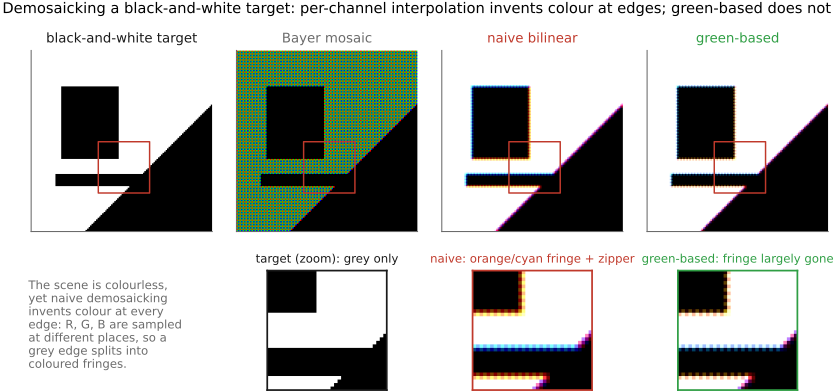
Run it first on the constant field: every neighbour equals the constant, every average equals the constant, and the image comes back untouched — the sanity check passes. Run it on a real photograph and you get a genuine color image whose colors, across the smooth interior of objects, look perfectly fine. In smooth regions, where the scene barely changes from pixel to pixel, averaging nearby samples is a reasonable guess and the result is clean. The trouble is concentrated exactly where images are most informative: at edges (Figure 3.12.3) — which is precisely where the rectangle test was built to look.
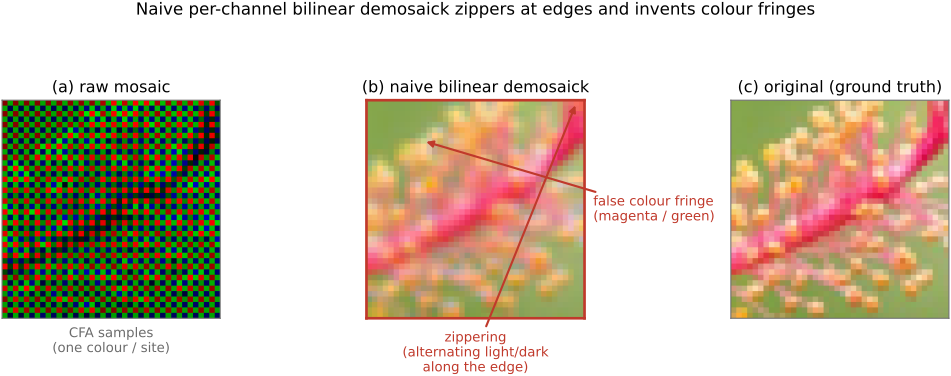
Two artifacts dominate. The first is zippering: along a sharp edge the reconstructed pixels alternate too-light, too-dark, too-light, too-dark, like the teeth of a zipper. The second is color fringing: a crisp black-and-white edge sprouts spurious colors — a little orange on one side, a little cyan on the other — that were never in the scene. Both are ugly, and both have clean explanations.
3.12.5 Why naive interpolation zippers: averaging across an edge⧉
Take our black-on-white corner and look only at the green channel (Figure 3.12.3 shows the color consequences; the mechanism is easiest to see in one channel). Imagine a vertical edge: a column of black pixels (value 0) against a column of white pixels (value 1), with the boundary falling between them. The green checkerboard samples some of those pixels and skips others.
Now ask what naive interpolation does at a skipped pixel sitting just on the white side of the edge. Its four green neighbours are up, down, left, and right — but left lands on the black side and right on the white side. Averaging all four mixes black into a pixel that should be pure white, pulling it grey. At the next skipped pixel the geometry flips and the error swings the other way. So the reconstructed values along the edge oscillate above and below the truth — precisely the zipper. The root cause is easy to name: we averaged across the edge, blending two populations of pixels (the black side and the white side) that should never have been mixed.
That diagnosis hands us the fix. The problem is not interpolation as such; it is interpolating in the wrong direction. If the edge is vertical, the pixels above and below a gap belong to the same side of the edge and agree with each other, while the pixels to the left and right straddle the edge and disagree. So we should interpolate along the edge (up–down) and ignore the direction that crosses it (left–right).
3.12.6 Doing better: edge-directed interpolation⧉
This is edge-directed (or edge-based) demosaicking, and the idea is to let the data choose the interpolation direction per pixel. At each missing green pixel we have two candidate directions, and we ask which one the local image structure prefers. The test is simple: compare how similar the neighbours are in each direction. For the vertical direction we look at $|G_\text{up} - G_\text{down}|$; for the horizontal, $|G_\text{left} - G_\text{right}|$. A small difference means those two neighbours agree — we are interpolating along a smooth direction — while a large difference means we are about to interpolate across something, probably an edge. So we pick the direction with the smaller difference and average only that pair:
In words: interpolate along whichever axis its two neighbours look most alike, on the bet that the other axis is the one crossing an edge. The intuition behind that bet is that the world is piecewise smooth — mostly flat regions separated by a relatively small number of strong, roughly one-dimensional edges (an object against its background). Get those one-dimensional edges right and you have fixed the cases the eye is most likely to notice. On the black-on-white corner this collapses the zipper dramatically: along the vertical part of the edge the algorithm interpolates vertically, never mixing black with white, and the teeth largely vanish (Figure 3.12.3, right).
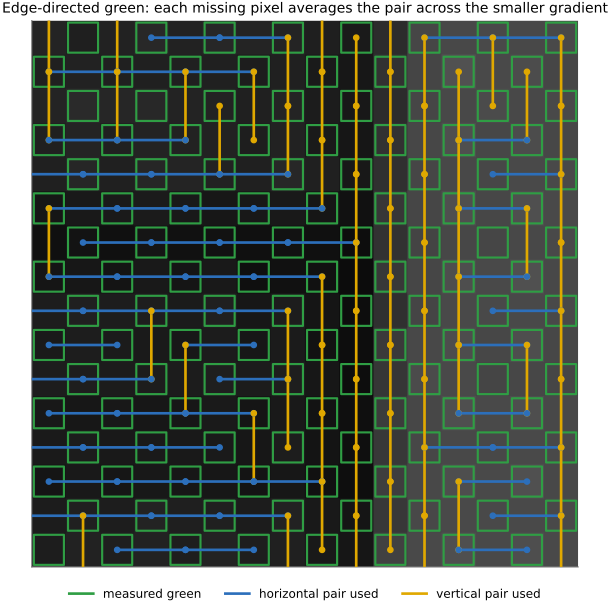
You can be cleverer still — when all four neighbours agree, fall back to averaging all four; weight by similarity instead of hard-switching; widen the window — but the core move is this single binary choice of direction, and it already buys most of the improvement. Seeing it happen on a real mosaic makes the rule concrete (Figure 3.12.4): zoom into the sensor grid and, for every missing-green pixel, the algorithm reaches for the green pair across the smaller gradient — vertical neighbours where a horizontal edge runs through, horizontal neighbours where a vertical one does. The choice visibly tracks the image's structure.
Edge-directed demosaicking is a first, very concrete instance of a theme that returns throughout the book: adapt the operation to the local structure of the image rather than applying the same fixed filter everywhere. Here the structure is an edge and the adaptation is choosing the interpolation direction; later, in edge-preserving filtering and denoising, the same instinct — use the similarity between pixels to decide how much they should influence each other — becomes the bilateral filter and the idea of affinity. Whenever a fixed linear filter blurs across something it should have respected, the cure is to look at the data first.
3.12.7 The harder half: red and blue, and color fringing⧉
So far we have nursed the green channel, which is the easy one — green is sampled densely, on a checkerboard, so its gaps are small and our edge test has neighbours close at hand. Red and blue are the real problem. They are sampled only a quarter of the time, the gaps are wider, and worst of all, in the empty rows and columns the very notion of an "edge direction" gets murky, because the nearest red (or blue) samples can be a couple of pixels away in every direction.
But even if we somehow interpolated red and blue perfectly on their own, we would still get color fringing, and it is worth seeing exactly why, because the reason points straight at the better algorithm. Go back to the black-on-white corner and suppose we do an excellent job on each channel independently. The catch is that the three channels are sampled at different locations. Red transitions from 0 to 1 at the red samples; blue transitions at the blue samples, which are a pixel away; green somewhere else again. So the three channels cross the edge at slightly different pixels. For a couple of pixels around the boundary, red has already jumped to 1 while blue is still 0 — and a pixel with high red and low blue is not grey, it is orange. One pixel over, the imbalance reverses and you get cyan. That is the fringe: not noise, but the three channels' edges failing to line up, an inevitable consequence of measuring them at different places. No amount of per-channel cleverness removes it, because the problem is between channels, not within any one.
3.12.8 Green-based demosaicking: interpolate the color difference⧉
The fix is the most elegant idea in the chapter, and it rests on a fact about real images: the color channels are highly correlated. Where the scene gets brighter, red and green and blue tend to rise together; an edge in the scene is usually an edge in all three channels at once, in roughly the same proportion. Put differently, the color (the balance between channels) varies much more slowly across an image than the brightness does. Brightness has sharp edges everywhere; hue is mostly smooth, changing only when you actually cross from one colored object to another.
That suggests we should not interpolate red and blue directly — those carry all the sharp edges — but interpolate the color difference instead, which is smooth and therefore safe to interpolate naively. The classic version uses the green channel as an anchor, since green is the one we reconstructed best:
- Reconstruct green first, everywhere, using the edge-directed method above. Green is densest, usually has the best signal-to-noise, and we already know how to do it well. Now we have a green value at every pixel.
- Form the difference $R - G$ at every pixel where red was actually measured (we can, because we now have green everywhere). Likewise $B - G$ at every measured blue pixel.
- Interpolate $R - G$ naively — plain linear interpolation, no edge logic — to fill it in at the empty pixels. This is the key step: because $R - G$ is nearly constant across edges (both channels jump together, so their difference barely moves), naive interpolation, which was a disaster on $R$ itself, is now perfectly safe.
- Add green back: $R = (R - G) + G$. Since we have green at every pixel, recovering $R$ from $R - G$ is trivial. Do the same for blue with $B - G$.
On the black-on-white corner the magic is visible (Figure 3.12.5). There red, green, and blue all go $0\to 1$ together, so $R - G$ is zero everywhere — interpolating a constant zero is exact, adding green back reproduces red perfectly, and the fringe is gone. On real images $R - G$ is not exactly constant, but it is smooth, which is enough: the sharp structure rides entirely on the well-reconstructed green channel, and red and blue inherit that sharpness through the difference. The result (Figure 3.12.3, right) is dramatically cleaner — crisp edges from green, correct color from the smooth differences, and very little fringing.
This is the same decomposition that runs through the whole book: split an image into a detail-rich part and a slowly-varying part, and treat each appropriately. Here detail lives in green (a stand-in for luminance) and is interpolated carefully; color lives in the differences $R - G$, $B - G$ (a stand-in for chrominance) and is so smooth it can be interpolated crudely. It is the same perceptual fact that lets JPEG subsample chroma and lets us denoise color more aggressively than brightness — luminance carries the acuity, chrominance can be coarse.
We interpolated the difference $R - G$. A natural alternative is the ratio $R / G$, which encodes the assumption that hue — the proportion of red to green — is locally constant (the "constant-hue" model), and which can behave better than the difference when brightness varies a lot within a region. Ratios bring their own headache: $G$ can be near zero in the shadows, and dividing by a small noisy number is asking for trouble. In practice the difference is simpler and more robust, the ratio can be sharper on saturated colors, and real pipelines mix or switch between them. The shared idea — interpolate color (a relationship between channels), not the raw channels — is what matters.
Even green-based, edge-directed demosaicking is not perfect. Fine, high-frequency color texture — a tiled roof, a striped shirt, a picket fence — can still break the "color is smooth" assumption and produce residual false color (often called maze or labyrinth artifacts), because at those scales the channels really are doing different things. Good enough for most images, but a real limitation, and the place where the modern methods earn their keep.
3.12.9 Classic (non-learning) demosaicking: the general strategy⧉
Our green-based method is the kernel of essentially every classic demosaicker; the production algorithms are refinements of the same two moves — reconstruct green carefully, then interpolate the colour differences — with three recurring additions:
- Edge direction, decided from the data. Rather than commit to interpolating green horizontally or vertically, estimate the local gradient and interpolate along the edge, never across it. The cheap, classic way (Hamilton–Adams) adds a second-order correction: it uses the measured red or blue at the centre pixel as a Laplacian-like estimate of how the green surface is curving, sharpening the green interpolation well beyond a plain average.
- Refinement / iteration. Once green and the colour differences are in, recompute: re-estimate the differences against the interpolated green, and repeat. Alternating-projections methods (Gunturk et al.) formalize this as projecting back and forth between "matches the measured samples" and "the colour differences are band-limited," converging to a consistent reconstruction.
- False-colour suppression. A median filter on the colour-difference channels $R-G$ and $B-G$ knocks out the isolated speckles of maze/false colour without touching luminance detail — a standard, almost free clean-up step.
Two named algorithms worth knowing. Malvar–He–Cutler (2004), "high-quality linear interpolation," is the workhorse: a single fixed $5\times5$ linear filter per pixel type, built as bilinear plus a gradient-correction term borrowed from the other channels. It is non-iterative, trivially fast, and so much better than bilinear that it is the default in MATLAB's demosaic, OpenCV, and countless pipelines. Adaptive Homogeneity-Directed (AHD) demosaicking (Hirakawa–Parks, 2005) goes further: it demosaicks the image both horizontally and vertically, converts each candidate to a perceptual space, and at every pixel keeps whichever direction yields the more homogeneous local neighbourhood (neighbours close in colour) — directly minimizing the zipper and false colour. AHD (and its descendants) is the high-quality default in dcraw / LibRaw, the open-source raw engines behind much of the ecosystem.
How do they compare to our simple green-based result? On smooth scenes, barely at all — the colour-difference idea already does the heavy lifting. The gap shows up exactly where we said green-based struggles: fine periodic texture and diagonal high-contrast edges, where Malvar's correction terms sharpen the green and AHD's homogeneity test picks the right edge direction, so the residual maze and zipper that our method leaves behind largely disappear. They cost more — a wider filter, a direction decision, sometimes a few iterations — but they remain hand-designed linear-algebra-and-heuristics methods, fully interpretable, and they were the state of the art until the learned demosaickers of the next section beat them on the hardest textures.
3.12.10 Related: the optical anti-aliasing filter⧉
There is a hardware accomplice to all of this. The mosaic samples each color on a sparse grid, and we know from the sampling and aliasing chapter what happens when you sample a signal that contains detail finer than the grid can represent: it aliases, folding high frequencies down into spurious low-frequency patterns — here, false color and moiré. The textbook defence against aliasing is to low-pass filter before sampling, and many cameras do exactly that with a physical optical low-pass filter (OLPF), also called an "anti-aliasing filter": a thin birefringent layer in front of the sensor that very slightly blurs the incoming image, smearing each point across neighbouring photosites so that no detail survives that is too fine for the mosaic to handle.
The tradeoff is blunt and honest: the OLPF trades sharpness for fewer color artifacts. It throws away a little real resolution to prevent aliasing the camera could not otherwise fix. As demosaicking algorithms got better at suppressing artifacts in software, manufacturers grew comfortable making the OLPF weaker, or removing it entirely, betting that a good demosaicker plus a sharp lens beats a blurry optical filter — a tidy example of computation displacing optics.
3.12.11 Beyond hand-tuned: joint denoising and learned demosaicking⧉
Everything so far is a hand-designed heuristic — choose a direction, interpolate a difference, add green back — and like most hand-designed image algorithms it has been steadily overtaken by learned ones. The most fruitful reframing was to stop treating demosaicking as an isolated step. Real RAW data is noisy, and demosaicking and denoising are entangled: interpolating noisy samples spreads the noise around, and denoising after demosaicking has to cope with artifacts the demosaicker introduced. Doing them jointly — solving for a clean, full-color image directly from the noisy mosaic — does markedly better than running the two in sequence (forward reference to denoising).
That joint problem turned out to be a natural fit for deep learning: train a network on pairs of (mosaicked, noisy input → clean full-color target) and let it learn the regularities of natural images — including the hard high-frequency color textures that defeat the difference trick (Gharbi et al., 2016). Learned joint denoise-and-demosaick networks are now standard; the feature shipped as Adobe Enhance Details in Camera Raw / Lightroom is a production example. We defer the machinery to the ML part of the book; the point here is the trajectory — a clean, hand-built heuristic that taught us what structure to exploit (cross-channel correlation, edges, noise), followed by a learned model that exploits the same structure more thoroughly.
3.12.12 Cross-reference: other ways to sense color⧉
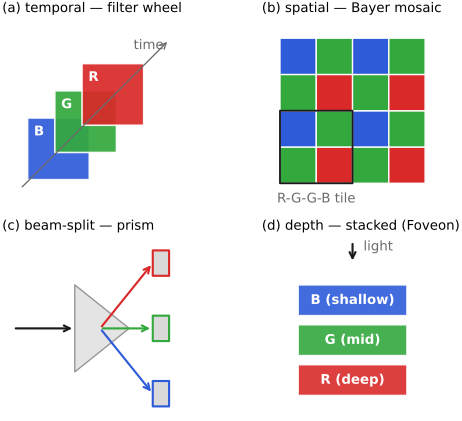
The mosaic is a clever answer to a hard constraint — a photosite measures one number, and color needs three — but it is not the only answer, and seeing the alternatives makes clear what the mosaic trades away (Figure 3.12.6). Broadly, you can multiplex the three measurements in time, in space, or in depth.
- Temporal multiplexing — take three exposures through three filters, one after another. This is how flat-bed and drum scanners work, and famously how Sergei Prokudin-Gorskii made color photographs of the Russian Empire around 1900, shooting three plates through red, green, and blue filters. (The same idea lives on in the color wheel spun in front of a monochrome sensor.) You get three real measurements at every pixel and need no interpolation — but only for a static scene; anything that moves between exposures shows color fringes.
- Spatial multiplexing — one measurement per location, varying the color across the grid: the Bayer mosaic itself, and, not coincidentally, the strategy your retina uses (a mosaic of long-, medium-, and short-wavelength cones). Single sensor, high resolution, mature technology — at the cost of interpolation (this whole chapter), color jaggies, the resolution lost to the OLPF, and the light absorbed by the filters.
- Three sensors — split the incoming light with a prism and route it to three separate sensors, one per color (the 3-chip / 3-CCD video cameras, named after the charge-coupled device (CCD) sensor). Three real values per pixel and almost no photons wasted (the prism redirects rather than absorbs), but you pay in cost, bulk, and alignment.
- Depth multiplexing — stack the color-sensitive layers so each pixel measures all three at once at different depths: color film (tripack emulsions) and the Foveon sensor, which exploits the fact that longer wavelengths penetrate silicon more deeply. Three numbers per pixel and good light efficiency, but it needs more color processing and tends to be noisier.
These all tie back to the Color technology part of the book; the throughline is that the Bayer mosaic wins on cost, resolution, and single-sensor simplicity, and demosaicking is the computational price we pay for that win.
3.12.13 Where this sits in the pipeline⧉
Step back to the whole image signal processor (ISP), which we recap at the end of the part. Demosaicking is one of the first stages, right after black-level subtraction and defective-pixel correction, operating on linear RAW. It comes before white balance, the color matrix, tone mapping, sharpening, and gamma encoding — because all of those want a complete three-channel image to work on, and because demosaicking, denoising, and white balance are physical operations that belong in linear light, with gamma encoding saved for the very end. Get the order wrong — demosaick after gamma, say, or sharpen before demosaicking — and you bake the artifacts in or distort the color comparisons the algorithm relies on. Demosaicking is where a pile of single-color photon counts first becomes a photograph.
Big lessons of this chapter
The recurring principles from this chapter, gathered for review.
Edge-directed demosaicking is a first, very concrete instance of a theme that returns throughout the book: adapt the operation to the local structure of the image rather than applying the same fixed filter everywhere. Here the structure is an edge and the adaptation is choosing the interpolation direction; later, in edge-preserving filtering and denoising, the same instinct — use the similarity between pixels to decide how much they should influence each other — becomes the bilateral filter and the idea of affinity. Whenever a fixed linear filter blurs across something it should have respected, the cure is to look at the data first.
This is the same decomposition that runs through the whole book: split an image into a detail-rich part and a slowly-varying part, and treat each appropriately. Here detail lives in green (a stand-in for luminance) and is interpolated carefully; color lives in the differences $R - G$, $B - G$ (a stand-in for chrominance) and is so smooth it can be interpolated crudely. It is the same perceptual fact that lets JPEG subsample chroma and lets us denoise color more aggressively than brightness — luminance carries the acuity, chrominance can be coarse.