💬Comments welcome. To leave a note, select any text and click the note / highlight button that pops up — or open the panel with the tab at the top-right (‹). Notes are visible only inside our private review group.
Computational Photography, an AI-powered Slopendium — 05 Edges matter
expand to📖 Full book outlinejump to1 parts · 9 chapters · 24 sections · 7 figures embedded · 2 placeholders · double-click a figure to enlarge
Part 5 EDGES MATTER
The thread of this part is that **where the edges are** governs the edit. Edges carry most of an image's meaning, so three families of method are organised around them: **gradient-domain (Poisson) editing** reconstructs an image *from* its edges (seamless cloning, gradient-domain HDR, photomontage); **edge-preserving filtering** smooths everything *except* across edges (bilateral, guided, local Laplacian → tone mapping, detail, denoising); and **seam optimization** cuts *along* the least-noticeable edges (seam carving, graph-cut compositing). All three lean on the linear-systems and convolution machinery from earlier parts; they belong together because they share one idea — respect the edges.
5.1 Poisson image editing
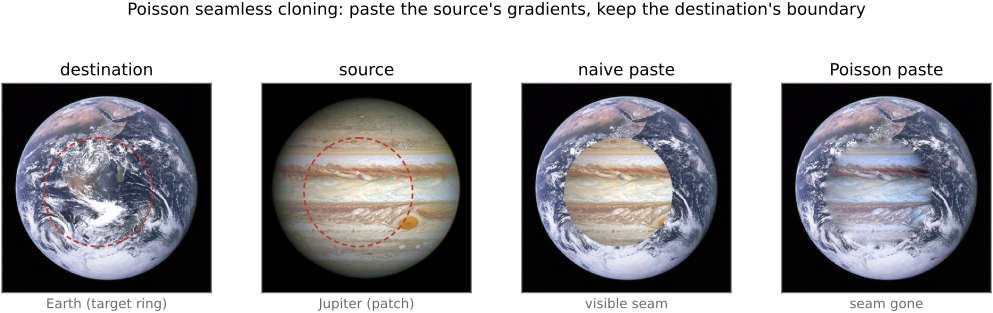
fig-seamless-cloning
fig-seamless-cloning · Poisson seamless cloning (Pérez 2003), EDGES MATTER → Poisson editing: a disk of Jupiter cloned onto Earth — destination (target ring) · source patch · naive paste (visible ring) · Poisson paste (seam gone)
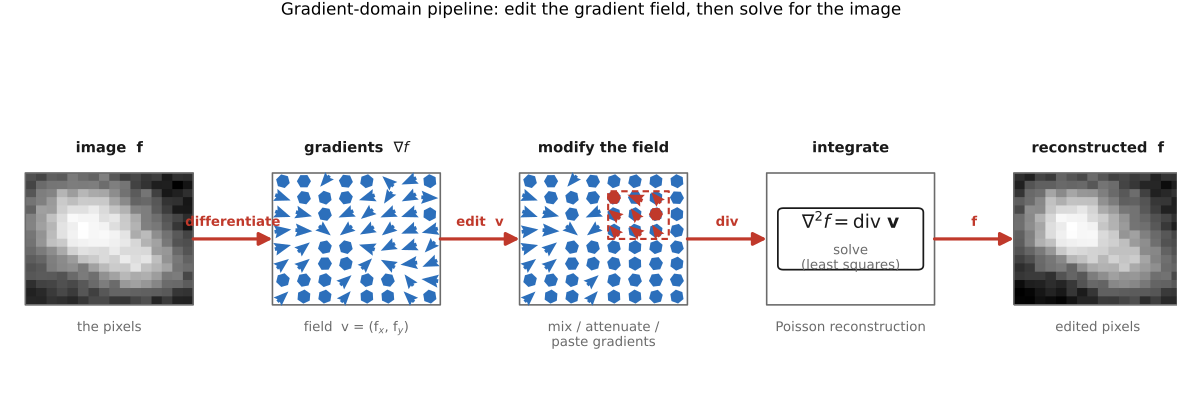
fig-gradient-domain-pipeline
fig-gradient-domain-pipeline · gradient-domain (Poisson) workflow: image → take gradients (∇f) → modify the field → integrate by solving ∇²f=div v → reconstructed (EDGES MATTER → Poisson editing)
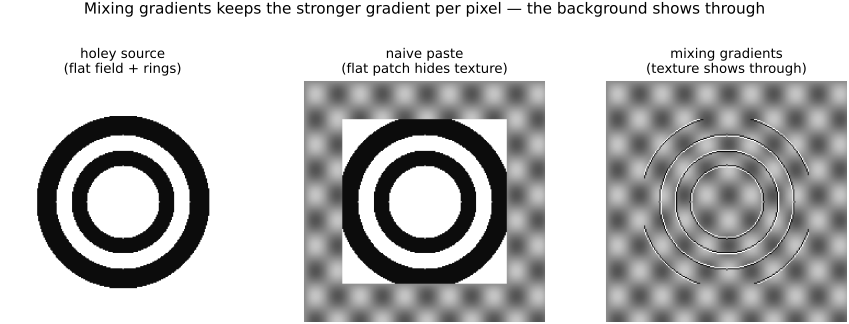
fig-mixing-gradients
fig-mixing-gradients · mixing gradients — keep the per-pixel *stronger* gradient so destination texture shows through holey / transparent inserts (naive vs max-gradient paste) (Poisson editing)
⬜ figure not yet created
`fig-chong-colorspace-results` — results from Chong, Gortler & Zickler 2008 [placeholder]
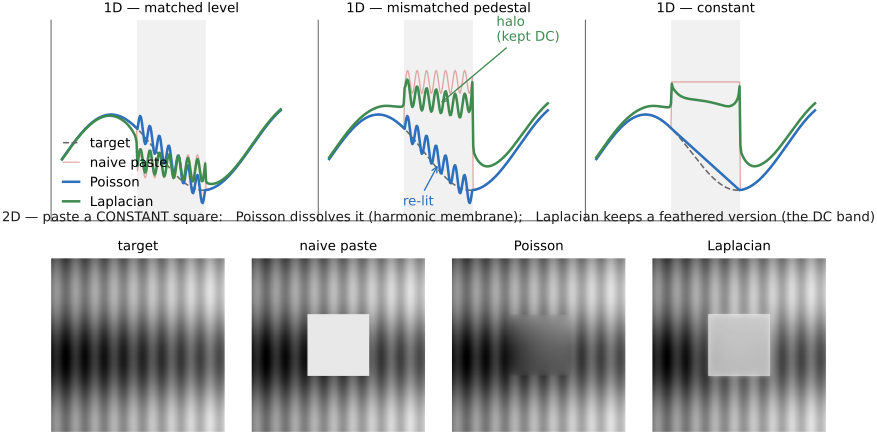
fig-poisson-vs-laplacian-blend
fig-poisson-vs-laplacian-blend · Poisson vs Laplacian-pyramid blending, contrasted on the DC: 1-D three cases (matched level — both agree; mismatched pedestal — Poisson re-lights, pyramid leaves a halo; constant — Poisson ramps/dissolves, pyramid keeps a feathered plateau) + 2-D (paste a constant square — Poisson dissolves it via the harmonic membrane, pyramid keeps a feathered version)
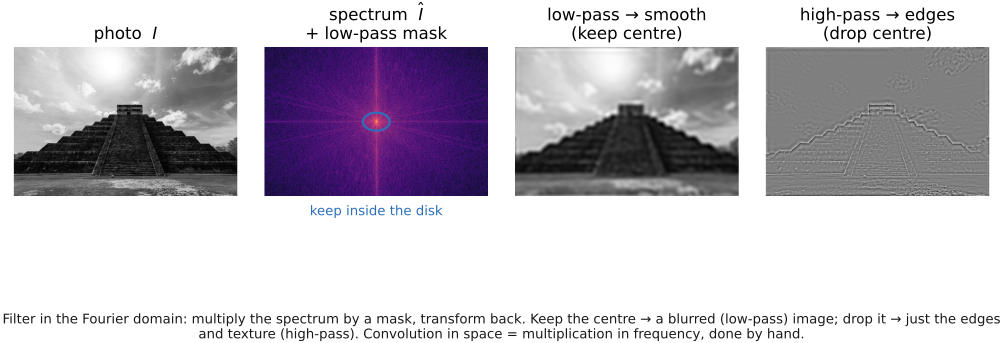
fig-fourier-lowpass-highpass
fig-fourier-lowpass-highpass · low-pass vs high-pass a real photo by masking its spectrum and inverse-transforming: keep center → blurred, drop center → edges only (convolution = mult in frequency, by hand) (Reading an image's Fourier transform)
equations
the **Poisson equation** $\nabla^2 f = \operatorname{div}\mathbf{v}$ (reconstruct the field $f$ whose gradient best matches guidance $\mathbf{v}$)
the **discrete Laplacian** system $4f_{p}-\sum_{q\in N(p)} f_{q}=\sum_{q\in N(p)}\!\big(\,v_{pq}\,\big)$ (one sparse equation per pixel $p$ over its 4-neighbours $N(p)$)
the **seamless-cloning Dirichlet boundary condition** $f|_{\partial\Omega}=f^{*}|_{\partial\Omega}$ (interior gradients from the source, boundary values pinned to the destination $f^{*}$)
5.2 Bilateral filtering
5.3 Locally adaptive regression kernel (LARK)
• **the view**: treat denoising / upsampling as **local regression** — fit a smooth function to nearby pixels, weighted by a kernel
• **steering / adaptive kernels**: shape the kernel to the **local image structure** — estimate the local gradient, then **stretch the kernel *along* edges and squeeze it *across* them** (an anisotropic, data-dependent weight) so it averages along the edge, not across it
• so LARK is the **regression flavour** of the same affinity idea: the kernel geometry is *derived from* local structure, generalizing the bilateral's scalar range weight to an oriented one
• also a **descriptor**: LARK signatures are used for detection / matching (Seo & Milanfar) — note in passing, not developed
5.4 NL-means (non-local means)
• **the leap — compare patches, not pixels**: the bilateral's affinity uses a single pixel's value; NL-means measures similarity between **small patches** around two pixels, so it matches **texture / structure**, not just brightness. `fig-nlmeans-patches`
• **non-local**: the search is **not limited to a spatial neighbourhood** — any patch anywhere in the image (a repeated texture, another brick, another eye) can vote; the spatial Gaussian is dropped or relaxed
• **patch distance & weight**: $d^2(p,q)=\sum_k g_a(k)\,\lVert I(p+k)-I(q+k)\rVert^2$ over patch offsets $k$ (optionally Gaussian-weighted $g_a$), weight $\propto e^{-d^2/2\sigma^2}$; average the **centre** pixels of the matching patches
• **why it denoises well**: a clean signal repeats, noise does not — so averaging many similar patches cancels noise while preserving structure
• the affinity reading again (now a patch-space affinity); the direct precursor to **BM3D** and to the self-similarity priors used in learned denoising (forward-ref ML)
• **BM3D** (Dabov et al. 2007) — the high-water mark of the patch / self-similarity idea, and for years the classical denoising **gold standard**. Where NL-means *averages* similar patches, BM3D goes further in two stages: (1) **block-matching** groups the most-similar patches into a **3-D stack**; (2) **collaborative filtering** applies a 3-D transform to that stack and **jointly shrinks** the coefficients (hard-threshold, then a Wiener pass using a first-pass estimate), exploiting the fact that aligned similar patches are *sparse together* — far more so than any one patch alone. Aggregate the filtered patches back (weighted by how many survived) and the result beats plain NL-means. Same lesson as the whole chapter — **find what belongs together (here, similar patches) and process them jointly** — pushed from a weighted average to a sparse transform-domain shrinkage; the bridge from bilateral/NL-means affinity to sparsity/dictionary and learned self-similarity denoisers (forward-ref [[Deep learning]]).
5.5 Local Laplacian filters
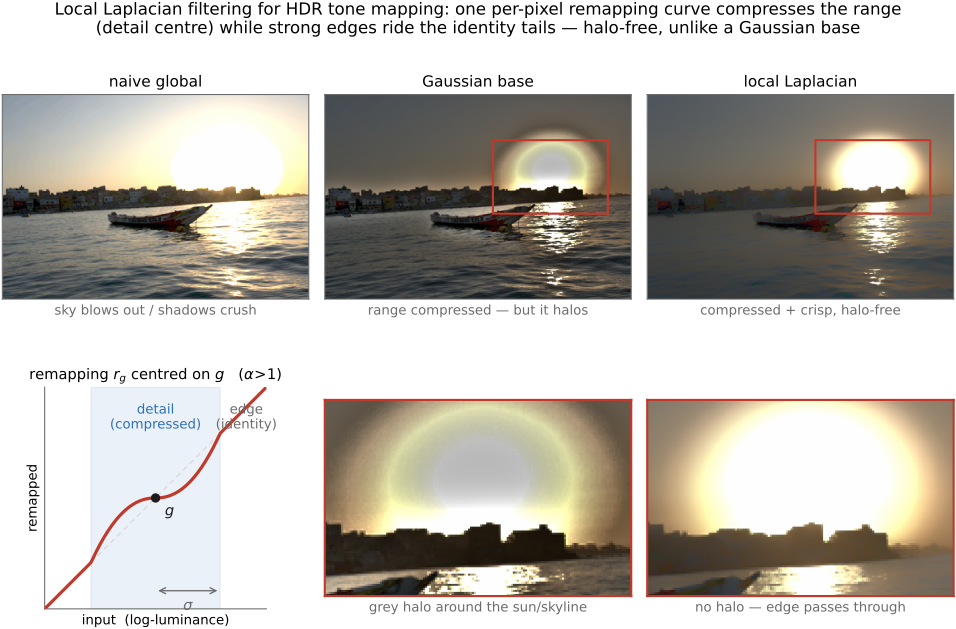
fig-local-laplacian
fig-local-laplacian · local Laplacian filters on a real HDR sunset (Paris–Hasinoff–Kautz 2011, implemented from scratch): naive global (blown) vs Gaussian base (halo) vs local Laplacian (halo-free) tone mapping, plus the compressive remapping curve $r_g(\cdot)$ (detail centre + identity tails) and a zoom comparison proving the silhouette stays halo-free (Local Laplacian filters)
⬜ figure not yet created
before/after detail-boost with **no halo** fig-wb-before-after
• **the odd one out — not an affinity method**: every other technique here weights *pairs* of pixels by similarity; local Laplacian instead works **band-by-band in a Laplacian pyramid** with a **pointwise remapping** — no range weight, no base/detail split (so none of the halos / gradient reversals those can produce). The multiscale cousin of the bilateral, by a different mechanism. Cross-ref [[Linear pyramids and wavelets]] (the pyramid it's built on) and [[Bilateral filtering]].
• **the mechanism**: to compute the output's Laplacian coefficient at a pixel and level, take the pixel's value $g$, apply a **remapping function** $r_g(\cdot)$ to the *whole* image (a smooth curve, centred on $g$, that decides what is "detail" vs "edge"), build a Laplacian pyramid of that remapped image, and read off **just this level's coefficient at this pixel**; collapse the resulting pyramid for the result.
• **the knob is the remapping $r$**: near $g$ (small amplitude = **detail**) it **compresses or amplifies** — controlling detail / local contrast; far from $g$ (large amplitude = **edge**) it stays the **identity** — so strong edges pass through untouched. One curve → detail enhancement, tone mapping, or inverse tone mapping, all **artifact-free**.
• **why it matters**: state-of-the-art **edge-aware detail manipulation and HDR tone mapping** with no halos and no gradient reversal — the failure modes that motivated the bilateral in the first place.
• **cost & the fast version**: the naive form rebuilds a pyramid per pixel-and-level (expensive); **Aubry et al. 2014** gives a fast approximation and shows the **unnormalized bilateral** is its single-scale relative (ties back to [[Bilateral filtering#Bilateral filter|the unnormalized bilateral]]).
5.6 Edge-preserving optimization — colorization
• **the shift — filtering → optimization**: instead of one weighted-average *pass*, solve a **global least-squares** problem whose smoothness term uses the affinity as a weight. The same affinity, now inside an energy.
• **colorization** (the demo): the user scribbles a few colors; **propagate** them so that **neighbouring pixels of similar luminance get similar color** — minimize $\sum_p (U_p-\sum_{q\in N(p)} a_{pq} U_q)^2$ over the chrominance $U$, with affinity $a_{pq}$ **large where $I_p\approx I_q$** (small luminance difference) — exactly the bilateral's range idea inside a quadratic energy
• **solve it** with the linear-systems machinery of the regression chapter — sparse, structured, solved by CG / multigrid (cross-ref [[Single-image computational photography#Blind deblurring]], [[Linear Inverse Problems and Regression]])
• the **affinity matrix** here is the same object as the **matting Laplacian** and the graph-cut edge weights → forward-ref [[#Compositing, segmentation and matting]] (matting / segmentation = affinity again)
• also placeable under [[Single-image computational photography#Blind deblurring]] (the "Colorization as optimization?" stub) — keep the *technique* here, cross-ref from there
5.7 Guided image filtering
• **the idea**: like the joint bilateral (filter $I$, take structure from a **guide** $J$) but the output is a **local linear transform of the guide**, $I^{\mathrm{out}}=a_k J + b_k$ fit per window by **least squares** — so it preserves the guide's edges by construction
• **why prefer it**: **$O(N)$**, **no range-quantization artefacts** (the gradient reversal the bilateral can show), and **differentiable** → drops into learning pipelines
• **uses**: edge-preserving smoothing; detail enhancement; **flash / no-flash**; **matting / feathering**; **dehazing** (guide = the hazy image — xref He, Sun & Tang 2009 dark-channel, [[#Dehazing as a prior-driven inverse problem]]); depth upsampling
• the affinity is now **implicit** in the local linear fit — same family, different mechanism; a fitting end-point for the chapter's through-line (bilateral → grid → learned → regression → optimization → guided, all *affinity*)
5.8 Seam optimization
• **the third leg of EDGES MATTER** (the part's framing payoff): Poisson **reconstructs from edges**, bilateral **smooths except across edges**, seam optimization **cuts along edges**. State it as the dual of edge preservation: edge-preserving filtering works *hard to avoid* edges; seam methods *go looking for them* — a transition is invisible exactly where the image is already changing, so we hide the cut **in the edges / busy texture** and keep it **out of smooth regions** where a seam would scream. (Callback to the part intro's "respect the edges.")
• the **unifying machinery**: all three sub-families are **discrete optimization on a graph or grid** — a 1-D least-cost path (**DP**), a 2-D globally-optimal boundary (**graph cut / min-cut**), or a spectral partition (**normalized cuts**). What changes between methods is **the energy / affinity**, not the optimizer.
💡 **Big lesson:** *many image edits are **discrete optimization on a graph** — dynamic programming, min-cut/max-flow, or spectral relaxation — and the **energy (affinity) you choose is the whole game**.* The optimizer is off-the-shelf; **what** you penalize (gradient magnitude, label disagreement across edges, region/boundary cost) is the design. This is the **L4 affinity** principle (Bilateral) turned into a *cut*: there the affinity said "average these together"; here it says "**don't cut here**." *(Register as new lesson **L12 · Image edits as discrete optimization on a graph (the energy is the design)**, first appearance here; "also relevant": Poisson/photomontage, compositing/segmentation/matting, texture synthesis, stereo/MRF labeling. Full box at this section's head; one-line callback to L4.)*
5.9 Recap: which edge-aware technique when?
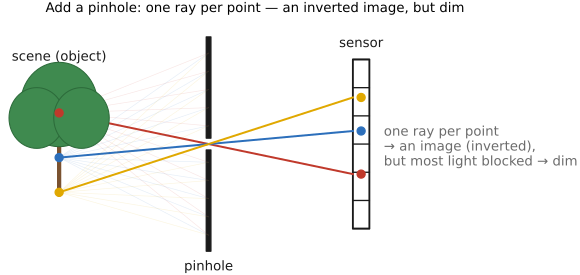
fig-pinhole-imaging
fig-pinhole-imaging · imaging-scenario series (2/3): add a pinhole to the bare sensor — one ray per scene point → a dim **inverted** image (same tree+sensor+colours as fig-bare-sensor-averaging)