12.6 Video editing⧉
This closing chapter spends the part's machinery. Editing is where alignment, flow, warping, and robust per-pixel statistics stop being algorithms and become tools an editor reaches for. It is deliberately lighter and demo-driven — and honest where a specific product or paper is uncertain. The through-line is the same one that ran through the whole part: almost every "video effect" is align the frames, then reduce or select across time, or re-time the timeline.
There is one more reason this chapter belongs at the end. Across the part, big lesson L17 said: establish a correspondence, then transport pixels along it. The reduce-over-time filters in this chapter are the contrarian exception that proves the rule. They produce striking results — a long exposure conjured from a clip, a crowded plaza emptied of people — with no correspondence estimated at all. Once the frames are registered, each pixel's time series is processed independently, exactly the Eulerian move that Video magnification made. So this coda quietly closes the loop: the part opened by insisting on correspondence, and ends by showing how much you can do by refusing it.
12.6.1 Non-linear editing: the timeline metaphor⧉
Start with the substrate. On magnetic tape, you edited in order by physically splicing: to change the third shot, you re-recorded everything after it, because the medium itself was sequential. Digital non-linear editing (NLE) broke that constraint. Clips are stored as random-access files, so you assemble them on a timeline in any order, re-arrange them freely, and the edit itself is nothing more than a list of references with in- and out-points into the source media. The edit is non-destructive — the original footage is never altered, exactly the non-destructive-editing discipline already established for stills in Recap ISP, non-destructive editing. "Non-linear" names this decoupling: the order in which you edit no longer has to match the order of playback.
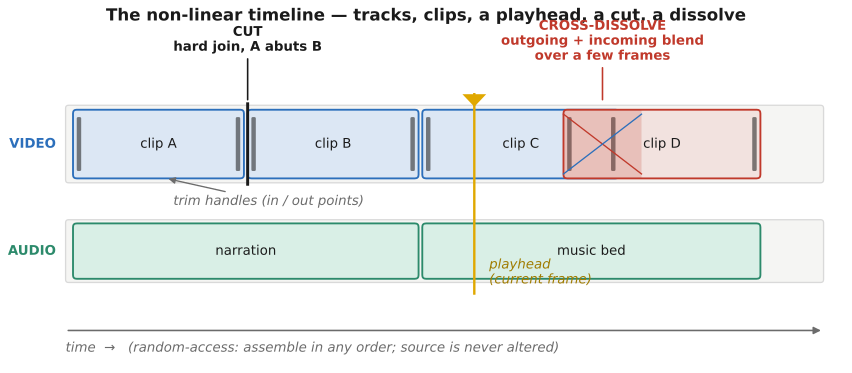
The timeline itself is a small visual language (Figure 12.6.1). Parallel video and audio tracks run left to right; clips sit on them with draggable trim handles; a playhead marks the current time. Edits come in two flavours. A cut is a hard join — one clip ends, the next begins, on the same frame. A transition is a soft join: a cross-dissolve, wipe, or fade that blends the outgoing and incoming clips over a short overlap. Worth noting that a cross-dissolve is literally the temporal cross-fade of Morphing and Frame interpolation and slow-motion synthesis — $(1-t)$ of the old clip plus $t$ of the new, swept over the transition — which is why it ghosts in exactly the same way when the two shots are misaligned, and why a flow-aware morph between them looks cleaner than a plain dissolve.
The timeline matters here because it is the substrate the rest of the chapter manipulates. Summarization shortens it; the reduce-over-time filters collapse a stretch of it to a single frame; transcript editing re-orders it from text; and slow motion and speed ramps (the subject of Frame interpolation and slow-motion synthesis) re-time it. Everything below is an operation on this one object.
The craft of editing — pacing, continuity, the cut on action, the rhythm that makes an edit invisible — is a whole art, and we touch only its computational hooks; the human side is out of scope here. Queue a short sidebar on editing grammar (Murch, In the Blink of an Eye).
12.6.2 Summarization: keyframes, fast-forward, and highlights⧉
The goal of summarization is to compress watching time, not file size — to turn an hour of footage into something glanceable or skimmable. Three primitives recur, each optimising something different.
Representative frames (keyframes). Pick a small set of frames that cover the content. The simplest cover is one frame per shot: detect shot boundaries where the inter-frame difference spikes (a cut), and take a representative from each segment. A slightly richer version clusters the frames by appearance and keeps a medoid per cluster. The output is a contact sheet or storyboard — a static glance at a dynamic thing. (This ties to scene-change detection; queue the summarization survey, Truong & Venkatesh 2007.)
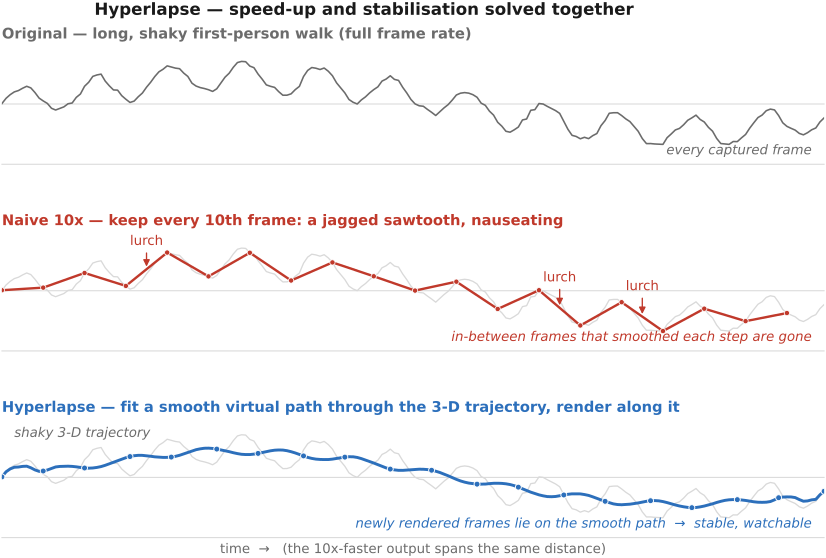
Adaptive fast-forward and hyperlapse. The problem is speeding up long first-person footage — a head-mounted camera on a hike, say. The naive fix, dropping nine of every ten frames for a $10\times$ speed-up, is unwatchably shaky: every footfall that was a small jolt at normal speed becomes a violent lurch when the in-between frames that smoothed it are gone. Hyperlapse Kopf et al. 2014 solves this by treating speed-up and stabilisation as one problem. It reconstructs the camera's path in 3-D from the footage, chooses a smooth virtual path through that trajectory, and renders new frames along the smooth path rather than sampling the jittery original ones. The path-smoothing is exactly the camera-trajectory smoothing of Video stabilization and rolling-shutter correction, and the rendering leans on the motion estimate of Optical flow — hyperlapse is stabilisation fused with time compression. The speed can also be content-adaptive: slow down over eventful, interesting stretches and race through dull ones, so the summary spends its frames where they matter (Figure 12.6.2). (Real-time hyperlapse on phones followed; queue Joshi et al. 2015.)
Highlight and event detection. Rather than cover the whole video, surface only the interesting parts. Score frames or short segments by some notion of interestingness — saliency, motion energy, faces, audio peaks, or a learned interestingness model (forward-ref Machine learning) — then keep the top-scoring segments. This is the engine behind automatic sports highlights and action-camera "best moments." Queue specific systems; the honest state is that what counts as a highlight is largely a learned, task-specific judgement.
12.6.3 Fun temporal filters: reduce-over-time⧉
Now the part where motion becomes a toy. Once the frames of a clip are aligned — stabilised, so the static scene sits still from frame to frame — apply a single per-pixel reduction across time:
Read back: at each pixel location $\mathbf p$, collapse its whole time series $\{I_t(\mathbf p)\}$ to one value with some reducer. The reducer is the entire effect, and four choices give four classic looks (Figure 12.6.3).
Mean over time is a long exposure synthesised from video: $O = \tfrac1N\sum_t I_t$. Moving water silks into a smooth sheet, headlights stretch into continuous light ribbons, a passing crowd blurs into translucent smears. This is exactly the denoise-by-averaging filter of Multiple exposure imaging — the same $1/\sqrt N$ noise reduction — but reframed as an effect rather than a fix. Same align-then-average pattern, opposite intent.
Median over time is robust background recovery, the people-remover: $O(\mathbf p) = \operatorname{median}_t I_t(\mathbf p)$. Anything transient — a tourist crossing the frame, a passing car — occupies any given pixel only briefly, so across the stack it is an outlier, and the median rejects outliers by construction. What survives is the static scene: the classic "empty the busy plaza" trick. This is the same robustness that made the median the denoiser of choice for salt-and-pepper noise back in Denoising — here it rejects temporal outliers instead of spatial ones.
Max over time is bright-streak accumulation: $O(\mathbf p) = \max_t I_t(\mathbf p)$, keep the brightest value each pixel ever saw. Stars smear into star trails as the sky rotates; light-painting, lightning, firework tails, a night runner's headlamp all leave their brightest trace. Min over time is the dual — the darkest value each pixel saw — handy for dropping specular flashes or recovering a persistently dark background.
There is a fifth move that is not a reduce but a pick. Instead of collapsing each pixel's time series with a statistic, choose the best frame per region:
where $s(I_t,\mathbf p)$ scores how good frame $t$ is at location $\mathbf p$. This is the "everyone smiling / no blinks" group-portrait trick: shoot a short burst, and for each face splice in the one frame where that person's eyes are open and they are smiling, then merge the pieces seamlessly. It is interactive digital photomontage Agarwala et al. 2004 — select-the-best-pixel over a stack — applied to a brief burst. The seamless merge is precisely the cut-then-reconstruct pipeline of the EDGES MATTER part: a graph-cut seam decides where to switch between source frames (Seam optimization) and a gradient-domain blend hides the residual mismatch (Poisson image editing, Blending). The scoring function $s$ — "eyes open, smiling" — is a learned face attribute (forward-ref Machine learning) (Figure 12.6.4).
One prerequisite governs all of these: the frames must be registered. On a tripod they already are; on handheld video they are not, and you must stabilise or align first (Video stabilization and rolling-shutter correction), or the static scene smears along with the moving parts and the effect collapses. This is the same align-then-combine discipline that high-dynamic-range (HDR) and panorama capture demanded — register first, reduce second.
And here is where L17 shows its other face. Every other application in this part estimated a correspondence and transported pixels along it. These filters do not: after a global registration, each pixel is treated in isolation, its time series reduced with no notion of where anything moved to. That is the Eulerian stance of Video magnification — process the signal at a fixed pixel rather than follow matter through space — and it is exactly why these effects are so cheap and so robust. The contrarian exception, one last time, proves the rule.
12.6.4 Transcript-based editing⧉
The last thread is the most modern, and the most surprising. Edit a talking-head video by editing its transcript.
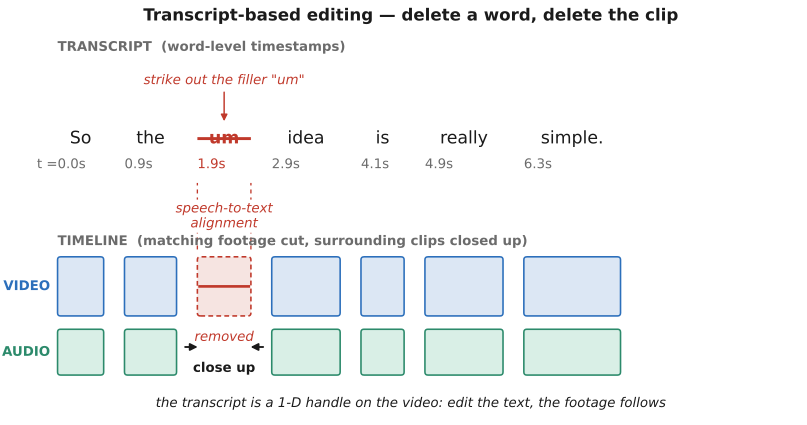
The pipeline is short. Run speech-to-text (automatic speech recognition, or ASR) with word-level timestamps (forward-ref Machine learning; here ASR is a black box). Now every word in the text is pinned to a moment in the audio, and the audio is locked to the video. So a chain of alignments connects text to picture: delete a sentence in the transcript, and the matching clip is removed from the timeline; reorder paragraphs, and the shots reorder to follow. The transcript becomes a one-dimensional handle on a two-dimensional medium — and text is enormously easier to scan and rearrange than a wall of thumbnails (Figure 12.6.5).
The killer feature is filler-word removal. Find every "um," "uh," "you know," and "like," strike them in the text, and the corresponding micro-segments vanish from the timeline, tightening the cut automatically — a clean-up that is tedious by hand and trivial by transcript. The same handle gives search-and-replace navigation ("jump to where they said aperture") and, with a voice model, overdub — retype a misspoken word and have it re-synthesised.
The research root is Berthouzoz, Li and Agrawala Berthouzoz et al. 2012, Tools for Placing Cuts and Transitions in Interview Video, which automated finding clean, well-hidden cut points — at sentence and pause boundaries — in interview footage. That work is the academic ancestor of the Descript-style transcript editors now in wide use. (Queue exact product citations.)
Why does it work, and where does it stop? It works because speech is a clean alignment signal for dialogue-driven video — the words give a sturdy, unambiguous index into the timeline. The limits follow from that same dependence. It is for spoken-word content; for action, music, or wordless footage there is no transcript to grab. And a jump cut between two non-adjacent kept segments can look abrupt — the speaker's head teleports — so the seam may need a transition or a flow-based seam-hiding frame interpolation (Frame interpolation and slow-motion synthesis) to smooth it over, which is one more place the part's interpolation machinery quietly earns its keep.
12.6.5 Coda: storyboards, interviews, and where this part lands⧉
Two brief notes before closing. Run the timeline forward and you get storyboarding and pre-visualisation — planning shots before they are captured; run it in reverse over an existing edit and auto-storyboarding pulls keyframes (the summarization primitive above) to recap what was shot. Queue a short note. And the transcript handle plus a multi-track timeline are tailor-made for interview and multi-cam assembly: synchronise several cameras by their common audio, then cut between angles by editing the shared transcript. Queue specific tooling.
That closes the arc of the whole part. We began with motion as physics to model — optical flow, warping, magnification, compression. We turned it into correction — stabilisation and rolling-shutter rectification — and then into synthesis — frame interpolation and slow motion that was never shot. We end here with editing: motion as raw material for storytelling. And underneath every effect in this chapter sat one of just two moves — register the frames, then reduce or select across time, or re-time the timeline — the same align, then combine, then decide spine that runs through the entire book.