10.5 Manual panorama stitching from multiple views⧉
PS6 solves a homography from four point pairs and stitches a planar mosaic. → Problem sets (appendix).
A panorama is the oldest computational-photography trick: a single shot cannot see wide enough, so take several overlapping photos and stitch them into one wide image. The deep question is what relates two overlapping photos of the same scene? — and the surprisingly clean answer, with no 3D and no depth, is what makes stitching a tractable problem rather than a full reconstruction. This chapter does the geometry by hand. The manual version asks the user to click the correspondences; the next chapter automates them. The pipeline as a whole — reproject every frame into one wide canvas — traces back to the panoramic-mosaic work of Szeliski and Shum (1997).
The move that drives this whole part is: instead of committing one capture parameter at the instant of exposure, record the whole set and choose afterward. A panorama defers your field of view — shoot several overlapping frames now, decide the final framing and crop of the wide view later. It is the same move as exposure bracketing → HDR (capture all exposures), focus stacks (all focal planes), and burst imaging (every instant). The cost is data and a harder reconstruction (alignment plus blending); the payoff is taking an irreversible decision out of the moment of capture. (Registered as L14 — it first appears in this part's introduction; the light-field/plenoptic camera (Advanced computational photography) is the same idea for the focus/viewpoint axis — the elegant special case.)
10.5.1 The scenario, and the one rule: rotate, don't translate⧉
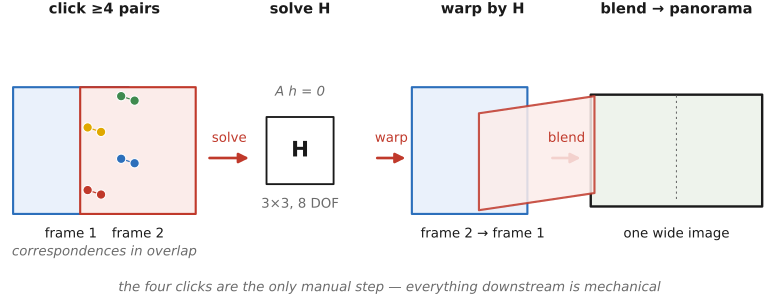
Here is the setup. You stand in one place and pan the camera across a scene, taking overlapping frames. Choose one frame as the reference; reproject — warp — the others into its coordinate system; blend the overlaps. The output is a virtual wide-angle view assembled from shots no single exposure could have captured (Figure 10.5.1).
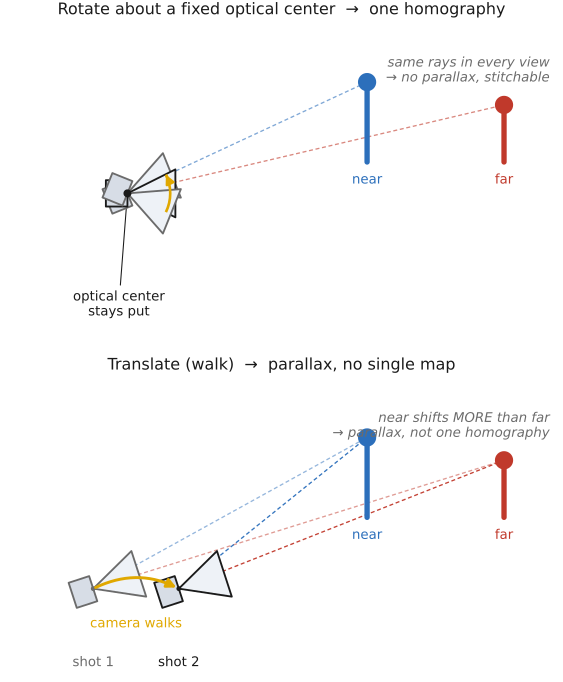
There is exactly one rule, and the whole chapter depends on it: the camera must undergo pure rotation about its optical center. It may rotate freely — pan, tilt, roll — but its viewpoint must not move. If you keep the optical center fixed, every pair of views is related by a single homography (derived two sections down) regardless of the scene's geometry, and that is what we are about to cash in.
Why does translating break it? If you walk — translate the optical center — near and far objects shift by different amounts. That is parallax, and it carries depth information: the foreground sweeps past the background. Once views differ by parallax there is no single 2D map between them, because the right shift for a pixel depends on how far away its scene point is; recovering it would mean knowing the depth of every pixel, i.e. doing actual 3D reconstruction. The slogan to carry away is "rotate, don't walk" (Figure 10.5.2). The one escape — a planar scene — is the chapter's last section: there a homography works even if you translate, because a flat surface has, in effect, a single depth law.
One pointer before we start, in keeping with our standing division of labor. The warping itself — forward vs. inverse warp, resampling, antialiasing — and the closely related perspective-distortion correction are developed in Matching pixels across space and time. Here we need only the geometry (which $H$ relates the views) and how to solve for it.
10.5.2 Refresher: pinhole projection is "divide by depth"⧉
Everything below is a consequence of one fact about the pinhole camera, so let us refresh it. A 3D point $(x,y,z)$ in the camera's frame images to the point $(x/z,\,y/z)$ on the plane $z=1$. Projection is division by depth. This is why far things look small: a larger $z$ shrinks $(x/z,y/z)$ toward the center. The whole nonlinearity of perspective lives in that single divide.
Now rotate the camera. Rotating the camera by $R$ is the same as rotating the world by $R^{-1}$ and leaving the camera put: to project a point into a camera that has been rotated by $R$, apply $R^{-1}$ to the point (equivalently, apply $R$ to the viewing ray) and then divide by the new depth. So a rotated view of the same scene is obtained by rotating the 3D points and re-projecting — divide by the new third coordinate $z'$.
And here is the trap we are about to escape. That recipe needs the 3D point, depth and all — but for stitching we have only the first image's pixels, never their depths $z$. We seem stuck: how can we predict where a point lands in the second view without knowing how far away it is? The next section is the escape.
10.5.3 Why you don't need 3D: depth cancels for a pure rotation⧉
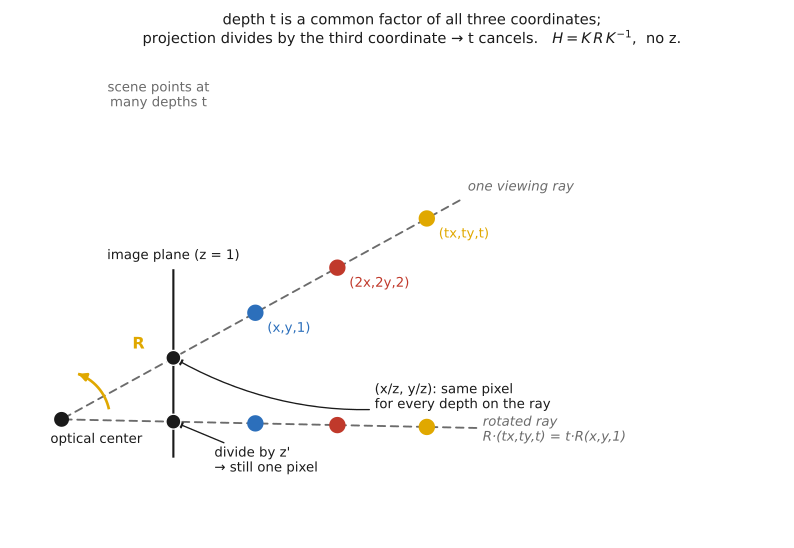
This is the key idea, and it is best stated as an observation about a single viewing ray: all points along one viewing ray reproject to the same place. A pixel $(x,y)$ in image 1 is the image of an entire ray of 3D points $(tx,\,ty,\,t)$ — one for every depth $t$, all sharing the same direction. Rotate that whole ray by $R$ and re-project. The rotation scales linearly, so the rotated ray is $R\,(tx,ty,t)^\top = t\,R\,(x,y,1)^\top$ — the depth $t$ is a common factor of all three coordinates. But projection divides by the third coordinate, and dividing kills that common factor. Every point on the ray, at every depth, lands on the exact same pixel in the rotated view. The destination pixel does not depend on depth at all (Figure 10.5.3).
That is the whole escape. Since depth does not matter, we are free to pick $z=1$: treat each pixel $(x,y)$ as the 3D point $(x,y,1)$ — pretend the image is a plane at distance 1 — rotate it by $R$, and divide by the new third coordinate. That is the entire mapping. We chose a depth purely for convenience, and any other choice would give the same answer, because the divide erases the choice.
Chaining the three steps — un-project (apply $K^{-1}$ to go from pixels to rays), rotate (apply $R$), re-project (apply $K$ to go from rays back to pixels) — gives the view-to-view map
where $K$ is the camera's intrinsics matrix (focal length, principal point), $R$ is the rotation between the two views, and $\simeq$ means "equal up to a nonzero scale" — you still divide by the last coordinate to read off image position. The thing to notice, and to dwell on, is that no $z$ appears in $H$. Depth has cancelled completely; the matrix that relates the two views is built only from the rotation and the calibration, nothing about the scene. For normalized coordinates ($K=I$) it collapses to $H=R$ acting on rays $(x,y,1)$.
State the punchline plainly: for a camera rotating about its optical center, the relationship between two images is a homography that is independent of the scene. No depth, no 3D model, no parallax — one $3\times3$ matrix relates the two views everywhere, for every pixel at once. This is the chapter's central idea and the reason panorama stitching is a clean linear problem instead of a reconstruction. It is reused by Automatic panorama stitching from multiple views and feature matching and by perspective correction in Matching pixels across space and time.
10.5.4 Homographies and homogeneous coordinates⧉
The map $\mathbf{x}'\simeq H\mathbf{x}$ deserves its own vocabulary, because the same object recurs throughout the rest of the part. We have been implicitly using homogeneous coordinates: represent a 2D point $(u,v)$ by three numbers $(x,y,w)$, with $u=x/w$ and $v=y/w$. To recover the ordinary Euclidean point you divide by the last coordinate. A point therefore has no unique triple: every scaling $(wx,wy,w)$ names the same point, so homogeneous coordinates are defined up to scale. Two payoffs justify the bookkeeping. First, they make perspective (that very divide) and translation expressible as a single matrix multiply. Second, they are literally "treat the image as a plane at $z=1$ in 3D," which is exactly the picture from the previous section.
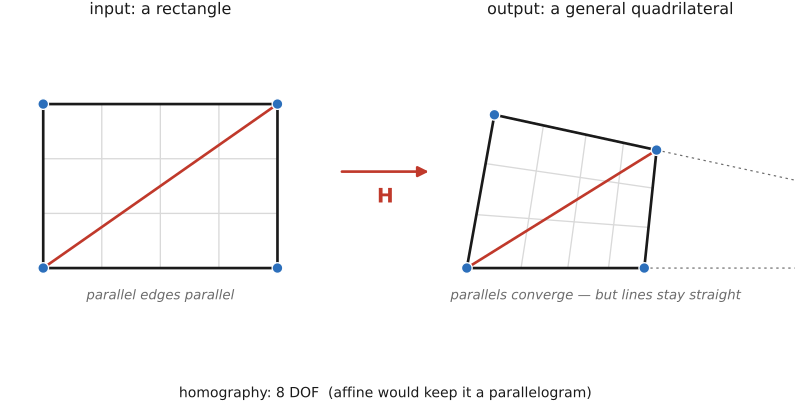
A homography is then any $3\times3$ matrix $H$ acting on homogeneous coordinates: compute $\mathbf{x}'=H\mathbf{x}$ as a plain matrix multiply, then divide by the resulting third coordinate $w'$ to read off image coordinates. It is the most general projective mapping of a plane — and, by the previous section, exactly the camera-rotation map. Geometrically it maps the input rectangle to an arbitrary quadrilateral: parallel lines need not stay parallel (they may converge toward a vanishing point), but straight lines stay straight (Figure 10.5.4). That is the same "project the plane, rotate, re-project" we already drew.
How much freedom does $H$ have? It has nine entries, but it is defined up to scale — $H$ and $kH$ produce the same map, since scaling all of $(w'x',\,w'y',\,w')$ by $k$ leaves the Euclidean point $(x',y')$ unchanged. So a homography has 8 degrees of freedom, not 9. This is the number to remember, because it tells us exactly how much data we need: 4 point correspondences supply 8 numbers, just enough to pin $H$ down. (This is the same $s=4$ minimal sample random sample consensus (RANSAC) draws in the next chapter, Automatic panorama stitching from multiple views and feature matching.)
Writing out $H=\left(\begin{smallmatrix}a&b&c\\ d&e&f\\ g&h&i\end{smallmatrix}\right)$, the per-point formula is
The shared denominator $w'=gx+hy+i$ is the perspective divide; the entries $g$ and $h$ are what make parallel lines converge. Setting $g=h=0$ (and $i\neq0$) makes the denominator constant, which removes the perspective entirely and leaves a plain affine map. This standard projective-geometry material is laid out at length in Hartley and Zisserman and Szeliski.
10.5.5 Solving for $H$ from correspondences⧉
The goal is concrete: given $\geq 4$ matched point pairs $\mathbf{x}_i \leftrightarrow \mathbf{x}_i'$, find the homography $H$ that maps each $\mathbf{x}_i$ to $\mathbf{x}_i'$. In manual stitching the user supplies these pairs by clicking matching landmarks across the overlap; automatically they come from feature matching (next chapter).
At first glance $\mathbf{x}'\simeq H\mathbf{x}$ looks nonlinear, because of the divide. The trick is to clear the denominator by cross-multiplying. Take $x' = (ax+by+c)/(gx+hy+i)$, multiply both sides by the denominator, and you get $ax+by+c-x'(gx+hy+i)=0$ — a single equation that is now linear in the unknown entries of $H$. Each correspondence yields two such equations (one from $x'$, one from $y'$). Stack them into
where $\mathbf{h}$ is the 9-vector of $H$'s entries and $A$ has two rows per correspondence. Four pairs give 8 equations.
There is one wrinkle: $\mathbf{h}=\mathbf{0}$ solves $A\mathbf{h}=\mathbf{0}$ trivially, and in any case $H$ is only defined up to scale, so we must fix the scale to get a meaningful answer. Two standard ways:
- The dirty version. Assume $i\neq0$ and simply set $i=1$ — true unless the camera is rotated by roughly $90°$. That leaves 8 unknowns and turns the system into $A\mathbf{x}=\mathbf{b}$ with a nonzero right-hand side. Solve it directly from 4 pairs, or by least squares if you have more — the overconstrained $\arg\min\lVert A\mathbf{x}-\mathbf{b}\rVert^2$ with normal equations $A^\top A\,\mathbf{x}=A^\top\mathbf{b}$. This is good enough for a problem set.
- The clean version. Keep all 9 unknowns and solve the homogeneous system $A\mathbf{h}=\mathbf{0}$ by SVD: the answer is the singular vector with the smallest singular value — the null space of $A$ — which makes no arbitrary assumption about $i$. This is exactly the null-space solve developed in Linear Inverse Problems and Regression.
Using more than 4 correspondences is a feature, not a complication: the system is then overdetermined, and the least-squares fit averages out clicking noise. (In the next chapter, this same overdetermination is what lets RANSAC discard wrong matches before the final fit.) The analogy to keep in mind is plain line fitting — recovering $x'=ap+b$ from many noisy $(p,x')$ pairs: the unknowns are the map's coefficients, the data are the point pairs, and different sets of pairs can yield the same $H$.
10.5.6 Warping and assembling the panorama⧉
With $H$ in hand for each frame, we build the wide image. Pick one image's coordinate frame as the canvas — the reference — and, for every other image, warp it into that frame using its homography (warping each frame one by one toward the reference). The union of the warped frames is the panorama; output pixels that no source image reaches stay black.
The right way to resample is the inverse warp: loop over output pixels $(x,y)$, map each one back into the source with $H^{-1}$, then divide and sample there (with interpolation and antialiasing). Going output-to-source this way guarantees every output pixel is filled — no holes — whereas a forward warp (source-to-output) scatters samples and leaves gaps. To size the canvas before you start, forward-map the source's four corners through $H$ to see where the warped image will land, take the bounding box of those, and then inverse-warp to fill the pixels. (Forward for the bounding box, inverse for the pixels.) The full forward-vs-inverse warp and resampling story lives in Matching pixels across space and time; here we only place the images.
Two loose ends, both pointers. First, the warped frames overlap and will not match exactly — exposure, vignetting, and tiny misalignments differ between shots — so they must be merged seamlessly; that is the job of the blending section (feathered, two-scale, or Poisson). Second, warping everything onto a single flat reference plane stretches badly at very wide fields of view; cylindrical or spherical projections (and the stereographic "little planet") are the fix, covered later under other projections.
10.5.7 Another application: document flattening and merging⧉
Everything above needed pure rotation because general scenes have depth. But there is a second route to the same homography, and it relaxes the rule entirely: a planar scene. If the scene is a single plane, a homography relates any two views of it — even when the camera translates — because a plane imposes one depth relationship across its whole surface, with no independent per-pixel depth to cause parallax. A plane photographed from any viewpoint maps to a plane by a homography. This is the planar twin of the rotation case.
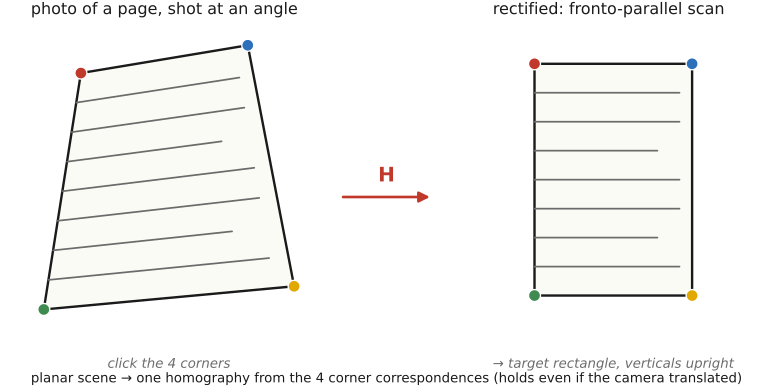
The headline use is document flattening, also called rectification. Photograph a page, whiteboard, painting, or building façade at an angle and it appears as a keystoned quadrilateral — verticals lean, the rectangle skews. Click (or automatically detect) its four corners, set them as correspondences to a target rectangle, solve for $H$ exactly as above, and warp. Out comes a fronto-parallel, "scanned" version with verticals vertical and the page rectangular again (Figure 10.5.5).
The same machinery also handles document merging. To capture a document or whiteboard too big for one frame, shoot overlapping planar patches and stitch them with planar homographies — the identical pipeline as a panorama, except the homography is justified by the flat scene rather than by pure rotation. This is the basis of book scanning, mosaicing microscope slides, and tiling aerial or satellite images of locally flat ground.
It is worth stating the unity plainly: panoramas (rotation) and document rectification or merging (plane) are the same homography solve — only the geometric reason the homography is valid differs. Perspective-distortion correction — straightening a building's converging verticals — is the very same trick, and is developed alongside the warp machinery in Matching pixels across space and time.
Big lessons of this chapter
The recurring principles from this chapter, gathered for review.
The move that drives this whole part is: instead of committing one capture parameter at the instant of exposure, record the whole set and choose afterward. A panorama defers your field of view — shoot several overlapping frames now, decide the final framing and crop of the wide view later. It is the same move as exposure bracketing → HDR (capture all exposures), focus stacks (all focal planes), and burst imaging (every instant). The cost is data and a harder reconstruction (alignment plus blending); the payoff is taking an irreversible decision out of the moment of capture. (Registered as L14 — it first appears in this part's introduction; the light-field/plenoptic camera (Advanced computational photography) is the same idea for the focus/viewpoint axis — the elegant special case.)