3.15 Recap ISP, non-destructive editing⧉
A fraction of a second after you press the shutter, a finished picture appears on the screen — and between the light hitting the sensor and that picture, a dozen distinct processing steps have already run. By now you have met almost all of them, one chapter at a time: black-level subtraction, demosaicking, white balance, a color matrix, tone curves, denoising, sharpening, gamma encoding, JPEG compression. What we have not yet done is set them side by side, in order, and follow a single photograph as it passes through the whole chain. That is this chapter. Almost nothing here is new; the payoff is the arrangement. In image processing the order of operations is not bookkeeping — it is the line between a correct picture and a broken one, and seeing the stages in sequence is what makes that order legible.
3.15.1 A basic ISP⧉
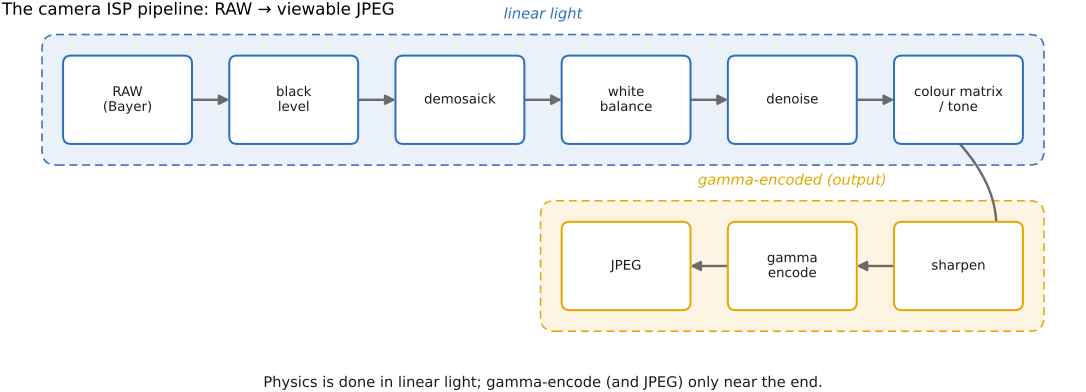
The fixed sequence of steps a camera runs to turn a raw sensor readout into a viewable picture is the image signal processor, or ISP. In a phone or a camera it is dedicated silicon, executing the same chain millions of times a day at video rates; in a desktop raw converter it is software doing the same work more slowly but far more flexibly. Either way the structure is a pipeline: a chain of stages, each consuming the previous stage's output and handing its own result forward (Figure 3.15.1). What follows walks that chain once, top to bottom.
The starting point: raw. The pipeline begins with the raw file — the sensor's measurement, essentially straight off the analog-to-digital converter, before any developing. We studied it in Demosaicking and File formats and compression, and it is worth recalling precisely what it is. Each photosite reports a single number: the light that reached it through its one color filter. So a raw image is not a color image at all but a grayscale mosaic in the Bayer pattern, with twice as many green sites as red or blue to match the eye's stronger luminance acuity. The numbers are usually 12 to 14 bits and, decisively, they are linear — proportional to the physical radiance the sensor gathered, with no gamma applied. Twice the light gives twice the number. This is the most physical, least-touched state the image will ever occupy, which is exactly why everything downstream wants to happen here, in linear light, before any encoding distorts the arithmetic.
"Raw" is a spectrum, though, not an absolute. Many cameras pre-cook the file to some degree — subtracting the black-level pedestal, repairing hot pixels, occasionally compressing or even nonlinearly remapping it — so a raw file is best understood as the least-cooked version the camera will hand you, not the literal untouched readout. Libraries like dcraw and its successor LibRaw (with the Python wrapper rawpy), and the open-source developers darktable and RawTherapee, exist precisely to read these proprietary formats and run the rest of the pipeline themselves — which is how you get to make the processing decisions instead of inheriting the camera's.
From the raw values, the ISP runs roughly the sequence below. The exact order differs between makers, but its shape is strikingly consistent, and the throughline — physics first in linear light, encoding last — never moves.
The 3A and black level. Before a single pixel is processed, the camera has already taken three automatic decisions, the 3A: auto-exposure (how long and how brightly to expose), auto-white-balance (an estimate of the illuminant's color), and auto-focus (where to focus — an optics matter we leave to a later part). Then the pipeline proper opens with housekeeping on the raw. Black-level subtraction removes the small pedestal the sensor reads even in total darkness, so that black is genuinely 0; hot- and defective-pixel correction patches the handful of stuck or excessively noisy photosites from their neighbours. Unglamorous, but load-bearing: every later stage assumes that black means black.
Demosaick. Next the mosaic becomes a full-color image — at every pixel we recover all three of red, green, and blue, even though only one was measured there. This is Demosaicking: the naive per-channel interpolation that zippers and fringes at edges, and the better green-first, edge-aware methods that interpolate along edges rather than across them. It runs on the linear raw, before white balance, because it is fundamentally a reconstruction problem and the smooth signal it is reconstructing lives in linear light.
Denoise. The raw measurement always carries noise — photon, read, and thermal — and the earlier you attack it the better, since later stages (sharpening above all) will amplify whatever survives. This is Denoising: spatial averaging, edge-preserving filters, and increasingly learned denoisers, often run jointly with demosaicking because the two problems are entangled. Noise is cleanly modelled in linear space (an affine signal-dependent variance), one more reason this stage belongs early and linear.
Lens corrections (optional). Many pipelines also repair optical defects here, while the data is still linear: vignetting (corner darkening), chromatic aberration (color fringing from the lens), and geometric distortion (barrel or pincushion bending of straight lines). These properly belong to the optics part, but it is useful to know they slot in around this point.
White balance and the color matrix. Now the image is made colorimetrically correct. White balance (WB) rescales the red, green, and blue channels so that a neutral surface in the scene comes out neutral in the image, undoing the color cast of the light — warm tungsten, cool shade. It is a per-channel multiply, and like exposure it is multiplicative, so it belongs squarely in linear light. A color matrix (a 3×3 transform) then converts the sensor's idiosyncratic, filter-specific RGB into a standard space such as sRGB — translating what this sensor measured into what a standard display expects. The color side is developed in Color technology; here the point is only that both steps are linear-light operations on the already-demosaicked image.
Tone, color, then sharpening. With a correct linear color image in hand, the pipeline applies the tonal and color rendering that gives the picture its look: the tone curves, the contrast, and often the local tone mapping of Point operations and Tone mapping, plus the manufacturer's signature color treatment. Then it sharpens — the unsharp masking of Neighborhood operations and convolution, ideally the adaptive variant that boosts detail more in textured regions and less in smooth ones, so it does not re-amplify the noise we just removed. Sharpening comes after denoising for exactly that reason: the two operations pull in opposite directions, and detail should be added back only once the noise is gone.
Gamma, beautification, JPEG. Only now, near the very end, does the image finally leave linear light. Gamma encoding (Image representation) re-spaces the values perceptually, spending the limited bits on disk where the eye can actually see differences. The camera may then layer on beautification curves — a gentle S-curve, a little saturation, the manufacturer's "look" — which are frankly non-radiometric, tuned to please rather than to measure, and which is why a straight-from-camera JPEG and a carefully developed raw of the same scene can look so different. Finally the image is compressed and written, almost always as JPEG (File formats and compression), which discards perceptually unimportant detail — coarse chroma, high-frequency discrete cosine transform (DCT) coefficients — to shrink the file. Beyond this baseline, modern cameras splice in entire computational stages — high dynamic range (HDR) burst capture, night mode, multi-frame fusion — but those belong to later parts; the chain above is the classical backbone they extend.
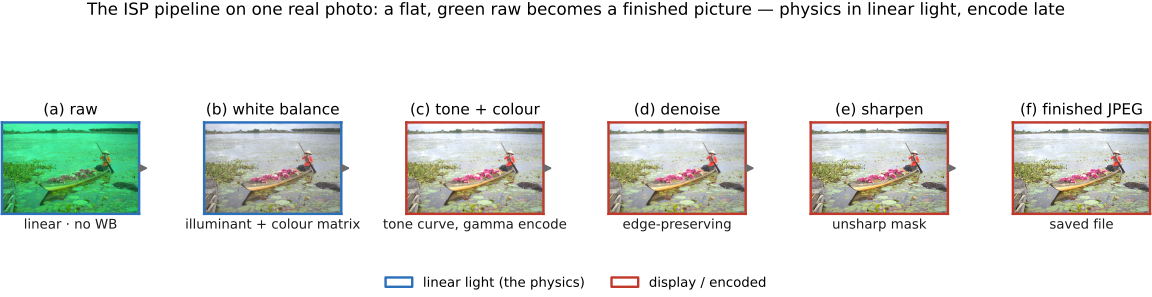
The block diagram tells you what the stages are; it is worth watching them actually run on a single photograph, so the abstract chain turns into a visible transformation (Figure 3.15.2). We begin from a genuine sensor readout — flat, dark, and conspicuously green, because the Bayer array carries twice as many green photosites and an overcast scene is greener still — and walk it forward: white balance neutralises the illuminant and the grey lake and sky go grey, the tone curve and gamma lift the flat capture into a finished display image, denoising cleans the overcast shadows, and sharpening crisps the detail. The same picture, six times over, with everything before the tone curve happening in linear light and only the tail running in the encoded display space — the diagram's lesson made literal.
Do the physics — white balance, demosaick, denoise — in linear light; encode (apply gamma) only near the end. Read down the pipeline and one pattern dominates, and it is the single most important takeaway of the whole part. Demosaicking, white balance, denoising, the color matrix, exposure — every operation that corresponds to something physical, to how light actually behaves — runs on linear values, because in linear light the math matches the physics: light adds, light scales, and a filter meant to preserve energy actually does. Gamma is a storage and display convention, not a physical law, so it goes on last, just before the bits hit disk, and comes off first whenever you reopen the file to edit.
Get the order wrong and the failures are concrete, not abstract. White-balance a gamma-encoded image and the neutral you were chasing comes out tinted. Blur or demosaick in gamma space and edges shift brightness, because averaging perceptually-spaced numbers is not the same as averaging light. Sharpen before denoising and you etch the noise permanently into the picture. This ordering is not arbitrary tradition: each stage assumes the ones before it have already run, and assumes the data stays linear until the encoding stage explicitly says otherwise. If you keep one thing from the basic part, keep this — a bare array of numbers is meaningless without its encoding, and the right encoding for physics is linear. Keep the picture linear while you do the physics, and encode only when you are done.
This pipeline view finally explains a choice every photographer faces and most cameras offer: shoot JPEG or shoot raw. Shooting JPEG means letting the camera run the entire pipeline above — its 3A, its tone curve, its sharpening, its compression — and keeping only the finished, baked result. It is convenient, small, and ready to share. But every decision is now permanent: the white balance is fixed, the highlights it clipped are gone, the 8-bit JPEG has thrown away the headroom you would need to rescue a shadow, and any edit you attempt starts from an image that has already been compressed and beautified.
Shooting raw means keeping the sensor's linear measurement and running the pipeline yourself, later, on a computer — and that is precisely why professionals do it. With the raw you still have all 12–14 bits, all the dynamic range the sensor captured, and the freedom to set white balance, exposure, and tone after the fact, as deliberate choices rather than the camera's instant guesses. The cost is honest: raw files are large, not directly viewable, and they require that you (or your software) do the developing. But the upside is decisive — you are editing the physics, not a beautified 8-bit approximation of it.
3.15.2 Recap 2: non-destructive editing⧉
There is a lovely idea hiding inside the raw workflow, and it is how every serious photo editor actually works. If shooting raw means you run the pipeline, then editing a photo is really just adjusting the pipeline's parameters — and you can store those adjustments instead of the resulting pixels.
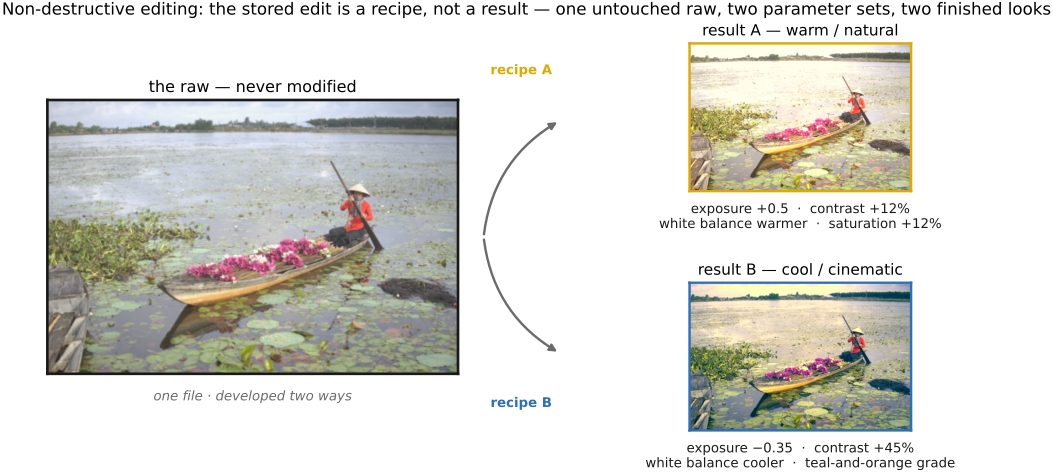
This is non-destructive editing, the model behind Adobe Lightroom, Capture One, darktable, and mobile editors like Halide. The raw file is never modified. Every edit you make — exposure, contrast, a tone curve, a white-balance shift, a sharpening amount, a local mask over the sky — is recorded as a parameter, a number or a curve in a small sidecar of metadata. Nothing is "applied" to the pixels and saved over them. Instead, whenever the program needs to show you the image, it reads the raw, reads your list of parameters, and recomputes the whole pipeline on the fly to produce the preview. What is stored is a recipe, not a result.
Because the recipe is independent of the raw, the same file can become entirely different finished pictures: you simply feed the pipeline a different parameter set, and nothing about the original is consumed in the process (Figure 3.15.3).
The benefits follow directly. The edit is fully reversible — drag exposure back to zero and it is genuinely as though you never touched it, because the original was never altered. It is re-editable — you can revisit a three-month-old adjustment and change a single slider with no accumulated loss from repeated re-saving. And it is resolution-independent — the same recipe drives a thumbnail preview or a full-resolution export, because it is just parameters fed to the pipeline at whatever size you ask. The one thing it demands is speed: recomputing the pipeline every time you nudge a slider only feels interactive if the pipeline is fast, which is why these tools lean hard on the graphics processing unit (GPU) and on carefully optimized image code — a concern we return to in the performance part.
Seen this way, a non-destructive editor is simply the camera's ISP, opened up and handed to the user: the same stages, in the same order, under the same linear-light-then-encode discipline (Lightroom's first steps run in linear space before it converts to a gamma space for display), but with the parameters exposed as sliders rather than frozen by the camera. The parametric pipeline is a programmable ISP. Everything in this part — the encodings, the point operations, the convolutions, demosaicking, denoising, the tone curves — is a knob on that pipeline. You now know what every knob does, and in what order they turn.
Big lessons of this chapter
The recurring principles from this chapter, gathered for review.
Do the physics — white balance, demosaick, denoise — in linear light; encode (apply gamma) only near the end. Read down the pipeline and one pattern dominates, and it is the single most important takeaway of the whole part. Demosaicking, white balance, denoising, the color matrix, exposure — every operation that corresponds to something physical, to how light actually behaves — runs on linear values, because in linear light the math matches the physics: light adds, light scales, and a filter meant to preserve energy actually does. Gamma is a storage and display convention, not a physical law, so it goes on last, just before the bits hit disk, and comes off first whenever you reopen the file to edit.
Get the order wrong and the failures are concrete, not abstract. White-balance a gamma-encoded image and the neutral you were chasing comes out tinted. Blur or demosaick in gamma space and edges shift brightness, because averaging perceptually-spaced numbers is not the same as averaging light. Sharpen before denoising and you etch the noise permanently into the picture. This ordering is not arbitrary tradition: each stage assumes the ones before it have already run, and assumes the data stays linear until the encoding stage explicitly says otherwise. If you keep one thing from the basic part, keep this — a bare array of numbers is meaningless without its encoding, and the right encoding for physics is linear. Keep the picture linear while you do the physics, and encode only when you are done.