3.6 Neighborhood operations and convolution⧉
PS2 implements box/Gaussian blur, gradients, sharpening, and the bilateral filter. → Problem sets (appendix).
Photograph a distant streetlight at night and zoom all the way into the result. The light is never a single lit pixel; it is a soft little blob, a few pixels wide, fading at its rim. No lens could squeeze that point of light back down to a point — diffraction and the imperfections of real glass spread it into a splotch — and the sensor recorded the splotch faithfully. The lesson hiding in that blob is the whole chapter: blur is not something that happens to a pixel, it is something that happens between pixels. Every recorded value is a mixture of the light meant for that spot and the light that leaked in from its neighbors.
In the previous chapter every operation was a point operation — the output pixel depended only on the input pixel sitting at the same location, run through a single curve. Here we let the output pixel consult its neighborhood, a small window of surrounding pixels, and combine them. This is the third of the three operation families we laid out (range, domain, neighborhood); we are now firmly in the neighborhood column. Blurring, sharpening, edge detection, and most of the noise-cleaning filters of later chapters all live here, and nearly all of them rest on a single operation called convolution.
3.6.1 Motivation: blur and sharpen⧉
Two everyday edits motivate the machinery, and they pull in opposite directions.
The first is blur. You blur on purpose constantly — to soften skin in a portrait, to fake a shallow depth of field, to knock down noise, or as an internal step in a larger algorithm (downsampling, building the pyramids of a later chapter, extracting the base layer of a local tone map). But blur also shows up uninvited, baked in by the optics: diffraction at the aperture, spherical aberration and other lens flaws, defocus, camera shake, and subject motion all smear a point of scene light into a blob on the sensor. Each sensor pixel therefore stores a weighted average of light from a small patch of the scene — exactly the picture from the lecture, where a pixel's value is the local average of the colors in front of it. Understanding that averaging precisely is what later lets us hope to undo it.
The second is sharpen — making an image crisp, undoing blur or at least faking its opposite. Sharpening is the mirror instinct: instead of mixing a pixel with its neighbors, accentuate how it differs from them.
Both deserve precision for the same reason. Once we know exactly how blur mixes neighbors, we can pose the harder question of how to remove it. That removal — deconvolution or deblurring — gets a whole later chapter, and it is tractable only because blur is a linear operation we can write down and, with care, attempt to invert. The payoff for being careful here is large, so let us be careful.
3.6.2 Convolution 101⧉
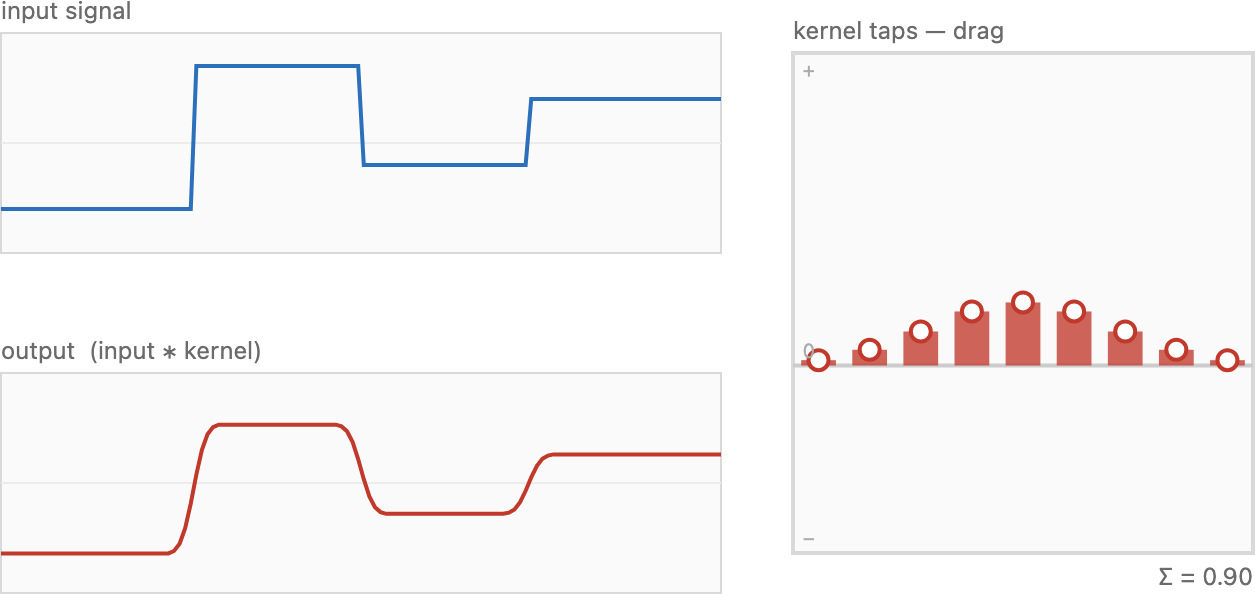
Start with blur, the easy direction. The recipe is almost embarrassingly simple: replace each pixel by a weighted average of its neighbors. For a gentle blur, give a pixel mostly to itself with a little spilled in from its immediate neighbors; for a heavy blur, spread the weight across a wider window. The little table of weights that says how much each neighbor contributes is the convolution kernel (written g, sometimes k). The kernel is the operation — pick the weights and you have picked the blur.
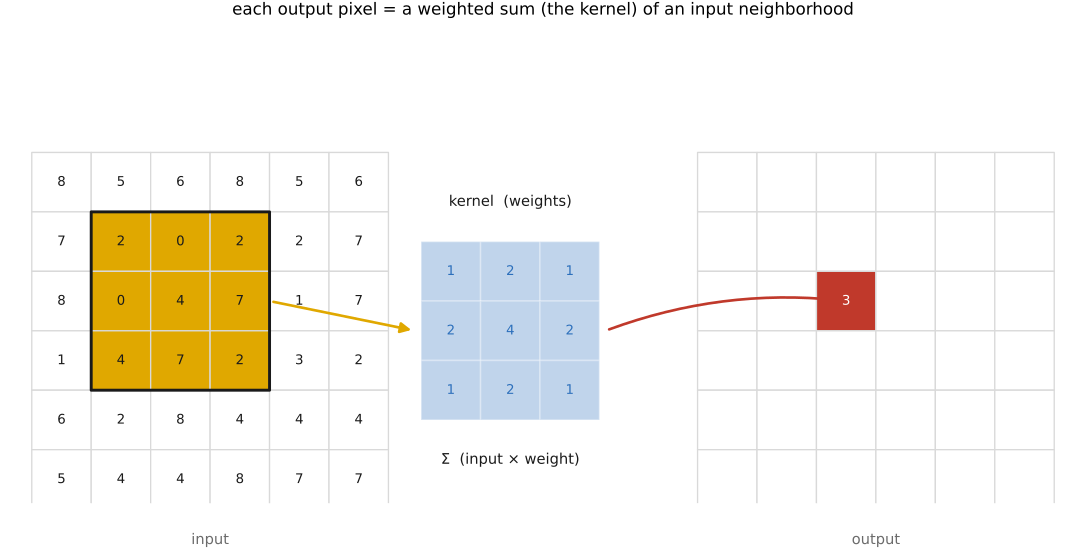
Two properties of this scheme are worth naming, because together they pin down the family of filters we can handle cleanly. First, it is linear: each output pixel is a weighted sum of input values with fixed weights, so scaling the input scales the output, and adding two images adds their outputs. (Formally, an operation $F$ is linear when $F(a\,I + b\,J) = a\,F(I) + b\,F(J)$ for any images $I, J$ and scalars $a, b$.) Second, it is shift-invariant: the same kernel applies at every pixel, so the operation does not care where in the image you are. Shift the input and the output just shifts to match. An operation that is both is a linear shift-invariant (LSI) filter, and convolution is precisely the LSI operation — no more, no less.
Both conditions are real constraints, and it helps to watch one break. A graduated neutral-density filter — the kind that darkens the sky at the top of the frame while leaving the foreground alone — multiplies each pixel by a factor that depends on its row, say $(1 - y/y_\max)$. That is still linear (scaling the input scales the output), but it is emphatically not shift-invariant: slide the image down and the darkening falls on different content. So it is a linear operation that is not a convolution. Convolution is the well-behaved special case where the rule is identical everywhere, and that uniformity is exactly what later lets the Fourier transform pry it open.
Convolution assumes one kernel applied everywhere (shift-invariant). Much real optical blur breaks that. Defocus blurs each object by an amount set by its depth, so a scene with near and far subjects holds many blur sizes at once. Camera shake is mostly a rotation of the camera, which smears the corners more than the center and along curved paths — one motion, but a different streak at every pixel. Spherical aberration, coma, and field curvature worsen toward the frame edge, and chromatic aberration even differs per colour channel. None of these is "a single kernel convolved over the whole image." The saving grace is locality: zoom into a small enough patch and the blur is approximately constant there, so it behaves as a local convolution — the image is a patchwork of slowly-varying kernels (a spatially-varying PSF). That is why the clean intuitions built in this chapter — blur is linear, deblurring is inverting a linear system, and how recoverable it is depends on which frequencies the kernel destroyed — still largely hold; what changes is bookkeeping (a field of kernels, or a physical motion model), not the core lesson. The honest, global treatment of camera-shake blur is in Blind deblurring.
Why insist on linearity at all? Because linear operations are the ones we have tools for. If blur is linear, then deblurring is inverting a linear system, and linear algebra can tell us in advance how hard that will be — whether the blur discarded information for good or merely scrambled it recoverably (the deblurring chapter's spoiler: usually somewhere in between). A nonlinear smear offers no such handle. One caveat to flag now and revisit: because blur is a physical, linear mixing of light, it acts on linear-light values, not on the gamma-encoded numbers a PNG stores. Blurring the gamma values is a common, visible mistake; we return to it in the blur zoo.
The algorithm itself is a short loop. Zero the output, then for every output pixel, walk over the kernel, multiply each input neighbor by its weight, and accumulate:
for each output pixel (x, y):
    out[x, y] = 0
    for each kernel offset (x', y'):
        out[x, y] += in[x + x', y + y'] · g[x', y']
assuming the kernel's coordinates are centred on zero. Read it back in words: each output pixel is the sum, over its neighborhood, of input value times the weight sitting on it. That is the entire computation — and yet a subtle sign issue lurks inside it, which is the subject of the next section.
3.6.3 The flip: where-from vs. where-to⧉
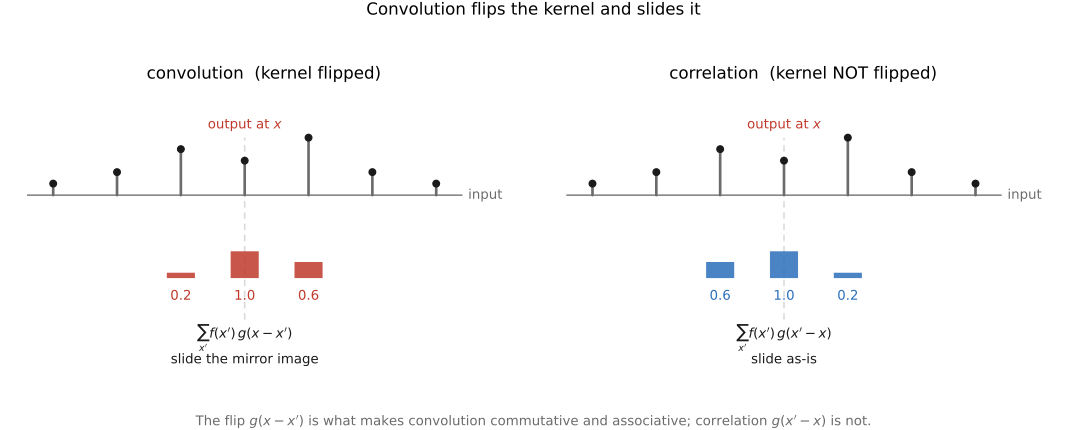
The loop just written reads in[x + x'] — the neighbor ahead by the offset. The textbook definition of convolution reads the neighbor behind; it subtracts the offset:
In words: to get the output at $x$, sum over all input positions $x'$, each weighted by the kernel evaluated at $x - x'$ — the kernel is flipped (and slid) before it is multiplied in. Why the flip, and does it matter?
The flip is the difference between where light goes to and where light comes from. The physical, forward model says light at scene position $x$ lands, blurred, at sensor positions $x + x'$ for the offsets in the kernel — light spreads outward. But when we compute the output at a fixed pixel $x$, we are asking the backward question: which input pixels contributed here? The answer is the ones at $x - x'$. The minus sign is nothing but the bookkeeping of inverting "where-to" into "where-from."
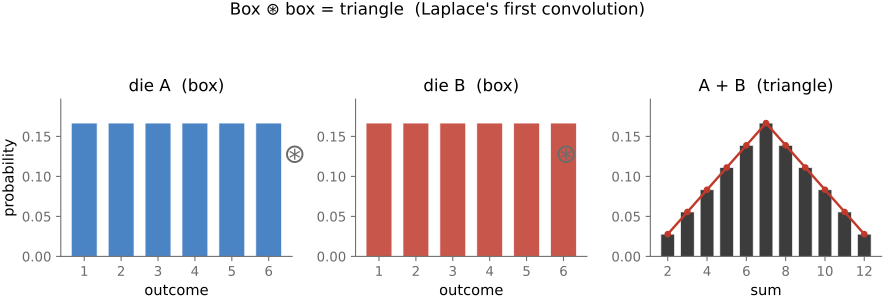
Convolution was first written down by Laplace, studying the sum of two random variables. If $X$ and $Y$ are independent with known distributions, the distribution of $X + Y$ is their convolution — and the flip falls out for free. To ask "how likely is $X + Y = x$?", enumerate the ways it can happen: $X = x'$ paired with $Y = x - x'$, for every $x'$. The second variable is forced to be the sum minus the first, and you add up the products of probabilities over all $x'$. That $x - x'$ is exactly the convolution flip — here not a convention but a logical necessity. The cleanest instance is two dice: each die is a flat distribution over 1–6 (a one-dimensional box), and the distribution of the total is that box convolved with itself, a triangle peaking at 7 (Figure 3.6.4). This is why, throwing two dice, a sum of 7 is much more likely than a 12: there are six ways to roll a 7 (1+6, 2+5, 3+4, 4+3, 5+2, 6+1) but only one way to roll a 12 (6+6), so a 7 comes up six times as often — the middling totals win because there are simply more ways to reach them. A box convolved with a box is a triangle; the box returns in the blur zoo.
Does the flip ever bite in practice? Only for asymmetric kernels. A box and a Gaussian are symmetric — flipping them changes nothing — so for the blurs that dominate this chapter you can ignore the flip entirely and the loop above is correct. But a derivative kernel like [−1, +1] is antisymmetric, and there the flip reverses the sign of the result, so it genuinely matters for gradients and sharpening. Drop the flip and you get a closely related operation called correlation, differing only in that flip. Correlation is perfectly useful — it is the natural operation for template matching, "where in the image does this patch appear?" — but it lacks convolution's clean algebra (the symmetries below), which is why convolution is the one we build the theory on.
3.6.4 Properties: the impulse, normalization, symmetry, commutativity⧉
A handful of properties make convolution pleasant to work with, and the slickest way to expose them is to feed the filter the simplest possible input: one bright pixel on a black background, the impulse $\delta$ (the discrete Dirac / Kronecker delta — one at the origin, zero everywhere else).
Convolve an impulse with a kernel and you get the kernel back, stamped at the impulse's location. The flip explains why: every output pixel asks "where did my light come from?", and the only nonzero input is the single bright pixel, so each output simply picks up the kernel weight that connects it to that pixel — tracing out the kernel. This output carries a name borrowed from optics: the point spread function (PSF), or impulse response. It is literally how the system spreads a single point of light — the very blob you saw around the streetlight. So the kernel, the impulse response, and the PSF are three names for one thing, with an immediate practical corollary: to discover what a filter does, feed it an impulse and read off the kernel. This is the single best debugging input for convolution code, and we will lean on it.
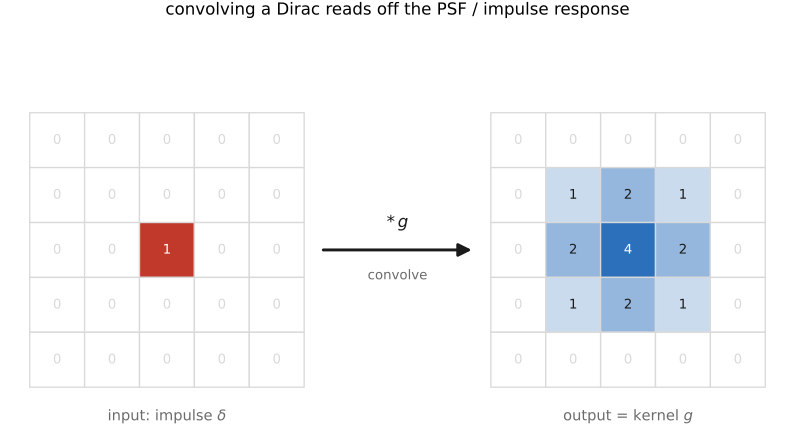
The impulse trick is also the fastest way to debug filtering code, so keep a few hand-checkable inputs at the ready. Convolve an impulse and the output is your kernel, laid out and flipped — read it off weight by weight to catch a wrong number, an off-by-one in the centring, and the flip (convolution vs. correlation) at a glance. A constant image must come back unchanged — and it does exactly when the weights sum to one, so a constant test verifies normalization. An off-centre single-1 shift kernel translates the whole image by exactly that offset, which checks the sign and direction of your indexing (and exposes a stray flip immediately). A half-plane — black on one side, white on the other — shows the border behaviour and the edge response. Do the very first test in 1-D (a 1×3 kernel), where every output pixel is computable by hand, before trusting anything in 2-D. (See the impulse picture in Figure 4.)
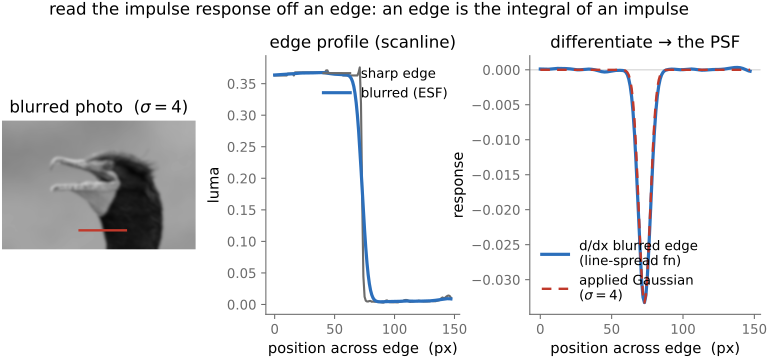
A clean impulse is a luxury you rarely have in a real photo, but a sharp edge does just as well, because a step is the running sum of an impulse. So the way a blur smears an edge is the integral of the impulse response along the edge normal: sample a scanline across a sharp boundary (its profile is the edge-spread function), differentiate it, and the bump you recover is the PSF's 1-D projection. Feed a blurred photo a real edge and the derivative hands back the very kernel that blurred it (Figure Figure 3.6.6) — the impulse test run on an edge instead of a lone pixel, and the everyday way lens sharpness (the modulation transfer function (MTF) of the next chapter) is actually measured.
The identity element follows at once: convolving with the impulse leaves the image untouched, $I * \delta = I$, because reading "where-from" with a kernel that points only at yourself just copies you. The remaining properties:
- Normalization. For a blur to preserve the image's overall brightness — neither darkening nor brightening it — the kernel weights must sum to one. A blur whose weights summed to 0.9 would dim the picture by 10% everywhere. (The rule of thumb is "normalize your kernels," but not always: a gradient kernel sums to zero on purpose, because it measures change, not brightness.) In practice the easy move is to build a kernel and then divide by its sum.
- Commutativity and associativity. $I * g = g * I$, and $(I * g) * h = I * (g * h)$. The first says it does not matter which operand you flip — the same logic as the dice, where all that matters is that the two offsets sum to the target. The second says a chain of filters can be pre-combined into one: blur-then-sharpen is a single convolution with $g * h$, computed once. These symmetries are exactly what the flip buys you; correlation has neither.
- Linearity, already noted, is the deepest property — it is the reason the next chapter's Fourier transform can diagonalize convolution into a simple per-frequency multiplication, and the reason deblurring is even thinkable.
3.6.5 Nitty-gritty: finite images⧉
Two practical wrinkles before the kernels themselves.
First, the kernel must be centred. Our images place $(0, 0)$ at the top-left corner, but a blur kernel is naturally centred on the pixel it is computing — its weights run from $-r$ to $+r$ around the middle, where $r$ is the kernel radius, so the full size is $(2r+1) \times (2r+1)$. An off-by-one here shifts the whole image by a pixel; an impulse test catches it instantly, because the blob lands off-centre.
Second, our images are not infinite. When the kernel hangs off the edge of the image it asks for pixels that do not exist, and we must decide what they mean — the same edge-handling choice we set up with the safe accessor in Image representation. The usual options: zero / black padding (treat the outside as black — but this darkens the borders, since a blur there averages in fake black), clamp / edge padding (repeat the nearest edge pixel — simple and safe), and mirror / reflect padding (fold the image back on itself — usually the best default, avoiding both the darkening of zero-padding and the streaking of clamp). Pick one deliberately; the figure library's gaussian_blur uses reflect.
3.6.6 A blur zoo⧉
With the mechanics settled, the only choice left is the kernel's shape. Two are worth knowing.
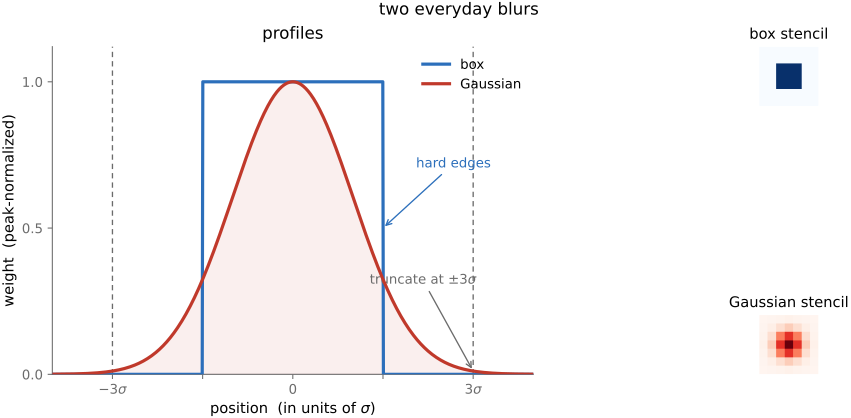
The box filter is the crudest: every pixel in a $(2r+1) \times (2r+1)$ window gets equal weight, $1/(2r+1)^2$, so the weights sum to one. It is a plain average of the neighborhood. It blurs, it is cheap, and it has a flaw — its hard square edge makes it directional (it blurs more along the diagonals) and it produces faint ringing the Fourier chapter will explain. The box is what you reach for when you want fast and rough.
The Gaussian is the workhorse. Its weights fall off smoothly with distance from the centre, following the bell curve
where $r$ is the distance to the centre and $\sigma$ (the standard deviation) sets the width — the blur's "radius" in spirit. Read it back: a neighbor's weight decays exponentially with the square of its distance, so nearby pixels count for a lot and far ones fade smoothly to nothing. The Gaussian is smooth, rotationally symmetric (no directional bias), and — as the next chapter shows — uniquely well-behaved in frequency, which is why it is the default blur almost everywhere.
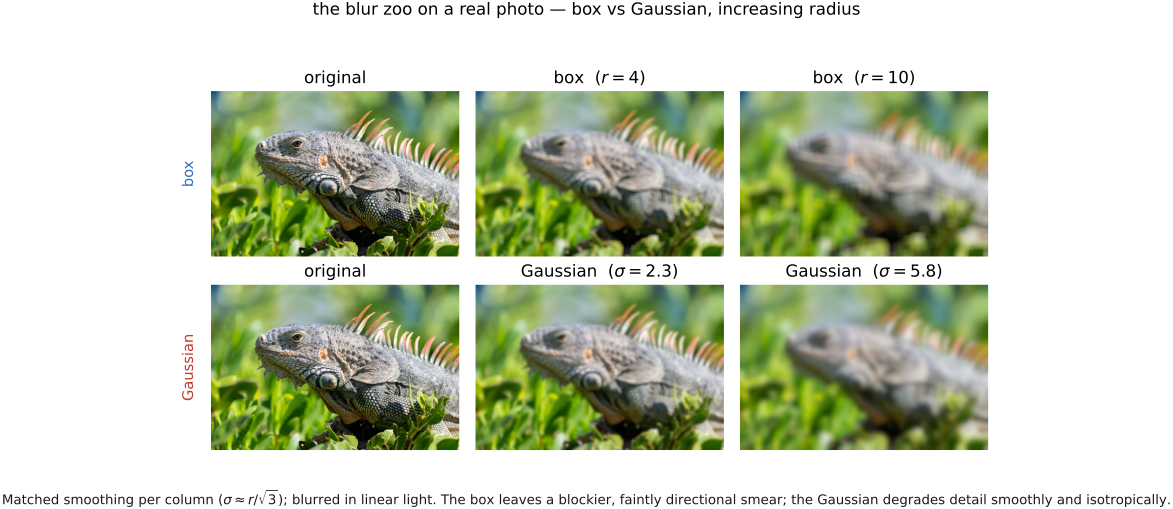
Run both on an actual photograph and the difference in feel is plain: the box smears fine texture into faintly blocky, slightly directional mush, while the Gaussian dissolves it smoothly and isotropically — which is exactly why the Gaussian is the one you reach for when the blur has to look natural (Figure Figure 3.6.8).
One technicality: the Gaussian never actually reaches zero — it has infinite support, positive everywhere. We cannot use an infinitely large kernel, so we truncate it, treating it as zero beyond some radius. A radius of 3σ is the standard choice: by three standard deviations the weights are negligible (well under 1% of the peak), so cutting them costs nothing visible while keeping the kernel finite. After truncating, renormalize so the surviving weights still sum to one.
Now the encoding warning comes due. Because blur is the physical mixing of light, a Gaussian blur should be computed in linear light — decode the gamma-encoded image to linear, blur, then re-encode. Blur the gamma values directly and the result is subtly wrong, most visibly where a bright and a dark region meet: the blurred transition bows toward dark, because gamma encoding is nonlinear and the average of two encoded values is not the encoding of their average. For gentle blurs on ordinary images you may not notice; for strong blurs, bright highlights, or anything you plan to deconvolve, it matters. (imageops.gaussian_blur operates on the array it is handed; the figure scripts feed it linear-light values whenever the physics demands it.)
3.6.7 Separability⧉
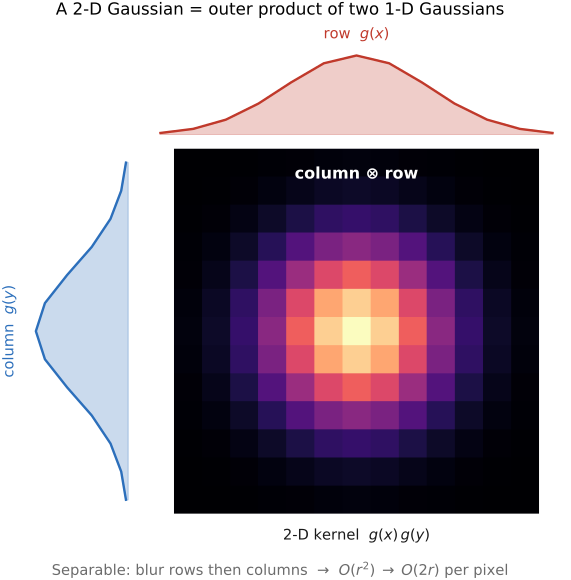
A $(2r+1) \times (2r+1)$ Gaussian appears to cost $(2r+1)^2$ multiplies per output pixel — quadratic in the radius, which is painful for a big blur. There is a beautiful escape. A 2-D filter is separable if it can be written as one 1-D filter applied along the rows followed by another along the columns — formally, the 2-D kernel is the outer product of two 1-D kernels. The Gaussian is separable, because $\exp(-(x^2 + y^2)/2\sigma^2) = \exp(-x^2/2\sigma^2) \cdot \exp(-y^2/2\sigma^2)$: a 2-D Gaussian is a horizontal 1-D Gaussian times a vertical one. (So is the box, trivially.)
The payoff is a cost win, not just elegance. Instead of one $(2r+1)^2$ pass you do two $(2r+1)$ passes — blur every row with a 1-D Gaussian, then blur every column. The cost per pixel drops from $O(r^2)$ to $O(2r)$, linear in the radius. For a $\sigma = 10$ Gaussian (radius 30, a 61×61 kernel) that is the difference between ~3700 multiplies per pixel and ~120 — a 30× speedup, and the reason large Gaussian blurs are practical at all. Separability is the first of several "do it in 1-D twice" tricks that recur through the book.
3.6.8 Gradient and oriented filters⧉
Not every useful kernel blurs. The most important non-blurring kernel measures change — how fast the image brightens or darkens as you step across it — and that turns out to be the foundation of edge detection.
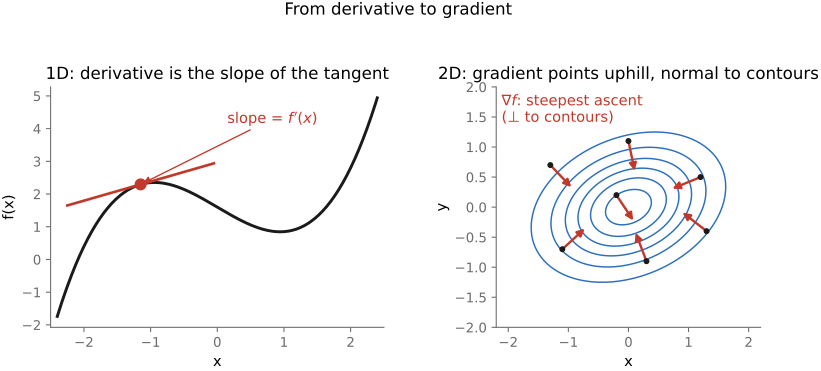
Recall from calculus that a derivative is a difference over a distance — the slope of the tangent (Figure 3.6.10, left). For a discrete image the simplest finite-difference kernel is [−1, +1], which subtracts a pixel from its right neighbor to estimate the horizontal derivative $I_x = \partial I / \partial x$. (Note the weights sum to zero — this kernel measures change, not brightness, so it is not normalized to one; and it is antisymmetric, so the flip genuinely matters.) The transpose, [−1; +1] stacked vertically, estimates the vertical derivative $I_y$. Where the image is flat the difference is zero; where it crosses an edge the difference spikes. So a derivative kernel lights up edges and ignores smooth regions.
A grayscale image is a two-dimensional function — a brightness landscape with hills and valleys — so its derivative is not a single number but a gradient: a vector that, like the slope of a hill, points in the direction of steepest brightening and is perpendicular to the contours of constant brightness (Figure 3.6.10, right). Its two components are exactly the horizontal and vertical partials, $I_x$ and $I_y$, which is why we estimate each with its own finite-difference kernel.
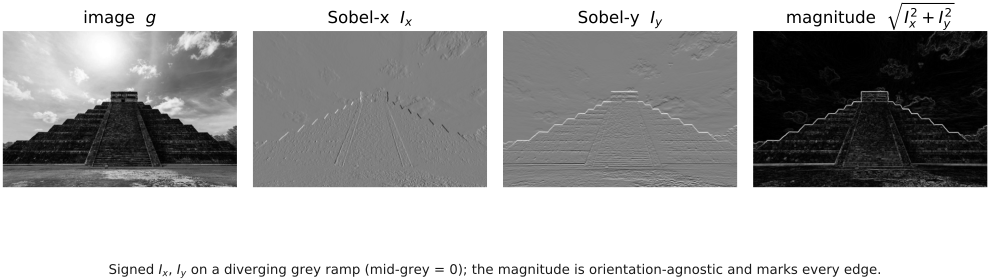
Raw finite differences are jumpy — they amplify noise, since noise is exactly small high-frequency wiggle. The standard fix is the Sobel kernel, which pairs a derivative along one axis with a little smoothing along the other:
a horizontal difference (the −1, 0, +1 across each row) blurred vertically (the 1, 2, 1 weighting down the columns) for noise robustness. Its transpose gives the vertical Sobel.
Stacking the two partials into a vector gives the image gradient $\nabla I = (I_x, I_y)$, the brightness-landscape gradient of Figure 3.6.10 applied to a real image. Two numbers fall out of it, both central to vision:
The magnitude is large exactly at edges and near zero in flat regions — a raw edge-strength map — and the orientation says which way the edge runs. Threshold the magnitude and you have a crude edge detector; the careful version (non-maximum suppression, hysteresis — the Canny detector) is a forward reference to the features chapter, but the gradient computed by two Sobel convolutions is its beating heart.
3.6.9 Sharpening⧉
Now the inverse instinct: make an image crisper. Blurring was easy — average the neighbors — but sharpening is not as obvious, because we cannot simply run blur backwards (that is deconvolution, and it is hard). The trick is to sharpen without inverting anything, by a clever detour through blur.
Here is the idea. Blur an image and you are left with its slow, smooth variations — its low frequencies. Subtract the blurred version from the original and what remains is everything the blur threw away: the fine detail, the edges, the texture — the high frequencies. Call that difference the detail (or high-pass) image. To sharpen, simply add the detail back, amplified:
In words: take the image, compute how much it exceeds its own blurred self at each pixel, and push it that much further — by a factor $k$ that controls the strength. Where the image is already smooth, $\text{in} - \text{blur}(\text{in})$ is near zero and nothing happens; where there is an edge or fine texture, the detail is large and gets boosted, so edges gain contrast and the image reads as sharper. Push $k$ too high and it over-sharpens — you can absolutely overdo it. This is the unsharp mask, the standard sharpen in every editor.
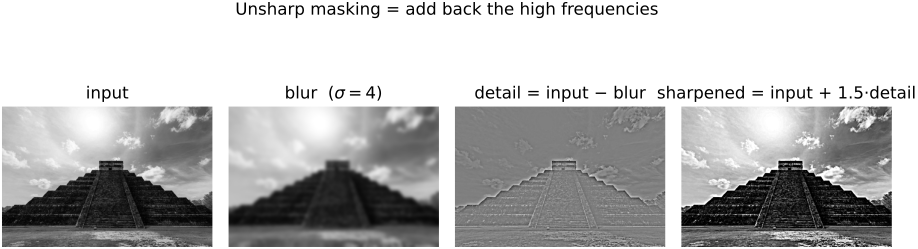
Because each step here is linear, the whole sharpening operation is itself a single convolution — a tidy illustration of associativity. Writing the blur as a kernel $g$ and the impulse as $\delta$, the sharpening filter is
a kernel that is a positive spike at the centre (greater than 1, to boost the pixel) surrounded by a negative ring (to subtract the neighbors). That $\delta - g$ shape — centre positive, surround negative — is the signature of sharpening, with a clean intuition: it amplifies the difference between a pixel and its neighbors. (Many such kernels exist, just as there were many blurs; this is the canonical one.)
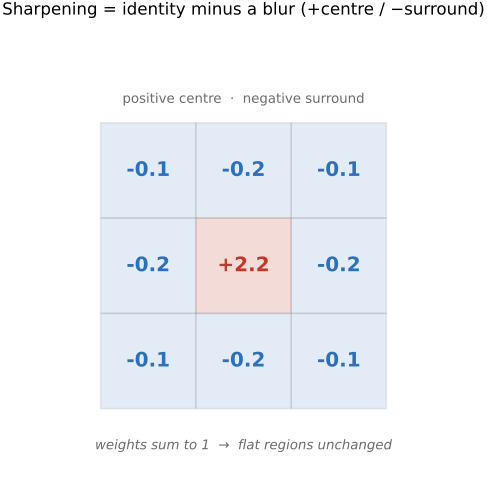
The name is a darkroom relic. Before digital, photographers sharpened a negative by sandwiching it with a slightly blurred, low-contrast positive copy — an "unsharp mask" — held a hair out of focus against the original. Where the two disagreed (at edges), the sandwich let extra light through, boosting edge contrast; where they agreed (flat areas), they cancelled. That is exactly $\text{in} - \text{blur}$, done in silver instead of arithmetic, and the name stuck.
3.6.10 Non-linear sharpening⧉
Linear unsharp masking is the standard sharpen, and it has two failure modes that motivate everything left in this chapter.
First, it amplifies noise. In a flat region — a clear sky, a smooth wall — there is no real detail, so $\text{in} - \text{blur}$ is mostly noise. Boost it and you boost the noise, turning a clean sky grainy. Second, it haloes at strong edges. Near a high-contrast boundary the detail image swings strongly positive on the bright side and negative on the dark side; amplify that and you get a bright fringe along one side of the edge and a dark fringe along the other — the tell-tale "halo" of an over-sharpened photo. Both failures appear on a real photo as the gain $k$ is pushed up (Figure Figure 3.6.14): a scanline across a strong edge shows the boosted detail overshooting into a bright/dark ring, while the smooth background turns gritty.
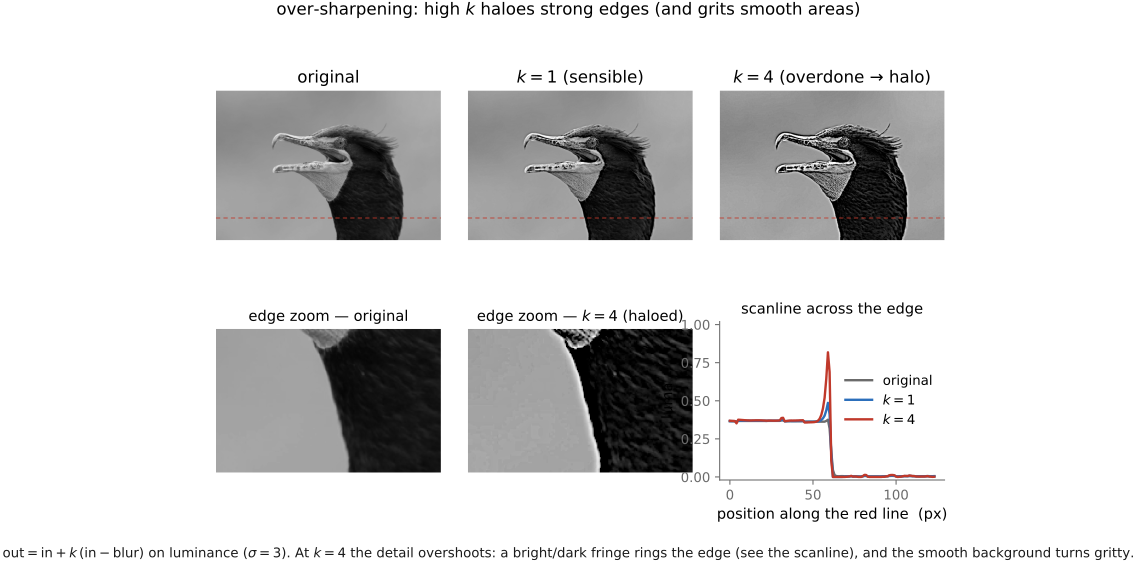
Both failures share a root cause: linear sharpening is blind to context. It applies the same boost everywhere, whether the local variation is meaningful detail or meaningless noise, whether the edge is gentle or violent. The fix is to make the sharpening adaptive — to gate the boost by what is locally happening: sharpen hard in textured, detailed regions where there is real structure to enhance, and back off in smooth regions (where the boost would only amplify noise) and at the most extreme edges (where it would only halo). One can steer the gain by local edgeness or intensity; the cubic and rational variants (Ramponi 1998) and the adaptive-control scheme of Polesel, Ramponi & Mathews (2000) — whose whole thesis is that an adaptive filter should enhance high-detail areas and leave smooth ones nearly alone — are the canonical references. Real editors fold in the same wisdom: apply sharpening mostly to luminance (not chrominance, where it just colors the noise), only in midtones (to avoid haloing the black and white points), and only near edges. We will give the principled version in the edge-preserving part.
But notice what "gate the boost by local edgeness" really demands. It asks the filter to know whether two nearby pixels belong to the same surface or straddle an edge — to treat neighbors differently depending on how similar they are. That is precisely the capability a plain convolution lacks, because a convolution reuses the same weights everywhere by definition. To get it, we must break shift-invariance on purpose. That is the next — and last — idea of the chapter, and one of the most important in the book.
3.6.11 Edge-preserving filtering: the nonlinear escape⧉
Step back to blur and look at its central weakness, the one the adaptive-sharpening discussion just circled. A Gaussian blur cleans noise beautifully — average a pixel with its neighbors and the random fluctuations cancel (the statistics are in the denoising chapter) — but it smears edges, because it averages across them too. Stand a filter on a sharp boundary between a dark region and a bright one and the Gaussian dutifully mixes the two, blurring the edge into a gradient. The smoothing we wanted in the flat regions destroys the structure we wanted to keep.
Why does this happen? Because a convolution weights a neighbor purely by how far away it is — the spatial Gaussian — so a far-but-similar pixel and a near-but-different pixel are treated by distance alone. Across an edge, the neighbors on the other side are spatially close but wildly different in value, and the blur averages them in regardless. They pollute the estimate: a pixel that belongs to the dark surface gets contaminated by bright pixels that have nothing to do with it.
The fix is breathtakingly simple to state. When you average a pixel with its neighbors, weight each neighbor not only by how close it is, but by how similar its value is. A neighbor that is nearby and the same color counts fully; a neighbor that is nearby but a very different color — because it sits across an edge — gets a low weight, or none. The averaging still smooths noise within a region (where neighbors agree), but it refuses to cross edges (where they disagree), so edges survive. This is the bilateral filter (Tomasi & Manduchi, 1998), so named because it combines two notions of distance: distance in space and distance in value (range).
Concretely, the bilateral filter keeps the spatial Gaussian $f(\|p - q\|)$ of an ordinary blur but multiplies it by a second Gaussian $g(|I(p) - I(q)|)$ on the intensity difference between the centre pixel $p$ and the neighbor $q$. The weight of neighbor $q$ in the average for pixel $p$ is the product $f \cdot g$: small unless $q$ is both spatially near and similar in value. For a color image the value difference is measured in 3-D color (RGB or, better, a perceptual space). One bookkeeping consequence: because the weights now depend on the pixel values, they are different for every output pixel, so unlike convolution we cannot pre-normalize the kernel once and for all — we must divide each output by its own sum of weights, a per-pixel normalization.
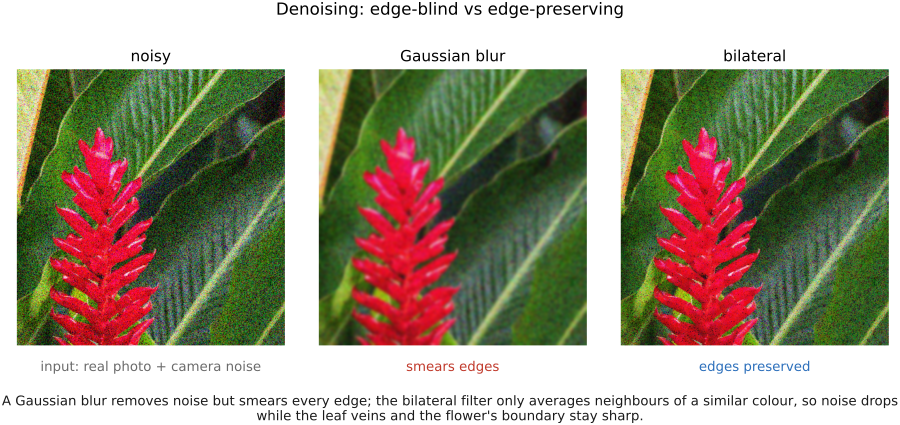
That value-dependence is exactly what makes the bilateral filter nonlinear and not shift-invariant: the weights are read from the image content, so two images do not add through it (the weights would change), and identical neighborhoods in different surroundings are treated differently. We have deliberately left the comfortable world of convolution — and gained the ability to smooth without destroying structure. The price is the loss of the clean algebra (no commutativity, no Fourier diagonalization) and a higher cost (you cannot precompute or separate the range weights — recompute $g$ for every pixel pair).
The single idea behind the bilateral filter, and behind a whole family of methods to come, is to use the color / intensity difference between two pixels as a measure of how much they "belong together" — their affinity. Pixels that look alike are probably the same surface and should influence each other; pixels that look very different are probably split by an edge and should not. Once you see filtering this way — averaging weighted by affinity rather than by distance alone — you hold the key to edge-aware denoising, edge-aware sharpening, local tone mapping without halos, matting, colorization, and more. The bilateral filter is just the most direct instance: affinity is value-similarity. Keep this lesson; it returns throughout the book.
This is also the principled answer to the adaptive-sharpening problem we left open: sharpen the detail the bilateral filter preserves, not the noise it rejects, and the halos and grain go away. And it is the engine of local tone mapping — split an image into a smooth base layer (an edge-preserving blur) and a detail layer (the rest), compress the base to fit a huge range into a small display, and recombine — a best-of-both decomposition developed in the high dynamic range (HDR) chapter. For now the takeaway is the lesson in the margin: when distance-based averaging fails because it ignores edges, replace distance with affinity, and let the image tell you which neighbors to trust.
3.6.12 Where this goes next⧉
We have built every neighborhood operation out of one idea — a weighted average of neighbors — and split it cleanly in two. When the weights are fixed (the same everywhere), we have convolution: linear, shift-invariant, blessed with normalization, commutativity, and an impulse response, the basis of blur, gradients, and sharpening. When the weights are allowed to depend on the image, we get edge-preserving filters like the bilateral, nonlinear but able to smooth without smearing.
Two threads run forward from here. The first is the Fourier transform (next chapter): every convolution we wrote as a sliding sum turns into a simple per-frequency multiplication in the right basis, which is what finally makes blur easy to analyze and — sometimes — to invert, the deblurring we promised. The second is the affinity lesson, which graduates from a single filter into a way of thinking about edge-aware processing that recurs for the rest of the book. Convolution is the linear backbone of image processing; the bilateral filter is the first crack of light into the nonlinear world beyond it.
Big lessons of this chapter
The recurring principles from this chapter, gathered for review.
The single idea behind the bilateral filter, and behind a whole family of methods to come, is to use the color / intensity difference between two pixels as a measure of how much they "belong together" — their affinity. Pixels that look alike are probably the same surface and should influence each other; pixels that look very different are probably split by an edge and should not. Once you see filtering this way — averaging weighted by affinity rather than by distance alone — you hold the key to edge-aware denoising, edge-aware sharpening, local tone mapping without halos, matting, colorization, and more. The bilateral filter is just the most direct instance: affinity is value-similarity. Keep this lesson; it returns throughout the book.