3.2 Developing, Testing and Debugging⧉
PS0 sets up the toolchain, a minimal image class, and image I/O. → Problem sets (appendix).
Let me start with an admission that will save you some grief. Most of the time you spend writing image-processing code will not go into writing it. It will go into figuring out why the picture that came out looks wrong — too dark, shifted by a pixel, fringed with color, peppered with NaN, or, on a genuinely bad day, not coming out at all because the program crashed. Image code has a special talent for failing quietly. A bug in ordinary software throws an exception or prints a wrong number and you notice. A bug in a blur produces a perfectly valid image that is merely a touch too soft, or a hair too dark at the borders — and it sails right past you unless you are in the habit of looking. This chapter is about that habit, and the few others that go with it.
Nothing here is specific to fancy algorithms. It is the unglamorous craft of getting code to actually work, adapted to the awkward fact that your data is a few million numbers you cannot read by eye. The principles are common sense; the reason to spell them out is that under deadline pressure everyone quietly abandons them, and every lapse costs you an afternoon. We go through the workflow, then the handful of principles that do most of the work, then the single best trick — testing on inputs you can verify by hand — before turning to the per-algorithm recipes, the dreaded segmentation fault, and a word on writing this kind of code with a large language model (LLM) at your elbow.
3.2.1 The workflow: build, run, look at the picture⧉
The mechanics will be familiar from any programming course. You write code in your favorite text editor or integrated development environment (IDE); you build, run, and repeat. What is different for images is the run step, because the thing you most need to inspect is not a variable sitting in a debugger — it is a picture.
So the one habit that anchors this entire chapter fits in a sentence: write your intermediate images to disk and open them. Saving a .png after each stage of your pipeline is the image-processing equivalent of a print statement — the "printf of image code." (We use PNG precisely because it is trivial to read and write; see Image representation.) When the final output is wrong, you do not squint at the source guessing which stage spoiled it. You open the intermediate images and see where things first went bad. The blurred image looks fine but the sharpened one is full of black specks? The bug is in sharpening, and you localized it in ten seconds without reading a line of code.
Saving to disk is the zero-setup default and it always works, so reach for it first. If you catch yourself dumping the same images over and over while tuning a parameter, it is worth wiring up a small display straight from your code — a window that pops the array on screen, or a tiny browser-based interface that lays a few intermediates side by side. That is a convenience, not a requirement. The discipline is looking at the picture; the tooling you look at it with is up to you.
Before you debug anything, write the smallest possible helper that takes an array and puts it on screen or on disk, and make calling it effortless: one short name, no ceremony. The friction of inspecting an intermediate result is the single biggest predictor of whether you will actually do it. If dumping a debug image costs one line, you will do it constantly and find bugs in minutes. If it costs a five-line incantation every time, you will skip it and reason in your head instead — which, as the next section argues, is exactly the mistake.
3.2.2 Principles⧉
A few principles sit underneath everything else. Written down they look obvious. The reason to write them down anyway is that under pressure everyone violates them, and every violation costs an afternoon.
Doubt everything. Assume no piece of your code works until you have watched it work. Not the convolution you wrote yesterday, not the helper you lifted from your own earlier project, and especially not the part that is "too simple to be wrong." The most painful bugs hide in the piece you were so sure of that you never bothered to check it.
Test incrementally. Never write the whole program and then run it for the first time. If you implement five stages and only then hit run, a wrong final image could be any one of the five — or any interaction among them — and you are searching a haystack. Implement one stage, test it, convince yourself it is right, and only then build the next on top. Bugs are cheap to catch when there is exactly one new place they could be hiding.
Isolate, and binary-search the bug. When something is wrong in a long pipeline, do not read it top to bottom hoping the error jumps out. Cut the problem in half: look at the image halfway through. Already wrong there? The bug is upstream — check halfway through that half. Still fine? The bug is downstream. Each look halves the suspect region, so you pin a bug in a ten-stage pipeline in three or four checks instead of ten. This is plain divide-and-conquer, the move you would use on any system, applied to a chain of images.
Change one thing at a time. When you are fixing a bug or chasing an effect, vary a single thing between runs. Change three things at once, watch the output move, and you have no idea which change did it — and if two of them are bugs that partly cancel, you will be thoroughly lost. One knob per experiment.
Display, don't guess. This is the principle that swallows the others, and the one people resist hardest, because reading the code feels faster than running it. It is not. Your mental model of what the code does is precisely the thing that is wrong — that is why there is a bug. So stop reasoning about what the array probably holds and dump it. Look at the actual numbers, the actual picture. Do not stare at the code trying to guess how it behaves; display enough intermediate information to know.
There is a sharp little corollary to "display, don't guess" worth promoting to a habit of its own.
Your code runs, the output looks plausible, and you want to confirm that a particular line is actually doing what you think. Deliberately break it — comment it out, zero its effect, flip its sign — and look again. If the picture changes the way you predicted, the line was doing its job and you have just proven it. If the picture doesn't change at all, that line was a no-op all along: dead code, a result you forgot to assign back, a parameter that never reached the function. A plausible-looking output is no evidence a step works; a predicted change when you break it is.
3.2.3 Test on inputs you can verify by hand⧉
If you take one concrete technique away from this chapter, take this one. The reason image bugs are hard is that you cannot check a million-pixel output by inspection — so don't start there. Feed your code tiny synthetic inputs whose correct output you can compute in your head, and check that you get exactly that. A 3×3 or 5×5 image is plenty; you can read every number.
A small zoo of these inputs covers most needs, and each isolates a different kind of failure:
- A constant image — every pixel the same value. Almost any well-behaved operation should leave a constant essentially unchanged: a blur of a flat field is still flat; a demosaicked gray patch is still that gray. If a constant comes back not constant, something is wrong at a basic level — usually normalization or an edge artifact — and you caught it on the easiest input there is.
- An impulse — all zeros with a single
1in the middle. This one is gold for anything linear; in a moment we will see it read a convolution's kernel straight off the output. - An edge / half-plane — half the image black, half white, one straight boundary. This stresses exactly where filters and resampling misbehave: at discontinuities. Halos, ringing, and color fringing all show up here and nowhere on a constant.
- A rectangle — a small bright block on a dark field. A step in two directions at once, with corners; good for alignment, demosaicking, and anything where horizontal and vertical handling might diverge.
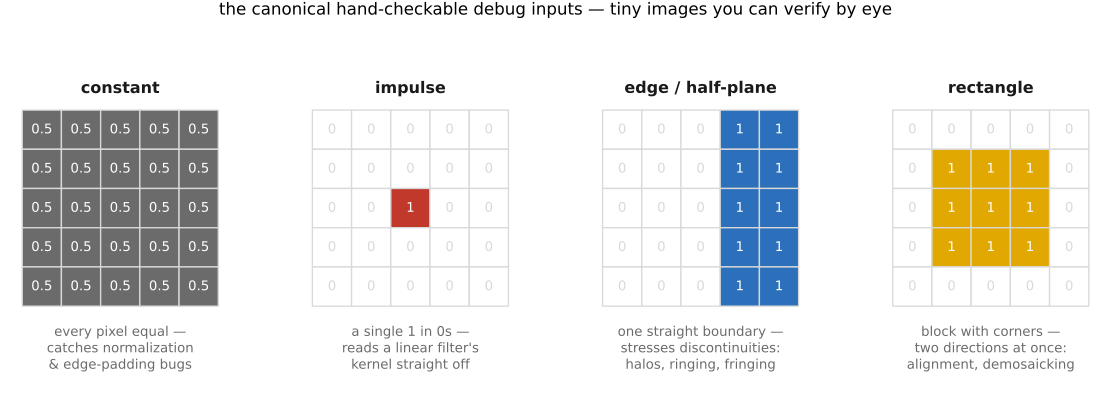
The crucial part, and the part everyone skips: feed these inputs to your intermediate stages, not only to the final program. Running the whole pipeline on an impulse tells you that something is broken; running each stage on an impulse tells you which stage. The synthetic inputs and the binary-search habit are the same idea from two directions — small inputs make each stage checkable, and checking each stage localizes the bug.
A surprising number of bugs announce themselves on a constant image, because a constant strips away every spatial effect and leaves only the value-handling exposed. If a uniform gray comes out darker — a classic symptom — your filter weights probably don't sum to 1 (the kernel isn't normalized), or your edge handling is padding with black and dragging the borders down. Either way you caught a real bug on an input you could verify in your head, before a single real photo was involved.
3.2.4 Per-algorithm debug recipes⧉
The general inputs above specialize beautifully once you know what a particular algorithm is supposed to do — an impulse reads a convolution kernel straight off the output, a known sub-pixel shift validates image alignment, the two limiting cases of the range parameter bracket the bilateral filter, and a constant patch tests demosaicking for channel leakage. Rather than work those recipes here, we keep them where they belong: each one now lives as a debug sidebar inside the algorithm's own chapter, next to the algorithm it tests.
- the impulse-reads-the-kernel test for convolution → Convolution;
- the constant / rectangle checks for demosaicking → Demosaicking;
- the large-/small-$\sigma_r$ limits of the bilateral filter → Bilateral filtering;
- the known 1–2 pixel shift for image alignment → Multiple-exposure imaging.
Notice the shape they all share: pick an input whose correct output you can state in advance, then check you got exactly that. The method never changes; the algorithm only changes what "correct" looks like.
3.2.5 Crashes and bounds⧉
Sometimes the program does not produce a wrong image — it dies. A segmentation fault, an index out of range, a process that simply vanishes. Image code crashes for a characteristic reason, and there is a characteristic fix.
The reason is almost always an array index gone out of bounds. You ask for a pixel that isn't there — x = -1 at the left edge, y = height at the bottom, a neighbour one step past the boundary in a filter loop. The maddening part is that the crash usually surfaces far from its cause. In C++ especially, reading or writing just past the end of a vector may not crash on the spot; it quietly corrupts adjacent memory, and the program topples over later, deep inside some innocent unrelated function, pointing your debugger at a line that is completely fine. So when you hit a segmentation fault, do not trust where it landed — suspect an index.
The fix is to make the bug surface at the moment it happens rather than later. When you suspect an indexing bug, print the offending index and the array's size right before the access, and — better — assert that every index lies in $[0, \text{size})$ before you use it. More generally, an assertion is a cheap way to pin down any property you believe should hold — that a constant came in constant, that the weights summed to 1, that a value stayed in range — so that the instant it stops being true the program halts and tells you where, instead of carrying a poisoned value downstream into a baffling final image. In a tight pixel loop you would not want these checks in your shipped, optimized build, so put them behind a debug flag: pay the cost while developing, compile it out for release. When an assertion fires it points at the exact access or invariant that broke, actual numbers in hand — no more chasing a crash that surfaced three functions away.
This is the same boundary problem we met when designing the safe pixel accessor in Image representation: a filter near the edge will ask for pixels past the boundary, and you must decide what that means (clamp, mirror, wrap, or zero). A bounds assertion and a well-defined edge policy are two sides of one coin — the assertion catches the accesses you forgot to handle, and the edge policy defines the answer for the ones you did.
Not every failure is a runtime crash. Early on, half of them are the compiler refusing to build at all, behind a wall of template noise that means nothing the first time you read it. The fastest move is rarely to reason it out from first principles: paste the error message into a search engine or an LLM and let the collective experience of everyone who hit the same message point you at the cause. A cryptic compiler error is almost always a known error, and treating it as a lookup rather than a riddle saves hours.
3.2.6 Vibe coding: writing image code with an LLM⧉
You will increasingly write this code with a large language model — call it vibe coding: describing what you want and letting the model draft it. For image processing this is mostly a genuine help and occasionally a trap, and it pays to be clear-eyed about which is which.
The good news first. For the scaffolding around your algorithms — file input/output, reading and writing PNGs, setting up that little display helper, wiring an interface, the boilerplate of looping over pixels — an LLM is excellent and you should lean on it. That is exactly the code that is tedious, well-trodden, and easy to eyeball for correctness.
The catch is the part that matters most. For code that is numerically or perceptually subtle — filtering, resampling, color, antialiasing — generated code has a habit of looking completely plausible while being subtly wrong. The model will cheerfully hand you a resampler that doesn't prefilter and so aliases, an "antialiasing" routine that isn't, or a cross-fade that goes muddy in the middle because it blended in the wrong space. None of these throw an error. None of these look wrong in the source. They are only wrong in the picture — which is precisely the failure mode this whole chapter exists to catch. So the guidance is simple: keep the model on a short leash for the subtle numerical and perceptual code, where "looks plausible" is no evidence at all, and let it run free on the boilerplate.
What makes this unnerving is that an LLM, like all of today's AI, can be remarkable and trivially incompetent in the same sitting — and not always where you would expect. I watched this play out reproducing Kemelmacher-Shlizerman & Seitz's Photobios (the morphing slideshow that ages a person smoothly across a whole collection of their photos — see Many images and photo collections). The model handled the genuinely hard parts on its own: it registered the faces from facial landmarks, and it found a dynamic-programming path through the collection so consecutive frames matched. Then it repeatedly botched the easy part — a one-line cross-fade, frame = (1−t)·start + t·end, the linear blend you would write in your sleep — and it took something like five re-prompts to get that single line right. The lesson is not that the model is dumb; it plainly isn't. The lesson is that competence on the hard stuff is no guarantee on the easy stuff, so you review even the trivial parts. The line you would never bother to check is exactly the one it will quietly get wrong.
Which means the rule for trusting generated image code is the same as the rule for trusting your own: guilty until tested. Take the impulse, the constant, the edge, the rectangle, and run the generated function on them exactly as you would run your own. The LLM cannot tell you its resampler is correct; the impulse response can.
The model is genuinely useful for debugging too, as long as you keep the verification in your own hands. Paste it a cryptic error and ask what causes that class of crash; ask it to propose a minimal reproduction of a bug; ask it where in a function to look for an off-by-one. All fair game. What you must not do is let it hand you a fix and apply it on faith — "this should fix it" carries exactly the same risk as the original generated code. Run the proposed fix against a hand-checkable input before you believe it. The LLM is a fast source of hypotheses; the impulse, the constant, and the edge remain your only source of proof.
Trust nothing — your own code or a model's — until you have watched it produce the right answer on an input simple enough to check by hand. Image code is unusually easy to get almost right and unusually hard to notice when you haven't. The defense is not cleverness; it is a small set of cheap, repeatable habits — look at the picture, test one piece at a time on inputs you can verify, change one thing, assert your bounds. Build those habits now, on three-by-three images, and they will carry you through every algorithm in the rest of this book.
Big lessons of this chapter
The recurring principles from this chapter, gathered for review.
Trust nothing — your own code or a model's — until you have watched it produce the right answer on an input simple enough to check by hand. Image code is unusually easy to get almost right and unusually hard to notice when you haven't. The defense is not cleverness; it is a small set of cheap, repeatable habits — look at the picture, test one piece at a time on inputs you can verify, change one thing, assert your bounds. Build those habits now, on three-by-three images, and they will carry you through every algorithm in the rest of this book.