BookNotesSlidesP-sets Syllabusdraft · v0.2.49.1
💬Comments welcome. To leave a note, select any text and click the note / highlight button that pops up — or open the panel with the tab at the top-right (‹). Notes are visible only inside our private review group.
Computational Photography, an AI-powered Slopendium
Frédo Durand, MIT · Version 0.2.53
expand to46 parts · 378 chapters · 2039 sections · 644 figures embedded · 166 placeholders · double-click a figure to enlarge
▸Part 1 INTRO⧉
<!--uid: intro-->
▸1.1 From digital to computational photography⧉
fig-results-montage
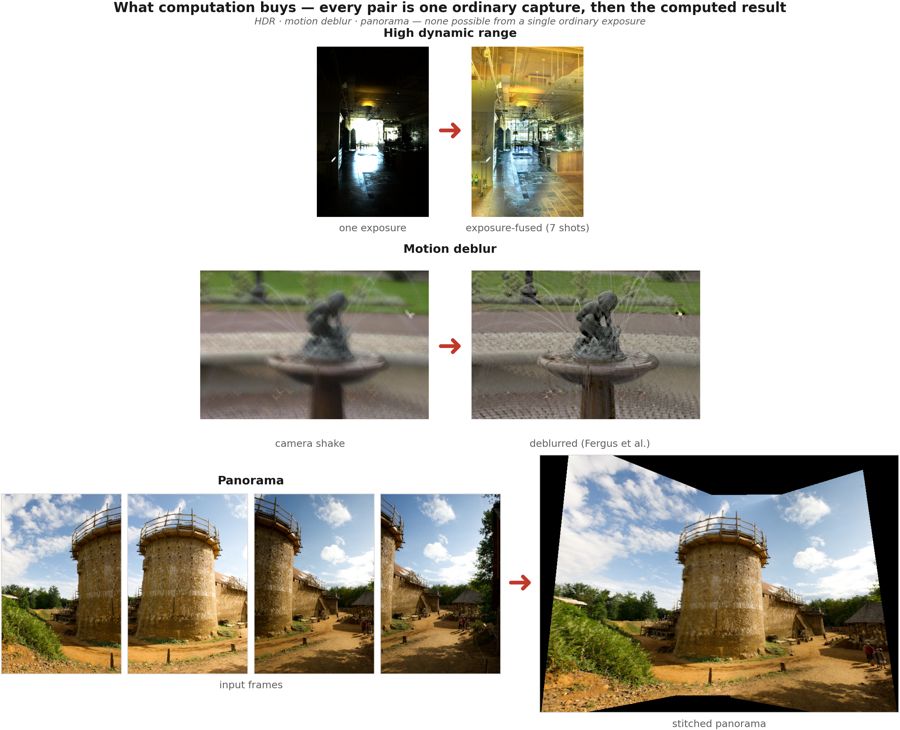
fig-results-montage · a montage of computational-photography results — HDR tone mapping, refocus-after-capture, motion deblur, a stitched panorama — the "look what computation buys you" opener ✅
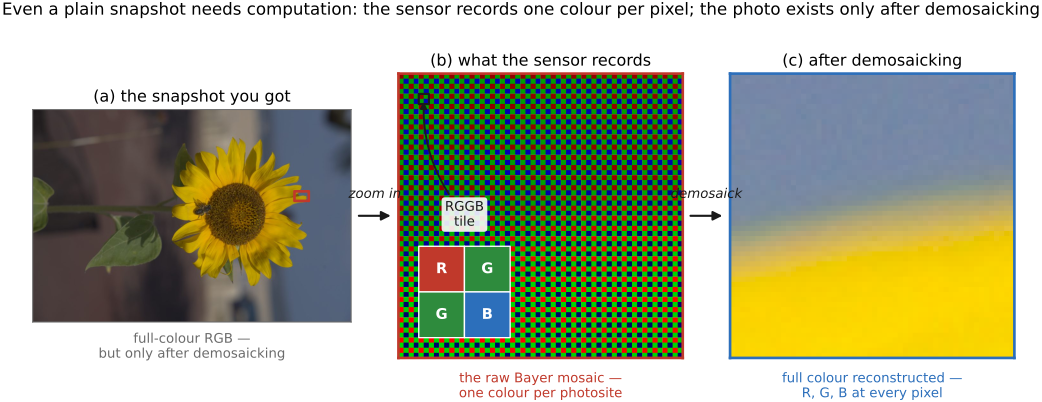
fig-demosaick-snapshot
fig-demosaick-snapshot · even a plain snapshot needs computation: one color per pixel (Bayer mosaic) → demosaicked RGB ✅
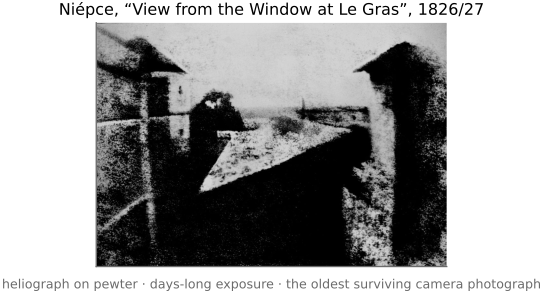
fig-first-photograph
fig-first-photograph ·
At first, the digital revolution merely replaced film by digital sensors more amenable to quick snapshots, instant gratification and sharing. But it did more than that : it created the opportunity to add arbitrary computation between the photons in a scene and the final image.
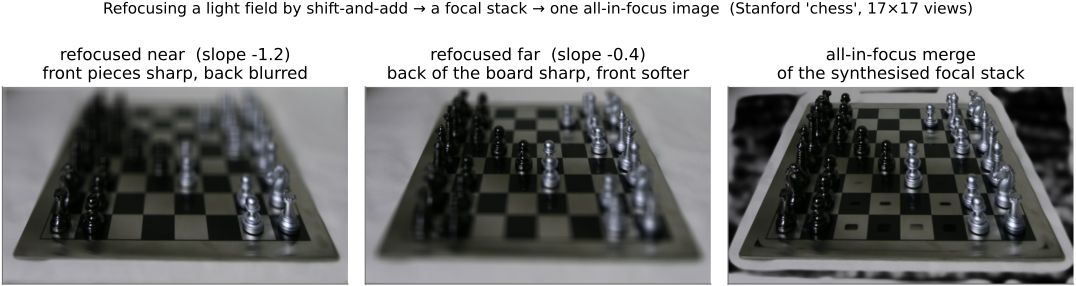
This allows us to do really cool stuff : manage scenes where contrast is excessive, computationally remove blur, combine images into virtual wide angle panoramas, and even capture the full array of light to do stuff like refocusing after the fact and extract 3D.
[results-montage figure — HDR tone mapping (Durand et al.), refocus-after-capture (Ng et al.), motion deblur (Levin et al.), panorama (problem set)]
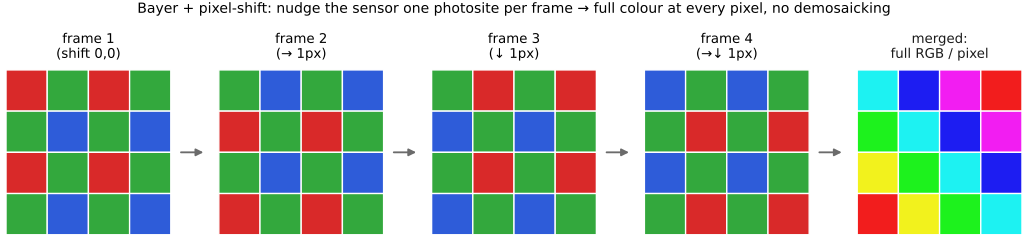
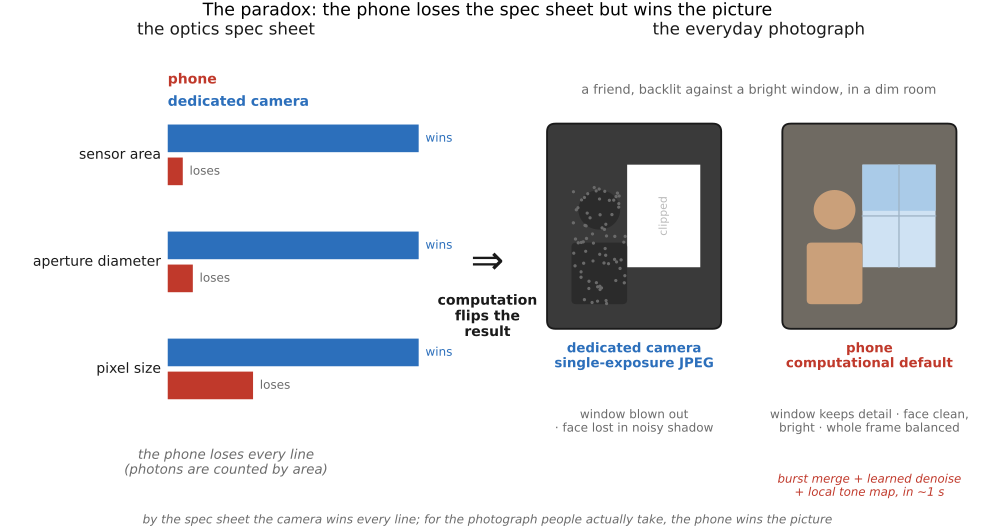
In fact, even a simple snapshot requires serious computation because each pixel usually captures only one of the 3 channels and the other two need to be reconstructed [demosaick-snapshot figure]. Cell phones these days take much better images than they have a right to because of computational photography.
Plus generative AI is poised to further revolutionize photography and image making with its ability to learn the space of all possible images in a manner reminiscent of a Borges novella (cite *The Library of Babel* and https://arxiv.org/abs/2310.01425)
1.1.3 What makes a technique useful⧉
1.1.5 Does photography still matter in the age of generative AI?⧉
1.1.6 A multidisciplinary field⧉
1.1.7 Beyond photography⧉
1.1.10 Neighboring fields, and where the work is published⧉
▸1.2 How to read this book⧉
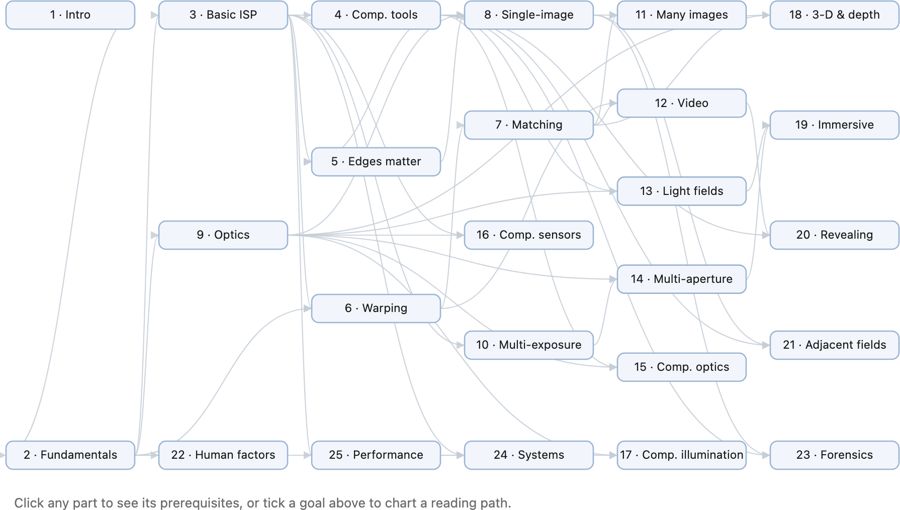
fig-chapter-dependency-graph
fig-chapter-dependency-graph · graph of chapter dependencies (provides/requires) so a reader can chart a path 🟨
• the book is organized **cross-cuttingly**: a chapter is sometimes a **tool** (convolution, the bilateral filter), sometimes a **big idea** (priors, the light field), and the major themes deliberately **recur** across chapters — the same lesson seen from several angles. The redundancy is intentional; cross-references thread the pieces together.
• **hammers and nails**: we deliberately sought a **balance between "hammers and nails"** — between **tools/techniques** (the hammers: convolution, the bilateral filter, optimization, priors) and **applications/challenges** (the nails: HDR, panoramas, deblurring, refocusing). Rather than a purely tool-first or purely application-first table of contents, the book's structure is **organized by a combination of tools and applications/challenges**, alternating between the two so each motivates the other.
• **intuition first**: lead with the idea and a picture, then the math. The audience is a **CS undergrad**, new to imaging (what to know coming in is spelled out in *[[#Prerequisites]]* below).
• **how to read**: FUNDAMENTALS grounds the physics and perception; BASIC IMAGE PROCESSING gives the toolkit; later parts build single- and multi-image computational photography. Read mostly front-to-back, or follow the dependency graph below to chart your own path.
• **how this book came to be**:
• grew out of Frédo's **computational photography course** at MIT — its lectures, slides, and problem sets are this book's backbone.
• written **with an AI collaborator** (Claude) as a deliberate experiment in **AI-assisted authoring** — the outline, figures, drafts, and the book's own tooling were co-developed; a fitting, slightly meta nod to the generative-AI theme the book itself discusses.
• the **process** (how outline, figures, and prose are generated, verified, and kept consistent) is documented in an appendix — itself a small piece of AI methodology [forward ref: "how this book was created"].
• **chapter dependency graph**:
• *(placeholder — to create later)* a **graph of chapter dependencies** belongs here, at the end of the intro: a diagram showing which chapters rely on which, so a reader can chart their own path through the book. Generate it from the **provides / requires** graph (see [[Book Generation Process#Cross-chapter dependencies]] and each section's `- prereqs:`), once enough of the book is written for the dependencies to be stable.
1.2.1 Choosing how much to read⧉
1.2.2 Machine-readable by design⧉
1.2.3 A book for machines, too⧉
▸1.3 How this book was made⧉
• a **short, intro-level** chapter (the headline version of the appendix [[Appendices#How this book was created (the early process)]]): the book is partly *about* generative AI and was partly written *with* it, so the making-of is part of the story, not a footnote.
• **where it came from**: grew out of Frédo's MIT computational photography course — ~**305k words** of auto-captured/auto-transcribed lecture transcripts, ~**114k** of slide decks, ~**42k** of problem sets (~**460k** of pre-existing teaching material) form the backbone.
• **how it was written**: drafted **with an AI collaborator** (Claude); outline/prose split with a compile step; figures are programs; the human edits triage back so re-compiling reproduces the corrections.
• **who did what**: AI for laborious-but-specified drafting, figure code, and bookkeeping; human for structure, judgment, catching subtle errors, and ownership of every claim.
• **the numbers, honestly**: ~**40.5k words** of typed prompts steered ~**735k words** of generated outline+prose (≈13–18× leverage, *not* authorship); the outline is model output too, so the earlier "2.2× human writing" framing was wrong — the real human contribution is **curation**, not keystrokes. Point to the two appendices for the full account and the under-the-hood prompts/verifiers.
▸1.4 What programming language for computational photography?⧉
• the book is **language-agnostic in its ideas** but ships in two editions — a **Python** one and a **C++** one (never one book showing both) — because the two languages serve different moments: Python to *think and prototype*, C++ to *ship and run fast*. The concepts are identical; pick the edition that matches your goal.
• **why choose which**: **Python** for **deep learning, prototyping, and convenience**; **C++** for **performance**. The gap is not small. When you write the **low-level code yourself** (e.g. your own convolution rather than a library call), the **speed differential** is dramatic: in Frédo's experience, roughly **1000× from Python to optimized C++**, and **at least another ~10× from C++ to Halide**. So the language choice is also a performance choice — see [[Making computational photography code fast]] and [[Appendices#Programming: Python, C++, and PyTorch]].
• **Python** — the right default for *learning, prototyping, and research*:
• **pros**: **readable** — NumPy array code reads almost like the math (`out = a + 0.5*b`); **fast to write and explore**, with interactive notebooks and instant feedback; a vast **ecosystem** (NumPy, SciPy, Pillow / OpenCV, scikit-image, Matplotlib, and the whole deep-learning stack — PyTorch, JAX); automatic memory; the lingua franca of research and ML.
• **cons**: **slow at the pixel level** — a naive per-pixel Python loop is orders of magnitude slower than C, so you must **vectorize** (push the loop down into NumPy's C core) or it crawls; the **GIL** limits real CPU threading; packaging / deployment is awkward; dynamic typing lets type bugs hide until run time; little control over memory layout or exact performance.
• bottom line: the right default for **learning, prototyping, and research** — and, through NumPy / PyTorch, fast *enough* for most of what we do here.
• **C++** — the right default for *performance and production*:
• **pros**: **fast and predictable** — close to the metal, with control over memory layout, cache behavior, and SIMD; what real **camera ISPs, real-time pipelines, and shipped products** are written in; static types catch errors at compile time; deploys to phones and embedded hardware.
• **cons**: **verbose and slower to write**; **manual memory management**, a rich source of bugs (out-of-bounds, leaks, use-after-free); a heavier **build / toolchain** story; far less interactive (edit–compile–run, not edit–run). The productivity tax is real.
• bottom line: the right default for **performance and production** — once the algorithm is settled and it must run fast, on device, at scale.
• **Halide** — a **domain-specific language** (embedded in C++ / Python) for high-performance image processing: you write the **algorithm** (what each pixel computes) **separately** from the **schedule** (how to tile, vectorize, parallelize, and fuse it across the memory hierarchy).
• **pros**: near-hand-tuned speed **without** hand-writing the tangled, hardware-specific loops; the *same* algorithm retargets to CPU / GPU / DSP by swapping the schedule; the basis of real camera stacks.
• **cons**: another language and mental model to learn, best reserved for the **hot paths** you have already identified — premature scheduling is its own trap. Covered properly in [[Making computational photography code fast]].
• **MATLAB (historical note)**: for years *the* platform for this work — a strong numerical/linear-algebra library and an IDE that handled **images natively** (an image is a matrix; `imread`/`imshow`/slicing; the Image Processing Toolbox); much of the literature was prototyped in it. **Largely displaced by Python** (NumPy fills the same array niche, free) and especially **PyTorch** (autodiff + GPU + deep learning, which MATLAB never matched). Worth knowing because older papers/code are in it, and its array-thinking carries over to NumPy.
• **Libraries (implement-from-scratch, then build on)**: the book has you **implement core algorithms from scratch** to understand them (the `imageops` reference), but to *build* / dive into advanced projects, stand on mature libraries — **Python**: Pillow (PIL), NumPy/SciPy, OpenCV, scikit-image, PyTorch (also a GPU-array + autodiff engine); **C++**: OpenCV (de-facto standard), Eigen (linear algebra), LibRaw (raw decode), Halide (hot paths).
• **side bar — Photoshop 1.0, in 128,000 lines (a language lesson from 1990)**: Adobe (via the **Computer History Museum**, 2013) released the source of **Photoshop 1.0.1** — **≈128,000 lines across 179 files**, written for the Macintosh by **Thomas Knoll** (its sole engineer for v1 — a computer-vision PhD student whose 1987 image-display hack became the app). The language split *is* this section's lesson, 35 years early: **≈75 % Pascal** (the productive high-level language) and **≈15 % hand-written 68000 assembly** for the speed-critical inner loops — *most of it readable, the hot pixels hand-tuned* — exactly the Python-vs-C++/Halide trade-off (a high-level language for the bulk, machine code where it counts; what **Halide** now automates). The code is famously *mostly uncommented but well-structured*. It's now studied as a cultural artifact: the **"Das digitale Bild"** project (DFG / LMU Munich) runs an ongoing **Critical-Code-Studies** *"reading the source code of Photoshop"* — code as a text to be close-read. **For scale:** today's Photoshop is reportedly **millions** of lines of C++ (Frédo's estimate ~**10 M**); **Adobe Camera Raw (ACR)** and **Lightroom** share the same Camera Raw engine, and a typical camera **ISP** is a large proprietary C/C++ codebase — exact modern sizes mostly **not public** [⚠️ confirm the ~10 M / current ACR/Lightroom/ISP figures]. (→ the hand-tuned-inner-loop angle returns in [[Making computational photography code fast]].)
• **Vibe coding (LLM-assisted)**:
• writing image code with an **LLM** ("vibe coding") is now part of the toolkit: great for **boilerplate, I/O, visualization, and explaining errors**, and a quick way to draft a function or a test.
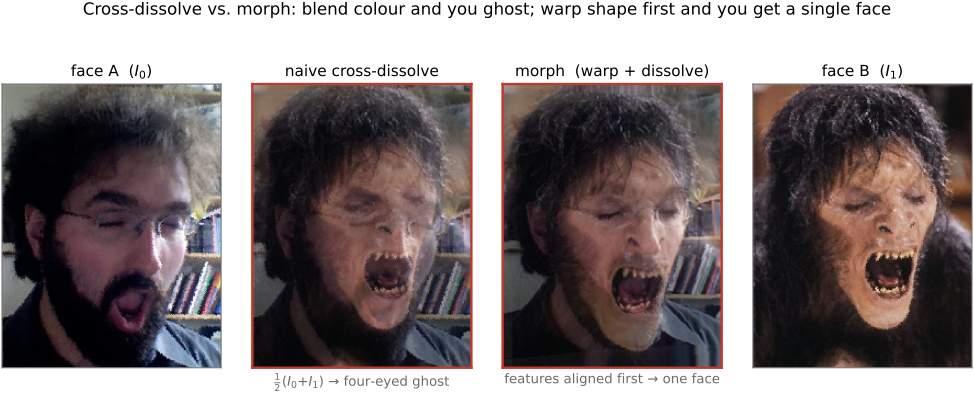
• **but** image code is **numerically and perceptually subtle** — "looks plausible" is not "correct" — so keep the model on a **short leash** for filtering, resampling, color, and antialiasing, and always **verify against a hand-checkable input** (a constant, an impulse, a half-plane) before trusting it. Treat generated image code as *guilty until tested* (see [[Developing, Testing and Debugging]]). AI coding sometimes **fumbles the trivial** even when it nails the hard parts — see the cross-fade anecdote in [[Basic image processing and ISP#Vibe coding: writing image code with an LLM]].
1.4.1 On the desktop: Python, C++, and Halide⧉
1.4.2 In the browser: JavaScript and the web stack⧉
1.4.3 On the phone: Android and iOS⧉
1.4.4 Libraries⧉
1.4.5 Vibe coding⧉
1.4.6 Programmability, or the lack thereof⧉
▸1.5 Problem sets⧉
• **PS0 — Environment & C++ basics**: toolchain setup, a minimal `Image` class, image I/O. (→ [[Developing, Testing and Debugging]])
• **PS1 — Image class, point operations, color**: pixel access, brightness/contrast, luminance–chrominance (YUV), gamma, white balance, the Spanish-Castle illusion. (→ [[Image representation]], [[Tone point operations]], [[Perceptual color and trichromatic vision]])
• **PS2 — Convolution & the bilateral filter**: box/Gaussian blur, gradients, sharpening, and bilateral denoising (with a YUV variant). (→ [[Convolution]], [[Bilateral filtering]])
• **PS3 — Denoising & demosaicking**: align-and-average a burst, ISO/variance; Bayer demosaicking (green-first, edge-based, color-difference) and Prokudin-Gorsky channel alignment. (→ [[Slopendium/Denoising]], [[Slopendium/Demosaicking and joint methods]])
• **PS4 — HDR**: merge an exposure bracket into a radiance map and tone-map it. (→ [[HDR merging]], [[Global tone mapping]])
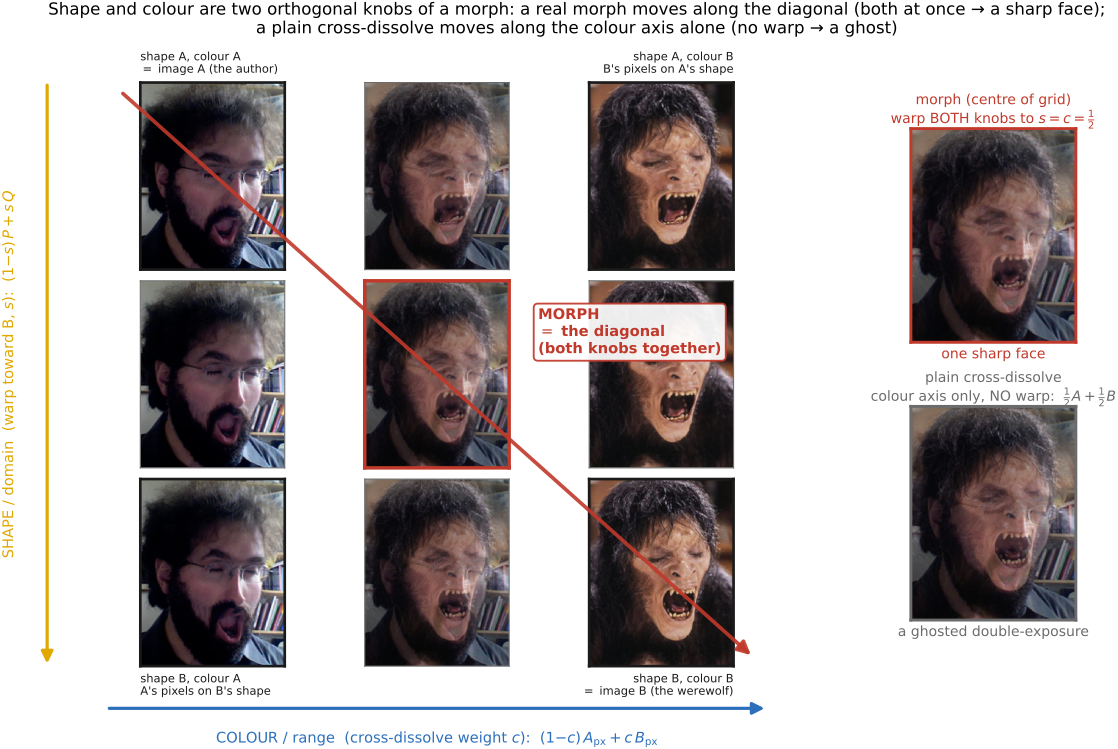
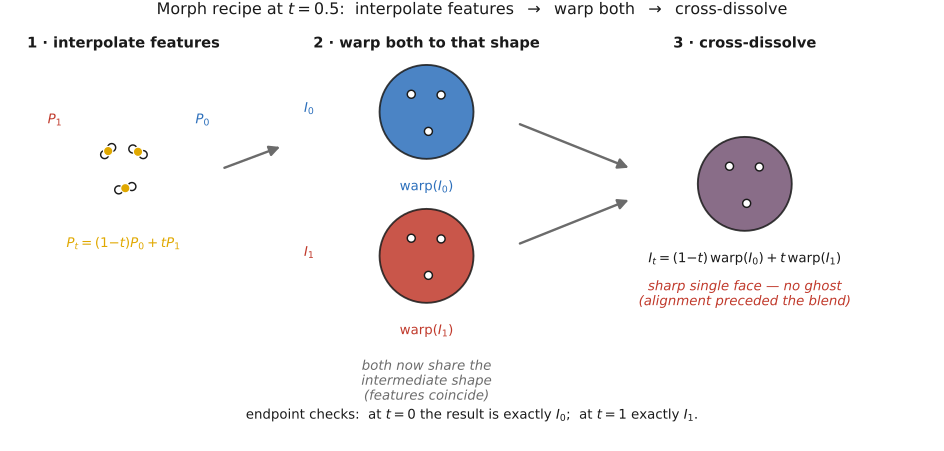
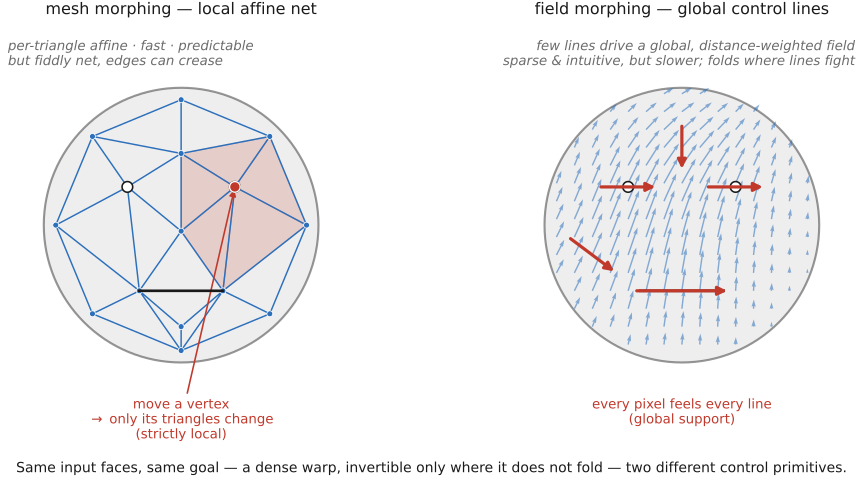
• **PS5 — Resampling, warping & morphing**: nearest/bilinear/bicubic/Lanczos resampling; Beier–Neely segment warps; a full Beier–Neely morph. (→ [[Warping]], [[Morphing]])
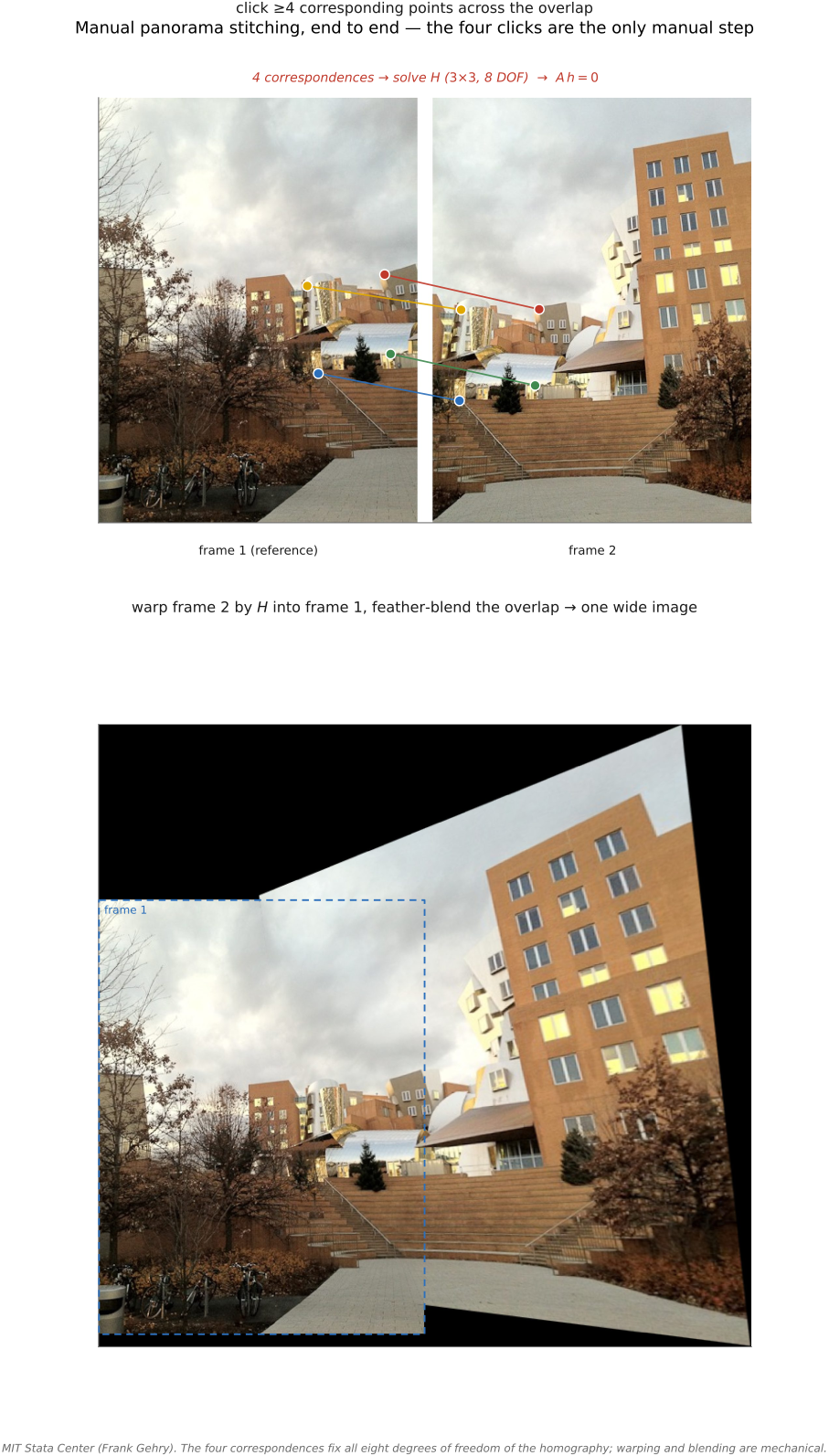
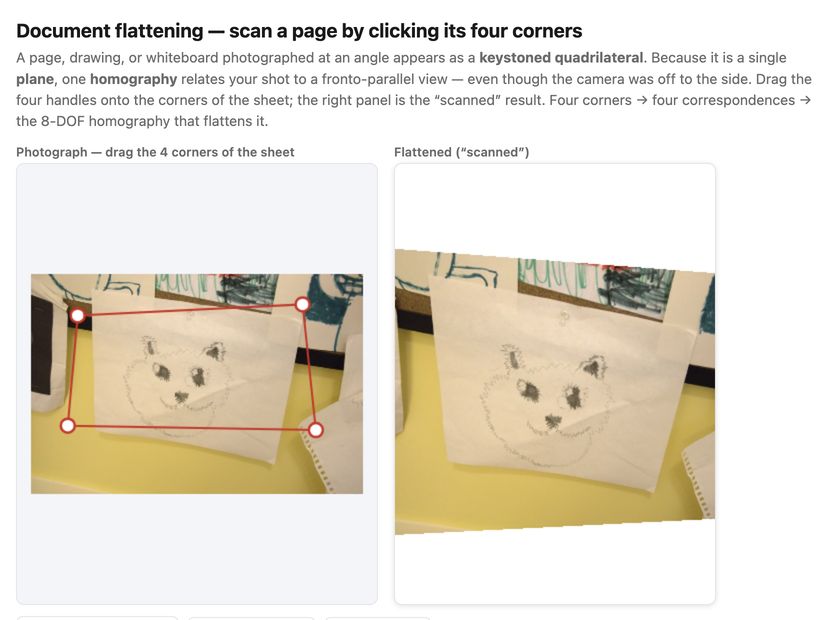
• **PS6 — Homographies & manual panoramas**: homogeneous coordinates, warp by a homography, solve $H$ from four correspondences, stitch a planar mosaic. (→ [[Manual panorama stitching from multiple views]])
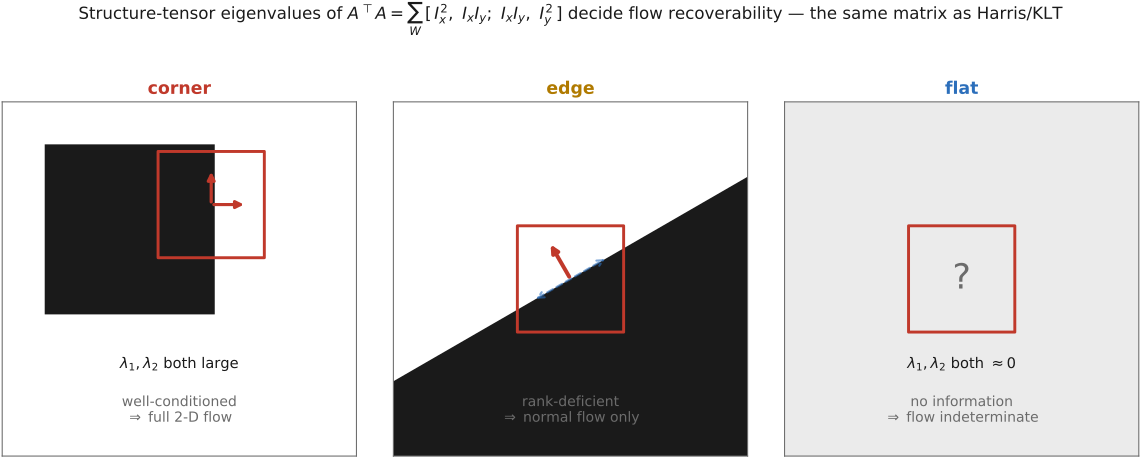
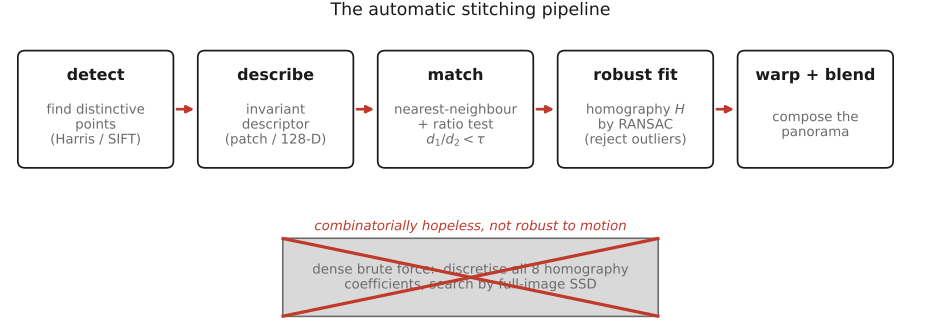
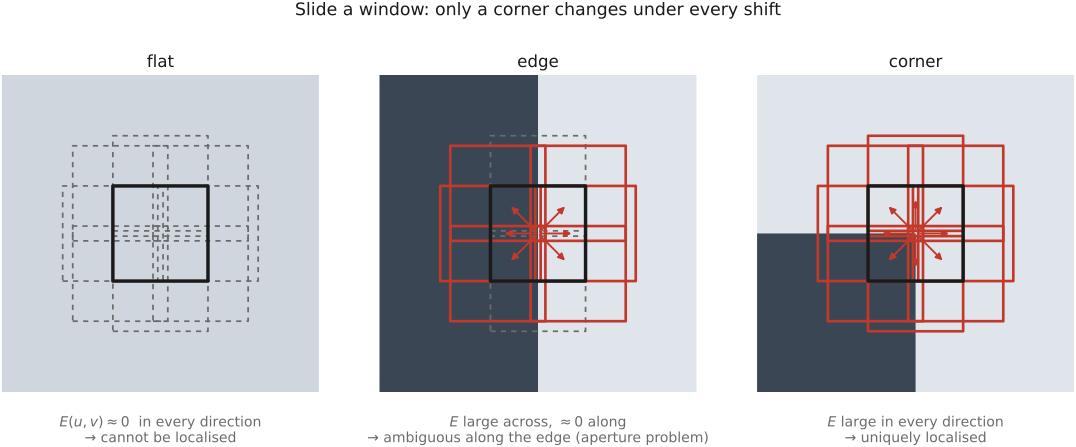
• **PS7 — Automatic panoramas**: Harris corners (structure tensor), patch descriptors, the second-nearest-neighbor ratio test, RANSAC, and feathered / two-scale blending. (→ [[Automatic panorama stitching from multiple views and feature matching]])
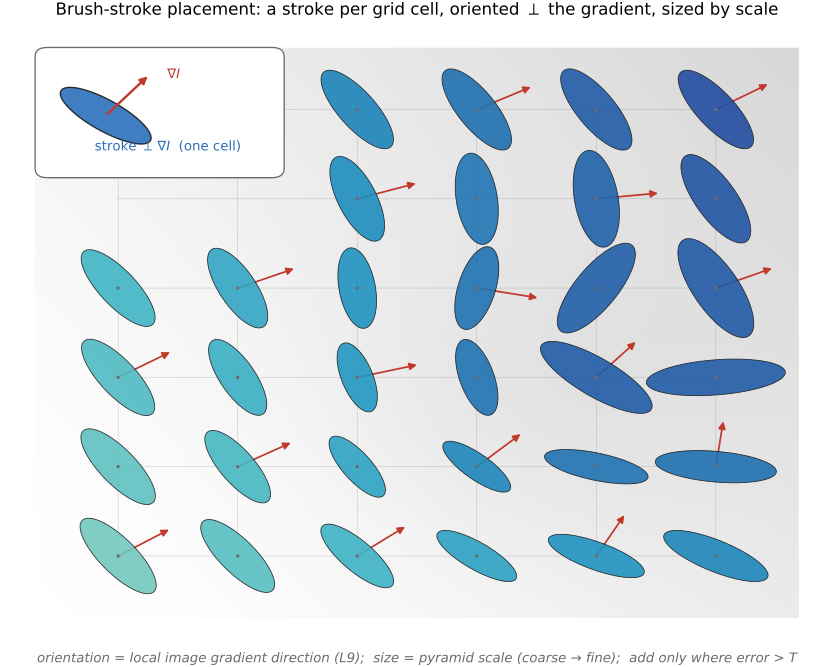
• **PS8 — Non-photorealistic rendering**: paintbrush splatting; single-scale, two-scale, and gradient-oriented painterly rendering. (→ [[Non-photorealistic rendering]])
• **PS9 — Make-your-own / video & ethics**: a self-proposed project (optical-flow retiming, phase-based video magnification, …) plus the ethics deliverable; its open menu of advanced topics seeds many [[Computational optics and coded imaging]] sections. (→ [[Optical flow]], [[Motion and video magnification|Video magnification]])
▸Part 2 FUNDAMENTALS OF IMAGING⧉
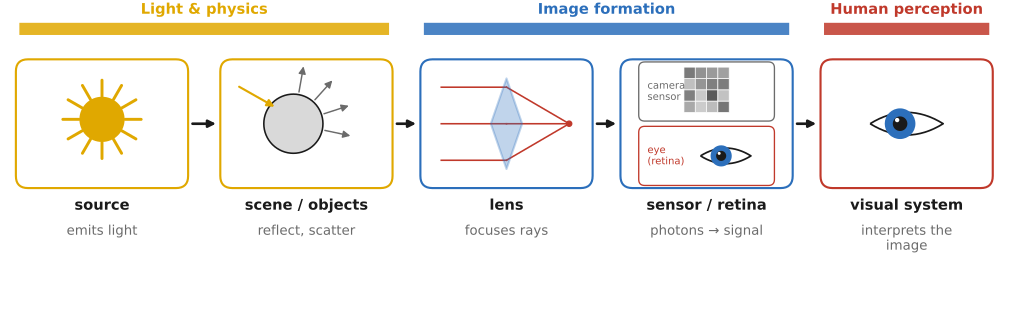
fig-light-journey
fig-light-journey · FUNDAMENTALS part opener — the journey of light: source → scene (reflection) → lens → sensor / retina → visual system, each step labeled with its chapter ✅
<!--uid: fundamentals-of-imaging-->
**Photography means writing with light** — from the Greek *phōs* ("light") and *graphē* ("drawing"). This part follows light from its source through the optics that form an image and onto the sensor that records it, studying each step in turn. What the eye and brain then make of that light — perception and **color** — is the subject of the next part, [[Visual perception and color]]; this part treats the image as a physical measurement and returns to color only to say where it is developed.
• **the path of light** (and the chapters that follow it): a **source** emits light → it strikes **objects** and is reflected, absorbed, and scattered (the scene) → it passes through a **lens** → and it lands on a camera **sensor** (its journey on into the **retina** and the **visual system** continues in [[Visual perception and color]]).
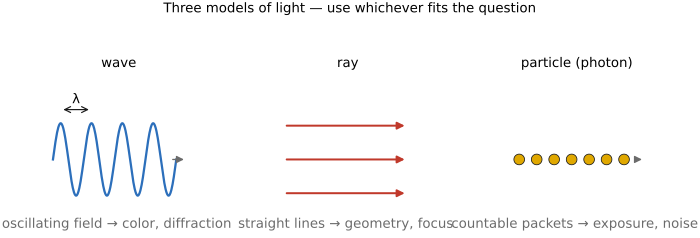
• **Light and optics** — what light *is* (wave / ray / photon), how it interacts with matter (reflection, refraction, scattering, the BRDF), and how we *measure* it (radiometry: radiance, irradiance, the inverse-square and cosine laws).
• **Image formation and linear perspective** — how a pinhole, then a **lens**, turns 3-D rays into a 2-D image (perspective projection), and the geometry that follows: **depth of field** and **motion blur**.
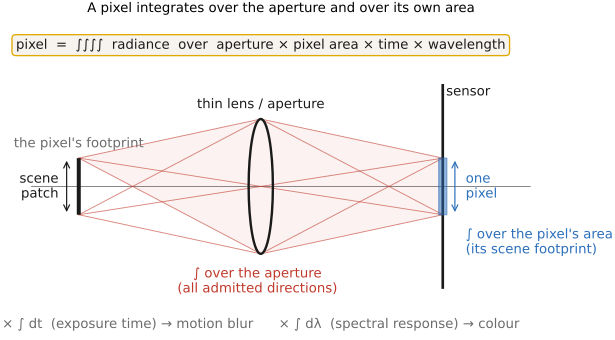
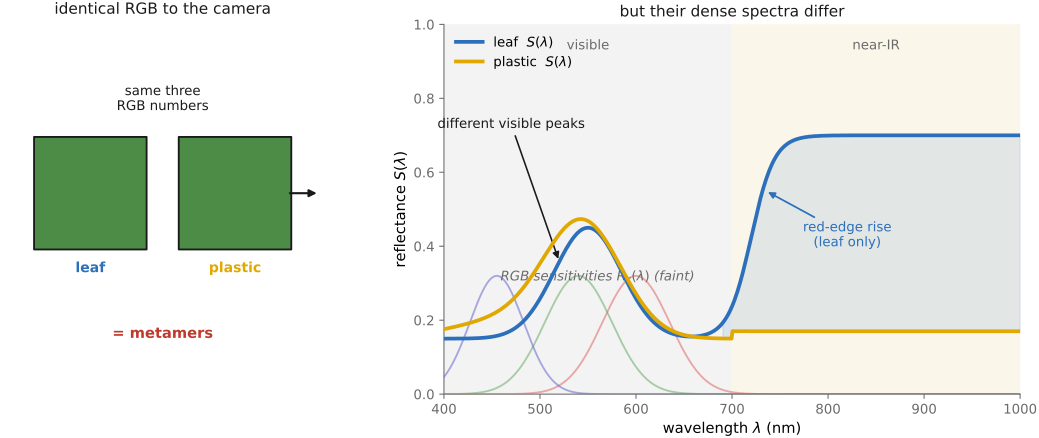
• **Image measurements as integrals over the plenoptic function** — a pixel value as an integral over the lens aperture, the pixel's area, the exposure time, *and the spectrum*; the spectral axis is where color enters, developed fully in [[Sensing color: multiplexing strategies]] in the next part.
• **The sensor and noise** — photosites and the CCD-vs-CMOS sensor (color capture itself, the Bayer mosaic, lives in [[Sensing color: multiplexing strategies]]), the exposure triangle, and **noise** (read + shot, and why SNR is worst in the shadows).
• **color and perception live in the next part.** Because color is made in the observer, not in the light, everything perceptual — trichromacy, color measurement and encoding, on-sensor color capture, and visual processing — is gathered in [[Visual perception and color]]. This part points forward to it wherever the spectral or perceptual side of a topic comes up.
• **skippable, but foundational**: a reader who only wants to code can jump straight to BASIC IMAGE PROCESSING — but the **big lessons** of this part recur everywhere later. The ones to carry forward:
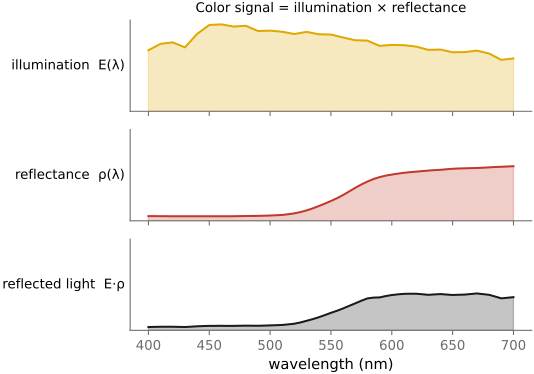
• **multiplicative vs additive** — much of imaging is *multiplicative* (illumination × albedo, contrast), some *additive* (incoherent light from different sources, blur); the right **encoding** (linear / log / gamma) follows from which one you are doing (→ [[Big Lessons]]).
• **gamma / ratios matter** — perception is roughly logarithmic, so we store images **gamma-encoded** to spend code levels where the eye looks; what matters is *ratios*, not absolute values.
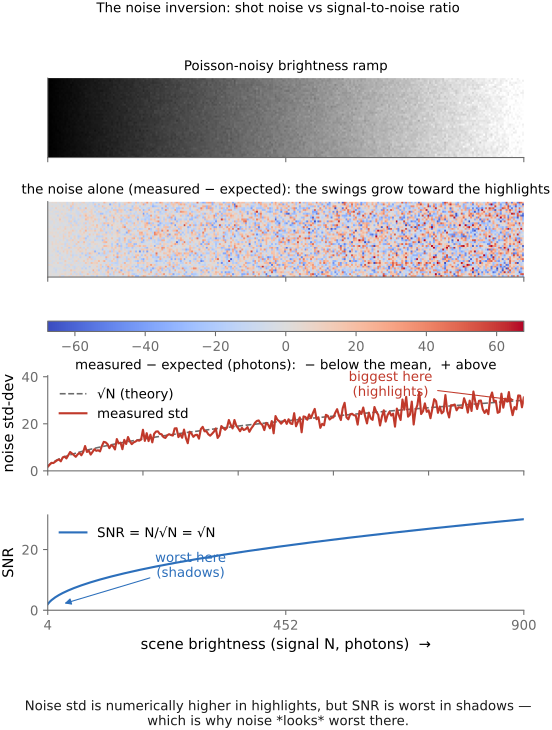
• **noise is affine** — sensor noise is **read + shot** (a constant plus a term that grows with the signal); because shot noise is **Poisson**, SNR is worst in the **shadows**, which is exactly where noise *looks* worst.
• **projective geometry is matrices + a division** — perspective projection is a **linear map in homogeneous coordinates** followed by a divide-by-depth; that single trick handles cameras, warps, and stereo.
• **color is non-orthogonal and non-negative** — the cone "axes" overlap and light cannot be negative, which is what makes color sensing and reproduction genuinely hard (no perfect set of primaries; white balance is never exact).
• **by the end of this part** you can trace a photon from a lamp to a perceived color, reason quantitatively about exposure and noise, and you will carry the small set of principles the rest of the book keeps reusing.
▸2.1 Light and optics⧉
• chapter intro: a working model of light — its **color** (spectrum), its **interaction with surfaces**, and its **energy** (radiometry); closes with the **plenoptic function** that ties the pipeline together
2.1.2 How light is created⧉
2.1.3 Light power and brightness⧉
2.1.4 Summing coherent vs. incoherent light⧉
2.1.6 Light-matter interaction is largely resonance⧉
2.1.7 Polarization⧉
2.1.9 Where color comes from⧉
2.1.12 Global illumination⧉
▸2.2 Pinhole image formation and linear perspective⧉
fig-camera-obscura
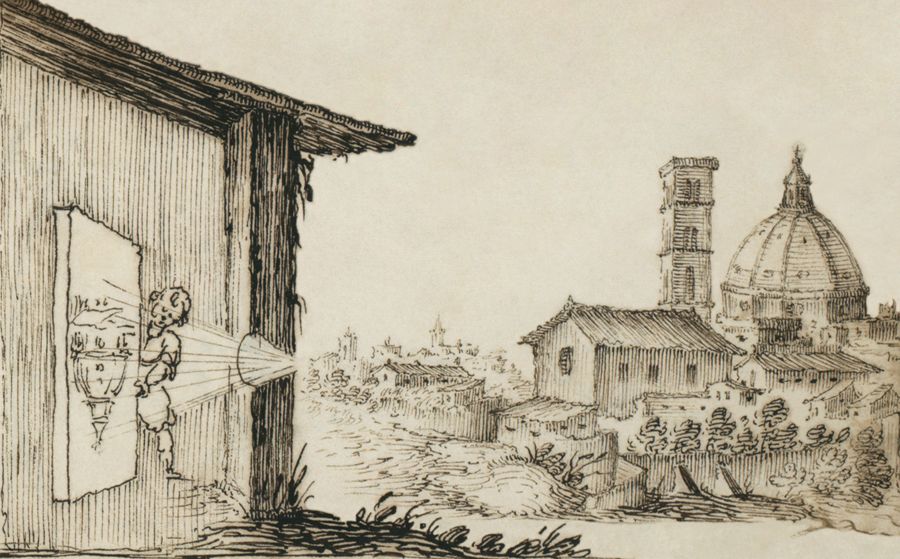
fig-camera-obscura · camera obscura / pinhole (artist's) 🟨
fig-camera-obscura-apparatus
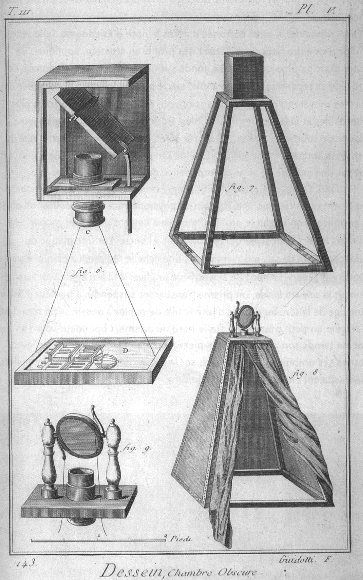
fig-camera-obscura-apparatus · camera obscura apparatus (Diderot engraving) 🟨
fig-bare-sensor-averaging
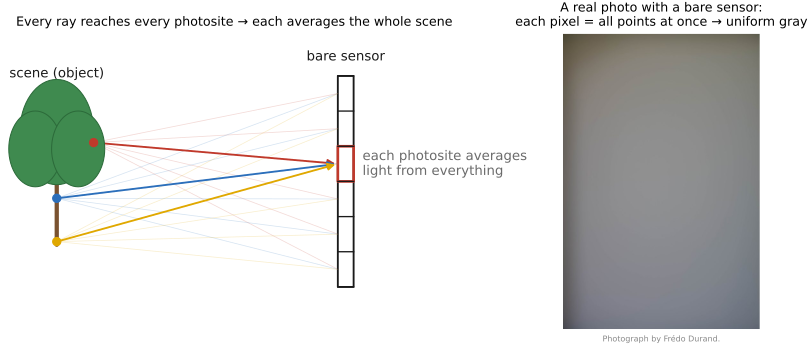
fig-bare-sensor-averaging · a bare sensor averages all rays 🟨
fig-pinhole-fov
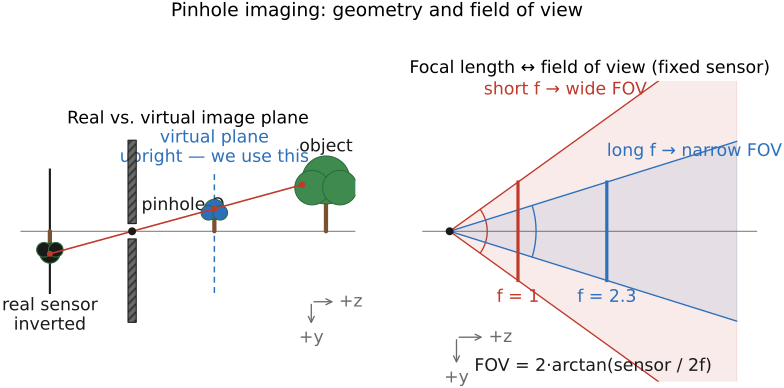
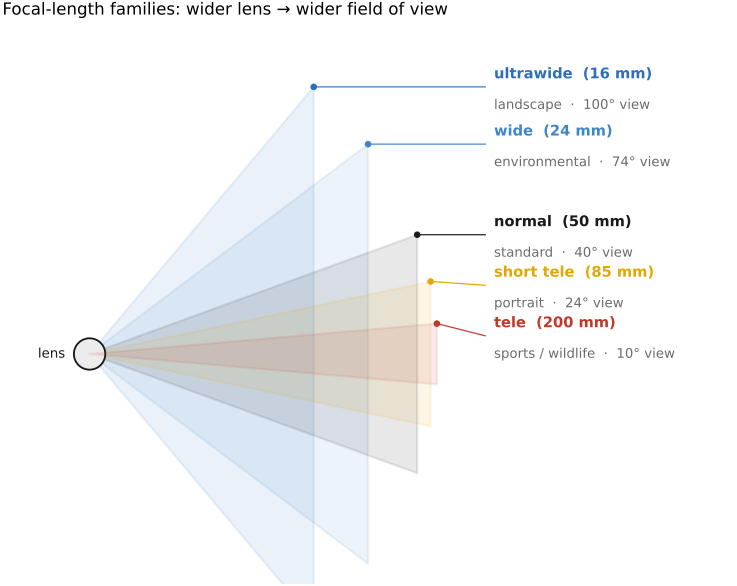
fig-pinhole-fov · pinhole geometry: real (inverted) vs virtual (upright) image plane, and focal length → field of view 🟨
fig-perspective-projection
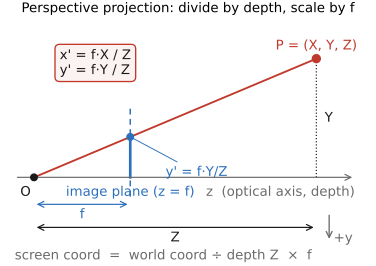
fig-perspective-projection · perspective projection equation: x'=f·X/Z, y'=f·Y/Z (divide by depth, scale by f) 🟨
fig-perspective-projection-3d
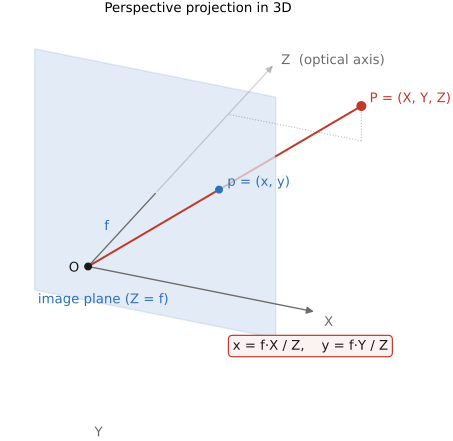
fig-perspective-projection-3d · perspective projection in 3D: P=(X,Y,Z) → p=(x,y) on the image plane through the pinhole 🟨
fig-perspective-vanishing-points
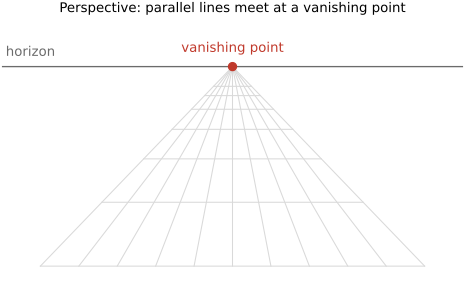
fig-perspective-vanishing-points · perspective projection + vanishing points 🟨
⬜ figure not yet created
focal length vs subject distance (background compression) fig-focal-length-compression
fig-face-distortion-sim
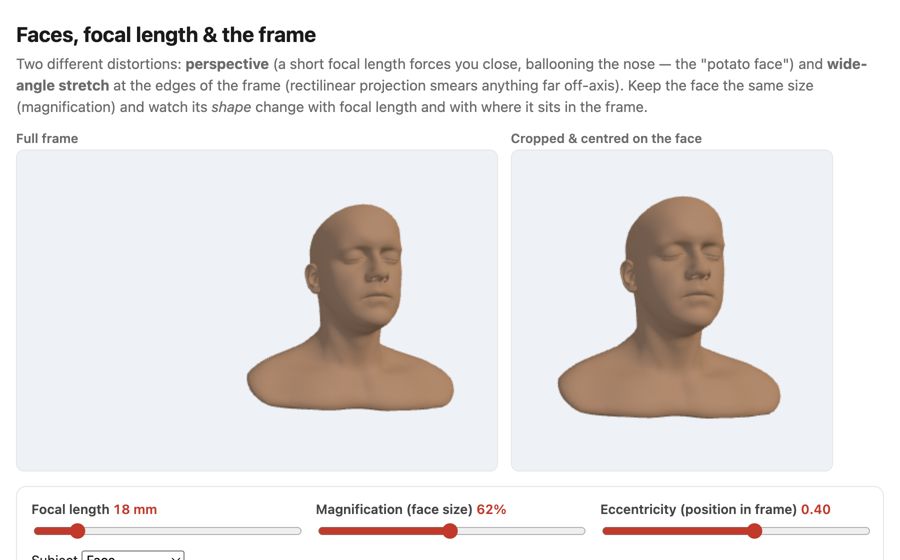
fig-face-distortion-sim · live face-distortion simulator (web edition): focal length + magnification + eccentricity controls with a full-frame view and a face-cropped view, showing the close-wide "big nose" perspective and the wide-angle edge stretch at constant face size; subject = a face, a grid sphere, or one of six diverse Meshy humans framed on the face; static fallback is a screenshot. *Human 3D models generated with Meshy AI.* ✅
fig-dolly-zoom-sim
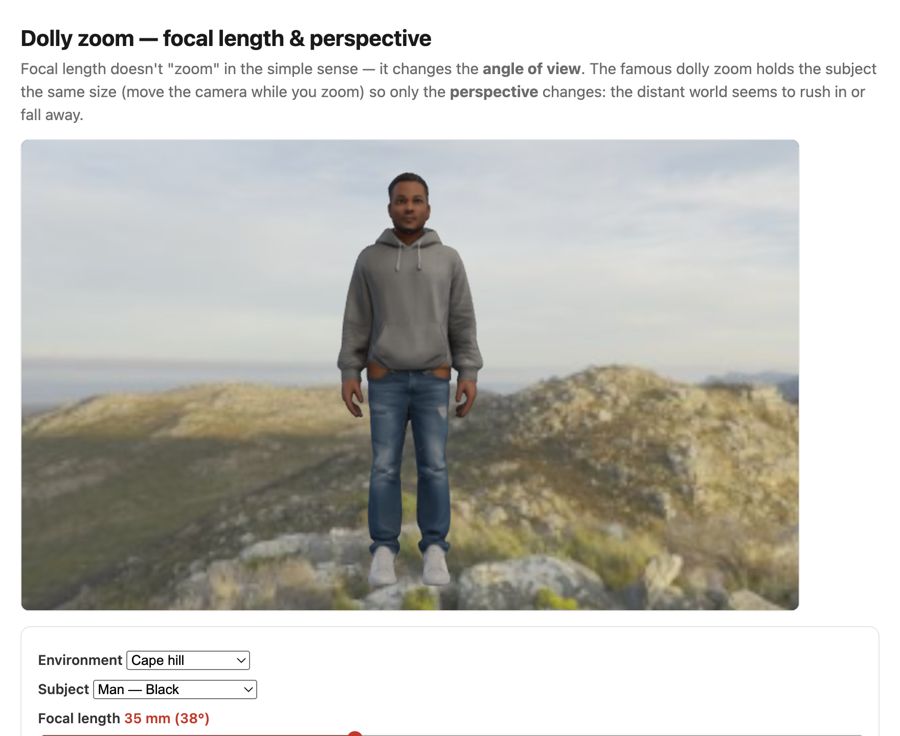
fig-dolly-zoom-sim · live dolly-zoom simulator (web edition): hold the subject size while focal length and camera distance trade off so only perspective / background scale changes; log focal (12–200 mm) + distance sliders, realistic Poly Haven environments, subject = head bust or one of six diverse Meshy humans. *Human 3D models generated with Meshy AI.* ✅
fig-portrait-lighting-sim
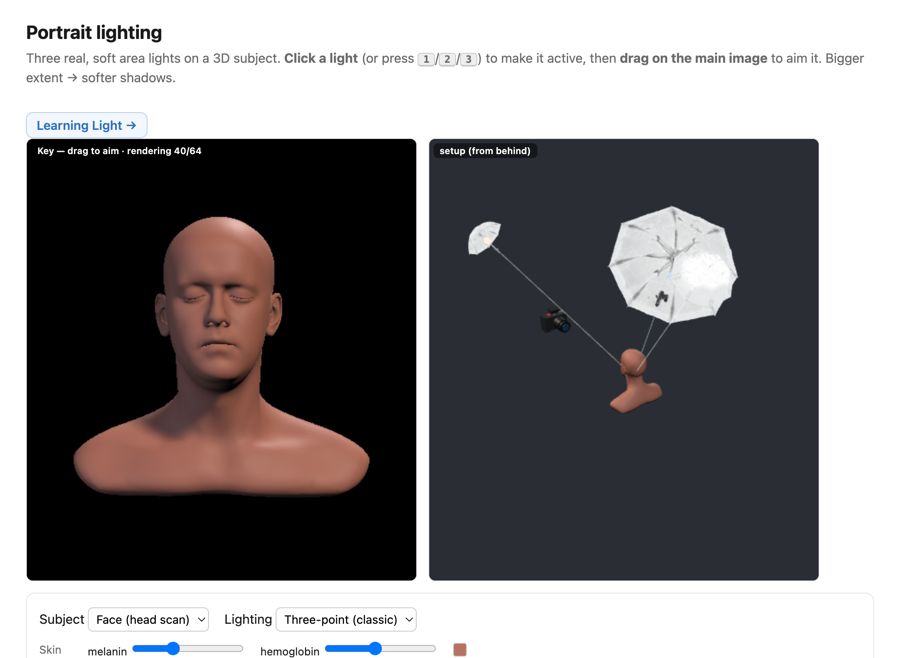
fig-portrait-lighting-sim · live portrait-lighting simulator (web edition): three soft area lights (key/fill/kicker — az/el/extent/intensity/color, area-light-supersampled soft shadows) on a 3D face with a physiological melanin/hemoglobin skin model; a from-behind setup view with Meshy studio umbrellas + a camera rig; lighting presets; static fallback is a screenshot. *3D umbrella generated with Meshy AI.* ✅
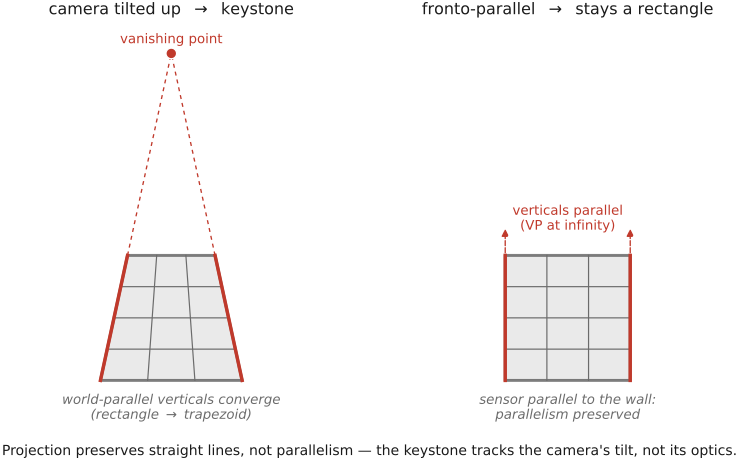
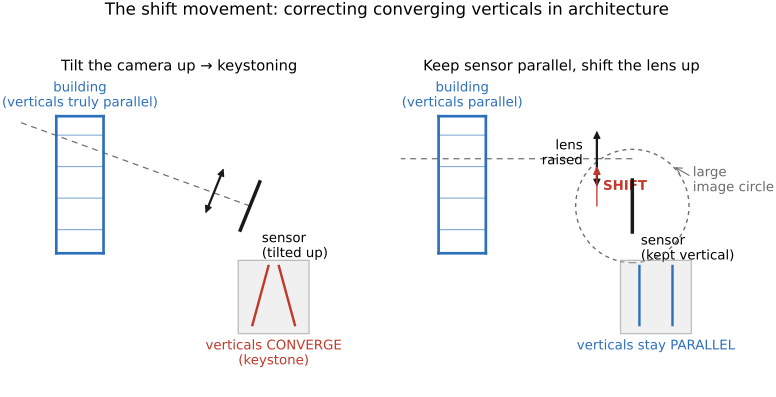
fig-keystoning-cause
fig-keystoning-cause · keystoning is the tilt, not the lens — a camera tilted up makes world-parallel verticals converge (façade → trapezoid), while the fronto-parallel shot keeps them parallel; projection preserves lines, not parallelism 🟨
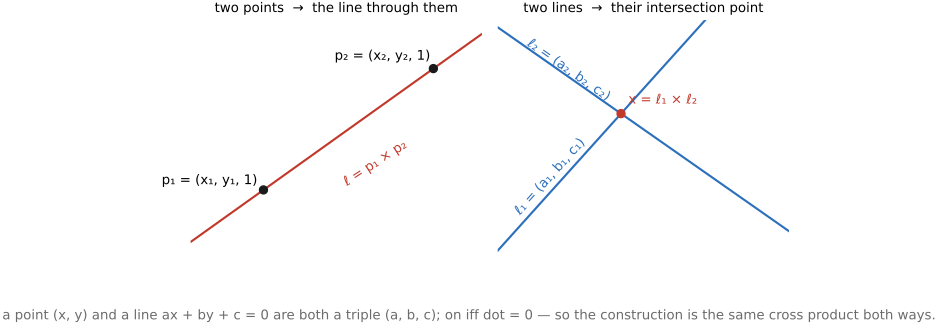
fig-point-line-duality
fig-point-line-duality · point↔line duality in homogeneous 2D: two points → a line, two lines → a point (same cross product) 🟨
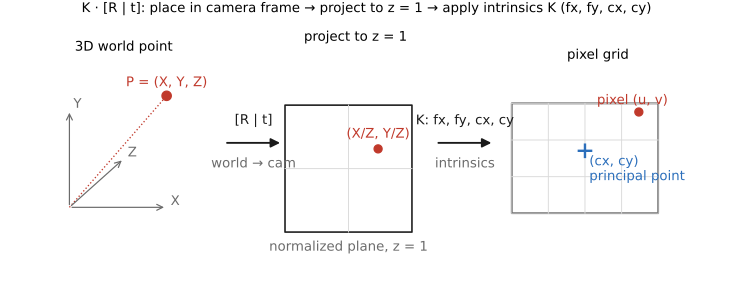
fig-projection-decomposition
fig-projection-decomposition · projection-matrix decomposition K·[R matplotlib, 3-stage pipeline
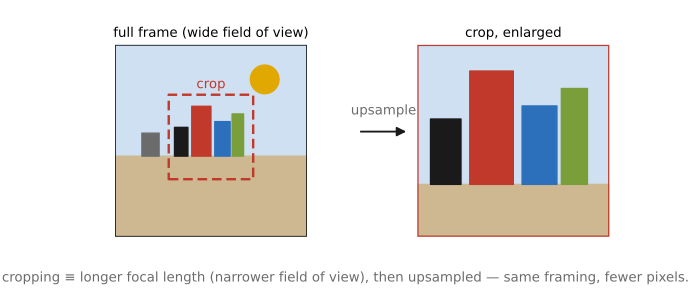
fig-crop-focal-length
fig-crop-focal-length · cropping = changing focal length: full frame vs a crop box ≡ a longer-focal-length capture, upsampled 🟨
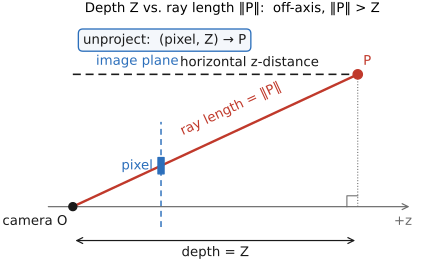
fig-depth-vs-ray-length
fig-depth-vs-ray-length · depth (z coordinate) vs ray length ‖P‖ from camera to a 3D point; unproject (pixel + depth → 3D) 🟨
• sensor alone would capture a diffuse light. We need to select which rays from which part of the scene contribute to which pixel.
equations
pinhole projection x = f·X/Z, y = f·Y/Z
homogeneous p ≈ K·[R|t]·P
field of view = 2·arctan(sensor / 2f)
2.2.3 Camera in a general configuration⧉
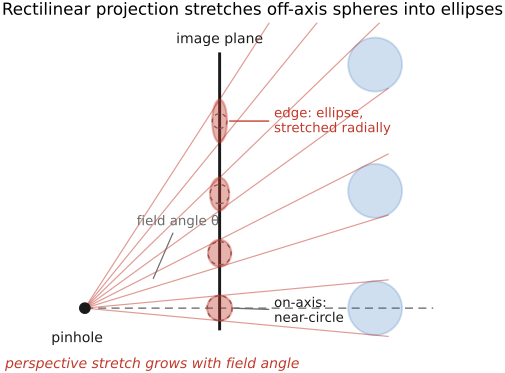
2.2.7 Wide-angle distortion: spheres bulge and faces stretch at the edges⧉
▸2.3 Lens image formation⧉
• chapter intro: from the **pinhole** (sharp but dim) to a **lens** (bright but with one focus plane) — refraction at curved surfaces, the thin-lens linearization, and the depth-of-field that the finite aperture forces on us
2.3.3 Aperture and the f-number⧉
▸2.4 Image measurements as integrals over the plenoptic function⧉
• chapter intro: the unifying idea behind sensing — **measurement = integrating a slice of the plenoptic function** — then the physical sensor that does it (photosites, CCD/CMOS) and the **noise** that limits it
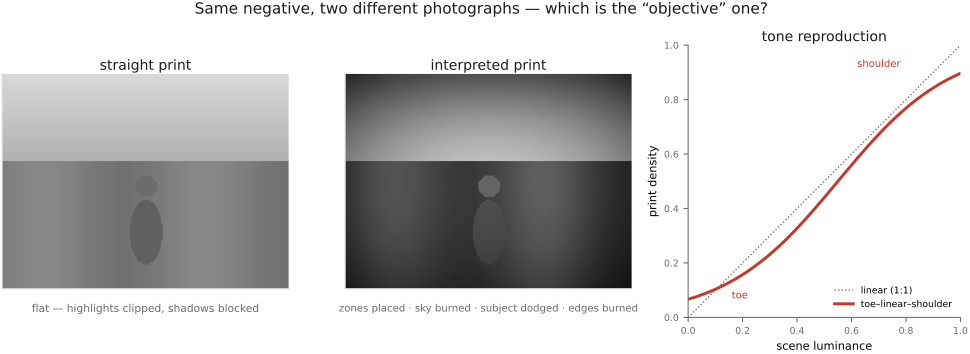
• sidebar — **photography as objective measurement**: the medium's long arc bends toward objective measurement (film/print = a *performance*; → measurement). The **digital sensor** is the far end: because each photosite *counts photons*, a **raw** image is ≈ a **calibrated radiometric measurement** — a physical map of scene radiance, in real units, of one snapshot of time — not just a rendering. This is what makes HDR / depth / deblur possible: the pixel numbers must *mean* something physical. Ties to the intro's **generation → measurement → generation** arc (→ [[Intro]]).
2.4.3 Exposure values (EV) and stops⧉
2.4.4 Splitting the integral⧉
2.4.5 Attempts to visualize the plenoptic function⧉
▸2.5 Depth of field⧉
fig-circle-of-confusion
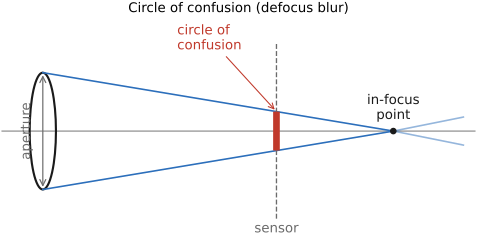
fig-circle-of-confusion · finite aperture & circle of confusion ✅
fig-defocus-vs-parameters
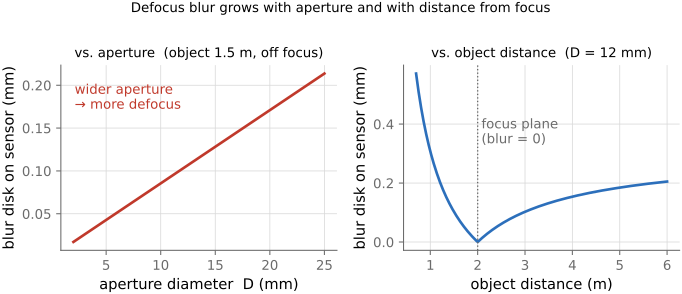
fig-defocus-vs-parameters · defocus blur (CoC) vs aperture and object distance 🟨
fig-depth-of-field
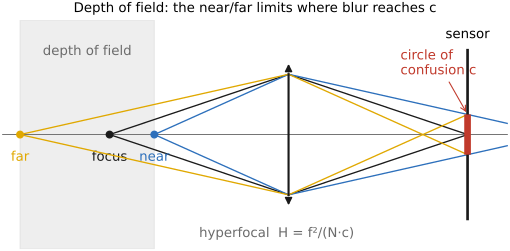
fig-depth-of-field · near/far limits where blur reaches c (linearized DoF) 🟨
fig-dof-derivation-near
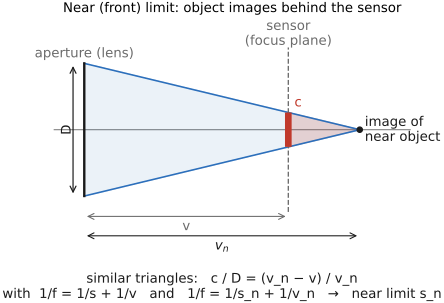
fig-dof-derivation-near · near (front) limit by similar triangles — all quantities 🟨
fig-dof-derivation-far
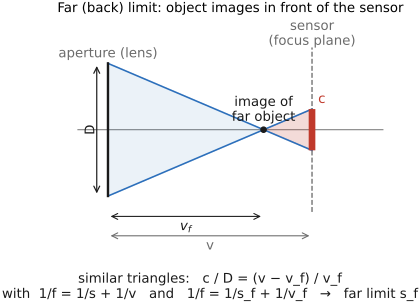
fig-dof-derivation-far · far (back) limit by similar triangles — all quantities 🟨
fig-dof-vs-parameters
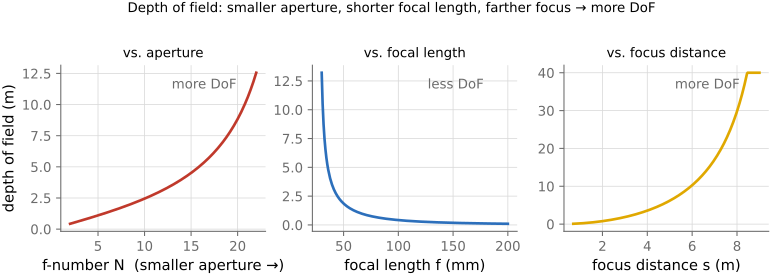
fig-dof-vs-parameters · DoF vs aperture, focal length, focus distance 🟨
fig-hyperfocal
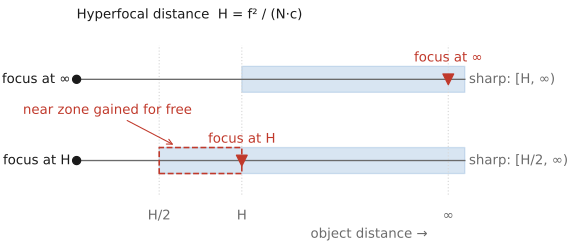
fig-hyperfocal · hyperfocal: focus at H → sharp from H/2 to ∞ 🟨
fig-dof-same-framing
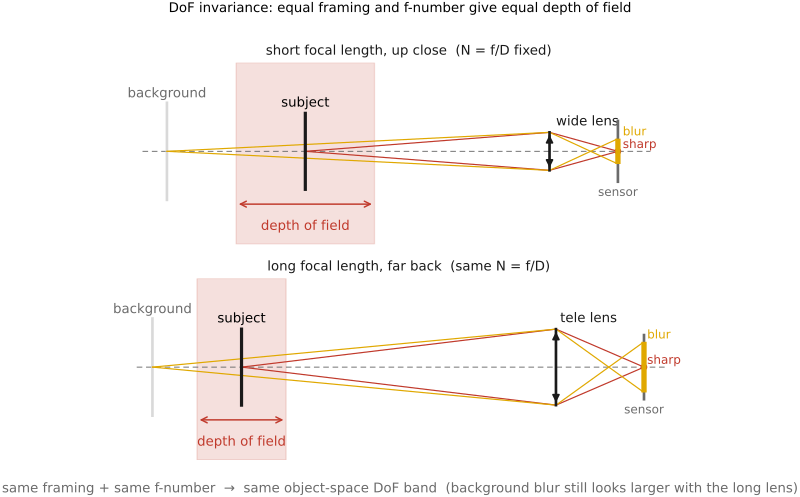
fig-dof-same-framing · same framing + same f-number → same object-space DoF (short vs long focal length); background blur still looks larger with the long lens 🟨
fig-dof-double-cone
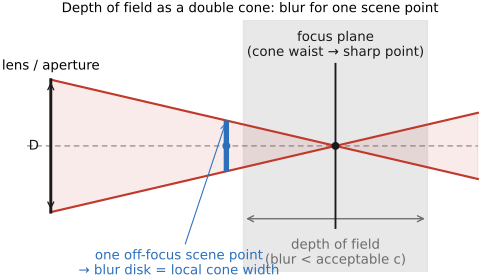
fig-dof-double-cone · object-space DoF as a double cone in front of the lens, waist on the focus plane (the blur for one scene point) 🟨
fig-dof-depth-dependent
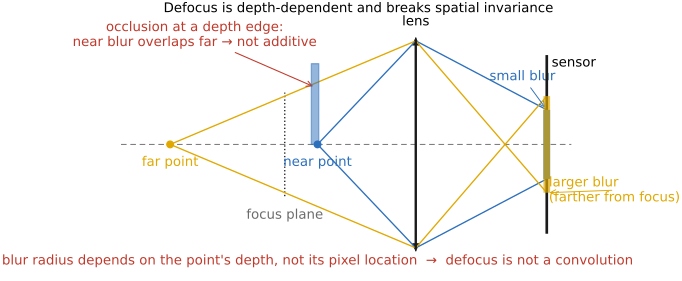
fig-dof-depth-dependent · defocus is NOT a convolution: blur radius depends on scene depth (not pixel location), and occlusion at depth edges 🟨
fig-dof-background-blur
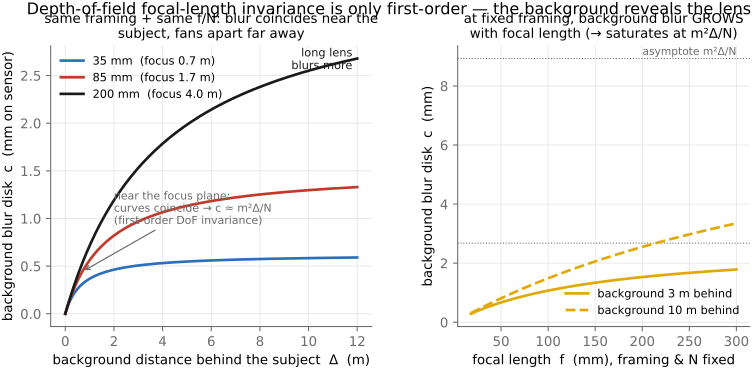
fig-dof-background-blur · DoF focal-length invariance is only first-order: background blur c vs background distance for 35/85/200 mm (matched framing & N) coincide near the subject and fan apart far away; + c vs focal length showing growth/saturation ✅
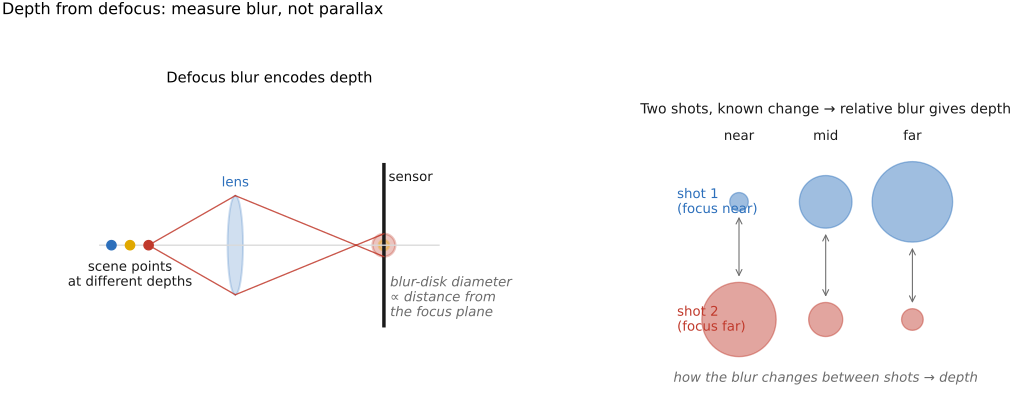
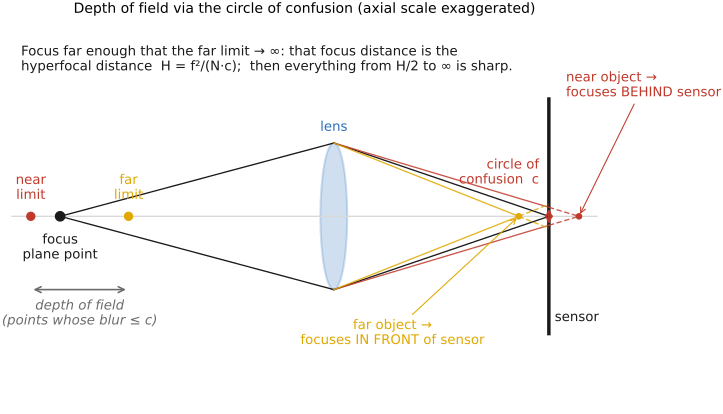
• **defocus / circle of confusion**: a point off the focus plane images to a point that is not on the sensor, so the aperture cone meets the sensor as a blur disk — the **circle of confusion**. A point still counts as sharp while its disk stays within an acceptable c. [CoC figure]
• the blur disk grows with the **aperture** (wider → bigger disk) and with the **object's distance from the focus plane** (zero exactly at focus); focal length and focus distance enter too. [defocus-vs-parameters figure]
• **depth of field** = the *range* of object distances whose blur disk stays within c; the **near** and **far** limits are where the blur just reaches c. [DoF near/far figure — each cone carried out to the CoC at the sensor]
• **deriving the limits**: on the image side a near-limit object images *behind* the sensor and a far-limit object *in front* of it; **similar triangles** relate the aperture D, that convergence distance, and the circle of confusion c — and together with the conjugate relations (1/f = 1/s + 1/v) they fix the near (front) and far (back) object-distance limits. [near-limit and far-limit similar-triangle figures]
• **hyperfocal distance** H = f²/(N·c): focus there and everything from **H/2 to infinity** is acceptably sharp — the focus setting that maximizes DoF (focusing at ∞ instead wastes the H/2…H zone). [hyperfocal figure]
• DoF **grows** with a smaller aperture (larger N), a shorter focal length, and a greater focus distance — these are the paraxial (linearized) formulas; the accurate model is in the Optics part. [DoF-vs-parameters figure]
• **the surprising invariance** (the lecture's flagged "important conclusion"): for a **fixed framing** (same subject size) and a **fixed f-number**, the depth of field in **object space** is essentially **independent of focal length** — switching 28 mm → 100 mm forces you to step back, and the larger physical aperture cancels the longer focal length. So "long lenses have shallow DoF" is really about **magnification**, not focal length per se. (The *background* still looks more blurred with the long lens — that's magnification of the out-of-focus disk, not a DoF change.) [same-framing/same-N → same DoF figure]
• ⚠️ **but the invariance is only *first-order* — the background gives the focal length away.** "Same framing + same f-number → same DoF" is the **small-defocus (paraxial)** result: it holds for the **near/far acceptable-sharpness limits straddling the subject**, but **not** for how hard a *distant* background is thrown out of focus. **Derivation** (thin lens; blur-disk diameter on the sensor): a point at distance $s_b$, with the lens focused at $s_f$, images to a circle of confusion $c \approx \dfrac{f^2}{N}\,\dfrac{|s_b-s_f|}{s_b\,s_f}$. **Fix the framing** — subject magnification $m=f/s_f$ held constant, so $s_f=f/m$ — and **fix $N$**, with the background a gap $\Delta=s_b-s_f$ behind the subject:
$$c(f)=\frac{m^2\Delta/N}{\,1+ m\Delta/f\,}\ \xrightarrow[f\to\infty]{}\ \frac{m^2\Delta}{N}.$$
The subject-zone DoF is ~independent of $f$ (the leading $f$ cancels — the **first-order invariance**), but the **background blur grows monotonically with focal length**, saturating at $m^2\Delta/N$. Two shots matched in framing *and* aperture render the **subject** identically, yet a **200 mm melts a far background far more** than a 35 mm: the correction term is order $m\Delta/f$ — negligible for a background near the focus plane (invariance looks exact), but dominant once the background is many focus-distances away. This is exactly why portrait shooters reach for long lenses for "background separation" even though the DoF on the *face* is unchanged. **Full derivation + plots** of $c$ vs. background distance for 35 / 85 / 200 mm (fixed framing & $N$) — the curves coincide near the focus plane and fan apart far from it. [`fig-dof-background-blur`]
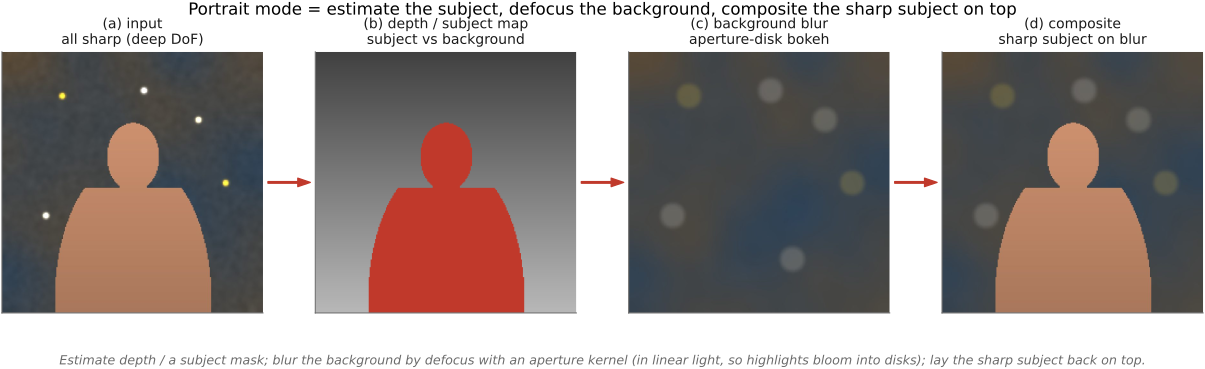
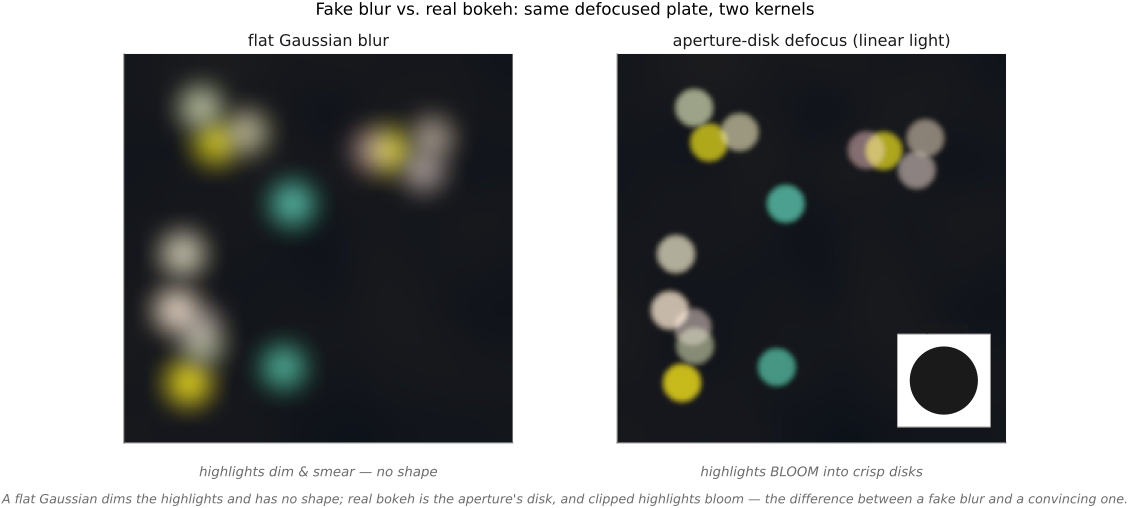
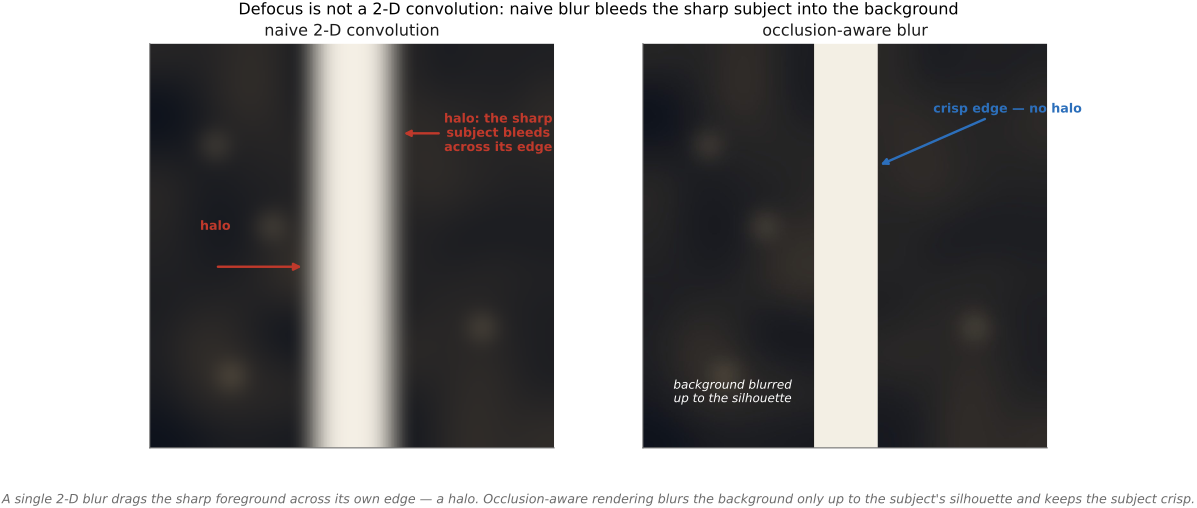
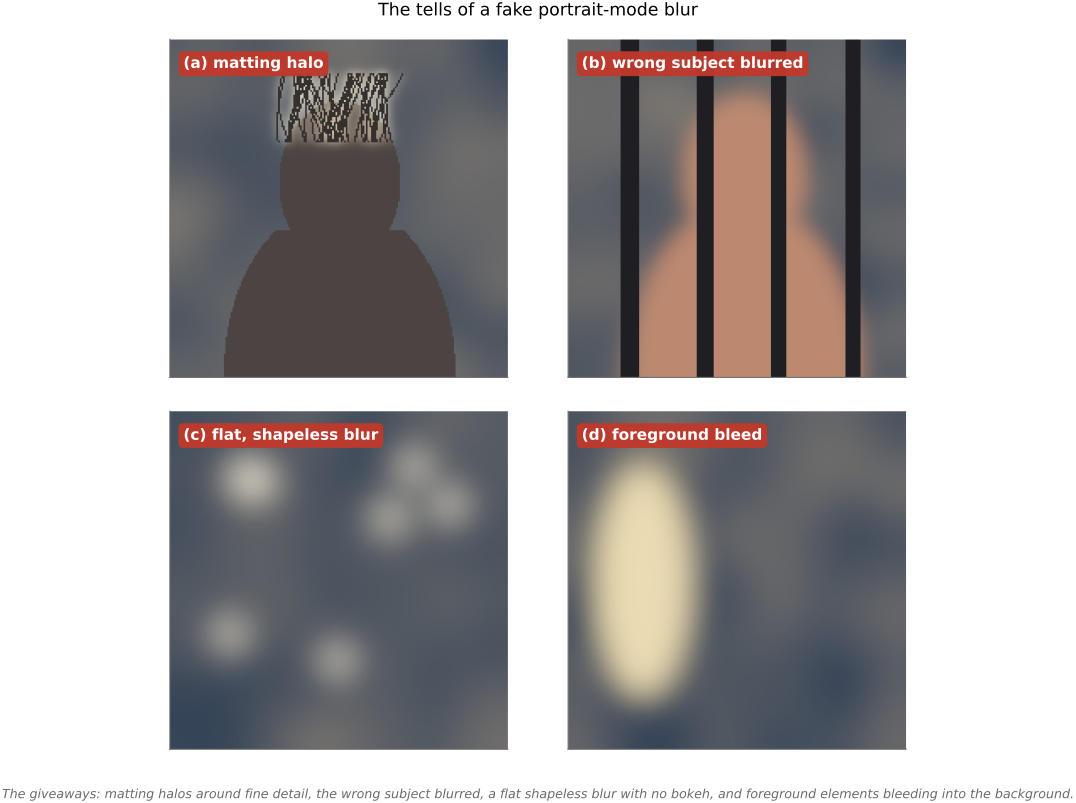
• **object-space picture & a caveat**: the simplest view is a **double cone** in front of the lens whose waist sits on the focus plane — it gives the blur for **one** scene point. But **defocus is *not* a spatially-invariant convolution**: the circle of confusion depends on each point's **scene depth** (not its pixel location), and at depth discontinuities **occlusion** matters — which is why naive "just blur the image" fakes look wrong, and why light-field / depth-aware methods (Advanced) do better. [object-space double cone; depth-dependent-blur + occlusion figure]
• **sensor size scales DoF**: shrink the sensor (keeping FOV) and both the circle of confusion and the aperture shrink, so DoF grows **linearly** with sensor size — why phone cameras have huge DoF (and resort to *computational* background blur), and why **macro is easier on small sensors** (a scaled-down camera photographs a scaled-down world — modulo diffraction)
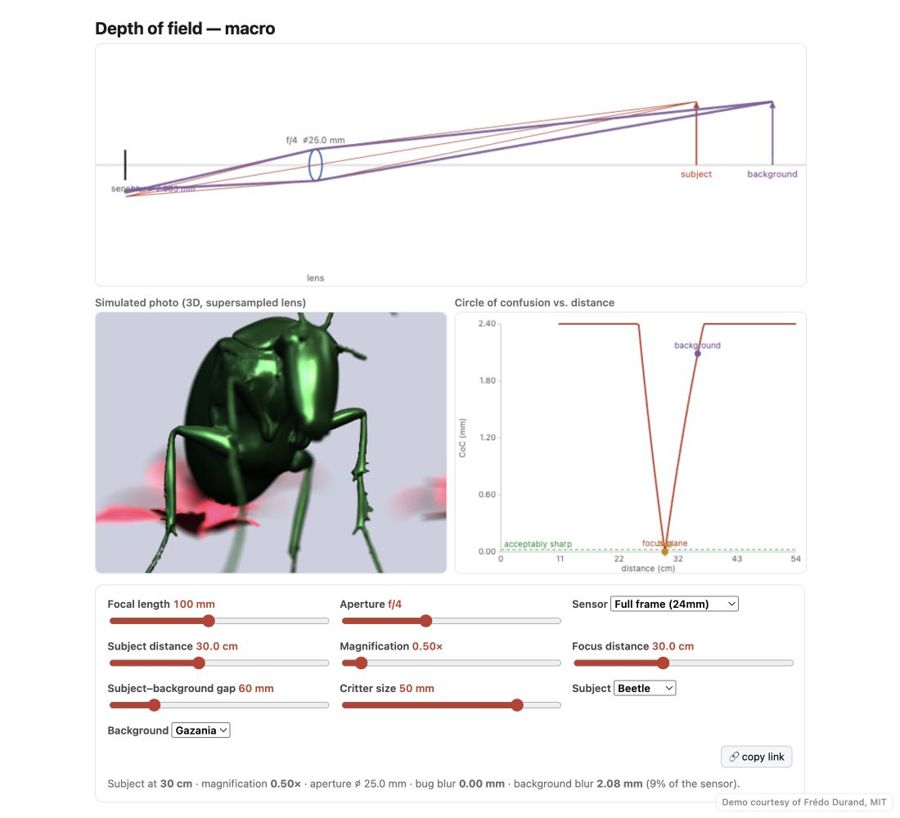
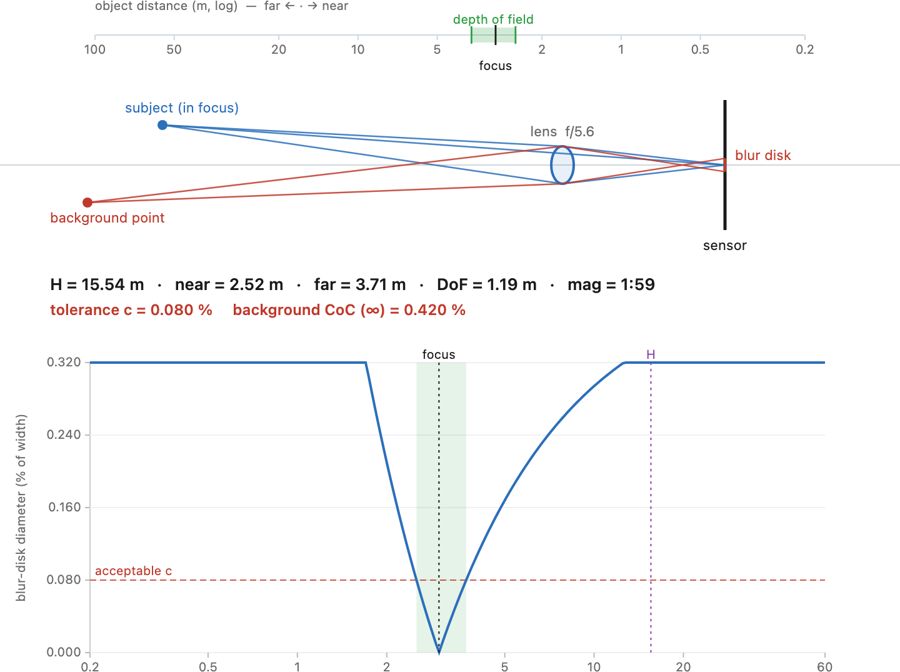
• 🖱️ **Interactive (web edition):** a live **macro depth-of-field simulator** — a to-scale thin-lens diagram, a lens-supersampled 3D photo (real bokeh), and a circle-of-confusion-vs-distance plot all driven by one shared optics model (focal length, f-number, sensor, focus distance, subject–background gap). A 3D bug (beetle / bee / ladybug) over a flower makes the macro lesson vivid: focus lands on the front of the face and the rest of the body, antennae, and background all fall out of focus. [fig-depth-of-field-sim; interactive] *(bug & flower 3D models generated with Meshy AI — acknowledge in the caption)*
equations
acceptable blur = circle of confusion c
defocus blur diameter b = D·|v − v′|/v′
hyperfocal H = f²/(N·c)
near limit D_n = s(H−f)/(H+s−2f)
far limit D_f = s(H−f)/(H−s)
total DoF = D_f − D_n
2.5.1 The circle of confusion⧉
2.5.2 Depth of field versus depth of focus⧉
2.5.3 Choosing the maximum circle of confusion⧉
2.5.4 The double cone, and the near and far limits⧉
2.5.5 Hyperfocal distance⧉
2.5.6 The surprising invariance⧉
2.5.7 Background blur beyond the focus plane⧉
2.5.8 Defocus is not a blur of the image⧉
2.5.9 Sensor size scales depth of field⧉
2.5.10 Defocus is integration over the aperture dimension of the plenoptic function⧉
▸2.6 Motion blur⧉
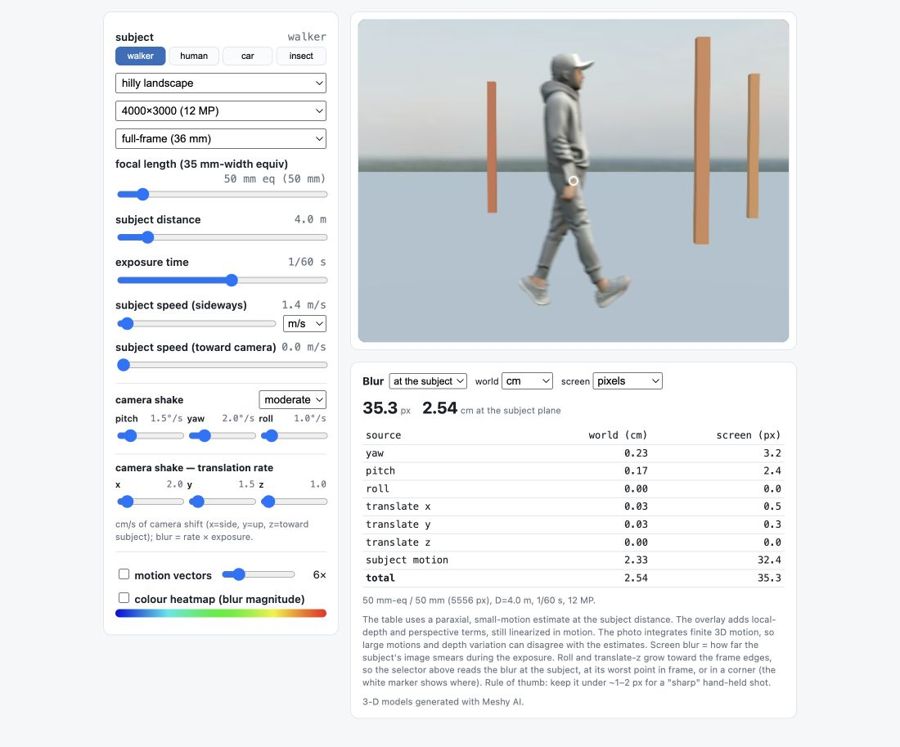
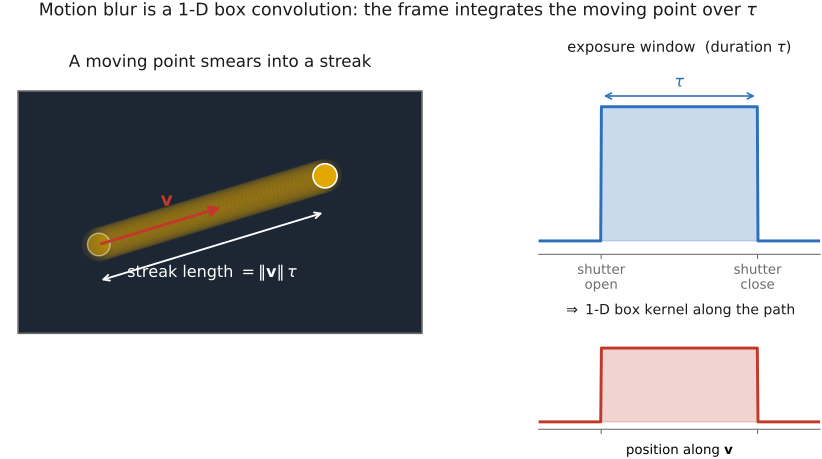
• **blur from subject motion**: $b_{px}\approx f_{px}\,v\Delta t/D$ — a straight streak = image velocity × exposure (constant-velocity linearization); only cross-axis motion blurs
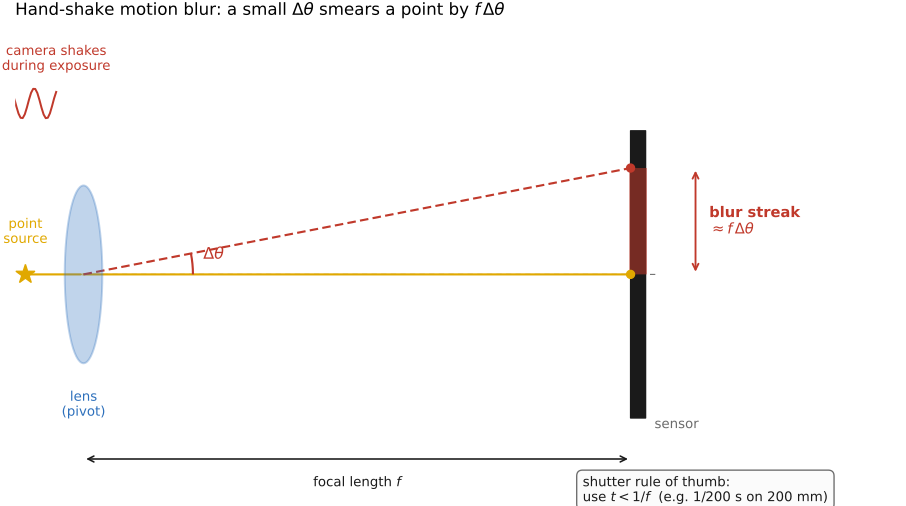
• **blur from camera shake**: translation $b\approx f_{px}\Delta_c/D$ (depth-dependent); rotation yaw/pitch $b\approx f_{px}\theta$ (**depth-independent**, small-angle); roll = spin about center, grows with radius
• **which dominates**: ratio $\theta D/\Delta_c$ → rotation wins at normal distance, translation only up close (macro); rotation blur is **spatially non-uniform** so one kernel can't undo it (Whyte); IMUs measure the rotation to deblur (Joshi)
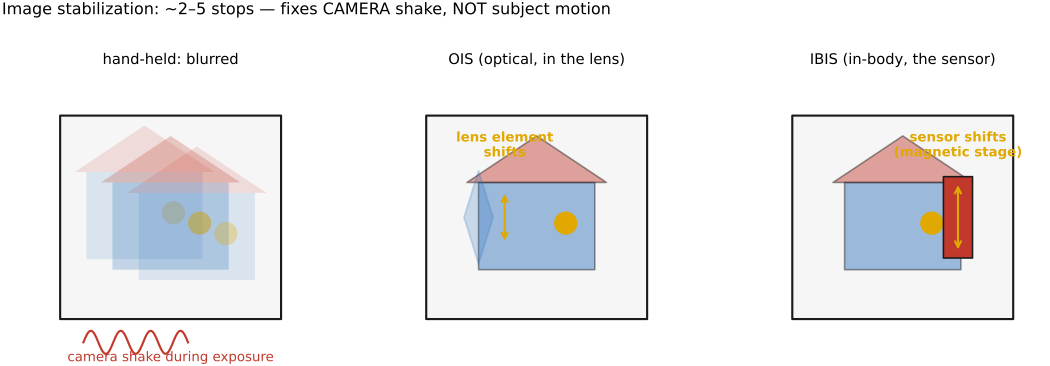
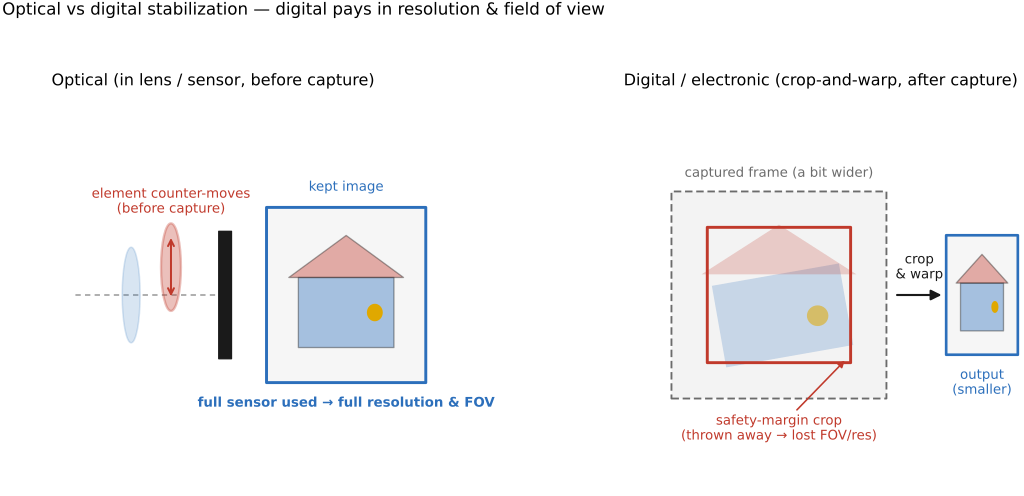
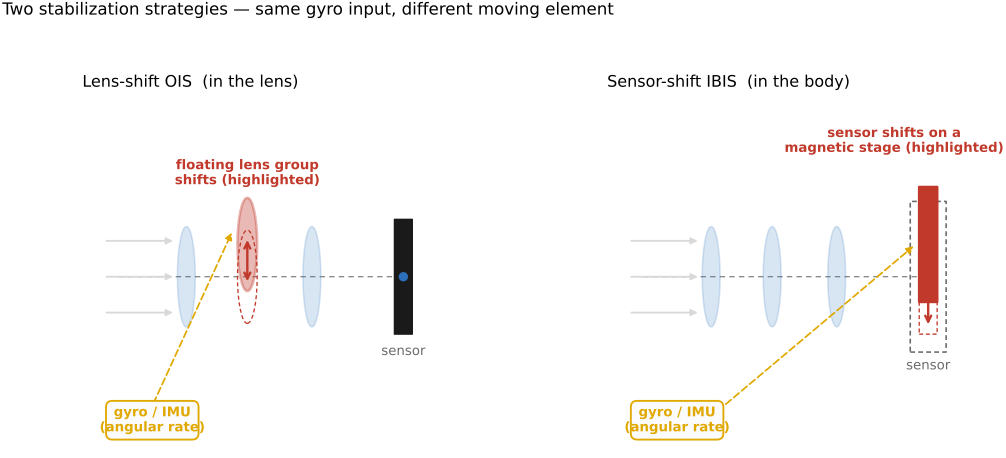
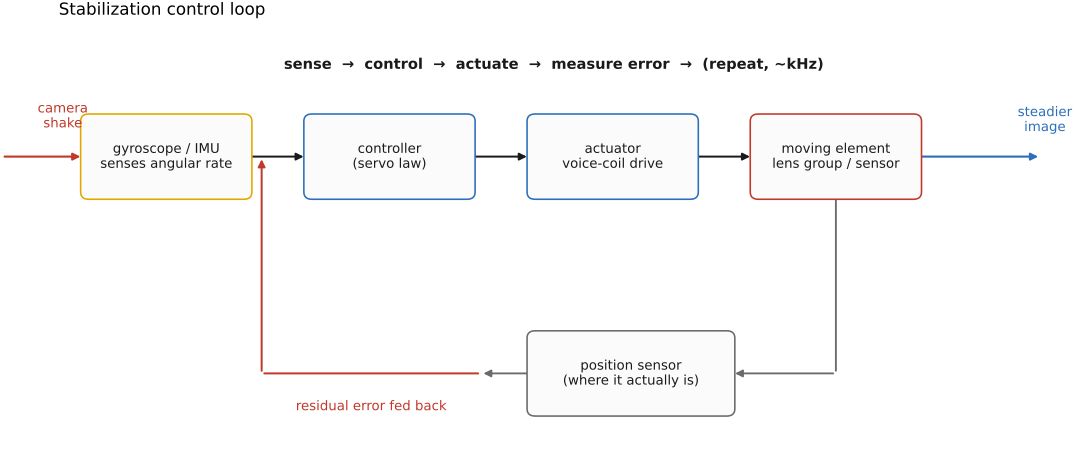
• **hand-holding rule** $\Delta t\lesssim 1/f$ s (×crop; ~2× faster for dense sensors); **image stabilization** cancels camera *rotation* (buys 3–5 stops) but not *subject* motion
• 🖱️ **Interactive:** motion-blur calculator — 3-D scene (Meshy walking human / car), temporal-supersampled blur, world+screen readout by source, motion-vector & flow-color overlays, hover pixel scale [fig-motion-blur-calculator; interactive]
2.6.1 Blur from subject motion⧉
2.6.2 Blur from camera shake⧉
2.6.3 How shift-invariant is camera-shake blur?⧉
2.6.4 Which dominates: translation or rotation?⧉
2.6.5 The hand-holding rule of thumb⧉
2.6.6 Shake from the shutter and mirror⧉
2.6.7 Panning: fighting subject motion by moving the camera⧉
2.6.8 Freezing motion with light⧉
2.6.9 The space-time view: motion blur is integration over time⧉
▸2.7 Sensors: photosites, CCD vs CMOS⧉
fig-sensor-microlens
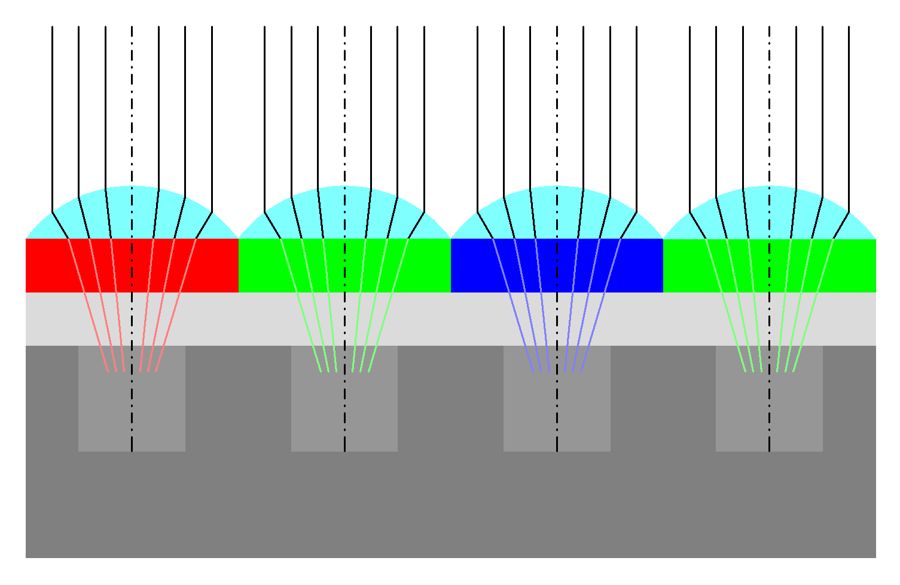
fig-sensor-microlens · sensor cross-section: microlens → filter → photosite 🟨
⬜ figure not yet created
CCD bucket-brigade readout vs CMOS read-in-place schematic fig-ccd-vs-cmos
fig-slowmo-axis
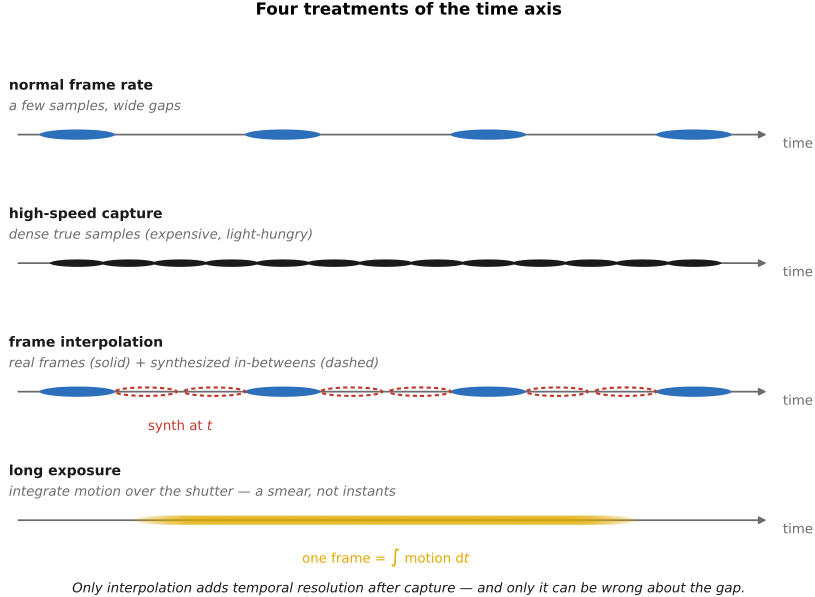
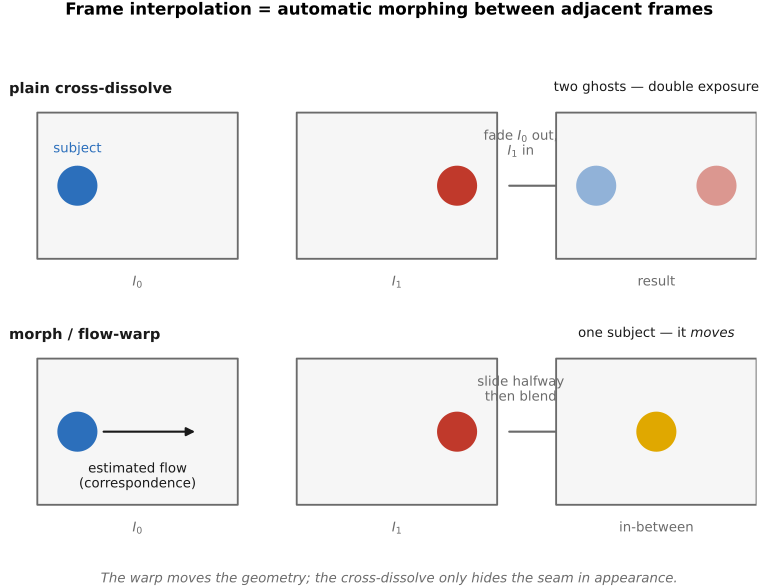
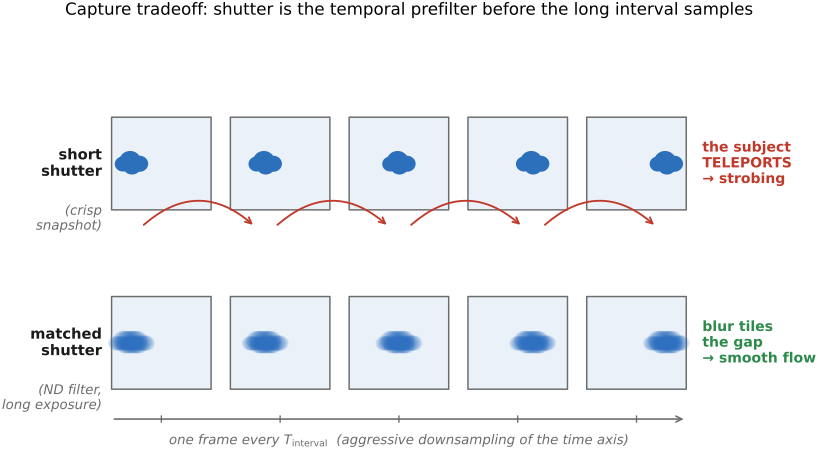
fig-slowmo-axis · four ways to treat the time axis on a shared timeline — normal capture (sparse), high-speed (dense true samples), interpolation (sparse reals with synthesized in-betweens), and long-exposure blur (the integral); only interpolation adds resolution after capture and can be wrong 🟨
fig-mirrorless-anatomy
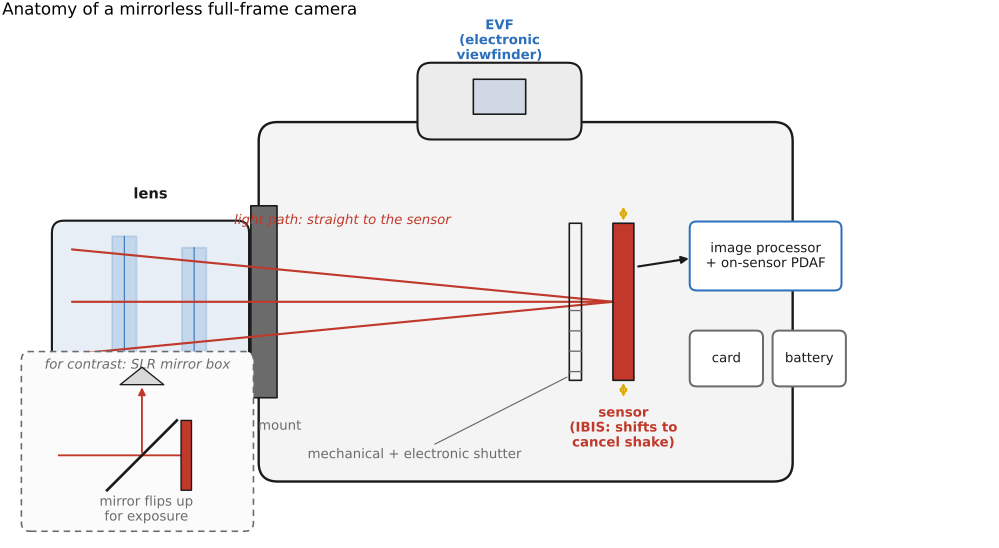
fig-mirrorless-anatomy · labeled cutaway of a mirrorless full-frame camera (lens+mount, sensor/IBIS, mech+electronic shutter, EVF, processor/on-sensor PDAF, card+battery); SLR mirror-box inset for contrast ✅
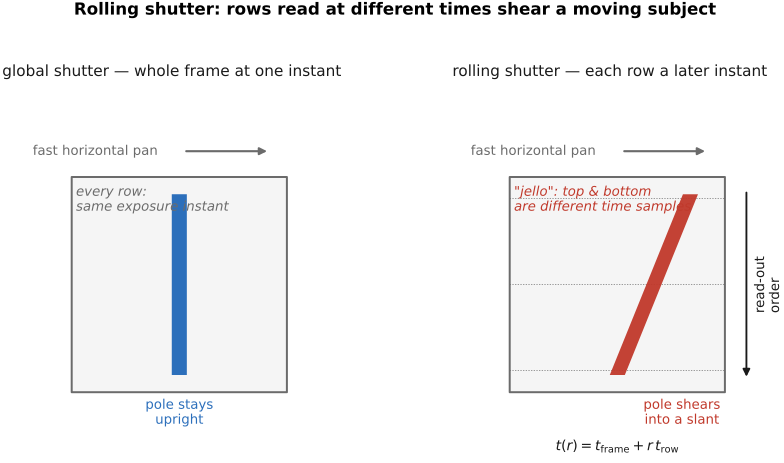
fig-rolling-shutter
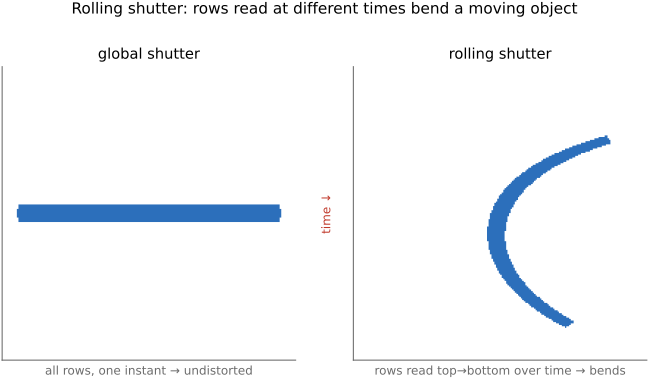
fig-rolling-shutter ·
fig-flash-sync
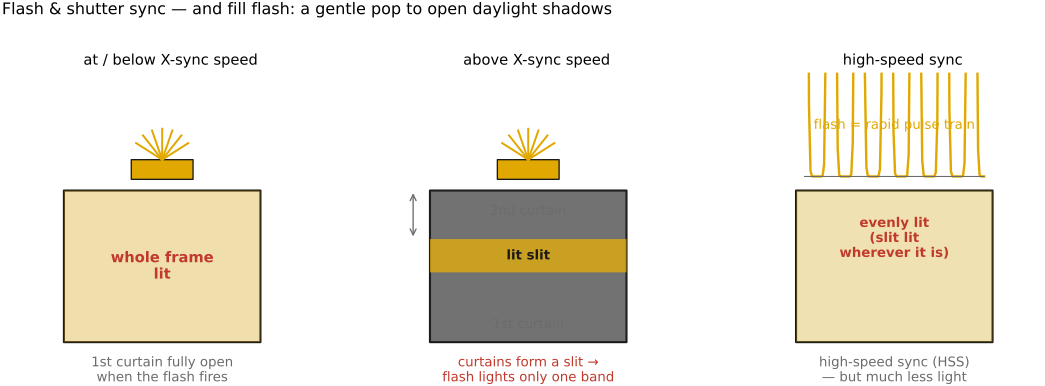
fig-flash-sync · flash & focal-plane-shutter sync: whole frame ≤ X-sync · slit/partial frame above it · high-speed-sync pulse train; fill-flash noted ✅
fig-lippmann
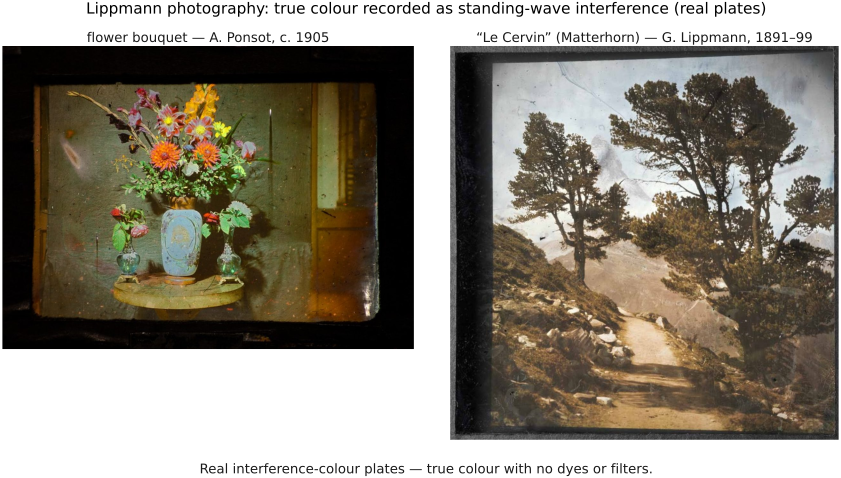
fig-lippmann · Lippmann interference color photography: recording (standing wave in a mercury-backed emulsion, antinodes λ/2 apart) + playback (Bragg reflection of the original wavelength under white light) ✅
2.7.1 The photoelectric effect⧉
2.7.3 Beyond the visible spectrum: near-infrared, thermal, and ultraviolet⧉
2.7.5 Analog-to-digital conversion⧉
2.7.8 Shutters⧉
2.7.12 The impact of sensor size⧉
2.7.13 How far sensors have come⧉
▸2.8 Noise, signal-to-noise ratio and dynamic range⧉
⬜ figure not yet created
noisy image + flat-patch histogram (ISO 3200) fig-noise-histogram
⬜ figure not yet created
noise vs ISO fig-noise-vs-iso
fig-noise-affine
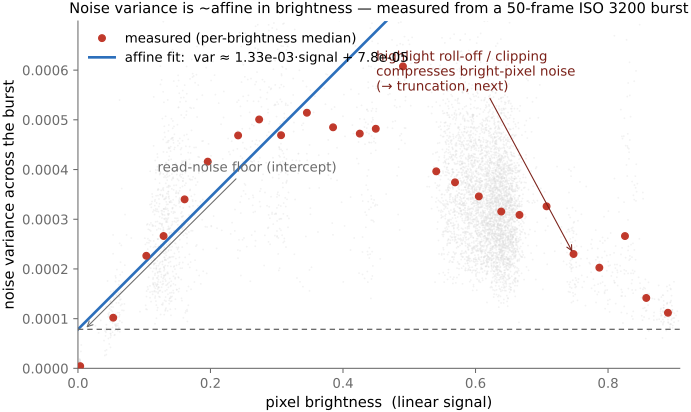
fig-noise-affine · measured noise variance is affine in brightness (σ²≈gain·I+read²) — real per-pixel variance vs mean from a 50-frame aligned ISO-3200 burst, with the affine fit, read-noise floor, and highlight roll-off (Noise, SNR, dynamic range) ✅
fig-noise-gaussian-pixels
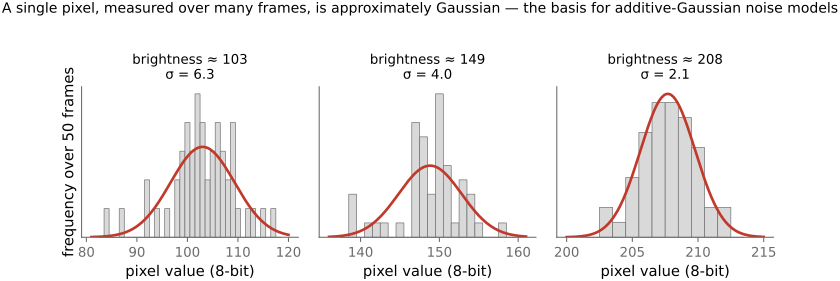
fig-noise-gaussian-pixels · a single pixel's value across many frames is ≈ Gaussian — per-pixel histograms from the ISO-3200 burst with Gaussian overlays (Noise) ✅
fig-noise-truncation
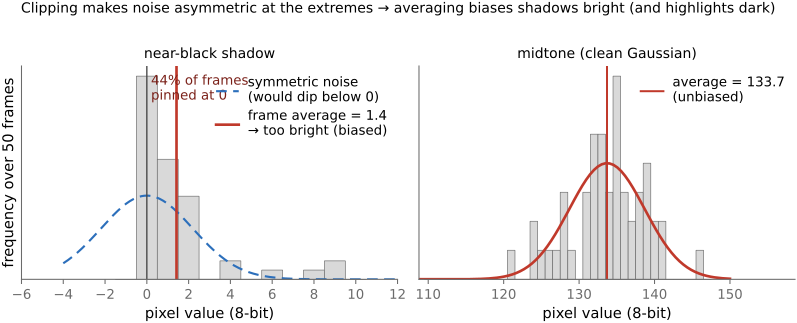
fig-noise-truncation · noise clips at black/white so it is not zero-mean at the extremes — a near-black pixel pinned at 0 ~44% of frames, its average biased bright, vs an unbiased midtone (Noise; denoising trap) ✅
fig-snr-vs-stddev
fig-snr-vs-stddev · noise std-dev map vs SNR map of a brightness ramp: std rises with brightness (∝√N), but SNR=√N is worst in the shadows 🟨
⬜ figure not yet created
**underexposure recovery — full-frame vs phone**: the same underexposed scene pushed up several stops in software, the full-frame frame cleaning up while the phone reveals amplified shadow noise / banding [fig-underexposure-recovery-ff-vs-phone fig-underexposure-recovery-ff-vs-phone
fig-results-montage
fig-results-montage · a montage of computational-photography results — HDR tone mapping, refocus-after-capture, motion deblur, a stitched panorama — the "look what computation buys you" opener ✅
fig-dynamic-range-comparison
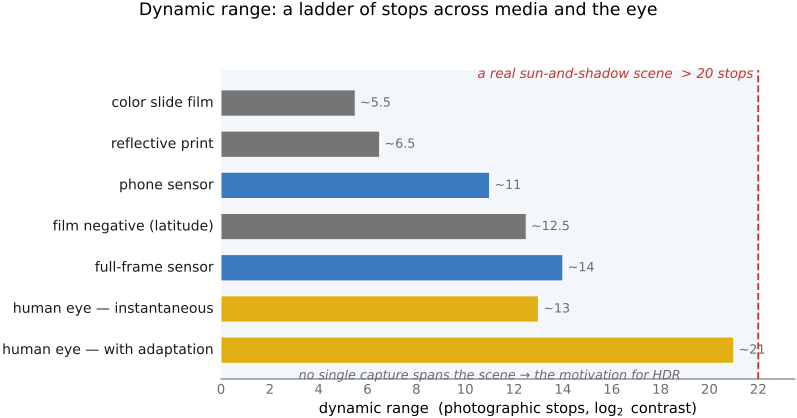
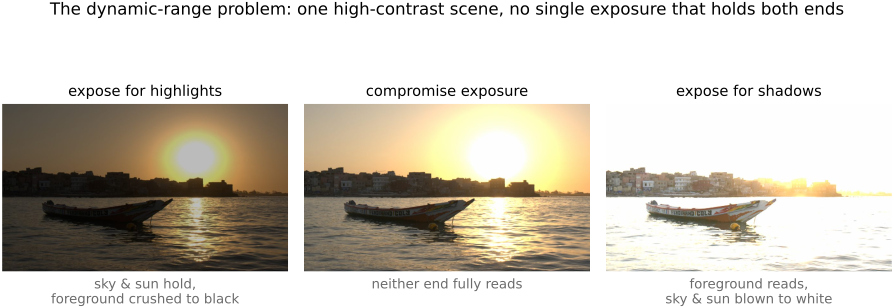
fig-dynamic-range-comparison · dynamic-range ladder in **stops** (horizontal bars): color slide (~5–6) · reflective print (~6–7) · film negative (~12–13) · phone sensor (~10–12) · full-frame sensor (~14) · human eye instantaneous (~10–14) vs adapted (~20+) · an animal example · a typical sun-and-shadow scene (>20) — shows why no single capture holds a high-contrast scene (→ HDR) ✅
⬜ figure not yet created
an animal or two
• the noise **sources** (their variances add):
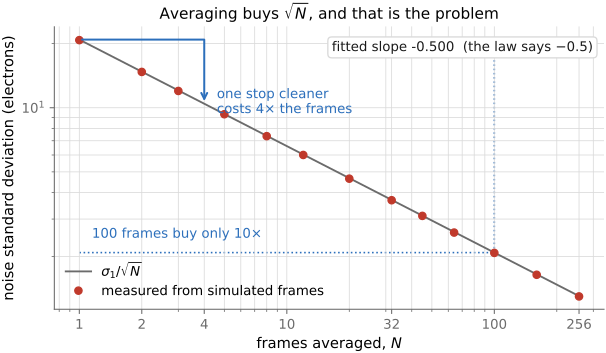
• **photon / shot noise** — the Poisson statistics of *counting photons*: variance = mean, so σ = √N. Fundamental (it's the light itself), dominates the midtones/highlights; averaging N independent frames cuts it by √N.
• **read noise** — added by the amplifier / ADC on readout; signal-independent, dominates the **shadows** and sets the noise floor (hence dynamic range).
• **thermal / dark current** — electrons freed by heat, independent of light; grows with exposure time and temperature (long exposures & astrophotography → sensor cooling, dark-frame subtraction).
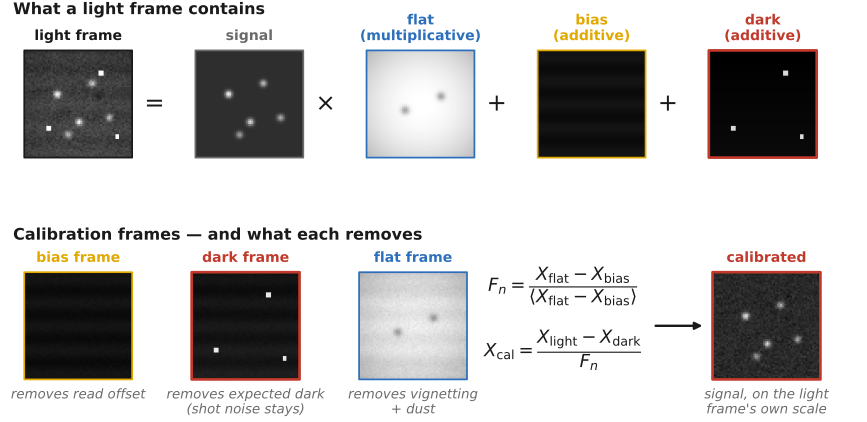
• **fixed-pattern / pattern noise** — per-pixel gain/offset non-uniformity (PRNU/DSNU), hot/stuck pixels, banding; *structured*, so it reads as worse than random noise of equal magnitude, and is removed by calibration (flat / dark fields).
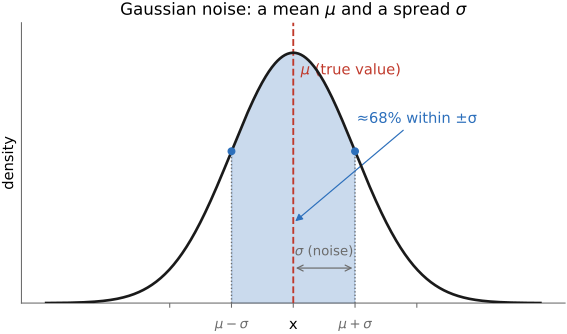
• 💡 **Big lesson — in a *linear* image, noise variance is an *affine* function of brightness.** The variances add: shot noise gives a term **proportional to the signal** (Poisson, variance = mean, scaled by the gain) and read noise a **constant** floor, so the total is **variance ≈ gain·signal + read²** — a straight line in brightness. You can *measure* it: take an aligned **burst** of a static scene and, per pixel, plot the variance across frames against the mean — the points trace that line, slope = photon gain, intercept = the read-noise floor. And a single pixel's value over many frames is **≈ Gaussian**, which is what licenses additive-Gaussian noise models. [`fig-noise-affine` — per-pixel variance vs brightness, measured from a 50-frame ISO-3200 burst; `fig-noise-gaussian-pixels` — per-pixel histograms] → register [[Big Lessons]]
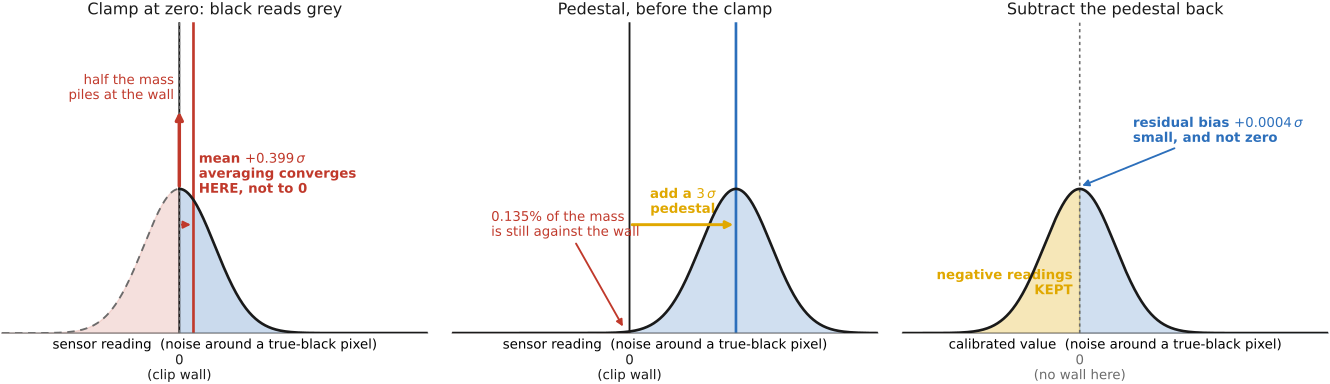
• 💡 **Big lesson — noise is *clipped* at black and white, so near the extremes it is *not* zero-mean.** A recorded value is clamped to [0, max]: near black the negative half of the noise is cut off (frames pile up at 0), near white the positive half is. So at the extremes the noise distribution is **asymmetric** and its mean is pushed **inward**. The consequence for **denoising**: any naive average/smoothing returns that biased mean, so it makes **shadows come out too bright and highlights too dark** — a bias every denoiser has to correct for (carried forward to [[#Denoising basics]] in BASIC). [`fig-noise-truncation` — a near-black pixel pinned at 0 a third of the time, its average biased bright; from the ISO-3200 burst] → register [[Big Lessons]]
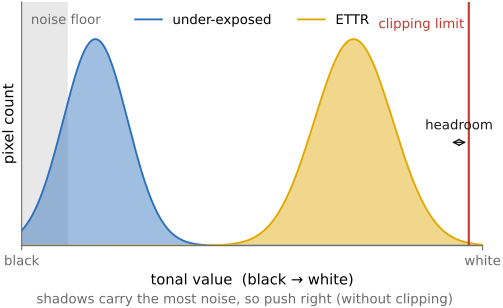
• **the key intuition — it's about ratios (SNR)**: shot noise is **Poisson**, so σ = √N grows with brightness — measured noise is actually **higher in the highlights**. Yet noise *looks* worst in the **shadows**, because perception cares about the **signal-to-noise ratio** SNR = N/√N = √N, which is worst where N is small. "Ratios are all that matters" — the same reason we encode in gamma/log, and the motivation for ETTR (below — Photography 101). [std-dev map vs SNR map figure]
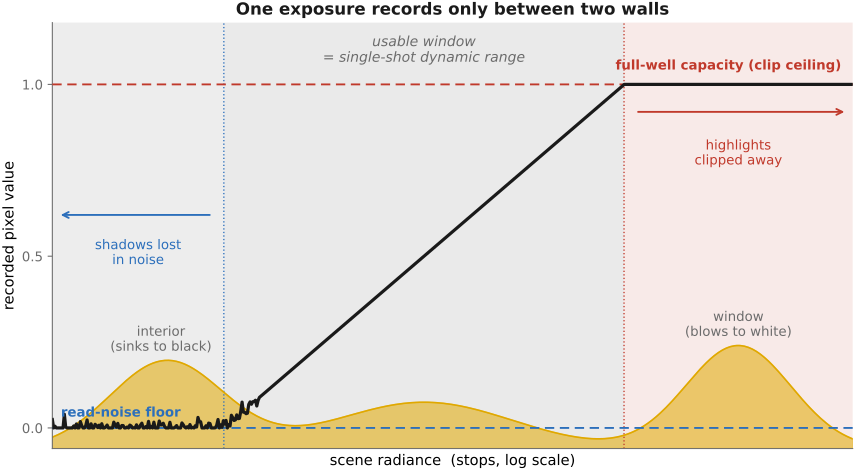
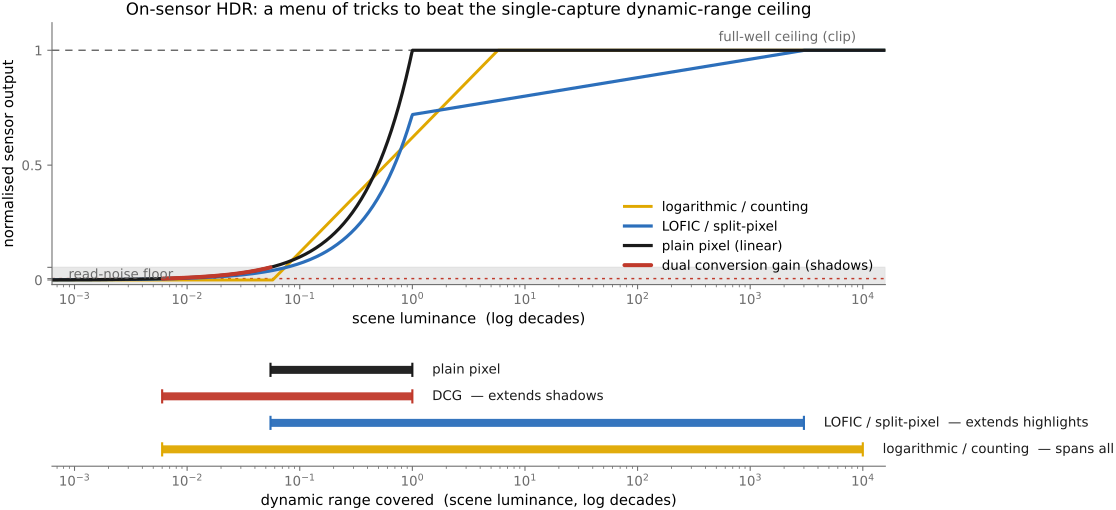
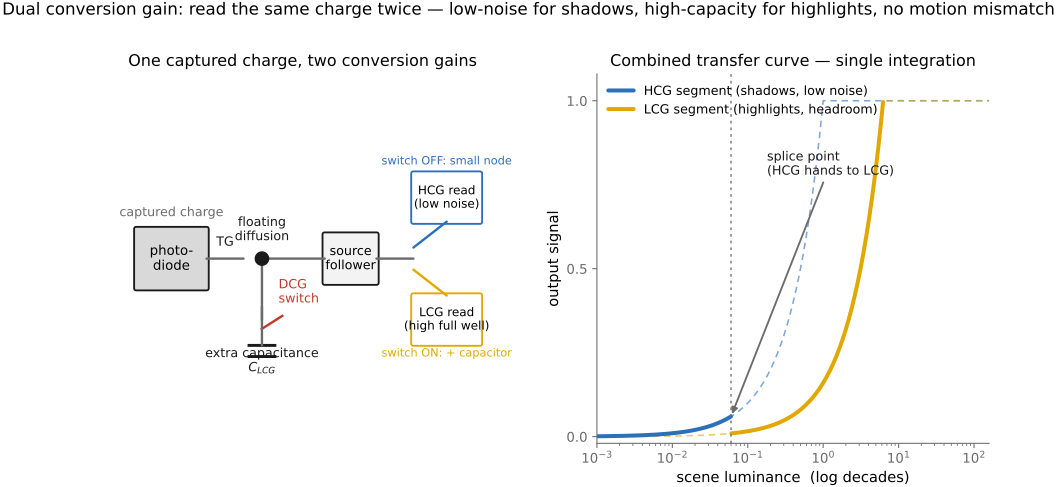
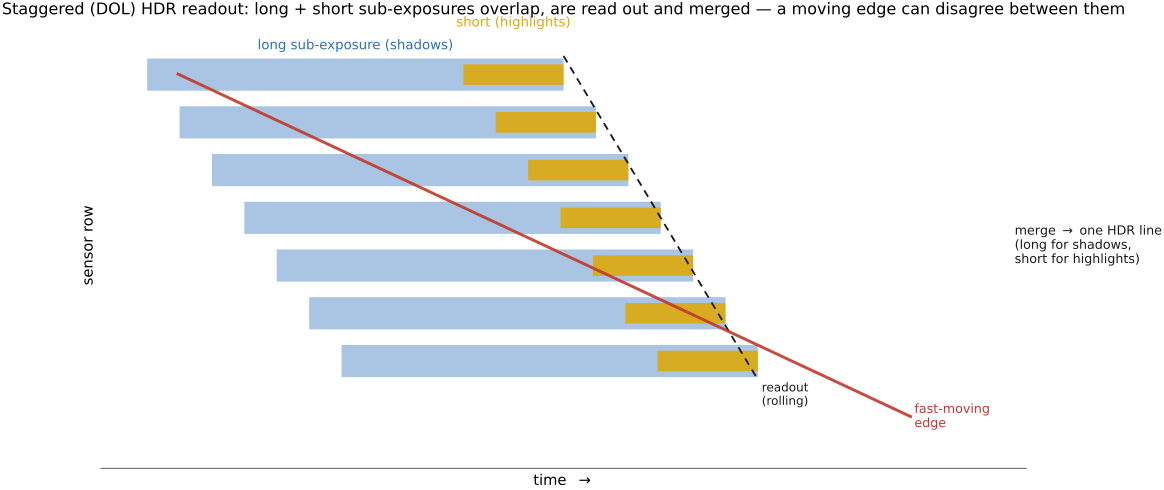
• **dynamic range** = the brightest recordable signal (sensor **saturation / full-well**) ÷ the **noise floor** (read noise in the shadows); it sets how much of a high-contrast scene fits in a *single* exposure → the motivation for **HDR** (Multiple exposure)
• **HDR (high dynamic range)**, sometimes called **wide dynamic range (WDR)**, is a deliberately **fuzzy** term — flag this. It gets used for at least four different things: the *scene* (a high-contrast world), the *capture* (multi-exposure / a high-DR sensor), the *file/encoding* (float or ≥10-bit radiance, e.g. OpenEXR, HDR10), and the *display* (an HDR monitor) — and, loosely, for the **tone-mapped "HDR look."** There is no single sharp definition; say which sense you mean. (Developed in [[Multiple exposure imaging]].)
• 💡 **Big lesson (L2.48) — dynamic range is set by full-well capacity over the noise floor**: a single exposure records from a **top** (the photosite's **full-well capacity** — where it clips to white) down to a **bottom** (the **noise floor** — read noise in the shadows); their **ratio is the dynamic range** (quoted in stops). You **widen** it with a **bigger well** (larger photosites — why a full-frame sensor out-ranges a phone) or a **lower floor** (cooling, lower read noise), and you **beat** it altogether by merging **multiple exposures** (HDR). The capture-side companion to **L2.49**: what bounds a shot is this *range*, not the bit depth. → register [[Big Lessons]]
• **examples, in stops** (the figure): a color **slide** is narrow (~5–6 stops), a reflective **print** ~6–7, **film negative** wide (~12–13 latitude), a **phone** sensor ~10–12, a **full-frame** sensor ~14; the **human eye** is ~10–14 stops *instantaneously* but ~**20+** once **adaptation** is allowed — and some **animals** do better in their niche; an outdoor sun-and-shadow scene can exceed **20 stops**, which is why no single capture holds it [fig-dynamic-range-comparison]
• **see it — recover an underexposed shot, full-frame vs phone**: shoot the *same* underexposed scene as **raw** on a **full-frame** camera and on a **phone**, then **push the exposure up** in software (e.g. +3–4 stops). The full-frame frame cleans up (deep full-well + low read-noise floor → wide dynamic range), while the phone frame breaks down into **shadow noise and banding** as the lift amplifies its read-noise floor — a direct, visible demonstration that **dynamic range scales with photosite / sensor size**, and exactly why phones lean on **burst / HDR+** (Multiple exposure) rather than a single exposure. [fig-underexposure-recovery-ff-vs-phone; photo — paired Fredo full-frame DNG + phone raw] *(also a coding exercise — see [[Exercises & Experiments]])*
• 💡 **Big lesson (L2.49) — quantization is rarely the real problem**: with enough bits and a sane encoding, it's **noise and dynamic range** (this section) that bite — not the number of levels. The one exception is **gamma / banding in shadows**, which is exactly why gamma encoding exists (allocate codes perceptually); so "rarely" ≠ "never". Reminded again in BASIC → Image representation → *Float vs 8-bit*.
equations
shot noise Poisson (variance = mean), σ ∝ √N, SNR = √N
variances add (shot + read + thermal)
averaging N frames → noise /√N
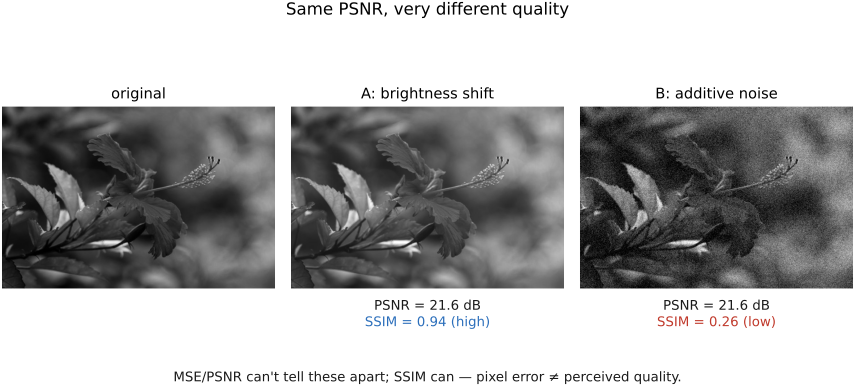
PSNR = 10·log₁₀(MAX²/MSE)
dynamic range = full-well ÷ read-noise floor
2.8.1 Noise sources⧉
2.8.2 The algebra of noise⧉
2.8.3 Signal-to-noise ratio: it's about ratios⧉
2.8.4 Noise variance is mostly affine in pixel brightness⧉
2.8.5 A fuller model of noise: Poisson photon noise plus clipping plus Gaussian electronic noise plus a second clipping⧉
2.8.6 Noise as a function of ISO⧉
2.8.7 Dynamic range⧉
2.8.8 Regimes, and how close we are to the limits⧉
2.8.9 Making noise variance uniform⧉
▸Part 3 VISUAL PERCEPTION AND COLOR⧉
fig-light-journey
fig-light-journey · FUNDAMENTALS part opener — the journey of light: source → scene (reflection) → lens → sensor / retina → visual system, each step labeled with its chapter ✅
<!--uid: visual-perception-and-color-->
This part picks up where [[Fundamentals of imaging]] leaves off: after light has been focused by a lens onto the retina or a sensor. Where part 2 treated the image as a physical measurement, this part asks what that measurement *means* to an observer. Color is not a property of light but a projection made in the eye and brain, and that single fact grounds white balance, color management, JPEG's chroma subsampling, and tone mapping downstream.
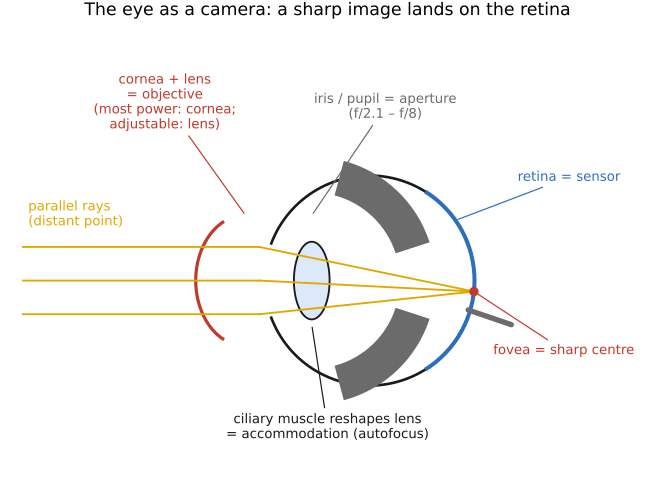
• **The eye and image formation** — the eye as an optical instrument: cornea, pupil, lens, and retina; the cone/rod mosaic and the fovea; and the eye's own refractive errors and how they are measured (inverse imaging).
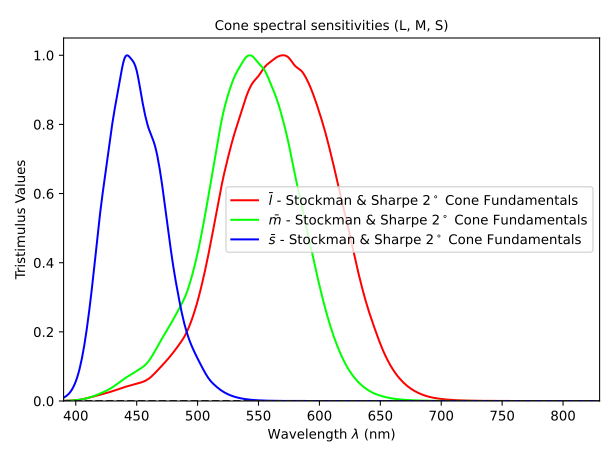
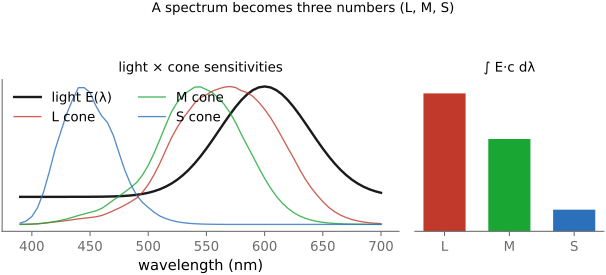
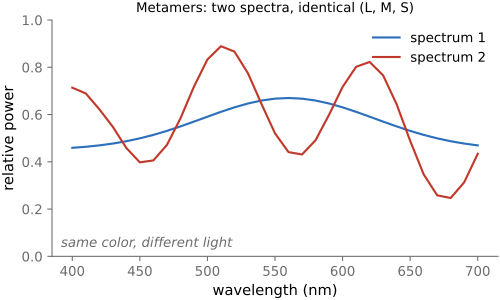
• **Perceptual color and trichromatic vision** — why three cones make us trichromatic; color as the projection of a spectrum onto three numbers; metamers, color blindness, opponent processing, and color as linear algebra.
• **Adaptation and constancy** — what the visual system does with light once it has it: light adaptation, working in ratios (contrast), and discounting the illuminant to report surface lightness and color (constancy).
• **Spatial and temporal vision** — how vision resolves detail across space and time: the contrast sensitivity functions, acuity, and flicker fusion, the limits every codec and display is tuned against.
• **The visual system attends little and makes things up** — attention and eye movements, and the constructed, filled-in nature of what we see.
• **Animal eyes** — human vision is one solution among many: how other eyes form images and sense color, from compound eyes to tetrachromats to the mantis shrimp.
▸3.1 The eye and image formation⧉
fig-eye-cross-section
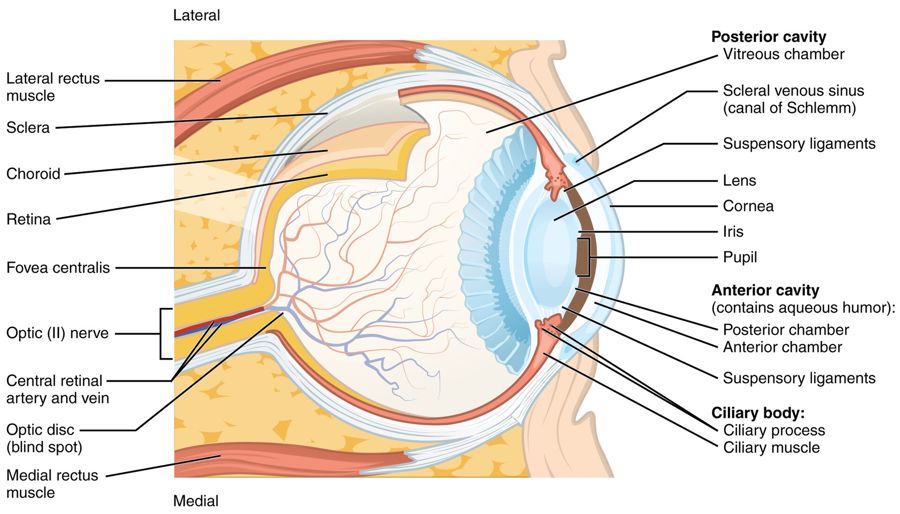
fig-eye-cross-section · eye cross-section 🟨
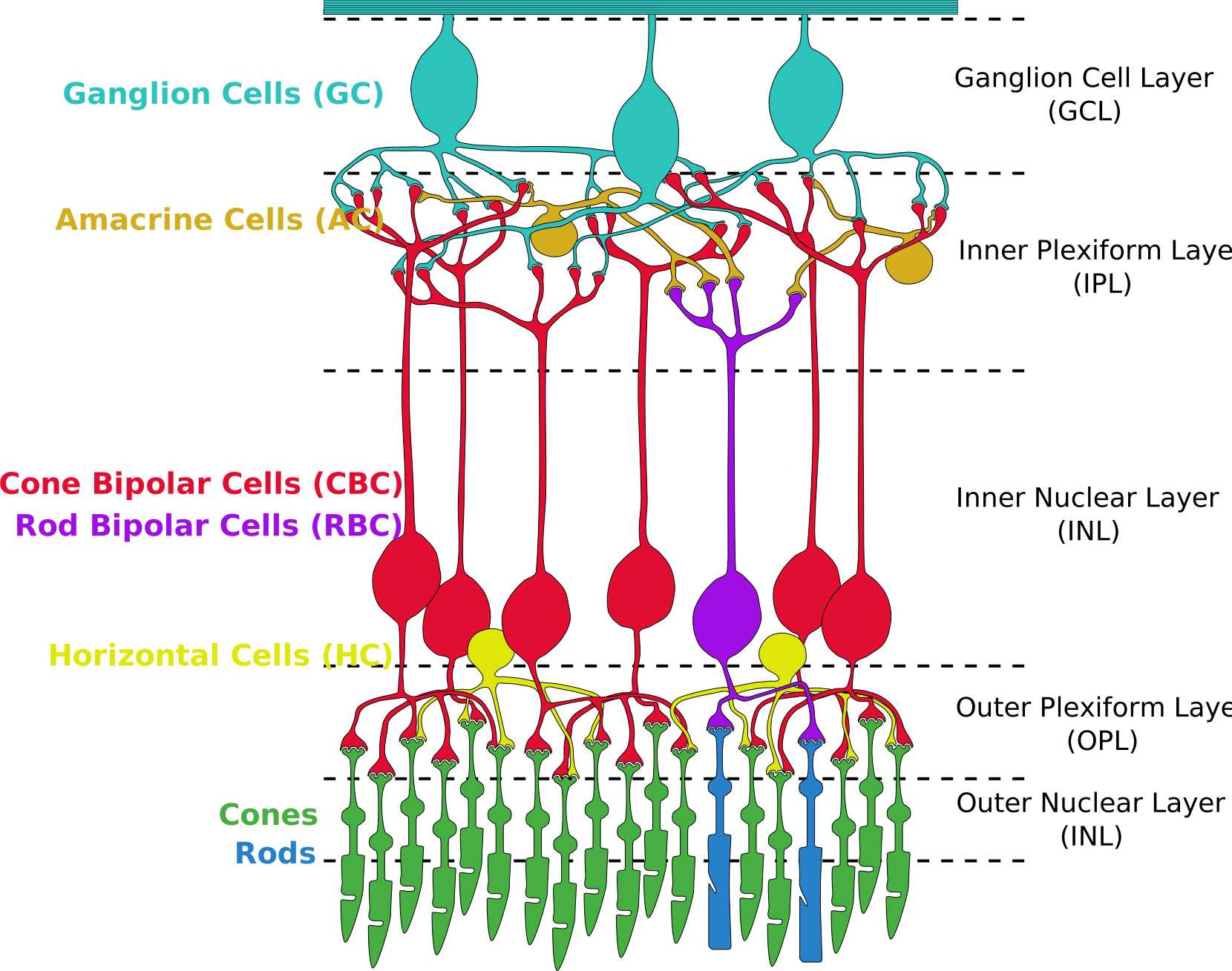
fig-retina-layers
fig-retina-layers · retina layers & photoreceptor synapses 🟨
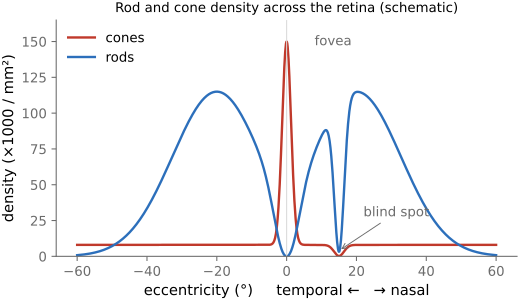
fig-cone-rod-distribution
fig-cone-rod-distribution · cone/rod distribution & fovea 🟨
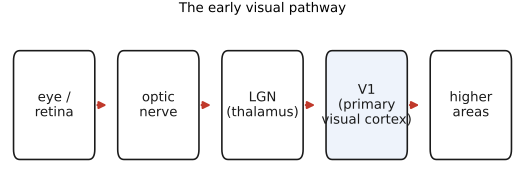
fig-visual-pathway
fig-visual-pathway · pathway retina→LGN→V1 🟨
fig-photoreceptor-cell
fig-photoreceptor-cell · anatomy of a rod & cone cell 🟨
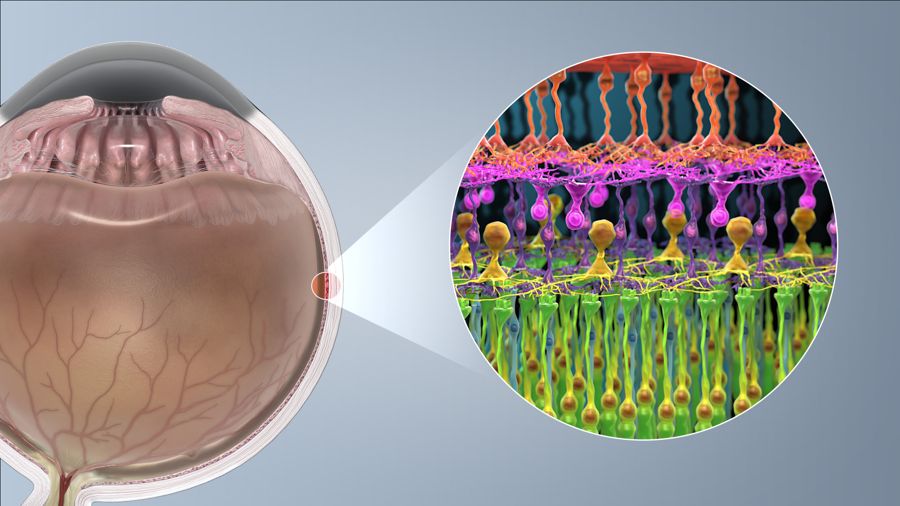
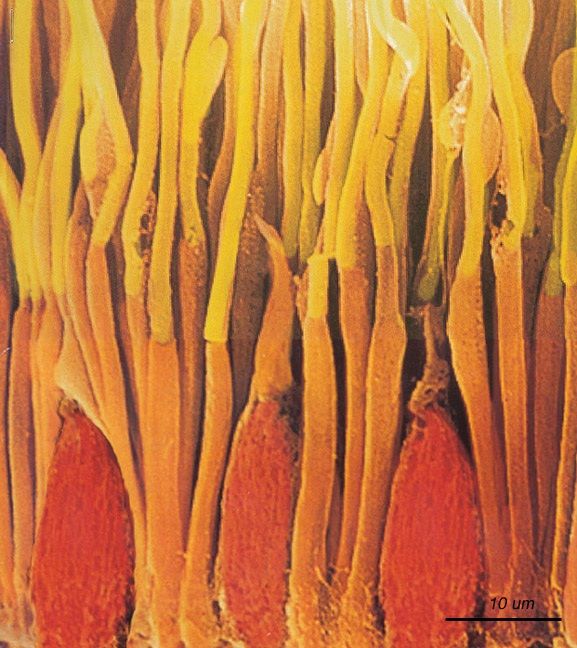
fig-rods-cones-micrograph
fig-rods-cones-micrograph · micrograph of rods & cones (primate retina) 🟨
• light, lens, pupil, retina,
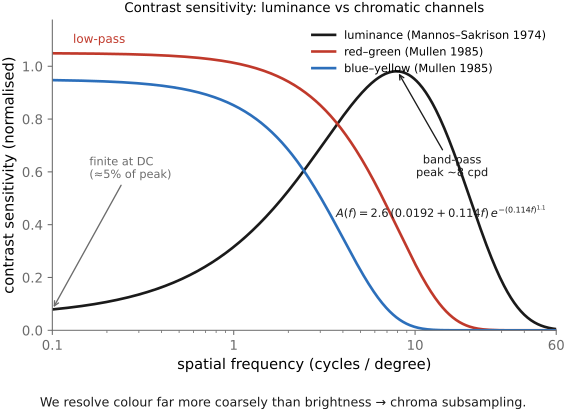
• cones/rods, distribution, fovea — note there are **no S (blue) cones in the very center of the fovea**, and far more L+M than S overall, so **blue is low-resolution and a bit out of focus** (chromatic aberration) — yet we perceive blue everywhere (the brain fills it in). Luminance ≈ the **L+M cone sum**, which is why **green carries most of the acuity** (and why Bayer uses 2× green).
• cells, ganglions, on-retina spatial processing, visual cortex, V1, higher.
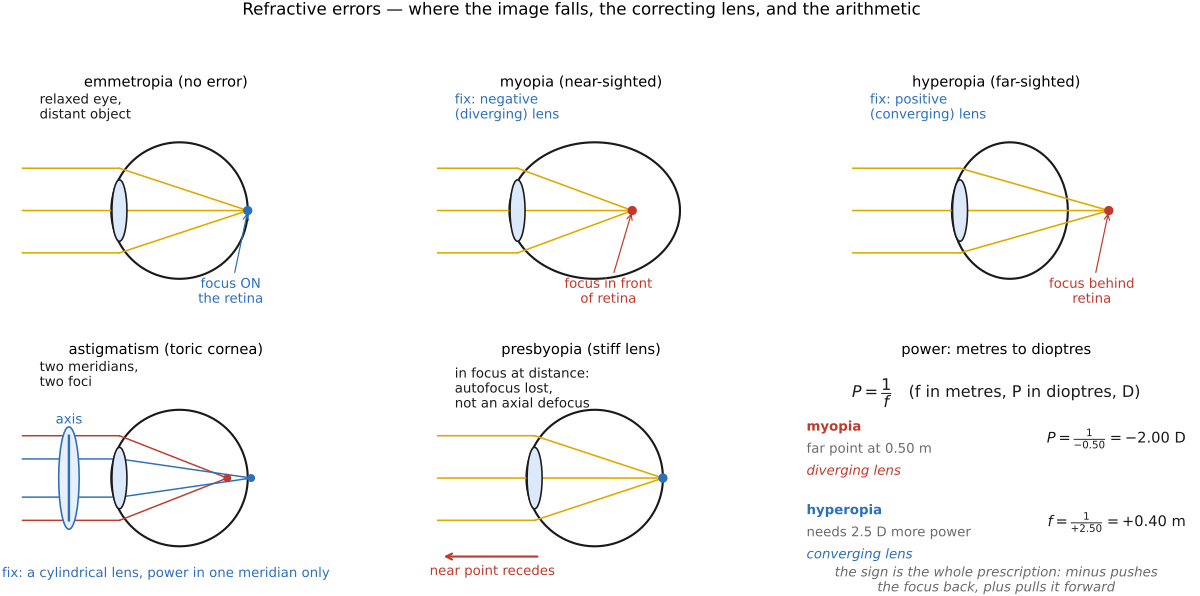
• **the eye as a camera — and its refractive errors.** Like any lens system the eye can mis-focus: **myopia** (eyeball too long / cornea too curved → image forms *in front* of the retina), **hyperopia** (too short → *behind*), **astigmatism** (a non-spherical cornea → two focal lines, not one point), and **presbyopia** (the aging lens stiffens and loses **accommodation**). Each is corrected by a lens quoted in **diopters** (D = 1/focal-length in meters): a negative/diverging lens for myopia, positive/converging for hyperopia, a **cylindrical** lens (with an axis) for astigmatism. [`fig-refractive-errors`]
• **how the prescription is *measured* (the machines), and why it's just inverse imaging.** **(1) Retinoscopy** — shine a moving streak of light into the eye and watch the **retinal reflex** sweep across the pupil; its direction and speed reveal myopia vs hyperopia, and trial lenses are stacked until the reflex stops moving ("neutralization"). **(2) Autorefractor** — automates this objectively: it projects an **infrared** target onto the retina and analyses the **returning image** (its focus/size, or a Hartmann–Shack / Scheimpflug pattern) to solve for the corrective lens that makes the retinal image sharp — essentially a little camera running autofocus *on your eye*, in seconds. **(3) Phoropter** — the familiar "better one… or two?" wheel of trial lenses over an eye chart: a **subjective** refinement of the machine's objective estimate. **(4) Wavefront aberrometer (Shack–Hartmann)** — for the full optical picture: a **lenslet array** samples the wavefront leaving the eye and measures **higher-order aberrations** (coma, spherical, trefoil), not just sphere/cylinder — the same wavefront sensing used in **adaptive optics** and in planning **LASIK**. The throughline: measuring an eye is **inverse imaging** — find the optics that would make the retinal image (or the returning wavefront) ideal. (Cross-ref wavefront / Shack–Hartmann sensing and adaptive optics in [[Slopendium/Compound lenses, and aberration correction]].)
▸3.2 Perceptual color and trichromatic vision⧉
3.2.1 Cone photoreceptors and perceptual color⧉
3.2.2 Metamers⧉
3.2.5 Color as linear algebra⧉
▸3.3 Adaptation and constancy⧉
• the perceptual machinery the visual system runs *on top of* color: adapting to level, working in ratios (contrast), and discounting the illuminant to report surface reflectance (lightness and color constancy), the properties compression, tone mapping, and display design optimize for.
3.3.2 Visual perception is largely invariant to multiplications⧉
3.3.5 Discounting the illuminant⧉
3.3.6 Failure of color constancy when viewing photographs⧉
▸3.4 Spatial and temporal vision⧉
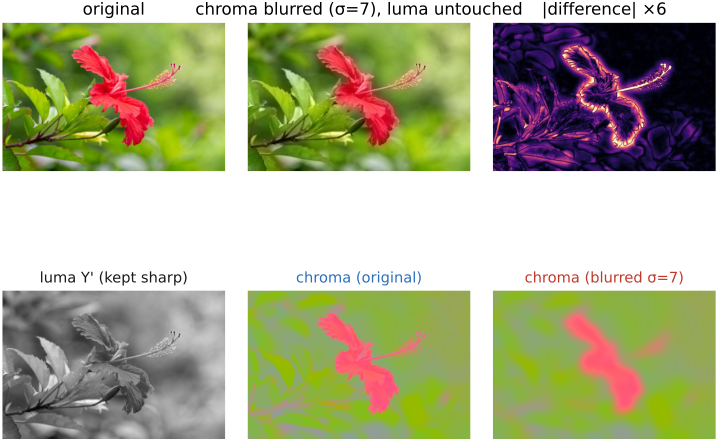
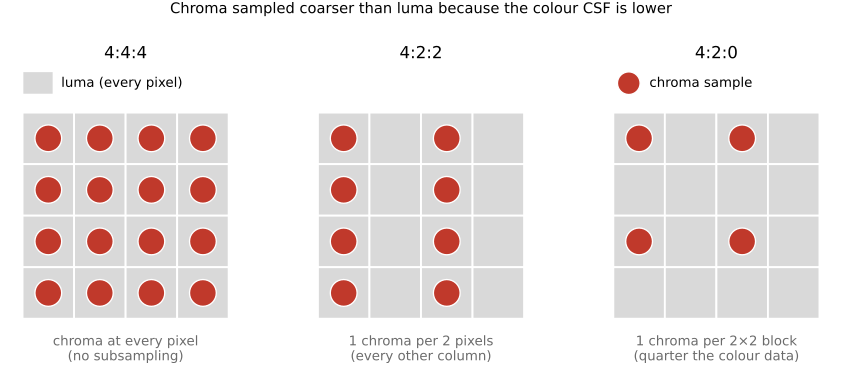
3.4.2 Chrominance spatial vision⧉
▸3.5 The visual system attends little and makes things up⧉
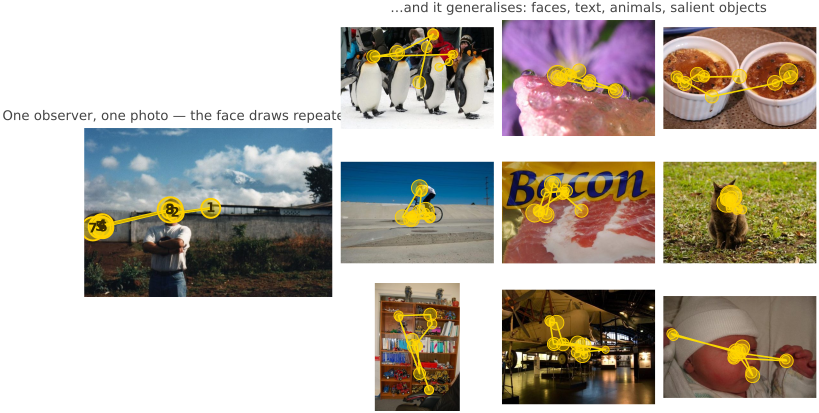
3.5.2 The visual system makes things up⧉
▸3.6 Animal eyes⧉
fig-eye-evolution
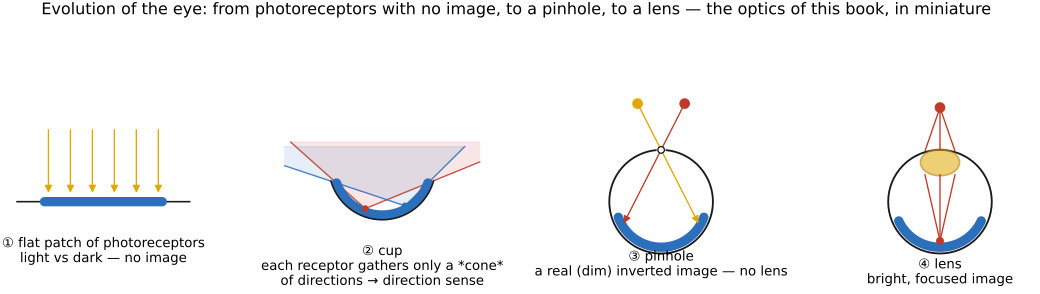
fig-eye-evolution · the evolution of the eye, in cross-sections: flat photoreceptor patch (no image) → cup (directional) → pinhole (an image, no lens) → lensed eye — recapitulating sensor → camera-obscura → lens (Bonus: animal eyes) 🟨
• **the eye evolved as a sequence of small improvements**, and it recapitulates the optics of this book — from "no image" to a focused one. Following Nilsson's stages (Land & Nilsson, *Animal Eyes*):
• **a flat patch of photoreceptors** (an *eyespot*): just **photosites**, **no image formation** — it tells light from dark and, crudely, which side has *more* light (phototaxis), but cannot form a picture. This is the bare **sensor** with no optics.
• **a concavity / cup**: fold the patch into a **pit** and the rim's shading gives **directional** sensitivity — the deeper the cup, the better you can tell *where* light comes from.
• **a pinhole**: close the cup almost shut → a **pinhole eye**, a real (if dim) **image** with no lens at all (the **nautilus** still uses one) — exactly the camera obscura of [[#Pinhole image formation and linear perspective]].
• **a lens**: fill the aperture with a **refractive lens** (often a graded-index sphere) → a **bright, focused** image, independently evolved in fish, cephalopods, and vertebrates. Add a **cornea, iris, and accommodation** and you have the human eye.
• so the human eye is *one* solution; evolution reached the same goal by very different routes (below).
• **a tour of those other solutions** — a useful contrast to the human eye and to camera design:
• **compound eyes** (insects): many **ommatidia** → wide field of view and fast temporal response, but low spatial resolution
• **more cone types**: birds / reptiles are **tetrachromatic** (a 4th cone, into the UV); the **mantis shrimp** has ~12–16 photoreceptor classes (yet poor color *discrimination* — it seems to recognize rather than compare) — the **divergence of opsins** across animal groups is the color sidebar in [[#Color]]
• **tapetum lucidum** (cats, deer): a reflective layer behind the retina that boosts night vision (and causes eye-shine)
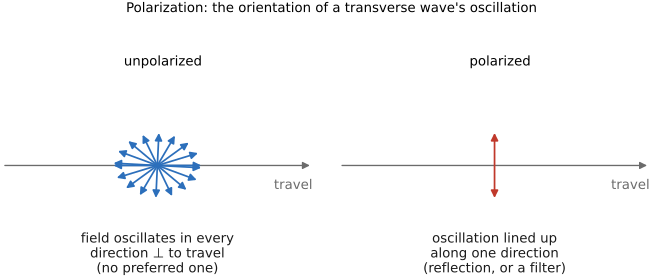
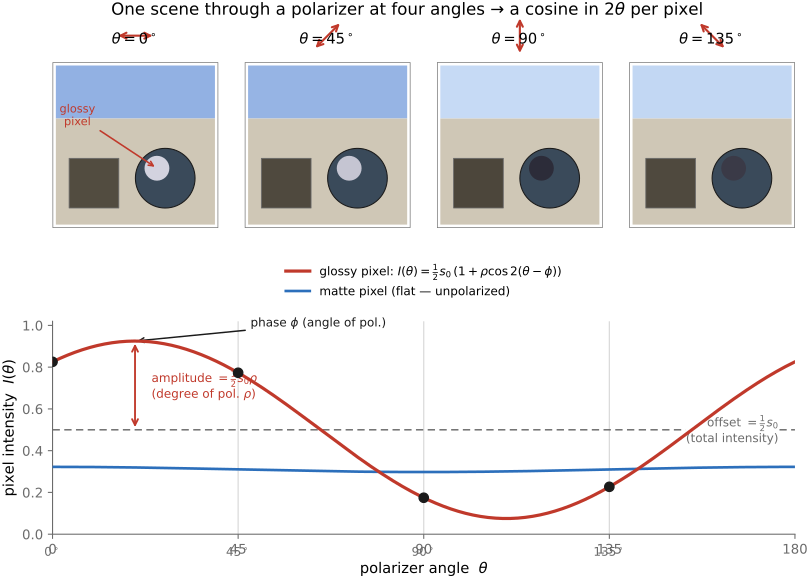
• **polarization vision** (cephalopods, many insects): they see light's **polarization** — a channel we're blind to
• **other eye designs**: **pinhole** (nautilus), **mirror eyes** (scallops — image formed by a concave mirror, not a lens), and the front-facing (**stereo**) vs side-facing (**field-of-view**) placement trade-off
• further reading: Land & Nilsson, *Animal Eyes*; the "Evolution of Eyes" chapter in *Vision* (Cambridge); a friendly overview at phos.co.uk, "The Evolution of Sight".
3.6.1 The optics: many ways to form an image⧉
3.6.2 The pupil: aperture shape as a clue to ecology⧉
3.6.3 Amphibious vision: focusing in air and in water⧉
3.6.4 The sensor: a retina that is not uniform⧉
3.6.5 Seeing in the dark: sensitivity and its tricks⧉
3.6.6 Acuity: the finest detail, and how to sharpen it⧉
3.6.7 Color vision: opsins remixed⧉
3.6.8 Polarization: the axis we are blind to⧉
3.6.9 Temporal vision: flicker, and motion first⧉
▸3.7 Human vision TLDR⧉
3.7.1 The eye is a camera with an uneven sensor⧉
3.7.2 Three cones reduce a spectrum to three numbers⧉
3.7.3 Primaries are a choice, and the axes are skewed⧉
3.7.4 Color blindness is a missing or shifted axis⧉
3.7.5 After the cones, brightness and two color differences⧉
3.7.6 The eye works on ratios, not levels⧉
3.7.7 The eye reports surfaces, not light⧉
3.7.8 Spatial vision is band-pass, and measured in degrees⧉
3.7.9 Color detail is coarser than brightness detail⧉
3.7.10 Vision has a finite temporal bandwidth⧉
3.7.11 Vision is foveal, serial, and partly invented⧉
3.7.12 What the rest of the book does with this⧉
▸Part 4 COLOR SPACES AND COLOR TECHNOLOGY⧉
<!--uid: color-spaces-and-color-technology-->
This part turns the perception of the previous part into technology. Once color is three cone responses, how do we measure it, encode it, capture it on a sensor that on its own cannot tell colors apart, reproduce it faithfully across devices, and keep it consistent from camera to print? These are the questions every color pipeline answers before it makes a picture.
• **Linear color reproduction and CIE XYZ** — measuring color (CIE XYZ), the chromaticity diagram, the type-system discipline, and linear RGB.
• **White balance and white point** — the two different "whites," chromatic adaptation, the Bradford and CAT16 transforms, and spectral sharpening.
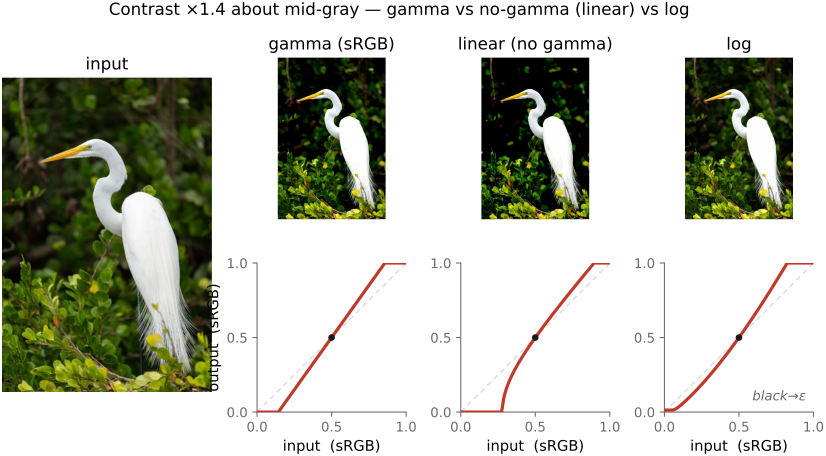
• **Encoding: linear, gamma or log** — how the three numbers are stored as bits; why "gamma correction" is a misnomer; gamma as encoding vs as a contrast operator; what gamma buys and costs.
• **RGB color spaces** — why a family rather than one: primaries, gamut, and bit budget; sRGB / Adobe RGB / Display P3 / Rec.2020 / ProPhoto.
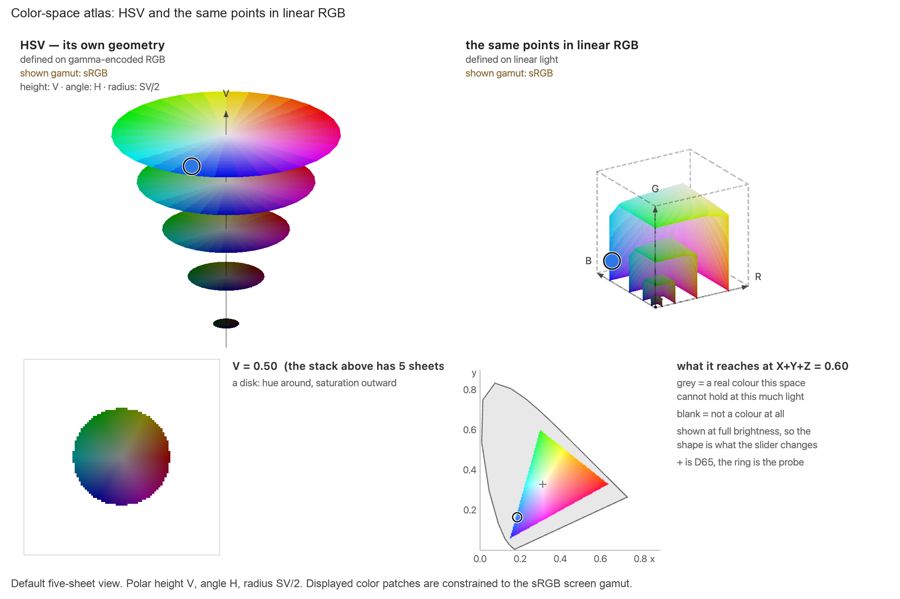
• **Advanced color: opponents, perceptually-uniform, and preferred** — the opponent split, the tensions pulled together, cylindrical UI spaces (HSV/HSL), perceptually-uniform spaces (CIELAB, Oklab), and preferred / memory colors (skin, sky).
• **Sensing color: multiplexing strategies** — how a monochrome sensor is made to see color: Bayer mosaic, 3-CCD prisms, stacked and dispersive sensors.
• **Synthesizing color** — reproducing color from primaries: additive vs subtractive, gamut mapping, displays, printing, color film, simple display calibration.
• **Recap: the full color pipeline, color management and ICC** — the end-to-end chain, the ICC machinery, and soft proofing.
• **Color TLDR** — the whole part in one page: all color spaces are coordinates on one 3-D space, converted by small matrices plus a few curves; plus a survey of what real software does and a practical what-space-for-what-task reference.
• **Color terms** — a reference glossary for the whole part (placed last): the color vocabulary grouped by what it measures (radiometry, photometry, colorimetry, color appearance, color spaces and encoding), plus tables of the chronic confusions and the terms that mean different things in different chapters.
In a hurry? Skip straight to the **Color TLDR** at the end of the part: it is the whole story in one page, with a decision table for choosing a space and a tour of what real pipelines actually do with color.
▸4.1 Linear color reproduction and CIE XYZ⧉
▸4.2 White balance and white point⧉
4.2.3 How do you know the illuminant?⧉
4.2.4 White balance with mixed illuminant⧉
▸4.3 Encoding: linear, gamma or log⧉
4.3.3 Color and encoding in real pipelines⧉
4.3.4 What gamma buys, and what it costs⧉
4.3.5 Gamma the contrast operator (gamma adjustment)⧉
4.3.7 Log encoding⧉
4.3.8 PQ, the perceptual quantizer⧉
4.3.9 HDR encoding⧉
▸4.4 RGB color spaces⧉
4.4.1 Two different words for impossible⧉
4.4.2 Reference: primaries, matrices, and transfer functions⧉
▸4.5 Advanced color: opponents, perceptually-uniform, and preferred⧉
4.5.5 Recap: a zoo of color spaces⧉
4.5.6 Color appearance models⧉
4.5.8 Color names and the prototypes behind them⧉
▸4.6 Sensing color: multiplexing strategies⧉
fig-color-multiplexing
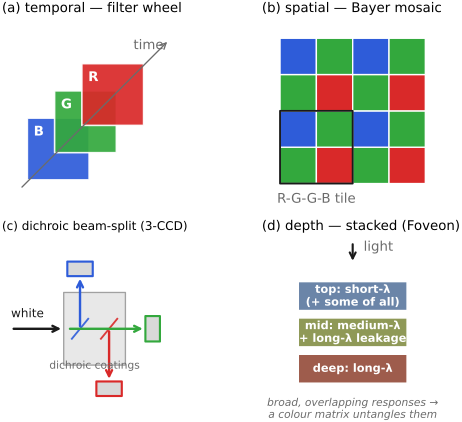
fig-color-multiplexing · four color-sensing multiplexing strategies: temporal, spatial (Bayer), **dichroic 3-CCD** beam-split, depth (Foveon, with realistic broad/overlapping layer colors + color-matrix note) 🟨
⬜ figure not yet created
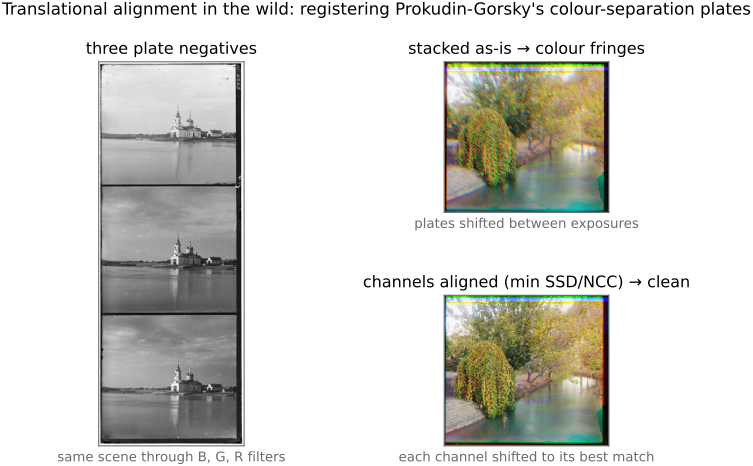
Prokudin-Gorskii color fringes fig-prokudin-gorskii
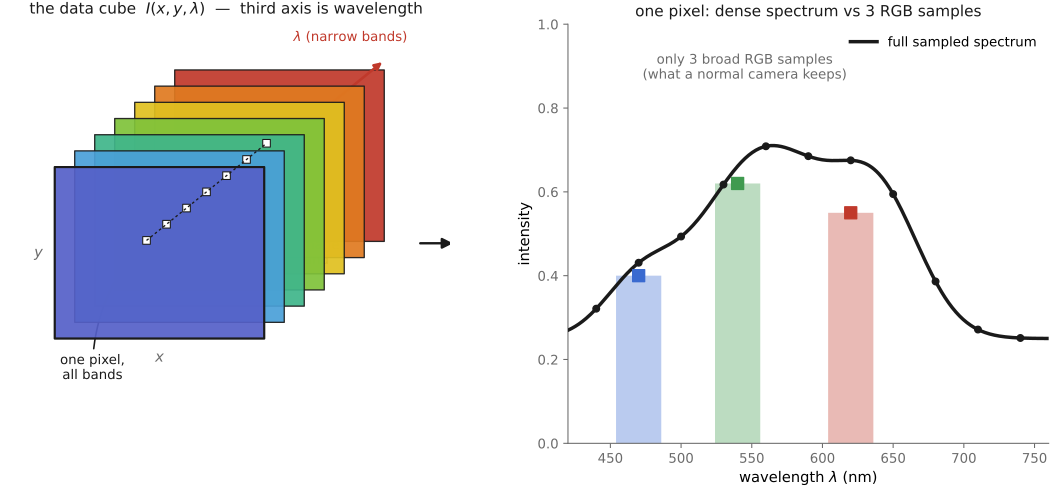
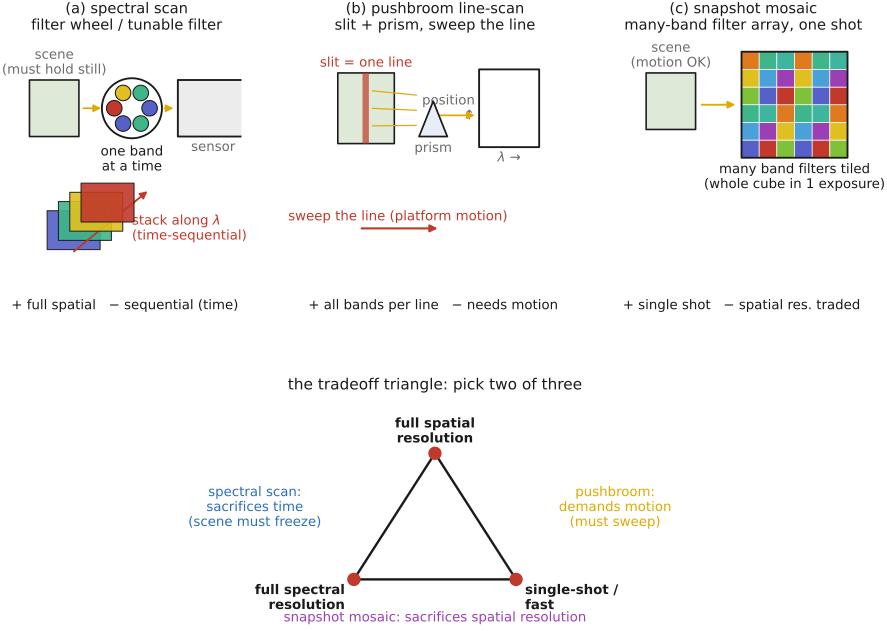
• four ways to turn a monochrome sensor into a color one: time, space (Bayer), prism (3-CCD), depth (Foveon), plus spectral/Lippmann and hybrids
• trichromatic vs spectral (multispectral) capture
4.6.1 Multiplexing in time⧉
4.6.2 Multiplexing in space: the color filter array⧉
4.6.3 Multiplexing across separate sensors: the beam-splitter⧉
4.6.4 Multiplexing per pixel by dispersion: color routers and nano-prisms⧉
4.6.5 Multiplexing per pixel by tunable absorbers: quantum dots⧉
4.6.6 Multiplexing in depth: stacked photodiodes⧉
4.6.7 Hybrid strategies⧉
4.6.8 Beyond trichromatic capture: full spectrum and multispectral⧉
4.6.9 Spectral sensitivity: matching the eye, catching photons, and white balance⧉
▸4.7 Synthesizing color⧉
▸4.8 Recap: the full color pipeline, color management and ICC⧉
▸4.9 Color TLDR⧉
• one 3-D space (human vision → 3 numbers); every color space is coordinates on it
• short sections: cones/LMS/metamerism; XYZ; chromaticity+gamut; linear RGB & why many; white point & balance; gamma for encoding; sRGB; RAW; log for HDR/video; opponents; HSV for UI; perceptually uniform for differences
• then two reference sections folded in: **Color and encoding in the real world** (ISPs, PyTorch/OpenCV, comp-photo pipelines, computer graphics, gamma & interpolation) and **What color space and encoding to do what?** (the task→space table and the by-space list)
4.9.1 Physical color⧉
4.9.2 Cones, LMS, and metamerism⧉
4.9.3 Light and chromatic adaptation⧉
4.9.4 XYZ⧉
4.9.5 Chromaticity and gamut⧉
4.9.6 Linear RGB, and why there are many⧉
4.9.7 White balance and white point⧉
4.9.8 Gamma is for encoding (and doesn't hurt processing much)⧉
4.9.9 Respect the encoding⧉
4.9.10 sRGB⧉
4.9.11 RAW files⧉
4.9.12 Log is for high dynamic range, video, and some processing⧉
4.9.13 Log and HDR⧉
4.9.14 Opponent (luma-chroma) spaces⧉
4.9.15 HSV is for UI⧉
4.9.16 Perceptually uniform spaces are for differences⧉
4.9.17 The full chain: from physical color to perceptual color to color names and memory⧉
4.9.18 Capture and rendering⧉
4.9.19 Color and encoding in the real world⧉
4.9.20 In camera ISPs⧉
4.9.21 In PyTorch and OpenCV⧉
4.9.22 Computational-photography pipelines⧉
4.9.23 Computer graphics and lighting simulation⧉
4.9.24 Gamma, cross-fading, and linear operations⧉
4.9.25 What color space and encoding to do what?⧉
4.9.26 The same list, by space⧉
4.9.27 Keep the working master⧉
▸4.10 Color terms⧉
4.10.1 Radiometry: physical light, no observer⧉
4.10.2 Photometry: physical light weighted by the eye⧉
4.10.3 Colorimetry: color via the standard observer⧉
4.10.4 Color appearance: perceptual, observer-dependent⧉
4.10.5 Color spaces and encoding⧉
4.10.6 Chronic confusions, named⧉
4.10.7 One word, several meanings⧉
▸Part 5 PHOTOGRAPHY⧉
<!--uid: photography-->
▸5.1 The camera as an instrument⧉
<!--uid: cameras-->
<!--tags: background useful hardware standard-->
▸5.2 Exposure and capture timing⧉
<!--uid: exposure-->
<!--tags: background useful practice-->
▸5.3 Viewpoint, lenses, and focus⧉
<!--uid: lenses-->
<!--tags: background useful practice standard-->
▸5.4 Working with light⧉
<!--uid: illumination-and-the-flash-->
<!--tags: background essential practice standard-->
▸5.5 Developing and editing a photograph⧉
<!--uid: traditional-and-digital-darkroom-->
<!--tags: background useful practice standard-->
▸5.6 Preparing photographs for viewing⧉
<!--uid: displays-->
<!--tags: background useful hardware standard-->
▸5.7 Photographic situations and tradeoffs⧉
<!--uid: types-of-photography-->
<!--tags: background useful practice standard-->
▸5.8 Photographic representation and its limits⧉
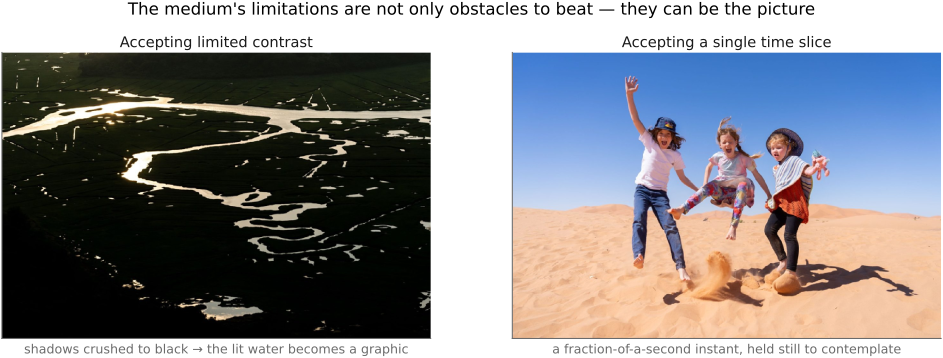
fig-medium-six-limitations
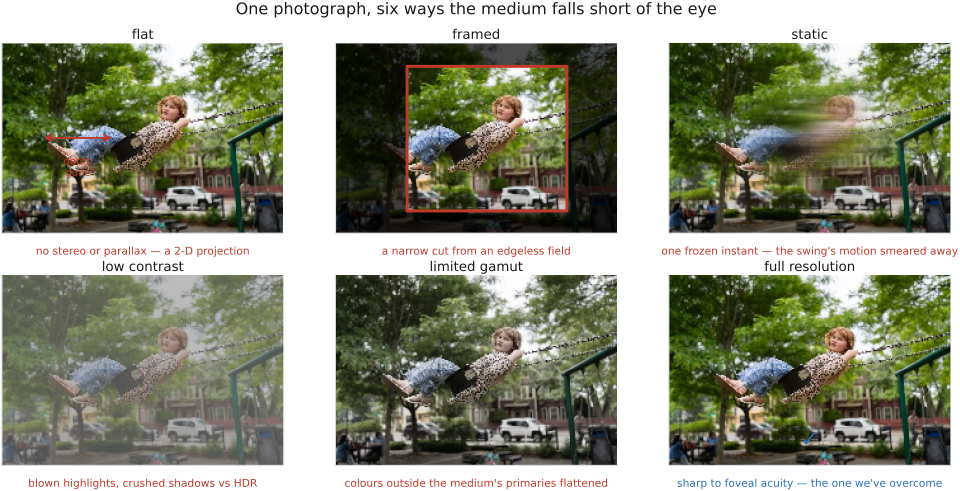
fig-medium-six-limitations ·
<!--uid: limitations-of-the-medium-->
<!--tags: background optional practice perception standard-->
▸5.9 Photography TLDR⧉
<!--uid: photography-practitioner-tldr-->
<!--tags: background useful practice standard-->
▸Part 6 LINEAR METHODS AND FOURIER ANALYSIS⧉
<!--uid: linear-methods-and-fourier-analysis-->
Linear methods deserve a part of their own for three reasons. (1) Many processes in photography are genuinely linear: incoherent imaging is linear in intensity, coherent imaging is linear in amplitude. (2) Even when a process is not linear it can usually be linearized for small quantities (thin-lens/paraxial optics, motion magnification). (3) Linear algebra offers a plethora of powerful tools for processing images and solving inverse recovery problems, both practical and conceptual. This part develops the linear-systems vocabulary (convolution, Fourier, sampling, pyramids) and the linear-algebra view of image formation and its inversion (imaging as a linear system, linear inverse problems, fundamental limits).
▸6.1 Introduction to forward and inverse linear methods⧉
6.1.2 Running the blur backward: the idealized case⧉
6.1.3 The catch: noise and ill-conditioning⧉
6.1.6 A different challenge: sampling and aliasing⧉
6.1.7 What the measurement determines⧉
▸6.2 Convolution⧉
⬜ figure not yet created
kernel sliding over an image fig-convolution-slide
fig-convolution-flip
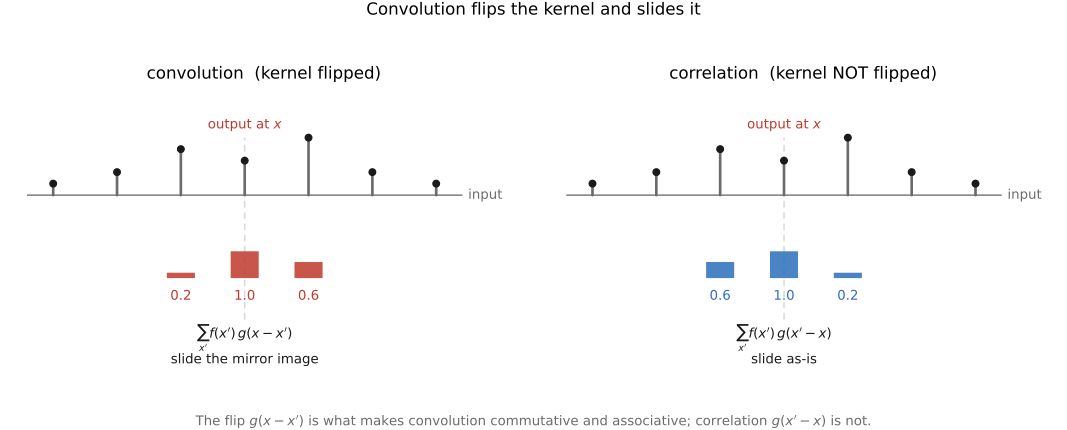
fig-convolution-flip · the flip: where-from vs where-to — convolution `g(x−x')` vs correlation 🟨
fig-psf-impulse
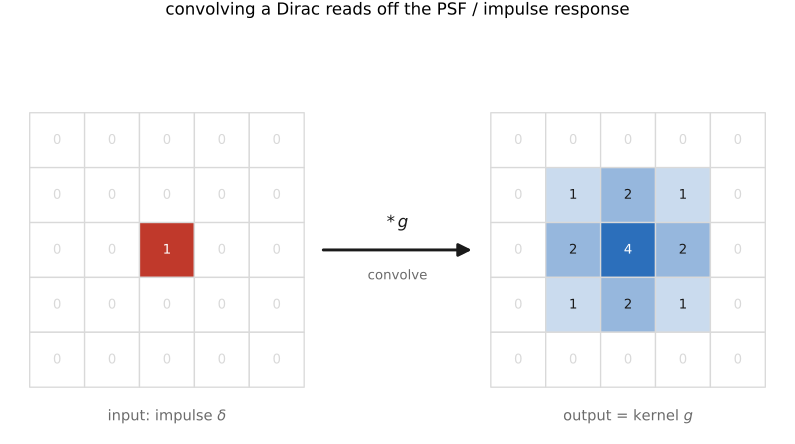
fig-psf-impulse · impulse in → kernel out: convolving a Dirac reads off the PSF / impulse response 🟨
fig-blur-zoo
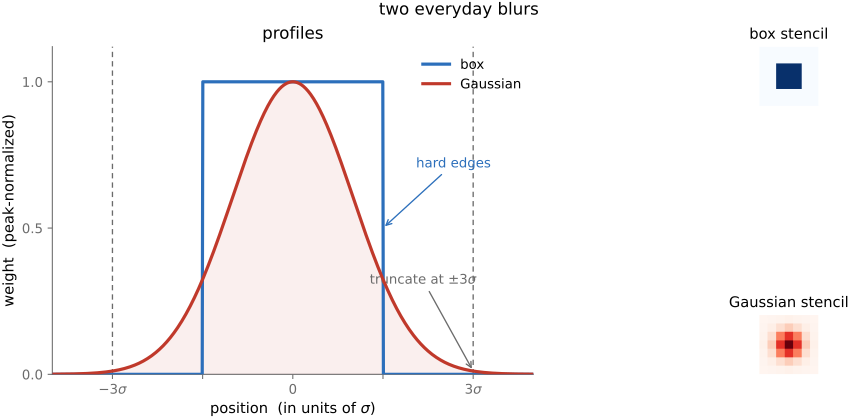
fig-blur-zoo · box vs Gaussian kernels — profiles + 2-D stencils, Gaussian truncated at ~3σ 🟨
fig-unsharp-mask
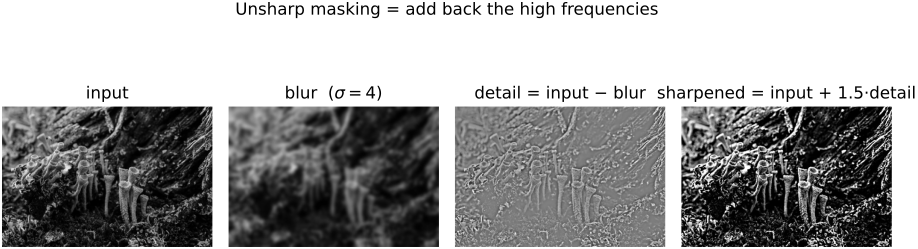
fig-unsharp-mask · unsharp-mask decomposition: input − blur = detail (high-pass), output = input + k·detail 🟨
fig-sharpen-kernel
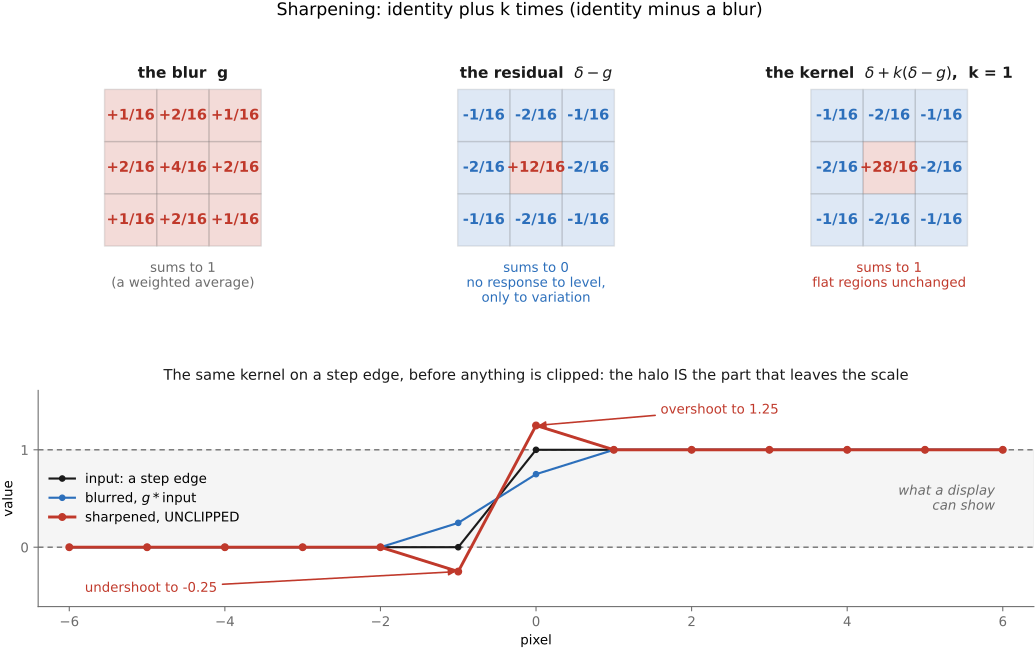
fig-sharpen-kernel · the sharpening kernel δ − blur as a +center / −surround stencil 🟨
fig-separable
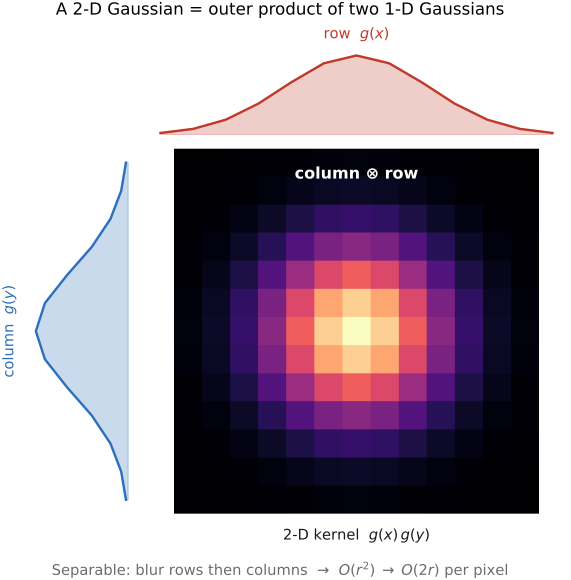
fig-separable · separability — a 2-D Gaussian = 1-D ⊗ 1-D (blur rows then columns); O(r²) → O(2r) 🟨
fig-gradient-sobel
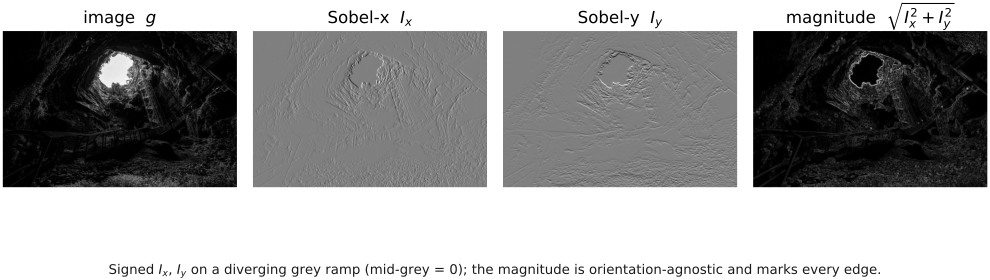
fig-gradient-sobel · Sobel x / y → gradient magnitude (edge strength) on an image 🟨
fig-convolution-probability
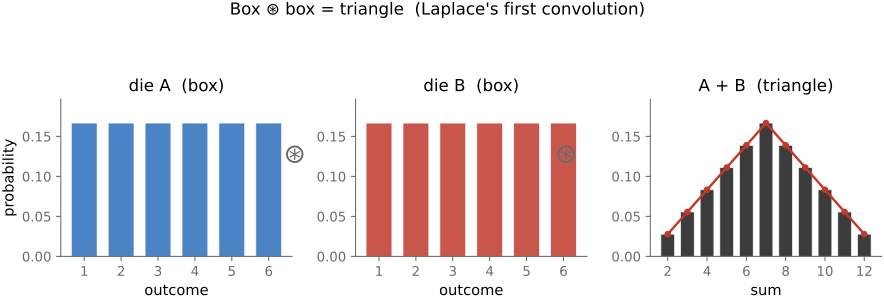
fig-convolution-probability · convolution as the sum of random variables: box ⊛ box = triangle (two dice) 🟨
equations
convolution (I*g)(x) = Σ I(x')·g(x−x')
Gaussian g(x) ∝ exp(−x²/2σ²)
unsharp out = in + k·(in − blur(in))
sharpening kernel δ − g
6.2.4 Convolution as a sum of translated images⧉
6.2.9 Linear sharpening⧉
6.2.11 Is imaging blur usually a shift-invariant convolution?⧉
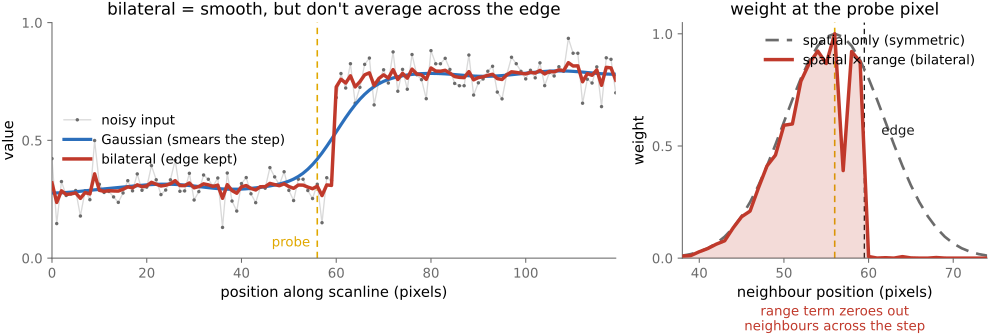
6.2.12 Fixed and data-dependent weights⧉
▸6.3 Fourier⧉
fig-fourier-basis-matrix
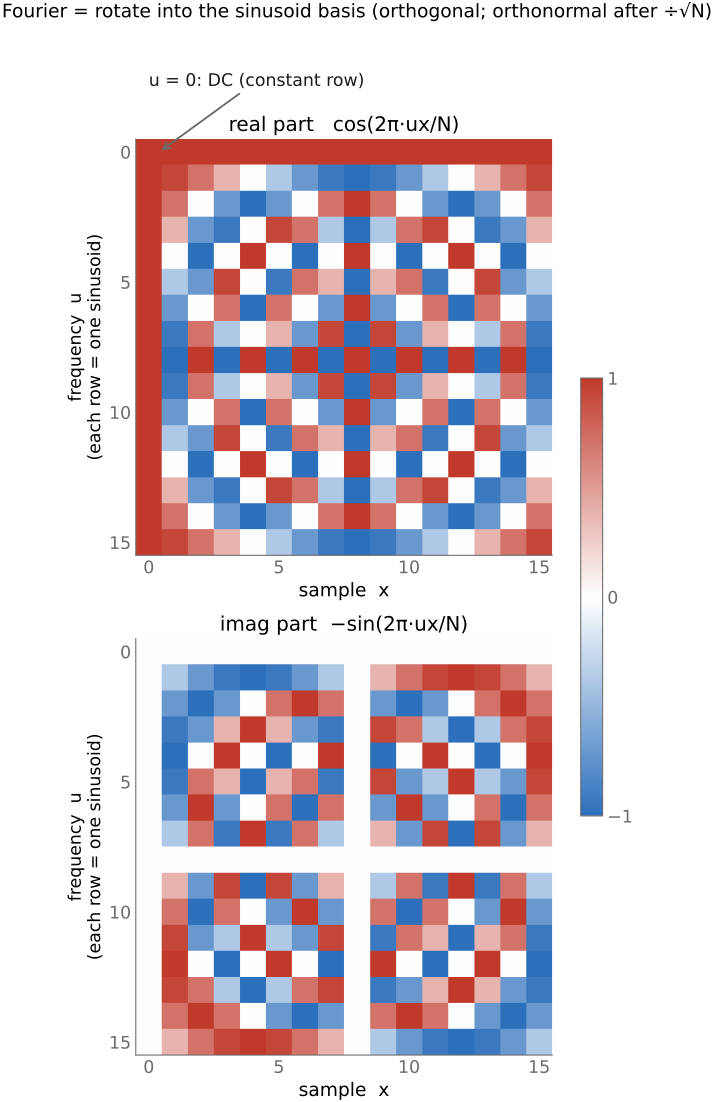
fig-fourier-basis-matrix · the DFT as a change-of-basis matrix (real & imaginary parts) 🟨
fig-sine-eigenvectors
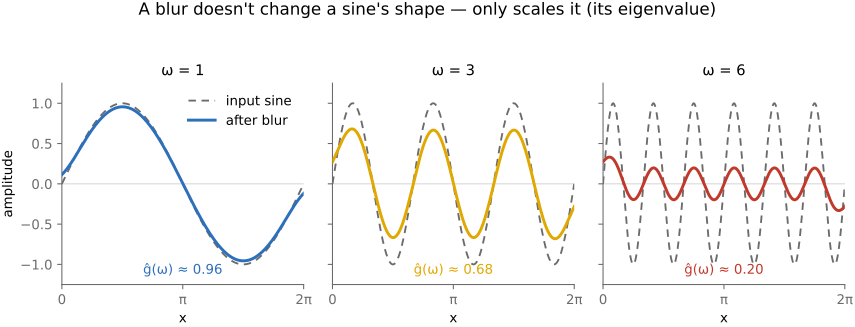
fig-sine-eigenvectors · sine waves are the eigenvectors of convolution: same wave out, only amplitude/phase change 🟨
fig-motion-blur-calculator
fig-motion-blur-calculator · live motion-blur calculator: a 3-D scene (walking figure or a car) imaged by a virtual camera, the blur rendered by **temporal supersampling** (many instants across the exposure, averaged). Set resolution / sensor / focal length (35 mm-equiv) / distance / exposure, add camera-shake **rates** in rotation (pitch/yaw/roll) and translation (x/y/z) plus a subject speed; the readout gives the blur at the subject in world (cm/m/in) and screen (px / % width) units, broken down by source. A per-pixel **G-buffer** (depth + subject mask) drives exact motion-vector arrows and a blur-magnitude heatmap: the subject carries its own motion, the background only camera shake. Environment backdrops + car color picker. Static fallback is a screenshot. *3D models generated with Meshy AI.* ✅
fig-fourier-magnitude-phase
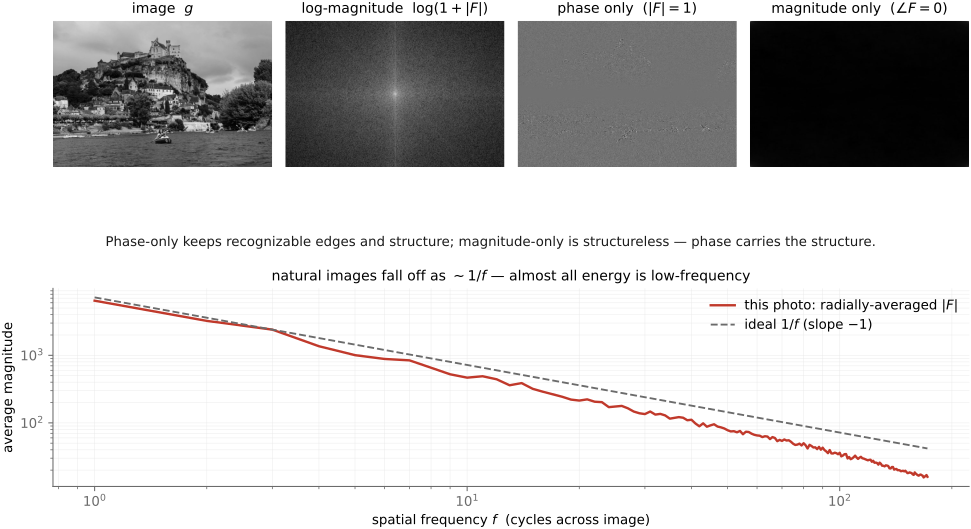
fig-fourier-magnitude-phase · an image's Fourier magnitude & phase, and the phase-swap demo (phase carries structure) 🟨
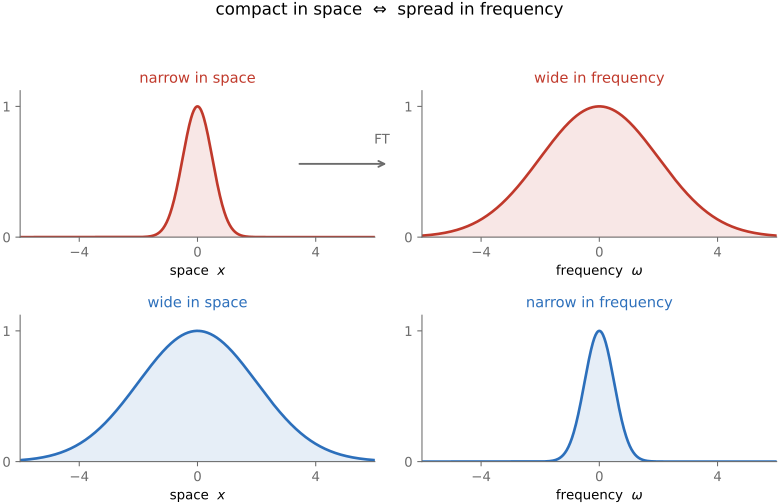
fig-compact-space-frequency
fig-compact-space-frequency · compact in space ⇔ spread in frequency (narrow vs wide Gaussian and its transform) 🟨
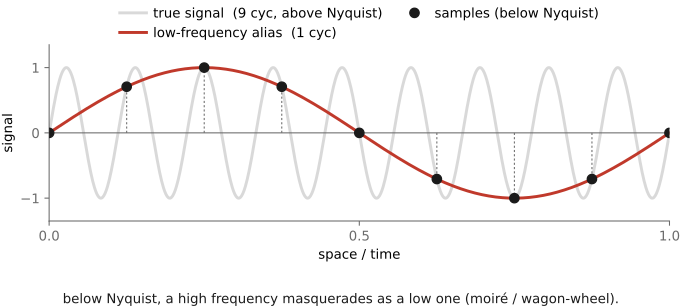
fig-aliasing
fig-aliasing · sampling a sine too coarsely → aliasing (high frequency folds to a low one) 🟨
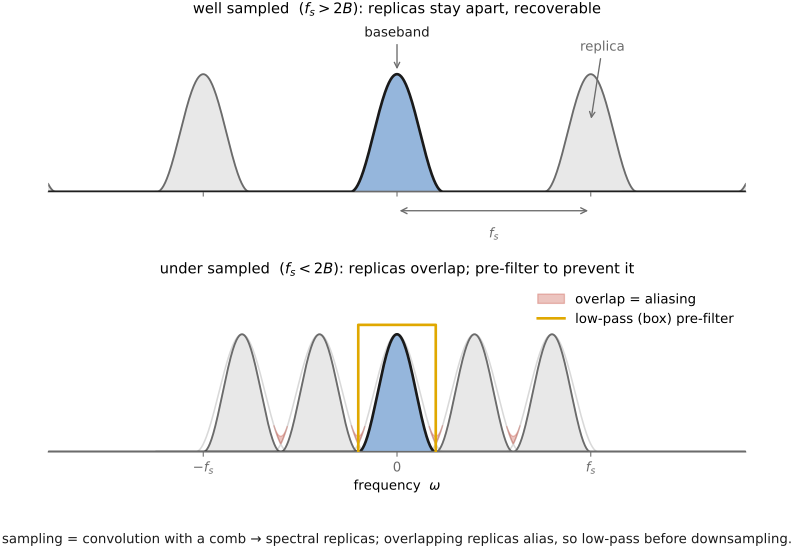
fig-sampling-comb
fig-sampling-comb · sampling = multiply by a comb → spectral replicas; pre-filter (low-pass) before downsampling 🟨
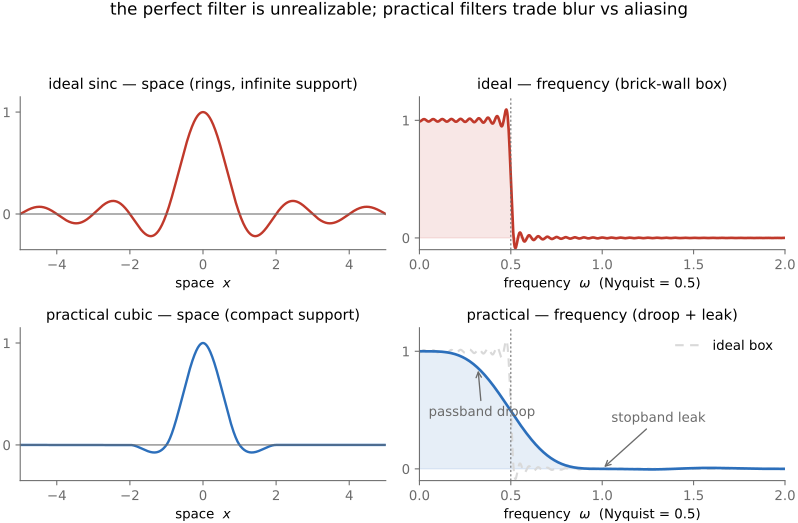
fig-sinc-vs-practical
fig-sinc-vs-practical · ideal sinc reconstruction vs a practical filter, in space and frequency 🟨
fig-deblur-preview
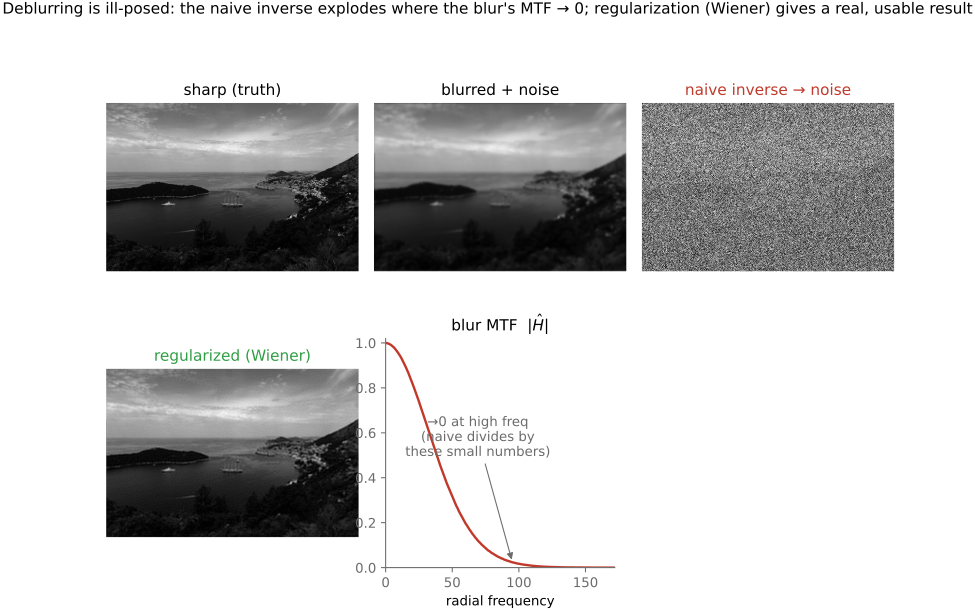
fig-deblur-preview · the deblur preview: sharp → blurred + noise → naive inverse amplifies noise; MTF 🟨
fig-diagonalize-2x2
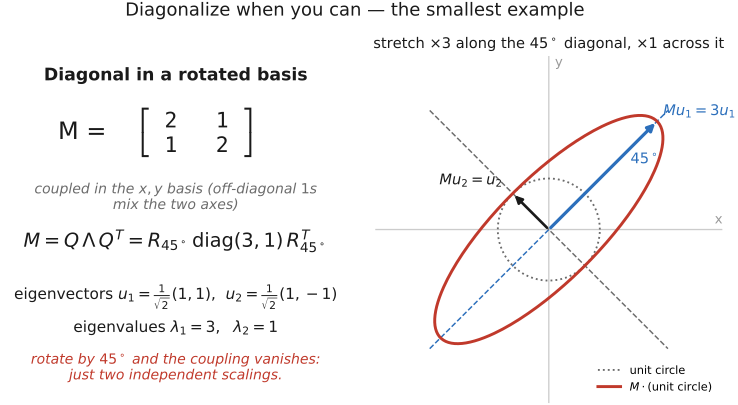
fig-diagonalize-2x2 ·
fig-fourier-conventions
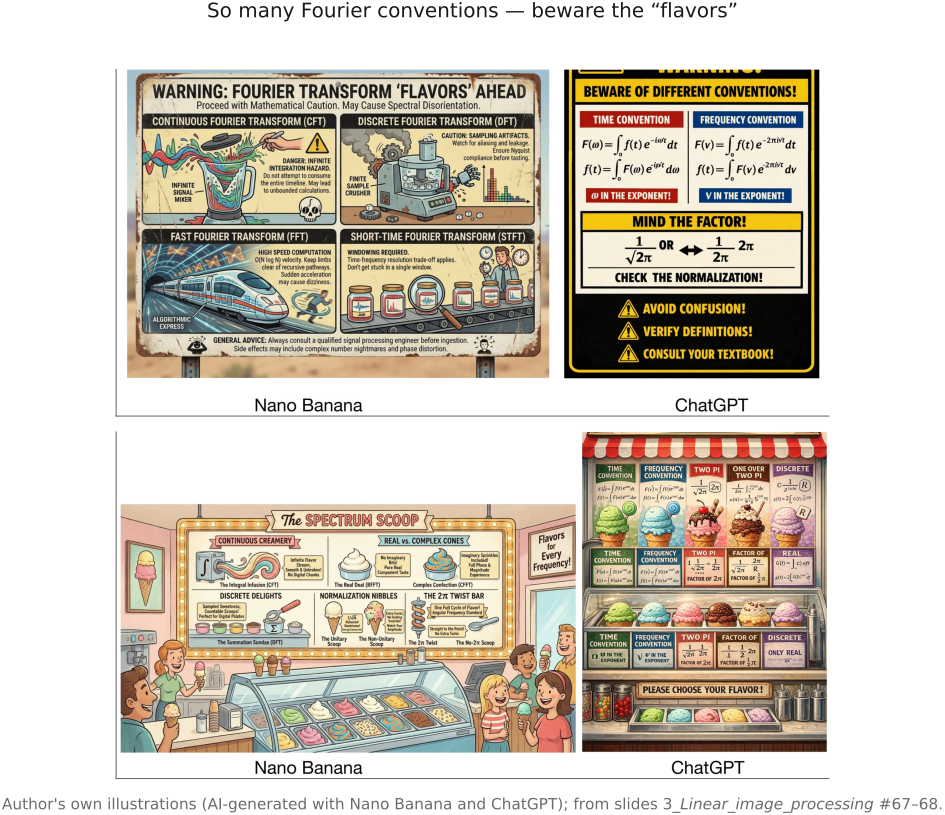
fig-fourier-conventions ·
fig-heat-diffusion-1d
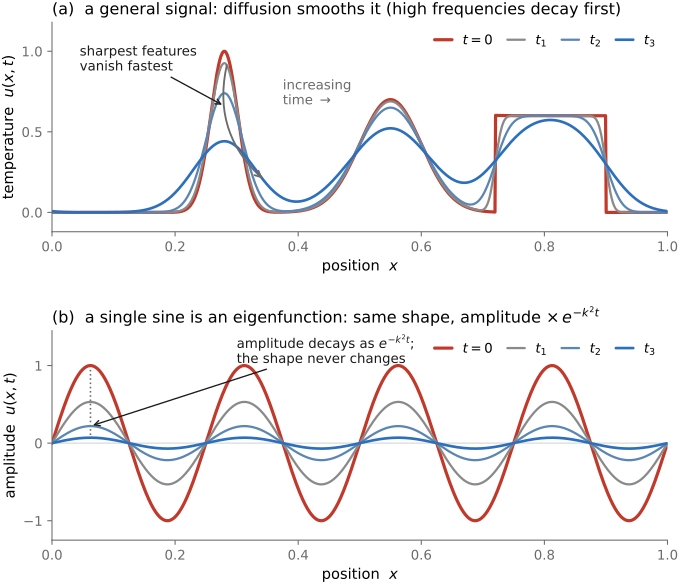
fig-heat-diffusion-1d ·
equations
DFT Î(u) = Σ I(x)·e^{−2πi ux/N}
Euler e^{iθ} = cos θ + i sin θ
convolution theorem ℱ{I*g} = ηĝ
eigen-relation g * e^{iωx} = ĝ(ω)·e^{iωx}
Nyquist — sample > 2× the highest frequency
6.3.5 The tiniest Fourier transform in the West⧉
6.3.8 A small bestiary of transforms⧉
6.3.9 Optics and Fourier⧉
6.3.10 MTF: a lens's frequency response⧉
6.3.15 Convolution by FFT⧉
▸6.4 Sampling, downsampling, and aliasing⧉
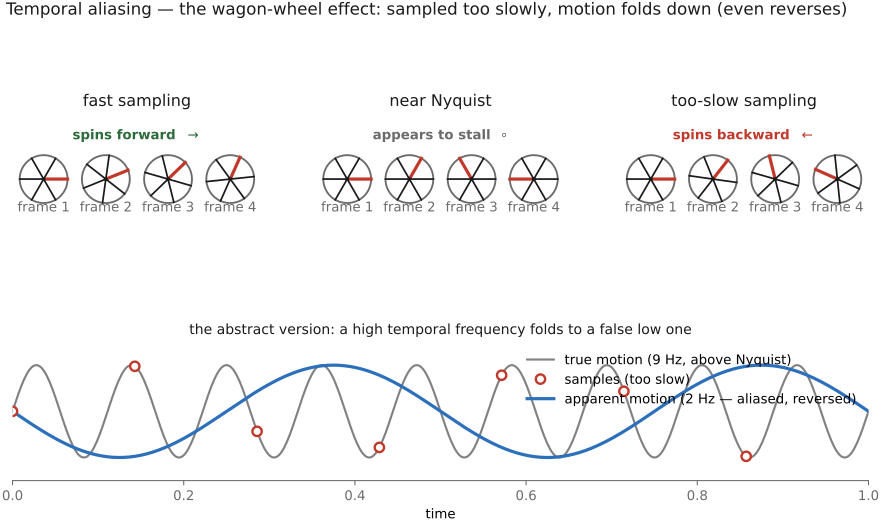
• promoted from a section of [[#Fourier]] into its own chapter (it earns one): a digital image is a **sampling** of a continuous scene, and detail finer than the grid **aliases** — folds down to a wrong, low frequency (moiré, wagon-wheel).
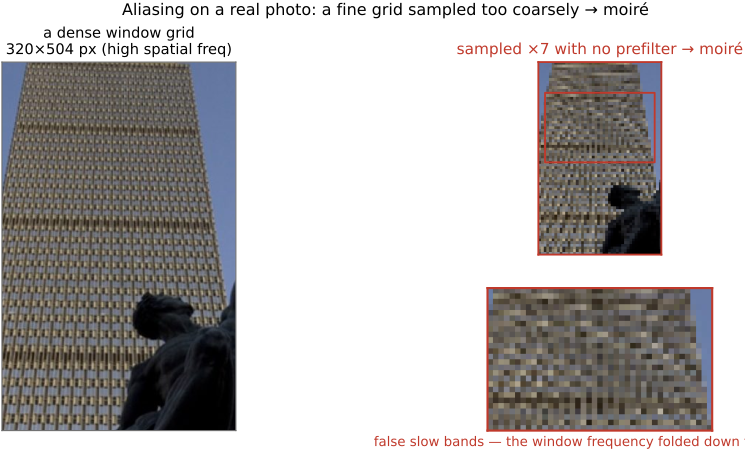
• **aliasing = a high frequency in disguise** (sine sampled below 2×/cycle → looks like a slower sine); 2-D version = moiré on a facade. Figures: `fig-aliasing`, `fig-aliasing-photo`.
• **Nyquist–Shannon**: sample at >2× the highest frequency; the **Nyquist frequency** is half the sampling rate; above it folds down irreversibly.
• **frequency-domain mechanism**: sampling is **multiplication by a Dirac comb** in space, so by the convolution theorem it becomes a **convolution in Fourier** — but by an unusually *simple* spectrum. The comb is **self-dual**: the Fourier transform of a Dirac comb is **another train of Diracs** (spaced at the sampling rate). And that is exactly why sampling is *easy* to reason about in Fourier: convolving by a single Dirac is just a **shift**, so convolving by a *train* of Diracs is just a **sum of shifted copies**. The spectrum is simply **replicated** at every multiple of the sampling rate — no smearing, just shifts. (This is the payoff of Fourier being built on the **shift theorem**: the one convolution that would otherwise be messy collapses into pure translation.) Band-limited copies sit apart; too-wide copies **overlap** = aliasing (`fig-sampling-comb`). Big lesson **L4.13**.
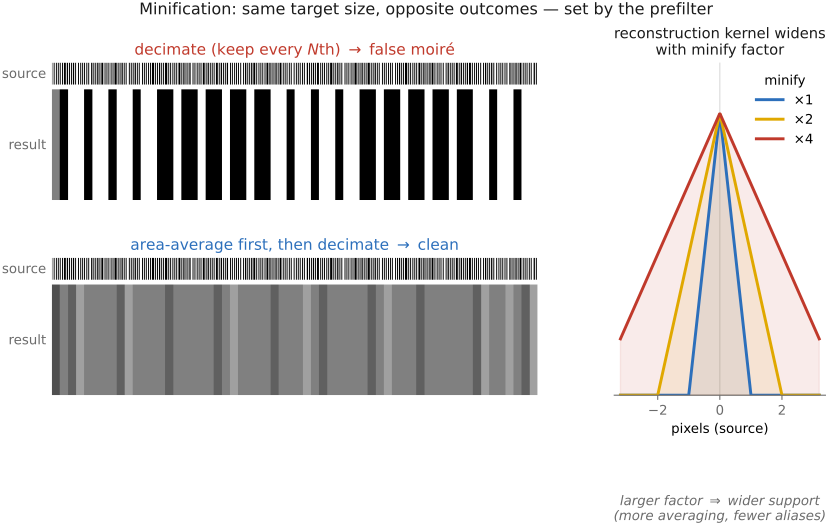
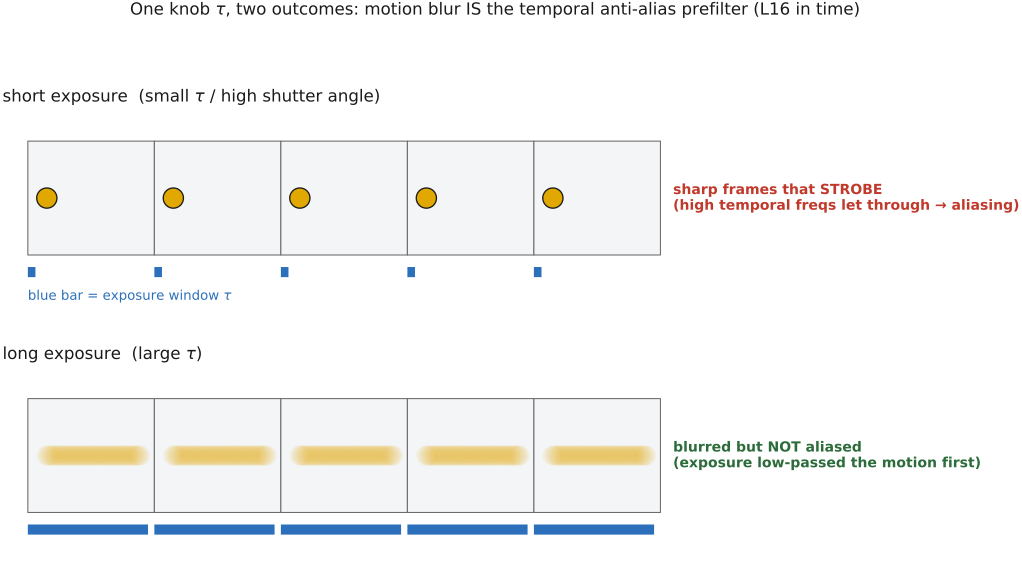
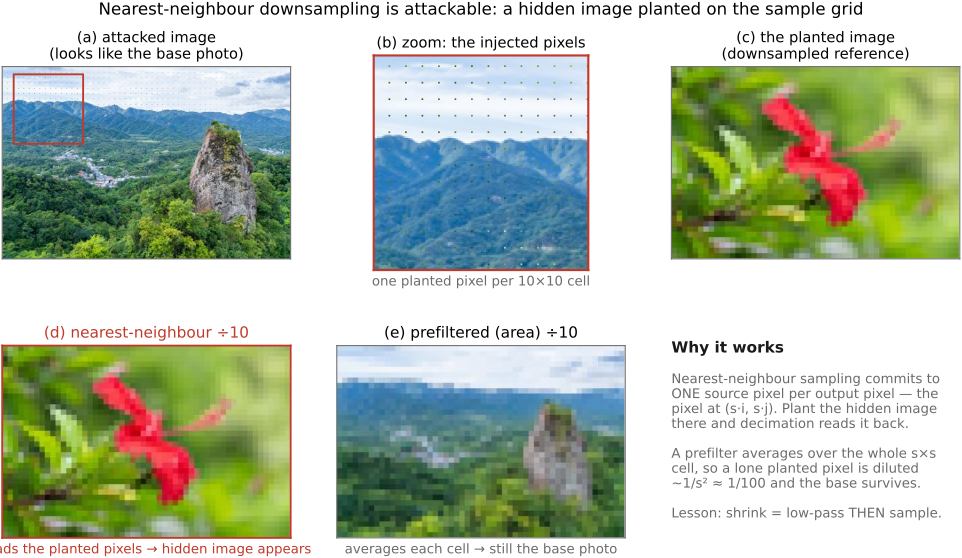
• **cure**: low-pass **pre-filter** (blur) *before* downsampling. Interactive demos: `fig-sampling-1d-demo` (1-D sampling/aliasing/pre-filter, tick-marked samples + spectrum) and `fig-sampling-2d-demo` (downsample the Prudential facade with/without pre-filter → moiré on/off).
• sidebars: aliasing **without** Fourier (pixel = area average); aliasing **on purpose** (KinéCam moiré encodes camera motion).
• **ideal sinc** reconstruction (perfect frequency box ⇒ infinite spatial ripple) is unreachable; practical filters compromise (`fig-sinc-vs-practical`) — handed off to [[#Resampling and upsampling]].
• xref: built on [[#Fourier]]; reconstruction / upsampling lives in [[#Resampling and upsampling]].
6.4.1 Aliasing: a high frequency in disguise⧉
6.4.2 Nyquist and the sampling theorem⧉
6.4.3 In two dimensions, aliasing has a direction⧉
6.4.4 Sampling in the frequency domain: spectral replicas⧉
6.4.5 Seeing it: sampling and pre-filtering, hands on⧉
6.4.6 The ideal reconstruction filter: sinc, and why it is unreachable⧉
▸6.5 Resampling and upsampling⧉
fig-resample-forward-inverse
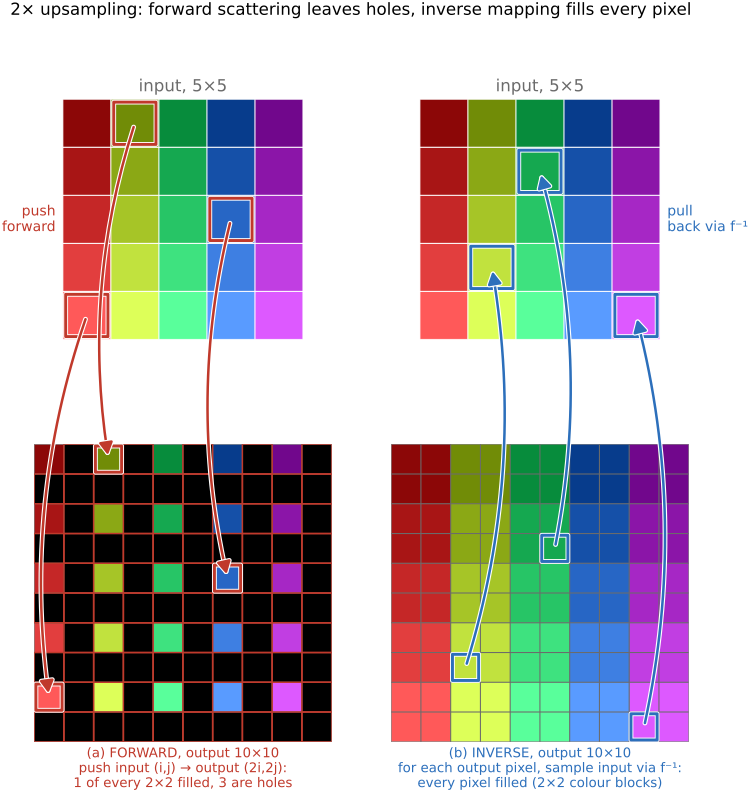
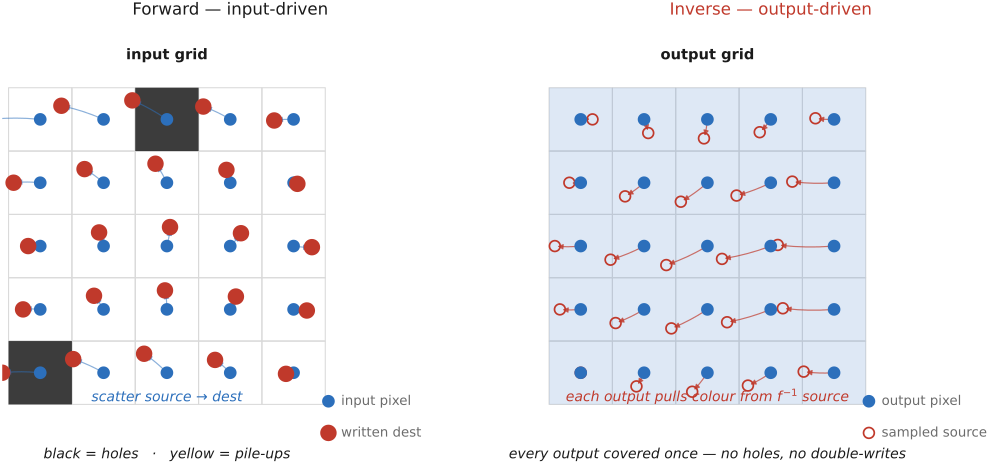
fig-resample-forward-inverse · concrete 2× upsampling on a 5×5 → 10×10 rainbow grid: FORWARD pushes input (i,j)→output (2i,2j) so 1 of every 2×2 output block is filled and 3 are black holes (regular lattice of gaps); INVERSE loops output, samples input via f⁻¹ (nearest) → every pixel filled (2×2 color blocks). Forward leaves holes, inverse fills everything (Resampling, BASIC) ✅
fig-linear-interp-1d
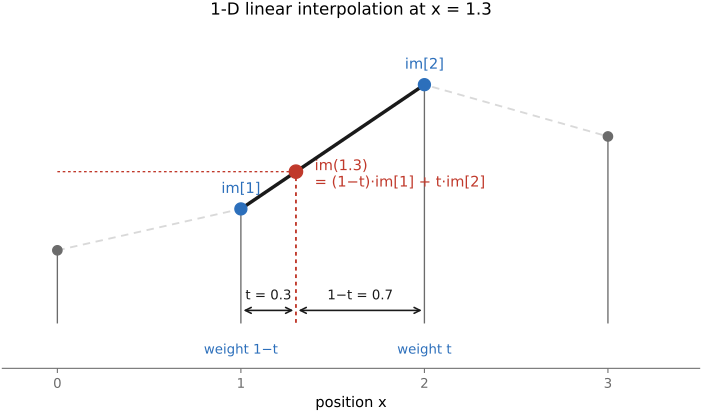
fig-linear-interp-1d · 1-D linear interpolation — `im[1.3]` from its two neighbors 🟨
fig-bilinear
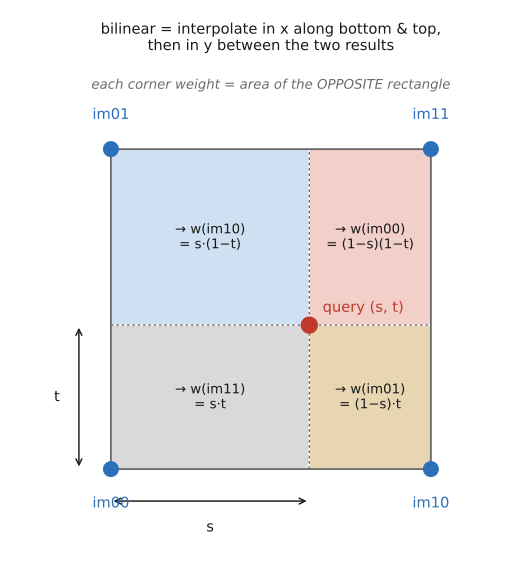
fig-bilinear · bilinear interpolation — the 4-neighbor weighting on the unit square 🟨
fig-resample-kernels-real
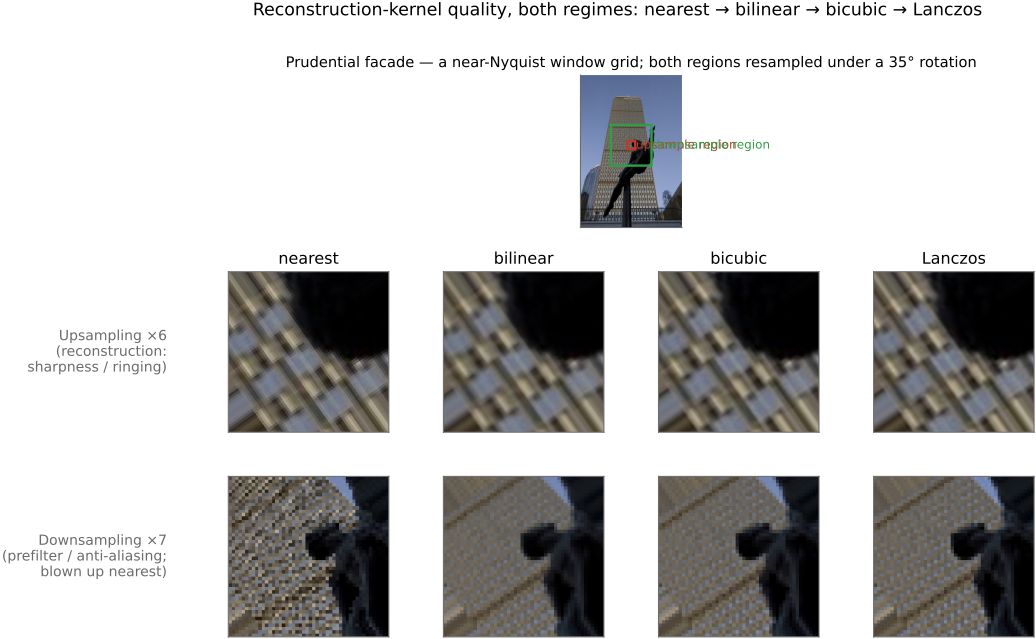
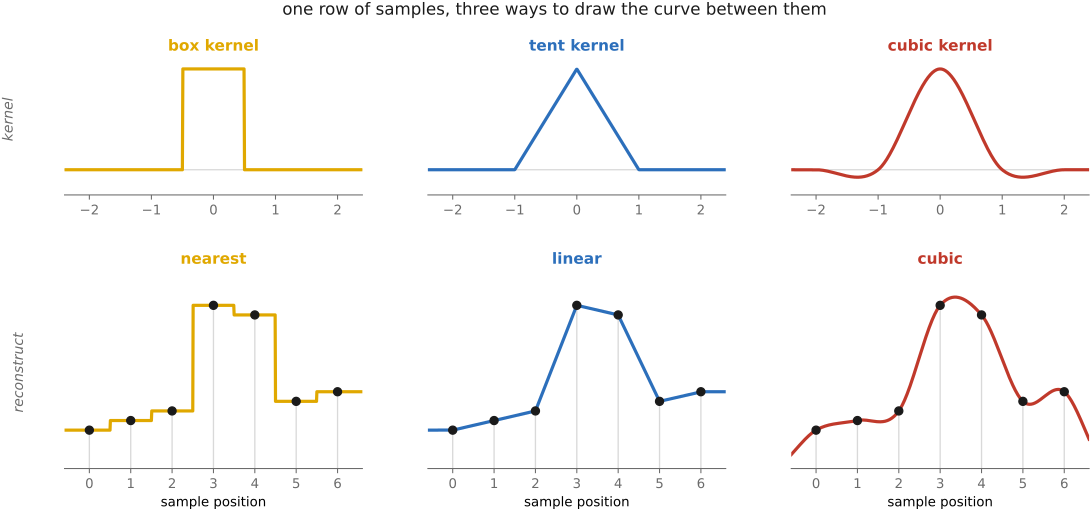
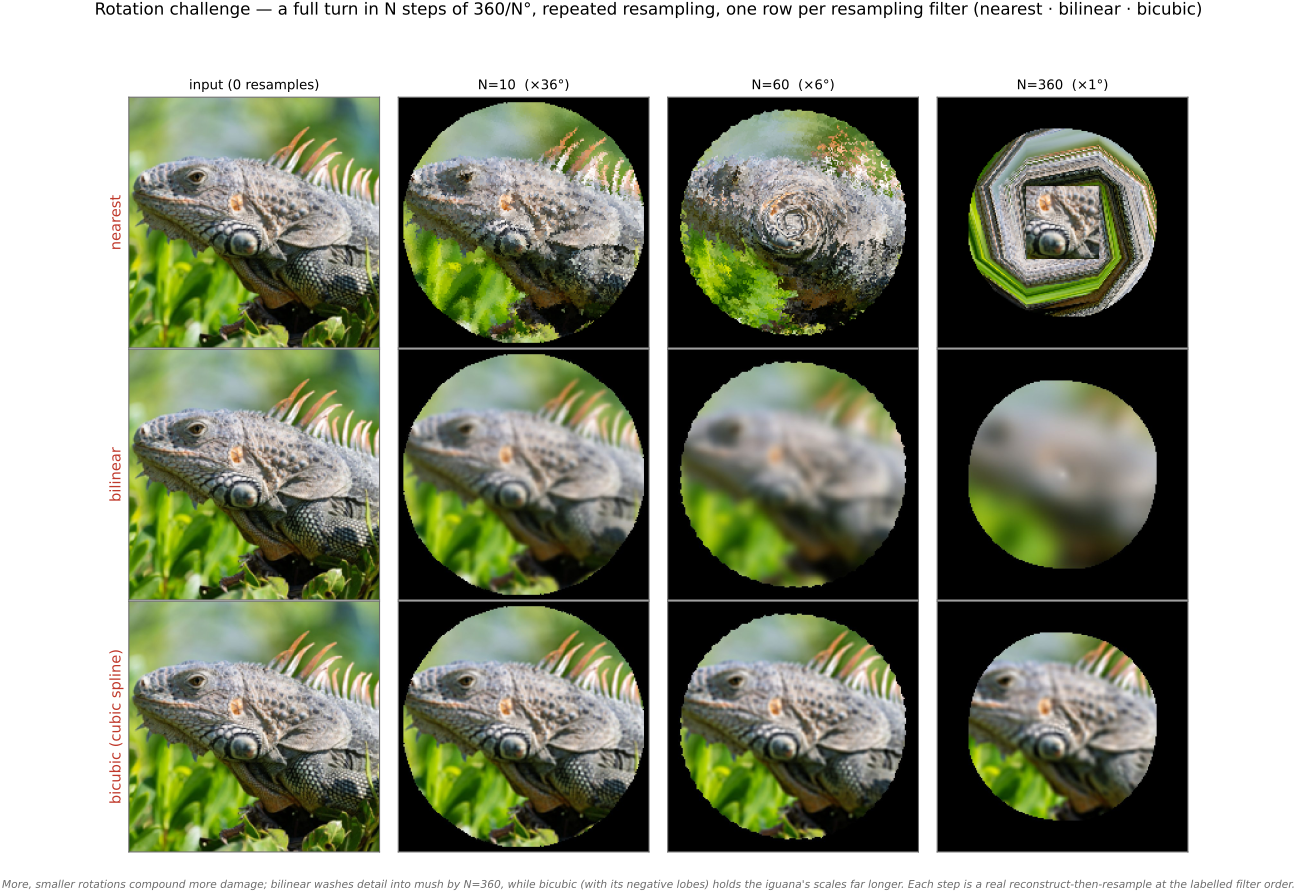
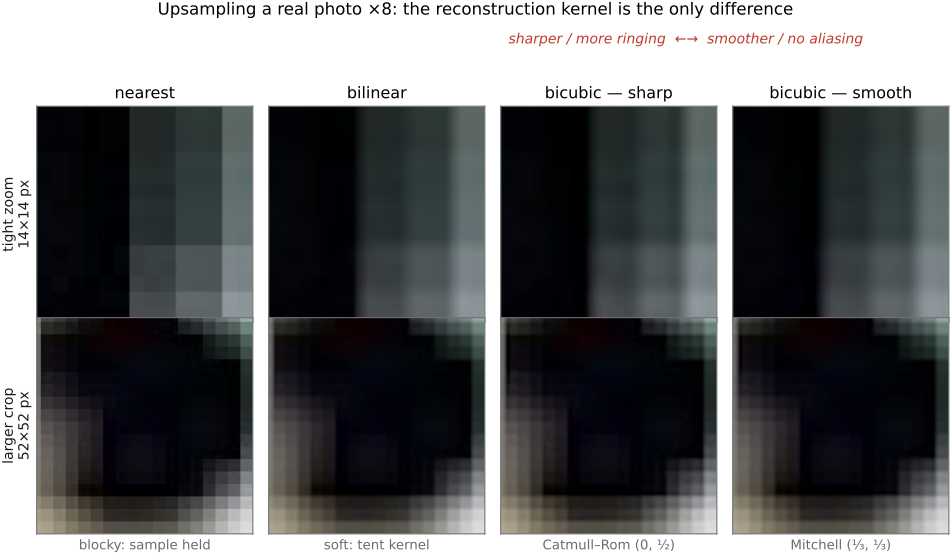
fig-resample-kernels-real · the kernel ladder on a REAL photo (Boston skyline + rainbow) resampled under a 35° rotation, magnified on a detail: nearest (blocky) → bilinear (smeared) → bicubic (edges restored) → Lanczos (sharpest) — adds Lanczos + the rotation case to `fig-interp-comparison` ✅
fig-reconstruction-pipeline
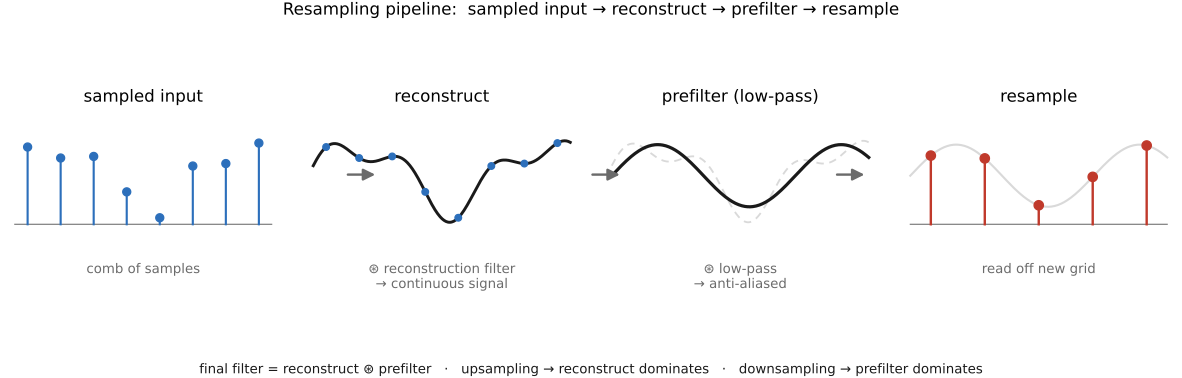
fig-reconstruction-pipeline · the resampling pipeline: sample → reconstruct → prefilter → resample 🟨
fig-aliasing-photo
fig-aliasing-photo · aliasing/moiré on a real photo: a window-grid facade decimated with no prefilter folds into moiré bands — the 2-D, real-image companion to `fig-aliasing` (Sampling and aliasing) ✅
equations
1-D linear interp
general resample out(x) = Σ I(x')·k(f⁻¹(x) − x')
Lanczos `sinc(πx)·sinc(πx/a)`
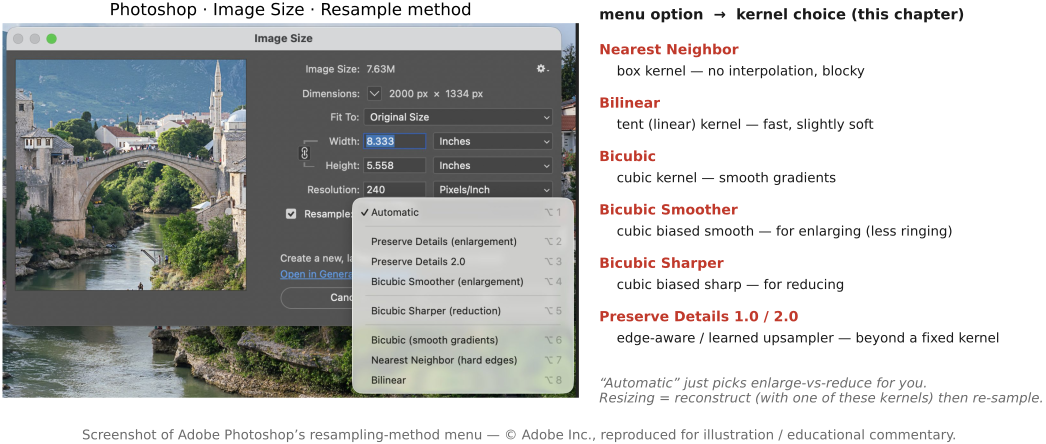
Mitchell–Netravali cubic (B, C)
6.5.5 Nearest neighbor⧉
6.5.13 Resampling and encoding⧉
6.5.15 Practical implementation choices⧉
▸6.6 Pyramids and wavelets⧉
fig-gaussian-pyramid
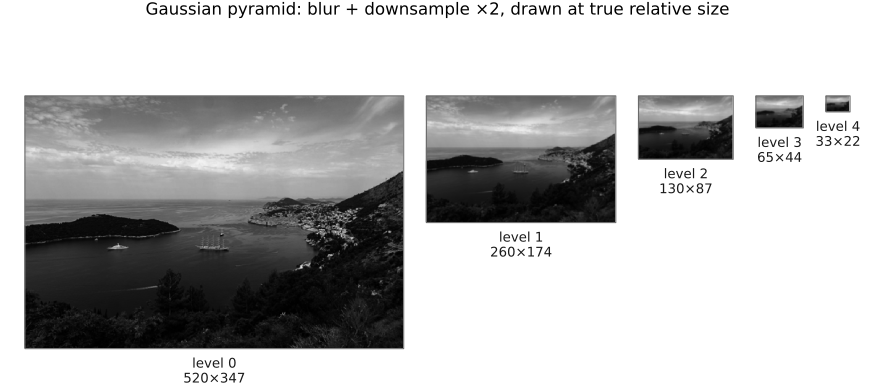
fig-gaussian-pyramid · the Gaussian pyramid — repeated blur + downsample tower (Pyramids, BASIC) 🟨
fig-laplacian-pyramid
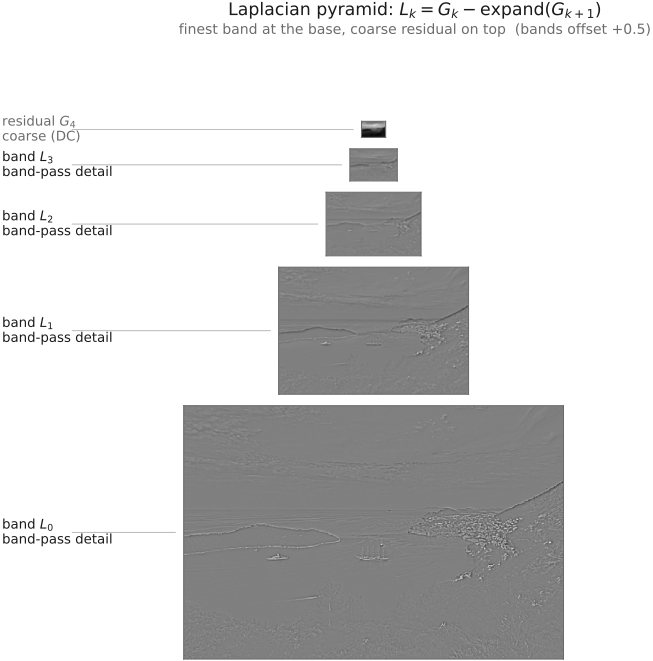
fig-laplacian-pyramid · the Laplacian pyramid — band-pass levels (G_k − expand(G_{k+1})) 🟨
fig-pyramid-encode-decode
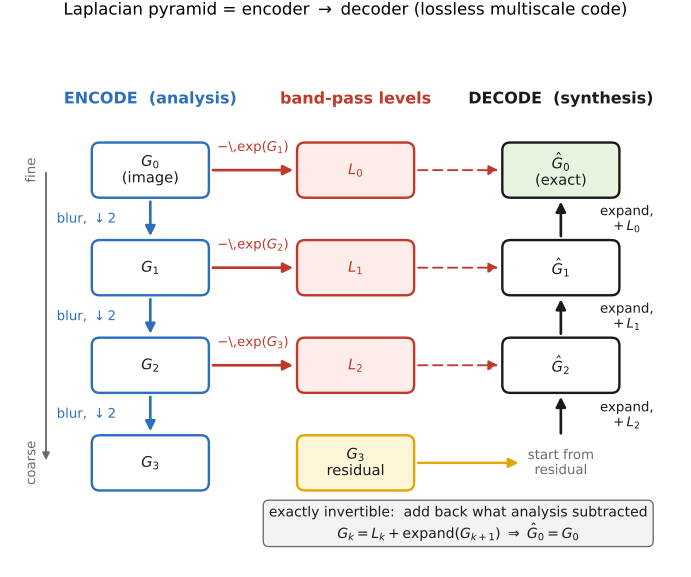
fig-pyramid-encode-decode · the Laplacian pyramid as an encoder → decoder (exact reconstruction) 🟨
fig-pyramid-frequency-bands
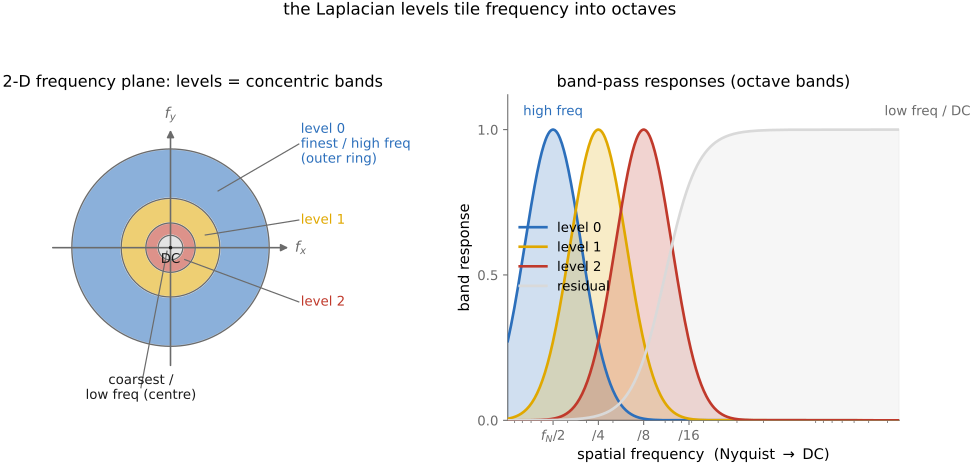
fig-pyramid-frequency-bands · each pyramid level = a frequency band (concentric Fourier rings) 🟨
fig-kernel-spectra
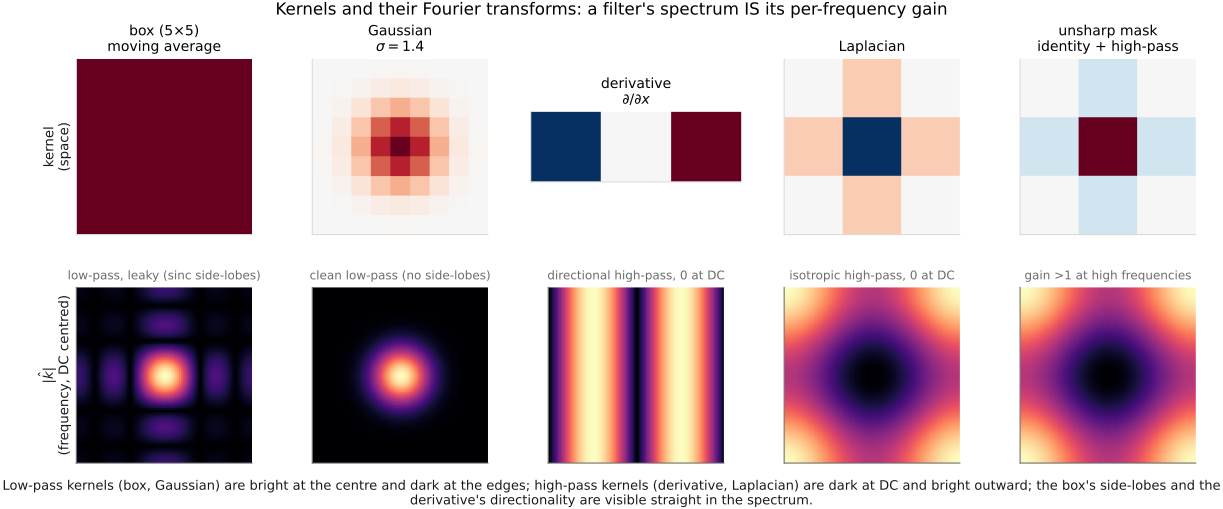
fig-kernel-spectra · five common kernels (box, Gaussian, derivative ∂/∂x, Laplacian, unsharp mask) shown in space and as their Fourier magnitudes — a filter's spectrum IS its per-frequency gain (low-pass leaky vs clean, directional/isotropic high-pass, boosting) ✅
fig-coring
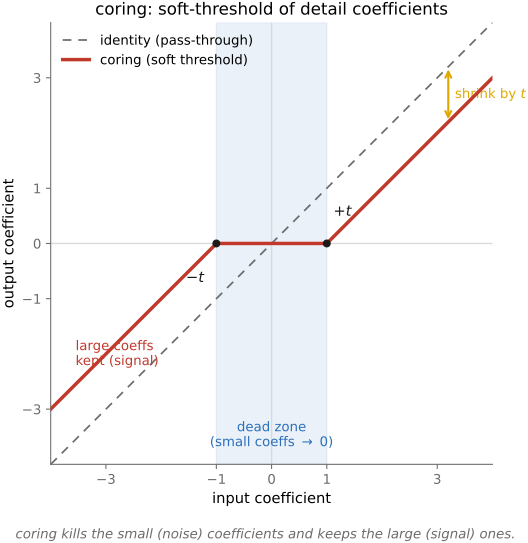
fig-coring · coring — zero the small detail coefficients (noise), keep the large ones 🟨
equations
reduce / expand (blur + ↓2 / ↑2 + blur)
L_k = G_k − expand(G_{k+1})
reconstruction G_k = L_k + expand(G_{k+1})
6.6.10 Pyramid blending⧉
6.6.11 Other applications⧉
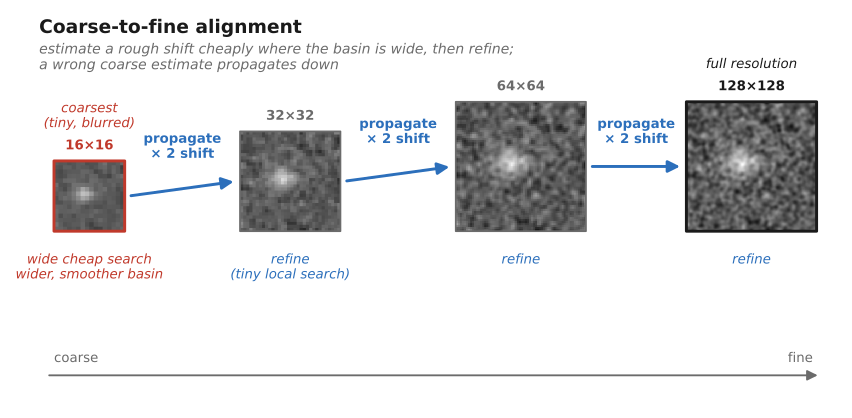
6.6.12 Coarse-to-fine methods⧉
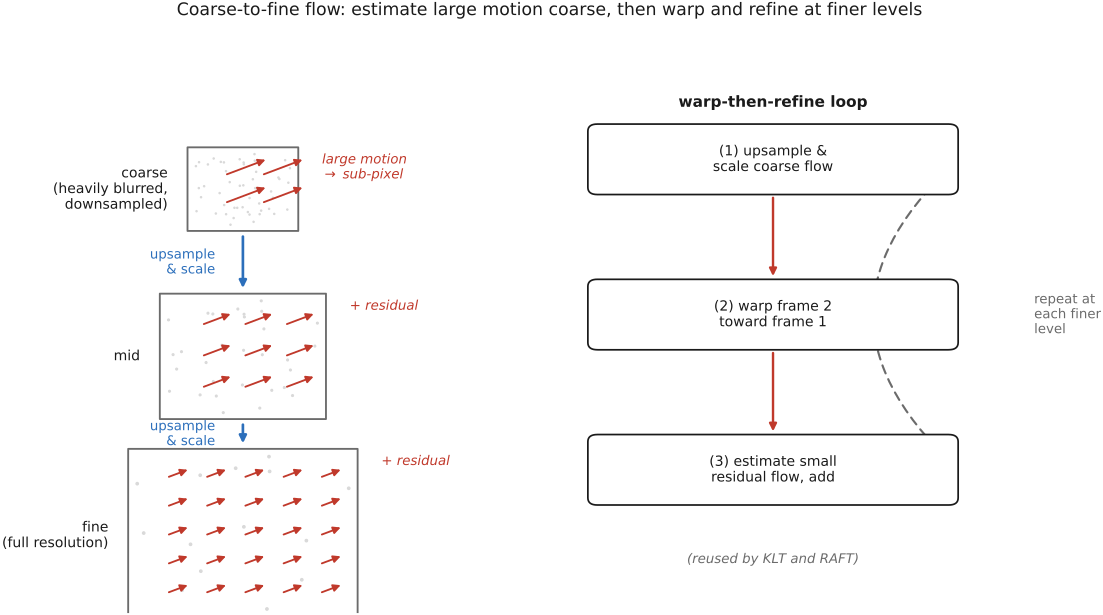
▸6.7 Image formation as a linear system⧉
6.7.3 How solvable is an imaging problem?⧉
6.7.4 Regularization⧉
6.7.7 Other forms of linearity, and multilinearity⧉
6.7.8 Designing measurements for recovery⧉
▸6.8 When linearity breaks down⧉
⬜ figure not yet created
deconvolution in linear vs gamma-encoded values [fig-deconv-gamma-linear]. fig-deconv-gamma-linear
▸6.9 Efficient linear solvers⧉
fig-deblur-linear-inversion
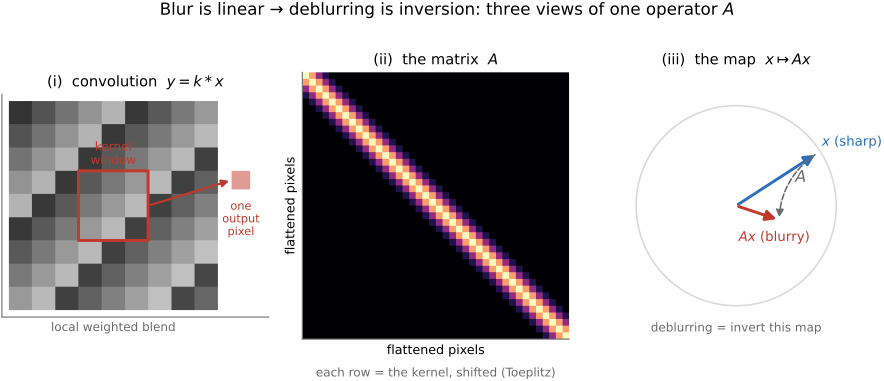
fig-deblur-linear-inversion ·
fig-deblur-preview
fig-deblur-preview · the deblur preview: sharp → blurred + noise → naive inverse amplifies noise; MTF 🟨
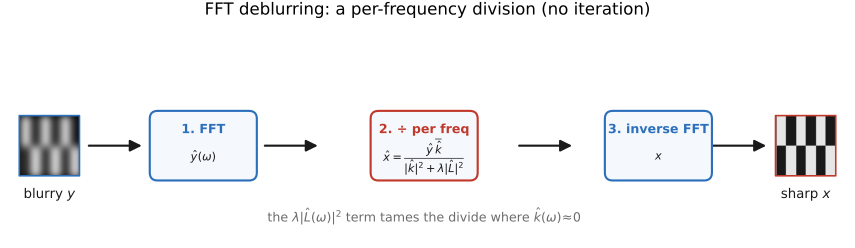
fig-deblur-fft-solver
fig-deblur-fft-solver ·
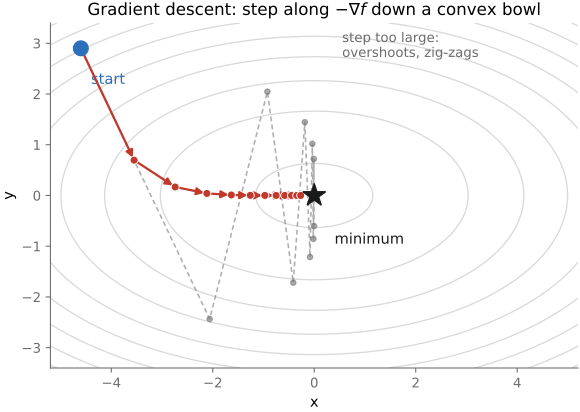
fig-gradient-descent
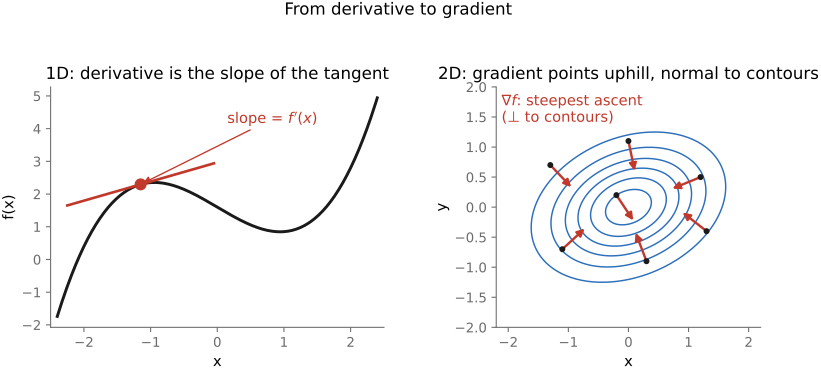
fig-gradient-descent · descent path on a convex-bowl contour (−∇f steps); too-large step overshoots (Optimization) 🟩
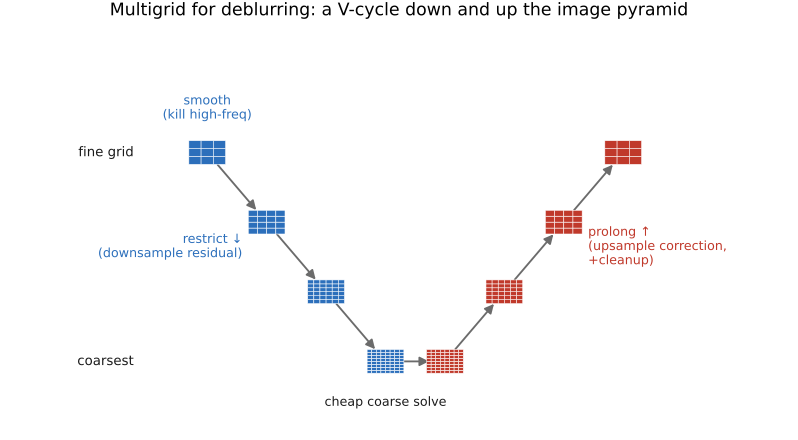
fig-deblur-multigrid-vcycle
fig-deblur-multigrid-vcycle ·
equations
normal equations $(A^\top A+\lambda L)x=A^\top y$
gradient $\nabla f=A^\top(Ax-y)$
gradient step $x_{t+1}=x_t-\eta A^\top(Ax_t-y)$
matrix-free product $A^\top A v=\tilde k*(k*v)$
flipped-kernel transpose $A^\top y=\tilde k*y$
regularized per-frequency FFT solve $\hat x=\overline{\hat k}\hat y/(|\hat k|^2+\lambda|\hat L|^2)$.
6.9.1 The problem, and the one trick⧉
6.9.2 Direct methods, and why they wall out⧉
6.9.3 Basic iterative solvers⧉
6.9.4 Conjugate gradient⧉
6.9.5 Preconditioning⧉
6.9.6 Multigrid⧉
6.9.7 Which solver when, and the edges⧉
▸Part 7 PROBABILISTIC APPROACHES AND MACHINE LEARNING⧉
<!--uid: probabilistic-approaches-and-machine-learning-->
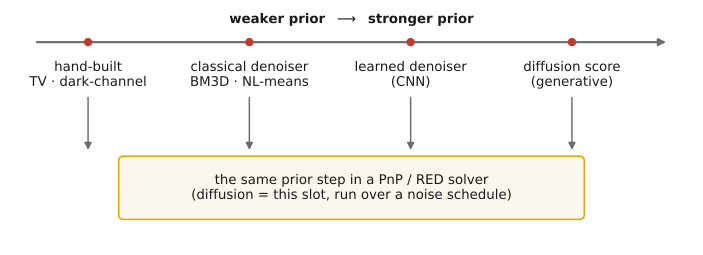
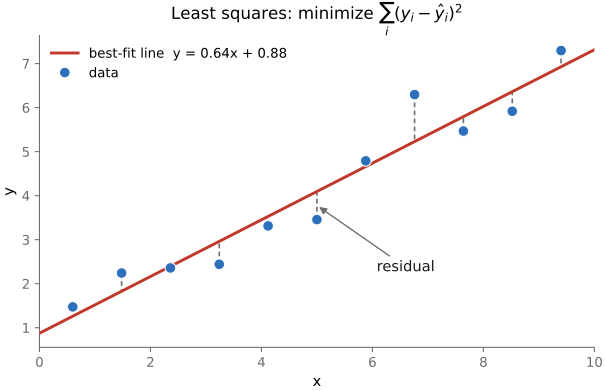
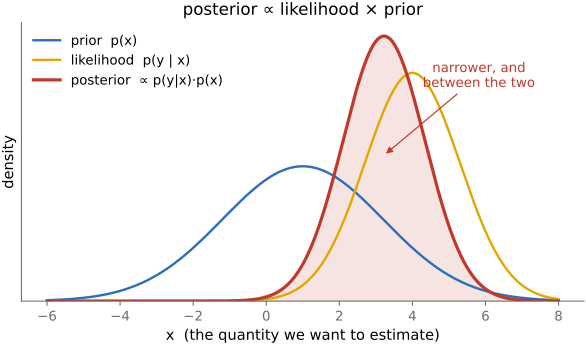
The linear-methods part cast recovery as regularized least squares: $y=Ax$ plus a penalty that prefers plausible images. This part reinterprets that penalty as a **prior**, a probability distribution over images, and follows it as it grows richer: first a **Bayesian** framing (likelihood × prior), then a prior **learned from data** (machine and deep learning), then one you can **sample** (generative models, diffusion). It is gathered here, before the single-image applications, because nearly every later part (deblurring, super-resolution, compositing, HDR, video) leans on one of these probabilistic or learned priors.
▸7.1 Imaging as Bayesian inference with probabilistic priors⧉
7.1.4 Matching the estimate to the task⧉
7.1.5 Harder inverse problems: factorization⧉
7.1.8 Deep learning, amortized inference, and generative AI⧉
▸7.2 Machine learning⧉
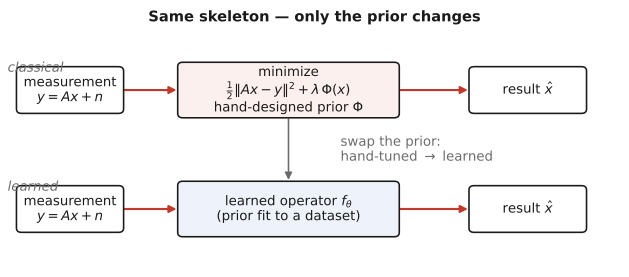
fig-learned-vs-handdesigned
fig-learned-vs-handdesigned · same inverse-problem skeleton, prior swapped: classical (data-fit + hand prior $\Phi$) vs learned ($f_\theta$ fit to data) (ML) ✅
fig-synthetic-data-pipeline
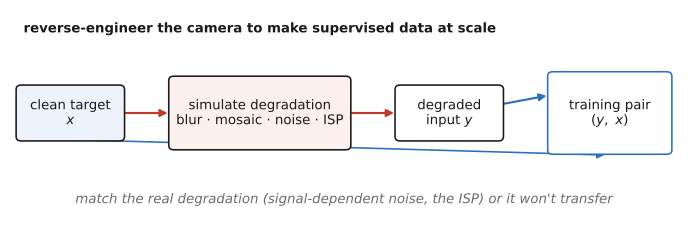
fig-synthetic-data-pipeline · manufacture (degraded, clean) training pairs by simulating the camera/degradation (ML) ✅
reference the ML & deep-learning refresher ([[Refreshers#Machine learning and deep learning]]) up front; this chapter does **not** re-teach networks — it sets up *learning an operator from data* and the **data** that powers it. The concrete deep-network operators are the next chapter, [[Deep learning]].
equations
learned operator $\hat I = f_\theta(\text{measurement})$ trained by $\min_\theta \sum_i \ell\!\big(f_\theta(x_i),\,y_i\big)$
reuse the inverse-problem $\hat I=\arg\min_I \lVert AI-b\rVert^2+\lambda\,R(I)$ from above to contrast a hand-tuned $R$ vs a learned one
▸7.3 Deep learning⧉
fig-learned-task-zoo
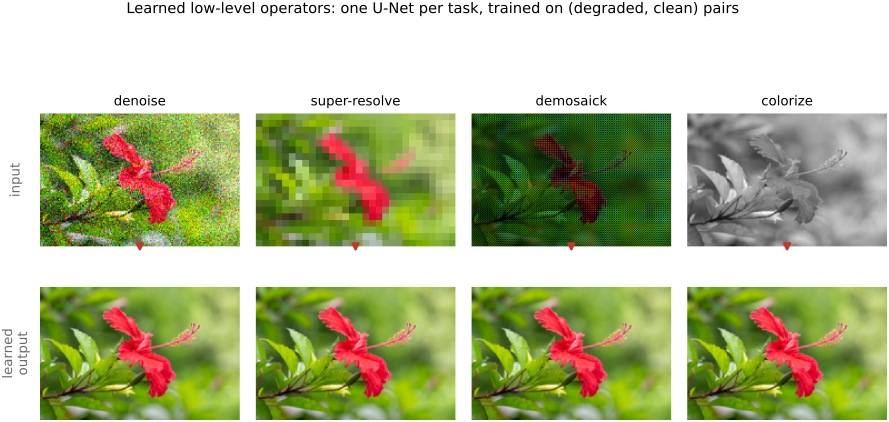
fig-learned-task-zoo · learned low-level operators: denoise / super-resolve / demosaick / colorize, each input→output on one photo (ML) ✅
fig-colorization-classical-vs-learned
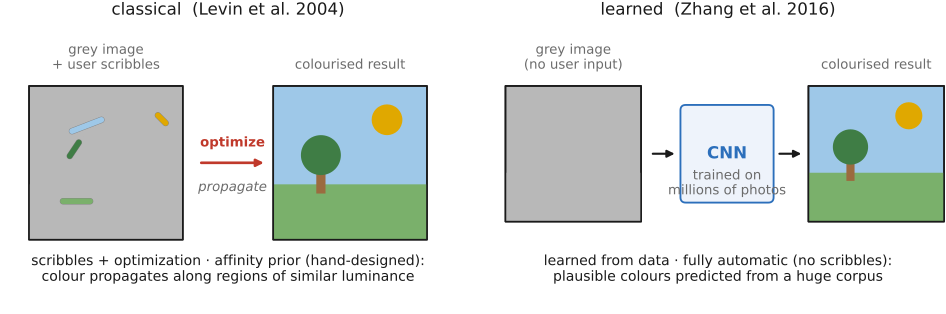
fig-colorization-classical-vs-learned · Levin 2004 scribble-propagation vs Zhang 2016 fully-automatic colorization (ML) ✅
⬜ figure not yet created
fig-depth-anything (one photo → its monocular depth map) fig-depth-anything
fig-gan-pix2pix
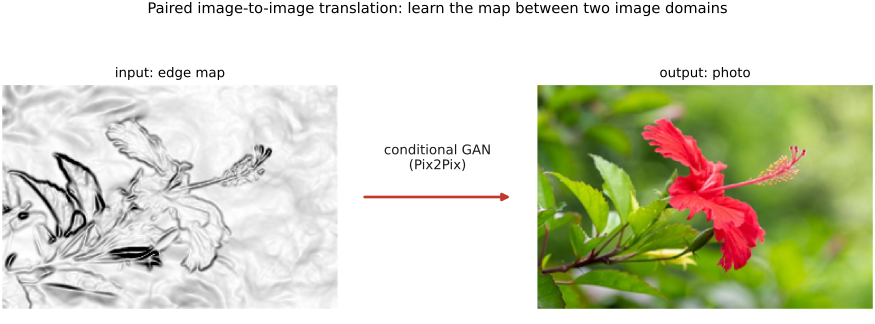
fig-gan-pix2pix · paired image-to-image translation: edge map → photo (conditional GAN) (ML) ✅
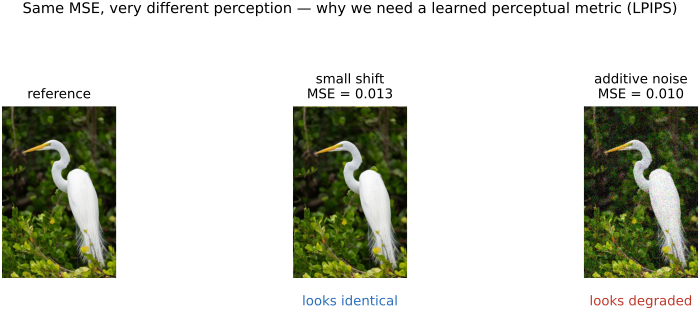
fig-perceptual-metric
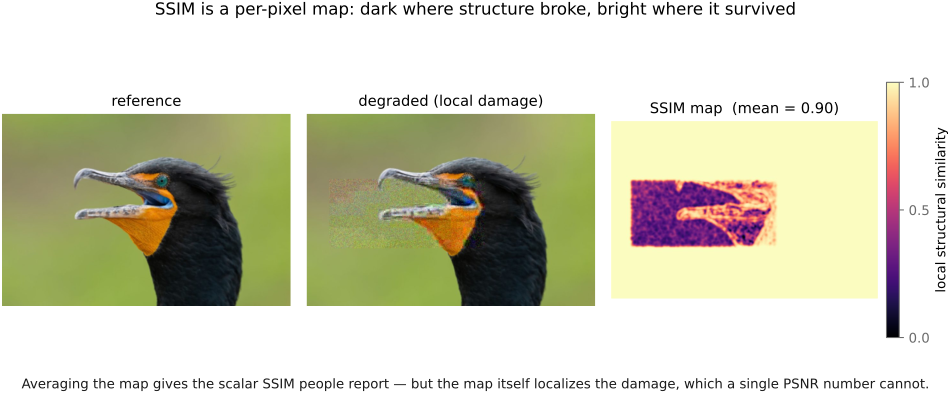
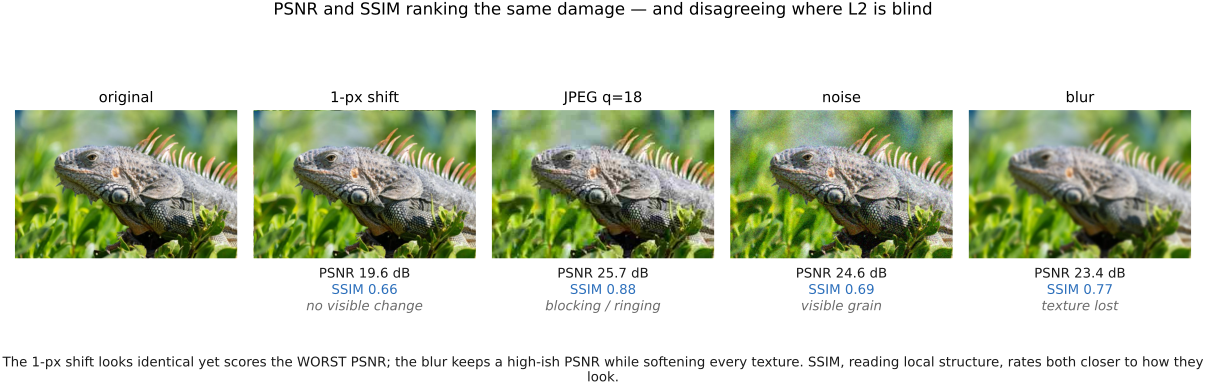
fig-perceptual-metric · same MSE, very different perception (small shift vs additive noise) → why LPIPS (ML) ✅
these are the **deep-network** realizations of the learned-operator framing ([[Machine learning]]); architectures and training are the Refreshers' job — here we survey *what gets learned*.
equations
minimal (survey chapter) — perceptual / feature loss $\ell_{\text{feat}}=\sum_l \lVert \phi_l(\hat I)-\phi_l(I)\rVert^2$ over deep features $\phi_l$ (LPIPS)
reuse the learned operator $\hat I = f_\theta(\text{measurement})$ from [[Machine learning]]
▸7.4 Generative AI and diffusion⧉
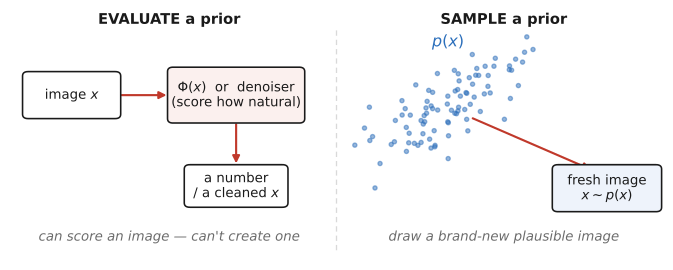
fig-genai-evaluate-vs-sample
fig-genai-evaluate-vs-sample · the generative leap (L5.2): a prior you can only *evaluate* ($\Phi$/denoiser) vs one you can *sample* ($x\sim p(x)$) (GenAI) ✅
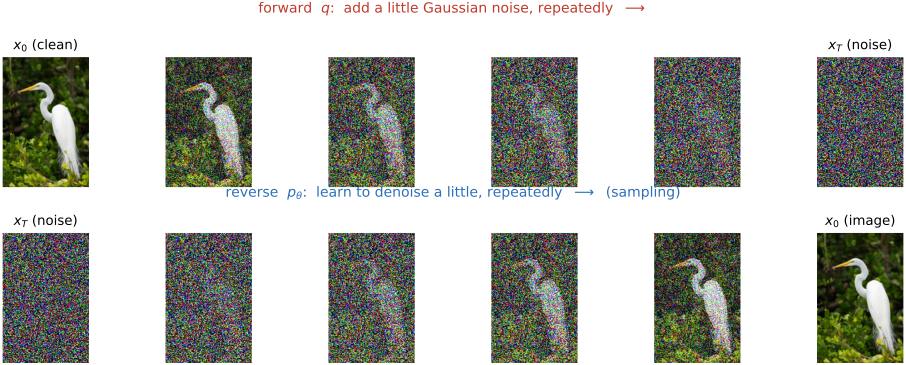
fig-diffusion-forward-reverse
fig-diffusion-forward-reverse · the two chains: forward $q$ adds Gaussian noise to a real photo; reverse $p_\theta$ denoises back (GenAI) ✅
fig-diffusion-demo
fig-diffusion-demo · live interactive demo (web edition): type a prompt and watch the reverse process denoise from noise, step by step; static fallback is a noise→photo filmstrip (GenAI) ✅
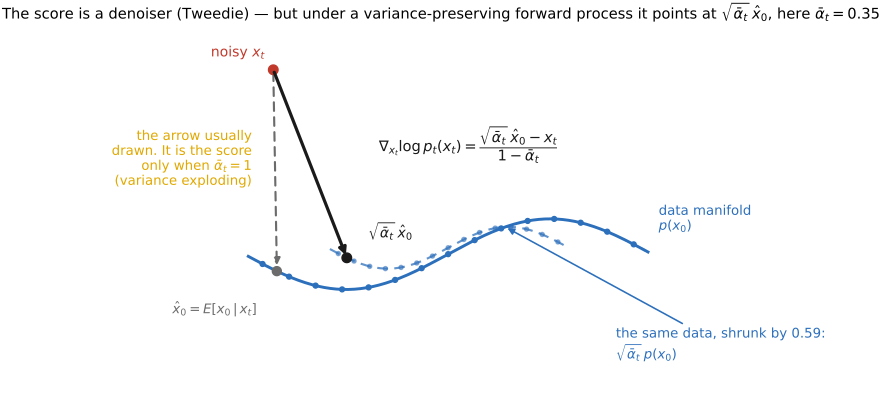
fig-score-is-denoiser
fig-score-is-denoiser · Tweedie: the score = the denoiser's correction toward the data manifold; one arrow, two names (GenAI) ✅
fig-latent-diffusion
fig-latent-diffusion · encode → diffuse in a compressed latent → decode; prompt conditions by cross-attention (Stable Diffusion) (GenAI) ✅
fig-posterior-sampling
fig-posterior-sampling · generative priors for inverse problems: one degraded $y$ → many plausible samples $x\sim p(x\mid y)$ (GenAI) ✅
fig-conditioning-controlnet
fig-conditioning-controlnet · one prompt + a spatial hint (edges / pose / depth) → a generated image obeying both (GenAI) ✅
This chapter is the **generative limit** of the two before it. *Machine learning* replaced a hand-designed prior with a **learned** one (L5.3); *Super-resolution* showed the prior is **not optional** and that a **denoiser is a universal prior** you can plug into any solver (L5.4, PnP/RED, and the punchline that the **score is a denoiser**). Here that same prior becomes something you can **sample from** — a generative model — and the canonical one, **diffusion**, is literally that denoiser run in a loop. We reference the ML / deep-learning refresher ([[Refreshers#Machine learning and deep learning]]) for U-Nets, transformers, and attention; this chapter does **not** re-teach networks — it surveys the *generative* idea and where it plugs back into the book's inverse-problem spine.
equations
forward (noising) process $x_t = \sqrt{\bar\alpha_t}\,x_0 + \sqrt{1-\bar\alpha_t}\,\epsilon$, $\epsilon\sim\mathcal N(0,I)$
training loss (predict the noise) $\mathbb{E}_{x_0,\epsilon,t}\big\lVert \epsilon - \epsilon_\theta(x_t, t)\big\rVert^2$
Tweedie / score = denoiser $\hat x_0 = x_t + \sigma_t^2\,\nabla_{x_t}\log p_{\sigma_t}(x_t)$, i.e. the score and a Gaussian denoiser are the same object
reverse (sampling) step — denoise a little, add a little noise, repeat from $x_T\sim\mathcal N(0,I)$ down to $x_0$
classifier-free guidance $\tilde\epsilon_\theta = \epsilon_\theta(x_t,\varnothing) + w\,\big(\epsilon_\theta(x_t,c) - \epsilon_\theta(x_t,\varnothing)\big)$
posterior sampling for an inverse problem — sample $x\sim p(x\mid y)\propto p(y\mid x)\,p(x)$ by alternating the diffusion prior step with a data-fit step against the forward model $A$ (a PnP/RED solver with a generative prior)
▸7.5 Image priors⧉
fig-pnp-loop
fig-pnp-loop · Plug-and-Play / RED: alternate a data-fidelity step with a denoiser-as-prior step until convergence — the prior is a black-box denoiser 🟨
fig-denoiser-as-prior-spectrum
fig-denoiser-as-prior-spectrum · one PnP/RED prior slot, ever-stronger denoisers: hand-built → classical → learned → diffusion score (GenAI / Super-res) ✅
equations
PnP iteration (HQS form) — alternate a **data-fit** step $z \leftarrow \arg\min_x \tfrac{1}{2}\lVert Ax - y\rVert^2 + \tfrac{\rho}{2}\lVert x - \tilde{x}\rVert^2$ and a **denoise** step $\tilde{x} \leftarrow \mathcal{D}_\sigma(z)$ (the prior, *any* denoiser $\mathcal{D}$)
RED gradient $\nabla \Phi(x) = x - \mathcal{D}(x)$ (prior gradient = residual of a denoiser)
Tweedie $\hat{x} = z + \sigma^2\, \nabla_z \log p_\sigma(z)$ (the score IS a Gaussian denoiser → diffusion = iterated $\mathcal{D}$)
7.5.2 The Gaussian prior in closed form: the Wiener filter⧉
7.5.7 Denoisers and noise-dependent scores⧉
▸7.6 Information theory⧉
7.6.2 Compression: the clearest application⧉
7.6.7 Sampling, sparsity, and histogram entropy⧉
▸Part 8 BASIC IMAGE PROCESSING AND ISP⧉
<!--uid: basic-image-processing-and-isp-->
At the end of this part, the readers will be able to implement a complete ISP or very basic version of a photo editing software (mini lightroom) with exposure, contrast, etc.
▸8.1 Image representation⧉
fig-image-memory-layout
fig-image-memory-layout · a 2×3 RGB image packed into 1-D memory two ways — interleaved HWC (NumPy) vs planar CHW (ML), with the stride formulas (Image representation, BASIC) 🟨
fig-edge-handling-photo
fig-edge-handling-photo · the four edge modes on a real crop — black / clamp / mirror / wrap continued past the border; real-image companion to `fig-edge-handling` (Image representation → falling off the edge, BASIC) ✅
8.1.13 Pixel lookups and boundaries⧉
▸8.2 What the numbers mean⧉
8.2.1 What the numbers actually mean: encoding⧉
8.2.2 What the numbers actually mean: color spaces⧉
▸8.3 Tone point operations⧉
fig-operation-types
fig-operation-types · the three image-operation types — range (point) vs domain (spatial) vs neighborhood (Values / point ops, BASIC) 🟨
8.3.9 Converting to black and white⧉
▸8.4 Beauty curves: the camera "look"⧉
8.4.7 Vignetting and grain, added on purpose⧉
8.4.8 Our curve, in code⧉
8.4.10 Beauty curves in real ISPs⧉
▸8.5 Color point operations⧉
8.5.1 Basic color enhancement: saturation and vibrance⧉
8.5.2 The color edits, in code⧉
8.5.3 Converting to black and white⧉
8.5.4 Video color grading⧉
▸8.6 Color beautification and preferred colors⧉
⬜ figure not yet created
`fig-color-look-corridors` (interactive, requested below) fig-color-look-corridors
⬜ figure not yet created
hue-vs-hue plot of translation vs contraction
fig-tonemap-taxonomy
fig-tonemap-taxonomy · a taxonomy of local tone mapping — bilateral base/detail, gradient-domain, local Laplacian, exposure fusion, learned — placed on a shared axis 🟨
⬜ figure not yet created
before/after sky and skin crops fig-wb-before-after
fig-dynamic-range-problem
fig-dynamic-range-problem · the dynamic-range problem on a real HDR photo: one sunset-over-river capture developed at three exposures — expose for highlights (foreground crushed) / compromise / expose for shadows (sky blown) — no single exposure holds both ends (BASIC tone mapping) ✅
▸8.7 Histograms⧉
fig-histogram
fig-histogram · an image histogram (per-channel) + cumulative histogram; its shape depends on the encoding space (BASIC tone mapping) 🟨
fig-histogram-encoding-spaces
fig-histogram-encoding-spaces · the same image's luminance histogram in linear / gamma (sRGB) / log; 18% gray marked at 0.18 / ~0.46 / ~0.75 — the encoding reshapes the value axis (BASIC histograms) 🟩
fig-histogram-equalization
fig-histogram-equalization · histogram equalization — the CDF used as the transfer curve, before/after (BASIC) 🟨
fig-histogram-matching
fig-histogram-matching · histogram matching — source + target images and their histograms → matched result, with the composed transfer curve $\text{CDF}_\text{tgt}^{-1}\circ\text{CDF}_\text{src}$ (BASIC histograms) ✅
• the **histogram** — the distribution of pixel values — is the natural companion to point operations: this short chapter is how to *read* it, and how it can *drive* an automatic tone curve
▸8.8 Sharpening⧉
fig-unsharp-mask
fig-unsharp-mask · unsharp-mask decomposition: input − blur = detail (high-pass), output = input + k·detail 🟨
fig-sharpen-kernel
fig-sharpen-kernel · the sharpening kernel δ − blur as a +center / −surround stencil 🟨
▸8.9 Dead pixels⧉
fig-operation-types
fig-operation-types · the three image-operation types — range (point) vs domain (spatial) vs neighborhood (Values / point ops, BASIC) 🟨
fig-ssim-map
fig-ssim-map · SSIM as a per-pixel map: reference, locally-damaged copy (one band JPEG-blocked + noised), and the SSIM heat-map that goes dark exactly on the damage — its mean is the scalar SSIM (Image metrics, BASIC) ✅
fig-color-space-atlas
fig-color-space-atlas · **interactive** color-space atlas: one space drawn twice, in its own geometry (cube / cone / bi-cone / warped cube) and in a chosen ambient frame (XYZ, LMS, linear RGB, sRGB, Chong, Oklab), from the same lattice, as edges / voxels / one slice; MacAdam ellipses optional; click to read coordinates in both; stripes for colors outside sRGB. Placed at the end of the perceptually-uniform section of **4.6 Advanced color**, where it works as the chapter's capstone: by then HSV/HSL, CIELAB, Oklab and Chong have each been shown alone, and the atlas is about the map between them. URL carries the state (`?space=&ambient=&mode=&axis=&at=&grid=&macadam=&zebra=`). 🟨
⬜ figure not yet created
the star-eater failure.
• dead / stuck / hot pixels — what each reports, and why hot pixels grow with exposure time, heat, and ISO
• where they come from: manufacturing defects vs aging; dark current doubling every 6–8 °C
• finding them: factory defect map (ships in-camera / travels as DNG FixBadPixels) + dark-frame calibration (long-exposure NR, pixel mapping)
• fixing them: concealment by same-color interpolation, before demosaicking; the star-eater pitfall of over-aggressive suppression
8.9.1 Where they come from⧉
8.9.2 Finding them⧉
8.9.3 Fixing them⧉
▸8.10 Auto-exposure and auto white balance⧉
fig-ae-metering
fig-ae-metering · **interactive** AE metering modes: pick a scene + mode (average / center-weighted / movable+resizable spot); the demo exposes so the metered region averages 18% and reports metered tone, gain, and clipped %; "where you meter sets the exposure" ✅
fig-white-balance-real
fig-white-balance-real · white balance computed from scratch (von Kries per-channel gain in linear light): a warm-casted photo corrected by gray-world vs white-patch/max-RGB, with the recovered channel gains (PS1) ✅
▸8.11 File formats and compression⧉
fig-jpeg-pipeline
fig-jpeg-pipeline · the JPEG encoder — RGB → opponent color → chroma subsample → 8×8 DCT → quantize → entropy code (File formats, BASIC) 🟨
fig-dct-basis
fig-dct-basis · the 8×8 DCT-II cosine basis (DC top-left → high frequency bottom-right) 🟨
fig-chroma-subsampling
fig-chroma-subsampling · chroma subsampling grids 4:4:4 / 4:2:2 / 4:2:0 (chroma sampled coarser than luma) 🟨
fig-jpeg-artifacts
fig-jpeg-artifacts · JPEG blocking & ringing at low quality (original vs q=8, zoomed crop) 🟨
fig-jpeg-quality-levels
fig-jpeg-quality-levels · JPEG quality sweep (q=85→40→20→10→5): the same photo's edge-crop at each quality with the whole-image file size beneath — degradation grows as size drops (File formats, BASIC) 🟩
8.11.5 Making JPEG differentiable⧉
▸8.12 Recap ISP, non-destructive editing:⧉
fig-isp-block-diagram
fig-isp-block-diagram · the ISP pipeline: RAW → black level → demosaick → white balance → denoise → tone/color → sharpen → gamma → JPEG (Recap ISP, BASIC) 🟨
8.12.2 Two stages this part did not teach⧉
8.12.3 Real ISPs⧉
8.12.4 Pipeline design and tuning⧉
8.12.5 The ISP, evolving: traditional → learned → generative⧉
▸8.13 A raw developer in the browser⧉
• the part's claim made drivable: a raw editor is a programmable ISP exposed to the user
• two suggested experiments: Profile → Neutral (the beauty curve's contribution), and the clipping overlay on a bright sky (recoverable vs gone → bracketing, MULTIPLE EXPOSURE IMAGING)
▸Part 9 EVALUATION⧉
<!--uid: evaluation-->
Before you can judge a result you have to produce a correct one, so this part opens with the craft of getting image code right: developing, testing, and debugging it against inputs you can check by hand. Then it turns to evaluation proper. Every chapter in this book ends in a picture, and sooner or later someone asks whether the picture is any good. That question splits in two, and the two halves need different instruments. Sometimes it means: how far is this result from the truth we were trying to recover? That is a number, and the metrics chapter builds those numbers and shows where they mislead. Sometimes it means: do people prefer it? That is a claim about people, and the only way to settle it is to ask them, which is the user-studies chapter.
The two halves fail in opposite ways. A metric is cheap, reproducible, and frequently measures the wrong thing. A study measures the right thing and is expensive, fragile, and easy to run badly. Most of the work of evaluation is knowing which instrument the claim actually calls for, and being willing to run neither when the figures already settle it.
▸9.1 Developing, testing and debugging⧉
9.1.4 Finding good real test inputs⧉
▸9.2 The expert's eye as evaluation⧉
▸9.3 Image metrics⧉
fig-ssim-vs-mse
fig-ssim-vs-mse · same PSNR, very different SSIM — pixel error ≠ perceived quality (Image metrics, BASIC) 🟨
• we **often need to compare two images** — fidelity, alignment, an ML training loss
equations
MSE = mean(‖I−J‖²)
PSNR = 10·log₁₀(MAX²/MSE)
SSIM = luminance·contrast·structure (local windows)
▸9.4 Towards meaningful user studies⧉
fig-user-research-timeline
fig-user-research-timeline · where each user-research method belongs in a project: discovery / ideation / design / development left to right, generative to evaluative underneath, annotated to mark that computational-photography papers sit only at the far evaluative end (Towards Meaningful User Studies, EVALUATION) ✅
fig-user-research-map
fig-user-research-map · the method map: qualitative-quantitative against attitudinal-behavioral, methods placed in the four quadrants, survey corner shaded to show where comp photo actually operates (Towards Meaningful User Studies, EVALUATION) ✅
⬜ figure not yet created
the five output-evaluation interface designs (rating scale, real/fake, select-all, two-alternative forced choice, drag-to-rank) fig-output-eval-interfaces
⬜ figure not yet created
the definitions table of common methodologies fig-uxr-method-definitions
⬜ figure not yet created
the tone-mapping case study (two published studies ranking the same operator at opposite ends) fig-tonemap-study-disagreement
9.4.5 Comparing outputs, and the checklist that makes it mean something⧉
9.4.6 When the tool is the contribution⧉
9.4.7 Asking before building⧉
9.4.8 The rest of the toolbox⧉
9.4.14 Doing it ethically⧉
▸Part 10 EDGES MATTER⧉
<!--uid: edges-matter-->
The thread of this part is that **where the edges are** governs the edit. Edges carry most of an image's meaning, so three families of method are organized around them: **gradient-domain (Poisson) editing** reconstructs an image *from* its edges (seamless cloning, gradient-domain HDR, photomontage); **edge-preserving filtering** smooths everything *except* across edges (bilateral, guided, local Laplacian, non-local means → tone mapping, detail, denoising); and **seam optimization** cuts *along* the least-noticeable edges (seam carving, graph-cut compositing). All three lean on the linear-systems and convolution machinery from earlier parts; they belong together because they share one idea — respect the edges.
▸10.1 Bilateral filtering⧉
10.1.7 Anisotropic diffusion and robust estimators⧉
▸10.2 Non-local means⧉
fig-nlmeans-patches
fig-nlmeans-patches · non-local means: compare *patches* not pixels — similar patches elsewhere vote for the center pixel (NL-means) ✅
⬜ figure not yet created
interactive weight-map demo [fig-nlmeans-demo] fig-nlmeans-demo
• chapter intro: split out of [[Non-local means and BM3D]]; NL-means is the bilateral filter living in patch space, and the reason image self-similarity denoises so well.
▸10.3 Edge-preserving optimization — colorization⧉
• **the shift — filtering → optimization**: instead of one weighted-average *pass*, solve a **global least-squares** problem whose smoothness term uses the affinity as a weight. The same affinity, now inside an energy.
• **colorization** (the demo): the user scribbles a few colors; **propagate** them so that **neighboring pixels of similar luminance get similar color** — minimize $\sum_p (U_p-\sum_{q\in N(p)} a_{pq} U_q)^2$ over the chrominance $U$, with affinity $a_{pq}$ **large where $I_p\approx I_q$** (small luminance difference) — exactly the bilateral's range idea inside a quadratic energy
• **solve it** with the linear-systems machinery of the regression chapter — sparse, structured, solved by CG / multigrid (cross-ref [[Single-image computational photography#Blind deblurring]], [[Image formation as a linear system]])
• the **affinity matrix** here is the same object as the **matting Laplacian** and the graph-cut edge weights → forward-ref [[#Compositing, segmentation and matting]] (matting / segmentation = affinity again)
• also placeable under [[Single-image computational photography#Blind deblurring]] (the "Colorization as optimization?" stub) — keep the *technique* here, cross-ref from there
10.3.1 The shift: filtering becomes optimization⧉
10.3.2 Colorization: the canonical demonstration⧉
10.3.3 Writing down the energy⧉
10.3.4 Solving it: a sparse linear system we already own⧉
10.3.5 One affinity, two faces: the matting Laplacian connection⧉
▸10.4 Local Laplacian filters⧉
⬜ figure not yet created
`fig-exposure-fusion-mertens` [candidate] — a 3-shot exposure bracket + its three per-pixel quality-weight maps (contrast · saturation · well-exposedness) → the **Laplacian-pyramid-blended** fused image, sharp and halo-free, *with no HDR radiance map ever formed* fig-exposure-fusion-mertens
fig-local-laplacian
fig-local-laplacian · local Laplacian filters on a real HDR sunset (Paris–Hasinoff–Kautz 2011, implemented from scratch): naive global (blown) vs Gaussian base (halo) vs local Laplacian (halo-free) tone mapping, plus the compressive remapping curve $r_g(\cdot)$ (detail center + identity tails) and a zoom comparison proving the silhouette stays halo-free (Local Laplacian filters) ✅
⬜ figure not yet created
before/after detail-boost with **no halo** fig-wb-before-after
• **start here — Mertens *exposure fusion*, the gentlest pyramid method**: the cleanest way into this chapter is the technique that does **local tone mapping for free, without ever building an HDR image or choosing a tone curve**. Given a **bracketed stack** (or several renderings of one scene), score each pixel of each frame by simple **quality weights** — **contrast** (Laplacian magnitude, "is it sharp here?"), **saturation** (spread of the RGB channels, "is the color alive?"), and **well-exposedness** (closeness to mid-gray, "is it neither crushed nor blown?") — then keep, per pixel, the best-exposed frame. *(Mertens, Kautz & Van Reeth 2007.)* [`fig-exposure-fusion-mertens`]
• **the catch, and the fix — blend in the Laplacian pyramid**: a *per-pixel* weighted average of the frames **seams and halos** (the weights jump at boundaries between which frame "wins"). The fix is **pyramid blending** ([[Pyramids and wavelets]], Burt–Adelson): build a **Laplacian pyramid of each frame** and a **Gaussian pyramid of each (normalized) weight map**, blend the coefficients **level by level** (each frequency band fused at its own scale, with a correspondingly-blurred weight), then collapse. Because every band is feathered over a scale-appropriate transition, the join is invisible and no halos appear — the same reason pyramid blending hides a seam, now driven by exposure-quality weights.
• **why it opens the chapter**: it is the most intuitive instance of the chapter's one idea — *do the edge-aware / local-tone work **band-by-band in a Laplacian pyramid**, not pixel-by-pixel* — and it needs no range weight, no base/detail split, no radiance map. (Full HDR-capture context and where exposure fusion sits among merge-then-tonemap pipelines: [[Multiple exposure imaging]]; here it is the on-ramp to the pyramid machinery.)
• **from fusing a stack to reshaping one image — local Laplacian filters**: exposure fusion *blends several images* in the pyramid; **local Laplacian filters** (Paris et al. 2011) take the same "manipulate the Laplacian pyramid, halo-free" idea and apply it to a **single** image, reshaping its own bands by a pointwise remapping. Same home (the Laplacian pyramid), one input instead of a stack.
• **the odd one out — not an affinity method**: every other technique here weights *pairs* of pixels by similarity; local Laplacian instead works **band-by-band in a Laplacian pyramid** with a **pointwise remapping** — no range weight, no base/detail split (so none of the halos / gradient reversals those can produce). The multiscale cousin of the bilateral, by a different mechanism. Cross-ref [[Pyramids and wavelets]] (the pyramid it's built on) and [[Bilateral filtering]].
• **the mechanism**: to compute the output's Laplacian coefficient at a pixel and level, take the pixel's value $g$, apply a **remapping function** $r_g(\cdot)$ to the *whole* image (a smooth curve, centered on $g$, that decides what is "detail" vs "edge"), build a Laplacian pyramid of that remapped image, and read off **just this level's coefficient at this pixel**; collapse the resulting pyramid for the result.
• **the knob is the remapping $r$**: near $g$ (small amplitude = **detail**) it **compresses or amplifies** — controlling detail / local contrast; far from $g$ (large amplitude = **edge**) it stays the **identity** — so strong edges pass through untouched. One curve → detail enhancement, tone mapping, or inverse tone mapping, all **artifact-free**.
• **why it matters**: state-of-the-art **edge-aware detail manipulation and HDR tone mapping** with no halos and no gradient reversal — the failure modes that motivated the bilateral in the first place.
• **cost & the fast version**: the naive form rebuilds a pyramid per pixel-and-level (expensive); **Aubry et al. 2014** gives a fast approximation and shows the **unnormalized bilateral** is its single-scale relative (ties back to [[Bilateral filtering#Bilateral filter|the unnormalized bilateral]]).
10.4.1 The wish, and why the bilateral leaves a halo⧉
10.4.2 What a Laplacian pyramid hands you⧉
10.4.3 The mechanism: a remapping recomputed per output pixel⧉
10.4.4 One curve, three edits: enhancement, tone mapping, inverse tone mapping⧉
10.4.5 Contrast with the bilateral base/detail split⧉
10.4.6 The cost, and the fast version⧉
▸10.5 Matting Laplacian⧉
10.5.6 Beyond matting: spatially-varying white balance⧉
▸10.6 Guided image filtering⧉
• **the idea**: like the joint bilateral (filter $I$, take structure from a **guide** $J$) but the output is a **local linear transform of the guide**, $I^{\mathrm{out}}=a_k J + b_k$ fit per window by **least squares** — so it preserves the guide's edges by construction
• **why prefer it**: **$O(N)$**, **no range-quantization artifacts** (the gradient reversal the bilateral can show), and **differentiable** → drops into learning pipelines
• **uses**: edge-preserving smoothing; detail enhancement; **flash / no-flash**; **matting / feathering**; **dehazing** (guide = the hazy image — xref He, Sun & Tang 2009 dark-channel, [[#Dehazing as a prior-driven inverse problem]]); depth upsampling
• the affinity is now **implicit** in the local linear fit — same family, different mechanism; a fitting end-point for the chapter's through-line (bilateral → grid → learned → regression → optimization → guided, all *affinity*)
10.6.1 The key idea: the output is a local line in the guide⧉
10.6.2 Fitting the line, and the one knob⧉
10.6.3 Why it is fast: O(N) regardless of window size⧉
10.6.4 No gradient reversal⧉
10.6.5 Reading the affinity back out⧉
10.6.6 Where it is used⧉
▸10.7 Locally adaptive regression kernel (LARK)⧉
• **the view**: treat denoising / upsampling as **local regression** — fit a smooth function to nearby pixels, weighted by a kernel
• **steering / adaptive kernels**: shape the kernel to the **local image structure** — estimate the local gradient, then **stretch the kernel *along* edges and squeeze it *across* them** (an anisotropic, data-dependent weight) so it averages along the edge, not across it
• so LARK is the **regression flavor** of the same affinity idea: the kernel geometry is *derived from* local structure, generalizing the bilateral's scalar range weight to an oriented one
• also a **descriptor**: LARK signatures are used for detection / matching (Seo & Milanfar) — note in passing, not developed
10.7.1 Change the verb: from averaging to fitting⧉
10.7.2 Steering the kernel to the local structure⧉
10.7.3 The regression flavor of the affinity⧉
10.7.4 LARK as a structure descriptor⧉
▸10.8 Poisson image editing⧉
fig-seamless-cloning
fig-seamless-cloning · Poisson seamless cloning (Pérez 2003), EDGES MATTER → Poisson editing: a disk of Jupiter cloned onto Earth — destination (target ring) · source patch · naive paste (visible ring) · Poisson paste (seam gone) ✅
fig-gradient-domain-pipeline
fig-gradient-domain-pipeline · gradient-domain (Poisson) workflow: image → take gradients (∇f) → modify the field → integrate by solving ∇²f=div v → reconstructed (EDGES MATTER → Poisson editing) ✅
fig-mixing-gradients
fig-mixing-gradients · mixing gradients — keep the per-pixel *stronger* gradient so destination texture shows through holey / transparent inserts (naive vs max-gradient paste) (Poisson editing) ✅
⬜ figure not yet created
`fig-chong-colorspace-results` — results from Chong, Gortler & Zickler 2008 [placeholder] fig-chong-colorspace-results
fig-poisson-vs-laplacian-blend
fig-poisson-vs-laplacian-blend · Poisson vs Laplacian-pyramid blending, contrasted on the DC: 1-D three cases (matched level — both agree; mismatched pedestal — Poisson re-lights, pyramid leaves a halo; constant — Poisson ramps/dissolves, pyramid keeps a feathered plateau) + 2-D (paste a constant square — Poisson dissolves it via the harmonic membrane, pyramid keeps a feathered version) ✅
fig-poisson-fourier
fig-poisson-fourier ·
equations
the **Poisson equation** $\nabla^2 f = \operatorname{div}\mathbf{v}$ (reconstruct the field $f$ whose gradient best matches guidance $\mathbf{v}$)
the **discrete Laplacian** system $4f_{p}-\sum_{q\in N(p)} f_{q}=\sum_{q\in N(p)}\!\big(\,v_{pq}\,\big)$ (one sparse equation per pixel $p$ over its 4-neighbors $N(p)$)
the **seamless-cloning Dirichlet boundary condition** $f|_{\partial\Omega}=f^{*}|_{\partial\Omega}$ (interior gradients from the source, boundary values pinned to the destination $f^{*}$)
10.8.4 A perception-based color space⧉
10.8.7 Screened Poisson: pinning the low frequencies⧉
10.8.9 Decolorization (Color2Gray) — keeping isoluminant contrast⧉
▸10.9 Seam optimization⧉
• **the third leg of EDGES MATTER** (the part's framing payoff): Poisson **reconstructs from edges**, bilateral **smooths except across edges**, seam optimization **cuts along edges**. State it as the dual of edge preservation: edge-preserving filtering works *hard to avoid* edges; seam methods *go looking for them* — a transition is invisible exactly where the image is already changing, so we hide the cut **in the edges / busy texture** and keep it **out of smooth regions** where a seam would scream. (Callback to the part intro's "respect the edges.")
• the **unifying machinery**: all three sub-families are **discrete optimization on a graph or grid** — a 1-D least-cost path (**DP**), a 2-D globally-optimal boundary (**graph cut / min-cut**), or a spectral partition (**normalized cuts**). What changes between methods is **the energy / affinity**, not the optimizer.
💡 **Big lesson:** *many image edits are **discrete optimization on a graph** — dynamic programming, min-cut/max-flow, or spectral relaxation — and the **energy (affinity) you choose is the whole game**.* The optimizer is off-the-shelf; **what** you penalize (gradient magnitude, label disagreement across edges, region/boundary cost) is the design. This is the **L4.21 affinity** principle (Bilateral) turned into a *cut*: there the affinity said "average these together"; here it says "**don't cut here**." *(Register as new lesson **L6.4 · Image edits as discrete optimization on a graph (the energy is the design)**, first appearance here; "also relevant": Poisson/photomontage, compositing/segmentation/matting, texture synthesis, stereo/MRF labeling. Full box at this section's head; one-line callback to L4.)*
10.9.5 GrabCut — interactive cutout from a single rectangle⧉
▸10.10 Recap: which edge-aware technique when?⧉
fig-edge-aware-taxonomy
fig-edge-aware-taxonomy ·
10.10.3 A worked chooser⧉
▸Part 11 WARPING, MORPHING, AND LAGRANGIAN APPROACHES⧉
<!--uid: warping-morphing-and-lagrangian-approaches-->
💡 **Big lesson (L17 · transport half):** almost every geometric technique is **(1) establish a correspondence / coordinate map**, then **(2) transport pixels along it** by warping and resampling. This part owns step (2) — one shared engine serving rectification, panoramas, morphing, stabilization, and frame interpolation — and the ways to *build* a map from sparse control. The hard *estimation* half (step 1) is [[Matching pixels across space and time]].
▸11.1 Warping⧉
fig-warp-domain-vs-range
fig-warp-domain-vs-range · one image, two orthogonal arrows — the domain arrow bends the grid (a pixel slides, carrying its color; a warp), the range arrow recolours in place (a point/tone op); warping moves where, not what 🟨
⬜ figure not yet created
`fig-forward-warp-holes` (forward/input-driven warp scatters input pixels to fractional output locations → gaps (uncovered output) and pile-ups (many inputs to one output)) fig-forward-warp-holes
fig-inverse-warp-lookup
fig-inverse-warp-lookup · inverse (output-driven) warping, the useful idiom — loop over output pixels, push each back through $f^{-1}$, sample there; every output covered once, the only difficulty a clean resampling 🟨
fig-recon-filters-1d
fig-recon-filters-1d · nearest (boxy staircase), linear (kinked through every sample), and cubic (smooth with mild overshoot) reconstruction of the same 1-D sample row — the sharpness/smoothness trade 🟨
⬜ figure not yet created
`fig-bilinear-weights` (the four surrounding pixels and the fractional-coordinate area weights of bilinear interpolation) fig-bilinear-weights
fig-minify-aliasing-moire
fig-minify-aliasing-moire · the L16 picture — a fine grating decimated naively (folds into false moiré) vs area-averaged first then decimated (clean); same size, opposite outcomes, decided by prefiltering 🟨
⬜ figure not yet created
`fig-kernel-scaling-minify` (the reconstruction kernel widened by the downscale factor so it averages over the right footprint — "gather farther when shrinking") fig-kernel-scaling-minify
fig-dof-ladder
fig-dof-ladder · the degrees-of-freedom ladder — a unit square under translation (2) → similarity (4) → affine (6) → projective (8) → free-form ($\infty$), each rung breaking a preserved property 🟨
fig-mesh-triangulation-warp
fig-mesh-triangulation-warp · piecewise-affine mesh warp — control matches triangulated, each triangle carrying its own affine map; exact and fast but only $C^0$, creasing along shared edges 🟨
⬜ figure not yet created
`fig-tps-rbf-warp` (a few control points displaced → a smooth thin-plate-spline field filling the gaps, minimal bending) fig-tps-rbf-warp
fig-beier-neely-segments
fig-beier-neely-segments · Beier–Neely feature-line warp — before/after directed segments, one segment's $(u,v)$ frame, and the distance-weighted blend of several segments' proposed displacements ($w_i=(\ell_i^p/(a+d_i))^b$) 🟨
fig-arap-vs-affine
fig-arap-vs-affine · drag one handle — an unconstrained affine/least-squares warp shears and stretches, vs an as-rigid-as-possible / MLS warp that keeps each neighborhood near a rotation so the shape bends without stretching ✅
💡 **Big lesson (L16 · Prefilter before you downsample):** a warp that *shrinks* the image (minifies) is throwing samples away — and if you just decimate (keep every $N$th source pixel, or sample a narrow reconstruction kernel) the detail too fine for the new grid **folds down into bold false moiré**, not into nothing. The fix is to **area-average first**: widen the resampling kernel in proportion to the downscale factor $s$ (so it gathers over the whole footprint each output pixel now covers) and renormalize — that low-pass blur is the prefilter. Enlarging needs *no* prefilter (clamp the kernel width to 1); shrinking *always* does. (→ see Big lesson **L16**, first placed in BASIC → Resampling; the frequency-domain *why* is **L4.8** — aliasing folds frequencies above the new Nyquist. The same lesson governs every geometric resample in this part: rectification corners that shrink, stabilization crops, optical-flow rendering.)
⚠️ **Candidate new part-spine lesson (flag only — not registered).** Almost every algorithm in this part follows one shape: **establish a correspondence / coordinate map between two images (or an image and a target frame), then transport pixels along it.** Warping makes the map explicit and applies it; perspective rectification *solves* the map (a homography) from constraints; panorama stitching *estimates* the map from features; morphing *interpolates between* two maps; optical flow *estimates a dense map* from brightness constancy; stabilization *smooths a map over time*; frame interpolation *renders along* a map. A lesson like **"find the coordinate map, then move the pixels"** would unify the part the way L5.4 unifies the inverse-problem part. Worth registering as a part-spine lesson for MOTION/WARPING — *noted here, deliberately not registered* (registry-first convention: register in [[Big Lessons]] before placing).
equations
warp as a domain map $\text{out}(x,y)=\text{in}\big(f^{-1}(x,y)\big)$ (move the domain, keep the range)
**forward** warp $\text{out}(f(x,y))\leftarrow \text{in}(x,y)$ (scatters → holes)
1-D **linear** reconstruction $\text{im}(x)= (1-\alpha)\,\text{im}[\lfloor x\rfloor]+\alpha\,\text{im}[\lceil x\rceil]$, $\alpha=x-\lfloor x\rfloor$
**bilinear** = separable 1-D linear in $x$ then $y$ (four-neighbor area weights)
general **convolution resampling** $\text{out}(x)=\sum_{x'}k\big(f^{-1}(x)-x'\big)\,\text{in}(x')$ with analytic kernel $k$ centered at the fractional source location
**minification kernel scaling** $k_s(t)=\tfrac1s\,k(t/s)$ for downscale factor $s$ (widen + renormalize → area-average = prefilter, **L16**)
**affine** $\begin{psmallmatrix}x'\\y'\end{psmallmatrix}=A\begin{psmallmatrix}x\\y\end{psmallmatrix}+\mathbf t$ (6 DOF)
**projective / homography** $\begin{psmallmatrix}x'\\y'\\w'\end{psmallmatrix}=H\begin{psmallmatrix}x\\y\\1\end{psmallmatrix}$, then $(x'/w',y'/w')$ (8 DOF
solve from 4 correspondences — [[Manual panorama stitching from multiple views]])
**TPS / RBF** field $f(\mathbf p)=A\mathbf p+\mathbf t+\sum_i w_i\,\phi(\lVert\mathbf p-\mathbf c_i\rVert)$ with $\phi(r)=r^2\log r$ (thin-plate radial basis)
**Beier–Neely** single-segment map via the segment frame $u=\dfrac{(\mathbf X-\mathbf P)\cdot(\mathbf Q-\mathbf P)}{\lVert\mathbf Q-\mathbf P\rVert^2},\ v=\dfrac{(\mathbf X-\mathbf P)\cdot\perp(\mathbf Q-\mathbf P)}{\lVert\mathbf Q-\mathbf P\rVert}$, then $\mathbf X'=\mathbf P'+u(\mathbf Q'-\mathbf P')+\dfrac{v\,\perp(\mathbf Q'-\mathbf P')}{\lVert\mathbf Q'-\mathbf P'\rVert}$, multi-segment weight $w_i=\Big(\dfrac{\ell_i^{p}}{a+d_i}\Big)^{b}$.
11.1.3 Resampling — a quick reminder (developed in BASIC)⧉
11.1.7 Liquify: brush-driven warping⧉
11.1.8 Liquify — the warp with a paintbrush bolted on⧉
▸11.2 Antialiasing for complex transforms⧉
fig-footprint-ellipse-jacobian
fig-footprint-ellipse-jacobian · one output-pixel circle back-projected through a perspective warp maps to a footprint ellipse; major/minor axes = singular values/vectors of the local Jacobian J (square only under a similarity); + a worked perspective grid ✅
fig-isotropic-vs-anisotropic-floor
fig-isotropic-vs-anisotropic-floor · receding checkerboard floor filtered three ways: point (aliased moiré) / isotropic (over-blur) / anisotropic-EWA (crisp into distance) ✅
fig-ewa-gaussian-ellipse
fig-ewa-gaussian-ellipse · elliptical-Gaussian EWA weight over source texels; conic Q≤F bounding box; incremental finite-difference march ✅
fig-feline-probe-line
fig-feline-probe-line · footprint ellipse approximated by a line of N circular trilinear MIP probes along the major axis, each sized to the minor axis (16× anisotropic; trilinear = N=1) ✅
fig-sat-ripmap
fig-sat-ripmap · summed-area table box average from 4 corner lookups of the integral image + ripmap grid of pre-shrunk-in-x/-in-y levels (axis-aligned anisotropy only) ✅
💡 **Big lesson (L16, anisotropic):** the prefilter-on-minify discipline (**L16**) is *direction-dependent* the moment the warp stops being a similarity. A general warp compresses the source more along one axis than another, so the right prefilter is not a round blur but an **oriented ellipse** — average a lot along the compressed direction, barely at all across it. Isotropic filtering must then either alias the compressed axis or blur the sharp one; anisotropic filtering (EWA and its approximations) does both jobs at once. Same lesson, one dimension richer.
equations
**footprint Jacobian** $J=\partial f^{-1}/\partial(x,y)$ (local linearization of the inverse warp)
the unit screen circle → ellipse with **covariance** $\Sigma=JJ^{\!\top}$, radii the singular values $\sigma_1\ge\sigma_2$ of $J$, **anisotropy** $\rho=\sigma_1/\sigma_2$
**EWA conic / Mahalanobis form** $Q(\mathbf u)=\mathbf u^{\!\top}\Sigma^{-1}\mathbf u=Au^2+Buv+Cv^2$, weight $w=\exp(-\tfrac12 Q)$ for $Q\le F$ (an elliptical Gaussian)
**incremental evaluation** $Q(u{+}1,v)=Q(u,v)+(2Au+Bv+A)$ with the increment itself stepped by the constant $2A$ → ~2 adds/texel
**Feline** probe centers $\mathbf c_i=\mathbf c\pm t_i\,\hat{\mathbf e}_1$ along the major axis $\hat{\mathbf e}_1$, each a trilinear sample at level $\text{LOD}=\log_2\sigma_2$, Gaussian-weighted
**summed-area box** average $=\big(S(x_1,y_1)-S(x_0,y_1)-S(x_1,y_0)+S(x_0,y_0)\big)/\text{area}$ with $S$ the integral image
**max-anisotropy clamp** $\sigma_1\leftarrow\min(\sigma_1,\rho_{\max}\sigma_2)$.
11.2.6 Jacobians of common warps⧉
▸11.3 Morphing⧉
fig-morph-crossfade-ghost
fig-morph-crossfade-ghost · why a cross-dissolve ghosts — two misaligned faces averaged at $t=0.5$ superimpose features into a translucent four-eyed, two-mouthed ghost; the blend handled color but ignored position ✅
⬜ figure not yet created
the failure that motivates everything)
fig-morph-shape-vs-color
fig-morph-shape-vs-color · the two orthogonal knobs of a morph — range (color) as the cross-dissolve and domain (shape) as feature-position interpolation; a true morph is their product, the square's corners labeling the four extremes 🟨
fig-morph-recipe
fig-morph-recipe · the three-step morph at $t=0.5$ — interpolate the features to the midpoint shape, warp both images to that same shape, then cross-dissolve; a sharp single face because alignment preceded the blend 🟨
⬜ figure not yet created
`fig-beier-neely-oneseg` (a single before/after line pair: the $(u,v)$ coordinate frame along/perpendicular to the segment, and how a point $X$ maps to $X'$) fig-beier-neely-oneseg
⬜ figure not yet created
`fig-beier-neely-multiseg` (several line pairs, each proposing an $X'_i$, combined by a distance/length **weighted average** — the field warp) fig-beier-neely-multiseg
fig-mesh-vs-field-morph
fig-mesh-vs-field-morph · two ways to drive the same morph — mesh (per-triangle affine, strictly local, fiddly, can crease) vs field/Beier–Neely (a few control lines, globally-supported distance-weighted field, sparse but fold-prone) 🟨
fig-view-morph-prewarp
fig-view-morph-prewarp · why two views need view morphing — a naive 2-D morph bends straight edges and shrinks a rotating object, vs view morphing (prewarp to aligned epipolar lines → interpolate → postwarp) keeping lines straight and shape intact 🟨
💡 **Big lesson (recurrence — *align before you blend*):** averaging two images only makes sense once their features sit at the *same place*. A plain cross-dissolve blends colors at fixed coordinates, so any misalignment **double-exposes into a ghost**; the cure is to **warp into correspondence first, then average** — the same move as panorama de-ghosting and multi-frame super-resolution's sub-pixel alignment. Morphing is this lesson taken to its limit: not just align-then-average, but interpolate the *alignment itself* over $t$. (Companion to the *capture-then-decide / align-then-merge* family; the dense automatic aligner is [[Optical flow]].)
▸11.4 Morphable models⧉
11.4.1 Step 1 — dense correspondence: the precondition for averaging shapes⧉
11.4.2 Step 2 — Procrustes alignment: factor out pose so PCA sees shape⧉
11.4.3 Step 3 — PCA: a mean and a basis of eigen-deformations⧉
11.4.4 Step 4 — shape and appearance are *separate* bases⧉
11.4.5 Step 5 — fitting a new photo: analysis-by-synthesis⧉
11.4.6 Step 6 — once fitted, edit by moving in the space⧉
11.4.7 Step 7 — from linear PCA to neural priors⧉
11.4.8 Recap and significance⧉
▸11.5 Shape-preserving warping⧉
11.5.1 Why plain interpolation shears: the rigidity gap⧉
11.5.2 As-rigid-as-possible (ARAP) manipulation⧉
11.5.3 Linear blend skinning and why the weights decide everything⧉
11.5.4 Bounded biharmonic weights (BBW)⧉
11.5.5 ARAP interpolation: rigid-as-possible morphing between two poses⧉
11.5.6 Moving least squares: the simpler cousin⧉
11.5.7 Recap and significance⧉
▸11.6 Perspective distortion and its correction⧉
fig-keystoning-cause
fig-keystoning-cause · keystoning is the tilt, not the lens — a camera tilted up makes world-parallel verticals converge (façade → trapezoid), while the fronto-parallel shot keeps them parallel; projection preserves lines, not parallelism 🟨
fig-rectify-before-after
fig-rectify-before-after · rectifying by homography — a keystoned input with four corner handles dragged onto a known rectangle (vanishing point marked) re-rendered fronto-parallel by $\text{out}(\mathbf x)=\text{in}(H^{-1}\mathbf x)$ 🟨
⬜ figure not yet created
`fig-vanishing-point-autosolve` (detected parallel-line bundles meeting at vanishing points → the homography that sends the vertical VP to infinity straightens the verticals) fig-vanishing-point-autosolve
fig-tilt-shift-scheimpflug
fig-tilt-shift-scheimpflug · fixing perspective in the lens — shift moves the sensor within an oversized image circle while staying parallel to the façade (no converging verticals), tilt sets the focus plane via the Scheimpflug condition 🟨
⬜ figure not yet created
`fig-rectify-resample-stretch` (the rectified output's non-uniform resolution: the far/top corners are enlarged and softened while the near edge is compressed — why one homography only rectifies a *plane*). fig-rectify-resample-stretch
💡 **Big lesson (L16 recurrence · prefilter the shrinking corners):** rectification does not resample uniformly — to make the *far* (top) of the façade as wide as the *near* edge, the homography **enlarges** the top corners (upsample → just interpolate) and **compresses** other regions (downsample → must prefilter, or alias). So a faithful rectifier applies the **prefilter-before-downsample** discipline *per region*, with the kernel footprint set by the **local Jacobian** of $H$ (how much each area shrinks). (→ see Big lesson **L16**, [[Warping]] / BASIC Resampling.)
equations
the rectifying map is a **homography** $\mathbf x' \simeq H\mathbf x$ (homogeneous
divide by $w'$) — the projective warp of [[Warping]]
solve $H$ from **4 correspondences** (building corners → target rectangle), each pair giving 2 linear equations, $H$ up to scale → 8 DOF (least squares / SVD, per [[Manual panorama stitching from multiple views]])
applied by **inverse warp + resample** $\text{out}(\mathbf x)=\text{in}\big(H^{-1}\mathbf x\big)$
the **auto** constraint: choose $H$ so the bundle of (imaged) parallel lines maps to a **vanishing point at infinity** (verticals become vertical / parallel).
11.6.5 A different perspective distortion — wide-angle portraits, and a content-aware fix⧉
11.6.7 A montage has no single viewpoint — a family in a box⧉
▸Part 12 MATCHING PIXELS AND HUMANS ACROSS SPACE AND TIME⧉
<!--uid: matching-pixels-and-humans-across-space-and-time-->
💡 **Big lesson (L17 · estimation half):** correspondence-then-transport — this part owns the **hard, ill-posed estimation** half (where did each pixel go?), ill-posed by the **aperture problem** and broken by occlusion and large motion; [[Warping and morphing]] owns the transport. Matching is literally the inverse of warping: warping consumes a coordinate map, matching produces one.
▸12.1 Brute force⧉
fig-align-before-average
fig-align-before-average · averaging an unregistered hand-held burst (a blurry double) vs averaging the same burst after alignment (sharp, clean, $1/\sqrt N$ benefit visible) ✅
fig-ssd-search-surface
fig-ssd-search-surface · the SSD score over candidate $(dx,dy)$ shifts drawn as a single-welled basin whose minimum marks the true alignment 🟨
fig-phase-correlation-spike
fig-phase-correlation-spike · two shifted frames producing, via the inverse FFT of the normalized cross-power spectrum, a single sharp delta whose position is the inter-frame shift 🟨
⬜ figure not yet created
L4.8 in a picture)
fig-coarse-to-fine-pyramid
fig-coarse-to-fine-pyramid · alignment estimated cheaply at the coarsest pyramid level then propagated and refined down to full resolution, capturing large motions while avoiding local minima 🟨
fig-channel-align-sergey
fig-channel-align-sergey · translational alignment in the wild: Prokudin-Gorsky's three color-separation plates stacked naively (color fringes) vs registered by SSD/NCC shift search (clean) ✅
💡 **Big lesson (L4.8 here · diagonalize when you can):** a pure translation is *diagonal* in the Fourier basis — it leaves every magnitude untouched and tilts only the phases by a ramp whose slope **is** the shift. So a brute-force $O(\text{window}^2)$ shift search collapses to a single FFT pair: form the normalized cross-power spectrum, inverse-transform, and read the shift off the location of the resulting delta. Whenever the operator is a shift, a convolution, or a correlation, ask first whether the frequency domain turns the work into a per-frequency (diagonal) operation. *(L4.8, first placed in [[Linearity, Fourier, aliasing and deblurring]]; here it turns a search into a transform.)*
equations
alignment objective $\hat T=\arg\min_T\sum_x(I_1(x)-I_2(Tx))^2$
**SSD** $\sum_{x,y}(I_1(x,y)-I_2(x+dx,y+dy))^2$ (minimized at the true shift
assumes brightness constancy)
**NCC** $\dfrac{\sum(I_1-\bar I_1)(I_2-\bar I_2)}{\sqrt{\sum(I_1-\bar I_1)^2}\sqrt{\sum(I_2-\bar I_2)^2}}$ (maximized toward $+1$
gain/offset-invariant)
**shift theorem** $I_2(x)=I_1(x-d)\Leftrightarrow\hat I_2(\omega)=\hat I_1(\omega)e^{-i\omega\cdot d}$
**normalized cross-power spectrum** $R(\omega)=\hat I_1\overline{\hat I_2}/|\hat I_1\overline{\hat I_2}|=e^{i\omega\cdot d}$ → $\mathcal F^{-1}\{R\}$ is a delta at $d$.
▸12.2 Sub-pixel matching⧉
12.2.1 Refining the cost: fit a parabola⧉
12.2.2 Refining in the frequency domain: phase correlation⧉
12.2.3 Refining by gradient: the Lucas–Kanade step⧉
12.2.4 What breaks it: peak-locking, texture, and noise⧉
12.2.5 One tool, everywhere downstream⧉
▸12.3 Sparse matching⧉
fig-structure-tensor-ellipse
fig-structure-tensor-ellipse · the structure tensor as an eigen-ellipse classifying flat (both eigenvalues small) / edge (one large) / corner (both large) — the basis of Harris & Shi-Tomasi ✅
fig-harris-corners
fig-harris-corners · Harris corner detection on a real photo — the structure-tensor response R=det M − k·tr²M, thresholded + non-max-suppressed, corners overlaid (heatmap + detections) ✅
fig-scale-space-dog
fig-scale-space-dog · SIFT keypoint detection — a Gaussian scale space, its Difference-of-Gaussians, and extrema across space AND scale marked with their characteristic scale ✅
fig-dolly-zoom-sim
fig-dolly-zoom-sim · live dolly-zoom simulator (web edition): hold the subject size while focal length and camera distance trade off so only perspective / background scale changes; log focal (12–200 mm) + distance sliders, realistic Poly Haven environments, subject = head bust or one of six diverse Meshy humans. *Human 3D models generated with Meshy AI.* ✅
fig-sift-descriptor
fig-sift-descriptor · the $16\times16$ window → $4\times4$ grid of 8-bin orientation histograms → 128-D normalized vector that is the SIFT descriptor 🟨
fig-descriptor-zoo
fig-descriptor-zoo · a compact zoo of descriptor families — SIFT gradient-orientation histograms, a binary (BRIEF/ORB) bit-string, HOG-like dense gradients, and a learned CNN vector ✅
fig-descriptor-matching
fig-descriptor-matching · matching descriptors between two views — keypoints in each, lines joining nearest-descriptor matches, mostly right with a couple of repeated-texture errors (motivates the ratio test) ✅
fig-ratio-test
fig-ratio-test · Lowe's ratio test — for one query keypoint, nearest (d1) vs second-nearest (d2) descriptor distances: a distinctive match has d1≪d2 (keep), an ambiguous one d1≈d2 (reject); plus the histogram of d1/d2 for true vs false matches, separated around ρ=0.8 ✅
The previous part transported pixels along maps that were *given* or *hand-drawn*. This part *estimates* the maps, and the cheapest, most robust way to start is not to match every pixel but to match a **sparse** handful of points you can find again. Three stages, in order: **detect** distinctive points (the *where*), **describe** each one's neighborhood (the *what*), and **match** descriptors across images (the *which-goes-with-which*). Detect for **repeatability** (the same physical point fires in both images, despite viewpoint, scale, and lighting), describe for **distinctiveness** (the descriptor is unique enough to match unambiguously and invariant enough to survive the change between images). The raw matches are then filtered — ratio test and RANSAC — in the next section.
💡 **Big lesson (the structure tensor, three jobs):** the same $2\times2$ matrix $M=\sum I\nabla I\nabla I^{\top}$ answers three questions across this part. *Is this a good point to detect?* — yes where $M$ has two large eigenvalues (a corner): **Harris / Shi–Tomasi**, here. *Is this patch's motion solve well-conditioned?* — same matrix invertible: **KLT** ([[Feature tracking]]). *What is the local flow constraint?* — $M$ is the normal-equation matrix $A^\top A$: **Lucas–Kanade** ([[Optical flow]]). Detect with it, track with it, solve flow with it — one matrix, read three ways. Corners are special precisely because the *same* both-directions-vary condition that localizes a point also makes its motion recoverable.
equations
**structure tensor** (second-moment matrix) $M=\sum_{W} w(\mathbf x)\begin{psmallmatrix}I_x^2 & I_xI_y\\ I_xI_y & I_y^2\end{psmallmatrix}$
**Harris response** $R=\det M-k\,(\operatorname{tr}M)^2=\lambda_1\lambda_2-k(\lambda_1+\lambda_2)^2$ (corner if $R$ large, $k\approx0.04$–$0.06$)
**Shi–Tomasi** corner = $\min(\lambda_1,\lambda_2)>\tau$
**scale-space** Difference-of-Gaussian $D(x,y,\sigma)=\big(G_{k\sigma}-G_{\sigma}\big)*I$, keypoint = local extremum in $(x,y,\sigma)$
**SIFT descriptor** = $4\times4$ cells $\times\,8$ orientation bins $=128$-D, $L_2$-normalized
**match** = nearest neighbor by Euclidean distance (float descriptors) or Hamming distance (binary descriptors — ORB/BRIEF).
▸12.4 Feature tracking⧉
fig-track-vs-flow
fig-track-vs-flow · two regimes of correspondence — dense flow (one pair, a vector at every pixel; dense but short) vs tracking (a few points threaded as trajectories across many frames; sparse but long) 🟨
fig-klt-is-harris
fig-klt-is-harris · one matrix, two readings — the same structure-tensor ellipse read as Harris ("good corner to detect?") and as KLT ("motion well-conditioned?"); detection and trackability are the same statement about $M$ 🟨
fig-good-features-to-track
fig-good-features-to-track · Shi–Tomasi points land only on corners — markers clustering on corners/junctions, never flat sky or single edges, with windows annotated by their eigenvalue pair; "good feature" = "well-conditioned $M$" = "corner" 🟨
fig-klt-pyramid-iteration
fig-klt-pyramid-iteration · Lucas-Kanade / KLT on a pyramid — a large real motion is a small pixel motion at the coarse level, estimated cheaply then warped and refined down with shrinking residuals ✅
fig-track-drift-occlusion
fig-track-drift-occlusion · three ways a long track fails — drift (window slides off as sub-pixel errors accumulate), occlusion (dissimilarity spikes → drop the feature), re-detection (a fresh Shi–Tomasi point spawned to replace a lost one) 🟨
fig-modern-point-trackers
fig-modern-point-trackers · long-range point tracking (TAP/PIPs/CoTracker) — a query point followed across frames as one trajectory, persisting through occlusion (dashed), where classical KLT loses it ✅
The previous section estimated a **dense** flow field — a motion vector at *every* pixel — between *one* pair of frames. This section does the complementary thing: follow a **sparse** handful of *distinctive* points across *many* frames. It is the same physics (brightness constancy, the aperture problem) restricted to the places where the math is well-behaved, and run forward in time. The payoff of the restriction is the chapter's spine: **the matrix that says a patch is a good corner to *detect* is the same matrix that must be invertible to *track* it.** Detect with it (Harris), track with it (KLT), refuse to track where it is singular (Shi–Tomasi). One $2\times2$ matrix, three jobs.
💡 **Big lesson (recurrence of L5.3 — a learned operator swaps a hand-designed prior for one learned from data):** classical KLT tracks a hand-built brightness patch by a hand-derived least-squares update; modern point trackers (PIPs, CoTracker) keep the *exact same task* — "where did this point go?" — but replace the patch with **learned features** and the greedy per-point update with a **learned, occlusion-aware, track-together** module. The skeleton (initialize a trajectory, iteratively refine it against appearance, predict visibility) is unchanged; only the operator is now fit to data. (→ see Big lesson **L5.3**; first appears in [[Deep learning]]. The same "neuralise the classical iteration" move powers RAFT in [[Optical flow]].)
equations
per-feature LK normal equations $M\,\Delta\mathbf{u}=\mathbf{b}$, with the **structure tensor** $M=\sum_{\mathbf{x}\in W} \begin{psmallmatrix}I_x^2 & I_xI_y\\ I_xI_y & I_y^2\end{psmallmatrix}$ and $\mathbf{b}=-\sum_{\mathbf{x}\in W} I_t\begin{psmallmatrix}I_x\\ I_y\end{psmallmatrix}$ → update $\Delta\mathbf{u}=M^{-1}\mathbf{b}$
**Shi–Tomasi trackability** $\min(\lambda_1,\lambda_2)>\lambda_{\min}$ (a feature is trackable iff $M$ is well-conditioned)
affine-warp **dissimilarity** $\varepsilon=\sum_W [\,I_2(A\mathbf{x}+\mathbf{d})-I_1(\mathbf{x})\,]^2$ (occlusion / lost-track test)
12.4.6 An application: synthetic motion blur from a track⧉
▸12.5 Robustness: the ratio test and RANSAC⧉
fig-ratio-test
fig-ratio-test · Lowe's ratio test — for one query keypoint, nearest (d1) vs second-nearest (d2) descriptor distances: a distinctive match has d1≪d2 (keep), an ambiguous one d1≈d2 (reject); plus the histogram of d1/d2 for true vs false matches, separated around ρ=0.8 ✅
fig-ransac-line-fit
fig-ransac-line-fit · the canonical why-RANSAC picture — points with gross outliers: least squares is dragged off, RANSAC's best minimal-sample line passes through the inlier majority (inlier band shaded) ✅
fig-ransac-homography
fig-ransac-homography · two views with raw nearest-neighbor matches (many crossing = wrong) vs the RANSAC inlier set consistent with a single homography (clean, near-parallel) ✅
A keypoint matcher hands you a pile of correspondences that is **mostly noise**: repeated texture, occlusion, and ordinary descriptor collisions all produce confident-but-wrong matches, and a single wrong match wrecks a least-squares fit (one bad point pulls the whole model). Two classic, complementary filters make matching usable — one prunes *before* fitting, the other fits *despite* the survivors' remaining outliers.
equations
**ratio test** accept iff $d_1/d_2<\rho$ (nearest vs second-nearest descriptor distance, $\rho\approx0.7$–$0.8$)
**RANSAC inlier** test $\lVert \mathbf x'_i-T(\mathbf x_i)\rVert<\epsilon$ for the fitted transform $T$
**iteration count** for success probability $p$ with inlier fraction $w$ and minimal-sample size $s$: $N=\dfrac{\log(1-p)}{\log\!\big(1-w^{s}\big)}$ (e.g. $s=4$ for a homography)
keep the $T$ with the most inliers, then **refit** on all inliers (least squares).
▸12.6 Deep learning approaches to sparse matching⧉
fig-learned-feature-pipeline
fig-learned-feature-pipeline · SuperPoint-style joint detect-and-describe — a shared CNN encoder splitting into a detector head (keypoint heatmap) and a descriptor head (dense field), with a homographic-adaptation self-supervision inset ✅
fig-superglue-attention
fig-superglue-attention · SuperGlue — two keypoint sets as graph nodes, self- and cross-attention edges, and a soft optimal-transport assignment matrix with a dustbin row/column for unmatched points ✅
fig-dust3r-pointmap
fig-dust3r-pointmap · DUSt3R/MASt3R — an image pair regressed into two dense pointmaps in one common frame, so correspondence, relative pose, and depth read off the aligned points (no keypoint stage) ✅
The classical pipeline — hand-designed detector, descriptor, nearest-neighbor matcher — is exactly the kind of three-stage hand-built system deep learning likes to swallow whole (the **L5.3** move: learn the operator from data). It arrives in three waves. First, **learned local features** that play SIFT's role — joint detector-and-descriptor networks (**LIFT**, **SuperPoint**, **D2-Net**, **R2D2**) trained for repeatability and matchability, often **self-supervised** by warping an image with known homographies and demanding consistent keypoints. Second, **learned matching** that reasons about the *whole set* of features at once instead of independent nearest-neighbors: **SuperGlue** (and the faster **LightGlue**) cast matching as graph/attention-based assignment (an optimal-transport-flavoured solve), while **detector-free** matchers like **LoFTR** skip keypoints entirely and match dense coarse-to-fine. Third, the **3-D-aware** turn — **DUSt3R / MASt3R** regress dense **pointmaps** directly from an image pair, so correspondence, camera pose, and depth fall out together with no explicit keypoint stage at all; matching stops being a separate step and becomes a by-product of predicting geometry. Each wave keeps the *task* and learns more of the *pipeline*.
equations
SuperGlue's matching as an **optimal-transport** assignment — maximize $\sum_{i,j}P_{ij}S_{ij}$ over (doubly-stochastic, dustbin-augmented) $P$ via Sinkhorn, $S$ the learned score matrix
contrast the classical per-point $\arg\min_j\lVert d_i-d_j\rVert$.
▸12.7 Fast matching⧉
fig-ann-tradeoff
fig-ann-tradeoff · approximate nearest neighbor — exact kd-tree backtracking vs an approximate bucket lookup, beside a recall-vs-query-time frontier (exact, FLANN, LSH, PQ/FAISS) ✅
fig-dolly-zoom-sim
fig-dolly-zoom-sim · live dolly-zoom simulator (web edition): hold the subject size while focal length and camera distance trade off so only perspective / background scale changes; log focal (12–200 mm) + distance sliders, realistic Poly Haven environments, subject = head bust or one of six diverse Meshy humans. *Human 3D models generated with Meshy AI.* ✅
fig-patchmatch-propagation
fig-patchmatch-propagation · PatchMatch's three steps on a nearest-neighbor field shown as a color image — random init (confetti) → propagation (coherent regions snap in) → random search (clean) ✅
Once you have descriptors, the cost is dominated not by computing them but by the **nearest-neighbor search** in a high-dimensional space — and exact NN is hopeless at scale (the curse of dimensionality defeats kd-trees past a few dozen dimensions). So the toolkit is **approximate** NN and clever propagation. For sparse descriptors: randomized **kd-trees / FLANN**, **locality-sensitive hashing** (collide nearby points into the same bucket), and **product quantization** for billion-scale retrieval (the lineage that became FAISS / ScaNN vector databases). For *dense* patch correspondence, **PatchMatch** abandons search trees entirely — random initialization plus **propagation** (good matches are spatially coherent, so a neighbor's offset is a great guess) plus occasional random refinement converges astonishingly fast ([[Patch match]]). Worth singling out is **Andrew Adams's random-projection lineage** — Gaussian kd-trees and the **permutohedral lattice** — which finds good high-dimensional matches by projecting onto a few random directions and splatting/propagating on a lattice; the same machinery accelerates the bilateral filter and NL-means denoising ([[Slopendium/Denoising]]). The recurring lesson: at scale, *good-enough-and-fast* beats *optimal-and-slow*, and **propagation** (exploit coherence) often beats **search** (treat each query independently).
▸12.8 Optical flow⧉
fig-flow-field-colorkey
fig-flow-field-colorkey · from two frames to a dense field — a per-pixel flow shown with the standard color key (hue = direction, saturation = speed, after Baker et al. 2011); coherent regions read as one color, static background near-white ✅
fig-brightness-constancy
fig-brightness-constancy · the assumption $I(x,y,t)=I(x+u,y+v,t{+}1)$ and where it breaks — three insets failing it (a surface re-lit, a sliding specular highlight, an occlusion with no counterpart) ⬜
fig-flow-constraint-line
fig-flow-constraint-line · one equation, a line of answers — $I_x u + I_y v + I_t = 0$ as a line in the $(u,v)$ plane; the gradient fixes only the normal component (normal flow), the along-edge tangent undetermined 🟨
fig-aperture-problem
fig-aperture-problem · why one pixel is not enough — a straight edge through an aperture (three true motions, identical appearance, only normal recoverable) and the barber-pole illusion (diagonal stripes appearing to move straight up) 🟨
fig-zoom-mechanism
fig-zoom-mechanism · a zoom at two focal lengths (short-f/wide vs long-f/tele): moving variator + compensator groups slide along the axis to change f while the focal plane (sensor) stays fixed; motion arrows between states ✅
fig-flow-corner-edge-flat
fig-flow-corner-edge-flat · the structure tensor $A^\top A$ deciding where flow is solvable — corner (two large eigenvalues, full 2-D flow), edge (rank-deficient, only normal flow), flat (indeterminate); the same picture that selected Harris corners 🟨
fig-klt-pyramid-iteration
fig-klt-pyramid-iteration · per-feature coarse-to-fine LK — for one patch, solve the $2\times2$ system at a blurred level, warp, recompute $I_t$, re-solve for a residual, propagate down; LK localized to a single window run down the pyramid ⬜
fig-bbw-weights
fig-bbw-weights · one handle's blend-weight field on a 2-D limbed shape: naive inverse-distance weight LEAKS across the gap to far parts, vs. bounded biharmonic weight that is smooth, local, non-negative and stays in its own part (magma heat-maps) ✅
fig-coarse-to-fine-flow
fig-coarse-to-fine-flow · making large motion sub-pixel — a Gaussian pyramid where coarse displacement is fractional; at each level upsample-and-scale, warp, estimate the small residual and add; a Laplacian view of the flow 🟨
fig-raft-skeleton
fig-raft-skeleton · RAFT, the classical pipeline neuralized — learned feature + context encoders, an all-pairs 4-D correlation volume, and a recurrent GRU update operator iterating; the boxes line up with data term, cost volume, and warp-then-refine 🟨
💡 **Big lesson (the chapter's core — *brightness constancy + the aperture problem*):** track a point by the one thing that's (assumed) conserved — its **brightness**. Linearizing that single scalar equation gives **one constraint per pixel**, $I_x u + I_y v + I_t = 0$, for **two** unknowns $(u,v)$ — so locally motion is **fundamentally underdetermined**: you can only see the component **along the image gradient** (normal flow), never the component **along an edge** (the *aperture problem*). Every flow method is a strategy for supplying the missing second equation — from a **neighbor** (Lucas–Kanade: pixels in a patch share a motion → the well-/ill-posedness is the **same corner/edge/flat structure tensor as Harris**), from a **smoothness prior** (Horn–Schunck), or from **learned context** (RAFT). *Only the gradient carries motion information, and one gradient is never enough.*
▸12.9 Deep learning approaches to optical flow⧉
fig-flow-unrolling
fig-flow-unrolling · the unrolling pattern — a classical iterative solver's loop (data term → update → repeat) beside its unrolled stack of identical learned modules (tied weights) trained end-to-end ✅
fig-learned-vs-handdesigned
fig-learned-vs-handdesigned · same inverse-problem skeleton, prior swapped: classical (data-fit + hand prior $\Phi$) vs learned ($f_\theta$ fit to data) (ML) ✅
fig-cost-volume
fig-cost-volume · the correlation/cost volume (learned analog of the SSD search surface) — a pixel's similarity to candidate matches in the other frame, a heatmap whose argmax is the match (local PWC-Net vs all-pairs RAFT) ✅
fig-raft-skeleton
fig-raft-skeleton · RAFT, the classical pipeline neuralized — learned feature + context encoders, an all-pairs 4-D correlation volume, and a recurrent GRU update operator iterating; the boxes line up with data term, cost volume, and warp-then-refine 🟨
The learned-flow story is best told as a single pattern rather than a parade of networks: **take the classical iteration of [[Optical flow]] and *unroll* it into a differentiable network trained end-to-end**, so the hand-tuned data term, smoothness regularizer, and coarse-to-fine schedule become learned. **FlowNet** first showed a CNN could regress dense flow at all. **PWC-Net** made the lineage explicit by folding the *classical* pipeline — **P**yramid, **W**arping, **C**ost-volume — into a compact, fast network: the same coarse-to-fine warping of the previous section, now with learned features and a learned update. **RAFT** is the design that came to dominate — build a 4-D **all-pairs correlation volume** (every pixel's similarity to every other) and apply a **recurrent update operator** that behaves like an unrolled iterative optimizer refining the field; it is the flow analog of "neuralize the classical solver" and the reason RAFT-style modules now appear in stereo, scene flow, and tracking. Transformer flows (**FlowFormer**, **GMFlow**) reframe the same problem as **global matching**, replacing the local cost-volume update with attention. Throughout, the *skeleton* — features, a cost/correlation volume, an iterative update, coarse-to-fine — is the classical one; learning supplies the operators.
equations
the unrolling view — classical $\
\mathbf f^{(k+1)}=\mathbf f^{(k)}-\eta\,\nabla E(\mathbf f^{(k)})\
$ becomes $\
\mathbf f^{(k+1)}=\mathbf f^{(k)}+\text{GRU}_\theta\big(\mathbf f^{(k)},\,\text{corr lookup}\big)$, the learned update standing in for the gradient step.
▸12.10 Face tracking⧉
12.10.1 Detecting the face⧉
12.10.2 Landmarks: pinning down the features⧉
12.10.3 Tracking across time⧉
12.10.4 Lifting to 3-D: the morphable model⧉
12.10.5 Recognition, and the dark side⧉
12.10.6 Which library to use⧉
▸12.11 Body pose estimation⧉
12.11.2 On-device, real time⧉
12.11.3 Lifting to 3-D: parametric bodies⧉
12.11.4 Which library to use⧉
▸Part 13 DENOISING⧉
<!--uid: denoising-part-->
▸13.1 Noise models, transforms, and benchmarks⧉
fig-perspective-montage
fig-perspective-montage · "family in a box" New-Year-card demo (real 3D): a 4×13 grid of cardboard boxes, each holding a diverse family member / cat / stuffy, rendered two ways and overlaid — the **montage** (every box shot head-on, its own perspective) vs. the **unified scene** (one camera in front of the center, edge boxes raked toward the global vanishing point); focal-length / distance slider + crossfade show the two coincide at long focal length and diverge wide. After [Durand, *Family in a box* (2023)](https://www.thecomputationalphotographer.net/2023/01/family-in-a-box/); perspective-perception refs Cooper-Piazza-Banks 2012, Hertzmann 2024. *Human, cat & stuffy 3D models generated with Meshy AI.* ✅
equations
$y = x + n$
the affine variance law
the Anscombe transform $f(y) = 2\sqrt{y + 3/8}$ and its exact unbiased inverse
PSNR and SSIM as the reported numbers, with their known failure modes ([[Image metrics]]).
13.1.1 The noise that is actually there⧉
13.1.2 Choosing the working domain⧉
13.1.3 Variance-stabilizing transforms⧉
13.1.4 A ladder of difficulty⧉
13.1.5 Salt-and-pepper is a different problem⧉
13.1.6 Benchmarks, and what a leaderboard number means⧉
▸13.2 Denoising by averaging⧉
⬜ figure not yet created
`fig-averaging-N-frames` (one noisy frame → mean of 3 → mean of 5 → mean of 45: the gray patch's histogram visibly narrows, after the Canon-1D ISO-3200 slide sequence) fig-averaging-
fig-sqrt
fig-sqrt ·
⬜ figure not yet created
doubling cleanliness costs 4× the frames)
⬜ figure not yet created
`fig-iid-variance-adds` (schematic of the derivation: $N$ independent noise samples, variance adds then $\div N^2$ → $\sigma^2/N$) fig-iid-variance-adds
fig-mean-vs-median-stack
fig-mean-vs-median-stack · plain-mean stack (residual ghost streak from one outlier frame) vs median / sigma-clip stack (streak rejected) of the same frames, with the per-pixel sample distribution inset ✅
fig-calibration-triad
fig-calibration-triad · a light frame's bias / dark / flat components and the calibration formula $X_\text{cal}=(X_\text{light}-X_\text{dark})/(X_\text{flat}-X_\text{bias})$ that subtracts the additive terms and divides out the multiplicative one 🟨
fig-clipping-bias
fig-clipping-bias · how clamping noise at zero biases a dark region bright under averaging, and how a pre-read positive offset restores zero-mean behavior 🟨
⬜ figure not yet created
`fig-astro-stack-reveal` (a single 30-s sub of a faint galaxy — almost noise — vs 200 subs stacked: structure emerges) fig-astro-stack-reveal
⬜ figure not yet created
`fig-sub-length-tradeoff` (read-noise floor vs total integration time: fewer-longer beats more-shorter once read noise is sub-dominant) fig-sub-length-tradeoff
💡 **Big lesson (the $1/\sqrt N$ law — averaging $N$ independent measurements halves the noise every 4× frames):** model each pixel as a true value plus **independent, zero-mean** noise. Averaging $N$ frames leaves the true value alone (its average is the true value) but the **noise variance falls as $1/N$**, so the **standard deviation — the visible error — falls as $1/\sqrt N$**. This is the part's recurring quantitative result: it is the same law behind HDR's noise-weighted merge, burst low-light (HDR+ / Night Sight), burst super-resolution, and astrophotography's hours of integration. The diminishing-returns sting is built in — *each extra stop of cleanliness costs four times the frames*. (It ties to **L2.48** — averaging is the algorithmic way to lower the effective **noise floor**, the complement to widening the well; the two together set how much real signal you can pull from shadow. Registered in [[Big Lessons]] alongside L2.48; first developed here.)
💡 **Big lesson (L11.2 · capture the full set, decide later):** rather than commit at the instant of exposure, **record the whole set and choose afterward**. Averaging is the first instance in this part: don't take *one* careful frame and hope — take a **burst** and combine. The same move recurs as exposure bracketing (capture all exposures → [[#HDR merging]]), focus stacks (capture all focal planes), and panoramas (capture all directions). The cost is data and a reconstruction step; the payoff is deferring an irreversible decision out of the moment of capture. (Registered in [[Big Lessons]] as **L11.2**; this part is its natural home.)
The previous part measured and characterized noise. This part *fights* it — and the bluntest, most trustworthy weapon is to take the **same picture many times and average**. No prior, no model of what images look like: just repeated measurement and the law of large numbers. Where single-image denoising ([[Bilateral filtering]]) must *guess* which neighbors to trust, averaging multiple frames adds **genuine independent information** with each shot. The whole chapter is one derivation and its consequences.
equations
noise model per pixel per frame $X_i = \mu + n_i$, with $\mathbb{E}[n_i]=0$ (zero-mean) and $\operatorname{Var}[n_i]=\sigma^2$, the $n_i$ **independent** across frames
the average $\bar X = \tfrac1N\sum_{i=1}^N X_i$
**unbiased** in the signal $\mathbb{E}[\bar X]=\mu$
the two variance rules $\operatorname{Var}[kX]=k^2\operatorname{Var}[X]$ and (independence) $\operatorname{Var}\big[\sum_i X_i\big]=\sum_i\operatorname{Var}[X_i]$
hence $\operatorname{Var}[\bar X]=\tfrac{1}{N^2}\cdot N\sigma^2=\dfrac{\sigma^2}{N}$, so $\boxed{\sigma_{\bar X}=\dfrac{\sigma}{\sqrt N}}$
sample-variance estimator with **Bessel correction** $\hat\sigma^2=\tfrac{1}{N-1}\sum_i (X_i-\bar X)^2$ (divide by $N{-}1$, not $N$ — removes the downward bias from reusing the same samples for mean and variance)
SNR $=\mu/\sigma$, in dB $20\log_{10}(\mu/\sigma)$, improving by $10\log_{10}N$ ($\approx 3$ dB per doubling)
calibration $\
X_\text{cal}=\dfrac{X_\text{light}-X_\text{dark}}{X_\text{flat}-X_\text{bias}}$ (subtract additive fixed-pattern, divide out multiplicative).
13.2.4 Handheld low light: the phone in your pocket⧉
13.2.6 When is splitting the light free?⧉
▸13.3 Gaussian, median, and bilateral filtering⧉
fig-denoise-chroma
fig-denoise-chroma · denoise color more than brightness: noisy real crop vs RGB denoise (chroma noise survives) vs luma/chroma denoise (aggressive chroma blur kills color blotches, keeps detail) (Denoising, BASIC) ✅
equations
the Gaussian kernel
the bilateral weight $w(p,q) = G_{\sigma_s}(\lVert p-q\rVert)\,G_{\sigma_r}(\lvert I_p - I_q\rvert)$.
13.3.1 Gaussian smoothing, and the assumption inside it⧉
13.3.2 The median, and the noise it is actually for⧉
13.3.3 The bilateral filter: a neighborhood that looks at the pixels⧉
13.3.4 Denoise color more than brightness⧉
13.3.5 What each filter destroys⧉
13.3.6 The noise these filters were shown with, and the noise a sensor makes⧉
13.3.7 Filtering in a stabilized domain⧉
13.3.8 Or vary the widths instead⧉
▸13.4 Pyramid and wavelet denoising⧉
fig-ettr-histogram
fig-ettr-histogram · expose-to-the-right: an image histogram pushed toward the highlights without clipping (vs an under-exposed one bunched at the noise floor) 🟨
equations
soft threshold $\operatorname{sign}(c)\max(|c|-\lambda, 0)$
the universal threshold $\lambda = \sigma\sqrt{2\log N}$.
13.4.1 Sparse in the right basis⧉
13.4.2 Thresholding, hard and soft⧉
13.4.3 Shrinkage as a MAP estimate⧉
13.4.4 Ringing, and why the transform is usually overcomplete⧉
13.4.5 Coring band by band, in practice⧉
13.4.6 Coring and the Gaussian scale mixture⧉
▸13.5 Total variation and optimization-based denoising⧉
fig-color-space-atlas
fig-color-space-atlas · **interactive** color-space atlas: one space drawn twice, in its own geometry (cube / cone / bi-cone / warped cube) and in a chosen ambient frame (XYZ, LMS, linear RGB, sRGB, Chong, Oklab), from the same lattice, as edges / voxels / one slice; MacAdam ellipses optional; click to read coordinates in both; stripes for colors outside sRGB. Placed at the end of the perceptually-uniform section of **4.6 Advanced color**, where it works as the chapter's capstone: by then HSV/HSL, CIELAB, Oklab and Chong have each been shown alone, and the atlas is about the map between them. URL carries the state (`?space=&ambient=&mode=&axis=&at=&grid=&macadam=&zebra=`). 🟨
fig-lens-design-tradeoff
fig-lens-design-tradeoff · lens-design Pareto cartoon as a 6-axis radar (sharpness, speed, size, weight, cost, distortion): fast pro prime vs compact phone lens overlaid, plus a dashed polygon showing where software correction shifts the phone lens (Lens optimization) ✅
equations
the ROF objective
the two penalties on a step edge, worked
one ADMM iteration with the TV proximal step named.
13.5.1 Why the penalty's shape decides the answer⧉
13.5.2 Isotropic, anisotropic, and the staircase⧉
13.5.3 Solving it⧉
13.5.4 Where it stands now⧉
▸13.6 Non-local means and BM3D⧉
fig-ssim-map
fig-ssim-map · SSIM as a per-pixel map: reference, locally-damaged copy (one band JPEG-blocked + noised), and the SSIM heat-map that goes dark exactly on the damage — its mean is the scalar SSIM (Image metrics, BASIC) ✅
⬜ figure not yet created
a BM3D patch stack drawn as the 3-D group it is.
equations
the NL-means weight $w(p,q) \propto \exp(-\lVert P_p - P_q\rVert^2/h^2)$.
13.6.1 A photograph repeats itself⧉
13.6.2 Non-local means: similarity as the weight⧉
13.6.3 BM3D: group, transform, shrink, aggregate⧉
13.6.4 The ceiling of hand-designed priors⧉
▸13.7 Learned denoisers⧉
fig-ettr-histogram
fig-ettr-histogram · expose-to-the-right: an image histogram pushed toward the highlights without clipping (vs an under-exposed one bunched at the noise floor) 🟨
⬜ figure not yet created
the unrolling diagram, iterations drawn as layers.
equations
the residual objective $\lVert \mathcal N(y) - (y - x)\rVert^2$
one ISTA step, then the same step with learned parameters.
13.7.1 DnCNN: learn the noise, not the image⧉
13.7.2 FFDNet: hand the network the noise level⧉
13.7.3 DRUNet: a denoiser built to be reused⧉
13.7.4 Unrolling: from learning a function to learning an algorithm⧉
▸13.8 Denoising without clean data⧉
⬜ figure not yet created
the assumption ladder as one table, requirement against method fig-uxr-method-definitions
fig-seidel-aberrations
fig-seidel-aberrations · the five monochromatic (Seidel) aberrations at a glance — spherical, coma, astigmatism, field curvature, distortion — each a tiny ray/spot icon + a one-line "what it looks like" note ✅
13.8.1 CBDNet: estimate the noise, keep the pairs⧉
13.8.2 Noise2Noise: two noisy observations⧉
13.8.3 Noise2Void and Noise2Self: one noisy image⧉
13.8.4 Blind2Unblind: recovering information hidden by the blind spot⧉
13.8.5 Choosing supervision for a real camera⧉
▸13.9 Generative denoising with diffusion models⧉
fig-denoising-without-prior
fig-denoising-without-prior · (a) noisy image + Gaussian cloud of consistent clean images (no prior); (b) add manifold (high curvature) — noisy point off it, MMSE/posterior-mean of two sharp on-manifold images lands off-manifold & blurry ("average is dull") ✅
13.9.1 Why the posterior mean can blur detail⧉
13.9.2 Sampling instead of averaging⧉
13.9.3 The reverse process is a sequence of denoisings⧉
13.9.4 What a hallucinated detail costs⧉
▸13.10 Video denoising⧉
⬜ figure not yet created
a flicker figure that only works in motion, one noisy clip denoised per frame and denoised temporally, played side by side fig-reduce-over-time
fig-color-space-atlas
fig-color-space-atlas · **interactive** color-space atlas: one space drawn twice, in its own geometry (cube / cone / bi-cone / warped cube) and in a chosen ambient frame (XYZ, LMS, linear RGB, sRGB, Chong, Oklab), from the same lattice, as edges / voxels / one slice; MacAdam ellipses optional; click to read coordinates in both; stripes for colors outside sRGB. Placed at the end of the perceptually-uniform section of **4.6 Advanced color**, where it works as the chapter's capstone: by then HSV/HSL, CIELAB, Oklab and Chong have each been shown alone, and the atlas is about the map between them. URL carries the state (`?space=&ambient=&mode=&axis=&at=&grid=&macadam=&zebra=`). 🟨
equations
the motion-compensated average $\hat x_t(\mathbf p) = \frac{1}{|\mathcal N|}\sum_{s \in \mathcal N} y_s(\mathbf p + \mathbf d_{s \to t}(\mathbf p))$
a temporal-consistency penalty on warped consecutive outputs.
13.10.1 Temporal redundancy is the resource⧉
13.10.2 Patches in space and time⧉
13.10.3 Learned video denoisers⧉
13.10.4 Temporal consistency, and the metric that does not measure it⧉
▸13.11 Denoising as a universal prior⧉
fig-pnp-loop
fig-pnp-loop · Plug-and-Play / RED: alternate a data-fidelity step with a denoiser-as-prior step until convergence — the prior is a black-box denoiser 🟨
fig-lateral-chromatic
fig-lateral-chromatic · lateral (transverse) CA: an off-axis bundle where R/G/B image at different HEIGHTS (different magnification per color) on the common image plane → colored fringes growing toward the frame edge; inset of the fringed edge (distinct from axial CA) ✅
equations
the HQS or ADMM split with the proximal step named as a denoising problem
$\rho(x) = \tfrac12 x^{\mathsf T}(x - D(x))$ and $\nabla\rho(x) = x - D(x)$
Tweedie, $\mathbb E[x \mid y] = y + \sigma^2\nabla_y \log p(y)$.
13.11.1 Plug-and-play: a denoiser inside ADMM⧉
13.11.2 Reusing the denoiser across measurement models⧉
13.11.3 RED: the denoiser as an explicit regularizer⧉
13.11.4 Tweedie's formula, and what a denoiser has been computing⧉
13.11.5 Sampling with a denoiser-derived score⧉
13.11.6 DRUNet as a plug-and-play prior, and continuation⧉
▸13.12 Measuring a denoiser⧉
fig-perceptual-metric
fig-perceptual-metric · same MSE, very different perception (small shift vs additive noise) → why LPIPS (ML) ✅
⬜ figure not yet created
a quality-against-cost plot with real timings.
13.12.1 The reference metrics, and what each rewards⧉
13.12.2 Comparing operating points⧉
13.12.3 What to hold fixed⧉
13.12.4 Ablations, cost, and what to report⧉
13.12.5 The question a benchmark does not answer⧉
▸13.13 The limits of denoising⧉
• there's a floor: **Levin et al.** bound how much *any* denoiser can recover — once noise swamps the local structure, detail is unrecoverable; stronger **priors** (and more photons) are the only way past it
• 💡 **L4.22 — the average is safe, and the average is dull**: MMSE = the **mean** of all images consistent with the data; over genuine uncertainty that average is **blurry / washed-out**. *Two perspectives on why* — (1) **convexity / geometry**: the natural-image set is **non-convex**, so a convex average of two valid images falls **off the manifold** into the blurry gap (the manifold is messy); (2) **perception**: the squared-error ruler MMSE uses treats image space as **Euclidean**, but **human perception is not Euclidean in image space** (a global shift is $L_2$-huge yet perceptually trivial; wrong texture is $L_2$-tiny yet glaring) — so the metric is mismatched too. Escape = change the objective (perceptual/adversarial loss) or **sample** one sharp outcome (diffusion) instead of averaging.
• **side bar (ethics) — when denoising becomes beautification**: pushed too far, denoising (especially on **skin**) erases **texture** (pores, fine lines) → the **"plastic" / wax-figure** look; skin-smoothing, blemish-removal and **beautification** are the *same operation* dialled up (suppress high-freq variation in detected skin). Phones often apply it **by default**, non-consensually — silently imposing a flawless-skin standard, making the photo unfaithful to the person, and affecting **self-image** (esp. young people). Where does a denoiser stop cleaning an image and start editing a face? → ties to ethics ([[Human factors and the art of photography]])
13.14 Denoising TLDR⧉
▸Part 14 SUPER-RESOLUTION AND UPSCALING⧉
<!--uid: super-resolution-and-upscaling-->
▸14.1 What can super-resolution actually do?⧉
fig-color-space-atlas
fig-color-space-atlas · **interactive** color-space atlas: one space drawn twice, in its own geometry (cube / cone / bi-cone / warped cube) and in a chosen ambient frame (XYZ, LMS, linear RGB, sRGB, Chong, Oklab), from the same lattice, as edges / voxels / one slice; MacAdam ellipses optional; click to read coordinates in both; stripes for colors outside sRGB. Placed at the end of the perceptually-uniform section of **4.6 Advanced color**, where it works as the chapter's capstone: by then HSV/HSL, CIELAB, Oklab and Chong have each been shown alone, and the atlas is about the map between them. URL carries the state (`?space=&ambient=&mode=&axis=&at=&grid=&macadam=&zebra=`). 🟨
fig-motion-blur-calculator
fig-motion-blur-calculator · live motion-blur calculator: a 3-D scene (walking figure or a car) imaged by a virtual camera, the blur rendered by **temporal supersampling** (many instants across the exposure, averaged). Set resolution / sensor / focal length (35 mm-equiv) / distance / exposure, add camera-shake **rates** in rotation (pitch/yaw/roll) and translation (x/y/z) plus a subject speed; the readout gives the blur at the subject in world (cm/m/in) and screen (px / % width) units, broken down by source. A per-pixel **G-buffer** (depth + subject mask) drives exact motion-vector arrows and a blur-magnitude heatmap: the subject carries its own motion, the background only camera shake. Environment backdrops + car color picker. Static fallback is a screenshot. *3D models generated with Meshy AI.* ✅
equations
the forward model $y = SBx + n$
Nyquist and the folded spectrum.
14.1.1 What the sensor kept and what it folded⧉
14.1.2 The forward model, and why this is an inverse problem⧉
14.1.3 Two operations, one word⧉
14.1.4 What a resolution number means once a prior is involved⧉
▸14.2 Multi-frame super-resolution⧉
fig-burst-subpixel
fig-burst-subpixel · hand-jitter across a burst lands samples between the LR grid points; merging the sub-pixel-shifted frames fills the HR grid 🟨
fig-numbers-mean-versions
fig-numbers-mean-versions · one set of raw-DNG pixel values rendered three plausible ways — scene-linear→sRGB (dull but correct) · the same numbers mis-encoded (double gamma) · + beauty pass (what a viewer expects); makes "numbers are meaningless without their encoding" concrete (Image representation → what the numbers mean, BASIC) ✅
equations
the multi-frame forward model with a per-frame warp $y_k = S B W_k x + n_k$
the back-projection update.
14.2.1 Sub-pixel shifts are extra samples⧉
14.2.2 The classical formulations⧉
14.2.3 Registration is the hard part⧉
14.2.4 What actually ships⧉
14.2.5 The gain, and where it stops⧉
▸14.3 Learned burst methods⧉
fig-digital-vs-optical-stab
fig-digital-vs-optical-stab · optical (in lens/sensor, before capture, full resolution & FOV) vs digital/electronic IS (crop-and-warp in software after capture): the EIS safety-margin crop + warp costing resolution/field of view vs the optical in-lens/sensor correction ✅
fig-modern-point-trackers
fig-modern-point-trackers · long-range point tracking (TAP/PIPs/CoTracker) — a query point followed across frames as one trajectory, persisting through occlusion (dashed), where classical KLT loses it ✅
equations
the permutation-invariant form, a per-frame encoder, a symmetric pooling over frames, and a decoder, so the output depends on the SET of frames and not their order.
14.3.1 Aligning in features, merging by attention⧉
14.3.2 A burst is a set, not a sequence⧉
14.3.3 Where the training data comes from⧉
14.3.4 What a learned merge does that a kernel cannot, and what it costs⧉
▸14.4 Single-image super-resolution: classical methods⧉
fig-slowmo-axis
fig-slowmo-axis · four ways to treat the time axis on a shared timeline — normal capture (sparse), high-speed (dense true samples), interpolation (sparse reals with synthesized in-betweens), and long-exposure blur (the integral); only interpolation adds resolution after capture and can be wrong 🟨
equations
the sparse-coding formulation with coupled dictionaries.
14.4.1 Interpolation, and what it actually assumes⧉
14.4.2 Example-based super-resolution⧉
14.4.3 Neighbor embedding and the manifold assumption⧉
14.4.4 Sparse coding and dictionary learning⧉
14.4.5 RAISR: a bank of learned filters, chosen by hashing⧉
14.4.6 The image as its own database⧉
▸14.5 Single-image super-resolution: deep learning⧉
fig-wide-angle-perspective-distortion
fig-wide-angle-perspective-distortion · wide-angle perspective distortion: off-axis spheres image as radially-stretched ellipses (flat-sensor geometry), and faces near a wide frame's edge are widened — not a lens flaw; forward-ref to correction (Pinhole image formation) ✅
14.5.1 The architectural line⧉
14.5.2 Where the upsampling goes⧉
14.5.3 The ceiling, and what it was made of⧉
14.5.4 What these networks do and do not learn⧉
▸14.6 The perception-distortion tradeoff and perceptual super-resolution⧉
fig-point-op-levels
fig-point-op-levels · levels on a real (flat/hazy) photo: bunched-up luma histogram stretched out to fill [0,1] by setting a black point and a white point — input + after + transfer curve with the clip-and-stretch anchors and the two histograms (Point operations → Black point, white point, and levels, BASIC) ✅
fig-depth-of-field-sim
fig-depth-of-field-sim · live macro depth-of-field simulator (web edition): a to-scale thin-lens diagram + a 3D photo (aperture-supersampled bokeh) + a circle-of-confusion plot all sharing one optics model; subject dropdown (Meshy beetle / bee / ladybug) over a flower background, focus landing on the front of the face so the body and antennae blur; static fallback is a screenshot. *Bug & flower 3D models generated with Meshy AI.* ✅
14.6.1 The tradeoff, stated⧉
14.6.2 Buying perceptual quality: perceptual losses and adversaries⧉
14.6.3 Measuring on both axes⧉
14.6.4 The hallucination problem⧉
▸14.7 Generative super-resolution⧉
fig-metric-degradation-gallery
fig-metric-degradation-gallery · one clean photo vs four degradations (1-px shift, low-q JPEG, noise, blur), each labeled with PSNR + SSIM — PSNR and SSIM mostly agree but disagree where L2 is blind (shift scores worst PSNR yet looks identical; blur keeps high PSNR yet softens texture) (Image metrics, BASIC) ✅
14.7.1 Conditional generation⧉
14.7.2 Sampling against averaging⧉
14.7.3 Consistency, faithfulness, and what to report⧉
14.7.4 The circle closes⧉
▸14.8 Reference-based and domain-specific super-resolution⧉
fig-depth-of-field-sim
fig-depth-of-field-sim · live macro depth-of-field simulator (web edition): a to-scale thin-lens diagram + a 3D photo (aperture-supersampled bokeh) + a circle-of-confusion plot all sharing one optics model; subject dropdown (Meshy beetle / bee / ladybug) over a flower background, focus landing on the front of the face so the body and antennae blur; static fallback is a screenshot. *Bug & flower 3D models generated with Meshy AI.* ✅
fig-color-space-atlas
fig-color-space-atlas · **interactive** color-space atlas: one space drawn twice, in its own geometry (cube / cone / bi-cone / warped cube) and in a chosen ambient frame (XYZ, LMS, linear RGB, sRGB, Chong, Oklab), from the same lattice, as edges / voxels / one slice; MacAdam ellipses optional; click to read coordinates in both; stripes for colors outside sRGB. Placed at the end of the perceptually-uniform section of **4.6 Advanced color**, where it works as the chapter's capstone: by then HSV/HSL, CIELAB, Oklab and Chong have each been shown alone, and the atlas is about the map between them. URL carries the state (`?space=&ambient=&mode=&axis=&at=&grid=&macadam=&zebra=`). 🟨
14.8.1 Reference-based super-resolution⧉
14.8.2 Face and text restoration⧉
14.8.3 One model, any scale⧉
14.8.4 Learning from the test image alone⧉
14.8.5 The ordering, stated⧉
▸14.9 Blind and real-world super-resolution⧉
fig-metric-degradation-gallery
fig-metric-degradation-gallery · one clean photo vs four degradations (1-px shift, low-q JPEG, noise, blur), each labeled with PSNR + SSIM — PSNR and SSIM mostly agree but disagree where L2 is blind (shift scores worst PSNR yet looks identical; blur keeps high PSNR yet softens texture) (Image metrics, BASIC) ✅
14.9.1 The real degradation chain⧉
14.9.2 Degradation modeling: the fix was data⧉
14.9.3 Estimating the degradation instead of covering it⧉
14.9.4 Real paired data, and the gap that remains⧉
▸14.10 Video super-resolution and practical systems⧉
fig-mean-vs-median-stack
fig-mean-vs-median-stack · plain-mean stack (residual ghost streak from one outlier frame) vs median / sigma-clip stack (streak rejected) of the same frames, with the per-pixel sample distribution inset ✅
14.10.1 Temporal consistency is the new constraint⧉
14.10.2 Using the neighbors⧉
14.10.3 Hybrid space-time super-resolution⧉
14.10.4 What is deployed⧉
14.10.5 What super-resolution actually delivers⧉
14.11 Super-resolution TLDR⧉
▸Part 15 DEMOSAICKING AND JOINT METHODS⧉
<!--uid: demosaicking-and-joint-methods-->
▸15.1 Basic traditional demosaicking⧉
fig-color-space-atlas
fig-color-space-atlas · **interactive** color-space atlas: one space drawn twice, in its own geometry (cube / cone / bi-cone / warped cube) and in a chosen ambient frame (XYZ, LMS, linear RGB, sRGB, Chong, Oklab), from the same lattice, as edges / voxels / one slice; MacAdam ellipses optional; click to read coordinates in both; stripes for colors outside sRGB. Placed at the end of the perceptually-uniform section of **4.6 Advanced color**, where it works as the chapter's capstone: by then HSV/HSL, CIELAB, Oklab and Chong have each been shown alone, and the atlas is about the map between them. URL carries the state (`?space=&ambient=&mode=&axis=&at=&grid=&macadam=&zebra=`). 🟨
fig-rotation-challenge
fig-rotation-challenge · Andrew Adams' rotation challenge: rotate a full turn in N steps of 360/N° (each step bilinear-resamples the PREVIOUS result), for N∈{10,60,360}; track a validity mask through identical rotations so corners that ever leave the frame go black. Result returns to 0° but is resampled N times → accumulated blur/mush + shrinking valid region toward the inscribed disc. More, smaller rotations compound MORE damage (rotate k× by 360/N, not once by k·360/N) ✅
equations
the bilinear estimate
the constant-difference assumption $R - G$ locally smooth
the Hamilton-Adams gradient test.
15.1.1 Downsampling and bilinear interpolation, and how they fail⧉
15.1.2 Interpolate along the edge, not across it⧉
15.1.3 Interpolate differences, not channels⧉
15.1.4 Demosaicking and other aspects of imaging⧉
▸15.2 Advanced traditional demosaicking⧉
15.2.1 Adaptive homogeneity-directed demosaicking (AHD)⧉
15.2.2 Residual interpolation and ARI⧉
15.2.3 Demosaicking as demultiplexing: frequency-domain methods⧉
15.2.4 Where the classical methods stop⧉
▸15.3 Mosaics and aliasing⧉
fig-vary-exposure-knobs
fig-vary-exposure-knobs · the four exposure knobs and their side effects — none for shutter, depth-of-field for aperture, noise for ISO, color cast plus camera contact for ND 🟨
fig-white-balance
fig-white-balance · **interactive** white-balance / metamerism playground (BASIC → the limits of white balance): a Macbeth ColorChecker rendered from spectral reflectances under a chosen illuminant (D65 / tungsten A / spiky fluorescent / warm LED); shows captured vs D65 ground truth, each patch's resulting spectrum, the best **diagonal** (von Kries) vs full **3×3** correction (least-squares, mean ΔE printed), and manual temperature/tint sliders — spiky illuminants leave an irreducible residual no 3×3 can remove ✅
⬜ figure not yet created
the prefilter mismatch on Bayer
⬜ figure not yet created
router footprints as prefilters
fig-coma
fig-coma · coma: an off-axis parallel bundle where each annular aperture zone images to a different height; chief ray through the lens center + zonal rays missing a common focus → the one-sided comet ("coma") spot with a head and a radial tail ✅
15.3.1 Each channel lives on a sparser lattice⧉
15.3.2 All channels at once: luma and chroma⧉
15.3.3 False color and moiré as spectral overlap⧉
15.3.4 X-Trans, Quad-Bayer and Nona-Bayer in the Fourier domain⧉
15.3.5 Prefiltering a mosaic: one blur for three lattices⧉
15.3.6 Anti-aliasing filters are disappearing⧉
15.3.7 Nano-prisms as anti-aliasing filters⧉
▸15.4 Optimizing and searching classical demosaickers⧉
15.4.1 Fitting a classical demosaicker by gradient descent⧉
15.4.2 Searching for the program itself⧉
▸15.5 Alternative color filter arrays⧉
fig-rgb-channels
fig-rgb-channels · a real photo split into its R / G / B grayscale planes — what each channel "sees" (Image representation → An image is an array, BASIC) ✅
15.5.1 Fuji's X-Trans⧉
15.5.2 Quad-Bayer and its modes⧉
15.5.3 RGBW and sparse color⧉
15.5.4 Designing the array and the algorithm together⧉
▸15.6 Learned demosaicking⧉
fig-seidel-aberrations
fig-seidel-aberrations · the five monochromatic (Seidel) aberrations at a glance — spherical, coma, astigmatism, field curvature, distortion — each a tiny ray/spot icon + a one-line "what it looks like" note ✅
fig-learned-vs-handdesigned
fig-learned-vs-handdesigned · same inverse-problem skeleton, prior swapped: classical (data-fit + hand prior $\Phi$) vs learned ($f_\theta$ fit to data) (ML) ✅
15.6.1 The data problem hiding inside a free training set⧉
15.6.2 Architectures, briefly⧉
15.6.3 Unrolling, and the bridge from the classical formulation⧉
15.6.4 What the networks learned⧉
15.6.5 Benchmarks and their age⧉
▸15.7 Neighboring problems in the raw stage⧉
fig-color-space-atlas
fig-color-space-atlas · **interactive** color-space atlas: one space drawn twice, in its own geometry (cube / cone / bi-cone / warped cube) and in a chosen ambient frame (XYZ, LMS, linear RGB, sRGB, Chong, Oklab), from the same lattice, as edges / voxels / one slice; MacAdam ellipses optional; click to read coordinates in both; stripes for colors outside sRGB. Placed at the end of the perceptually-uniform section of **4.6 Advanced color**, where it works as the chapter's capstone: by then HSV/HSL, CIELAB, Oklab and Chong have each been shown alone, and the atlas is about the map between them. URL carries the state (`?space=&ambient=&mode=&axis=&at=&grid=&macadam=&zebra=`). 🟨
15.7.1 Defective pixels⧉
15.7.2 Phase-detect autofocus pixels⧉
15.7.3 Black level, clipping, and where pink highlights come from⧉
15.7.4 Lens shading and crosstalk⧉
15.7.5 The ordering claim, once more⧉
▸15.8 Joint demosaicking and denoising⧉
fig-coma
fig-coma · coma: an off-axis parallel bundle where each annular aperture zone images to a different height; chief ray through the lens center + zonal rays missing a common focus → the one-sided comet ("coma") spot with a head and a radial tail ✅
equations
the joint forward model $y = M(x) + n$ with $M$ the mosaic operator and $n$ signal-dependent
the sequential pipelines written out for comparison.
15.8.1 The two orderings, made visible⧉
15.8.2 The joint formulation⧉
15.8.3 FlexISP: one energy, one prior⧉
15.8.4 What it buys, and where it is deployed⧉
15.8.5 Correcting chromatic aberration jointly⧉
15.8.6 The argument generalizes⧉
▸15.9 Joint methods and the end-to-end pipeline⧉
⬜ figure not yet created
the two pipelines drawn side by side with the adjustable parameters marked, which is the whole argument in one picture. fig-tonemap-study-disagreement
15.9.1 What end-to-end learning gains⧉
15.9.2 What it costs⧉
15.9.3 Keeping a useful intermediate representation⧉
15.9.4 Where the field actually is⧉
15.9.5 Where demosaicking sits in the pipeline⧉
▸15.10 Quad-Bayer and Nona-Bayer processing⧉
15.10.1 Why the classical methods do not transfer⧉
15.10.2 Remosaicking: making the sensor look like Bayer⧉
15.10.3 Demosaicking the grouped layout directly⧉
15.10.4 Remosaic or demosaic directly?⧉
15.10.5 Split exposures within a block⧉
▸15.11 Synthetic data, unprocessing, and raw reconstruction⧉
fig-numbers-mean-versions
fig-numbers-mean-versions · one set of raw-DNG pixel values rendered three plausible ways — scene-linear→sRGB (dull but correct) · the same numbers mis-encoded (double gamma) · + beauty pass (what a viewer expects); makes "numbers are meaningless without their encoding" concrete (Image representation → what the numbers mean, BASIC) ✅
equations
the forward pipeline as a composition and its inverse, with the non-invertible steps named.
15.11.1 The inversion, step by step⧉
15.11.2 Why an approximate inverse is good enough⧉
15.11.3 Raw reconstruction as a goal of its own⧉
15.11.4 The pipeline diagram, walked backwards⧉
▸15.12 Hardware alternatives to the mosaic⧉
fig-pixel-shift
fig-pixel-shift · Bayer + sensor pixel-shift hybrid: four one-photosite-shifted Bayer frames → merged full RGB per pixel, no demosaicking (half-pixel shift → super-resolution) ✅
15.12.1 Pixel shift: spending time, precisely⧉
15.12.2 Foveon and stacked photodiodes: spending silicon depth⧉
15.12.3 Assorted pixels: spending spatial resolution on another axis⧉
15.12.4 RGB-NIR: adding a band the eye does not have⧉
15.12.5 Color wheels: spending time, sequentially, for many bands⧉
15.12.6 Four ways to multiplex color⧉
15.12.7 Routing color instead of filtering it⧉
15.12.8 One table, one question⧉
15.13 Demosaicking TLDR⧉
▸Part 16 DEBLURRING⧉
<!--uid: deblurring-->
▸16.1 What blur is, and what deblurring can undo⧉
16.1.1 Why naive inversion fails⧉
16.1.2 The fix, stated once⧉
16.1.3 Which space to deblur in⧉
▸16.2 Non-blind deconvolution⧉
16.2.1 The Wiener filter: the regularized, noise-aware inverse⧉
16.2.2 Richardson-Lucy: iterate toward the likelihood⧉
16.2.3 Constraints instead of priors⧉
▸16.3 Priors for deconvolution⧉
16.3.1 Sparse gradients: the prior that keeps edges sharp⧉
16.3.2 Solving it, and the trick that made it fast⧉
▸16.4 Blind deblurring⧉
16.4.1 Estimating the kernel and the image at once⧉
16.4.2 Can you measure the kernel instead?⧉
16.4.3 Why the obvious optimizer fails⧉
16.4.4 Two ways to solve it⧉
▸16.5 Spatially varying blur⧉
16.5.1 Rotational camera shake⧉
16.5.2 A table of blurs, and which are convolutions⧉
16.5.3 What ships in a phone⧉
▸16.6 Defocus, and undoing what the lens softened⧉
16.6.1 The defocus PSF, and why one deconvolution is wrong⧉
16.6.2 Estimating the blur field⧉
16.6.3 Lens softening, which is a different problem with the same shape⧉
16.6.4 Engineering the blur instead of fighting it⧉
▸16.7 Learned deblurring⧉
16.7.1 Networks that skip the kernel⧉
16.7.2 The datasets are the argument⧉
16.7.3 What learning did and did not change⧉
▸16.8 Video, bursts, and lucky imaging⧉
16.8.1 Atmospheric seeing: why one long exposure fails⧉
16.8.2 Shoot thousands, keep the sharpest⧉
16.8.3 Align and stack the survivors⧉
16.8.4 A poor man's adaptive optics⧉
▸16.9 Measuring a deblur⧉
16.9.1 What went wrong, specifically⧉
16.9.2 What to measure⧉
16.9.3 On what data⧉
16.9.4 What to report⧉
16.10 Deblurring TLDR⧉
▸Part 17 HIGH DYNAMIC RANGE CAPTURE⧉
<!--uid: high-dynamic-range-capture-->
▸17.1 Dynamic range and multiple-exposure capture⧉
17.1.1 The gap between the scene, the sensor and the screen⧉
17.1.2 Bracketing, and which parameter to vary⧉
17.1.3 Doing it in the sensor instead⧉
17.1.4 Two caveats: single-shot range, and where this is used⧉
▸17.2 Camera response and radiance calibration⧉
17.2.1 The linear case: recovering the exposure ratios⧉
17.2.2 The non-linear case: recovering the curve⧉
17.2.3 The pipeline end to end⧉
17.2.4 From exposure to photometry⧉
▸17.3 Merging exposures⧉
17.3.1 The weighted merge⧉
17.3.2 When every exposure is bad at a pixel⧉
17.3.3 What comes out is not a picture⧉
17.3.4 Optimizing the capture and merge⧉
▸17.4 Ghosts and motion⧉
17.4.1 Align first, and know what alignment cannot do⧉
17.4.2 Rejection: pick a reference and disagree with it⧉
17.4.3 The other approaches, and why rejection is the usual choice⧉
17.4.4 The bracket you did not have to take⧉
▸17.5 Single-shot range and inverse tone mapping⧉
17.5.1 Range without a bracket, in the sensor⧉
17.5.2 Inverse tone mapping: inventing the range⧉
17.5.3 Choosing among the three routes⧉
▸17.6 HDR+ and burst imaging on phones⧉
17.6.1 Why a phone shoots a burst, and why it underexposes⧉
17.6.2 The HDR+ pipeline: align and robust-merge in raw⧉
17.6.3 From burst HDR to burst super-resolution⧉
▸17.7 Encoding HDR images⧉
17.7.1 How many bits does a range need?⧉
17.7.2 Floating point: half floats and OpenEXR⧉
17.7.3 Shared exponents and logarithms: Radiance RGBE and LogLuv⧉
17.7.4 Editable HDR: floating-point DNG and TIFF⧉
17.7.5 Backward-compatible HDR: from JPEG-HDR to gain maps⧉
17.7.6 Display-referred encodings: PQ, HLG and video⧉
17.7.7 Choosing an encoding⧉
▸Part 18 TONE MAPPING AND DISPLAY⧉
<!--uid: tone-mapping-and-display-->
▸18.1 Tone mapping and perception⧉
18.1.1 Why a faithful copy looks flat: four causes⧉
18.1.2 The four do not multiply⧉
18.1.3 What local tone mapping relies on⧉
▸18.2 Global tone mapping⧉
18.2.1 Two families: global and local⧉
18.2.2 Scale factors and logarithms: Ward and Drago⧉
18.2.3 One curve for everything: Reinhard's photographic operator⧉
18.2.4 Histogram adjustment: a curve shaped by the image⧉
18.2.5 Why log space helps⧉
18.2.6 From luminance to color⧉
18.2.7 Why a single curve cannot win⧉
18.2.8 Choosing and checking a tone map⧉
▸18.3 Two-scale and bilateral tone mapping⧉
18.3.1 Base and detail⧉
18.3.2 The first attempt, and its halos⧉
18.3.3 LCIS: diffusion that stops at edges⧉
18.3.4 Bilateral tone mapping⧉
18.3.5 The decomposition zoo, and what it fixes⧉
▸18.4 Exposure fusion⧉
18.4.1 Three qualities, one weight⧉
18.4.2 Blending without seams⧉
18.4.3 Why it survives⧉
▸18.5 Local Laplacian filtering and other multiscale methods⧉
18.5.1 Multiscale models of adaptation⧉
18.5.2 Subband companding: Li, Sharan and Adelson⧉
18.5.3 Local Laplacian filters⧉
18.5.4 Pyramids in exposure fusion and phones⧉
▸18.6 Gradient-domain tone mapping⧉
18.6.1 Attenuating large gradients: Fattal, Lischinski and Werman⧉
18.6.2 Why it is hard to control⧉
18.6.3 A screened version: anchoring the large scales⧉
▸18.7 Tone mapping as perceptual optimization⧉
18.7.1 Display-adaptive tone mapping⧉
18.7.2 iCAM06: the color appearance route⧉
18.7.3 Why they did not take over⧉
▸18.8 Display rendering transforms and color⧉
18.8.1 From operators to view transforms⧉
18.8.2 Per-channel curves and the hue problem⧉
18.8.3 The responses: AgX, OpenDRT, ACES 2.0 and PBR Neutral⧉
18.8.4 Looks and grading⧉
18.8.5 Learned tone mapping, in brief⧉
▸18.9 High dynamic range in traditional photography⧉
18.9.1 Three places to intervene⧉
18.9.2 Combination printing: Le Gray and his successors⧉
18.9.3 Reducing the range of the scene: lighting⧉
18.9.4 Filters at capture: graduated neutral density and its relatives⧉
18.9.5 Exposure and development: the negative's curve⧉
18.9.6 The Zone System⧉
18.9.7 Printing: paper grade, dodging and burning⧉
18.9.8 Masking: the darkroom's base and detail⧉
18.9.9 What carried over to computation⧉
▸18.10 HDR displays and display mapping⧉
18.10.1 What a display can actually show⧉
18.10.2 HDR displays and dual modulation⧉
18.10.3 Display mapping: rendering for the display at hand⧉
18.10.4 Gain maps on displays of different headroom⧉
18.10.5 Inverse tone mapping⧉
▸18.11 Evaluating tone mapping⧉
18.11.1 Why the comparisons disagree⧉
18.11.2 What can be measured without a reference⧉
18.11.3 What needs people⧉
18.11.4 What to report⧉
18.12 HDR TLDR⧉
▸Part 19 LAYERS, TRANSPARENCY, COMPOSITING, AND MATTING⧉
<!--uid: layers-transparency-compositing-and-matting-->
▸19.1 Transparency and compositing⧉
⬜ figure not yet created
`fig-premultiplied-alpha-demo` (**interactive** — filter a transparent cutout two ways: straight RGB (haloed/fringed) vs premultiplied (clean) fig-premultiplied-alpha-demo
fig-ewa-warp-demo
fig-ewa-warp-demo · **interactive** anisotropic resampling / EWA (6.2): a receding checkerboard floor compared under nearest / bilinear / trilinear-MIP / EWA filtering, with a draggable probe whose back-projected footprint ellipse is drawn in texture space — shows why an isotropic filter over- or under-blurs a stretched footprint ✅
fig-segmentation-graphcut
fig-segmentation-graphcut · binary segmentation as a min-cut on a grid graph wired to source/sink terminals; the cut is the object boundary (GrabCut inset) 🟨
fig-blend-twoscale-split
fig-blend-twoscale-split · a source split into low and high bands, the low band blended smoothly and the high band composited winner-take-all, plus a hard-cut / feather / two-scale comparison 🟨
⬜ figure not yet created
GrabCut rectangle → mask)
⬜ figure not yet created
`fig-graphcut-segmentation-demo` (**interactive** — scribble/rectangle graph-cut segmenter with a $\lambda$ smoothness slider and the live min-cut mask) fig-graphcut-segmentation-demo
fig-segmentation-three-framings
fig-segmentation-three-framings · three framings of segmentation — min-cut, normalized-cut, and least-cost path (intelligent scissors) — on the same boundary 🟨
fig-matting-equation
fig-matting-equation · the matting equation — one boundary pixel is $\alpha F + (1-\alpha)B$: a foreground color, a background color, and a soft coverage $\alpha$ 🟨
⬜ figure not yet created
`fig-trimap-to-alpha` (user trimap FG/BG/unknown → recovered continuous $\alpha$ over the unknown band) fig-trimap-to-alpha
fig-chroma-key
fig-chroma-key · **interactive** green/blue-screen matting (8.9, camera-capable): pull an $\alpha$ matte from color distance to the key (green/blue/eyedropped), tune tolerance/softness/spill, composite over a new background; source = built-in green-screen frame, upload, or live webcam ✅
⬜ figure not yet created
`fig-harmonization` (a correct-$\alpha$ cutout pasted raw ("stickered on") vs Poisson-blended vs color/lighting-harmonized → "belongs") fig-harmonization
The previous chapters fixed *one* image — denoise, deblur, recover detail. Now we **combine** images: separate a subject (above all a **person**) from its background and lay it over another. This is the most-used and least-solved editing operation — it drives portrait-mode **fake depth of field**, sky replacement, green-screen VFX, "select subject" — and it is still an **open problem**: even learning and generative methods are not quite there, partly because true mattes are nearly impossible to measure (training leans on **synthetic composites**). The chapter goes **compositing → segmentation → matting**: the forward, easy `over` operator and the alpha channel (the data model of Photoshop's layer stack) first, then the binary cut, then the soft one. The honest twist is that "which pixels are the subject" has no crisp answer at hair, fur, motion blur and glass — so the right object is not a binary mask but a **soft $\alpha$**, governed by one line, $C = \alpha F + (1-\alpha)B$, which is both ill-posed *and* non-linear.
equations
**compositing / matting equation** $C = \alpha F + (1-\alpha)B,\ \alpha\in[0,1]$ — *forward* = composite, *inverse* = matting (under-determined: 3 knowns, 7 unknowns per pixel)
**graph-cut segmentation energy** $E(\mathbf{L}) = \sum_p D_p(L_p) + \lambda \sum_{(p,q)\in\mathcal N} V_{pq}(L_p,L_q)$ with **data term** $D_p$ (color fit FG vs BG) and **edge-aware smoothness** $V_{pq}\propto \exp(-\lVert C_p-C_q\rVert^2/2\sigma^2)$ (an **affinity**, **L4.21**), minimized **exactly** for two labels by min-cut/max-flow (**L6.4**)
**closed-form matting** $\hat\alpha = \arg\min_\alpha \alpha^\top L\,\alpha$ s.t. trimap, where $L$ is the **matting Laplacian** (a pixel-affinity matrix from a local color-line model) — *the same affinity-Laplacian as colorization*
▸19.2 Segmentation⧉
⬜ figure not yet created
`fig-premultiplied-alpha-demo` (**interactive** — filter a transparent cutout two ways: straight RGB (haloed/fringed) vs premultiplied (clean) fig-premultiplied-alpha-demo
fig-ewa-warp-demo
fig-ewa-warp-demo · **interactive** anisotropic resampling / EWA (6.2): a receding checkerboard floor compared under nearest / bilinear / trilinear-MIP / EWA filtering, with a draggable probe whose back-projected footprint ellipse is drawn in texture space — shows why an isotropic filter over- or under-blurs a stretched footprint ✅
fig-segmentation-graphcut
fig-segmentation-graphcut · binary segmentation as a min-cut on a grid graph wired to source/sink terminals; the cut is the object boundary (GrabCut inset) 🟨
fig-blend-twoscale-split
fig-blend-twoscale-split · a source split into low and high bands, the low band blended smoothly and the high band composited winner-take-all, plus a hard-cut / feather / two-scale comparison 🟨
⬜ figure not yet created
GrabCut rectangle → mask)
⬜ figure not yet created
`fig-graphcut-segmentation-demo` (**interactive** — scribble/rectangle graph-cut segmenter with a $\lambda$ smoothness slider and the live min-cut mask) fig-graphcut-segmentation-demo
fig-segmentation-three-framings
fig-segmentation-three-framings · three framings of segmentation — min-cut, normalized-cut, and least-cost path (intelligent scissors) — on the same boundary 🟨
fig-matting-equation
fig-matting-equation · the matting equation — one boundary pixel is $\alpha F + (1-\alpha)B$: a foreground color, a background color, and a soft coverage $\alpha$ 🟨
⬜ figure not yet created
`fig-trimap-to-alpha` (user trimap FG/BG/unknown → recovered continuous $\alpha$ over the unknown band) fig-trimap-to-alpha
fig-chroma-key
fig-chroma-key · **interactive** green/blue-screen matting (8.9, camera-capable): pull an $\alpha$ matte from color distance to the key (green/blue/eyedropped), tune tolerance/softness/spill, composite over a new background; source = built-in green-screen frame, upload, or live webcam ✅
⬜ figure not yet created
`fig-harmonization` (a correct-$\alpha$ cutout pasted raw ("stickered on") vs Poisson-blended vs color/lighting-harmonized → "belongs") fig-harmonization
The previous chapters fixed *one* image — denoise, deblur, recover detail. Now we **combine** images: separate a subject (above all a **person**) from its background and lay it over another. This is the most-used and least-solved editing operation — it drives portrait-mode **fake depth of field**, sky replacement, green-screen VFX, "select subject" — and it is still an **open problem**: even learning and generative methods are not quite there, partly because true mattes are nearly impossible to measure (training leans on **synthetic composites**). The chapter goes **compositing → segmentation → matting**: the forward, easy `over` operator and the alpha channel (the data model of Photoshop's layer stack) first, then the binary cut, then the soft one. The honest twist is that "which pixels are the subject" has no crisp answer at hair, fur, motion blur and glass — so the right object is not a binary mask but a **soft $\alpha$**, governed by one line, $C = \alpha F + (1-\alpha)B$, which is both ill-posed *and* non-linear.
equations
**compositing / matting equation** $C = \alpha F + (1-\alpha)B,\ \alpha\in[0,1]$ — *forward* = composite, *inverse* = matting (under-determined: 3 knowns, 7 unknowns per pixel)
**graph-cut segmentation energy** $E(\mathbf{L}) = \sum_p D_p(L_p) + \lambda \sum_{(p,q)\in\mathcal N} V_{pq}(L_p,L_q)$ with **data term** $D_p$ (color fit FG vs BG) and **edge-aware smoothness** $V_{pq}\propto \exp(-\lVert C_p-C_q\rVert^2/2\sigma^2)$ (an **affinity**, **L4.21**), minimized **exactly** for two labels by min-cut/max-flow (**L6.4**)
**closed-form matting** $\hat\alpha = \arg\min_\alpha \alpha^\top L\,\alpha$ s.t. trimap, where $L$ is the **matting Laplacian** (a pixel-affinity matrix from a local color-line model) — *the same affinity-Laplacian as colorization*
▸19.3 Blue and green screen matting, chroma key⧉
⬜ figure not yet created
`fig-premultiplied-alpha-demo` (**interactive** — filter a transparent cutout two ways: straight RGB (haloed/fringed) vs premultiplied (clean) fig-premultiplied-alpha-demo
fig-ewa-warp-demo
fig-ewa-warp-demo · **interactive** anisotropic resampling / EWA (6.2): a receding checkerboard floor compared under nearest / bilinear / trilinear-MIP / EWA filtering, with a draggable probe whose back-projected footprint ellipse is drawn in texture space — shows why an isotropic filter over- or under-blurs a stretched footprint ✅
fig-segmentation-graphcut
fig-segmentation-graphcut · binary segmentation as a min-cut on a grid graph wired to source/sink terminals; the cut is the object boundary (GrabCut inset) 🟨
fig-blend-twoscale-split
fig-blend-twoscale-split · a source split into low and high bands, the low band blended smoothly and the high band composited winner-take-all, plus a hard-cut / feather / two-scale comparison 🟨
⬜ figure not yet created
GrabCut rectangle → mask)
⬜ figure not yet created
`fig-graphcut-segmentation-demo` (**interactive** — scribble/rectangle graph-cut segmenter with a $\lambda$ smoothness slider and the live min-cut mask) fig-graphcut-segmentation-demo
fig-segmentation-three-framings
fig-segmentation-three-framings · three framings of segmentation — min-cut, normalized-cut, and least-cost path (intelligent scissors) — on the same boundary 🟨
fig-matting-equation
fig-matting-equation · the matting equation — one boundary pixel is $\alpha F + (1-\alpha)B$: a foreground color, a background color, and a soft coverage $\alpha$ 🟨
⬜ figure not yet created
`fig-trimap-to-alpha` (user trimap FG/BG/unknown → recovered continuous $\alpha$ over the unknown band) fig-trimap-to-alpha
fig-chroma-key
fig-chroma-key · **interactive** green/blue-screen matting (8.9, camera-capable): pull an $\alpha$ matte from color distance to the key (green/blue/eyedropped), tune tolerance/softness/spill, composite over a new background; source = built-in green-screen frame, upload, or live webcam ✅
⬜ figure not yet created
`fig-harmonization` (a correct-$\alpha$ cutout pasted raw ("stickered on") vs Poisson-blended vs color/lighting-harmonized → "belongs") fig-harmonization
The previous chapters fixed *one* image — denoise, deblur, recover detail. Now we **combine** images: separate a subject (above all a **person**) from its background and lay it over another. This is the most-used and least-solved editing operation — it drives portrait-mode **fake depth of field**, sky replacement, green-screen VFX, "select subject" — and it is still an **open problem**: even learning and generative methods are not quite there, partly because true mattes are nearly impossible to measure (training leans on **synthetic composites**). The chapter goes **compositing → segmentation → matting**: the forward, easy `over` operator and the alpha channel (the data model of Photoshop's layer stack) first, then the binary cut, then the soft one. The honest twist is that "which pixels are the subject" has no crisp answer at hair, fur, motion blur and glass — so the right object is not a binary mask but a **soft $\alpha$**, governed by one line, $C = \alpha F + (1-\alpha)B$, which is both ill-posed *and* non-linear.
equations
**compositing / matting equation** $C = \alpha F + (1-\alpha)B,\ \alpha\in[0,1]$ — *forward* = composite, *inverse* = matting (under-determined: 3 knowns, 7 unknowns per pixel)
**graph-cut segmentation energy** $E(\mathbf{L}) = \sum_p D_p(L_p) + \lambda \sum_{(p,q)\in\mathcal N} V_{pq}(L_p,L_q)$ with **data term** $D_p$ (color fit FG vs BG) and **edge-aware smoothness** $V_{pq}\propto \exp(-\lVert C_p-C_q\rVert^2/2\sigma^2)$ (an **affinity**, **L4.21**), minimized **exactly** for two labels by min-cut/max-flow (**L6.4**)
**closed-form matting** $\hat\alpha = \arg\min_\alpha \alpha^\top L\,\alpha$ s.t. trimap, where $L$ is the **matting Laplacian** (a pixel-affinity matrix from a local color-line model) — *the same affinity-Laplacian as colorization*
▸19.4 Matting⧉
⬜ figure not yet created
`fig-premultiplied-alpha-demo` (**interactive** — filter a transparent cutout two ways: straight RGB (haloed/fringed) vs premultiplied (clean) fig-premultiplied-alpha-demo
fig-ewa-warp-demo
fig-ewa-warp-demo · **interactive** anisotropic resampling / EWA (6.2): a receding checkerboard floor compared under nearest / bilinear / trilinear-MIP / EWA filtering, with a draggable probe whose back-projected footprint ellipse is drawn in texture space — shows why an isotropic filter over- or under-blurs a stretched footprint ✅
fig-segmentation-graphcut
fig-segmentation-graphcut · binary segmentation as a min-cut on a grid graph wired to source/sink terminals; the cut is the object boundary (GrabCut inset) 🟨
fig-blend-twoscale-split
fig-blend-twoscale-split · a source split into low and high bands, the low band blended smoothly and the high band composited winner-take-all, plus a hard-cut / feather / two-scale comparison 🟨
⬜ figure not yet created
GrabCut rectangle → mask)
⬜ figure not yet created
`fig-graphcut-segmentation-demo` (**interactive** — scribble/rectangle graph-cut segmenter with a $\lambda$ smoothness slider and the live min-cut mask) fig-graphcut-segmentation-demo
fig-segmentation-three-framings
fig-segmentation-three-framings · three framings of segmentation — min-cut, normalized-cut, and least-cost path (intelligent scissors) — on the same boundary 🟨
fig-matting-equation
fig-matting-equation · the matting equation — one boundary pixel is $\alpha F + (1-\alpha)B$: a foreground color, a background color, and a soft coverage $\alpha$ 🟨
⬜ figure not yet created
`fig-trimap-to-alpha` (user trimap FG/BG/unknown → recovered continuous $\alpha$ over the unknown band) fig-trimap-to-alpha
fig-chroma-key
fig-chroma-key · **interactive** green/blue-screen matting (8.9, camera-capable): pull an $\alpha$ matte from color distance to the key (green/blue/eyedropped), tune tolerance/softness/spill, composite over a new background; source = built-in green-screen frame, upload, or live webcam ✅
⬜ figure not yet created
`fig-harmonization` (a correct-$\alpha$ cutout pasted raw ("stickered on") vs Poisson-blended vs color/lighting-harmonized → "belongs") fig-harmonization
The previous chapters fixed *one* image — denoise, deblur, recover detail. Now we **combine** images: separate a subject (above all a **person**) from its background and lay it over another. This is the most-used and least-solved editing operation — it drives portrait-mode **fake depth of field**, sky replacement, green-screen VFX, "select subject" — and it is still an **open problem**: even learning and generative methods are not quite there, partly because true mattes are nearly impossible to measure (training leans on **synthetic composites**). The chapter goes **compositing → segmentation → matting**: the forward, easy `over` operator and the alpha channel (the data model of Photoshop's layer stack) first, then the binary cut, then the soft one. The honest twist is that "which pixels are the subject" has no crisp answer at hair, fur, motion blur and glass — so the right object is not a binary mask but a **soft $\alpha$**, governed by one line, $C = \alpha F + (1-\alpha)B$, which is both ill-posed *and* non-linear.
equations
**compositing / matting equation** $C = \alpha F + (1-\alpha)B,\ \alpha\in[0,1]$ — *forward* = composite, *inverse* = matting (under-determined: 3 knowns, 7 unknowns per pixel)
**graph-cut segmentation energy** $E(\mathbf{L}) = \sum_p D_p(L_p) + \lambda \sum_{(p,q)\in\mathcal N} V_{pq}(L_p,L_q)$ with **data term** $D_p$ (color fit FG vs BG) and **edge-aware smoothness** $V_{pq}\propto \exp(-\lVert C_p-C_q\rVert^2/2\sigma^2)$ (an **affinity**, **L4.21**), minimized **exactly** for two labels by min-cut/max-flow (**L6.4**)
**closed-form matting** $\hat\alpha = \arg\min_\alpha \alpha^\top L\,\alpha$ s.t. trimap, where $L$ is the **matting Laplacian** (a pixel-affinity matrix from a local color-line model) — *the same affinity-Laplacian as colorization*
▸Part 20 FIELD OF VIEW EXTENSION AND PANORAMA STITCHING⧉
<!--uid: field-of-view-extension-and-panorama-stitching-->
▸20.1 Manual panorama stitching from multiple views⧉
fig-pano-rotate-vs-translate
fig-pano-rotate-vs-translate · pure camera rotation about a fixed center (views related by one homography) vs camera translation (parallax, no single map) 🟨
fig-depth-cancels-ray
fig-depth-cancels-ray · points at different depths along one ray collapsing to a single pixel after rotation and reprojection — depth drops out of the view-to-view map 🟨
⬜ figure not yet created
`fig-pinhole-divide-by-z` (3D point $(x,y,z)$ → image $(x/z,y/z)$: projection = divide by depth) fig-pinhole-divide-by-z
fig-homography-quad
fig-homography-quad · a homography sending a rectangle to a general quadrilateral, keeping lines straight while letting parallels converge (8 DOF; affine would keep a parallelogram) 🟨
⬜ figure not yet created
`fig-homog-coords-1d` (1D homogeneous coords: point $x$ ↔ ray $(x,1)$ fig-homog-coords-1d
fig-fundamental-matrix
fig-fundamental-matrix · **interactive** epipolar/fundamental-matrix demo (image-pair view, complements the 3-D `fig-epipolar-line`): pick a point in image 1 (u₁,v₁), slide the depth of P along its back-projection ray, and watch P's image slide along the **epipolar line** drawn in image 2; a top-down panel shows the triangulation; camera-2 **baseline + toe-in** sliders change the relative pose; the **fundamental matrix F** (x₂ᵀ F x₁ = 0) is computed live. ✅
⬜ figure not yet created
`fig-pano-warp-to-reference` (pick one image as reference fig-pano-warp-to-reference
fig-pano-4clicks
fig-pano-4clicks · the manual stitching pipeline: click four correspondences across the overlap, solve $H$, warp, blend into one wide frame 🟨
fig-doc-flatten
fig-doc-flatten · **interactive** document flattening (10.4): drag the four corners of a page/drawing photographed at an angle → fronto-parallel "scan" via the recovered homography (planar-scene case); three real children's-drawing photos (cat sketch, lion on black paper, framed dolphin) + upload ✅
💡 **Big lesson (L11.2 · Capture the full set, decide later):** *the move that drives this whole part is — instead of committing one capture parameter at the instant of exposure, **record the whole set and choose afterward**.* A panorama defers your **field of view**: shoot several overlapping frames now, decide the final framing/crop of the wide view later. It is the same move as exposure bracketing → HDR (capture all exposures), focus stacks (all focal planes), and burst imaging (every instant). The cost is data and a harder reconstruction (alignment + blending); the payoff is taking an irreversible decision *out* of the moment of capture. (Registered in [[Big Lessons]] as **L11.2** — *first appears* with light-field/plenoptic cameras, but it is the **spine of this part** and surfaces in every section here; one-line callbacks at HDR, focus stacks, and panoramas.)
A panorama is the oldest computational-photography trick: a single shot can't see wide enough, so take **several overlapping photos** and stitch them into one wide image. The deep question is *what relates two overlapping photos of the same scene?* — and the surprisingly clean answer (no 3D, no depth) is what makes stitching a tractable problem rather than a full reconstruction. This chapter does the geometry by hand; the **manual** version asks the user to click the correspondences, and the [[#Automatic panorama stitching from multiple views and feature matching|next chapter]] automates them.
equations
pinhole projection $(x,y,z)\mapsto(x/z,\,y/z)$ (project = divide by depth)
homography $\mathbf{x}' \simeq H\mathbf{x}$ with $H\in\mathbb{R}^{3\times3}$, **8 DOF** (defined up to scale, $H\sim kH$)
pure-rotation view-to-view map $H = K R K^{-1}$ — **independent of depth**
for the calibrated/normalized case $H = R$ acting on rays $(x,y,1)$
the per-point divide $\big(x',y'\big)=\big(\tfrac{a x+by+c}{gx+hy+i},\,\tfrac{dx+ey+f}{gx+hy+i}\big)$
the linear system $A\mathbf{h}=\mathbf{0}$ (each correspondence → 2 rows
4 correspondences → 8 equations in 8 free unknowns).
▸20.2 Automatic panorama stitching from multiple views and feature matching⧉
fig-feature-pipeline
fig-feature-pipeline · the detect → describe → match → robust-fit feature pipeline that automates stitching, with the abandoned dense-SSD search crossed out beside it 🟨
fig-corner-flat-edge
fig-corner-flat-edge · why corners are the best keypoints — only a corner's small window changes under a shift in every direction (flat / edge / corner columns, aperture problem) 🟨
fig-harris-eigen-ellipse
fig-harris-eigen-ellipse · the structure tensor's eigenvalues linked to the flat / edge / corner classification and the sign of the Harris response $R=\det M-k(\operatorname{tr}M)^2$ 🟨
⬜ figure not yet created
axes $\propto\lambda^{-1/2}$
fig-harris-not-scale-invariant
fig-harris-not-scale-invariant · one scene corner classified "corner" at one scale and "edge" at another under a fixed window, motivating scale selection 🟨
⬜ figure not yet created
`fig-scale-space-bumps` (1D bumps of three widths blurred over a stack of Gaussians fig-scale-space-bumps
fig-dog-pyramid
fig-dog-pyramid · the Difference-of-Gaussians pyramid and the 26-neighbor space-and-scale extremum test that detects SIFT keypoints 🟨
fig-sift-descriptor
fig-sift-descriptor · the $16\times16$ window → $4\times4$ grid of 8-bin orientation histograms → 128-D normalized vector that is the SIFT descriptor 🟨
⬜ figure not yet created
`fig-canonical-orientation` (gradient-orientation histogram of the patch fig-canonical-orientation
fig-ratio-test-histograms
fig-ratio-test-histograms · overlapping raw-distance histograms vs well-separated ratio $d_1/d_2$ histograms for correct/incorrect matches, showing why the ratio test discriminates 🟨
fig-ransac-line
fig-ransac-line · RANSAC's sample → fit → count-inliers → keep-best → re-fit loop on a toy line-fitting example, four panels 🟨
⬜ figure not yet created
`fig-ransac-pano-inliers` (a real overlap: matches colored — rejected-by-ratio-test, RANSAC outliers, inliers — and the resulting clean stitch) fig-ransac-pano-inliers
⬜ figure not yet created
`fig-ransac-iterations-graph` (probability-of-failure vs inlier fraction $w$, family of curves for $N=10,10^2,\dots,10^6$ iterations — the exponentials at work) fig-ransac-iterations-graph
The [[#Manual panorama stitching from multiple views|manual pipeline]] is complete except for one human step: someone clicked the corresponding points. That step is the bottleneck — slow, and impossible at scale (gigapixel mosaics, photo collections, video). This chapter replaces the clicks with **automatic feature matching**, which Durand's slides rightly call *"perhaps the most important innovation in computer vision and computational photography in the last twenty years"* — the same machinery powers 3D reconstruction, tracking, object recognition, retrieval, and robot navigation. We keep the homography solve from before; we only manufacture its inputs.
equations
window SSD under a shift $E(u,v)=\sum_{x,y} w(x,y)\,[I(x+u,y+v)-I(x,y)]^2$
**Taylor → quadratic form** $E(u,v)\approx \begin{psmallmatrix}u&v\end{psmallmatrix} M \begin{psmallmatrix}u\\ v\end{psmallmatrix}$ with the **structure tensor** $M=\sum w\begin{psmallmatrix}I_x^2&I_xI_y\\ I_xI_y&I_y^2\end{psmallmatrix}$
**Harris response** $R=\det M-k(\operatorname{tr}M)^2=\lambda_1\lambda_2-k(\lambda_1+\lambda_2)^2$ ($k\approx0.04$–$0.06$)
Shi–Tomasi $R=\min(\lambda_1,\lambda_2)$
**scale-space** $L(\cdot,\sigma)=G_\sigma*I$, **DoG** $D=L(\cdot,k\sigma)-L(\cdot,\sigma)\approx(k{-}1)\sigma^2\nabla^2 G*I$ (scale-normalized Laplacian)
**descriptor distance** SSD $d=\lVert \mathbf{f}_i-\mathbf{f}_j\rVert^2$
**ratio test** $d_1/d_2<\tau$ ($\tau\approx0.8$, $d_1\le d_2$ the two nearest neighbors)
**RANSAC inlier test** $\lVert \mathbf{x}_i'-H\mathbf{x}_i\rVert<\varepsilon$
probability a random $s$-sample is all-inlier $w^s$
**iteration count** $N=\dfrac{\log(1-p)}{\log(1-w^s)}$ (succeed with prob. $p$
inlier fraction $w$
sample size $s{=}4$ for a homography).
20.2.2 The feature pipeline, recalled⧉
▸20.3 Blending⧉
⬜ figure not yet created
`fig-blend-visible-seam` (a registered two-image mosaic with a hard photometric seam — exposure + white-balance + vignetting mismatch — the problem statement) fig-blend-visible-seam
⬜ figure not yet created
`fig-blend-feather-ghost` (single distance-weighted average → the same scene where small misregistration produces a doubled/ghosted edge and overall blur) fig-blend-feather-ghost
fig-blend-twoscale-split
fig-blend-twoscale-split · a source split into low and high bands, the low band blended smoothly and the high band composited winner-take-all, plus a hard-cut / feather / two-scale comparison 🟨
⬜ figure not yet created
`fig-blend-twoscale-result` (basic reprojection vs smooth blend vs two-scale, side by side — the slide-95/96 comparison) fig-blend-twoscale-result
fig-blend-mask-pyramid
fig-blend-mask-pyramid · the blend mask decomposed by a Gaussian pyramid, the transition wide at coarse levels and sharp at fine levels, explaining why width tracks frequency band 🟨
⬜ figure not yet created
`fig-blend-laplacian-bands` (per-band blend $L^k_{out}=m^k L^k_A+(1-m^k)L^k_B$ then collapse → the seamless multiband result) fig-blend-laplacian-bands
fig-blend-poisson-vs-pyramid
fig-blend-poisson-vs-pyramid · pyramid vs Poisson blending on a paste with a DC offset — the pyramid leaves a faint low-frequency halo, Poisson absorbs the offset into the boundary 🟨
fig-blend-seam-graphcut
fig-blend-seam-graphcut · two overlapping frames with a moving person and the min-cut seam routed through low-disagreement pixels around the person, taking them entirely from one source 🟨
💡 **Big lesson (L6.3 · the eye cares about gradients, not absolute values):** a stitch seam is jarring not because the *average* brightnesses differ but because the **gradient is wrong right at the boundary** — a sudden jump the visual system reads as an edge that isn't in the scene. So the entire blending ladder is a sequence of ways to *fix the gradients at the seam*: smooth-blend the low frequencies so the jump is spread out (two-scale, multiband), or paste the gradients and solve for values so the jump is **absorbed into an invisible DC shift** (Poisson), or route the seam through pixels whose gradients already match so there is nothing to fix (graph cut). A constant brightness/color offset between two frames is **invisible once the boundary gradient is right** — exactly why gradient-domain blending works. (→ first appears in [[Poisson image editing]] — *the key idea*; recurs here as the organizing principle of stitch blending.)
equations
**feathering / alpha** $I_{out}(p)=\dfrac{\sum_i w_i(p)\,I_i(p)}{\sum_i w_i(p)}$ with $w_i$ a distance-to-boundary weight
**two-scale** — split $I_i=L_i+H_i$ ($L_i=G_\sigma * I_i$, $H_i=I_i-L_i$)
blend low band by feathering, high band winner-take-all $H_{out}(p)=H_{\arg\max_i w_i(p)}(p)$
**multiband / Laplacian** per band $L^k_{out}=m^k\,L^k_A+(1-m^k)\,L^k_B$ where $m^k$ is the **Gaussian-pyramid** level-$k$ of the mask, then collapse $\sum_k \mathrm{expand}(L^k_{out})$
**Poisson blend** $\displaystyle \min_f \iint_\Omega \lVert\nabla f - \mathbf v\rVert^2\ \text{s.t. } f|_{\partial\Omega}=I_{\text{target}}|_{\partial\Omega}$, Euler–Lagrange $\nabla^2 f=\operatorname{div}\mathbf v$
**seam energy** $E=\sum_p D_p(\ell_p)+\sum_{(p,q)}V_{pq}(\ell_p,\ell_q)$ (data + smoothness, minimized by graph cut)
20.3.7 The complete pipeline, end to end⧉
▸20.4 Bells and whistles⧉
fig-projections-three
fig-projections-three · the same wide scene unrolled three ways — plane (lines straight, FOV limited), cylinder (verticals straight, full horizontal sweep), sphere (full surround, everything curves) — with a "use when" each 🟨
⬜ figure not yet created
`fig-projection-line-bending` (a straight architectural edge: planar keeps it straight but can't exceed ~120° fig-projection-line-bending
fig-bundle-drift
fig-bundle-drift · a chained-homography 360° panorama (visible gap from accumulated drift) vs a bundle-adjusted one (error distributed around the loop, closure seamless) 🟨
⬜ figure not yet created
`fig-gain-vignette-solve` (per-image gain + a vignetting falloff recovered jointly so overlaps agree — before/after) fig-gain-vignette-solve
fig-deghost-seam
fig-deghost-seam · a blended overlap where a walking person is doubled into a ghost vs a deghosted result that routes the seam to take the person from one frame only 🟨
fig-parallax-breaks-homography
fig-parallax-breaks-homography · two shots from a translated camera where aligning the background doubles the foreground and aligning the foreground tears the background — one homography cannot handle depth-dependent parallax 🟨
The pairwise pipeline (match → RANSAC → homography → blend) makes a *demo*. A *tool* has to survive 360° loops, lens imperfections, people who wander through the shot, and a photographer who took a step sideways. Each subsection below is one such assumption breaking, and the repair. The recurring fix is the same: **treat the whole panorama as one global estimation problem instead of a chain of independent local ones.** *(To consult Ce Liu & Miki Rubinstein for the production deghosting / motion-handling and continuous-capture details — queue marker.)*
equations
**bundle adjustment** $\displaystyle \min_{\{\theta_j\}} \sum_{j,k}\sum_{i} \rho\big(\lVert \hat{\mathbf x}^j_i(\theta_j,\theta_k) - \mathbf x^k_i \rVert\big)$ — jointly over all camera params $\theta_j$ (rotation $R_j$, focal $f_j$, distortion, gain), summed over all feature correspondences $i$ across all overlapping image pairs $(j,k)$, $\rho$ a robust loss
**gain compensation** $\min_{\{g_j\}} \sum_{(j,k)}\sum_{p\in \text{overlap}} (g_j I_j(p) - g_k I_k(p))^2 + \lambda\sum_j (g_j-1)^2$
**radial distortion** $r_d = r(1+\kappa_1 r^2 + \kappa_2 r^4)$ folded into $\theta_j$
▸20.5 Continuous panoramas (e.g. on cell phones)⧉
⬜ figure not yet created
`fig-sweep-incremental` (a phone panning fig-sweep-incremental
fig-sweep-central-strip
fig-sweep-central-strip · a single frame with only its central strip retained, annotated low-vignetting / low-distortion / low-parallax, and narrow overlaps feathered between strips 🟨
⬜ figure not yet created
strips overlap just enough to feather)
fig-rolling-shutter-pan
fig-rolling-shutter-pan · a slanted, sheared vertical pole from an uncorrected fast pan vs a straightened, rectified version, illustrating line-by-line CMOS readout during camera motion 🟨
fig-portrait-undistortion
fig-portrait-undistortion · distortion-free wide-angle portraits (Shih, Lai & Liang 2019): stretched edge face → content-aware warp mesh (locally stereographic over faces, perspective elsewhere) → corrected face with straight lines preserved (Perspective distortion and its correction) ✅
A cell-phone "sweep" panorama is the same goal — one wide image from many views — but the *capture model* is inverted: instead of shooting N discrete frames and stitching offline, the phone **captures a continuous video while you pan** and builds the mosaic **as the frames arrive**. That streaming constraint, plus the fact that you're hand-holding and continuously translating, reshapes every design choice. *(To consult Ce Liu & Miki Rubinstein for the mobile-pipeline specifics — queue marker.)*
equations
**per-strip registration** incremental homography $H_{t} = H_{t-1}\,\Delta H_t$ ($\Delta H_t$ = frame-to-frame, often near pure rotation, predicted from the **gyroscope**)
**rolling-shutter** per-row pose $\mathbf p(y)=\mathbf p_0 + y\cdot \dot{\mathbf p}$ (camera moves *during* a frame's readout → row $y$ captured at time $t_0+y\,t_{\text{row}}$)
**strip feather** $I_{out}=\alpha I_{\text{new strip}} + (1-\alpha)I_{\text{mosaic}}$ across the narrow overlap
▸Part 21 INPAINTING⧉
<!--uid: inpainting-->
▸21.1 Inpainting, texture synthesis, and object removal⧉
fig-inpaint-prior-spectrum
fig-inpaint-prior-spectrum · the hole-filling prior spectrum: PDE/diffusion (smoothness) → exemplar/texture (self-similarity) → learned/generative (semantics) 🟨
fig-pde-isophote-diffusion
fig-pde-isophote-diffusion · PDE inpainting continues isophotes (level lines) smoothly into the hole — diffusion of structure inward (Bertalmío 2000) 🟨
fig-thin-lens-vs-real
fig-thin-lens-vs-real · side-by-side "convenient lie vs reality": ideal thin lens (single plane, all parallel rays → one focus) vs a real thick multi-surface lens where outer rays focus short of the paraxial focus (spherical aberration → blur, no single point) ✅
fig-efros-leung-growth
fig-efros-leung-growth · Efros–Leung non-parametric synthesis: grow one pixel at a time by matching its known neighborhood against the sample 🟨
fig-quilting-seam
fig-quilting-seam · image quilting: lay overlapping patches and cut along the minimum-error boundary so seams disappear (Efros–Freeman 2001) 🟨
⬜ figure not yet created
`fig-object-removal` (Criminisi: a person erased, the hole filled by confidence-/edge-priority patch order so structures continue across it) fig-object-removal
⬜ figure not yet created
`fig-highlight-recovery` (a clipped specular spot → inpainted plausible surface color) fig-highlight-recovery
This chapter is the most literal instance of 💡 L10. A hole has **no measurement at all** — the only thing that can fill it is a model of what images look like. So inpainting is best read as a **ladder of priors**, from the weakest ("be smooth") to the strongest (a learned generative model), and the whole chapter is *which prior, and where it copies-vs-invents*. The recurring honesty: filled pixels are **plausible, never measured** — verifiable when the prior copies genuine structure from elsewhere, an outright **guess** when it hallucinates.
💡 **Big lesson (recurrence of L5.4 · the prior is not optional):** filling a hole is the purest case — there is *zero* data inside it, so **100% of the answer comes from the prior.** Smoothness, self-similarity, a photo database, a learned net — each is a different prior, and the result is exactly as good (and as honest) as the prior is. (→ see Big lesson **L5.4**, first placed in [[#Super-resolution]]; here taken to its extreme — no data, all prior.)
▸21.2 Patch match⧉
fig-nnf-field
fig-nnf-field · the nearest-neighbor field: every patch points to its best match elsewhere — visualized as a color-coded offset map 🟨
fig-patchmatch-three-steps
fig-patchmatch-three-steps · PatchMatch's three moves — random initialisation → propagation (good offsets spread to neighbors) → random search (refine locally) 🟨
⬜ figure not yet created
`fig-patchmatch-apps` (one image → hole-filled, retargeted (wider, no distortion), reshuffled (an object dragged, surround re-synthesized)) fig-patchmatch-apps
fig-shiftmap-labeling
fig-shiftmap-labeling · Shift-Map editing as a graph-cut labeling: each output pixel is assigned a shift, optimized for data + smoothness 🟨
The previous chapter's exemplar methods (Efros–Leung, Criminisi) all live or die on one operation: *for each patch, find its most similar patch elsewhere.* Done naively that's a full search per patch — far too slow to be interactive, and the real reason texture synthesis felt like a batch job. This chapter is the **two ways to make that fast or optimal**: a brilliant **randomized heuristic** (PatchMatch) that gets a near-perfect answer in milliseconds, and a **global graph-cut** (Shift-Map) that gets the *optimal* answer more slowly. The unifying object is the **nearest-neighbor field**; the unifying lesson is 💡 **L6.4** — *the edit is an optimization over a correspondence, and the energy you pick is the design.*
💡 **Big lesson (recurrence of L6.4 · image edits as optimization on a graph):** "where does each output pixel come from?" is a **labeling** — assign every output pixel a **shift** into the input. Pick the **energy** — a data term (respect the user's keep/remove/resize constraints) plus a **seam** term (neighboring pixels should take consistent offsets, so cuts fall on real edges) — and a generic **graph-cut** solver does the rest. PatchMatch is the *fast heuristic* answer to the same labeling; Shift-Map is the *globally-optimal* one. (→ see Big lesson **L6.4**, first placed in Seam optimization; it is the affinity lesson L4.21 turned into a *cut*.)
▸21.3 Inpainting using millions of photographs⧉
fig-scene-completion
fig-scene-completion · Hays & Efros scene completion: an image with a hole → top matching scenes retrieved from a database → plausible composited completions, Poisson-blended (Inpainting Using Millions of Photographs, 11.5) ✅
Hays and Efros's *Scene Completion* makes a startling bet: the best way to fill a hole in your photo is to find someone else's photo of a similar place and copy its pixels in. Where classical inpainting hallucinates from the image's own texture, this retrieves from a corpus of millions and lets the *data* be the prior — and it works precisely because, at that scale, a matching scene almost always exists. It is the ancestor of every "millions of photographs" method in this part, and the clean foil to model-based diffusion inpainting.
▸21.4 Generative inpainting⧉
▸Part 22 COMPOUND LENSES, AND ABERRATION CORRECTION⧉
<!--uid: compound-lenses-and-aberration-correction-->
▸22.1 Aberrations and optical challenges⧉
⬜ figure not yet created
`fig-single-element-limit` (one element: spherical aberration + color blur, rays missing the point) fig-single-element-limit
fig-doublet-triplet-gauss
fig-doublet-triplet-gauss · cross-sections of three classic designs as stacked glass elements — achromatic doublet (2), Cooke triplet (3, + − +), double-Gauss (6, ≈symmetric about the stop); each labels element count and the aperture stop ✅
fig-double-gauss
fig-double-gauss · a labeled double-Gauss cross-section: 6 elements ≈symmetric about the central aperture stop, parallel ray bundle traced to the focal plane; notes near-mirror symmetry cancels odd aberrations (coma, distortion, lateral color) ✅
fig-telephoto-vs-retrofocus
fig-telephoto-vs-retrofocus · two two-group schematics — telephoto (+ then −, principal plane H′ pushed in front → physical length < f) vs retrofocus/inverted-telephoto (− then +, long back-focal distance to clear the SLR mirror); marks f vs physical length, H′, F′ ✅
fig-zoom-mechanism
fig-zoom-mechanism · a zoom at two focal lengths (short-f/wide vs long-f/tele): moving variator + compensator groups slide along the axis to change f while the focal plane (sensor) stays fixed; motion arrows between states ✅
fig-principal-planes-pupils
fig-principal-planes-pupils · a thick-lens cardinal-points diagram: principal planes H, H′, nodal points N, N′, entrance & exit pupils (the stop imaged by front/rear groups), focal points F, F′; f measured from H′ via the H→H′ equivalent-thin-lens construction ✅
equations
thick-lens / system focal length via the two principal planes (FUNDAMENTALS' $1/f=1/u+1/v$ holds when $u,v$ are measured from $H, H'$)
f-number from the **entrance-pupil** diameter $N = f/D_{\text{EP}}$ (not the front element)
T-stop $T = N/\sqrt{\tau}$ (transmittance $\tau<1$)
effective vs back focal length.
▸22.2 Aberrations correction⧉
fig-achromat-doublet
fig-achromat-doublet · an achromatic doublet: positive crown cemented to negative flint; singlet panel (red & blue split = chromatic aberration) vs doublet panel (red = blue at a common focus); labels crown/flint, low/high dispersion ✅
⬜ figure not yet created
the dispersion cancels)
fig-lens-profile-correction
fig-lens-profile-correction · computational lens correction: a real window-grid facade degraded (barrel + vignette + lateral CA) → a measured profile's three radial maps (warp / gain / per-channel rescale) → corrected; note: geometric defects only, not blur (Aberrations correction) ✅
fig-psf-deconvolution
fig-psf-deconvolution · non-blind deconvolution by the measured PSF: a real crop convolved with a comatic PSF (inset) + noise → Wiener deconvolution (sharper) → under-regularized (noise amplified); image = scene ∗ PSF (Aberrations correction) ✅
fig-radial-distortion-correction
fig-radial-distortion-correction ·
equations
**achromat condition** $\phi_1/V_1 + \phi_2/V_2 = 0$ (powers weighted by dispersion cancel the chromatic term — Abbe number $V_d=(n_d-1)/(n_F-n_C)$ from the challenges chapter)
image = scene $*$ **PSF** $\to$ correction = **deconvolution** by the *measured, spatially-varying* PSF (cross-ref Wiener $\hat X = \overline K Y/(|K|^2+\mathrm{SNR}^{-1})$).
22.2.5 Aberration data in the DNG, and the limits of per-copy correction⧉
▸22.3 Measuring lens quality⧉
fig-mtf-curves
fig-mtf-curves ·
fig-slanted-edge-sfr
fig-slanted-edge-sfr ·
fig-mtf-through-focus
fig-mtf-through-focus ·
fig-mtf-field
fig-mtf-field ·
fig-spot-diagram
fig-spot-diagram · spot diagram = the lens's PSF sampled by rays: 3 field positions (on-axis tight → corner comatic smear), RMS spot µm under each, dashed Airy (diffraction) circle (Lens optimization) ✅
• the bridge from the previous chapter: *Aberrations and optical challenges* told you **what** can go wrong; this chapter tells you **how well** a given lens actually does, in numbers — the scorecard that *Lens optimization* minimizes and *Aberrations correction* inverts. You cannot optimize, target a spec, or computationally correct what you have not measured.
equations
$\text{MTF}(\nu) = |\text{OTF}(\nu)|$, $\text{OTF}=\mathcal F\{\text{PSF}\}$
**MTF50** (frequency where contrast = 0.5) and **limiting resolution** (MTF → a low cutoff, in **lp/mm**)
diffraction-limited cutoff $\nu_c = 1/(\lambda N)$
SFR chain $\text{edge}\to\text{ESF}\to\text{LSF}=\mathrm d(\text{ESF})/\mathrm dx \to \text{MTF}=|\mathcal F\{\text{LSF}\}|$
relative illumination / vignetting falloff
distortion % vs field.
▸22.4 Lens optimization⧉
fig-spot-diagram
fig-spot-diagram · spot diagram = the lens's PSF sampled by rays: 3 field positions (on-axis tight → corner comatic smear), RMS spot µm under each, dashed Airy (diffraction) circle (Lens optimization) ✅
⬜ figure not yet created
before/after optimization) fig-wb-before-after
fig-merit-function-loop
fig-merit-function-loop · lens design as optimization, a closed loop: parameters → ray-trace (fields × wavelengths × pupil zones) → merit function Φ (weighted spot/wavefront + constraints) → damped-least-squares step → repeat; the book's forward-model+loss+optimizer pattern (Lens optimization) ✅
fig-lens-design-tradeoff
fig-lens-design-tradeoff · lens-design Pareto cartoon as a 6-axis radar (sharpness, speed, size, weight, cost, distortion): fast pro prime vs compact phone lens overlaid, plus a dashed polygon showing where software correction shifts the phone lens (Lens optimization) ✅
fig-rms-spot-vs-field
fig-rms-spot-vs-field · RMS spot radius (µm) vs field (center→corner) for 3 wavelengths, rising toward the edge, with the Airy diffraction limit as a shaded dashed floor (Lens optimization) ✅
• the move: add elements → add **surfaces, glasses, and air gaps** → add free parameters to *trade off* aberrations against each other. The art is doing it with as few elements as the quality target allows (cost, weight, flare).
equations
ray-trace forward model — apply Snell's law $n_1\sin\theta_1=n_2\sin\theta_2$ surface-by-surface (no paraxial approximation)
merit function $\Phi = \sum_{\text{fields}}\sum_{\lambda}\sum_{\text{pupil rays}} w_i\,\lVert (x_i,y_i) - (\bar x,\bar y)\rVert^2 \
+\
(\text{constraints on } f, \text{length, edge thickness}\dots)$ — a weighted sum of squared transverse ray errors plus penalties
damped-least-squares (Levenberg–Marquardt-style) update on the parameter vector.
▸22.5 A short bestiary of classic designs⧉
• **achromatic doublet**: a positive crown + negative flint, usually cemented; the *minimum* system that corrects color (two wavelengths) and is also used to tame spherical aberration. (Full treatment in *Aberrations correction*.) [`fig-doublet-triplet-gauss`]
• **Cooke triplet**: three elements (+ − +) — the smallest design with enough freedom to correct **all** the primary (Seidel) aberrations *and* color; the ancestor of most simple lenses. [`fig-doublet-triplet-gauss`]
• **double-Gauss (Planar)**: roughly **symmetric about the aperture stop**, 6–7 elements; symmetry automatically cancels the *odd* aberrations (coma, distortion, lateral color), which is why it dominates fast normal lenses ($f$/2 and faster). [`fig-double-gauss`]
• **telephoto vs. retrofocus** — two ways to decouple physical length from focal length: [`fig-telephoto-vs-retrofocus`]
• **telephoto** (positive group then negative): the rear negative group pushes the rear principal plane *forward*, so a long-focal-length lens is **physically shorter** than its $f$.
• **retrofocus / inverted telephoto** (negative then positive): pushes the rear principal plane *back*, giving a long **back-focal distance** — needed so a wide-angle lens clears the SLR mirror box (and historically why mirrorless can go wider/smaller).
• **zoom**: a variable-focal-length system — groups slide so $f$ changes (the *variator*) while a *compensator* group keeps the image plane fixed; many elements, many compromises, the hardest thing to optimize. [`fig-zoom-mechanism`]
▸22.6 Scaling laws in optics⧉
fig-optics-scaling-law
fig-optics-scaling-law ·
fig-monocentric-multiscale
fig-monocentric-multiscale ·
fig-gigapixel-mosaic
fig-gigapixel-mosaic ·
---
22.6.1 Lohmann's scaling laws: why a good lens is heavy⧉
22.6.2 The gigapixel barrier for a single lens⧉
22.6.3 The escape: monocentric multiscale optics⧉
22.6.4 Capture everything, crop later: the spatial cousin of the light field⧉
▸22.7 Special optics⧉
fig-scheimpflug-tilt
fig-scheimpflug-tilt · the Scheimpflug principle: tilting the lens makes the lens plane, image plane & plane of focus meet in a common line → the focus plane tilts into a wedge of sharpness; contrasted with the parallel (untilted) case ✅
fig-fisheye-projection
fig-fisheye-projection · projection mappings — image radius r vs incidence angle θ for rectilinear (r=f·tanθ, blows up near 90°), equidistant (r=f·θ) and equisolid (r=2f·sin(θ/2)); why fisheye reaches ~180° where rectilinear can't ✅
fig-seidel-aberrations
fig-seidel-aberrations · the five monochromatic (Seidel) aberrations at a glance — spherical, coma, astigmatism, field curvature, distortion — each a tiny ray/spot icon + a one-line "what it looks like" note ✅
fig-catadioptric-mirror-lens
fig-catadioptric-mirror-lens · a mirror (catadioptric) lens: light folds via primary + secondary mirror (Cassegrain); central obstruction → ring-shaped (doughnut) bokeh — folded path + doughnut-highlight inset ✅
fig-anamorphic-squeeze
fig-anamorphic-squeeze · anamorphic optics: 2× horizontal squeeze at capture → de-squeeze in post; a circle → vertical oval on sensor → restored; oval bokeh + horizontal flares noted ✅
fig-fresnel-zones
fig-fresnel-zones · a Fresnel lens: collapse a thick convex lens into concentric ring "zones" that keep the local surface slope but drop the bulk; cross-section of a normal lens vs its Fresnel equivalent ✅
fig-grin-vs-metalens
fig-grin-vs-metalens · three ways to bend light: shaped bulk lens (refraction), a GRIN rod (curved ray through a varying-index medium, flat faces), and a metalens (flat surface, sub-wavelength nanostructures setting a phase profile); "keep the phase, drop the thickness" ✅
fig-tilt-shift-perspective
fig-tilt-shift-perspective · the *shift* movement (not tilt): tilting the camera up keystones a building (converging verticals) vs. keeping the sensor vertical/parallel and raising the lens within a large image circle, so verticals stay parallel — architectural perspective control ✅
fig-telescope-types
fig-telescope-types · refractor (doublet objective → focus) vs. reflectors — Newtonian (concave primary + flat 45° secondary → side focus) and Cassegrain (primary + convex secondary → focus through a hole behind the primary); glass vs. mirrors to a focus ✅
fig-microscope-objective
fig-microscope-objective · high-NA objective at a short working distance: finite (fixed tube length, objective forms the image directly) vs. infinity-corrected (subject at front focus → parallel "infinity space" → separate tube lens forms the image) ✅
fig-soft-focus
fig-soft-focus · a soft-focus portrait lens: under-corrected spherical aberration (marginal rays cross nearer than paraxial → halo at the paraxial plane) and the resulting PSF — a sharp core inside a broad glow vs. a well-corrected lens; a *wanted* aberration ✅
fig-apodization-pupil
fig-apodization-pupil · an apodizing filter: pupil transmission profile (hard-edged plain aperture vs. radially graded) → the defocus disk each makes (flat disk with a hard ring vs. a smoothly fading disk, no ring) — shaping the bokeh PSF in hardware ✅
equations
**Scheimpflug condition** (lens plane, image plane, focus plane meet in one line) + the **Hinge rule** for where the focal wedge pivots
fisheye projection laws $r = f\theta$ (equidistant), $r = 2f\sin(\theta/2)$ (equisolid-angle) vs. rectilinear $r = f\tan\theta$
anamorphic squeeze factor (typ. 2×)
Fresnel = local surface slope preserved, bulk removed.
22.7.8 Teleconverters⧉
▸22.8 Focus⧉
fig-focus-conjugate-move
fig-focus-conjugate-move · focusing geometry: as subject distance u changes the image distance v must change (1/f=1/u+1/v); the lens slides to keep the image plane on the fixed sensor — near vs far focus (lens extends vs retracts) ✅
fig-compound-focusing
fig-compound-focusing · **interactive** (10.8 Focus): 2-D ray trace of a two-group lens on a fixed sensor; mode selector unit / front-cell / internal focusing + a focus-distance slider (∞→0.25 m); highlights which group moves, its travel, and the focus-breathing tradeoff ✅
fig-xkcd-1855
fig-xkcd-1855 ·
equations
focus error → sensor shift via $1/f=1/u+1/v$ (differentiate to get sensor move per diopter — of order $f^2$)
focus breathing = effective $f$ drift with the focusing group's motion.
▸22.9 Autofocus⧉
fig-contrast-af-curve
fig-contrast-af-curve · contrast-detect AF: high-frequency contrast (sharpness) vs focus position, peaked at best focus; hill-climb arrows that must overshoot past the peak then step back (no direction cue) ✅
⬜ figure not yet created
hunting to find it)
fig-pdaf-principle
fig-pdaf-principle · phase-detect AF: a separator splits the beam to two line sensors; the signed phase (separation) of the two profiles gives direction + amount of defocus ("stereo in the lens"); in-focus vs front/back-focus ✅
fig-autofocus-demo
fig-autofocus-demo · **interactive** autofocus (9.6 Focus, autofocus): CDAF tab — sharpness ∑‖∇I‖² vs focus, hill-climb with hunting + low-light failure; PDAF tab — two half-pupil line signals, signed disparity → one-shot focus ✅
fig-dual-pixel-af
fig-dual-pixel-af · on-sensor / dual-pixel AF: a photodiode split into L/R halves under one microlens; the L vs R images give per-pixel disparity → defocus; split-pixel cross-section + the two readout images ✅
fig-depth-from-defocus
fig-depth-from-defocus · depth from defocus: the blur-disk diameter grows with distance from the focus plane; two shots at different focus/aperture → estimate depth from the relative blur ✅
equations
contrast metric (sum of squared gradients / high-pass energy) maximized
phase-detect: **disparity between the two pupil half-images is proportional to defocus** (it is stereo with a baseline = the pupil split — ties to FUNDAMENTALS $Z=fB/d$)
defocus blur radius $\propto$ distance from focus and aperture (from *Depth of field*).
22.9.5 Where to focus: saliency, faces, and eyes⧉
▸22.10 Glare suppression⧉
fig-lens-flare-ghosting
fig-lens-flare-ghosting · stray light: a bright source, a ray reflecting off two internal lens surfaces → a "ghost" landing displaced on the sensor, plus a veiling-glare wash; ghost vs flare labeled ✅
fig-dr-clip-vs-noise
fig-dr-clip-vs-noise · one exposure's two walls — clipping at full-well above, the noise floor below — shading the narrow band of scene contrast that fits between them 🟨
fig-ar-coating-interference
fig-ar-coating-interference · anti-reflection coating: a quarter-wave film cancels the front-surface reflection by destructive interference (top-surface reflection vs film–glass reflection, extra path λ/2 → out of phase); two emergent wavelets summing to ~0 + design rules $n_c=\sqrt{n_1 n_2}$, $d=\lambda/4n_c$ ✅
fig-lens-hood-baffles
fig-lens-hood-baffles · lens hood + internal blackened baffles: an off-axis source (sun outside the frame) is blocked by the hood; stray light that sneaks in is trapped/absorbed by baffles; wanted image-forming rays (within the angle of view) pass through to the sensor ✅
fig-veiling-glare-psf
fig-veiling-glare-psf · a PSF with a bright core + a broad low-level skirt (veiling glare) on a log-radial profile; second panel shows the integrated veil lifting blacks / reducing contrast ✅
equations
Fresnel reflectance at an interface $R=\left(\frac{n_1-n_2}{n_1+n_2}\right)^2$ (~4%/surface for air–glass → why an uncoated multi-element lens loses huge contrast)
**quarter-wave AR condition** — coating index $n_c=\sqrt{n_1 n_2}$ and thickness $\lambda/4$ for destructive interference
veiling glare modeled as the image $*$ a **broad glare PSF** → deconvolution.
▸22.11 Optical stabilization⧉
fig-handshake-motion-blur
fig-handshake-motion-blur · hand-shake motion blur: a small angular shake $\Delta\theta$ over the exposure smears a point into a streak of length $\approx f\,\Delta\theta$ on the sensor (lens as pivot, focal length $f$); the $t<1/f$ shutter rule of thumb ✅
fig-ois-vs-ibis
fig-ois-vs-ibis · two stabilization strategies side-by-side: lens-shift OIS (floating lens group moves) vs sensor-shift IBIS (sensor moves on a magnetic stage), moving element highlighted, same gyro/IMU input ✅
fig-gyro-feedback-loop
fig-gyro-feedback-loop · the stabilization control loop as a block diagram: gyro/IMU senses angular rate → controller → actuator moves the lens group/sensor → position sensor feeds residual error back (sense→control→actuate→measure, ~kHz) ✅
fig-digital-vs-optical-stab
fig-digital-vs-optical-stab · optical (in lens/sensor, before capture, full resolution & FOV) vs digital/electronic IS (crop-and-warp in software after capture): the EIS safety-margin crop + warp costing resolution/field of view vs the optical in-lens/sensor correction ✅
equations
image-plane shift for a camera rotation $\Delta\theta$ is $\approx f\,\Delta\theta$ (so **longer $f$ ⇒ more blur ⇒ more correction needed**)
stabilization benefit quoted in **stops** = $\log_2$ of the shutter-time ratio it allows
the actuator must move the element/sensor to make the **net image displacement ≈ 0** over the exposure.
▸22.12 The eye as an optical instrument: vision and its correction⧉
fig-eye-as-camera
fig-eye-as-camera · the eye as a camera: cornea + crystalline lens = objective, iris/pupil = aperture, retina = sensor (fovea), accommodation = autofocus — labeled cross-section ✅
fig-refractive-errors
fig-refractive-errors · the four refractive errors — myopia / hyperopia / astigmatism / presbyopia — where the image focuses vs the retina and the correcting (negative / positive / cylindrical / add) lens ✅
⬜ figure not yet created
bifocal vs progressive vs AF-glasses focal zones [schem] fig-bifocal-progressive-af
22.12.3 Measuring the eye's optics⧉
▸Part 23 DEPTH OF FIELD⧉
<!--uid: depth-of-field-part-->
▸23.1 Bokeh, focus stacking, and depth-of-field control⧉
fig-dof-coc
fig-dof-coc · depth of field via the circle of confusion: the double cone behind the lens; points whose blur disk stays within the CoC limit c at the sensor are "acceptably sharp" → near/far DoF limits; CoC + hyperfocal H=f²/(N·c) labeled ✅
fig-dof-raydiagram
fig-dof-raydiagram · **interactive** 2-D thin-lens depth-of-field ray diagram + plot: set focal length, f-number, subject distance, circle of confusion and sensor size; the diagram shows the focused cone landing on the sensor and a background point spreading into a blur disk; reads off near/far limits, hyperfocal distance H and magnification; "constant magnification" toggle plots total DoF vs focal length (nearly flat — at fixed framing DoF barely depends on focal length). A lighter companion to the 3-D dof sim. ✅
⬜ figure not yet created
pointer to FUNDAMENTALS for the full geometry)
fig-bokeh-shapes
fig-bokeh-shapes · bokeh: out-of-focus highlights take the aperture's shape — circular (many blades / wide open) vs polygonal (few blades, stopped down); synthetic defocus-disk fields + aperture insets ✅
fig-cats-eye-vignetting
fig-cats-eye-vignetting · cat's-eye bokeh: off-axis defocus disks clipped into lemon / cat's-eye shapes by optical (mechanical) vignetting toward the frame edge; round at center → clipped at edge, tilted toward center ✅
fig-focus-stacking
fig-focus-stacking · optics-chapter illustrative figure (07-07 Figure 4): a stepped-focus stack → sharpness selection → all-in-focus composite. Synthetic per-slice defocus on one photo (`sourced/corn-cobs.jpg`, © Frédo Durand) — license-safe. The full real-data treatment lives in part-08 `fig-focalstack-*` ✅
equations
**all imported** from FUNDAMENTALS (circle of confusion, hyperfocal $H=f^2/(Nc)$, near/far limits, DoF scaling). New here: aperture-shape ⇒ defocus-disk shape (the disk is the **image of the aperture stop**)
cat's-eye area loss from off-axis pupil clipping.
23.1.1 The geometry of focus⧉
▸23.2 Fake (synthetic) depth of field⧉
fig-portrait-mode-pipeline
fig-portrait-mode-pipeline · fake/portrait-mode DoF pipeline (9.8): all-sharp input → depth/subject map → depth-aware aperture-disk background blur → sharp subject composited on top ✅
fig-gaussian-vs-bokeh
fig-gaussian-vs-bokeh · the same defocused background two ways — a flat Gaussian (dim, shapeless) vs a real aperture-disk bokeh where clipped highlights bloom into hard-edged disks (blurred in linear light); fake vs convincing ✅
fig-occlusion-aware-blur
fig-occlusion-aware-blur · defocus is not a 2-D convolution — naive whole-image blur bleeds a sharp foreground edge into the background (a halo), vs occlusion-aware rendering that blurs the background up to the subject's silhouette and keeps the subject crisp ✅
fig-portrait-failure-modes
fig-portrait-failure-modes · a 2×2 gallery of the tells of fake DoF — matting halo (hair), wrong subject blurred, flat shapeless blur, foreground bleed ✅
equations
the **thin-lens blur radius** vs depth — for a pixel at depth $z$ with focal plane at $z_f$, the circle-of-confusion (hence blur-kernel) radius $c(z)\propto \big|\tfrac{1}{z_f}-\tfrac{1}{z}\big|$ (imported from [[Bokeh, focus stacking, and depth-of-field control|depth of field]] / FUNDAMENTALS)
**energy-correct scatter** — each source pixel splats a disk of total weight 1, so brightness is preserved and clipped highlights bloom.
▸23.3 Focal stacks and depth of field extension⧉
⬜ figure not yet created
`fig-focalstack-problem` (a macro/close-up scene at one aperture: only a thin slab is sharp, foreground and background mush — "even f/16 isn't enough") fig-focalstack-problem
fig-focalstack-capture
fig-focalstack-capture · a focus stack — several frames of one scene focused at different distances, the sharp slab moving through depth — plus an inset on refocusing the lens vs translating on a rail 🟨
fig-focalstack-sharpness
fig-focalstack-sharpness · one frame walked through high-pass → square → smooth to produce its per-pixel sharpness map $s_k$ (pipeline layout with arrows + $\LaTeX$ labels) ✅
fig-focalstack-why-square
fig-focalstack-why-square · a 1-D edge whose signed band-pass averages to ~0, and how squaring it makes the local average register the presence of detail 🟨
fig-focalstack-argmax-composite
fig-focalstack-argmax-composite · the per-pixel argmax selection map (which-frame-won / coarse depth) beside the all-in-focus image, plus a zoom comparing $\gamma=1$ vs $\gamma=4$ weighting ✅
⬜ figure not yet created
exponent-1 vs exponent-4 weighting)
fig-focalstack-photomontage
fig-focalstack-photomontage · a weighted-sum merge (ghosting and blur at depth edges) vs a graph-cut-plus-Poisson merge (clean seams) of the same focal stack (Agarwala et al.) 🟨
fig-focalstack-magnification
fig-focalstack-magnification · a focus-at-infinity frame overlaid with a focus-close frame to show that refocusing changes scale, so frames must be registered before merging 🟨
💡 **Big lesson (L11.2 · Capture the full set, decide later):** instead of committing the focus distance at the instant of exposure, **record a whole stack of focal planes and choose per pixel afterward**. The slogan: *focus stacking is to the focus distance what HDR bracketing is to exposure and what the light-field camera is to the aperture* — defer an irreversible capture decision out of the moment of exposure, paying with **more data** and a **harder reconstruction (a per-pixel merge)** for the payoff of an all-in-focus image no single shot could make. (Registered in [[Big Lessons]] as **L11.2**; its full first-appearance box sits at the light-field / plenoptic introduction — here it recurs on the **focus axis**, the third sibling after HDR's **exposure axis** and panorama's **viewpoint axis**.)
equations
per-pixel **sharpness** $s_k(p)=\sum_{q\in w(p)} \lVert \nabla I_k(q)\rVert^2$ (local **high-frequency energy** — squared band-pass / Laplacian power, then window-summed/Gaussian-smoothed)
**all-in-focus selection** $k^\*(p)=\arg\max_k s_k(p)$, output $I(p)=I_{k^\*(p)}(p)$
**soft weighted composite** $I(p)=\dfrac{\sum_k w_k(p)\,I_k(p)}{\sum_k w_k(p)}$ with $w_k(p)=s_k(p)^\gamma$ (exponent $\gamma\!\approx\!4$ → near-argmax but smoother)
**Photomontage energy** $E(\ell)=\sum_p D_p(\ell_p)+\sum_{p\sim q}V_{pq}(\ell_p,\ell_q)$ minimized by graph cut (data $D$ = $-$sharpness of label $\ell_p$
smoothness $V$ = seam-cost penalizing visible transitions), then **Poisson** reconstruction across the chosen labels.
▸Part 24 ILLUMINATION AND REFLECTION⧉
<!--uid: illumination-and-reflection-->
⬜ figure not yet created
`fig-intrinsic-decomp` (one photo → its **reflectance** layer (flat albedo) × **shading** layer (smooth illumination, no texture)) fig-intrinsic-decomp
fig-retinex-thresholding
fig-retinex-thresholding · Retinex: threshold the log-gradient (small steps = shading, large steps = reflectance edges), then re-integrate 🟨
⬜ figure not yet created
`fig-multi-illuminant-wb` (a scene lit warm tungsten on one side, cool window light on the other → one global white balance leaves *one* half wrong fig-multi-illuminant-wb
fig-hdr-merge-antelope
fig-hdr-merge-antelope · the HDR merge on a REAL bracket (Antelope Canyon): two exposures (short/long) + their per-pixel reliability weight maps → reliability-weighted radiance average → tone-mapped result; both sun and shadows readable ✅
fig-reflection-removal-cues
fig-reflection-removal-cues · cues that separate a window reflection from the transmitted scene — ghosting/double-image, polarization, focus difference 🟨
fig-dichromatic-model
fig-dichromatic-model · the dichromatic reflection model: observed color = a body (diffuse) component + a specular (illuminant-colored) component — a plane in color space 🟨
A single photograph mixes things the eye effortlessly keeps apart: it instantly reads a white shirt in shadow as *white-and-shadowed*, not as a gray shirt. The camera can't — it records the **product**, $I = R\cdot S$, illumination times surface (**L2.6**). This chapter is the project of **un-mixing** that product from one image — separating light from surface, or one layer of light from another. And it is the same story as super-resolution and deblurring: the un-mixing is **under-determined**, so a **prior** does the work (**L5.4**). The unifying frame is the **intrinsic-image decomposition**; everything else here is a special case of it. (These are the *single-image* methods; their easier *multi-image* cousins — flash/no-flash, a rotating polarizer, a light stage — live in **Computational illumination (Advanced)**.)
💡 **Big lesson (recurrence of L2.6 + L5.4):** because the world is **multiplicative** — what you measure is light **×** surface — recovering *either factor* from one image is **ill-posed**: a dark patch can be a dim surface in bright light or a bright surface in dim light, and the pixel can't tell you which. So separating illumination from reflectance (or a reflection from a transmission, a shadow from a stain, a highlight from a color) always needs a **prior** about how surfaces, light, and natural images behave — not a tuning knob but the load-bearing part of the method. (→ see **L2.6** · multiplicative world, FUNDAMENTALS; → see **L5.4** · the prior is not optional, [[#Super-resolution]].)
equations
**image as product** $I(x) = R(x)\,S(x)$ — log makes it additive $\log I = \log R + \log S$ (**L2.6/L2.19**)
**Retinex / gradient classification** — assign $\nabla(\log I)$ to $\nabla R$ if $|\nabla\log I| > \tau$ (sharp = reflectance) else to $\nabla S$ (smooth = shading), then **Poisson-integrate** each layer (**L6.3**)
**layer superposition (reflection)** $I = T + R$ (transmitted + reflected), under-determined → priors
**dichromatic model** $I(x) = m_d(x)\,\Lambda_{\text{body}} + m_s(x)\,\Lambda_{\text{illum}}$ (diffuse in the **surface** color direction + specular in the **illuminant** color direction — two color vectors, separable per pixel)
▸24.2 Mixed-lighting white balance⧉
24.2.1 Why a global gain must fail⧉
24.2.2 Estimating the per-pixel mixture: an under-determined inverse problem⧉
24.2.3 Correcting each region for its own light⧉
24.2.4 What came after⧉
▸24.3 Dehazing⧉
⬜ figure not yet created
`fig-dark-channel` (hazy photo, its dark channel, recovered transmission map, dehazed result) fig-dark-channel
Haze isn't a deblurring problem — light is **scattered**, not convolved — but it's the same *idea* as the previous chapter in a new costume: an image-formation model that is **under-determined**, made solvable by **one well-chosen statistical prior**.
equations
**haze image model** $Y(x)=t(x)\,X(x) + A\,(1-t(x))$ (transmission $t=e^{-\beta d}$, airlight $A$, depth $d$, scattering coeff $\beta$)
**dark channel** $X^{\text{dark}}(x)=\min_c \min_{x'\in\Omega(x)} X_c(x')$
▸24.4 Intrinsic images with time lapse⧉
⬜ figure not yet created
`fig-intrinsic-timelapse-stack` (a fixed-camera day sequence: shadows sweep across a constant scene fig-intrinsic-timelapse-stack
fig-intrinsic-weiss-median
fig-intrinsic-weiss-median · noisy per-frame log-gradient maps with moving shadow edges, their per-pixel median over time giving clean reflectance gradients, then a Poisson integration to a flat-lit reflectance plus residual shading (Weiss) 🟨
💡 **Big lesson (L11.2 · Capture the full set, decide later — time/illumination axis):** one image can't separate **reflectance** from **shading** (the split is ambiguous — L5.4). A **time-lapse stack under changing light** breaks the tie: record the **whole sequence** and decide per-pixel afterward — **what stays constant is reflectance, what varies is shading**. Same defer-the-decision move as HDR (exposure), focal stacks (focus), hyperspectral (wavelength) and light fields (aperture) — here the deferred axis is **time / illumination**. (→ see Big lesson **L11.2**, [[Big Lessons]]; and **L5.4**, the prior-not-optional ambiguity this resolves.)
equations
image model $I(x,y,t)=R(x,y)\cdot S(x,y,t)$ (reflectance constant in $t$, shading varies)
in **log** $\log I = \log R + \log S$ (product → sum, L2.6/L2.19)
spatial gradient $\nabla\log I(t)=\nabla\log R+\nabla\log S(t)$
**Weiss estimator** $\widehat{\nabla\log R}(x,y)=\operatorname{median}_t\,\nabla\log I(x,y,t)$ (shading gradients vary/cancel, reflectance gradient persists)
recover $\log R$ by **gradient-domain reconstruction** (Poisson, $\nabla^2\log R=\operatorname{div}\,\widehat{\nabla\log R}$)
then $\log S(t)=\log I(t)-\log R$.
24.4.3 Passive and controlled illumination⧉
▸24.5 Colorization⧉
24.5.1 One channel in, three channels out⧉
24.5.2 A spectrum of priors: scribbles, references, and learned models⧉
24.5.3 The multimodality trap: why naïve colorization goes muddy⧉
24.5.4 Closing the loop: learned priors with a human's hints⧉
24.5.5 Plausible is not correct⧉
24.5.6 Where it sits⧉
▸Part 25 NPR AND STYLIZATION⧉
<!--uid: npr-and-stylization-->
▸25.1 Style transfer⧉
fig-style-transfer-zoo
fig-style-transfer-zoo · the zoo of style transfer — patch/analogies, texture statistics (Gram), neural optimization, feed-forward, image-to-image GANs — same skeleton, swap the prior 🟨
⬜ figure not yet created
`fig-two-scale-tone-transfer` (a target photo given the *look* of a model photograph by transferring large-scale tone + detail/texture, after Bae 2006) fig-two-scale-tone-transfer
fig-neural-style-content-style
fig-neural-style-content-style · neural style: a content loss (deep feature match) balanced against a style loss (Gram-matrix match), summed into one objective 🟨
The thread of this chapter is one sentence: **match the *look* of a reference onto a target, keeping the target's content.** It runs from **classical** methods — match patches or low-order statistics by hand — to **learned** ones — match deep-feature statistics, or learn a whole image-to-image mapping. Several of these pieces appear as *models* in [[Deep learning]]; here they're gathered under the single idea of **style transfer**.
equations
(light) **neural style** objective $\min_{\hat I}\ \alpha\,\lVert\phi_\ell(\hat I)-\phi_\ell(I_{\text{content}})\rVert^2 + \beta\sum_\ell \lVert G_\ell(\hat I)-G_\ell(I_{\text{style}})\rVert^2$, with **Gram matrix** $G_\ell = \phi_\ell\phi_\ell^\top$ (style = feature correlations)
feed-forward variant trains a net to minimize the same **perceptual loss** in one pass
▸25.2 Non-photorealistic rendering⧉
fig-npr-painterly-layers
fig-npr-painterly-layers · painterly rendering in coarse-to-fine brush layers: big strokes lay the ground, smaller strokes add detail where it matters (Hertzmann 1998) 🟨
fig-npr-abstraction-pipeline
fig-npr-abstraction-pipeline · the Winnemöller abstraction pipeline: edge-preserving smooth → luminance quantize → Difference-of-Gaussians edges, composited 🟨
fig-npr-flow-dog
fig-npr-flow-dog · isotropic Difference-of-Gaussians lines vs flow-based coherent lines that follow the local edge tangent (Kang et al. 2007) 🟨
fig-npr-brush-pset
fig-npr-brush-pset · the brush-stroke problem-set figure: placing, orienting and sizing strokes from image gradients (course p-set) 🟨
Everything before this chapter tried to make images **truer** — sharper, cleaner, better-exposed. NPR does the opposite on purpose: it throws information **away** to make a photograph more like a **drawing or a painting** — to *communicate* rather than reproduce. The surprising lesson is that the tools are the **same** ones from EDGES MATTER: the operation that makes a good cartoon — **flatten the unimportant texture, keep and darken the meaningful edges** — is exactly the **edge-preserving / base–detail** decomposition (**L4.21**), used to *abstract* instead of *enhance*. A light chapter and a coda: *learned* stylization is in [[#Style transfer]] above and [[Deep learning]]; here we cover the **classical, structure-driven** core and the course **brush p-set**.
equations
(light) **stroke placement** — paint where the canvas differs from a **blurred reference** (error $> T$), stroke **orientation $\perp \nabla I$**, **size coarse→fine** across pyramid levels
**DoG edges** $D = G_{\sigma_1}*I - G_{\sigma_2}*I$, thresholded → ink lines
**abstraction** = **bilateral**-flattened (quantized) color **+** DoG edges overlaid
▸Part 26 AI FOR PHOTOGRAPHY⧉
<!--uid: ai-for-photography-->
▸26.1 Editing as a program⧉
⬜ figure not yet created
one photograph edited two ways, as a readable operation sequence with its sliders and as a generated image fig-paraxial-vs-snell
⬜ figure not yet created
the sequence Exposure learns, step by step, with the image after each operation. fig-gain-vignette-solve
26.1.1 The edit as a recipe⧉
26.1.2 Learning a sequence of operations, without language⧉
26.1.3 Predicting a curve against predicting a plan⧉
26.1.4 When pixels are the right output⧉
▸26.2 Language as an editing interface⧉
fig-user-research-map
fig-user-research-map · the method map: qualitative-quantitative against attitudinal-behavioral, methods placed in the four quadrants, survey corner shaded to show where comp photo actually operates (Towards Meaningful User Studies, EVALUATION) ✅
26.2.1 What people say, and what tools do⧉
26.2.2 From a phrase to an operation and an amount⧉
26.2.3 Regions: "the sky", "her face"⧉
26.2.4 Asking back⧉
▸26.3 Language models that call vision tools⧉
⬜ figure not yet created
one request traced through a router and through a generated program, side by side. fig-paraxial-vs-snell
26.3.1 A language model as a dispatcher⧉
26.3.2 Writing a program over image modules⧉
26.3.3 What these systems cannot see⧉
▸26.4 Planning a retouch⧉
fig-learning-transition
fig-learning-transition · book-wide overview: each PART placed on the hand-designed→learned→generative axis with a range bar (foundations classical; single-image/3-D/forensics furthest right); intro 'field in transition' ✅
fig-focus-stacking
fig-focus-stacking · optics-chapter illustrative figure (07-07 Figure 4): a stepped-focus stack → sharpness selection → all-in-focus composite. Synthetic per-slice defocus on one photo (`sourced/corn-cobs.jpg`, © Frédo Durand) — license-safe. The full real-data treatment lives in part-08 `fig-focalstack-*` ✅
26.4.1 Teaching a model to see an adjustment⧉
26.4.2 A plan with reasons⧉
26.4.3 An agent over a real editor's tools⧉
26.4.4 Editable output⧉
▸26.5 Verify and correct⧉
⬜ figure not yet created
a two-round edit where the check catches a failure and the second plan fixes it. fig-rectify-resample-stretch
26.5.1 Decompose, act, check⧉
26.5.2 Who does the checking⧉
26.5.3 Stopping⧉
▸26.6 AI editing in products⧉
fig-tonemap-real
fig-tonemap-real · global vs local tone mapping RESULT on a real HDR photo (seal at marina): naive single exposure · global Reinhard (one slope flattens local contrast → hazy) · local bilateral base+detail split (range fits, detail stays crisp) — real-image companion to `fig-tonemap-global-vs-local` (BASIC tone mapping) ✅
26.6.1 Driving the tools already there⧉
26.6.2 Describing the result instead⧉
26.6.3 Assistants that call an editor⧉
▸26.7 Trust, authorship and evaluation⧉
26.7.1 Did it do what was asked?⧉
26.7.2 Can the user see what it did?⧉
26.7.3 Does the photograph still say what it recorded?⧉
▸Part 27 GENERATIVE IMAGE EDITING⧉
<!--uid: generative-image-editing-->
▸Part 28 PHOTO COLLECTIONS⧉
<!--uid: many-images-and-photo-collections-->
reference ML
▸28.1 Photo mosaics⧉
fig-photomosaic
fig-photomosaic · a target photo rebuilt as a photomosaic — each cell a database thumbnail tinted to the cell's mean color; full view reads as the target, a zoom reveals the tiles, a side panel shows one cell's mean-color match (Photo Mosaics, 11.1) ✅
Build one image from thousands of small photos as tiles: downsample the target to a coarse grid, and for each cell pick the library photo whose appearance — mean color, or a small low-resolution descriptor — best matches, a per-cell nearest-neighbor search over the tile database ([[Retrieval]]). Up close it is a wall of distinct photographs; from a distance the eye's spatial integration ([[Human vision]]) fuses the tiles back into the target. The craft is all in the matching and the color balancing: keep tiles from repeating, optionally color-correct each toward its cell, and allow multi-scale tiles where detail demands. It sets up the artistic-collection projects later in the part.
28.1.1 The tiling-and-matching pipeline⧉
28.1.2 Color correction and avoiding repeats⧉
28.1.3 Multi-scale and irregular tilings⧉
28.1.4 Why it resolves into the target at a distance⧉
▸28.2 Retrieval⧉
fig-image-retrieval
fig-image-retrieval · content-based retrieval: a query image → a ranked row of nearest database matches, decreasing similarity left→right (Retrieval, 11.2) ✅
fig-bag-of-visual-words
fig-bag-of-visual-words · the text-retrieval analogy: local features → quantized visual words against a vocabulary → an inverted index + TF-IDF, drawn beside the document→words→index text pipeline (Retrieval, 11.2) ✅
Search a database by *appearance*, not metadata: represent each image as a point in a space where distance is dissimilarity, and return its nearest neighbors. The classic pipeline is text retrieval in disguise — local features quantized to "visual words," indexed, and ranked — while the modern one learns an embedding so that nearness means *semantic* likeness, even across modalities (search images with a sentence). Both live or die on doing the nearest-neighbor search fast enough at web scale ([[Fast matching]]).
equations
**TF-IDF** weight $w_{t,d}=\mathrm{tf}_{t,d}\cdot\log\frac{N}{n_t}$ (visual-word frequency in an image, down-weighted by how common the word is across the corpus)
cosine similarity $\cos\theta=\frac{\mathbf q\cdot\mathbf d}{\lVert\mathbf q\rVert\lVert\mathbf d\rVert}$ between embedding/BoW vectors.
28.2.4 Mining what makes a place distinctive⧉
▸28.3 Auto curation⧉
fig-auto-curation
fig-auto-curation · a cluster of near-duplicate shots scored by quality + aesthetics → the single best kept (green), the rest dimmed (Auto curation, 11.3) ✅
From a huge personal set, automatically keep the few that are worth keeping. The pipeline reads like a triage: reject the technically broken (blurry, blown-out, blinked), score the survivors for aesthetic appeal, collapse near-duplicate bursts to their best member, and finally choose a small set that is both good *and* varied. It is retrieval's selective sibling — not "find images like this" but "find the ones worth keeping." Three criteria really combine — **technical** (sharpness, focus, noise), **aesthetic** (a learned sense of a good photo), and **personal relevance** (whether the shot matters *to you*) — and only the first is fully objective, which is why automatic curation can propose but not decide.
▸28.4 Life logging cameras⧉
fig-lifelog-firehose
fig-lifelog-firehose · a wearable camera's day → a firehose of thousands of thumbnails funnelling through curation/summary down to a few keepers (Life logging cameras, 11.4) ✅
Always-on wearable cameras passively photograph your whole day, producing thousands of images with no decision per shot. The seminal one, SenseCam, was studied as a memory aid more than a camera — which is the point: the value is in *recall*, and that only works once the unmanageable stream is curated, summarized, and made searchable. Passive capture thus hands the rest of this part its hardest workload, and hands ethics a thorny case.
▸28.5 Photo tourism⧉
fig-photo-tourism
fig-photo-tourism · SfM on an internet photo collection: a pile of tourists' photos of one landmark → a sparse 3-D point cloud with recovered camera frusta around it (Photo tourism, 11.6) ✅
Photo Tourism showed that the uncoordinated photographs the internet already holds of any famous place are, collectively, a 3-D scanner. Structure-from-motion ties them together — matching features across radically different viewpoints, rejecting the garbage with RANSAC, and solving for both the scene points and every camera at once — yielding a point cloud studded with the recovered cameras. The application is experiential: navigate the place in 3-D and glide between real photographs. The technique is foundational SfM; the data is the crowd's.
▸28.6 Photobios⧉
fig-photobio-timelapse
fig-photobio-timelapse · one person's face photos aligned to a common frame (eyes registered) and time-ordered into a smooth aging sequence (Photobios, 11.7) ✅
A photobio takes the unsorted portraits a person amasses over decades and turns them into a smooth, navigable life of the face. Align them all to one frame, order them sensibly, and morph across the gaps — and the data supplies a continuous experience no single photo holds. It is morphing-plus-alignment at collection scale, and a personal-faces echo of the landmark navigation in Photo Tourism.
▸28.7 Average Explorer⧉
fig-galton-composite
fig-galton-composite ·
fig-category-averages
fig-category-averages ·
fig-average-explorer-ui
fig-average-explorer-ui ·
28.7.1 Galton's composite portraiture: what it was for⧉
28.7.2 Alignment is everything⧉
28.7.3 The average of a category⧉
28.7.4 An artistic lineage⧉
28.7.5 AverageExplorer: averaging made interactive⧉
28.7.6 What an average is, and what it is good for⧉
▸28.8 Pix 2 GPS⧉
fig-im2gps
fig-im2gps · IM2GPS geolocation: a query photo → nearest geotagged matches → a world-map probability heatmap of likely locations (Pix 2 GPS, 11.8) ✅
IM2GPS asks the audacious question — *where on Earth is this?* — and answers it with nothing but pixels and a giant geotagged collection. Retrieve the visually nearest photos, look at *their* coordinates, and the planet itself becomes the model. Crucially the answer is a distribution, not a point: a nondescript field stays vague, while distinctive architecture or vegetation pins the location sharply. It is the geolocation member of the "millions of photos" family.
equations
a posterior over location $p(\text{lat,lon}\mid I)\propto$ the geotag density of the nearest visual neighbors (a kernel/Parzen estimate over the retrieved matches' coordinates).
28.8.3 Mapping the collection itself⧉
▸28.9 Personalized priors⧉
fig-personalized-prior
fig-personalized-prior · a prior fine-tuned on one person's own photos restores/synthesizes *them* faithfully vs a generic prior (wrong identity) — DreamBooth-style personalization (Personalized priors, 11.9) ✅
A prior is whatever the model assumes before it sees the degraded input — and for restoring or generating a specific person, the best assumption is *their own past photographs*. Personalized priors fold an individual's collection into the model so that super-resolution, restoration, and generation snap toward the real subject instead of a generic average. It is this part's data-as-prior philosophy aimed at a single person: the collection is small, but it is *exactly the right* collection.
▸28.10 Artistic projects with photo collections⧉
fig-salavon-average
fig-salavon-average · averaging many same-genre photos into one ghostly prototype that surfaces the genre's shared conventions (Artistic projects, 11.10) ✅
▸28.11 Pareidolia⧉
fig-pareidolia-faces
fig-pareidolia-faces · objects whose arrangement triggers a face percept, with a face-detector box + eye/mouth overlay — human vs machine pareidolia (Artistic projects, 11.10) ✅
**Pareidolia** is the human tendency to see **faces (and patterns) in things** — the outlet on the wall, the front of a car, a cloud. It is a perception quirk with real bite for computational photography, where face detectors are run indiscriminately across every image. *Seeing Faces in Things* (**Hamilton, Stent, … Freeman, 2024**, [arXiv:2409.16143](https://arxiv.org/abs/2409.16143)) turns the phenomenon into a computational object: a dataset of **~5,000 human-annotated "faces in things"** and a study comparing **human vs. machine** face detection on them. [`fig-pareidolia-faces`]
The findings worth telling: face detectors *partly* fire on these illusory faces but **diverge from humans**, and the authors argue an evolutionary pressure to detect **animal** faces may explain why humans over-detect. It is a clean case where a **photo collection** exposes something about *perception itself* — the data-as-instrument creed of this part turned on the visual system, tying the artistic thread back to [[Human vision]].
▸28.12 Displaying images together⧉
fig-kdtree-layout
fig-kdtree-layout ·
fig-som-photo-map
fig-som-photo-map ·
fig-photomosaic
fig-photomosaic · a target photo rebuilt as a photomosaic — each cell a database thumbnail tinted to the cell's mean color; full view reads as the target, a zoom reveals the tiles, a side panel shows one cell's mean-color match (Photo Mosaics, 11.1) ✅
28.12.1 Selection⧉
28.12.2 Layout⧉
28.12.3 Self-organizing maps: a learned map of a collection⧉
28.12.4 Photomosaics: one picture made of many⧉
28.12.5 Color and coherence⧉
28.12.6 Color and coherence⧉
28.12.7 Themes⧉
▸Part 29 MAKING COMPUTATIONAL PHOTOGRAPHY CODE FAST⧉
<!--uid: making-computational-photography-code-fast-->
▸29.1 Algorithmic speedups⧉
29.1.1 Precompute and look up — pay once, before the loop⧉
29.1.2 Separability — a 2-D pass for the price of two 1-D passes⧉
29.1.3 Recursive / IIR filters — a running state, cost independent of radius⧉
29.1.4 Integral images / summed-area tables — any box sum in four lookups⧉
29.1.5 Fast median filters — a sliding histogram for a constant-time median⧉
29.1.6 Pyramids and multiscale — do the large-scale work on small images⧉
29.1.7 Discretize the range to accelerate non-linear filters⧉
29.1.9 Choosing a method⧉
29.1.10 Where this goes next⧉
▸29.2 Modern CPUs: memory hierarchy, parallelism, and what it takes to go fast⧉
29.2.5 Measuring and improving a kernel⧉
29.2.7 Why photography is hard for the machine⧉
29.2.8 Keep the comparison valid⧉
29.2.9 Where this goes next⧉
▸29.3 Halide at a high level: decoupling algorithms from schedules⧉
29.3.1 Images as pure functions⧉
29.3.2 The schedule: four questions for every stage⧉
29.3.3 What the compiler derives⧉
29.3.4 The compiler makes almost no decisions⧉
29.3.5 What the split buys, measured⧉
29.3.6 How long does a schedule take to write?⧉
29.3.7 Where it ended up⧉
29.3.8 Letting the compiler find the schedule⧉
29.3.9 The split was always there, done by hand⧉
29.3.10 Gradient Halide: differentiating the pipeline⧉
29.3.11 When to use the split⧉
29.3.12 Where this goes next⧉
▸29.4 Halide programming⧉
29.4.1 Getting started with Halide⧉
29.4.2 Functional, with no loops: `Func`, `Var`, `Expr`⧉
29.4.3 A first image pipeline: brighten, then blur⧉
29.4.4 Reductions: `RDom`, sums, and histograms⧉
29.4.5 The two extremes: root and inline⧉
29.4.6 Scheduling the loops within a stage: `reorder`, `split`, `tile`, `vectorize`, `unroll`, `parallel`, `fuse`⧉
29.4.7 The heart of it: producer-consumer granularity (`compute_at`, `store_at`)⧉
29.4.8 Comparing schedules with measurements⧉
29.4.9 The schedule ladder, with numbers: ten times faster from one line⧉
29.4.10 Boundaries and bounds⧉
29.4.11 Same algorithm, new machine: the GPU⧉
29.4.12 Letting the compiler schedule: the auto-scheduler⧉
29.4.13 A repeatable scheduling experiment⧉
29.4.14 Where this goes next⧉
▸29.5 Scaling up Halide⧉
⬜ figure not yet created
the lab's per-pipeline Func graph and result boxes (`fig-halide-box7-graph`, `fig-halide-box7-result`, `fig-halide-harris-graph`, `fig-halide-harris-result`, `fig-halide-bilateral-graph`, `fig-halide-bilateral-result`, `fig-halide-pyramid-graph`, `fig-halide-pyramid-result`). fig-halide-box7-graph
29.5.1 Decoupling storage from computation: `store_at`⧉
29.5.2 A 7×7 box blur: reductions and update definitions⧉
29.5.3 Harris corner detection: ten stages, fifteen edges⧉
29.5.4 A brute-force bilateral filter: what a schedule cannot fix⧉
29.5.5 The bilateral grid: changing the algorithm instead⧉
29.5.6 A three-level Laplacian pyramid: multi-resolution stages⧉
29.5.7 The development loop: correctness, measurement, and benchmarking hygiene⧉
29.5.8 Going farther: what the tutorials cover that we did not⧉
▸29.6 Hardware backends: GPU, NPU, DSP⧉
*(Follows the CPU primer: the real-world hardware imaging code runs fast on, beyond hand-written C++/Halide — the heterogeneous units a modern camera SoC orchestrates.)*
• **GPU compute — OpenCL / Vulkan for image processing**: the per-pixel work (filters, pyramids, warps, blending, demosaicking) is **embarrassingly parallel**, so it maps naturally to the GPU. **OpenCL** kernels and **Vulkan compute shaders** are the cross-platform ways to run it on mobile and desktop GPUs; **Halide can target these backends**, so the same algorithm retargets from CPU SIMD to GPU compute. The GPU is the workhorse for **real-time** image processing (camera preview, video).
• **On-device ML framework (e.g. LiteRT)**: trained imaging models — denoise, super-resolution, segmentation/portrait, semantic ISP, HDR fusion — increasingly run **locally on the device** for latency, privacy, and offline use. **LiteRT** (formerly TensorFlow Lite), Core ML, and ONNX Runtime Mobile load **quantized (int8/fp16)** models and **delegate** the heavy layers to the GPU or NPU. Cross-ref [[Deep learning]] (the models).
• **NPU acceleration for imaging models**: dedicated **neural processing units** (Apple **Neural Engine**, Qualcomm **Hexagon** AI, Google **Tensor** TPU) run CNN/transformer inference at **far higher throughput per watt** than CPU/GPU — the engine behind Night mode, learned demosaicking/denoising, face & scene understanding in the live pipeline. The scheduling problem shifts from cache tiling to **operator fusion, quantization, and keeping the NPU fed**.
• **DSP programming for real-time 3A control**: the **3A** loop — **auto-exposure, auto-focus, auto-white-balance** — needs per-frame scene statistics and control at video rate with minimal power, so it typically runs on a low-power **DSP** (e.g. Hexagon) inside the camera subsystem/ISP rather than the application CPU. Real-time, deadline-driven, and tightly coupled to the sensor — a different optimization regime from batch image processing.
29.6.1 GPU — the data-parallel workhorse⧉
29.6.2 The neural accelerator: NPU and TPU⧉
29.6.3 DSP — the real-time control loop⧉
29.6.4 ISP, FPGA, and ASIC — the fixed-function end⧉
29.6.5 The heterogeneous SoC, and the spectrum to carry away⧉
29.6.6 On-device ML runtimes, and why the work stays on the phone⧉
▸29.7 Efficient neural network inference⧉
29.7.1 Quantization: fewer bits per weight⧉
29.7.2 Pruning: fewer weights⧉
29.7.3 Knowledge distillation: a small student, a big teacher⧉
29.7.4 Low-rank and tensor factorization⧉
29.7.5 Efficient architectures: cheapness designed in⧉
29.7.6 Neural architecture search: let the machine design it⧉
29.7.7 Hardware-aware deployment and the roofline⧉
29.7.8 Comparing deployable models⧉
29.7.9 Where this leaves the part⧉
▸29.8 Automatic search for fast methods⧉
29.8.1 The problem is a curve, not a point⧉
29.8.2 What a broader search space can offer⧉
29.8.3 Ma et al. 2022: searching structure and parameters together⧉
29.8.4 Three axes of "search instead of design"⧉
29.8.5 The broader family, and what it costs⧉
29.8.6 From search result to implementation⧉
▸29.9 8-bit and fixed-point arithmetic⧉
29.9.1 Integer versus fixed-point: where the binary point sits⧉
29.9.2 Rounding, dithering, and the banding trap⧉
29.9.3 Saturation and the width of the accumulator⧉
29.9.4 fp16 versus bf16: the exponent–mantissa bargain⧉
29.9.5 int8 quantization for neural inference⧉
29.9.6 Where wider arithmetic matters⧉
29.9.7 When float is non-negotiable⧉
▸Part 30 VIDEO⧉
<!--uid: video-->
**Roadmap.** **[[Motion blur, temporal sampling, and resampling]]** sets up the time axis (a frame is an integral; time is sampled; the Lagrangian-vs-Eulerian framing). The applications follow: **[[Video compression and motion compensation]]** (correspondence on a budget), **[[Video stabilization and rolling-shutter correction]]** (estimate → smooth → re-render), **[[Frame interpolation and slow-motion synthesis]]** (transport to the in-between), and a closing **[[Video editing]]** coda (timelines, summarization, reduce-over-time filters, transcript-based editing). The Eulerian payoff — amplifying motion too small to see — has moved to **[[Motion and video magnification]]** in [[Revealing the invisible]].
equations
motion blur $B(\mathbf x)=\tfrac1\tau\int_0^\tau I(\mathbf x-\mathbf v t)\,dt$
▸30.1 Motion blur, temporal sampling, and resampling⧉
fig-motion-blur-integral
fig-motion-blur-integral · a frame is an integral over the exposure — a bright point traversing the frame while the shutter is open records a streak of length $\lVert\mathbf v\rVert\tau$; motion blur is a 1-D box convolution along $\mathbf v$ 🟨
⬜ figure not yet created
`fig-blur-spatial-vs-temporal` (side-by-side: a spatial Gaussian PSF blurring a static edge vs a temporal box PSF blurring a *moving* edge — same convolution, different axis) fig-blur-spatial-vs-temporal
fig-shutter-angle
fig-shutter-angle · shutter angle sets the blur — a rotating-disc shutter at $0°/180°/360°$ admitting a smaller/larger fraction of the frame interval $T$; $180°$ ($\tau=T/2$) is the cinematic film-look, small angles strobe 🟨
fig-temporal-aliasing-wagonwheel
fig-temporal-aliasing-wagonwheel · the wagon-wheel effect — a spoked wheel sampled below temporal Nyquist appears to stall near it and spin backward past it; the temporal twin of moiré 🟨
⬜ figure not yet created
`fig-temporal-nyquist` (a sinusoidal motion signal sampled at frame rate $f_s$: $f_s>2f_{\text{motion}}$ reconstructs the true motion fig-temporal-nyquist
fig-blur-as-temporal-prefilter
fig-blur-as-temporal-prefilter · one knob, two outcomes — the same fast motion captured long (blurred but not aliased; the window low-passed before sampling) vs short/high-angle (sharp but strobing); the exposure window is the temporal anti-alias filter, L16 in time 🟨
fig-lagrangian-vs-eulerian
fig-lagrangian-vs-eulerian · the organizing diagram — Lagrangian (arrows following particles over time → flow and tracking, output trajectories) vs Eulerian (a fixed grid, each pixel plotting intensity-over-time → magnification, never asking where anything went) 🟨
The two great themes of spatial imaging are **convolution** (a measurement integrates over a region — the PSF) and **sampling** (a discrete grid can only represent frequencies below Nyquist, else they alias). This section's single claim is that **both recur, identically, on the *time* axis** — and together they organize the entire part. A frame is an *integral over the exposure* → **motion blur** is convolution *in time*. A video is a *sequence of temporal samples* → motion faster than the frame rate **aliases** (the wagon wheel) *in time*. And the question "do I think of motion as *particles I follow* or *a time-series at each fixed pixel*?" is the **Lagrangian vs Eulerian** distinction that separates flow/tracking from video magnification.
💡 **Big lesson (recurrence of L4.8 / L16 — Nyquist, and *prefilter before you downsample*, on the time axis):** the spatial sampling laws apply unchanged in **time**. **L4.8:** a frame rate $f_s$ can only faithfully capture temporal frequencies below $f_s/2$; faster motion **folds down** to a false low frequency — the **wagon-wheel effect** is temporal moiré. **L16:** the cure for aliasing is to **prefilter before sampling** — and in time the prefilter is *built into the camera*: integrating over the exposure window (which produces motion blur) is exactly the temporal **anti-alias filter**. So motion blur and temporal aliasing are not two problems but **the same tradeoff** — a longer exposure removes strobing by *blurring*, a shorter one gives sharp frames that *strobe*. (→ see Big lessons **L4.8** & **L16**, first placed in [[Linearity, aliasing and deblurring]] / [[Basic image processing and ISP]]; the **wagon-wheel** is L16's named temporal instance.)
equations
**motion blur** $B(\mathbf{x})=\dfrac{1}{\tau}\displaystyle\int_0^\tau I(\mathbf{x}-\mathbf{v}\,t)\,dt$ (a directional integration along the motion vector $\mathbf v$ over exposure $\tau$) $= I * k_{\mathbf v}$ with **path kernel** $k_{\mathbf v}$ a 1-D box of length $\|\mathbf v\|\tau$ oriented along $\mathbf v$ (constant-velocity case)
**shutter angle** $\theta=360^\circ\cdot\tau/T$ (exposure $\tau$ as a fraction of frame interval $T=1/f_s$)
**temporal Nyquist** $f_s > 2\,f_{\text{motion}}$ (sample faster than twice the motion's highest temporal frequency, else alias)
**aliased apparent frequency** $f_{\text{app}}=|f_{\text{motion}} - n f_s|$ (the folded-down false frequency — wagon wheel)
▸30.2 Video compression and motion compensation⧉
fig-video-temporal-redundancy
fig-video-temporal-redundancy · temporal redundancy made visible — three near-identical consecutive frames whose per-pixel difference $I_t-I_{t-1}$ is near-black except a thin fringe at moving edges and a disoccluded patch; the only new information to code 🟨
fig-mc-prediction-loop
fig-mc-prediction-loop · the motion-compensated prediction loop — encoder (block-match → motion vectors, residual $r=I_t-\hat I_t$ → DCT → quantize → entropy-code, plus a reconstruction branch storing the lossy reference) and the mirror-image decoder; $\min D+\lambda R$ in the mode-decision box 🟨
⬜ figure not yet created
decoder mirrors it)
⬜ figure not yet created
`fig-block-matching-search` (one macroblock in frame $t$, its search window in the reference frame, the best-match offset = the motion vector) fig-block-matching-search
⬜ figure not yet created
`fig-residual-vs-naive` (left: code the whole block fig-residual-vs-naive
fig-ipb-gop
fig-ipb-gop · a GOP timeline — an I-frame opening the group, P-frames predicting forward, B-frames predicting from past and future references; arrows are prediction dependencies, so coding order $\neq$ display order 🟨
fig-mc-as-flow
fig-mc-as-flow · same correspondence, two budgets — a dense smooth optical-flow field vs the codec's one-constant-vector-per-block field; the same "where did this come from?" coarsened to what is cheap to estimate and transmit 🟨
The still-image part of this book taught one compression idea over and over: **don't store what the viewer won't miss, and don't store what you can predict.** JPEG ([[File formats and compression]]) throws away high-frequency chroma and finely-quantizes the DCT because perception won't notice. Video adds a second, far larger redundancy that stills can't touch: **the next frame looks almost exactly like this one.** At 30–60 fps the camera and the world barely move between frames; most of the picture is *already on screen*. Coding each frame independently (so-called **Motion-JPEG** — literally JPEG-per-frame) ignores this entirely and is wildly wasteful. Real codecs **predict each frame from its neighbors and code only the prediction error.** That is the whole subject.
💡 **Big lesson (correspondence on a budget):** **motion compensation is optical flow you can afford.** A codec needs, for every block, *where did this come from in a frame we already have?* — exactly the correspondence question of [[Optical flow]]. But it does not need a physically correct, dense, sub-pixel flow field; it needs a **coarse, block-constant** field that is **cheap to estimate** and, crucially, **cheap to transmit** — and it chooses that field to **minimize total bits**, not endpoint error. So decades before learned optical flow, video codecs were already estimating dense-ish correspondence at massive scale — just optimized for rate, not accuracy. The recurring move: *reuse what the decoder already has, and code only the difference.* (Recurs as the framing for [[Motion and video magnification|Video magnification]], which keeps the difference instead of discarding it; and is the rate-aware cousin of the correspondence story in [[Optical flow]].)
equations
motion-compensated **residual** $r(x,y)=I_t(x,y)-\hat I_t(x,y)$ where $\hat I_t(x,y)=I_{\text{ref}}\big(x-u,\,y-v\big)$ is the reference frame shifted by the block's motion vector $(u,v)$
**block-matching cost** $(u,v)=\arg\min_{(u,v)}\sum_{(x,y)\in B}\big|I_t(x,y)-I_{\text{ref}}(x-u,y-v)\big|$ (SAD over a block $B$, sometimes SSD)
**rate–distortion** objective $\min\ D+\lambda R$ — choose motion vectors/modes to minimize distortion $D$ *plus* $\lambda$ times the bits $R$ (the codec optimizes bits, not physical accuracy)
coded frame $\approx$ entropy-code$\big(\text{quantize}(\text{DCT}(r))\big)$ + motion vectors
▸30.3 Video editing⧉
fig-nle-timeline
fig-nle-timeline · the non-linear timeline — parallel video/audio tracks, clips with trim handles, a playhead, a labeled hard cut and a cross-dissolve transition; the random-access reference-list model that replaced sequential tape splicing 🟨
⬜ figure not yet created
`fig-reduce-over-time` (one stacked video → four outputs side by side: **mean** (motion-blur/long-exposure), **median** (people vanish), **max** (bright streaks / star trails), **min** (darkest-pixel) — the per-pixel reduce family) fig-reduce-over-time
⬜ figure not yet created
`fig-median-deghost` (a busy plaza, N frames → median → empty plaza: transient people removed) fig-median-deghost
⬜ figure not yet created
`fig-everyone-smiling` (a burst of a group portrait → per-region best-frame selection → one frame where everyone's eyes open / smiling, after photomontage) fig-everyone-smiling
fig-hyperlapse
fig-hyperlapse · hyperlapse vs naive fast-forward — a shaky first-person walk, a jagged frame-dropping $10\times$ speed-up (nauseating), and a hyperlapse that reconstructs the 3-D trajectory, fits a smooth virtual path, and renders along it (stable); speed-up and stabilisation together 🟨
fig-transcript-edit
fig-transcript-edit · transcript-based editing — a word-timestamped transcript with a filler "um" struck through, and the timeline below with the aligned micro-segment removed and clips closed up; speech-to-text as a 1-D handle on video 🟨
This closing chapter spends the part's machinery. Editing is where alignment, flow, warping, and robust per-pixel statistics stop being algorithms and become **tools an editor reaches for**. It's deliberately lighter and demo-driven — and honest where a specific product or paper is uncertain (marked *queue*). The through-line: almost every "video effect" is **align the frames, then reduce or select across time**, or **re-time the timeline**.
equations
per-pixel temporal reduce $O(\mathbf p) = \operatorname*{reduce}_{t} I_t(\mathbf p)$ for $\operatorname{reduce}\in\{\text{mean},\ \text{median},\ \max,\ \min\}$ (after alignment)
mean = long-exposure $O = \tfrac1N\sum_t I_t$
median = robust background $O(\mathbf p)=\operatorname{median}_t I_t(\mathbf p)$ (transients are outliers → rejected)
selection composite $O(\mathbf p) = I_{t^\star(\mathbf p)}(\mathbf p)$ with $t^\star(\mathbf p)=\arg\max_t s(I_t,\mathbf p)$ (pick the frame maximizing a per-region score $s$ — e.g. "eyes open / smiling")
30.3.5 In-betweening: synthesizing the frames an edit needs⧉
▸30.4 Frame interpolation and slow-motion synthesis⧉
fig-interp-as-morph
fig-interp-as-morph · interpolation as a morph — a plain cross-dissolve of two frames yielding two ghosts vs a flow-warp where corresponded points slide halfway before blending so the subject moves rather than fades; the correspondence here is automatic optical flow 🟨
fig-flow-warp-blend
fig-flow-warp-blend · the flow-based interpolation pipeline — estimate bidirectional flow, backward-warp each frame to time $t$ ($-t\mathbf F_{0\to1}$ and $(1-t)\mathbf F_{1\to0}$), convex-blend by $(1-t),t$; a highlighted disocclusion hole present in only one warped frame 🟨
⬜ figure not yet created
`fig-forward-vs-backward-warp` (splatting a pixel forward leaves holes/collisions fig-forward-vs-backward-warp
⬜ figure not yet created
`fig-occlusion-disocclusion` (a moving foreground: the background it *uncovers* exists in only one of the two frames → which frame to copy from) fig-occlusion-disocclusion
fig-slowmo-axis
fig-slowmo-axis · four ways to treat the time axis on a shared timeline — normal capture (sparse), high-speed (dense true samples), interpolation (sparse reals with synthesized in-betweens), and long-exposure blur (the integral); only interpolation adds resolution after capture and can be wrong 🟨
fig-film-largemotion
fig-film-largemotion · large motion where small-motion flow fails — classical flow tearing/doubling a fast subject, vs FILM's scale-agnostic shared-weight feature pyramid matching at a coarse level then refining, with a perceptual loss keeping the result sharp ⬜
A normal camera shoots, say, 30 fps; to play a moment 8× slower and smooth you'd need ~240 distinct instants per second that were never recorded. You can either **capture** them (a high-speed camera — true, but expensive and light-hungry) or **synthesize** them. Frame interpolation synthesizes: given two real frames, invent the ones that belong **between** them. The whole problem reduces to a question you already met in [[Morphing]] — *what moved where?* — answered here by **optical flow** or by a **learned** model.
💡 **Big lesson (recurrence of L11.2 · capture the full set, decide later — and its limits):** high-speed photography is the honest way to own every instant (capture the full temporal set, pick the moment/shutter later). Interpolation is the **budget substitute**: when you *didn't* capture the full set, a **prior** invents the missing instants. So this chapter sits at the seam between **L11.2** (capture everything) and **L5.4** (the prior is not optional) — the in-between frames are partly **reconstructed** (where flow is reliable) and partly **hallucinated** (across occlusions). (→ see Big lessons **L11.2**, first in MULTIPLE EXPOSURE, and **L5.4**, first in Super-resolution.)
equations
linear motion assumption $x_t = (1-t)\,x_0 + t\,x_1$ along a flow vector
backward-warp synthesis $I_t(\mathbf{p}) = (1-t)\,I_0(\mathbf{p} - t\,\mathbf{F}_{0\to 1}(\mathbf{p})) + t\,I_1(\mathbf{p} + (1-t)\,\mathbf{F}_{1\to 0}(\mathbf{p}))$ (warp each source to $t$, then convex-blend by temporal distance)
occlusion-aware blend $I_t = \dfrac{(1-t)\,V_0\,W_0 + t\,V_1\,W_1}{(1-t)\,V_0 + t\,V_1}$ with visibility masks $V_0,V_1$ (down-weight the frame where a pixel is occluded)
flow consistency check $\lVert \mathbf{F}_{0\to1}(\mathbf p) + \mathbf{F}_{1\to0}(\mathbf p + \mathbf F_{0\to1}(\mathbf p))\rVert \le \tau$ (forward-backward agreement → trust map)
▸30.5 Hybrid low/high resolution and frame-rate imaging⧉
fig-spacetime-bandwidth-tradeoff
fig-spacetime-bandwidth-tradeoff ·
fig-hybrid-imaging-rig
fig-hybrid-imaging-rig ·
fig-hybrid-deblur
fig-hybrid-deblur ·
30.5.1 The space–time bandwidth trade-off⧉
30.5.2 The hybrid two-camera architecture⧉
30.5.3 Motion from the fast stream⧉
30.5.4 Applications: deblur, space–time super-resolution, video from stills⧉
30.5.5 Modern descendants⧉
▸30.6 Video stabilization and rolling-shutter correction⧉
fig-stab-pipeline
fig-stab-pipeline · the stabilization pipeline — estimate (fit inter-frame $F_t$ from KLT/RANSAC, chain into the real path $C_t$) → smooth ($C_t\to P_t$) → re-render (warp by $W_t=P_t C_t^{-1}$, crop to a valid window); the path is the correspondence, the warp the transport 🟨
fig-stab-trajectory-smoothing
fig-stab-trajectory-smoothing · smoothing the camera-path signal — a jittery raw trajectory $C_t$, a Gaussian low-pass that removes tremor but lags/overshoots at pans, and an $L_1$-optimal path snapping to static/constant-velocity/eased segments with sharp transitions 🟨
fig-stab-crop-window
fig-stab-crop-window · the stabilization↔crop tradeoff on one frame — the captured rectangle warped by $W_t$ to a tilted quad with empty margins, the crop window the largest rectangle valid for every frame (upscaled back); more shake removed forces a smaller crop 🟨
⬜ figure not yet created
`fig-l1-cinematic-paths` (the three allowed motion primitives — static hold, constant pan, smooth ease-in/out — that L2.6 stitches together) fig-l1-cinematic-paths
fig-rolling-shutter-skew
fig-rolling-shutter-skew · rolling-shutter distortion — a global shutter keeping a vertical pole upright under a fast pan vs a rolling shutter where per-row readout $t(r)=t_\text{frame}+r\,t_\text{row}$ shears the pole and smears fan blades (the jello effect) 🟨
⬜ figure not yet created
`fig-rolling-shutter-perrow` (the row-time diagram: each scanline exposed at $t_0 + r\,\Delta t$, each reading a different camera pose, then rectified to one virtual instant) fig-rolling-shutter-perrow
The previous chapters made motion an *enemy to estimate* (optical flow) or a *cue to track* (KLT). Here motion is the thing we want to **edit**: handheld footage carries an involuntary high-frequency camera path on top of the intended one. Every method in this chapter is one pipeline — **measure the real path, design a better path, warp the frames onto it** — and the only thing you give up is the **border pixels** that the better path no longer sees.
💡 **Big lesson (recurrence of L16 · prefilter before you downsample / temporal aliasing):** stabilization is *temporal* signal processing on the camera-path signal — and the same Nyquist intuition applies. We **low-pass the trajectory** to remove jitter, and rolling-shutter "jello" is precisely a **temporal aliasing** artifact (rows sampled at different times under fast motion, the video cousin of the wagon-wheel effect). (→ see Big lesson **L16**, first placed in BASIC → Resampling; here it recurs as *smooth the path in time, and beware time-varying sampling within a frame*.)
equations
cumulative path $C_t = F_t F_{t-1}\cdots F_1$ from inter-frame transforms $F_t$ (each a homography or affine fit to feature matches)
update/correction warp $W_t = P_t\, C_t^{-1}$ sending real pose $C_t$ to smoothed pose $P_t$
low-pass smoothing $P_t = \sum_k g_k\, C_{t-k}$ (Gaussian weights $g_k$)
**L2.6 objective** $\min_{P}\ \lVert D^1 P\rVert_1 + \lVert D^2 P\rVert_1 + \lVert D^3 P\rVert_1$ (penalize 1st/2nd/3rd path derivatives in $L_1$ → mostly-zero derivatives = static / constant-velocity / constant-acceleration segments) subject to the crop-window inclusion constraints
rolling-shutter row time $t(r) = t_{\text{frame}} + r\cdot t_{\text{row}}$ and per-row pose $R(t(r))$, rectify pixel $(r,c)$ by reprojecting through $R(t_{\text{ref}})\,R(t(r))^{-1}$
▸30.7 Time-lapse photography⧉
fig-timelapse-interval-strobe
fig-timelapse-interval-strobe ·
fig-blur-as-temporal-prefilter
fig-blur-as-temporal-prefilter · one knob, two outcomes — the same fast motion captured long (blurred but not aliased; the window low-passed before sampling) vs short/high-angle (sharp but strobing); the exposure window is the temporal anti-alias filter, L16 in time 🟨
fig-timelapse-deflicker
fig-timelapse-deflicker ·
fig-hyperlapse-pipeline
fig-hyperlapse-pipeline ·
fig-timelapse-mining
fig-timelapse-mining ·
fig-timelapse-factored
fig-timelapse-factored ·
equations
temporal sampling/aliasing — playback rate $= N_\text{captured}/(f_\text{play}\cdot T_\text{interval})$ speed-up
deflicker as per-frame affine luminance correction $\hat I_t = a_t I_t + b_t$ (solve $a_t,b_t$ so overlapping/static regions match a reference)
intrinsic factoring $I_t(x)=R(x)\,S_t(x)$ (reflectance constant, shading varies — median-over-time in the log-gradient domain, Weiss).
▸30.8 Video textures⧉
30.8.1 Finding good transitions⧉
30.8.2 Playing it⧉
30.8.3 Relatives and descendants⧉
▸Part 31 LIGHT FIELDS AND PLENOPTIC CAMERAS⧉
<!--uid: light-fields-and-plenoptic-cameras-->
---
▸31.1 Light fields 101⧉
31.1.1 Capture rays, not pixels⧉
31.1.2 The plenoptic function, reduced to four dimensions⧉
31.1.3 Ray and point are dual⧉
31.1.4 Reading the 4-D structure through its 2-D slices⧉
31.1.5 Rendering a new view by looking up rays⧉
31.1.6 Light fields vs. plenoptic and radiance⧉
▸31.2 Light field cameras⧉
31.2.1 Integral photography: Lippmann's fly's-eye plate (1908)⧉
31.2.2 The plenoptic camera: a microlens array on the sensor⧉
31.2.3 Lytro: the consumer plenoptic camera⧉
31.2.4 Commercial light-field cameras beyond Lytro⧉
31.2.5 Camera arrays: a grid of full cameras⧉
31.2.6 The spatial↔angular tradeoff⧉
31.2.7 Two strategies, and why arrays and microlenses are dual⧉
▸31.3 Other light field acquisition setups⧉
fig-lf-gantry-capture
fig-lf-gantry-capture ·
fig-lf-catadioptric-mirrors
fig-lf-catadioptric-mirrors ·
fig-lf-coded-aperture-acq
fig-lf-coded-aperture-acq ·
31.3.1 One camera on a gantry: sample the aperture in time⧉
31.3.2 Handheld, unstructured capture: let the poses be irregular⧉
31.3.3 Catadioptric capture: one sensor, many viewpoints at once⧉
31.3.4 Coded aperture in time: sweep the pupil itself⧉
31.3.5 The everything-else, mapped⧉
▸31.4 Refocusing and synthetic aperture⧉
31.4.1 Reconstructing a photo: it is all about which rays you sum⧉
31.4.2 Digital refocusing is shift-and-add⧉
31.4.3 A focal stack from one capture, and an all-in-focus image⧉
31.4.4 Fourier-slice photography: the fast version⧉
31.4.5 Reading refocus and depth off an epipolar slice⧉
31.4.6 Synthetic aperture: an aperture the size of a room⧉
▸31.5 Aberration correction in light fields⧉
fig-lf-aberration-correction
fig-lf-aberration-correction ·
fig-light-journey
fig-light-journey · FUNDAMENTALS part opener — the journey of light: source → scene (reflection) → lens → sensor / retina → visual system, each step labeled with its chapter ✅
31.5.1 An aberration is misrouted rays⧉
31.5.2 Re-routing each ray to the ideal-lens position⧉
31.5.3 The trade: ray bookkeeping instead of glass, and only what you sampled⧉
▸31.6 Light field aliasing and 4D Fourier analysis⧉
fig-lf-4d-spectrum
fig-lf-4d-spectrum ·
fig-plenoptic-sampling-bound
fig-plenoptic-sampling-bound ·
fig-lf-aliasing-ghosting
fig-lf-aliasing-ghosting ·
31.6.1 The light field is a sampled signal, and its samples are viewpoints⧉
31.6.2 Depth is slope is spectral orientation⧉
31.6.3 The bowtie: a spectrum shaped by the scene's depth range⧉
31.6.4 How densely must you sample? The plenoptic-sampling bound⧉
31.6.5 Geometry buys back samples: the depth-vs-views tradeoff⧉
31.6.6 Under-sampling looks like a ghost⧉
31.6.7 Where this sits⧉
▸31.7 Lumigraph and shape priors for sharper light field rendering⧉
fig-lumigraph-geometry
fig-lumigraph-geometry ·
fig-histogram-exposure
fig-histogram-exposure · one real scene at three exposures (−2 / as-shot / +2 stops), each with its luminance histogram — distribution slides left→right, clipping spikes pin to the edge; crushed-shadow / clipped-highlight callouts (BASIC histograms) ✅
31.7.1 Pure light-field rendering blurs because it has no shape⧉
31.7.2 The Lumigraph: reproject onto a geometry proxy, then blend⧉
31.7.3 Unstructured inputs: free-hand views, no grid required⧉
31.7.4 Surface light fields⧉
▸31.8 Light field microscopy⧉
fig-lightfield-microscopy
fig-lightfield-microscopy ·
fig-demosaick-snapshot
fig-demosaick-snapshot · even a plain snapshot needs computation: one color per pixel (Bayer mosaic) → demosaicked RGB ✅
31.8.1 The optical setup: a microlens array at the intermediate image plane⧉
31.8.2 The spatial-versus-angular trade: a coarse 3-D volume⧉
31.8.3 Recovering the volume: synthetic refocusing, then 3-D deconvolution⧉
31.8.4 Why single-shot 3-D is the whole point⧉
▸31.9 Light field networks⧉
⬜ figure not yet created
`fig-light-field-network` (a small MLP maps a parameterized ray → RGB fig-light-field-network
fig-lightfield-refocus
fig-lightfield-refocus · **light field → refocus → merge:** refocus a light field by **shift-and-add** (refocused near / refocused far) → the synthesized focal stack merged to one all-in-focus image. placed in **[[11 Advanced computational photography]] § Refocusing** (forward-ref'd from the DoF & focal-stack chapters); registered here next to its focus-stacking siblings ✅
fig-medium-expressive
fig-medium-expressive · two-panel: the medium's limitations as expression — a backlit estuary with shadows accepted to black (limited display contrast as a graphic), and three kids frozen mid-jump (a single time slice held to contemplate); intro counterpoint to "alleviate limitations" ✅
31.9.1 NeRF: a radiance field rendered by volume integration⧉
31.9.2 Light field networks: a ray straight to color, in one evaluation⧉
31.9.3 A family of neural light fields⧉
31.9.4 Test-time training: the network as the per-scene prior⧉
31.9.5 Hand-off: from rays to radiance fields and generation⧉
▸31.10 Practical aspects of light field cameras⧉
fig-lightfield-bandwidth
fig-lightfield-bandwidth ·
⬜ figure not yet created
may be a sidebar instead.
---
31.10.1 Do you lose all that resolution?⧉
31.10.2 Can you do video? Is it practical? — the bandwidth problem⧉
31.10.3 The time dimension is high speed⧉
31.10.4 Adjacent frontiers, briefly⧉
31.10.5 So, do I get my camera?⧉
▸Part 32 MULTI-APERTURE IMAGING⧉
<!--uid: multi-aperture-imaging-->
▸32.1 Camera arrays: one rig, many instruments⧉
32.1.1 One rig, four instruments⧉
32.1.2 Commercial arrays: the Light L16⧉
32.1.3 Where this sits⧉
32.2 Bullet time⧉
32.3 Multi-camera phones⧉
▸Part 33 COMPUTATIONAL OPTICS AND CODED IMAGING⧉
fig-coded-imaging-pipeline
fig-coded-imaging-pipeline ·
fig-editing-lr-vs-ps
fig-editing-lr-vs-ps · the two digital darkrooms: a Lightroom-style parametric develop panel (WB, exposure/contrast, tone curve, HSL, clarity/dehaze, sharpening/NR, lens corr., local masks) vs a Photoshop-style layer/mask workspace (clone/heal, content-aware fill, dodge/burn, curves) — each tool annotated with the chapter that derives it ⬜
fig-optics-linear-positive-vs-computation
fig-optics-linear-positive-vs-computation ·
<!--uid: computational-optics-and-coded-imaging-->
▸33.1 Wavefront coding⧉
fig-wavefront-coding-psf
fig-wavefront-coding-psf ·
fig-cubic-phase-mask
fig-cubic-phase-mask ·
fig-edof-result
fig-edof-result ·
33.1.1 Why you cannot just deblur defocus⧉
33.1.2 The fix: re-engineer the blur⧉
33.1.3 The cubic phase plate⧉
33.1.4 The depth-invariant PSF and a single deconvolution⧉
33.1.5 What it costs⧉
33.1.6 Where it sits⧉
▸33.2 Compressive sensing⧉
33.2.1 Sub-Nyquist: fewer measurements than unknowns⧉
33.2.2 Two ingredients: incoherent measurements and sparsity⧉
33.2.3 Recovery by $\ell_1$: the geometry of basis pursuit⧉
33.2.4 Why it works: the restricted isometry property, intuitively⧉
33.2.5 The single-pixel camera⧉
33.2.6 Where compressive sensing wins, and where it does not⧉
▸33.3 Coded aperture⧉
33.3.1 The bad forward operator of a clear aperture⧉
33.3.2 A mask designed for a flat, zero-free spectrum⧉
33.3.3 One shot, two outputs: depth and an all-in-focus image⧉
33.3.4 The design criterion: which pattern?⧉
33.3.5 Coded-aperture pairs: splitting the trade across two shots⧉
33.3.6 Heterodyning the light field: dappled photography⧉
33.3.7 Where it sits⧉
▸33.4 Phase-coded apertures⧉
fig-phase-coded-psf-vs-depth
fig-phase-coded-psf-vs-depth ·
fig-focal-sweep
fig-focal-sweep ·
fig-lattice-focal-lens
fig-lattice-focal-lens ·
33.4.1 A reminder on wavefront coding⧉
33.4.2 Focus sweep⧉
33.4.3 The lattice-focal lens⧉
33.4.4 Where it sits⧉
▸33.5 Code in time (phase, amplitude)⧉
fig-flutter-shutter-mtf
fig-flutter-shutter-mtf ·
fig-kernel-spectra
fig-kernel-spectra · five common kernels (box, Gaussian, derivative ∂/∂x, Laplacian, unsharp mask) shown in space and as their Fourier magnitudes — a filter's spectrum IS its per-frequency gain (low-pass leaky vs clean, directional/isotropic high-pass, boosting) ✅
fig-coded-exposure-deblur
fig-coded-exposure-deblur ·
33.5.1 Why ordinary motion blur is (almost) unrecoverable⧉
33.5.2 The flutter shutter: chop the exposure into a code⧉
33.5.3 The decode: one deconvolution, a sharp moving object⧉
33.5.4 Amplitude in time, and phase in time⧉
33.5.5 Coded strobing, temporal multiplexing, and compressive video⧉
33.5.6 Motion-invariant photography⧉
33.5.7 Where it sits⧉
▸33.6 Theoretical analysis of imaging systems in the 4D light field Fourier domain⧉
fig-camera-tradeoffs-1
fig-camera-tradeoffs-1 ·
fig-lightfield-refocus
fig-lightfield-refocus · **light field → refocus → merge:** refocus a light field by **shift-and-add** (refocused near / refocused far) → the synthesized focal stack merged to one all-in-focus image. placed in **[[11 Advanced computational photography]] § Refocusing** (forward-ref'd from the DoF & focal-stack chapters); registered here next to its focus-stacking siblings ✅
33.6.1 The light field's spectrum, and the one move that explains everything⧉
33.6.2 Every camera is a different slice⧉
33.6.3 Putting cameras on one footing: the Bayesian comparison⧉
33.6.4 The dimensionality gap: most of the 4-D spectrum is afocal⧉
33.6.5 The lattice-focal lens: tiling the wedge⧉
33.6.6 The upper bound, and the gap we have not closed⧉
33.6.7 From cameras to light transport: the same spectral lens⧉
33.6.8 Where this leaves the part⧉
▸33.7 End-to-end optimization⧉
fig-end-to-end-loop
fig-end-to-end-loop ·
fig-deep-optics-result
fig-deep-optics-result ·
33.7.1 The pipeline as one differentiable graph⧉
33.7.2 Backpropagating into the glass⧉
33.7.3 What gets designed: a height map, not a hyperparameter⧉
33.7.5 What it costs, and where it can go wrong⧉
33.7.6 Where it sits⧉
▸33.8 Fourier optics⧉
fig-lens-fourier-transform
fig-lens-fourier-transform ·
⬜ figure not yet created
the spectrum made physical)
fig-pupil-otf-psf
fig-pupil-otf-psf ·
fig-diffraction-limit-airy
fig-diffraction-limit-airy ·
fig-fourier-ptychography
fig-fourier-ptychography ·
equations
coherent image (field) $U_i = \mathcal F^{-1}\{ P\cdot \mathcal F\{U_o\}\}$
**coherent transfer function** $H_{\text{coh}}=P(u,v)$
**incoherent OTF** $H(u,v)=\dfrac{P\star P}{\int|P|^2}$ (normalized autocorrelation of the pupil)
**PSF** $h(x,y)=|\mathcal F\{P\}|^2$
**diffraction-limited cutoff** $f_c = \dfrac{1}{\lambda N}$ (incoherent, $N=f/\#$)
**Abbe limit** $d_{\min}=\dfrac{\lambda}{2\,\mathrm{NA}}$
aberrations as pupil phase $P=A\,e^{i\,2\pi\,W(u,v)/\lambda}$ (wavefront error $W$, Zernike).
33.8.1 Light as a wave: amplitude, phase, and what "coherent" means⧉
33.8.2 Diffraction is a Fourier transform⧉
33.8.3 A lens computes a Fourier transform⧉
33.8.4 The pupil function *is* the transfer function⧉
33.8.5 The diffraction limit⧉
33.8.6 Aberrations are pupil phase⧉
33.8.7 Every code in this part is a choice of pupil⧉
33.8.8 Fourier ptychography: synthesizing a bigger pupil⧉
▸33.9 Exotic / advanced optics⧉
33.9.2 GRIN⧉
33.9.3 Metalenses and advanced crazy optics à la Barbastathis (coherent though)⧉
33.9.4 Non-linear optics⧉
▸33.10 Optical modulators (spatial light modulators): DMD and LCD/LCoS⧉
• **DMD** — micromirror array, each mirror tilts ± → **binary amplitude**, very fast (kHz); DLP projectors, single-pixel / compressive imaging, coded exposure & illumination
• **LCD / LCoS** — liquid-crystal pixels rotate polarization → with a polarizer give **grayscale amplitude**; in **phase-only** mode the controllable retardance imposes an arbitrary **phase** profile (programmable lens / hologram / aberration corrector)
• a programmable SLM is the **active** cousin of the fixed coded masks above (and of metalenses) — same idea (shape the wavefront), but reconfigurable on the fly
▸Part 34 COMPUTATIONAL SENSORS⧉
<!--uid: computational-sensors-->
The sensor is the other place to be clever: instead of (or as well as) coding the optics, build pixels that measure something an ordinary Bayer sensor throws away — range, photon arrival time, velocity, change events — or fuse in data from sensors that are not cameras at all. This part collects the **computational sensor** ideas, the **extra (non-visual) sensors** that ride along in a modern device, and the **high-/ultra-high-speed temporal** capture that lives most naturally with them.
▸34.1 Assorted pixels⧉
34.1.1 Dual-pixel and phase-detect pixels: buying depth and focus⧉
34.1.2 Clear, white, and other color-filter variants⧉
34.1.3 Polarization pixels⧉
34.1.4 Spatially varying exposure: assorting for dynamic range⧉
34.1.5 The common thread⧉
▸34.2 Modern sensors (quad Bayer, in-sensor HDR, and beyond)⧉
fig-quad-bayer-layout
fig-quad-bayer-layout ·
⬜ figure not yet created
binning vs remosaic paths)
fig-insensor-hdr-methods
fig-insensor-hdr-methods ·
fig-dual-pixel-split
fig-dual-pixel-split ·
34.2.1 Quad Bayer, Tetracell, and nona-binning⧉
34.2.2 In-sensor HDR: capturing range before the merge⧉
34.2.3 Dual-pixel autofocus, on the same sensor⧉
34.2.4 BSI and stacked sensors: compute under the pixels⧉
34.2.5 The global-versus-rolling shutter trade⧉
34.2.6 Beyond: nano-prism, organic, and event pixels⧉
▸34.3 On-sensor HDR⧉
fig-onsensor-hdr-strategies
fig-onsensor-hdr-strategies ·
fig-dual-conversion-gain
fig-dual-conversion-gain ·
fig-staggered-exposure-readout
fig-staggered-exposure-readout ·
34.3.1 Staggered / multiple-exposure readout (DOL-HDR)⧉
34.3.2 Dual (and triple) conversion gain (DCG)⧉
34.3.3 Split-pixel: a large and a small photodiode⧉
34.3.4 Spatially-varying exposure (SVE) / assorted exposures⧉
34.3.5 Lateral overflow integration capacitor (LOFIC)⧉
34.3.6 Logarithmic, self-resetting, and counting pixels⧉
34.3.7 On-sensor HDR versus multi-frame HDR⧉
▸34.4 Depth sensors⧉
• a taxonomy of ways to recover per-pixel **range $Z$** — the dimension a single camera throws away in the divide-by-$Z$ projection (FUNDAMENTALS):
• **stereo** (passive): two cameras a baseline $B$ apart; triangulate depth from **disparity**, $Z = fB/d$ (cross-ref *Multiple view geometry*). Cheap and passive, but fails on **textureless / repetitive** surfaces — the correspondence problem.
• **stereo with structured light** (active): *project* a known pattern — stripes, a pseudo-random **speckle / dot** pattern, or phase-shifted sinusoids — so correspondence is solved even on a blank wall; one camera + one projector triangulate. The original **Kinect v1** (PrimeSense speckle); industrial **phase-shift profilometry** for 3-D scanning. Robust indoors; struggles in bright sun and on specular / very dark surfaces.
• **LiDAR** (light detection and ranging): emit a laser pulse and time its return (**direct time-of-flight**) for each scanned or flashed direction → a depth **point cloud**. Scanning (spinning or MEMS-mirror) vs **flash** LiDAR (a SPAD array — cross-ref single-photon sensors below); long range, works in the dark — the basis of self-driving range sensing and recent phone/tablet LiDAR.
• **time-of-flight** (the other active route): continuous-wave (**phase**) ToF — e.g. **Kinect v2** — vs direct/pulsed ToF (LiDAR); see the Time-of-flight subsection below.
• others, in passing: depth from **focus / defocus** and **dual-pixel** (Optics — Focus/AF), **monocular learned depth** (COMPUTATIONAL TOOLS — Deep learning), and shape-from-X.
34.4.1 Stereo: passive triangulation⧉
34.4.2 Structured light: projecting the texture⧉
34.4.3 LiDAR and direct time-of-flight⧉
34.4.5 Passive depth from one camera, in passing⧉
34.4.6 The menu, in one view⧉
▸34.5 Single-photon sensors (SPAD, avalanche, photon counting)⧉
34.5.1 From avalanche gain to a single-photon click⧉
34.5.2 Photon-counting arrays: zero read noise, shot-noise-limited⧉
34.5.3 The Quanta Image Sensor: a different road to one photon⧉
34.5.4 What it costs: dark counts, dead time, fill factor, data rate⧉
▸34.6 Doppler / velocity imaging⧉
• per-pixel **velocity** from a frequency / phase shift — optical Doppler, Doppler **lidar / radar**, laser **vibrometry**; the imaging cousin of medical **Doppler ultrasound** and Doppler weather radar
• measures motion **directly** (radial velocity) rather than inferring it from frame-to-frame optical flow → fast, robust in low light; pairs with ToF (range + range-rate)
34.6.1 The Doppler shift, as a velocity sensor⧉
34.6.2 The instruments: vibrometry, Doppler LiDAR, radar⧉
34.6.3 Where it fits⧉
▸34.7 Event sensors⧉
34.7.1 How it works: per-pixel change detection⧉
34.7.2 The upside: microseconds, dynamic range, no blur, little data⧉
34.7.3 The downside: no picture, and a new kind of data⧉
34.7.4 Uses, lineage, and the contrast with single-photon⧉
▸34.8 Specialized and research sensors⧉
fig-geiger-apd-lidar
fig-geiger-apd-lidar ·
34.8.1 Geiger-mode avalanche-photodiode arrays: photon-counting laser radar⧉
34.8.2 Digital-pixel focal-plane arrays⧉
34.8.3 Scientific imagers: cryogenic CCDs, sCMOS, and gigapixel mosaics⧉
34.8.4 Stacked and processing-in-pixel sensors⧉
34.8.5 Curved focal planes⧉
34.8.6 Beyond the visible, and filter-array sensors⧉
34.8.7 Radiation-hardened and defense focal planes⧉
34.8.8 The chapter's point⧉
▸34.9 Extra sensors and non-visual data⧉
34.9.1 Accelerometer and gyroscope: the inertial measurement unit⧉
34.9.2 Sound: microphones, audio-visual sync, and the visual microphone⧉
34.9.3 GPS: geotagging and place⧉
34.9.4 Compass and magnetometer: heading and orientation⧉
34.9.5 Near-infrared: the cut filter, dark flash, and NIR-assisted denoise⧉
34.9.6 Temperature: dark-current compensation⧉
34.9.7 Accelerometer, gyro⧉
34.9.8 Sound⧉
34.9.9 GPS⧉
34.9.10 Compass⧉
34.9.11 Near IR⧉
34.9.12 Temperature⧉
▸34.10 Ultra high-speed imaging⧉
fig-light-in-flight
fig-light-in-flight ·
fig-streak-camera
fig-streak-camera ·
fig-ultrafast-nlos
fig-ultrafast-nlos ·
34.10.1 Streak cameras: sweeping time onto a spatial axis⧉
34.10.2 Femto-photography: a movie of light in flight⧉
34.10.3 Compressive ultrafast photography: a single-shot coded streak⧉
34.10.4 Transient imaging and looking around corners⧉
34.10.5 The bridge to direct time-of-flight and LiDAR⧉
▸34.11 Hyperspectral imaging, color wheels⧉
fig-hyperspectral-cube
fig-hyperspectral-cube · the cube as an image stack indexed by wavelength, contrasting a pixel's full spectrum against the three numbers RGB retains 🟨
fig-pixel-shift
fig-pixel-shift · Bayer + sensor pixel-shift hybrid: four one-photosite-shifted Bayer frames → merged full RGB per pixel, no demosaicking (half-pixel shift → super-resolution) ✅
fig-hyperspectral-rgb-vs-spectrum
fig-hyperspectral-rgb-vs-spectrum · two materials identical in RGB but clearly distinct in their measured reflectance spectra (with the three RGB sensitivities overlaid) — the metamer case for many bands 🟨
fig-hyperspectral-capture
fig-hyperspectral-capture · the three capture architectures (spectral scan, pushbroom line-scan, snapshot mosaic) and the spatial-vs-spectral-vs-time tradeoff triangle 🟨
⬜ figure not yet created
pushbroom slit+prism scanning lines in space
fig-demosaick-snapshot
fig-demosaick-snapshot · even a plain snapshot needs computation: one color per pixel (Bayer mosaic) → demosaicked RGB ✅
⬜ figure not yet created
`fig-hyperspectral-uses` (material map / NDVI vegetation map / art-conservation pigment or underdrawing reveal). fig-hyperspectral-uses
💡 **Big lesson (L11.2 · Capture the full set, decide later — wavelength axis):** RGB throws away the spectrum at the instant of capture (three broad bands, irreversibly mixed). Hyperspectral imaging **records the whole spectrum per pixel and decides spectral questions afterward** — the same defer-the-decision move as HDR (exposure axis), focal stacks (focus axis) and light fields (aperture axis), now on the **wavelength axis**. Cost: data, light, capture time. Payoff: you can ask *what is this made of* long after the shutter. (→ see Big lesson **L11.2**, [[Big Lessons]]; first-appearance box at the light-field introduction.)
equations
**measurement as projection** — a camera channel $c$ records $I_c(x,y)=\int S(x,y,\lambda)\,R_c(\lambda)\,d\lambda$
RGB is this with **3** broad $R_c$
hyperspectral is the same with **many narrow** band responses $R_b(\lambda)$ (near-delta), recovering the spectrum $S(x,y,\lambda)$ sampled at the bands — i.e. the cube $I(x,y,\lambda_b)$
**NDVI** $=\dfrac{I_{\mathrm{NIR}}-I_{\mathrm{red}}}{I_{\mathrm{NIR}}+I_{\mathrm{red}}}$ (a band ratio — a per-pixel multiplicative/normalized index, L2.6).
▸34.12 Polarization imaging⧉
fig-polarization-axis
fig-polarization-axis ·
fig-seasons
fig-seasons · sidebar — seasons: N. America in summer vs winter (sun angle → energy per area, cosine law) 🟨
fig-polarization-reflection-removal
fig-polarization-reflection-removal ·
fig-polarization-dehaze
fig-polarization-dehaze ·
fig-polarization-mosaic
fig-polarization-mosaic ·
fig-shape-from-polarization
fig-shape-from-polarization ·
💡 **Big lesson (L11.2 · Capture the full set, decide later — polarization axis):** an ordinary camera collapses the light's oscillation orientation at the instant of capture, just as RGB collapses the spectrum. Record a small **stack across polarizer angles** and you can defer questions intensity can't answer — *is this glare or surface?*, *how far through the haze?*, *which way does this facet face?* — to a per-pixel computation afterward. It is the same defer-the-decision move as HDR (exposure), hyperspectral (wavelength) and light fields (aperture), now on the **polarization axis** — and a clean illustration of the plenoptic lesson that the *same* capture-a-stack-and-combine machinery recurs on every axis of light. (→ see Big lesson **L11.2**, [[Big Lessons]].)
equations
**per-angle intensity (Malus)** $I(\theta)=\tfrac12\,s_0\,\big(1 + \rho\cos(2(\theta-\phi))\big)$ — fit a cosine in $2\theta$ to the measured angles to get total intensity $s_0$, **DoLP** $\rho=\sqrt{s_1^2+s_2^2}/s_0$, **AoP** $\phi=\tfrac12\operatorname{atan2}(s_2,s_1)$
**Stokes (linear)** $s_0=I_0+I_{90}$, $s_1=I_0-I_{90}$, $s_2=I_{45}-I_{135}$
**specular/diffuse split** — the polarized component (varying part of $I(\theta)$) is dominated by **specular/surface** reflection, the unpolarized offset by **diffuse/body** reflection, so $I_\text{diffuse}\approx I_\text{min}$, $I_\text{specular}\approx I_\text{max}-I_\text{min}$
**polarization dehazing** — airlight is partially polarized, so $\hat A_\infty,\
t(x)$ recovered from $I_\text{max},I_\text{min}$ and the airlight DoLP, then invert $I=t\,L+(1-t)A_\infty$.
▸Part 35 COMPUTATIONAL ILLUMINATION⧉
<!--uid: computational-illumination-->
If you control the light as well as the camera, a whole second axis of coding opens up: vary the **illumination** — its timing, direction, spectrum, polarization, or spatial pattern — and fuse the resulting images. From flash/no-flash and multi-flash to structured light, dual photography, and robot-flown light sources, the optimized degree of freedom here is the **light itself**.
▸35.1 Flash photography⧉
35.1.1 Flash / no flash⧉
35.1.2 Ramesh's multiflash⧉
35.1.3 Removing flash artifacts⧉
35.1.4 Dark flash and covert infrared photography⧉
35.1.5 Dark flash (plus Stasi version!)⧉
▸35.2 High-speed and stroboscopic photography⧉
fig-edgerton-strobe-timeline
fig-edgerton-strobe-timeline ·
fig-motion-blur-calculator
fig-motion-blur-calculator · live motion-blur calculator: a 3-D scene (walking figure or a car) imaged by a virtual camera, the blur rendered by **temporal supersampling** (many instants across the exposure, averaged). Set resolution / sensor / focal length (35 mm-equiv) / distance / exposure, add camera-shake **rates** in rotation (pitch/yaw/roll) and translation (x/y/z) plus a subject speed; the readout gives the blur at the subject in world (cm/m/in) and screen (px / % width) units, broken down by source. A per-pixel **G-buffer** (depth + subject mask) drives exact motion-vector arrows and a blur-magnitude heatmap: the subject carries its own motion, the background only camera shake. Environment backdrops + car color picker. Static fallback is a screenshot. *3D models generated with Meshy AI.* ✅
⬜ figure not yet created
multi-strobe rep-rate freezing a motion sequence). fig-temporal-nyquist
35.2.1 Freezing motion: the microsecond strobe⧉
35.2.2 The trigger problem⧉
35.2.3 Stroboscopic multiplicity: a sequence on one frame⧉
35.2.4 Digital descendants: LED strobes and high-speed cameras⧉
▸35.3 Illumination-based matting⧉
fig-illumination-matting-prism
fig-illumination-matting-prism ·
35.3.1 The well-posed case to beat: chroma key⧉
35.3.2 The magic prism: Disney's sodium-vapor process⧉
35.3.3 Near-infrared and time-multiplexed matting⧉
35.3.4 Flash/no-flash matting: separation by falloff⧉
35.3.5 Engineering the capture instead of the prior⧉
35.3.6 The throughline: control the capture, not the prior⧉
▸35.4 Separation of direct and global illumination⧉
35.4.1 The frequency insight⧉
35.4.2 Nayar's program: programmable, structured illumination⧉
35.4.3 Toward coherent separation⧉
▸35.5 Light domes⧉
35.5.1 The reflectance field and one-light-at-a-time capture⧉
35.5.2 Relighting by linear combination⧉
35.5.3 Scaling down: tabletop LED domes⧉
35.5.4 Scaling out: the dome taken into the wild⧉
35.5.5 The found dome: the eye⧉
▸35.6 Automatic aesthetic lighting⧉
35.6.1 Computational bounce flash⧉
35.6.2 Drone lighting: flying the light into place⧉
▸35.7 Dual photography⧉
• sidebar: Yang privacy
35.7.1 Light transport as a matrix⧉
35.7.2 Helmholtz reciprocity: transpose the matrix⧉
35.7.3 The unsettling reach: privacy and seeing the unseen⧉
▸35.8 Coherent imaging⧉
35.8.1 The confocal principle: rejecting out-of-focus light⧉
35.8.2 Seeing through scattering media⧉
35.8.3 Illumination as a designed variable⧉
35.8.4 The part in one line⧉
▸Part 36 3D AND DEPTH⧉
<!--uid: 3d-and-depth-->
▸36.1 Multiple view geometry⧉
• chapter intro: the leap from one image to **two** — what a second viewpoint buys you (depth), built on the stereo / disparity intuition, then the epipolar-geometry derivation of E/F, with only their estimation and the multi-view scaling-up forwarded
▸36.2 What "depth" means, and where it comes from⧉
• recap, don't re-teach: **depth = the z-coordinate**, *not* the ray length to the point; **unprojection** (pixel + depth → 3-D point) inverts perspective projection (defined in [[Multiple view geometry]] / Fundamentals). A **depth map** is just a per-pixel z image; a **point map** (DUSt3R's term, below) is its unprojected 3-D field.
• the cues/sensors that *give* depth, as a quick inventory (each lives in its home chapter; collected here for contrast):
• **stereo / disparity** — two views, triangulate matched points (baseline + correspondence) → [[Multiple view geometry]]
• **multi-view** — many views (the SfM/MVS pipeline below)
• **active depth** — **time-of-flight**, **structured light** (project a known pattern), **LiDAR** — return z directly (pointer to sensors/optics; RealSense & phone face-ID dot projectors)
• **defocus / focus** — depth-from-defocus and focal stacks → [[Computational optics and coded imaging#Light field and multi-aperture imaging]], Depth of field
• **dual-pixel** — the half-aperture parallax phones already capture for autofocus, reused for portrait depth → Optics (dual-pixel AF)
• **motion** — structure-from-motion / optical-flow parallax → [[Matching pixels across space and time]]
• **monocular cues** — a *single* still already implies depth to a human (occlusion, perspective, texture gradient, shading, familiar size, haze); turning those into numbers is the next chapter
• the recurring catch: most reconstructions recover geometry only **up to a similarity** (scale/rotation/translation) unless something fixes the **absolute scale** — a known baseline, a calibration target, or a metric sensor. Keep "relative" vs "metric" depth distinct.
36.2.1 Depth means the camera-frame *z*-coordinate⧉
36.2.2 Depth is the *z*-coordinate, not the ray length⧉
36.2.3 Where depth comes from: a cue-and-sensor inventory⧉
36.2.4 Relative vs metric: the scale you usually don't have⧉
▸36.3 Monocular depth estimation (one image → depth)⧉
⬜ figure not yet created
`fig-monocular-cues` (one photo annotated with each depth cue) fig-monocular-cues
⬜ figure not yet created
`fig-depth-map-relative-vs-metric` (RGB → relative depth → why scale is undetermined without a sensor) fig-depth-map-relative-vs-metric
⬜ figure not yet created
`fig-portrait-bokeh-from-depth` (depth map → depth-graded blur, the phone "portrait mode") fig-portrait-bokeh-from-depth
36.3.1 Why one image cannot determine depth⧉
36.3.2 Relative depth, and the scale-and-shift ambiguity⧉
36.3.3 From hand-built priors to borrowed diffusion priors⧉
36.3.4 What the maps are good for⧉
▸36.4 Single-image 3-D: tour into the picture, photo pop-up, 3-D Ken Burns⧉
fig-spidery-mesh
fig-spidery-mesh ·
⬜ figure not yet created
`fig-popup-ground-vertical-sky` (geometric-context labels → folded pop-up) fig-popup-ground-vertical-sky
fig-disocclusion-holes
fig-disocclusion-holes ·
36.4.1 The universal recipe, and why holes are the hard part⧉
36.4.2 Tour Into the Picture: the spidery mesh⧉
36.4.3 Automatic Photo Pop-up⧉
36.4.4 3-D Ken Burns and 3-D photos: the monocular form⧉
▸36.5 Multi-view 3-D reconstruction: the classic pipeline⧉
fig-sfm-pipeline
fig-sfm-pipeline ·
fig-plane-sweep
fig-plane-sweep ·
36.5.1 The pipeline, stage by stage⧉
36.5.2 Why it is brittle — and why SfM survives anyway⧉
▸36.6 Structured light scanning⧉
fig-structured-light-triangulation
fig-structured-light-triangulation ·
fig-structured-light-codes
fig-structured-light-codes ·
36.6.1 Projector as inverse camera: triangulation with trivial correspondence⧉
36.6.2 The coding ladder, and the frames-versus-motion trade⧉
36.6.3 Calibration and failure modes⧉
▸36.7 Photos → radiance fields and Gaussian splatting (NeRF, 3DGS)⧉
fig-nvs-vs-reconstruction
fig-nvs-vs-reconstruction ·
fig-nerf-raymarch
fig-nerf-raymarch ·
fig-3dgs-splat
fig-3dgs-splat ·
⬜ figure not yet created
`fig-photos-to-splat-pipeline` (capture → COLMAP poses+points → optimize → real-time viewer) fig-photos-to-splat-pipeline
36.7.1 Two goals, one diagram⧉
36.7.2 Inverse differentiable rendering, and the discontinuity that forced fuzziness⧉
36.7.3 NeRF: a scene as a tiny neural network⧉
36.7.4 Do we even need the network?⧉
36.7.5 3-D Gaussian splatting: the lessons without the deep learning⧉
36.7.6 The practical recipe — and what is baked in⧉
36.7.7 Relaxing the assumptions: NeRF in the wild⧉
▸36.8 Feed-forward (amortized) 3-D: skip the per-scene optimization⧉
⬜ figure not yet created
`fig-pointmap` (image + per-pixel depth → unprojected 3-D point field) fig-pointmap
fig-overfit-vs-amortized
fig-overfit-vs-amortized ·
36.8.1 Amortization: pay once, reuse forever⧉
36.8.2 The line: DUSt3R, MASt3R, VGGT⧉
36.8.3 The observation, and the loop it closes⧉
36.8.4 The trade, and the data dependency⧉
▸36.9 Re-photography⧉
fig-rephotography-guidance
fig-rephotography-guidance ·
fig-fundamental-matrix
fig-fundamental-matrix · **interactive** epipolar/fundamental-matrix demo (image-pair view, complements the 3-D `fig-epipolar-line`): pick a point in image 1 (u₁,v₁), slide the depth of P along its back-projection ray, and watch P's image slide along the **epipolar line** drawn in image 2; a top-down panel shows the triangulation; camera-2 **baseline + toe-in** sliders change the relative pose; the **fundamental matrix F** (x₂ᵀ F x₁ = 0) is computed live. ✅
36.9.1 Why you cannot just overlay⧉
36.9.2 The real-time guidance loop⧉
36.9.3 Where it sits⧉
▸36.10 The landscape, and is 3-D a "fake task"?⧉
• a deliberately reflective close (slides 84–86): the field is a **complex landscape** along several axes — *reconstruction* (output 3-D) vs *NVS* (output 2-D); *overfit-per-scene* (NeRF, 3DGS) vs *amortized* (DUSt3R, VGGT); *baked illumination* vs *relightable*; **number of input views** (1 → 360° → ∞); the **3-D representation** used (volumetric/fuzzy vs hard surface vs 4-D ray space — or none); how much **prior** is learned; world-space vs camera-space.
• the provocation worth leaving the reader with: the **Bitter Lesson** (Sutton) and the **"parable of the parser"** — when data + compute are plentiful, the hand-built intermediate (here, *explicit 3-D*) may be an unnecessary **"fake task"** that learning can skip. **Is 3-D still needed, or is it scaffolding we'll discard?** (Counterpoint: real applications — robotics, AR, fabrication, autonomous driving — keep wanting *actual* geometry. → [[Adjacent fields and applications]].)
• frontier (slide 50): scalability / long context, beyond shape+texture (materials, **relightability**), **motion** (dynamic scenes), less supervision, fewer inductive biases.
36.10.1 The field spans several design axes⧉
36.10.2 The field as a landscape, not a line⧉
36.10.3 Is 3-D a "fake task"?⧉
36.10.4 The counterpoint, and the frontier⧉
▸Part 37 INTEGRAL AND IMMERSIVE IMAGING⧉
<!--uid: integral-and-immersive-imaging-->
▸37.1 Stereo glasses⧉
fig-stereoscope-history
fig-stereoscope-history ·
fig-stereo-separation-methods
fig-stereo-separation-methods ·
37.1.1 Wheatstone's stereoscope (1838)⧉
37.1.2 Routing a different image to each eye⧉
37.1.3 Shooting and synthesizing a stereo pair⧉
▸37.2 VR goggles⧉
fig-vr-three-levels
fig-vr-three-levels ·
fig-hmd-optics
fig-hmd-optics ·
37.2.1 The three levels⧉
37.2.2 The optics: a microdisplay and a magnifier per eye⧉
37.2.3 Tracking, latency, and why headsets used to make people sick⧉
37.2.4 Passthrough, mixed reality, and where today's products sit⧉
▸37.3 3D displays with accommodation⧉
fig-vergence-accommodation-conflict
fig-vergence-accommodation-conflict ·
fig-accommodation-displays
fig-accommodation-displays ·
37.3.1 Four ways to deliver a focus cue⧉
37.3.2 The other gaps, and the ultimate display⧉
▸37.4 Lenticular displays⧉
fig-lenticular-principle
fig-lenticular-principle ·
⬜ figure not yet created
the parallax-barrier alternative)
fig-integral-photography-lippmann
fig-integral-photography-lippmann ·
37.4.1 Lippmann's integral photography: the common ancestor⧉
37.4.2 Multi-view, and the resolution–views tradeoff⧉
37.4.3 Light-field telepresence: Google Starline⧉
37.4.4 Display depth of field and antialiasing⧉
▸37.5 Holography⧉
fig-holography-record-replay
fig-holography-record-replay ·
fig-computational-holography
fig-computational-holography ·
37.5.1 Lippmann and Gabor: recording the wave⧉
37.5.2 Off-axis holography and the space-bandwidth wall⧉
37.5.3 Computational holography⧉
▸37.6 Retinal projection⧉
fig-retinal-maxwellian
fig-retinal-maxwellian ·
fig-retinal-per-cone-oz
fig-retinal-per-cone-oz ·
37.6.1 The Maxwellian view: focus set by the display, not the eye⧉
37.6.2 From the virtual retinal display to laser eyewear⧉
37.6.3 The frontier: writing to individual cones⧉
▸Part 38 REVEALING THE INVISIBLE⧉
<!--uid: revealing-the-invisible-->
▸38.1 Accidental cameras⧉
38.1.1 The accidental pinhole: a window is a camera⧉
38.1.2 The accidental pinspeck: the anti-pinhole⧉
38.1.3 The occluder as a crude lens, and recovery as deconvolution⧉
38.1.4 Corners and doorways: an edge that resolves the hidden room⧉
38.1.5 Where else the world hides a camera⧉
▸38.2 Reflections in the eye⧉
fig-world-in-an-eye
fig-world-in-an-eye ·
fig-eyes-for-relighting
fig-eyes-for-relighting ·
38.2.1 The cornea as a catadioptric mirror⧉
38.2.2 The geometry: from a corneal pixel to a direction in the world⧉
38.2.3 What the recovered reflection is good for⧉
▸38.3 Motion and video magnification⧉
fig-eulerian-vs-lagrangian
fig-eulerian-vs-lagrangian ·
38.3.1 The Lagrangian precursor: track, then exaggerate⧉
38.3.2 Eulerian video magnification: amplify the time series at each pixel⧉
38.3.3 Why amplifying brightness amplifies motion⧉
38.3.4 Phase-based magnification: move the motion into phase⧉
38.3.5 What it reveals: vital signs, structures, materials, modes⧉
▸38.4 Visual microphone⧉
38.4.1 From sub-pixel motion to a sound waveform⧉
38.4.2 Bandwidth: high-speed cameras and the rolling-shutter trick⧉
38.4.3 How good is the copy? The object's frequency response⧉
38.4.4 The active cousins: laser vibrometry and interferometry⧉
▸38.5 Corner camera⧉
38.5.1 The edge as a one-dimensional aperture⧉
38.5.2 From a faint gradient to a usable signal⧉
38.5.3 What the corner can and cannot tell you⧉
▸38.6 Active non-line-of-sight⧉
38.6.1 Third-bounce geometry and time-of-flight⧉
38.6.2 The hardware: photographing light in flight⧉
38.6.3 From back-projection to fast, exact inversion⧉
38.6.4 The trade, stated plainly⧉
▸38.7 Passive non-line-of-sight⧉
fig-photoshop-resample
fig-photoshop-resample · the resampling kernel zoo as a shipping product's UI: Photoshop *Image Size* resample-method dropdown screenshot + on-figure legend mapping each menu option to its kernel — Nearest Neighbor→box, Bilinear→tent, Bicubic→cubic, Bicubic Smoother→cubic biased smooth (enlarge), Bicubic Sharper→cubic biased sharp (reduce), Preserve Details 1.0/2.0→edge-aware/learned upsampler. © Adobe Inc., educational commentary ✅
fig-nn-downsample-adversarial
fig-nn-downsample-adversarial · "decimation reveals hidden content": plant single pixels of a 2nd image at the NN sample sites (s·i, s·j) of a base photo — naive NN ÷s reconstructs the **hidden** image, prefiltered (area) ÷s averages it away and keeps the base. Panels: attacked image, pixel-zoom showing the planted dots, hidden reference, NN result, prefiltered result, "why it works". Image-scaling attack — cite arXiv:2104.11222 (Tamkin et al.) & arXiv:2104.08690 (Quiring et al.) 🟨
• **the setup**: no laser, no time-of-flight — only **ambient light** from the hidden scene spilling onto a **relay surface** you can see (a floor, a wall). An **accidental occluder** — a vertical **edge**, a **doorframe**, an opaque object — selectively blocks rays, so different parts of the visible surface "see" different parts of the hidden region. The occluder is what makes the problem solvable: a fully open scene blurs everything together.
• **occluder as a crude lens / coded aperture**: the edge or object **modulates** the hidden light, much like a **pinhole or coded aperture** modulates a normal scene. The light measured on the visible surface is (hidden image) **convolved** with the occluder's transfer/visibility function — so recovering the hidden image is a **deconvolution / inverse problem**, where the **occluder geometry** is itself part of the unknown.
• **corner camera (1-D)**: at a wall corner, the vertical edge acts as a 1-D **angular** aperture — the **penumbra** gradient on the floor encodes a 1-D image of the hidden scene **vs. angle around the corner**; differencing/inverting the penumbra yields a 1-D **video** of motion in the hidden room (Bouman et al. 2017). Cross-ref `[[#Corner camera]]`.
• **computational periscopy (2-D, single photo)**: with an **opaque occluder** of known or estimated shape between the hidden scene and the wall, a **single photograph** of the wall contains enough structure to **invert** for a full **2-D image** of the hidden scene — the occluder's cast shadow plays the role of a coded aperture (Saunders, Murray-Bruce & Goyal 2019).
• **passive vs active — the contrast**: **active** NLOS (above) sends a controlled light pulse and times its return, buying strong signal and depth at the cost of specialized hardware; **passive** NLOS is **photon-starved and ill-conditioned** (faint penumbra signal, unknown occluder), trading robustness for working with **ordinary cameras and existing light** — and it degrades gracefully as the accidental occluder becomes less ideal.
38.7.1 The occluder is what makes it solvable⧉
38.7.2 A deconvolution where the lens is unknown⧉
38.7.3 One dimension: the corner camera⧉
38.7.4 Two dimensions from a single photo: computational periscopy⧉
38.7.5 Active versus passive, the ledger⧉
▸38.8 Mm-wave, wifi⧉
38.8.1 Why radio walks through walls⧉
38.8.2 Time of flight, again — radar is NLOS with a longer wave⧉
38.8.3 From a radio smear to a human skeleton: the learned map⧉
38.8.4 What it sees, and what it costs us⧉
▸Part 39 ADJACENT FIELDS AND APPLICATIONS⧉
<!--uid: adjacent-fields-and-applications-->
39.1 Optical computing⧉
▸39.2 Astro⧉
39.3 X-ray⧉
▸39.4 Microscopy⧉
• confocal
39.5 Mm-wave⧉
39.6 Music, sound⧉
39.7 Fluorescence⧉
39.8 Opto-acoustic⧉
39.9 Ultrasound⧉
39.10 Aerial imaging⧉
39.11 Computer vision⧉
39.12 Robotics, driving⧉
▸Part 40 HUMAN FACTORS⧉
<!--uid: human-factors-->
▸40.1 Human factors and the art of photography⧉
▸40.2 Ethics of computational photography⧉
• photography has **never been "the truth"** — framing, exposure and selection are choices; computation only widens the gap between scene and image
• **manipulation & provenance**: retouching → deepfakes; the line between *enhancement* and *deception*; **forensics** (detecting edits) and **provenance** (C2PA / content credentials, watermarking) — see forensics (Missing stuff)
• **fairness & representation**: film and auto-exposure / AWB were tuned for light skin (**Shirley cards**) — a bias that persists in metering, white balance and face detection; design for **diverse skin tones** (→ Skin tones)
• **privacy & consent**: faces, surveillance, always-on cameras, face / plate recognition; the right not to be captured
• **generative AI**: training-data consent & copyright, synthetic "photographs", and what *photographic evidence* means when any image can be generated (→ Generative AI)
• the book's stance: name each capability *and* its misuse, and prefer transparency (disclose computation) — an editorial line to keep consistent
▸40.3 Computational models of perception⧉
fig-interp-comparison
fig-interp-comparison · UPSAMPLING ×8 on a real photo (iguana eye + scales): nearest vs bilinear vs **two** bicubics bracketing the sharpness↔aliasing/ringing tradeoff — Catmull–Rom (0, ½) sharp vs Mitchell (⅓, ⅓) smooth; tight zoom (blocky) + larger crop (real pixel size) 🟨
fig-color-space-atlas
fig-color-space-atlas · **interactive** color-space atlas: one space drawn twice, in its own geometry (cube / cone / bi-cone / warped cube) and in a chosen ambient frame (XYZ, LMS, linear RGB, sRGB, Chong, Oklab), from the same lattice, as edges / voxels / one slice; MacAdam ellipses optional; click to read coordinates in both; stripes for colors outside sRGB. Placed at the end of the perceptually-uniform section of **4.6 Advanced color**, where it works as the chapter's capstone: by then HSV/HSL, CIELAB, Oklab and Chong have each been shown alone, and the atlas is about the map between them. URL carries the state (`?space=&ambient=&mode=&axis=&at=&grid=&macadam=&zebra=`). 🟨
40.3.1 Spatial (and spatio-temporal) vision⧉
fig-csf-chromatic
fig-csf-chromatic · three contrast-sensitivity functions: luminance (band-pass) vs red–green and blue–yellow (low-pass, lower cutoff) — we resolve color more coarsely than brightness 🟨
fig-blur-as-temporal-prefilter
fig-blur-as-temporal-prefilter · one knob, two outcomes — the same fast motion captured long (blurred but not aliased; the window low-passed before sampling) vs short/high-angle (sharp but strobing); the exposure window is the temporal anti-alias filter, L16 in time 🟨
40.4 User studies⧉
▸40.5 Accessibility: photography by and for blind users⧉
▸40.6 The social and personal practice of photography⧉
▸Part 41 IMAGE FORENSICS AND AUTHENTICATION⧉
<!--uid: image-forensics-and-authentication-->
The rest of this book is mostly about *making* images — better, brighter, sharper, or out of nothing. This part is about *believing* them. Cheap editing tools, and now generative models that synthesize a convincing photograph from a sentence, have severed the old reflexive link between "photograph" and "something that happened." Two responses run in parallel. **Forensics** works on an image you are handed cold — no cooperation, possibly an adversary on the other side — and looks for the statistical and physical fingerprints that authentic capture leaves and editing or generation disturbs. **Authentication** works the other way around: it asks creators and cameras to *sign* their work and every edit to it, so trust comes from a verifiable record rather than a hunt for tells. Neither is sufficient alone — forensics gives evidence, not proof, and provenance is opt-in — so the honest position is that they are complementary.
▸41.1 Image Forensics⧉
⬜ figure not yet created
the **forensic-trace cheat sheet** — one tampered composite annotated with the cue each method would catch (PRNU residual, CFA grid break, JPEG ghost, wrong shadow) [fig-forensic-traces fig-forensic-traces
fig-telephoto-vs-retrofocus
fig-telephoto-vs-retrofocus · two two-group schematics — telephoto (+ then −, principal plane H′ pushed in front → physical length < f) vs retrofocus/inverted-telephoto (− then +, long back-focal distance to clear the SLR mirror); marks f vs physical length, H′, F′ ✅
fig-correspondence-then-transport
fig-correspondence-then-transport · the L17 spine — one scene displaced (two views / two faces / two frames / one long frame), each resolved by estimating a coordinate map (homography, morph field, flow, track, motion vector, camera path) then transporting pixels by one shared inverse-warp engine; the finding is hard, the moving is plumbing 🟨
⬜ figure not yet created
correlate a suspect image's residual against camera fingerprints to identify the source / localize a paste [fig-prnu-fingerprint] fig-prnu-fingerprint
⬜ figure not yet created
**JPEG ghost** — re-save at a quality and difference: a region with a different compression history pops out [fig-jpeg-ghost] fig-jpeg-ghost
fig-illum-times-reflectance
fig-illum-times-reflectance · light = illumination × reflectance (per-wavelength) ✅
⬜ figure not yet created
a composited face lit from the wrong side [fig-lighting-consistency] fig-lighting-consistency
The premise of all blind forensics: a real photograph is the output of a specific **physical pipeline** — a particular sensor, a color-filter mosaic, a demosaicking algorithm, a lens, a JPEG encoder, a single illumination of a single 3-D scene — and that pipeline stamps the pixels with **consistent low-level regularities**. Splice two photos together, paint something out, scale a pasted region, or synthesize an image from a network, and those regularities are broken locally or never reproduced. Forensics is the art of modeling the expected regularity and flagging where it fails.
▸41.2 Authentication and provenance (C2PA)⧉
fig-learning-transition
fig-learning-transition · book-wide overview: each PART placed on the hand-designed→learned→generative axis with a range bar (foundations classical; single-image/3-D/forensics furthest right); intro 'field in transition' ✅
fig-provenance-vs-forensics
fig-provenance-vs-forensics ·
fig-telephoto-vs-retrofocus
fig-telephoto-vs-retrofocus · two two-group schematics — telephoto (+ then −, principal plane H′ pushed in front → physical length < f) vs retrofocus/inverted-telephoto (− then +, long back-focal distance to clear the SLR mirror); marks f vs physical length, H′, F′ ✅
fig-c2pa-manifest
fig-c2pa-manifest ·
fig-c2pa-chain
fig-c2pa-chain ·
fig-durable-credentials
fig-durable-credentials ·
fig-content-credentials-ui
fig-content-credentials-ui ·
fig-cos4-vignetting
fig-cos4-vignetting · natural vignetting: relative illumination ∝ cos⁴θ falling toward the corner, with an image-corner darkening illustration (companion to `fig-cos4-falloff`, ties θ to image radius + a picture) ✅
Forensics is a losing race in the limit: as generators improve, the pixel-level tells vanish. Authentication changes the game by **not relying on the pixels to confess**. Instead it asks the *honest* parts of the pipeline — the camera, the editing app, the AI tool, the publisher — to **cryptographically sign what they did**, and binds that signed record to the image. A reader then **verifies a signature against a trust list** rather than hunting for artifacts. The catch, which we keep front and center, is that this is **opt-in**: it can prove an image *is* what it claims, but a missing or stripped credential proves nothing — so it complements forensics rather than replacing it.
▸Part 42 SYSTEMS⧉
<!--uid: systems-->
▸42.1 Programmable and modular cameras⧉
42.1.1 What a closed camera hides⧉
42.1.2 The Frankencamera: a camera as a pipeline of requests⧉
42.1.3 From FCam to camera2⧉
42.1.4 Opening cameras that were not meant to be opened⧉
42.1.5 Modular cameras⧉
▸42.2 Image processing libraries⧉
42.2.1 What a library provides⧉
42.2.2 Eager whole-image libraries⧉
42.2.3 Demand-driven, streaming libraries⧉
42.2.4 Separating the algorithm from its schedule⧉
42.2.5 GPU and tensor libraries⧉
42.2.6 Choosing⧉
▸42.3 Lightroom-style raw developers⧉
42.3.1 The recipe and the catalog⧉
42.3.2 The pipeline and its order⧉
42.3.3 Case study: CompPhotoRoom⧉
42.3.4 One graph, three drivers⧉
42.3.5 Boundaries at algorithms, not operators⧉
42.3.6 Two implementations of every stage⧉
42.3.7 Merging is most of the performance⧉
42.3.8 What a raw developer knows about cameras⧉
▸42.4 Photoshop-style editors⧉
42.4.1 The layer stack⧉
42.4.2 Tiles⧉
42.4.3 Case study: gamut⧉
42.4.4 The document is a graph, shown as a stack⧉
42.4.5 Copy-on-write tiles make undo and duplication free⧉
42.4.6 Destructive edits as a log⧉
42.4.7 Selections are sparse, and skipping saves the operation⧉
42.4.8 Scheduling: pull, cache, fuse⧉
42.4.9 What it buys⧉
42.4.10 Editors in the browser⧉
▸42.5 Networking and image transport⧉
42.5.1 Delivering the right image⧉
42.5.2 Tiles and pyramids over the network⧉
42.5.3 Where to compute⧉
42.5.4 Sending a recipe instead of the image⧉
▸42.6 Photography programming on phones⧉
42.6.1 Android: camera2 and CameraX⧉
42.6.2 iOS: AVFoundation, Core Image, and the photo library⧉
42.6.3 The closed middle⧉
42.6.4 Running the computation on the device⧉
▸Part 43 CONCLUSIONS, DISCUSSION⧉
<!--uid: conclusions-discussion-->
Measurement, generation
Sociology
▸43.1 Recap in context⧉
43.1.1 Modern phones, multiple apertures, pano, HDR+⧉
43.1.2 Recap: a modern mirrorless camera⧉
43.1.3 Recap: a modern cell phone multi camera⧉
43.1.4 Lightroom⧉
43.1.5 Photoshop⧉
▸43.2 Why phones are so good (at photography)⧉
fig-phone-vs-dslr-everyday
fig-phone-vs-dslr-everyday ·
43.2.1 Computation beats glass⧉
43.2.2 The whole pipeline is co-designed⧉
43.2.3 Machine learning and data at scale⧉
43.2.4 Many small cameras for one big one⧉
43.2.5 The human and system advantages⧉
43.2.6 The hard caveats: physics still wins where it must⧉
43.2.7 The throughline⧉
▸Part 44 BACK MATTER⧉
<!--uid: back-matter-->
The reference apparatus the rest of the book points back to: the **bibliography**, the **glossary** of terms, the **acronym** list, and the derived term **index**. (The Appendices — the math/code refreshers — are kept as their own separate part for now.) The glossary, acronyms, and index are generated from companion files and rendered to back-matter pages; the bibliography from `Sources/bibliography.md`.
▸44.1 Bibliography⧉
The book's references — the **books, papers, and sites** cited throughout — collected in one place. Every in-text citation (written `[@key]` in the drafts) links here, and in the HTML build hovering a citation shows the full reference as a tooltip.
The list is maintained as machine-readable data in [[bibliography|Sources/bibliography.md]] and **rendered** to the bibliography page, grouped into **Textbooks & books**, **Papers**, and **Web, standards & misc**, sorted alphabetically. Each entry carries a stable **citation key**; drafts cite it as `[@key]` (optionally `[@key|custom text]`).
*(The rendered list is generated — edit `Sources/bibliography.md` and rebuild rather than hand-editing the page.)*
▸44.2 Glossary⧉
The book-wide glossary of terms — maintained in [[Glossary]] and rendered to the `glossary.html` back-matter page. Every bolded term-of-art in the drafts should have an entry.
▸44.3 Acronyms⧉
The expansion list for every acronym used (BRDF, PSF, MTF, SLM, SPAD, ToF, …) — rendered to the `acronyms.html` page, a companion to the glossary.
▸44.4 Term index⧉
The alphabetical term index, derived automatically from the glossary and the drafts (see `index_build.py`) and rendered to the `term-index.html` page.
▸Part 45 APPENDICES⧉
<!--uid: appendices-->
▸45.1 C++ for Python programmers⧉
The problem sets are in C++; this is the bridge from Python. Why C++ (compiled, close to the metal, often 100–1000× faster on the per-pixel loops of image processing, and the language Halide plugs into), then the shifts that matter (static types, `;` and `{}`, header vs implementation, value vs reference vs `const`, `std::vector` and strides, and the debugging traps where errors surface far from their cause), a side-by-side brighten example plus further Python-to-C++ comparisons (clamp, grayscale, blend, image mean) in the multi-language code tabs, and pointers onward to the first problem set.
45.1.1 What changes, coming from Python⧉
45.1.2 A first taste, side by side⧉
45.1.3 A few more comparisons⧉
45.1.4 Files and compilation⧉
45.1.5 Value, reference, and `const`⧉
45.1.6 Memory, briefly⧉
45.1.7 Images in C++⧉
45.1.8 Debugging, and the parts that hurt⧉
45.1.9 Where to go next⧉
▸45.2 Refreshers⧉
The book is built on a small kit of mathematical tools, used over and over: images are **vectors**, operations on them are **linear maps** (so we get to use all of linear algebra and the Fourier transform), recovering an image from measurements is an **optimization**, noise is **probability**, and the modern workhorses are **learned**. This appendix is the kit — each tool sketched just far enough to read the chapters that use it, with a pointer to where to go deeper.
▸45.3 Problem Set 0 — Environment and C++ basics⧉
45.3.1 Summary⧉
45.3.2 Installation and environment setup⧉
45.3.3 Compilers⧉
45.3.4 Makefiles⧉
45.3.5 Submission System⧉
45.3.6 Debugging⧉
45.3.7 Image Input/Output⧉
45.3.8 C++⧉
45.3.9 Headers and Source Files⧉
45.3.10 Static Typing⧉
45.3.11 Text Input/Output⧉
45.3.12 Simple Image Class⧉
45.3.13 A Better Image Class⧉
45.3.14 Submission⧉
▸45.4 Problem Set 1 — Image class, point operations, and color⧉
45.4.1 Summary⧉
45.4.2 The image class⧉
45.4.3 Pixel Accessors and Setters⧉
45.4.4 Creating Basic Images/Shapes⧉
45.4.5 Brightness and contrast⧉
45.4.6 More image class methods⧉
45.4.7 Colorspaces⧉
45.4.8 Luminance-Chrominance⧉
45.4.9 YUV⧉
45.4.10 Discussion⧉
45.4.11 Gamma-Encoding⧉
45.4.12 Spanish castle illusion⧉
45.4.13 White balance⧉
▸45.5 Problem Set 2 — Convolution and the bilateral filter⧉
45.5.1 Summary⧉
45.5.2 Smart accessor⧉
45.5.3 Blurring⧉
45.5.4 Box blur⧉
45.5.5 General kernels⧉
45.5.6 Gradients⧉
45.5.7 Gaussian Filtering⧉
45.5.8 Sharpening⧉
45.5.9 Denoising using bilateral filtering⧉
45.5.10 6.8370 only (or 5% Extra Credit): YUV version⧉
45.5.11 Extra credit⧉
45.5.12 Submission⧉
▸45.6 Problem Set 3 — Denoising and demosaicking⧉
45.6.1 Summary⧉
45.6.2 Denoising from a sequence of images⧉
45.6.3 Basic sequence denoising⧉
45.6.4 ISO⧉
45.6.5 Variance⧉
45.6.6 Alignment⧉
45.6.7 Demosaicing⧉
45.6.8 Basic green channel⧉
45.6.9 Basic red and blue⧉
45.6.10 Edge-based green⧉
45.6.11 Red and blue based on green⧉
45.6.12 6.865 only (or 5% extra credit): Sergey Prokudin-Gorsky⧉
45.6.13 Cropping and splitting⧉
45.6.14 Alignment⧉
45.6.15 Extra credit (maximum of 10%)⧉
▸45.7 Problem Set 4 — High dynamic range⧉
45.7.1 Summary⧉
45.7.2 HDR merging⧉
45.7.3 Tone mapping⧉
45.7.4 Extra credit (10% max)⧉
▸45.8 Problem Set 5 — Resampling, warping, and morphing⧉
45.8.1 Summary⧉
45.8.2 Resampling⧉
45.8.3 Basic scaling with nearest-neighbor⧉
45.8.4 Scaling with bilinear interpolation⧉
45.8.5 Bicubic and Lanczos (required for 6.8370, 5% Extra credit for 6.8371)⧉
45.8.6 Rotations (5% extra credit)⧉
45.8.7 Warping and morphing⧉
45.8.8 Basic Vector Tools⧉
45.8.9 Segments⧉
45.8.10 Warping according to one pair of segments⧉
45.8.11 Warping according to multiple pairs of segments⧉
45.8.12 UI⧉
45.8.13 Morphing⧉
45.8.14 Class morph⧉
45.8.15 Extra credit⧉
▸45.9 Problem Set 6 — Homographies and manual panoramas⧉
45.9.1 Summary⧉
45.9.2 Class morph⧉
45.9.3 Homogeneous coordinates⧉
45.9.4 Linear algebra⧉
45.9.5 Warp and image with a homography⧉
45.9.6 Compute homography from 4 pairs of points⧉
45.9.7 Bounding boxes⧉
45.9.8 Transform a bounding box⧉
45.9.9 Bounding box union⧉
45.9.10 Translation⧉
45.9.11 Putting it all together⧉
45.9.12 6.8370 only (Or 5% Extra Credit for 6.8371): Speed up Warping using Bounding Boxes⧉
45.9.13 6.8370 only (Or 5% Extra Credit for 6.8371): Extra Test Cases and Images⧉
45.9.14 Extra credit (up to 10% total)⧉
▸45.10 Problem Set 7 — Automatic panoramas⧉
45.10.1 Summary⧉
45.10.2 Previous problem set code⧉
45.10.3 Class morph⧉
45.10.4 Harris corner detection⧉
45.10.5 Structure tensor⧉
45.10.6 Harris corners⧉
45.10.7 Descriptor and correspondences⧉
45.10.8 Descriptors⧉
45.10.9 Features⧉
45.10.10 Best match and 2nd best match test⧉
45.10.11 RANSAC⧉
45.10.12 Automatic panorama stitching⧉
45.10.13 Blending⧉
45.10.14 Linear blending⧉
45.10.15 Better Blending⧉
45.10.16 Mini planet⧉
45.10.17 6.8370: Stitch N Images (6.8371: Extra Credit 5%)⧉
45.10.18 Make your own panorama⧉
45.10.19 Extra credits (10% max)⧉
▸45.11 Problem Set 8 — Non-photorealistic rendering⧉
45.11.1 Summary⧉
45.11.2 Paintbrush splatting⧉
45.11.3 Painterly rendering⧉
45.11.4 Single scale⧉
45.11.5 Importance sampling with rejection⧉
45.11.6 Two-scale painterly rendering⧉
45.11.7 Oriented painterly rendering⧉
45.11.8 Orientation extraction⧉
45.11.9 Single-scale⧉
45.11.10 Two scale⧉
45.11.11 Your image⧉
45.11.12 Paper review (6.865 only)⧉
45.11.13 Extra credits⧉
▸45.12 Problem Set 9 — Make-your-own, video, and ethics⧉
45.12.1 Summary⧉
45.12.2 Make your own assignment⧉
45.12.3 Deliverables⧉
45.12.4 Ethical issues in computational photography⧉
45.12.5 Assignment lists⧉
45.12.6 Previous Years' Assignments⧉
45.12.7 Additional - Easy⧉
45.12.8 Additional - Normal (with instructions)⧉
45.12.9 Additional - Normal⧉
45.12.10 Additional - Normal (but requires hardware)⧉
45.12.11 Additional - Harder⧉
▸45.13 EXIF and image metadata⧉
fig-exif-dump
fig-exif-dump ·
• **What EXIF is.** Structured **metadata embedded in the image file itself** (JPEG, TIFF, and most RAW/DNG), not a sidecar — the camera's record of *how* the shot was taken. In JPEG it rides in the **APP1 marker segment**; the payload is a little **TIFF/IFD** structure (tags → values). Standardized as **Exif** (JEITA/CIPA), with **DCF** governing on-card file/folder naming.
• **EXIF is not the only block.** A photo commonly carries two more metadata standards alongside EXIF: **XMP** (Adobe's XML-based metadata — where Lightroom/ACR edit settings, keywords, and ratings live, often in a **sidecar `.xmp`** for raw files) and **IPTC** (the press/captioning standard — caption, byline, credit, keywords, location). The three **co-occur** and can **disagree** (e.g. a date or copyright string present in more than one and edited in only one); a tool like `exiftool` reads all three at once.
• **Field groups** — the metadata sorted by what it describes:
• **capture settings**: exposure time / **shutter speed**, **f-number** (aperture), **ISO**, **exposure program / mode**, metering mode, **exposure bias** (compensation), flash fired/mode
• **optics**: **focal length** (and **35 mm-equivalent**), lens make / model, subject / focus distance
• **image**: pixel width & height, **orientation** flag (the in-camera rotation the viewer must apply), **color space** / embedded ICC profile, white-balance tag
• **time**: **DateTimeOriginal** (when the photo was taken) vs **DateTimeDigitized** (when it was written/scanned) — they differ for film scans and edits; plus sub-second and time-zone tags
• **place**: **GPS** latitude / longitude / altitude (and heading, timestamp)
• **MakerNotes**: proprietary, undocumented per-vendor blobs (often where the interesting bits — true ISO, lens corrections, shot count — hide)
• **embedded thumbnail / preview**: a small JPEG (and, in RAW, a full-res preview) carried alongside the full image
• **identity / file**: software, artist / copyright, camera & lens serial numbers, owner name
• ⚠️ **caveats** (why EXIF frustrates): coverage is **incomplete** (not every camera writes every field) and **inconsistent** across makers; some values — notably **ISO** and **shutter speed** — are **approximate / rounded** and **not radiometrically correct**, so never read them as calibrated radiometry.
• 🔒 **privacy.** EXIF leaks more than people expect: **GPS** coordinates (home/where a photo was taken), camera & lens **serial numbers** (links photos to one device), and **owner name** / copyright. Many platforms strip EXIF on upload; if sharing matters, strip it yourself (`exiftool -all=`).
• **Tools.** `exiftool` (the reference, widest tag coverage), `exiv2`; in Python `piexif` and `Pillow` (`Image.getexif()`), the C `libexif`.
• **How the book's pipeline reads EXIF.** The capture chapter pulls orientation, exposure triangle, and lens info from EXIF to annotate and correctly display the book's own photos — see [[Basic image processing and ISP]] → "Beyond the pixels: basic metadata and EXIF" and "Data versus metadata: EXIF".
45.13.1 What EXIF is⧉
45.13.2 The fields, grouped by what they describe⧉
45.13.3 How far to trust it⧉
45.13.4 Privacy: the metadata that follows the picture⧉
45.13.5 Reading and writing EXIF⧉
▸45.14 DNG: the Digital Negative⧉
• **What DNG is.** An **open, documented raw format** introduced by **Adobe in 2004**, built on **TIFF/EP**: a single, vendor-neutral, **archival** container for camera raw data — *one* published format instead of a proprietary raw per camera model (Canon CR2/CR3, Nikon NEF, Sony ARW, Fuji RAF, …). The spec is public, so anyone can read and write it.
• **The problem it solves.** Every camera ships its **own undocumented raw**; software must reverse-engineer each one, and old proprietary raws risk becoming **unreadable** as cameras and decoders age. DNG is a **stable, documented target** for long-term archiving and interchange — a "digital negative" you can still open decades later.
• **What's inside (the container).** A **TIFF/IFD** structure (same family as EXIF): the **raw image data**, full **EXIF + MakerNote** metadata, **XMP** (edit settings, ratings), one or more embedded **JPEG previews** + a **thumbnail**, and the **color/calibration** data a converter needs to render the raw.
• **Two flavors of raw payload.** **Mosaic ("raw") DNG** keeps the original **Bayer CFA** samples — demosaick later, the usual case (→ [[Slopendium/Demosaicking and joint methods]]); **Linear DNG** stores already-**demosaicked** data (one RGB triple per pixel) — used after processing/remosaic or for non-Bayer sensors.
• **Color-rendering data (how raw → color).** DNG carries the math to turn sensor counts into colorimetric values: **ColorMatrix / ForwardMatrix / CameraCalibration** tags for (typically) **two reference illuminants** (e.g. Standard-A and D65) interpolated by correlated color temperature, plus **AsShotNeutral / AsShotWhiteXY** (the camera's white-balance estimate). **DNG camera profiles (DCP)** add hue/saturation/tone maps. (→ [[Measuring and encoding color|Color technology]] — camera color matrices & white balance.)
• **DNG opcodes.** A small list of **opcodes** the raw processor applies at decode: **WarpRectilinear / WarpFisheye** (geometric distortion correction), **FixVignetteRadial** (vignetting), **GainMap** (per-channel lens-shading / color cast), **TrimBounds**, defective-pixel maps. This is how DNG bakes in **lens corrections declaratively** (→ Optics, lens-profile correction).
• **Compression.** **Lossless JPEG** (default) or **uncompressed**; an optional **lossy DNG** trades some fidelity for size. (→ [[File formats and compression]].)
• **Embed-the-original.** A DNG can **wrap the original proprietary raw** inside itself, so conversion is **reversible** (extract the untouched original later).
• **Adoption & relatives.** Native raw on some cameras (**Leica, Pentax/Ricoh**), most Android phones via the **Camera2** API, and Apple **ProRAW** (which *is* DNG); the **Adobe DNG Converter** transcodes proprietary raws; **CinemaDNG** is the motion/video raw variant. Not universal — **Canon, Nikon, Sony** keep their own raw formats.
• **Trade-offs.** *Pros*: open, documented, archival; one pipeline; embedded corrections + profiles; lossless and often smaller than the native raw. *Cons*: a transcoding step; some maker-note / "secret-sauce" raw features may not map; not every tool round-trips a DNG perfectly.
• **Relation to EXIF.** DNG **contains** EXIF and XMP — it is a **superset container**, so the trust/coverage caveats of [[Appendices#EXIF and image metadata]] apply to the metadata it carries.
45.14.1 What DNG is, and the problem it solves⧉
45.14.2 Inside the container⧉
45.14.3 What the raw payload looks like: mosaic vs linear⧉
45.14.4 The color recipe: matrices, profiles, and white balance⧉
45.14.5 Opcodes: corrections the decoder must apply⧉
45.14.6 Compression, and embedding the original⧉
45.14.7 Where you meet DNG: adoption and relatives⧉
45.14.8 Trade-offs, and DNG's relation to EXIF⧉
▸45.15 Rendering a raw DNG⧉
fig-dng-beauty-pass
fig-dng-beauty-pass · the same scene-linear DNG render before/after the beauty pass — dull (correct radiometry) vs developed (display) (appendix → Rendering a raw DNG) ✅
• **Two jobs, kept separate.** The *radiometric* job (recover scene-linear: demosaic + LR exposure/WB/crop + corrected color matrix) and the *cosmetic* job (the **beauty pass**: baseline tone curve + highlight roll-off + saturation). Rule: **process in scene-linear; apply the beauty pass only at display, last.**
• **The pipeline.** read XMP develop settings → demosaic camera-native linear (no gamma/WB/auto-bright) → WB from Temperature/Tint (Adobe `dng_temperature`) → color via `ForwardMatrix · diag(1/refNeutral) · (AB·CC)⁻¹` → exposure `×2^EV` → crop. That is the scene-linear ground truth; the beauty pass renders it for display.
• **Where Lightroom's "look" comes from.** matrix → HueSatMap → LookTable → baseline tone curve (the DCP profile). We reproduce matrix + an empirically-recovered baseline tone curve, and deliberately skip HueSatMap/LookTable (marginal, easy to get wrong). The thing to have an Adobe engineer confirm.
• **Easy mistakes (we made several).** forgetting the beauty pass (dull, ~1–1.6 stops dark); **double gamma**; **CameraCalibration applied as `FM·CC`** (un-inverted → fixed ~4% blue/warm cast — the headline bug); as-shot WB instead of the photographer's; auto-exposing instead of honoring `Exposure2012`; **hue-preserving highlights** (magenta sky vs clean white); kinked tone curve; over-reaching on the profile; baking the beauty pass into data; wrong-DNG/wrong-reader (Bayer original = rawpy; demosaicked LinearRaw = tifffile).
• **Special cases.** HDR DNGs (extended-range linear → needs a tone-map) and Lightroom panoramas (bake their own look) fall outside the normal path.
45.15.1 The pipeline, step by step⧉
45.15.2 Where Lightroom's "look" actually comes from⧉
45.15.3 What we would ask an Adobe engineer to check⧉
45.15.4 Two kinds of DNG, and the special cases⧉
45.15.5 Easy mistakes (most of which we made)⧉
▸45.16 Datasets⧉
A pointer index, not a survey: the workhorse public datasets behind the methods in this book, grouped by task. Each entry is a name, a one-line description, and a link.
**Classification / features**
• **ImageNet** — million-image labeled classification set; the pretraining backbone behind most vision features. https://image-net.org
• **COCO** — common objects in context: detection, segmentation, captioning. https://cocodataset.org
• **Places** — scene-recognition dataset (millions of images, hundreds of scene categories). http://places2.csail.mit.edu
**Super-resolution**
• **DIV2K** — 2K-resolution high-quality images, the standard SR training set. https://data.vision.ee.ethz.ch/cvl/DIV2K
• **Flickr2K** — 2K Flickr images, often paired with DIV2K for training. *(verify URL)* https://github.com/limbee/NTIRE2017
• **Set5 / Set14 / BSD100 / Urban100** — small standard SR **test** sets (classic images, natural scenes, urban self-similar structure). *(verify URL)* https://github.com/jbhuang0604/SelfExSR
**Deblurring & restoration**
• **GoPro (Nah et al. 2017)** — sharp/blurry video-frame pairs synthesized from high-fps GoPro footage; the standard dynamic-scene motion-deblurring benchmark. *(verify URL)* https://seungjunnah.github.io/Datasets/gopro
• **REDS** — REalistic and Dynamic Scenes (NTIRE challenge set): high-quality video for deblurring, super-resolution, and denoising. *(verify URL)* https://seungjunnah.github.io/Datasets/reds
**Denoising**
• **SIDD** — Smartphone Image Denoising Dataset: real noisy/clean smartphone pairs. https://www.eecs.yorku.ca/~kamel/sidd/
• **DND** — Darmstadt Noise Dataset: real-photograph denoising benchmark (held-out ground truth). https://noise.visinf.tu-darmstadt.de
• **Kodak** — the 24 "kodim" lossless test images, a long-standing denoising/compression benchmark. *(verify URL)* https://r0k.us/graphics/kodak/
**HDR / tone mapping**
• **HDR+ burst dataset** — Google's raw burst dataset behind HDR+ computational photography. https://hdrplusdata.org
• **Kalantari HDR (dynamic scenes)** — multi-exposure bursts with motion, for HDR merging with moving content. *(verify URL)* https://www.robots.ox.ac.uk/~szwu/storage/hdr/kalantari17.html
• **Laval HDR (sky / indoor)** — high-dynamic-range outdoor-sky and indoor panoramas (lighting estimation). *(verify URL)* http://hdrdb.com
• **Fairchild HDR Photographic Survey** — calibrated HDR scenes for tone-mapping evaluation. *(verify URL)* http://markfairchild.org/HDR.html
**Retouching / enhancement**
• **MIT-Adobe FiveK** — 5,000 raw photos each retouched by five expert artists; the standard learned-enhancement set. https://data.csail.mit.edu/graphics/fivek
**Depth / flow**
• **NYU Depth V2** — indoor RGB-D (Kinect) for monocular depth. https://cs.nyu.edu/~silberman/datasets/nyu_depth_v2.html
• **KITTI** — driving stereo / depth / flow benchmark. https://www.cvlibs.net/datasets/kitti/
• **Middlebury stereo** — classic high-accuracy stereo benchmark. https://vision.middlebury.edu/stereo/
• **MPI Sintel** — synthetic optical-flow benchmark with long-range, large-motion sequences. http://sintel.is.tue.mpg.de
**Color / white balance**
• **NUS / Gehler-Shi** — color-constancy sets with measured ground-truth illuminant (color-checker in scene). *(verify URL)* https://www2.cs.sfu.ca/~color/data/shi_gehler/
• **Cube+** — single-illuminant color-constancy images with a calibration cube. *(verify URL)* https://ipg.fer.hr/ipg/resources/color_constancy
**Faces**
• **CelebA / CelebA-HQ** — celebrity faces with attributes; HQ is the high-res variant for generative work. https://mmlab.ie.cuhk.edu.hk/projects/CelebA.html
• **FFHQ** — Flickr-Faces-HQ: 70k high-quality aligned faces (the StyleGAN set). https://github.com/NVlabs/ffhq-dataset
• **LFW** — Labeled Faces in the Wild: the classic face-verification benchmark. http://vis-www.cs.umass.edu/lfw/
**Inpainting / segmentation / matting**
• **Places2** — same scene corpus as *Places / Places2* (Classification, above); also the standard set for **inpainting** and scene parsing.
• **ADE20K** — densely annotated scene parsing / semantic segmentation. https://groups.csail.mit.edu/vision/datasets/ADE20K/
• **Composition-1k** — the standard alpha-matting benchmark (foregrounds composited over many backgrounds). *(verify URL)* https://sites.google.com/view/deepimagematting
45.16.1 Classification and features⧉
45.16.2 Super-resolution⧉
45.16.3 Deblurring and restoration⧉
45.16.4 Denoising⧉
45.16.5 HDR and tone mapping⧉
45.16.6 Retouching and enhancement⧉
45.16.7 Depth and motion⧉
45.16.8 Light fields⧉
45.16.9 Color and white balance⧉
45.16.10 Faces⧉
45.16.11 Inpainting, segmentation, and matting⧉
45.16.12 Image quality⧉
▸45.17 A camera-feature wish list⧉
• **framing**: most asks are not hard *algorithms* — the book covers them — they are missing because of conservative firmware, cramped UI, and closed software. The list is the book held up as a mirror to real products.
• **exposure, ISO, HDR**: tiered **auto-ISO** (minimum shutter speed as a first-class rule); **ambient/flash balance** control; **in-camera HDR bracket → 16-bit raw merge** (→ [[HDR merging]]); **auto-ETTR** with a pull flag recorded in metadata; **frame averaging** for a low-ISO, low-noise long exposure (→ [[Slopendium/Denoising]], the $\sqrt{N}$ argument).
• **bracketing the controls**: alternate settings *within a burst* — flash/no-flash pairs, slow+fast shutter pairs, and **aperture bracketing** at constant exposure for post-hoc depth-of-field choice (→ [[Bokeh, focus stacking, and depth-of-field control|depth of field]]; light field).
• **focus & DoF**: **focus stacking** with step-size control and blur-boundary detection (→ [[Bokeh, focus stacking, and depth-of-field control|depth of field]]); focus-shift compensation; cycle through detected **faces/AF subjects** when it locks on the wrong one (→ [[Autofocus]]).
• **computational raw / sensor**: a **true per-channel raw histogram** (not the JPEG proxy); **lossless-compressed raw**; **pixel-shift multi-shot high-res** (→ [[Multi-frame super-resolution]]).
• **motion data & metadata**: record the **gyro/accelerometer** streams for shake removal, blur assessment, stabilization (→ [[Video stabilization and rolling-shutter correction]]) and automatic **perspective correction** (→ [[Perspective distortion and its correction]]); in-camera **rating/sorting** that round-trips to the editor (cross-ref [[Appendices#EXIF and image metadata]] — XMP/IPTC); save/restore settings as a text file; separate stills/video settings.
• **panorama**: an electronic **sweep-panorama** mode like a phone's (→ [[Automatic panorama stitching from multiple views and feature matching]]).
• **UI & ecosystem**: better self-timer / long-exposure / **AF-ON** ergonomics; **automatic Wi-Fi offload** at home; and the wish that subsumes the rest — **open the software ecosystem** so third parties can add exactly these features. The recurring lesson: the bottleneck is openness, not optics.
45.17.1 Exposure, ISO, and dynamic range⧉
45.17.2 Bracketing more than exposure⧉
45.17.3 Focus and depth of field⧉
45.17.4 Computational raw and the sensor⧉
45.17.5 Motion data, metadata, and workflow⧉
45.17.6 Panorama and multi-shot⧉
45.17.7 The interface and the ecosystem⧉
▸45.18 How this book was created (the early process)⧉
This book was written **with an AI collaborator** (Anthropic's Claude), as a deliberate experiment in AI-assisted authoring — a fitting, slightly meta exercise for a book about computational imaging. The short version: an AI did much of the drafting, building, and checking; a human did all of the deciding. The longer version (below) matters because the failure modes everyone worries about — hallucinated facts, inconsistent notation, prose that drifts over hundreds of pages — are exactly what the method is built to prevent.
45.18.4 Generative imagery: cover art and 3D⧉
▸45.19 How this book is made now⧉
The companion to [[How this book was created (the early process)]], which is frozen as the account of the first method. This one describes the process as it actually runs today: the author edits the rendered draft rather than a specification, and eleven agents with written ownership of separate parts of the project coordinate through files rather than through a conversation. It carries the working relationship (how a prompt becomes work, what the author decides, what an agent decides on its own), the internals of the multi-agent system (the ownership map, the state files, the inboxes, the shared contract, the objections file, the skills), the gates that enforce all of it, and a downloadable bundle of the real files so the method can be studied rather than believed.
▸45.20 The course tutor: a local, book-grounded AI teaching assistant⧉
• **What it is.** A terminal **and** browser chatbot tutor for the course, grounded in *this book* plus the lecture slides and pset handouts. It answers conceptual questions fully and, for problem-set work, **guides** — concept, the section to read, the next step — without handing over answers or solution code.
• **Local-first.** The default runs an open-weights model (**Gemma**, via Ollama) **on the student's own machine** — no API key, no per-token cost, works offline. An install-time probe picks a model tier that fits the hardware (a small model on any laptop; a larger, multimodal one on a GPU / Apple Silicon).
• **Retrieval-augmented (RAG).** The book drafts, outline, companion files, slide digests, and pset *handouts* are chunked, embedded, and stored in a small local vector index; each question retrieves the most relevant passages, which are fed to the model as grounded context — the same "write from the sources, not memory" rule the authoring pipeline uses. **Solutions and answer keys are deliberately never indexed.**
• **Guide, don't solve.** Enforced by a Socratic system prompt + worked exemplars, *not* by a brittle filter (a student can get answers from any frontier model anyway — the point is a genuinely useful *guided* tool, the CS50 stance). A **grounding gate** makes the tutor say "the material doesn't cover this" rather than confabulate when retrieval is weak (the Jill-Watson "decline when uncovered" behavior).
• **It links and shows.** Answers cite the book by name and **link** to the published section; in the browser it renders **equations** (LaTeX/KaTeX) and shows the relevant **figures** inline — the reasons a browser UI beats a terminal for a visual, mathematical subject. A **vision-capable** model lets a student upload an image (their result, an artifact) and ask about it.
• **Two front-ends, one core.** A terminal client (lives in the dev shell, can see code, works over SSH) and a local browser app (equations, figures, image upload, a model dropdown) share the same retrieval + inference + logging core. An optional **online backup** (instructor-hosted) serves students whose machines can't run a local model.
• **Logging and analytics for the instructor.** Every interaction (question, retrieved sources, response) is logged and delivered to the instructor. A batch pipeline produces a **dashboard**: what help students seek, usage over time, per-student activity, retrieval-coverage gaps, and a **pedagogy audit** — an independent model reviews each turn for quality (correct / confusing / harmful), grounding, and answer-leaks, surfacing problem turns. Student identities are **pseudonymized and PII-scrubbed** before any third-party model sees a trace.
• **Privacy & honesty.** Interaction logs are student records (FERPA): disclosed in the syllabus, access-restricted, anonymized before external analysis. The tutor is labeled as an AI that can be wrong; it points students *back into the book* rather than substituting for it.
45.20.1 What it is, and what it is for⧉
45.20.2 Local-first⧉
45.20.3 Grounded in the book: retrieval-augmented generation⧉
45.20.4 How the retrieval works⧉
45.20.5 Indexing other people's books⧉
45.20.6 Measuring it, and keeping it from going stale⧉
45.20.8 Two front-ends, one core⧉
45.20.9 What the instructor sees⧉
45.20.10 Privacy and disclosure⧉
45.20.11 Privacy and honesty⧉
▸45.21 The semi-automatic grading system⧉
• **The shape (to confirm).** Each pset ships a **test harness** + reference data; submissions are built and run against it, image/numeric outputs compared to references **within a tolerance**, and a provisional score produced for a human to review and adjust.
• **What is automatic vs human (to confirm).** *Automatic:* compiles, runs without crashing, output matches reference within tolerance, performance within budget where relevant. *Human:* partial credit for near-misses, code style/clarity, the open-ended make-your-own / video / ethics components, and any appeal.
• **To fill in (from Frédo):** the exact harness and languages (Python/C++), per-pset reference outputs and tolerances, the rubric and point allocation, how grades + feedback are returned to students, the academic-integrity / permitted-AI-use policy (and how it interacts with [[Appendices#The course tutor: a local, book-grounded AI teaching assistant|the tutor]]), and any plagiarism/similarity checks.
45.21.1 The shape (to be confirmed)⧉
45.21.2 Automatic versus human (to be confirmed)⧉
45.21.3 To be filled in (from the instructor)⧉
▸45.22 Under the hood: prompts, patterns, and verifiers⧉
• a **companion to [[Appendices#How this book was created (the early process)|How this book was created]]**, one level deeper: the recurring **prompt patterns** that made the AI a dependable co-author (registry-first single-source-of-truth; source-grounding + "flag, don't fabricate"; fresh context per section; outline↔prose split with write-back; hand-checkable verification for numeric/image code; an adversarial reviewer panel; a verbatim prompt log; repeated house-style directives).
• the **verifier suite** (V1–V24) as a table — what each catches, which are mechanical build-gates vs human-facing reviewer warnings.
• thesis: the value of an AI collaborator is bounded by the **scaffolding** built around it; the scaffolding, not the model, is where the craft lives. For the reader who wants to *reproduce* the method.
45.22.1 Prompt patterns that made it work⧉
45.22.2 The verifier suite⧉
45.22.3 Why this is the interesting part⧉
▸45.23 Reading a Lytro light field⧉
45.23.1 The container: the LFP/LFR format⧉
45.23.2 The pipeline, step by step⧉
45.23.3 From hexagonal lenslets to a uniform grid⧉
45.23.4 Why a white image⧉
45.23.5 Open questions and where we approximate⧉
45.23.6 Easy mistakes (most of which we made)⧉
▸45.24 File conversion tools⧉
45.24.1 JPG → PNG, without an alpha channel⧉
45.24.2 DNG → a linear PNG⧉
45.24.3 A Lytro capture → a Stanford-style light-field archive⧉
45.24.4 How they run in the browser⧉
45.24.5 Easy mistakes⧉
▸45.25 The interactive figures — a prompt-by-prompt making-of⧉
45.25.1 Summary⧉
45.25.2 Lorentz resonance: `fig-lorentz-resonance` (Figure 2.1.8)⧉
45.25.3 Rainbow droplet: `fig-rainbow-droplet` (Figure 2.1.14)⧉
45.25.4 Diffraction wave simulation: `fig-diffraction-wave-sim` (Figure 2.1.29)⧉
45.25.5 Exposure-triangle simulator: `fig-exposure-triangle-sim` (Figure 2.11.5)⧉
45.25.6 Repeated quantization: `fig-repeated-quantization` (Figure 3.1.4)⧉
45.25.7 JPEG generation loss: `fig-jpeg-generation-loss` (Figure 3.17.9)⧉
45.25.8 Exposure round-trip (JPEG): `fig-exposure-jpeg-roundtrip` (Figure 3.17.10)⧉
45.25.9 1-D sampling pipeline: `fig-sampling-1d-demo` (Figure 3.10.4)⧉
45.25.10 2-D sampling pipeline: `fig-sampling-2d-pipeline` (Figure 3.10.6)⧉
45.25.11 Mitchell–Netravali bicubic (B,C): `fig-bicubic-bc` (Figure 3.11.13)⧉
45.25.12 Rotation resample challenge: `fig-rotation-resample-interactive` (Figure 3.11.18)⧉
45.25.13 Mini-Lightroom: `fig-mini-lightroom` (Figure 3.18.4)⧉
45.25.14 Poisson blending: `fig-poisson-blend` (Figure 5.1.5)⧉
45.25.15 Bilateral grid (3-D): `fig-bilateral-grid-3d` (Figure 5.2.15)⧉
45.25.16 Perspective montage: `fig-perspective-montage` (Figure 6.6.13)⧉
45.25.17 Beier–Neely morph: `fig-beier-neely-demo` (Figure 6.3.4)⧉
45.25.18 Live face landmarks: `fig-face-landmarks-live` (Figure 7.10.2)⧉
45.25.19 Lens optimizer: `fig-lens-optimizer-demo` (Figure 9.4.4)⧉
45.25.20 Full auto-panorama: `fig-pano-stitch` (Figure 10.7.9)⧉
45.25.21 CLIP-IQA curation: `fig-clip-iqa` (Figure 11.3.2)⧉
45.25.22 Photobio time-lapse: `fig-photobio-demo` (Figure 11.7.2)⧉
45.25.23 Refocus shift geometry: `fig-refocus-shift-geometry` (Figure 13.4.2)⧉
45.25.24 Chroma key: `fig-chroma-key` (Figure 8.11.7)⧉
45.25.25 Portrait-lighting simulator: `fig-portrait-lighting-sim` (Figure 2.11.26)⧉
45.25.26 Aberration explorer: `fig-aberration-explorer` (Figure 9.1.6)⧉
45.26.1 Find a demo⧉
45.26.2 Sharing, linking, and embedding a demo⧉
45.26.3 Introduction⧉
45.26.4 Fundamentals — light, optics, sensors⧉
45.26.5 Visual perception and color⧉
45.26.6 Color spaces and color technology⧉
45.26.7 Photography⧉
45.26.8 Linear methods and Fourier analysis⧉
45.26.9 Probabilistic approaches and machine learning⧉
45.26.10 Basic image processing and the ISP⧉
45.26.11 Making computational-photography code fast⧉
45.26.12 Edges matter⧉
45.26.13 Computational tools — machine learning and diffusion⧉
45.26.14 Edges matter — gradient-domain and edge-preserving⧉
45.26.15 Warping and morphing⧉
45.26.16 Matching pixels across space and time⧉
45.26.17 Single-image computational photography⧉
45.26.18 Compound lenses and aberration correction⧉
45.26.19 Multiple-exposure imaging⧉
45.26.20 Many images and photo collections⧉
45.26.21 Video⧉
45.26.22 Light fields and plenoptic cameras⧉
45.26.23 Computational illumination⧉
45.26.24 3-D and depth⧉
45.26.25 Revealing the invisible⧉
45.26.26 Appendices and end matter⧉
45.26.27 Not yet placed⧉
▸45.27 Course slides⧉
45.27.1 The lectures⧉
45.28 Course slides, 2026 edition⧉
▸45.29 Course slides, earlier years⧉
45.29.1 2006, the first offering⧉
45.29.2 The ENS / INRIA edition (around 2009)⧉
45.29.3 2011–2012, the Keynote editions⧉
45.29.4 The MIT year-by-year editions (2007–2015)⧉
▸45.30 The Computational Photographer⧉
45.30.1 Faculty jobs: why and how to get them⧉
45.30.2 Can academia compete with the resources of industry?⧉
45.30.3 Family in a box⧉
45.30.4 Do good research, run a great lab⧉
45.30.5 AI image synthesis is the biggest innovation in image making since photography⧉
45.30.6 Lidar for autofocus⧉
45.30.7 TedFest 2022⧉
45.30.8 I want a light field camera⧉
45.30.9 Lloyd Chambers's feature Christmas list⧉
45.30.10 Ethics and computational photography⧉
45.30.11 The DSLR will probably die. Are mirrorless the future of large standalone cameras?⧉
45.30.12 Eurographics keynote slides⧉
45.30.13 Halide talk⧉
45.30.14 Do good research⧉
45.30.15 Slides from my Siggraph talk about computational photography⧉
45.30.16 No telephoto on cell phones⧉
45.30.17 A perfect flat lens with metamaterials⧉
45.30.18 Why video compression fails on confettis⧉
45.30.19 This camera shows you a similar picture instead of the one you are taking⧉
45.30.20 Project idea: automatic composite portrait⧉
45.30.21 Lytro Cinema Camera: guestimates of characteristics⧉
45.30.22 Auto white balance for flash and LEDs⧉
45.30.23 Autofocus noise and microphone array⧉
▸45.31 How to do research⧉
45.31.1 Frédo's own notes⧉
45.31.2 A few more starting points⧉
45.31.3 Further reading, talks, and advice⧉
45.31.4 Odds and ends⧉
▸45.32 The Art and Science of Depiction⧉
45.32.1 Introduction⧉
45.32.2 There is no passive recording⧉
45.32.3 What is a picture?⧉
45.32.4 Introduction to human vision⧉
45.32.5 Vision solves problems⧉
45.32.6 Picture organization and Gestalt⧉
45.32.7 Gaze movements and focal points⧉
45.32.8 Color⧉
45.32.9 Limitations and compensations I: the picture is flat⧉
45.32.10 Limitations and compensations II: viewpoint and frame⧉
45.32.11 The image is static; contrast and gamut are limited⧉
45.32.12 Contrast⧉
45.32.13 Representation systems⧉
45.32.14 Perspective⧉
45.32.15 Drawing and line drawing⧉
45.32.16 Denotation systems⧉
45.32.17 Tone system⧉
45.32.18 Non-photorealistic rendering, and style⧉
▸45.33 Photoshop 1.0, running⧉
45.33.1 What is on the menu bar⧉
45.33.2 Running it in a browser⧉
45.33.3 What to try⧉
45.33.4 The source code is public, and that is not the same as buildable⧉
45.33.5 How the program is put together⧉
45.33.6 What the assembly relies on⧉
▸45.34 Photoshop 1.0 ported to JavaScript⧉
45.34.1 Gaussian Blur, and five boxes⧉
45.34.2 Unsharp Mask is thirty lines⧉
45.34.3 Find Edges, without a square root⧉
45.34.4 Add Noise, and the same theorem again⧉
45.34.5 Median, and what happens at the border⧉
45.34.6 Despeckle and Sharpen Edges are not kernels⧉
45.34.7 Custom is the general case, and the built-ins are the special cases⧉
45.34.8 On reading source code⧉
▸Part 46 MISSING STUFF, BUGS⧉
<!--uid: missing-stuff-bugs-->
▸46.1 fig-learning-transition (hand-designed → learned → generative spectrum) — parked here⧉
Moved out of the intro (`Draft — 01-01`) on 2026-06-25: the one-axis placement of every part on the classical → learned → generative spectrum was the author's rough qualitative estimate, not a measurement, and needs rethinking (per-part data, a cleaner visual, or folding it into the Machine-learning / Deep-learning chapters) before it returns to the book. Figure id: `fig-learning-transition`.
46.2 Denoising by averaging is after basic denoising⧉
46.3 Photomosaics, my self organizing maps⧉
▸46.4 Rephotography⧉
in multiple images?
46.5 Extreme low light⧉
46.6 Tilt shift,⧉
▸46.7 Misc.⧉
Something about plugins
Something about software engineering and image processing libraries
Zero lag shutter
Beautification????
Decluttering
Hybrid images
Depth map extraction, especially for fake Depth of field
▸46.8 De-weathering (fog, rain)⧉
Moved here from the former *Advanced computational photography* part — dehazing, rain/snow removal, and through-the-weather imaging still need a home chapter (fold into edge-aware / single-image restoration, or give its own treatment).
---
▸46.9 Near-infrared (NIR) photography *(relocated from REVEALING THE INVISIBLE, 2026-06-28)*⧉
fig-atmospheric-scattering
fig-atmospheric-scattering · Rayleigh scattering: blue sky (short path) vs red sunset (long path) 🟨
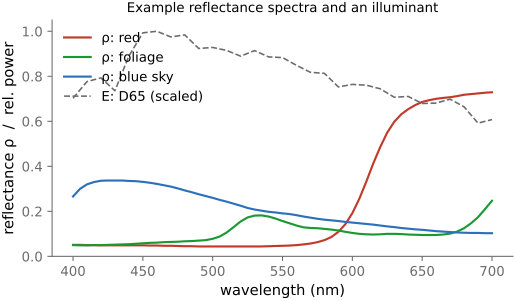
fig-bw-conversions
fig-bw-conversions · one color photo → black & white several ways: single channel (R/G/B) · average · weighted luminance · red-filter channel mix (dark sky) · an isoluminant pair collapsing to one gray — the choices differ (Converting to B&W, Color technology) ✅
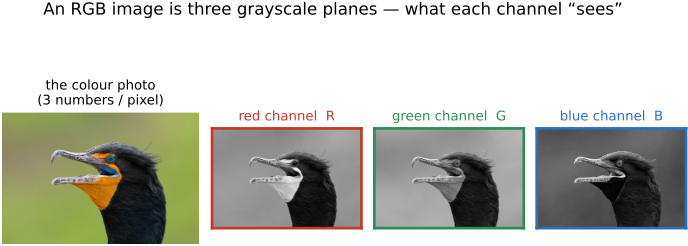
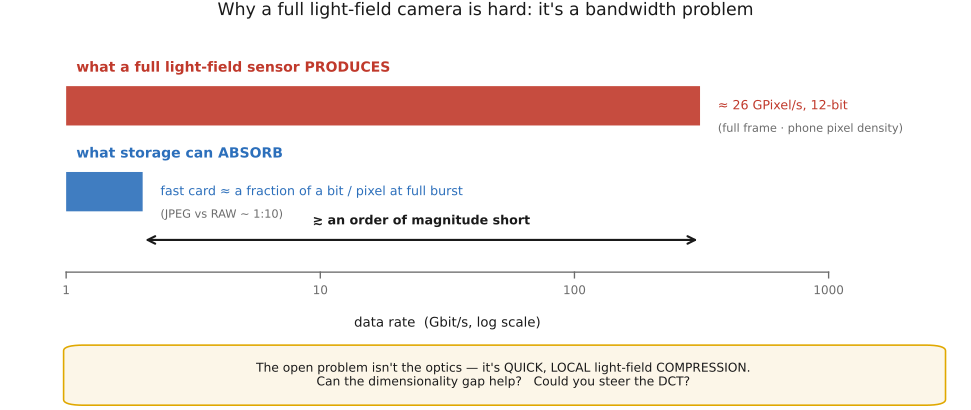
• **how**: silicon photodiodes respond well into the **near-infrared**, so every camera ships with an **IR-cut filter** to keep IR from contaminating color. Two routes to NIR imaging: (1) **convert the camera** — remove the internal IR-cut filter (and optionally replace it with clear glass or an IR-pass filter); (2) **filter the lens** — an **IR-pass (visible-blocking) filter** (e.g. R72 / 720 nm) on a stock camera, at the cost of long exposures since most IR is being thrown away by the still-present internal cut filter.
• **what changes — the look**: **foliage glows bright white** (chlorophyll/leaf cell structure reflects NIR strongly) — the classic **"Wood effect"** (after R. W. Wood, 1910); **skin** goes smooth and waxy (NIR penetrates the surface, veins show); **blue sky darkens** and **haze is cut** (less Rayleigh scattering at longer wavelengths → see further); **water** goes inky black.
• **false-color IR**: since NIR is invisible, render it by **mapping bands to visible channels** (e.g. NIR→red, red→green, …) — the surreal magenta-foliage "Aerochrome" look; a channel-remapping choice, not a measurement.
• **uses beyond art**: **forensics & art conservation** (read faded ink, underdrawings, alterations beneath paint); **agriculture / remote sensing** — **NDVI** $=(\text{NIR}-\text{Red})/(\text{NIR}+\text{Red})$, the vegetation-health index that exploits the foliage-glows-in-NIR effect; **astronomy** (NIR pierces dust, redshifted light — e.g. JWST); and as an **extra channel** for computational photography (NIR-assisted denoising / dehazing / dark flash, cross-ref).